r/arduino • u/CaryBure • Oct 09 '26
Do i buy the original kit or a knock off one?
The priginal kit is a bit expensive and offers less than the knockoff one but how do i know the knockoff is good or bad
r/arduino • u/CaryBure • Oct 09 '26
The priginal kit is a bit expensive and offers less than the knockoff one but how do i know the knockoff is good or bad
r/arduino • u/smashcat666 • Oct 09 '26
Edit: I've finished it now - new video is up on my channel showing all the extra animation etc it can now do. Flash is now pretty much full, but I'm very happy with the result! There are full details of how to get any of the games working on my github. You need a composite monitor, some resistors and transistors for the audio. Or make a shield from my design. You can use an NES controller too! Have fun!
Github is here: https://github.com/Smashcat/UNO_Manic_Miner
New video is here: https://www.youtube.com/watch?v=qakuvavLC40
There is a WebASM emulator running the exact same Arduino code so you can play in your browser here: https://www.smashcat.org/pacman-ce/
I finally finished another game on the engine for the original Uno. Only needs a couple of resistors for video, and some buttons to play. I love the original game and was sure I could cram it into the 32KB of flash on the Uno, and it did! Using an amber CRT here for that lovely phosphor glow. It'll be in the github repo as soon as I finish tuning it a bit more :) There is no flickering in real life - it's a result of filming the 50hz CRT with my phone :)
r/arduino • u/Kooky-Strawberry5127 • Oct 09 '26
so i'm working on a project where i'm trying to build a master midi clock for all my synthesizers. i'm using an arduino nano and a 3.5mm TRS output jack for the midi output. I have an OLED screen as well.
My problem is, my code outputs a flat 5V line without a pulse that i'm measuring from an oscilloscope - i'm using the uClock library for the bpm generation, however i'm not sure if a flat 5v line without pulses is what i'm supposed to be getting? i've tried plugging it in to a korg volca to sync the tempo as well and it doesn't work.
this is my code:
#include <SoftwareSerial.h>
#include <uClock.h>
SoftwareSerial midiSerial(2, 5);
void onPPQNCallback(uint32_t tick) {
if (tick % 4 == 0) {
midiSerial.write(0xF8);
}
}
void setup() {
midiSerial.begin(31250);
uClock.init();
uClock.setOutputPPQN(uClock.PPQN_96);
uClock.setOnOutputPPQN(onPPQNCallback);
uClock.setTempo(120.0);
uClock.start();
}
void loop() {
uClock.run();
}#include <SoftwareSerial.h>
#include <uClock.h>
SoftwareSerial midiSerial(2, 5);
void onPPQNCallback(uint32_t tick) {
if (tick % 4 == 0) {
midiSerial.write(0xF8);
}
}
void setup() {
midiSerial.begin(31250);
uClock.init();
uClock.setOutputPPQN(uClock.PPQN_96);
uClock.setOnOutputPPQN(onPPQNCallback);
uClock.setTempo(120.0);
uClock.start();
}
void loop() {
uClock.run();
}if anyone here is familiar with midi clocks please help me out and let me know what i'm doing wrong - my korg volca drum syncs fine with analog midi and i'm not sure if that's the issue here
r/arduino • u/Downtown_Falcon_5789 • Oct 09 '26
I'm trying to make a servo MG995 work through a PCA9865 (using Arduino nano every). The issue is that when I try to connect everything up, the servo starts vibrating instead of rotating. Consider that the first 2 times I tried that servomotor it all worked perfectly but now not anymore. I wonder why this happens... these were the second model of servos I bought from amazon because I had the same problem with the previous ones.
Anyway, the connections I made are:
| PCA | ARDUINO NANO EVERY |
|---|---|
| SDA | A4 |
| VCC | 5V |
| GND | GND |
| SLC | A4 |
Moreover, there's the extern alimentation to the PCA with a regulable power supply (set at 6v), 5A.
On amazon the minimum voltage declared is 4v so I don't think it's a problem of alimentation.
Has someone any piece of advice for me?
r/arduino • u/chicco4life • Oct 09 '26

Hi guys, my friend and I built [Mellow Harness](https://github.com/Mellow-Machines-Lab/MellowHarness) — an open-source agent harness for configurable, interactive ESP32-based AI hardware and AI companions.
We placed a System One Model, Jev, at the center of the harness loop to enable quick, expressive feedback. With a small prompt, recent event history and a roster of allowed actions, it can interpret new situations and choose a fitting mood or reaction. Our goal is a lively companion that feels like it has a character of its own.
In our prototype logs, 105 Jev decision passes had a median of **227 ms (about 0.23 seconds)**. We'd like to believe this lag is almost negligible and is significantly more suitable than traditional LLM responses that can take up to a few seconds.
To demonstrate how it works, we also built [Buddygotchi](https://github.com/Mellow-Machines-Lab/buddygotchi): a little coding companion that follows your agents as they work, need attention or finish a task, with pixel animations, sounds and connected moods.
The current setup uses a Mac host for the harness and a hosted Jev API. The ESP32 renders the face, plays available sounds and reports taps and button presses over USB or Bluetooth. Immediate task feedback follows local rules; model-guided reactions share the same event log. The public Pixel example uses the MicroTech MTR024QV01A-V1 CYD board.
We also published [a blog about how we designed the harness](https://mellowmachines.substack.com/p/mellowharness-for-responsive-ai-hardware). If you're working with LLM agents and building your own harnesses, you may find it interesting!
PS: Mellow Machines Lab is a small open-source team doing this after work. We feel the noise and anxiety around AI too, so we wanted to build something warm, welcoming and fun together! DM if you'd like to join :D
r/arduino • u/FoxConstant8352 • Oct 09 '26
IS There much difference between EPS32 and ESP32wroom.. the pins shown in this video donot match with the one I have esp32.. can anyone tell if my esp32 can work.. and instead of ps3 controller any other controller work?. Pls any help is enough...
r/arduino • u/Agreegmi02 • Oct 09 '26
I have installed Arduino IDE 2.3.10, but can not select an arduino board. And i can't install boards with the board manager without VPN. Where must me unpack the archive from Github or how else can I download boards?
r/arduino • u/NoU_14 • Oct 07 '26
I made a little E-paper display to show the local weather where I live for the upcoming week. It runs on a 2.9" black/white/red E-paper display, as well as a custom PCB to drive it.
The device shows the weather conditions, min/max temperature, and expected precipitation for today and the next 6 days. Today is always marked in red, and the weekend is always bold. The graphs automatically adjust based on min and max temperature to always use the full allocated width. The rain data at the bottom shows a "-" if there isn't any rain predicted that day, a black number if it's 5mm or less and red if more than 5mm is predicted.
The device updates every half hour, and gets it's data over MQTT from my Home Assistant server. This in turn gets it from a plugin pulling from a free API of a local service.
I made it so the people I live with don't have to constantly ask me what the weather is going to be, and also kind of just to see if I could. I'm fairly happy with the UI, though it is a tad cramped right now. I might try to squeeze a couple pixels out so the graph doesn't overlap.
r/arduino • u/Cycle_Broad • Oct 08 '26
Hi all! I wanted something on my desk that would actually make me move, so I built KT1.
What it does
Hardware: ESP32-S3 Display (FNK0104B: 2.8" touch + audio built in), plus optional MPU6050, DHT11, LDR and a touch module. Every sensor is optional.
The case is a cardboard box I painted blue, because I don't have a 3D printer and I think it has more personality anyway. The PC companion is Windows-only for now.
Repo (MIT, EN/ES docs): https://github.com/Amloii/KT1-deskpet
Happy to answer questions, and feedback on the firmware architecture is very welcome. A few details people usually ask: it runs on a single ESP32-S3 with dual-core split (UI/render on core 1, Wi-Fi/IMU/audio on core 0). Wiring map and BOM are in docs/en/hardware.md. Voice chat sends audio + a screenshot to Gemini only if you add an API key, otherwise nothing leaves the device.
r/arduino • u/merlinux1 • Oct 09 '26
Hi everybody,
Quite happy with the result. Been dreaming about designing something like that for years. I did do similar things using arm boards and much smaller and crappier screens but never got around to do it for my PC.
hardware used is a arduino mega 2560 clone and a cheap chinese 3.95tft screen (ili9488 chip).
The data is being fed by a python script running as a systemd service.
I did 95% of it without AI but I had a few bugs due to memory overflow (and timings) and I ended up cleaning the code with gemini's help. The glitches disappeared after adjusting my code as per gemini's instructions...Took me a few days and most of it was getting the dang screen to work (a nightmare)!!!
Now next project, get this thing inside my case :)
r/arduino • u/CallmeLee1999 • Oct 08 '26
This is my Arduino project using two joysticks and a button to control a robot arm.
Each servo is controlled based on the analog values read by the Arduino. I then map these values to the corresponding servo angles.
Besides that, I also use a button to save the robot's position. After moving the robot to a specific position, I can press the button to save that position.
Once the entire sequence is completed, I can double-click the button to replay the saved sequence and make the robot arm repeat the same movements.
r/arduino • u/Aleks_07_ • Oct 08 '26
I’m having a really strange problem with my stepper motor setup. No matter how I code the stepper motor, it vibrates extremely heavily and makes a very loud whining/buzzing sound. Sometimes it also skips steps.
The vibration is so bad that it feels like it’s resonating through my whole house.
Setup:
Arduino Uno
CNC Shield V3
DRV8825
NEMA 17 17HS4401S, 1.5A
24V power supply
VREF currently around 0.75V
Full-step at the moment (no microstepping jumpers)
I’ve tried different step delays/speeds and also tried AccelStepper with acceleration, but I still get the same extreme vibration and whining.
The motor does move at very low speeds, but it vibrates heavily and can start skipping steps at other speeds.
Does anyone with experience with stepper motors have an idea what could be causing this? I’m wondering if it could be current/VREF, resonance, the DRV8825, wiring, or something else.
I can provide videos, pictures of the wiring, and the exact code if needed.
r/arduino • u/fiberopticitrus • Oct 08 '26
I am a 19 year old Mechanical Engineering student in Italy ans this is my 2nd year. i dont know where to start and get into electronics.
I want to build lots of things diy fpv drone,
geiger counter, analogue synth, guitar paddles, radars i want to build all i want is to start building but i dont know where to start. I am an absolute beginner but have a great engineering background and i recently got into electronics club and i want to start at some point. Can anyone that felt like me give me some advice? Lots of my friends knew these from high school clubs but i never get to join them. Should i buy an arduino pack and which one? Thank you
r/arduino • u/Ratfus • Oct 08 '26
Hi,
I've begun looking into getting a Mac Studio, which is a $3,000+ computer. Naturally, I get a little weary plugging this bad boy into one of my $60 (I hope I don't fry this component) projects. Last thing I want to do is pay the Apple repair tax or test my soldering skills with said computer.
Further, I've read stories on here of people frying their ports/computers. From what I'm gathering from research/AI, USB isolators are the way to go in order to completely protect my computer? I don't mind frying a $60 USB hub, but I might cry if I fry my Mac. Will a USB isolator truly isolate the computer from my destructive tendencies as its name implies?
I could always just keep connecting my MacBook up and having the ports shut down because of the dumb shit I do, but I really don't want to break even that old computer. New one, I definitely need to be careful though as I don't think Apple covers idiocy.
r/arduino • u/Adventurous_Kale_123 • Oct 08 '26
Hello, arduino community! I'm new here and I use Arduino UNOs for school projects. I was just wondering if you can use 2 buzzers simultaneously(kind of like a music chord where the frequencies/notes harmonize) since when I try to simulate it on Tinkercad, it just seems to not work. I was wondering if there was a way to do it since I'm planning to do a music box for my finals project. Thanks!
r/arduino • u/kashmir2517 • Oct 08 '26
I have replaced the 3v battery on my RTC module and since then it has been displaying "Sun 01-01-2000 00:00:00" I know it is my code and there is a lot of extra stuff in there for when it powers on. Does anyone have an idea on how I can add a clock time reset to my code? Thanks! I will post the code I am using below.
// Example program for the MD_DS1307 library
//
// Implements a clock display on a LCD shield.
#include <LiquidCrystal.h>
#include <MD_DS1307.h>
#include <Wire.h>
#ifdef ARDUINO_ARCH_SAMD
MD_DS1307 myRTC; ///< Locally created instance of the RTC class
#else
#define myRTC RTC ///< Library created instance of the RTC class
#endif
LiquidCrystal lcd(5, 6, 7, 8, 9, 10);
void setup()
{
pinMode(4, OUTPUT); //Red LED pin
pinMode(3, OUTPUT); //Green LED pin
//digitalWrite(4,HIGH); //Red LED-ON
// initialize the LCD
lcd.begin(16,2);
lcd.clear();
lcd.noCursor();
lcd.print("Initializing...");
delay(4000);
lcd.clear();
lcd.print("5...");
delay(1000);
lcd.clear();
lcd.print("4...");
delay(1000);
lcd.clear();
lcd.print("3...");
delay(1000);
lcd.clear();
lcd.print("2...");
delay(1000);
lcd.clear();
lcd.print("1...");
delay(1000);
lcd.clear();
//digitalWrite(4,LOW); //Red LED-OFF
delay(3000);
//digitalWrite(3,HIGH); //Green LED-ON
lcd.clear();
lcd.setCursor(1,0);
lcd.print("Initialization");
lcd.setCursor(4,1);
lcd.print("Complete!");
delay(4000);
lcd.clear();
if (!myRTC.isRunning())
myRTC.control(DS1307_CLOCK_HALT, DS1307_OFF);
}
void p2dig(uint8_t v)
// print 2 digits leading zero
{
if (v < 10) lcd.print("0");
lcd.print(v);
}
const char *dow2String(uint8_t code)
{
static const char *str[] = {"--- ", "Sun ", "Mon ", "Tue ", "Wed ", "Thu ", "Fri ", "Sat "};
if (code > 7) code = 0;
return(str[code]);
}
void printTime()
{
lcd.setCursor(1,0);
lcd.print(dow2String(myRTC.dow));
p2dig(myRTC.mm);
lcd.print("-");
p2dig(myRTC.dd);
lcd.print("-");
lcd.print(myRTC.yyyy);
lcd.setCursor(4,1);
p2dig(myRTC.h);
lcd.print(":");
p2dig(myRTC.m);
lcd.print(":");
p2dig(myRTC.s);
if (myRTC.status(DS1307_12H) == DS1307_ON)
lcd.print(myRTC.pm ? " pm" : " am");
}
void loop() {
pinMode(3, OUTPUT); //Green LED pin
//digitalWrite(3,HIGH); //Green LED-ON
myRTC.readTime();
printTime();
delay(100);
}r/arduino • u/d0kt0rnull • Oct 07 '26
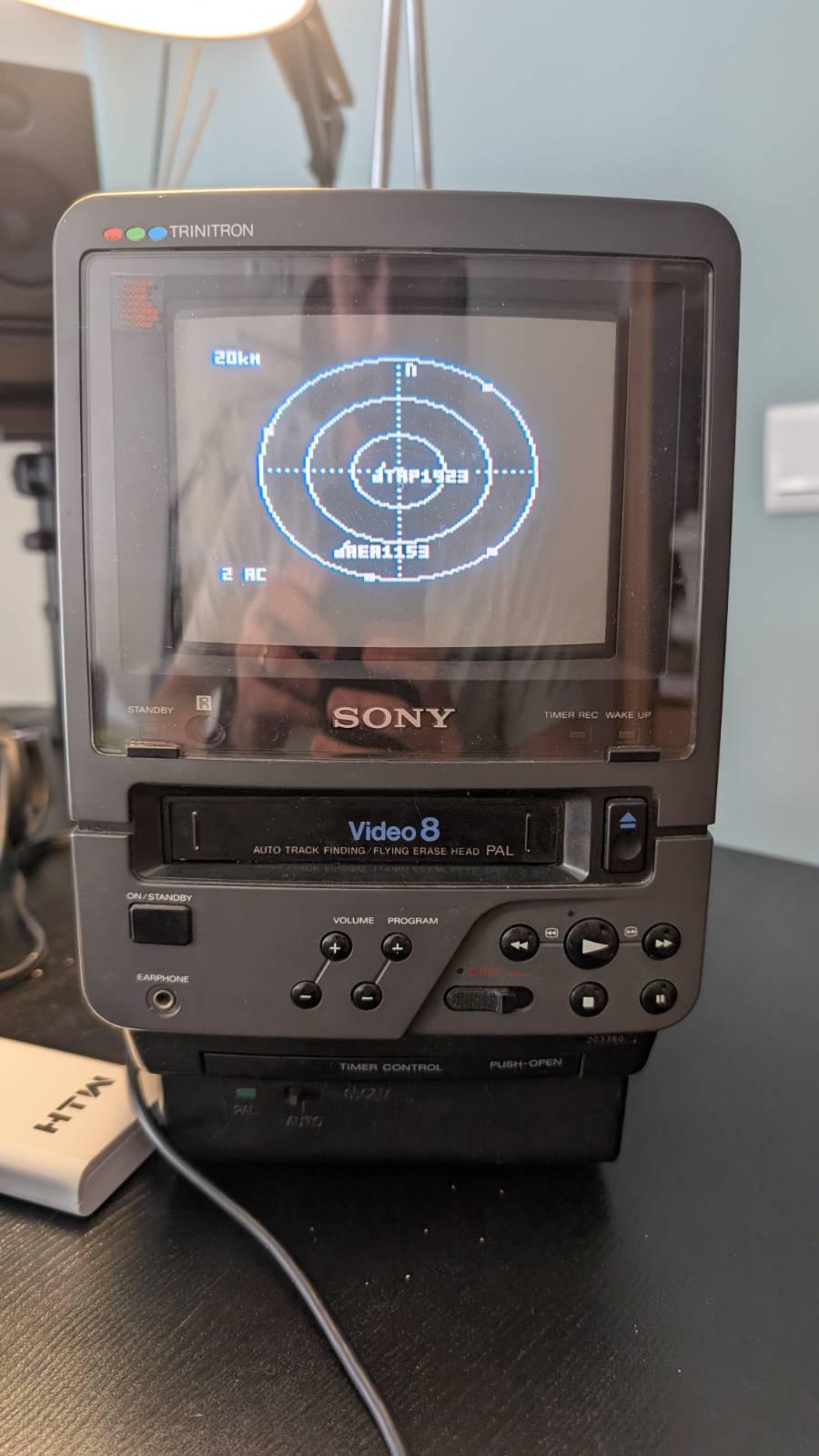
I had an old Sony Trinitron/Video 8 combo TV sitting around and wanted to give it something to do. After seeing MatixYo's ESP32-Plane-Radar (a sonar-style ADS-B radar on a round GC9A01 display), I wondered if I could get the same idea onto a CRT.
How it works:
Let me know if you have any ideas for next project! Cheers.
r/arduino • u/Alive-Leadership-658 • Oct 07 '26
I'll upload the photo in the comments
After reading various documentation and projects, I connected two small servo motors to the transistors, because I know that this way I can use the 5V of Arduino for some servo motors, I was trying with 2, but one turns and the other makes a strange noise.... sometimes the first one doesn't turn either when I press the button of the 2nd servo
I connected both the same way. The transistors have pin B with the Arduino pin and resistor, E has ground, and C connects to the servo's brown pin. I'll leave you the code now!
Ps: The code comments are in Italian, but I'm Italian, I apologize if you can't read them
#include <Servo.h>
Servo servo1;
Servo servo2;
// GRUPPO 1
const int PIN_SERVO1 = 8;
const int PIN_TRANS1 = 7;
const int PIN_PULSANTE1 = 2;
// GRUPPO 2
const int PIN_SERVO2 = 11;
const int PIN_TRANS2 = 9;
const int PIN_PULSANTE2 = 3;
void setup() {
Serial.begin(9600);
pinMode(PIN_TRANS1, OUTPUT);
pinMode(PIN_TRANS2, OUTPUT);
pinMode(PIN_PULSANTE1, INPUT_PULLUP);
pinMode(PIN_PULSANTE2, INPUT_PULLUP);
digitalWrite(PIN_TRANS1, LOW);
digitalWrite(PIN_TRANS2, LOW);
// NON facciamo attach qui
}
void loop() {
// -------- SERVO 1 --------
if (digitalRead(PIN_PULSANTE1) == LOW) {
digitalWrite(PIN_TRANS1, HIGH); // alimentazione ON
delay(100);
if (!servo1.attached()) {
servo1.attach(PIN_SERVO1);
servo1.write(120);
}
} else {
if (servo1.attached()) {
servo1.detach();
}
digitalWrite(PIN_TRANS1, LOW); // alimentazione OFF
}
// -------- SERVO 2 --------
if (digitalRead(PIN_PULSANTE2) == LOW) {
digitalWrite(PIN_TRANS2, HIGH); // alimentazione ON
delay(100);
if (!servo2.attached()) {
servo2.attach(PIN_SERVO2);
servo2.write(120);
}
} else {
if (servo2.attached()) {
servo2.detach();
}
digitalWrite(PIN_TRANS2, LOW); // alimentazione OFF
}
}
r/arduino • u/Itchy_Age3074 • Oct 08 '26
Hey guys here's a question: I have a 6 AA NiMH (1,2V) battery holder and i want to use it for both an arduino and an esp32 . I could plug the dc jack into the arduino and get 5V for the esp32 to convert into 3,3V, but the gpt says it could dissipate a lot of heat. Im not usig motor or big modules, just wifi/bluetooth and simple leds, lcd displays with some potentiometers and push buttons.
Should I use a breadboard converter (like the one) or its just fine if im not using too much components?
r/arduino • u/stephensmwong • Oct 08 '26
I've an Arduino UNO Q, updated to the latest Debian image from arduino.cc and latest App Lab software. When I want to shutdown the board, I've ssh into the Debian, issued, 'shutdown -h now', but the board always just reboot itself! What is the procedure to properly shutdown the UNO Q?
r/arduino • u/Xerd-R • Oct 07 '26
I finally chopped two legs off my hexapod robot and now its a proper robot dog. Dont worry all the features I have developed for the old robot transferred just fine to the new robot; we still have body leveling, emotes, puppet mode etc.
Quttro ZBD is lighter, faster and more agile in many ways than its hexapod older sibling yet due to less parts used it costs considerably less to build, around 200 usd.
Still uses ESP32 S3 as well as off the shelf Arduino parts and DS3218 servos. reduced number of legs made it a lot easier to put together and since I already ironed out the scripts for previous version and use inverse kinematics solver for each leg adjusting the gait mechanism was a breeze as well.
I will also work on reinforcement training for a developing a control policy in IK solver's place, I am hoping I can get a more organic / fluid walking out of the robot instead of current mechanic looks.
I shared a more detailed video about it on my youtube channel, if you want you can watch it from the link below:
It is still fully open source so you can find all the files you need to build one down in the links.
MakerWord Link (has more photos of the robot):
https://makerworld.com/en/models/3402746-quattro-zbd-robot-dog#profileId-3874600
Link for CAD design, 3D Print files and Wiring Diagram:
ESP32 Scripts:
https://github.com/serdarselimys/QuattroZBD-ESP32Scripts
Companion mobile controller app apk:
https://github.com/serdarselimys/QuattroZBD-AndroidControllerApp
Parts List:
ESP32 S3 x 1
PCA 9685 Servo Driver Board x 1
MPU6050 IMU Sensor x 1
Voltage Sensor Board x 1
15A Adjustable Voltage Buck Converter x 2 (1 per pair of legs)
5V 3A Buck Converter x 1
DS3218 High-Torque Servos x 12
Wago Connector (2-in-4 Out) x 1
2-Inch TFT Screen x 1
M3x8 Screws x ~100
M4x30 Screws x 4
8x5x16 mm Ball Bearings x 12
3S LiPo Battery (3000mAh – 6000mAh) x 1
I have been working on a bipedal version hence the "2 more to go" in the tittle, I am almost finished with the updated leg structure so it can stand up on two legs but the remaining parts are going to be same as much as possible. So expect a bipedal version in upcoming weeks if I can make it walk :)
r/arduino • u/Ok-Offer-2788 • Oct 07 '26
Hi, I’m currently doing a school arduino project that’s a regular with a ping pong ball cannon attached to it, for this function I’m using a medium 12 v solenoid connected to a relay that’s connected to three 3.7 volts batteries.
I inspired myself in the following project https://www.instructables.com/Arduino-Ping-Pong-Ball-Cannon/
The general idea here was to miniaturize this cannon and add it to the car.
So far the cannon part isn’t going amazingly, as I haven’t been able to make the solenoid work so far, therefore I wanted to ask if anyone has any advice or has tried something similar.
r/arduino • u/Aleks_07_ • Oct 07 '26
I’m setting up a 230V AC to 24V DC power supply for a CNC Shield V3 with four DRV8825 stepper drivers.
The power supply is a Janco HS-400L-24 (24V, 16.7A / 400W), and I’ve connected the DC output to the CNC Shield’s 12–36V input.
I’m planning to adjust the VREF on the DRV8825 drivers before connecting the stepper motors.
Does the wiring in the pictures look correct, and is there anything I should check before powering it on and adjusting VREF?
r/arduino • u/TheJoenuV • Oct 07 '26
I have only one song on the SD card; it is named correctly and it plays. The resistors are also correct, I measured it with my multimeter. Do I need to do something to activate the ADKey function? I will only be using ADKey 1, but this shouldn't affect anything else. The Buttons are also correctly placed.
The Z line of the Breadboard is Ground.
The W line of the Bread Board is VCC and is at 3.3 V.
EDIT: The buttons were all wired incorrectly. Fixed it by just rearranging them. Also i saw that the GND pin of my AUX port was not connect, now everything works, theres a little bit of speaker noise