r/arduino • • 26d ago

Look what I made! DIY Desk Pet V1. Robot Cat That Reacts When You Touch It Also Has A Joystick Remote Control.

Thumbnail
youtube.com
0 Upvotes

I built a tiny desk-pet robot car with an animated cat face on a round screen. It has 8 emotions, reacts to touch, falls asleep when ignored, and drives with a wireless joystick remote. 🐱

More builds:

🔗 Links:
🔧 Yumo Builds: electronics, ESP32 and Arduino projects, built while learning
https://www.youtube.com/@YumoBuilds
🖨️ Yumo Builds Lab: 3D printing, electronics and creative design
https://www.youtube.com/@YumoBuildsLab 👈 New Channel

Note: For More Info Please Check Out README first.

💾 SOURCE CODE, WIRING, 3D STL File And Full Guide:
https://github.com/yumobuilds/Yumo-Cat-Robot-Car-V1

🛠 Parts used:
- 2x ESP32-C3 Super Mini (car and remote)
- GC9A01 round TFT 240x240
- 2x SSD1306 OLED 128x32
- Touch sensor module
- 4x continuous-rotation servos
- Analog joystick module
- 2x 18650 battery (car), 1x small lithium battery (remote)
- 3D printed wheels (Bambu Lab H2C)

License: free for noncommercial use (PolyForm Noncommercial 1.0.0). Tag u/yumobuilds if you build one!

please Like and subscribe for more videos!


r/arduino • • 27d ago

Hardware Help Very small full colour screen recs?

5 Upvotes

I'm planning a small camera project where I need a fairly high resolution full colour screen. 0.96in seems to be the closest size produced but finding them with a good reproduction is tricky. Their refresh rate doesn't have to be great just to be able to show a feed from a camera

Similarly any decent small camera recommendations? Again it doesn't have to be amazing quality the intended used for all this is a viewfinder. So goodish quality in a live feed but doesn't have to be camera quality


r/arduino • • 28d ago

Beginner's Project Can someone help me find what’s wrong?

Thumbnail
gallery
26 Upvotes

I’m a complete beginner with the hardware and I’m following a guide. Specifically,

https://wiki.elegoo.com/oshw-getting-started-&-kits/digital-2

For some reason I can’t get the buttons to do anything. No matter what one I click, the led doesn’t turn on. I’ve tried rewriting it in different ways but nothing seems to work.

**The first image is wired differently than the second and third

Any help would be appreciated.

Update:
It ended up being a connection issue with the microcontroller. The first few circuits I tested worked with the microcontroller on the breadboard but always had a loose connection. I avoided soldering since this is a from a starter kit and wanted to be able to move things around. After connecting the header pins using jumper wires, it worked correctly.


r/arduino • • 29d ago

I built a battery powered breadboard

1.3k Upvotes

I wanted a compact way to do quick prototyping without being tied to a bench power supply. Here's the solution I came up with, a breadboard with two independent batteries built in, one delivering 5V and the other 12V.

How it's wired:

  • Each output has its own 10000mAh USB-C battery, so the two supplies are completely independent.
  • Each battery connects with a short right angle USB-C cable to a CH224K USB-PD trigger board. The trigger board asks the battery for a fixed voltage set with its DIP switches. One is set to 5V and the other to 12V.
  • Each trigger board then feeds two outputs, dupont connectors on the top and banana jacks on the sides.

Here are the files if anyone wants to build their own: Printables

Full build guide with photos on my website: willsworkshop.com


r/arduino • • 28d ago

Look what I made! We made Snake run on a seven-segment display

123 Upvotes

This was originally going to be mostly a tutorial for the SM1628 driver. My father loves reverse-engineering displays and figuring out how to control them. I enjoy learning about it too, but I don't quite share that burning passion. I do love seeing games run on things that were never meant for them, though.

So we ended up making Snake run on a salvaged seven-digit, seven-segment panel, using an SM1628B driver, an Arduino Uno and an old industrial joystick. We also added a START button to begin another round and a transistor-driven active buzzer that beeps when we start, eat food or lose. I wanted to see how unsuitable a display we could use and still have a playable game.

Each of the 49 bars is one position for the snake, and the food is a blinking bar. There isn't much room to move around, and turns between digits can be awkward: reaching food on the vertical bar immediately beside you means coming around from the opposite direction. It worked much better than I expected, though.

We made a video showing the build, the awkward movement between digits, and both of us trying to play it:
https://www.youtube.com/watch?v=3hOSXTLOnHo

We also put together an SM1628/SM1628B tutorial with code, wiring diagrams, mapping tools and display effects. Different panels can have different connections, so it explains how to find your own map:

https://github.com/emsyscode/sm1628-arduino


r/arduino • • 29d ago

Look what I made! I made a DIN rail mount for the Arduino Uno

Thumbnail
gallery
236 Upvotes

For a school project I wanted an Arduino Uno in a control cabinet, next to the rest of the hardware on a DIN rail. Every Uno I have seen in a cabinet is held in place by hope and a USB cable, so I designed a small 3D printed X-shaped bracket that screws onto the four mounting holes and clicks onto a snap-on DIN clip.

It mounts in any orientation (I tested horizontal, vertical and upside down, and the Uno did not complain). It uses very little filament, and the clip system is the same as on my Raspberry Pi 5 and L298N DIN brackets.

Printed on a Bambu Lab A1 in PLA Basic, 0.20 mm Standard profile, about 20 minutes. PETG is better if it sits somewhere warm. I used M2 bolts and nuts.

Before someone asks: yes, I could have used zip ties or a project box, but this looks more professional.

Model (free): [MakerWorld link]

Snap-on DIN clip: [MakerWorld link]


r/arduino • • 28d ago

Hardware Help Could you guys help me with my breadboard problem?

Thumbnail
gallery
39 Upvotes

The wires are connected to an SG90 servo, and for some reason, it doesn't work when I upload the code. I think the problem might be the breadboard, because when I connect it directly using stripped wires, it works as it should. Please help me! 🙏

I've tried several different ways of connecting it on the breadboard, but I still can't get it to work.

Thank you so much to anyone who can help me!


r/arduino • • 28d ago

My DIY two-wheel balancing robot — early hardware tests and an open-source Arduino library

22 Upvotes

Friends,

I'm doing my best to continuously improve dengebot, fix bugs, and make the library more reliable with every update.

But I want to be completely sincere with you: **I genuinely need your help.**

My goal is to make dengebot a useful, free, and open-source resource for the entire Arduino community.

I sincerely value every piece of feedback, whether positive or negative. Bug reports, suggestions, criticism, and real-world testing are all incredibly important to me.

I'm not claiming that the library is perfect. I'm committed to improving it, learning from your experiences, and making it as robust, stable, and accessible as possible.

**This project is not just about writing code. It's about building something useful together.**

Thank you all in advance for your time, feedback, and support.

**Gmby06 – Mustafa Bay**

--------------------------------------------------------------------------------------------------------------------------

I've been developing **dengebot**, a free, open-source Arduino-compatible control library for two-wheel self-balancing robots.

The goal is to make it easier for makers to develop, tune, and experiment with balancing robots using different microcontrollers, motors, and motor drivers.

I've just released **v1.7.4 – Safety Guard Fixes (Community Preview)**.

**GitHub:** https://github.com/Gmby06/dengebot

**Latest release:** https://github.com/Gmby06/dengebot/releases/tag/v1.7.4

### What does dengebot include?

- Configurable PID-based balancing control with gyro-rate feedback and integral management.

- Complementary filtering for accelerometer and gyroscope data, with optional adaptive filtering.

- Gyroscope bias calibration helpers.

- DC motor PWM/direction and stepper speed/direction command conversion.

- Optional DC motor dead-zone compensation.

- Telemetry for debugging and PID tuning.

- Optional software START/STOP, fall detection, and FAULT recovery protection.

### What's improved in v1.7.4?

The latest update focuses on safety and reliability:

- Fixed header include guard conflicts.

- Improved START/STOP and FAULT recovery behavior.

- Added immediate PID state reset on successful target-aware START.

- Added optional fall protection relative to the balance target angle.

- Strengthened sensor and startup validation.

- Expanded regression tests.

The core PID mathematics remains unchanged.

### Supported Arduino platforms

The example sketches successfully compile through GitHub Actions for:

- Arduino Uno

- Arduino Nano

- Arduino Mega 2560

- ESP8266

- ESP32

- ESP32-S3

I've also physically tested START/STOP, fall-angle shutdown, and FAULT recovery on my own Arduino Nano-based two-wheel balancing robot.

However, compilation success doesn't guarantee that every motor, driver, or robot configuration will work without tuning.

### Important note

dengebot is a **control library, not complete ready-to-run robot firmware**.

You still need to configure your IMU, motor driver, motor directions, sensor axes, and power system.

The software safety guard does not replace hardware motor shutdown or an independent watchdog.

### Looking for community testers!

I'd really appreciate feedback from anyone building a two-wheel self-balancing robot, especially those using:

- L298N or TB6612 motor drivers.

- Geared DC motors.

- Different Arduino or ESP32 boards.

- Stepper/NEMA17-based balancing systems (not yet physically validated).

If you try the library, I'd be interested in hearing:

  1. Which board, IMU, motors, and driver are you using?
  2. What PID values work best on your robot?
  3. How does your robot respond to small disturbances?
  4. Did you encounter any compilation, calibration, or safety issues?
  5. What features or examples would make the library easier to use?

**Next planned update: v1.7.5 – PWM movement-threshold calibration**, focused on helping users find suitable motor activation and dead-zone settings.

The project is released under the MIT license.

I'm developing this as an open-source community project, and real hardware feedback would be very valuable.

Thanks for taking a look! I'd be happy to discuss the implementation or hear suggestions for improvement.


r/arduino • • 28d ago

Look what I found! A..r..d..u..i..n..o

43 Upvotes

Found on old phone


r/arduino • • 28d ago

Hardware Help I2C Bus freezes after a few seconds to a minute

Post image
6 Upvotes

Hello!

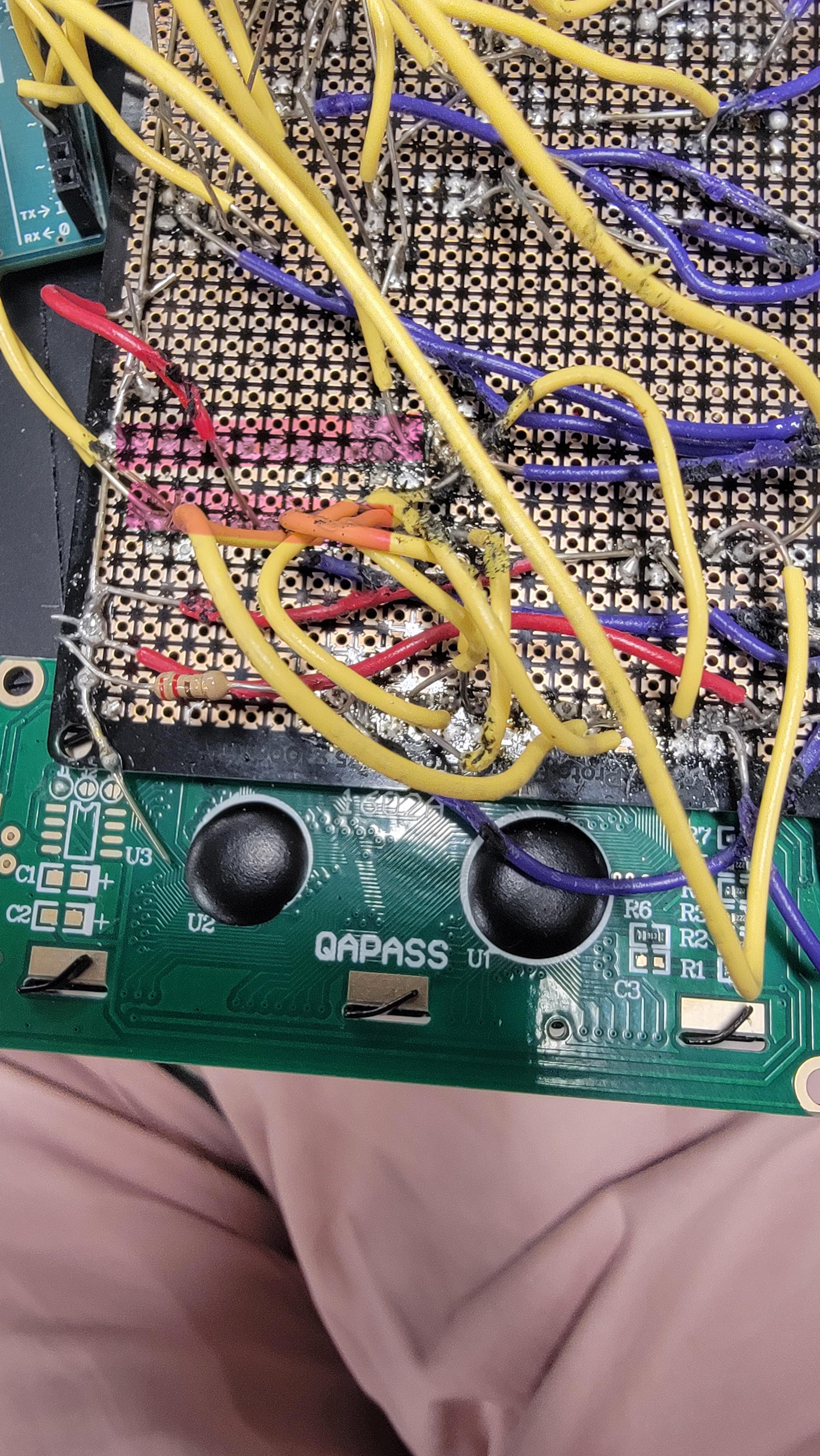
I have an Arduino UNO R3 connected to an LCD via I2C. I'm using an MCP23017 chip to convert from parallel to I2C. I've been using it fine for around a minute, but after that, it appears to drop off the I2C bus. Once I disconnect, I also have to wait a few minutes before I can reconnect and it'll work again.

The chip doesn't seem to get very hot while it runs. The reset pin is connected to the Arduino and pulled high. The A0-A2 are connected to ground. I've tried adding pull-up resistors to SDA/SCL but it didn't do anything. I've tried flashing the SCL 10 times to reset the bus, but that doesn't work either. I used a different MCP23017 and it had this same issue, and this one now seems to have gotten that problem.

I'm at a loss for what I can do.

Any help would be great. Thanks!

Sorry for the messy wiring, I've highlighted the MCP23017.


r/arduino • • 28d ago

Beginner's Project Proximity unlock for a car

0 Upvotes

I want to build a "key" to unlock my car by proximity. I know such things already exist in the aftermarket but I'd like to create my own or have an idea if it's even worth to try. I've worked with arduinos before (barely) and I have a degree in coding.

I've no problem with the parts that will go in the car but I'd like for the "key" to be as small as possible. The closest it can be to an actual car key.

The installation would be work on my behalf I just want to be pointed at parts and have an idea where to go.


r/arduino • • 28d ago

Hardware Help How can I automate the opening and closing of my valve?

Thumbnail
gallery
5 Upvotes

Hello,

I have a valve in my experiment that I have to open and close every morning, in case of an incident. It’s currently the only part of my setup that can’t be controlled remotely, and I’d like to change that. I was thinking of adding some kind of motor, controlled by an Arduino or something similar, to operate the valve. It takes about 5 turns in each direction to open and close it. Do you have any ideas on how to set this up and which motor to use? What component should I use to connect the valve to the motor? For context, replacing the valve isn’t an option for now because it would be too complicated.


r/arduino • • 28d ago

Help i cant turn the light on after pressing the red button on arduino uno

12 Upvotes

Hey guys any help how can i fix this the code is good and putting the led i think its okay please i need a guide


r/arduino • • 28d ago

I made a free 3D Arduino lab that runs in the browser: wire circuits, write real code, press Run (and burn LEDs safely)

0 Upvotes

Hi r/arduino! I've been building Learn Arduino, a free 3D lab where you can learn Arduino without buying a kit first.

What you can do:

- Build circuits in 3D: drop parts on a breadboard (or straight on the table) and drag wires between pins

- Write normal Arduino code and press Run: it compiles and runs on a simulated UNO

- See the current flow through the wires

- Make mistakes safely: no resistor = burnt LED, shorts burn the board, just like real life

- Every circuit also shows its real schematic

- 16 ready projects (Blink, servo, ultrasonic parking sensor, stepper, OLED plant monitor…) and 19 parts

- A free step-by-step tutorial for every project

It's free and works on phones too. The 3D lab has no ads.

Link: https://learnarduino.tech

It is open source https://github.com/ajeetjain94608/learn-arduino

I'd really love feedback from people who know Arduino well:

- Does anything behave differently from the real board?

- Which part or project should I add next?


r/arduino • • 28d ago

Homing signals for Mi vaccum cleaner

3 Upvotes

​The homing signal board on my Xiaomi Mi Robot Vacuum-Mop 2 Pro (MJST1SHW) charging dock is damaged, and the vacuum can no longer detect the dock to return for charging. Finding a standalone replacement dock on the second-hand market isn't working out, as sellers are pricing them almost as high as a complete used setup.

​I’m currently trying to build a replacement beacon using an Arduino/ESP32. I set up two IR LEDs for the left and two for the right, modulated at 38kHz. However, the vacuum doesn't respond to the custom beacons at all during its docking routine.

​Does anyone have experience generating these specific homing signals? I would greatly appreciate any insights into the correct IR protocol, pulse timings, or data payloads required to get the vacuum to recognize the dock.


r/arduino • • 28d ago

How about a Hallowuino half-dozen?

Thumbnail
blog.arduino.cc
2 Upvotes

we picked a half-dozen Hallowuino-themed projects to feature on the blog, including u/parsupo's T-1-7 Warrior Robot from this very sub! let us know if you build any of these, or share your own spooky season build here! 💙


r/arduino • • 29d ago

Hardware Help Old Intel Galileo worth it?

Post image
78 Upvotes

I redescovered a Intel Galileo I got as a present probably 10-15 years ago, never used it. It seems to be working (Lights up when plugged in) but I am having a hard time finding any software/programs to run it with. It seems like it was retired from updates in 2017. My question is if it is even worth looking further for software, can it be used or if i possible refactor it in anyway? I'm getting the feeling that it would just be easier to buy something "new". Any tips or feedback appreciated!


r/arduino • • 29d ago

Look what I made! UPDATE Talking Pumpkins, almost final form

9 Upvotes

A while back I posted the start of this project that used an ESP32 S2 Mini, (a pair of them) where they act as old pumpkin friends sitting on the porch chit catting and arguing. Then they can interact with the kids as well.

Halloween is getting closer and I had to change a few things about this, and get them into some cases.

  1. The speakers used to be next to the boards, but I needed the speaker to be on top. A) its closer to the eye holes on the actual pumpkin, and B) I didn't carve a big enough hole for the speaker to be next to the board.
  2. Loud speaker pops. I had to add a 1000uf capacitor next to the amp to protect the current jumps on boot
  3. The mic and the amp share I2S CLK. When I moved the mic to be on dupont wires, that cable distances threw off the shared CLK. Sooo I had to basically make up a 2nd clock pin on the esp32 so the mic and amp could have different CLKs. But they are still internally connected inside the ESP32 of course.
  4. I had to print the case. It's a simple design, but it works.

So far, no one has been able to jailbreak my friends. We'll see if that holds true on halloween night.


r/arduino • • 29d ago

Hardware Help Button box ports help

Thumbnail
gallery
11 Upvotes

Hey guys! First of all I am really hoping this does not break rule 6 lol (and apologies for long post).

Anyways we are trying to make a button box to use in flightsims at home and we just got done with the 3d printing bit of it (see 2nd pic). We are now moving on to the actual Arduino parts so wiring, soldering and coding.I have tried my best to get a bunch of references but I would like to please ask for some help double checking if this is actually correct or not before soldering everything.

I tried to explain some bits in the Paint diagram and using colour codes but it's still messy, I'm sorry haha. Anyways there are 8 buttons (used a 3x3 matrix to have enough ports), 4 rotary encoders, 4 ON-OFF-ON switches, 2 potentiometers and a ON-OFF (SPDT?) switch on pin 13, I forgot to get that in the text below.

Oh and here are some of the resources I have used:
https://www.youtube.com/watch?v=xEeHsGMz--M
https://www.youtube.com/watch?v=wkY1NsbWj5I
https://www.youtube.com/watch?v=Z7Sc4MJ8RPM

You guys reckon this should technically work? What should I change? At least as far as wiring and pins goes... We'll cross the bridge of coding when we get to it, still need to figure out how to code the 2 types of switches. Tysm!


r/arduino • • 29d ago

Hardware Help Issues with Lora antennas

5 Upvotes

Issues with antennas

Hi! I have been working with the RA01 and RA02 lora module for a proyect but I had a lot of range issues: the first time (RA01) I accidentally broke one of the SMD components in the lora PCB and had to replace it. After that we upgraded with Lora RA02 and the default antenna (sleeve dipole) but the range that we have got was below 200 meters with SF7 and 125kHz BW. With the two modules next to each other we had a RSSI between -70 and -90 which I know its a really bad signal level. The first thing I suspected is about the EM noise of the system (lot of servos) but with all desconected the issue still remain. My second suspect was the default antennas, a sleeve dipole antenna that after removing their thermal cover I noticed that the length wasn't matching the actual wave length. So I tried to adapt a pair of helicoidal antennas (that come with de ra01 module) in the default antennas connector with the sleeve remaining (that I had read that was necessary adapting the helicoidal antena in a ipex coaxial cable). With that, standing next to each other the RSSI oscillates between -50 and -70 dB but still below 200 meters range. How can I improve the module range? I read a lot about the topic and similar issues with other people and checked all the stuff (trace match for spi, external EM noise, mismatched parameters between terminals, decoupling capacitors and weak power sources, etc) but still having the issue. What could it be? My actual suspects are the ipex connector (Small, brief improvements may be seen by moving the antenna) or the antenna itself and planned to build a sleeve dipole antenna with the correct lengths to test the performance. What else can I do? Directional antennas are not an option


r/arduino • • 29d ago

Hardware Help Solderless Perfboard

4 Upvotes

I end up doing a lot silly projects, and I like using the smaller half breadboards. I keep my wiring relatively clean using bojack wires.

However, these breadboards are all row connected, and while that's helpful at the beginning, I run out of space for components very quickly.

What I want is a breadboard that isn't row connected. Like a perfboard, but solderless. Maybe the underside lets you bridge holes with jumper wires, and then the top side you can plug in whatever anywhere.

Does anything like this exist?


r/arduino • • Oct 27 '26

Look what I made! My ESP32-S3 world radio: one button, a random station from anywhere on Earth, and the album cover in the middle of a visualiser

665 Upvotes

Built on the Arduino core (Arduino-ESP32 3.3 on PlatformIO) for the Waveshare ESP32-S3-Touch-LCD-1.85, a round 360x360 touch screen with a speaker connector and battery header, so there's no soldering.

Press Drift and it picks a country, weighted by how many stations it has, and lands on one of its most played stations. Leave it alone and the screen turns into a spectrum radiating from the song's cover, with the station and the song running round the rim. There's a web remote on your network for searching 61,000+ stations, favourites, a battery gauge that learns its own curve, and it updates itself from GitHub.

Libraries: ESP32-audioI2S for the MP3/AAC streams and song titles, JPEGDEC and PNGdec for the covers and station logos, U8g2 fonts for the text (including the circular text on the rim), ArduinoJson for the station data. The display is an ST77916 over QSPI, which I ended up driving through esp_lcd directly because Arduino_GFX's QSPI bus garbled it.

The hardest part was memory: TLS on the S3 only uses internal RAM, so with an HTTPS stream playing there's room for about one more handshake. The old stream stops before each drift, and the covers, decoders and task stacks all live in PSRAM.

No toolchain needed to try it: https://airdrift.stream/esp32 flashes it from Chrome or Edge over USB, then you scan a QR code on the screen to give it your WiFi.

Source (MIT): https://github.com/Air-Drift/ESP32-S3

The stations come from Air Drift (https://airdrift.stream), a free radio site I make, with a globe you can spin. It's also on phones, Windows, Fire TV and Alexa: https://airdrift.stream/apps

Happy to answer questions about any of it.


r/arduino • • 29d ago

Best Low-Cost Sensor for Measuring 0.01 mm Movement

26 Upvotes

I'd like to ask for some help! I'm developing a device for my undergraduate research project, and one of its main functions is to measure a certain displacement, preferably without physical contact.

I initially thought about using a camera, but I'd like to explore other options as well.

The challenge is that the displacement I need to measure is on the order of 0.01 mm. I don't have a large budget since I'll be paying for it myself, so I need the solution to be as inexpensive as possible.

If you have any suggestions, I'd appreciate them. Ideally, the sensor should be able to communicate with an Arduino or ESP32.


r/arduino • • 29d ago

Serious help needed!!

4 Upvotes

I got interschool in a month. I'm learning robotics from scratch. I'm in 9th icse and our school is giving us commercial applications instead of robotics so I have no knowledge while others have

So guyz, the issue is, we have to make an robotic car that is following line and reacting to color codes. Me and my friend have practiced enough to work with motor driver, two motors, and an ir sensor, push buttons and led lights till now thanks to our super brains and quick learning

We need alot helps guyz if you're willing to help.

The issue rn is that my friend is telling me to use two ir sensors and one color sensor in center but my idea is that three ir sensors and one ir sensor in center for the car to get centered. What should we do?

Ardunio uno r3 project btw