r/arduino • u/ALMA_x11 • 26d ago
CH004 FN1: MONSTERS
My youtube channel name is ALMA Industries
Calling all Vampires, Ghosts, and Zombies to the dance floor. A DIY microcontroller project to get a pumpkin to talk and sing. Happy Halloween!
r/arduino • u/ALMA_x11 • 26d ago
My youtube channel name is ALMA Industries
Calling all Vampires, Ghosts, and Zombies to the dance floor. A DIY microcontroller project to get a pumpkin to talk and sing. Happy Halloween!
r/arduino • u/ZoinkosJokeShop • 26d ago
This will be the first time that I'm building something based on my own ideas that has both circuitry and coding aspects. I've built programs from my own ideas before but not something like this.
All of the Arduino projects I've done have come from either a book or something like that.
I just don't know the steps. I hope that makes sense.
Like when I paint a picture these are the steps I follow:
and so on.
But just not sure the steps. I need to 3D print a thing, Code a thing, Build a thing. And not sure what to do first. I think I might be able to get it together once I know how to start.
r/arduino • u/AffectionateShare446 • 26d ago
I was trying to build a 555 timer with a PIR to trigger it, and I found that some chips worked fine and others didn’t work at all. It was driving me crazy I couldn’t figure out why I had a batch of bad chips.
I finally found that some chips have skinnier leads, which don’t make good contact with your prototype board. So if you’re using chips on your prototype board, I recommend doing a continuity test between the lines on your board and the chip itself, to make sure that the chip is actually making contact contact.
Hope this helps somebody..
r/arduino • u/gm310509 • 26d ago
You might be wondering what bare metal programming is. Maybe you've heard of it, maybe you haven't. This video is all about Bare Metal Programming. I include several examples, including some you can try yourself.
This video is about bare metal programming, specifically bare metal on 8 bit AVR MCUs and even more specifically the Uno R3 (ATMega328P) and Mega (ATMega2560).
At their core, all modern computing devices rely on bare metal programming and can only interact with the outside world using bare metal programming. Most of the time you do not see the bare metal programming as it is buried deep within the Operating System and installed device drivers, but it is there, under the covers. As a programmer on a Mac, Windows or Linux, you would normally make high level system calls to the Operating System and it will manage what is needed to do to deal with the underlying hardware and administration of it. But at the lowest layer, interaction with peripheral devices - e.g. disk drives, keyboards, serial ports and other devices - is through bare metal programming.
On embedded systems, including Arduino, we do have access to what is under the covers and this video is an introduction to bare metal programming.
In the video, I cover several different scenarios and use multiple examples to support what I am showing. I also show you how to look up important information assets such as register names, interrupt vector names, MCU capabilities and more.
The main topics covered include:
Example programs include:
Blink an LED using bare metal and the HAL.
You can see the videos here: Bare Metal Programming on Arduino.
I try to make my guides "follow along", so get a drink, a snack and ready the "pause button" as we explore aspects of bare metal. This one has a less follow along than some of my others, but the first parts and the last parts are definitely follow along and I do explain the other test programs as I use them.
To perform all of the follow along activities, you will need the following:
Other videos that might be of interest:
Or just peruse (and subscribe to) my channel The Real All About Arduino.
r/arduino • u/Fair_Material1676 • 26d ago
I’m new to electronics but I want to make a simple system that will flash a light via WiFi or Bluetooth for example 1 time every week until I press a reset button or something. My question is which controller would be best and what are some of the things I need. sorry if this is the wrong subreddit
r/arduino • u/electronics_maker • 27d ago
Came across this old project from a few months ago. I used my laptop's webcam and OpenCV to track hand movements and make the eyes on a TFT display follow along. Just a fun little experiment I worked on in my free time.
r/arduino • u/Two_Hundred_Ten_Art • 26d ago
Hi everyone! I'm completely new to this, so please bear with me! 😅😭
I recently bought a modern rotary telephone. By "modern," I mean it has a PCB and various components connected through JST-style connectors, rather than the old-school mechanical circuitry found in vintage rotary phones.
My goal is to connect this telephone to my PC and use it as an input device. Specifically, I want to:
I've already figured out how to connect the handset's microphone and speaker to my computer, so I only need to figure out how to capture the hook switch and dial inputs.
Here's how they're currently connected to the telephone's PCB:
[EDIT] Dial Keys
I'm planning to use an Arduino to read these inputs and translate them into keyboard keystrokes that my computer can recognize. For example, picking up the handset could trigger a Spacebar press, hanging it up could trigger another keypress, and dialing a number would send the corresponding numeric character.
My question is: Can I connect these JST connectors directly to the Arduino's GPIO pins?
My assumption is that the hook switch and rotary dial work by opening/closing circuits or sending simple HIGH/LOW (1/0) signals. If that's the case, could I read the pin states using the Arduino, determine which number is being dialed, and program it to send the corresponding keystrokes?
Or is there something else I need to consider, such as voltage levels, pull-up/pull-down resistors, or signal conditioning?
I'd really appreciate any advice, especially from anyone who has worked with rotary phones, Arduino, or similar DIY projects.
Thanks in advance! I'm still learning electronics, so please explain it like I'm a beginner. 😅
r/arduino • u/Sovfound • 26d ago
We've been exploring communication architectures for robotics and distributed embedded systems at Sovereignty Foundation (SovFound.org), and we'd love to hear from the Arduino community.
In a robotics project, you might have several components working together:
As projects grow, communication between these components can become increasingly complicated.
We're developing Pulse Mesh, a messaging transport designed to simplify communication between programs and machines.
Some of its capabilities include:
We're particularly interested in exploring how Pulse Mesh could fit into robotics architectures involving Arduino/ESP32 devices and Linux-based companion computers.
We have a few questions for the community:
We're interested in real-world experiences, limitations and architectural suggestions.
Pulse Mesh is currently in beta/pre-production.
Project: https://github.com/Sovereignty-Foundation/pulse-mesh
Documentation: https://pulse-mesh.net
Looking forward to learning from the community.
r/arduino • u/anonOmattie • 26d ago
Hey all! In short, this project uses an ESP32 at the center of a 16-universe pixel artnet sACN controller with wired Ethernet connection. Everything from the software, hardware, and development is open source! You might have seen this project before, and I am pretty excited to share a short update with you all!
Link to repository: https://github.com/mdethmers/ESP32-Artnet-Node-receiver/tree/main
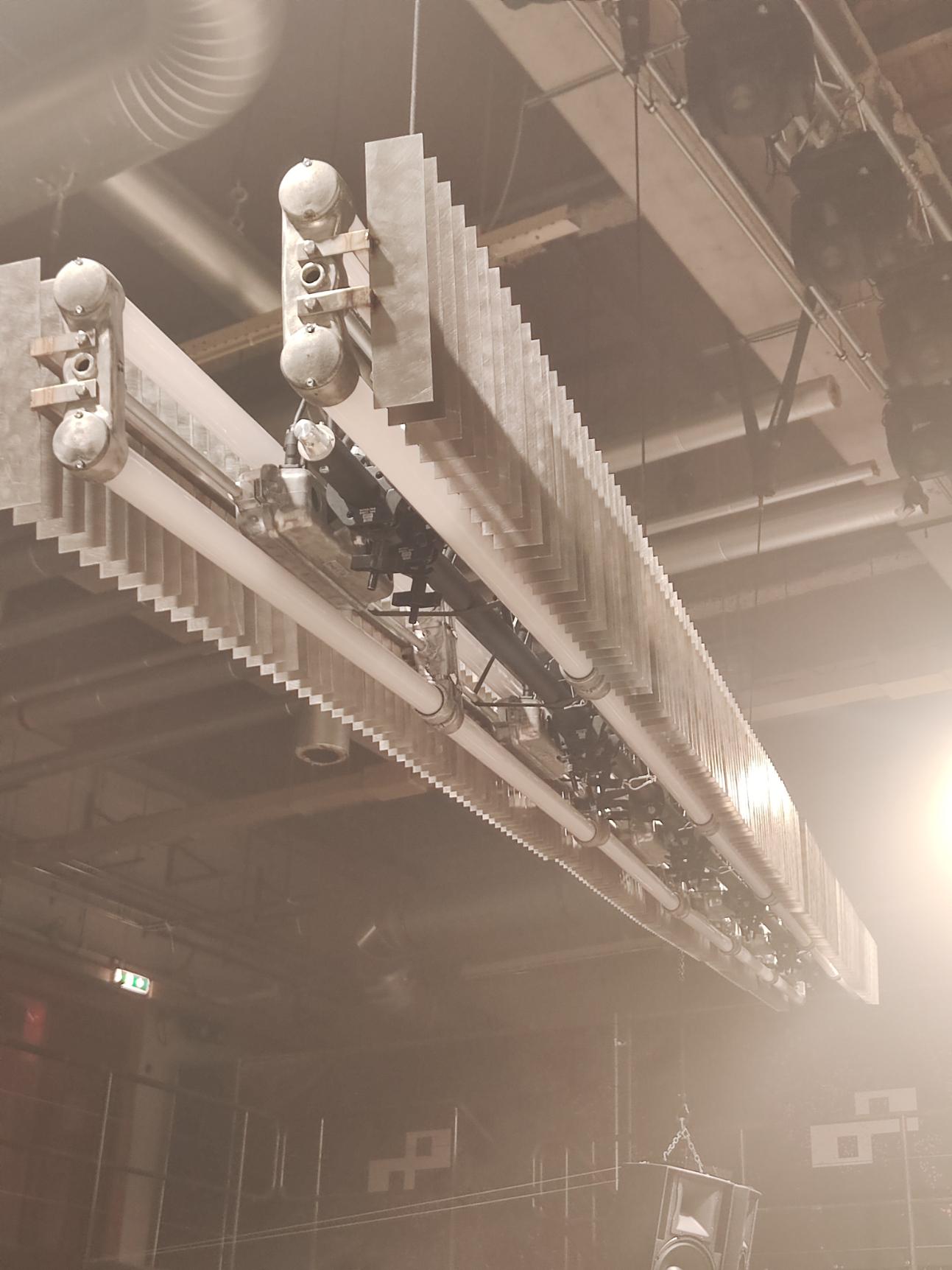
Ive pushed this controller to its limits during Amsterdam Dance Event, using 12 in a network that was run almost 24/7 in a humid and hot environment (see image!) They worked perfectly throughout the weekend, and they looked amazing in th evenue!
However, I did find some performance issue which I adressed with the newest update.
- Added Artnet node discovery through WebUI
- Improved WebUI design for better usability
- Fixed bug which crashed the node above 48fps at 16 universes
- Reduced frame buffer to have more ram available
- Added Artnet source filtering to prevent 2 sources from talking to the same node
- The node now filters on an Artnet-ID, which prevent the node from assumiing any data is Artnet data and crashing when its not (idk why I didnt do this before...)
The node already worked perfectly as a standalone unit, but these updates make it a lot more resillient in a production environment with other nodes, fixtures and consoles in the same network.
I am sharing the github here for anybody that is interested in following along with the development! The next hardware iteration will add current, voltage and temperature sensing to the board, next to power distribution and fused outputs that are already present! And for those that are fan of WLED: that is also supported on this hardware. Great if you want to do more then just Artnet!
Let me know if you have any questions or want to contribute! Im available here or on discord.

r/arduino • u/No-Reach-9412 • 27d ago
My cables are messy, my solders aren’t perfect, and my buttons definitely aren’t straight. But who cares! I’ve finished my first soldered project, and I couldn’t be happier with the results. This is the first time on this electronics journey I’ve felt like I’ve actually made something! I just need to make an enclosure now which will be difficult due to the buttons being a bit dodgy lol but I’ll give it a go eventually.
For those wondering, its a pomoduro timer, the left button adds 5 minutes, the middle button submits the timer, the right button removes five, 4th button turns off the screen (to reduce LED burn incase I want to leave it plugged in), and the last button brings up the set time menu.
I’m insanely pleased with this project, and the cool part is, its something I can actually use. I tend to use a pomoduro timer at work to help me focus, but its a simple python script I wrote ages ago. Now I have a physical one, and it has snoopy on it!
r/arduino • u/Tuxrad • 26d ago
Hi everyone, I need help with a few things with my arduino. I know for sure I'm far from a pro at coding, and soldering. I want to use Adafruit's alphanumerical display (14-segment display) with an Arduino Mega 2560. Images of what I have will be shown.
What I have:
Alphanumerical display backpack (first image, HT16K33A)
4 2-digit alpha numerical displays (No backpack currently attached, buy link if you want to chek 'em out: https://www.adafruit.com/product/3129 )
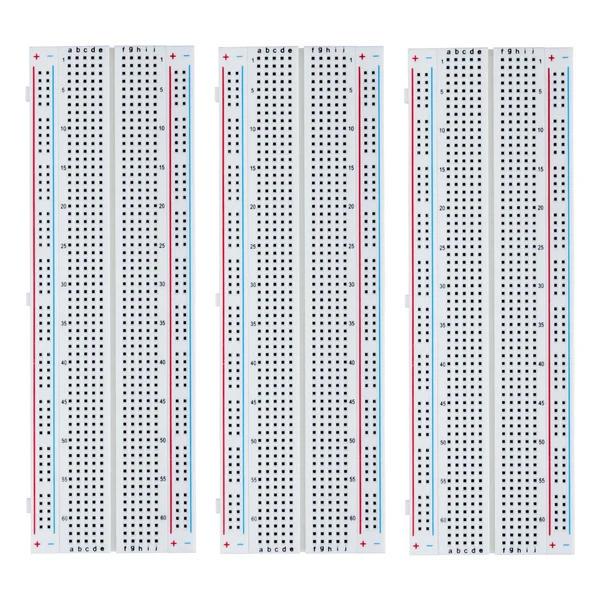
Breadboard
My arduino Mega 2560
All I want to do for now is a project where I can type on my keyboard to show that on the display and scroll across. I'll work from there.


r/arduino • u/greyHumanoidRobot • 27d ago
I'm using a ATmega 32u4 at 3.3 volts. This is an Adafruit Feather. I'll be reading various digital inputs like switch positions and a rotary encoder. All of the wires to the switches will be within 15 centimeters at most. Internal to the microcontroller are pull-ups that are 20K to 50K ohms. The specification states there is a wide range on the value of the pull-up resistors.
Do you find the built-in pull-ups to be adequate or do you supplement it with an external resistor in parallel ? What value are you aiming for ? (average of the internal and the external)
r/arduino • u/ExchangeConscious207 • 26d ago
hi!!! Im fairly new to arduino and I have the WEIRDEST problem: I have an android phone, a mac and a PC. I've bought 3 different boards at this point: nanos, nanos with ch340 and even an uno.
This is my situation: the boards connect fine to any of these three devices, i manage to upload blink or whatever example sketch onto them. I'm working on a proyect involving LEDS and ultrasonic sensor so I need a fairly complex sketch to be uploaded onto them, and once I do... THE BOARDS STOP COMMUNICATING WITH ANY DEVICES further. The sketch's uploaded and it's working, but theyre bricked. I've tried every fix under the sun and now have a bunch of brand new boards, all unresponsive. Has anyone ever encountered this???
If anyone could help me I'd owe them my LIFE
r/arduino • u/Michelin1927 • 27d ago
Sup guys. I’m building SerialCraft, an open-source Fabric mod connecting Arduino/ESP32 and others boards with Minecraft Java. I’m currently testing it with my new Arduino UNO Q :D
You can:
The idea is to learn electronics while playing Survival: craft the laptop and I/O modules, then experiment with your own circuits.
I use AI tools to help write and refine code, alongside working through the architecture and learning Fabric.
It’s still experimental, and I’d love for you to try it! What would you build? Bug reports and feedback on the setup are welcome.
Download: Modrinth
Documentation and guides: serialcraft.xyz
Thanks for reading and sharing your feedback!
r/arduino • u/Wangysheng • 27d ago
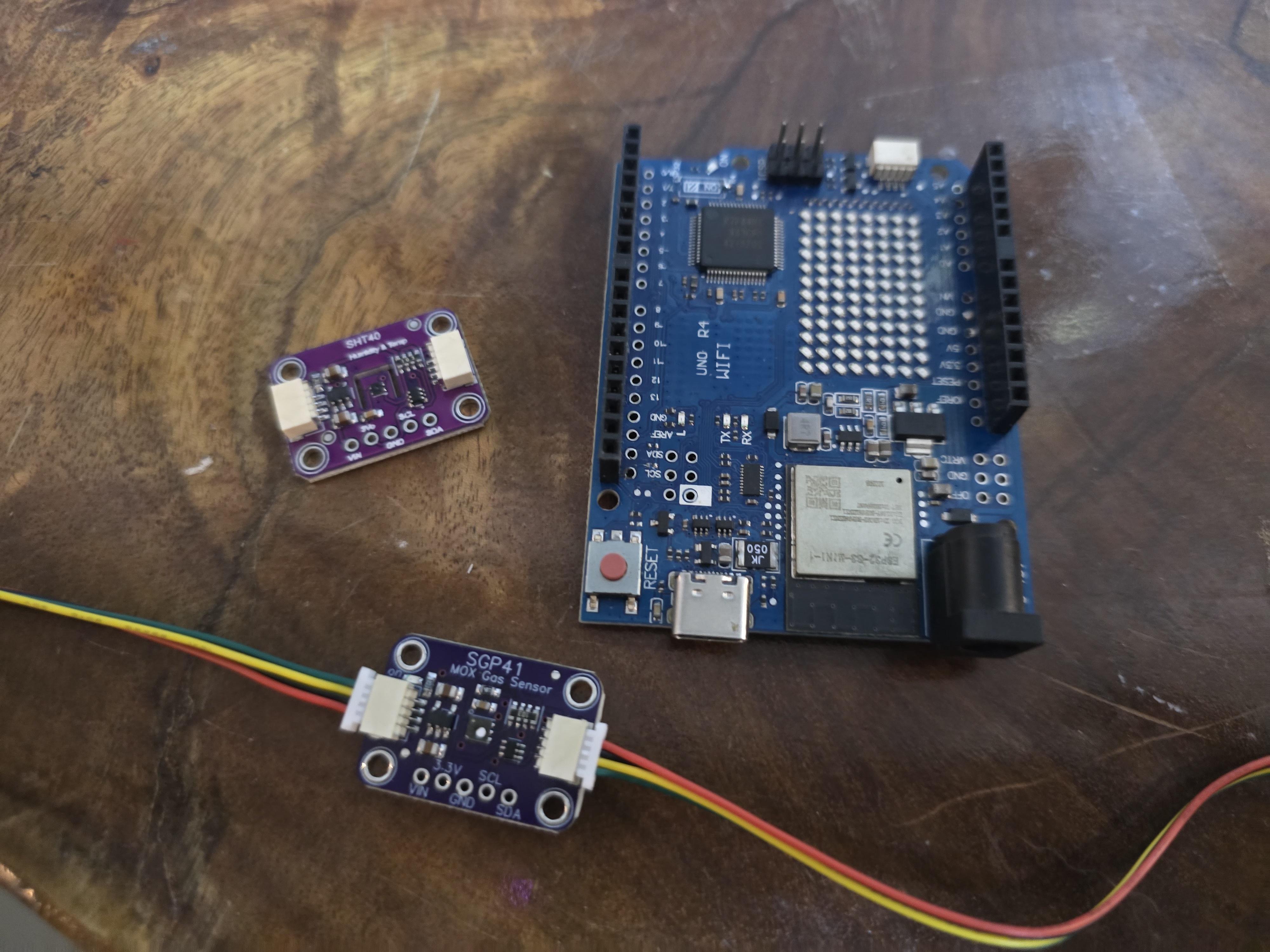
Has anyone have the same cloned modules? I have probed the pins of these modules with a DMM and it seems it doesn't line up to the ones in the UNO R4 Wifi (also a clone) or maybe I have probed it incorrectly. The modules in the picture are SHT40 (top) and SGP41 (bottom). These are used for our project in our classes.
r/arduino • u/DarkPigeon78 • 27d ago
I'd like some feedback if you think my project has potential or not please.
I started developing a do-it-all option for my students to develop their projects (initially for water rockets), but I had some thoughts about making it bullet proof, with lots of potential. I came up with four ideals, and this led me to make my own development board.
Powerful, Protection, Precision and Portability (my core ideals for this).
Basically, it does everything I wanted for my student's projects.
Starting out with MicroPython was good, but I always knew Arduino was much better for time prioritization and using interrupts and counters and such.
I'd love your feedback, and any tips or project ideas I could use this for with my students.
Cheers,
Phil
r/arduino • u/Robonaviagtors • 27d ago
Hi! We’re Team Robonavigators, and we built Navigator 1 around an Arduino UNO R4 WiFi.
The rover hosts a browser dashboard for driving and telemetry. It uses front and rear ultrasonic sensors, a servo for scanning, a downward-facing IR sensor for cliff detection, and an analog voltage sensor to monitor the battery. A physical switch selects access-point or hotspot connectivity, and the onboard LED matrix displays the IP address.
The sketch includes obstacle avoidance, object following, a drawn-path mode, browser voice control, manual driving, and an idle proximity guard.
The sketch, pinout and bill of materials are here: https://github.com/Robonavigators/Navigator-1
We’d love feedback on the hardware and code, particularly ideas for improving the obstacle avoidance and reliability.
r/arduino • u/MrNiceThings • 28d ago
Two weeks ago I shared this project in progress in the ESP32 sub and it's now done. It's a CO2 sensor which connects to Home Assistant via MQTT, sends its data and goes to sleep, so nothing special there, except fo maybe the e-ink display. That said I try to do something unique with every project, here it's the weird yet easy to understand UI which I had a lot of fun with.
So to sum this up, we have ESP-WROOM-32 module, 4,2" B/W e-ink, SHT30 temp/hum sensor, SCD40 CO2 sensor, 2x 18650, TP4059 + protection and USB-C. Programmed in platformio @ arduino framework.
Since the original post, one important thing became quite clear. Due to massive power consumption of the CO2 sensor, the device won't last more than a year. If used solely as a temp / hum sensor, it will last multiple years easily.
Github link:
https://github.com/mcer12/Ambien-ESP32
Original post:
https://www.reddit.com/r/esp32/comments/1x5mu2q/co2_sensor_with_home_assistant_support_eink_and/
And here's a longer blog post if anyone's interested:
https://nicethingsguy.com/blog/ambien-battery-powered-co2-sensor-with-e-ink-display
note: I don't even know what's considered an arduino these days. This has been programmed in platformio and arduino framework but is that enough to share here? I don't know, I'm at the admin gods' mercy :D
r/arduino • u/wsalasr • 27d ago
Hi, I am using a Soft Latch power supply circuit that works correctly. Its current operation is as follows:
When the ON switch is pressed, the input voltage VIN passes through transistor Q1, which turns ON and allows power to reach the voltage regulator. The regulator then supplies power to the microcontroller.
When the OFF switch is pressed again, the microcontroller receives the signal and executes the shutdown command, turning Q1 OFF and disconnecting the power supply.
So far, the circuit works perfectly.
However, I would like to add a third operating mode: when VIN is connected for the first time, the circuit should automatically turn ON, meaning Q1 should conduct without requiring the ON switch to be pressed. This would allow the microcontroller to power up automatically and remain ready to receive the shutdown command when the OFF switch is subsequently pressed. All other existing functions must remain unchanged.
I have tried to achieve this by placing a 10 µF capacitor in parallel with the ON/OFF switch to generate an activation pulse when VIN is connected. Initially, it works: when VIN is applied, the capacitor generates a pulse and the microcontroller powers up automatically. However, when I disconnect and reconnect VIN, the circuit no longer turns ON automatically. I suspect this happens because the capacitor retains some of its charge and therefore fails to generate the required pulse again.
What modifications would you recommend to achieve this third operating mode?
Specifically, I need Q1 to turn ON automatically whenever VIN is applied, while preserving the existing ON/OFF switch functionality and soft-latch operation. I am looking for a reliable solution that allows this power-on and shutdown cycle to be repeated as many times as necessary, without requiring manual intervention to turn the circuit ON initially.

r/arduino • u/Either-Bridge9970 • 28d ago
I am trying to make a fire detector and extinguisher. The servo has to spin continuously from 0 to 180 degree and the flame sensor is to be mounted on it. But after uploading the code, first, the servo is stuttering while rotating and also the flame sensor and buck converter(which is giving 5.07V from 9V battery) LED is blink very slightly.
Is the problem due to the 9V battery?
Will replacing the power source with lithium ion batteries do the job? If yes, what mah batteries to use and how many?
Note: I will be using one servo mounted with flame sensor which will rotate continuously and another servo which will be mounted by water pump pipe.
r/arduino • u/YUMOBUILDS • 26d ago
I built a tiny desk-pet robot car with an animated cat face on a round screen. It has 8 emotions, reacts to touch, falls asleep when ignored, and drives with a wireless joystick remote. 🐱
More builds:
🔗 Links:
🔧 Yumo Builds: electronics, ESP32 and Arduino projects, built while learning
https://www.youtube.com/@YumoBuilds
🖨️ Yumo Builds Lab: 3D printing, electronics and creative design
https://www.youtube.com/@YumoBuildsLab 👈 New Channel
Note: For More Info Please Check Out README first.
💾 SOURCE CODE, WIRING, 3D STL File And Full Guide:
https://github.com/yumobuilds/Yumo-Cat-Robot-Car-V1
🛠 Parts used:
- 2x ESP32-C3 Super Mini (car and remote)
- GC9A01 round TFT 240x240
- 2x SSD1306 OLED 128x32
- Touch sensor module
- 4x continuous-rotation servos
- Analog joystick module
- 2x 18650 battery (car), 1x small lithium battery (remote)
- 3D printed wheels (Bambu Lab H2C)
License: free for noncommercial use (PolyForm Noncommercial 1.0.0). Tag u/yumobuilds if you build one!
please Like and subscribe for more videos!
r/arduino • u/PeaIcy760 • 27d ago
I'm planning a small camera project where I need a fairly high resolution full colour screen. 0.96in seems to be the closest size produced but finding them with a good reproduction is tricky. Their refresh rate doesn't have to be great just to be able to show a feed from a camera
Similarly any decent small camera recommendations? Again it doesn't have to be amazing quality the intended used for all this is a viewfinder. So goodish quality in a live feed but doesn't have to be camera quality
r/arduino • u/Buff-Bird • 28d ago
I’m a complete beginner with the hardware and I’m following a guide. Specifically,
https://wiki.elegoo.com/oshw-getting-started-&-kits/digital-2
For some reason I can’t get the buttons to do anything. No matter what one I click, the led doesn’t turn on. I’ve tried rewriting it in different ways but nothing seems to work.
**The first image is wired differently than the second and third
Any help would be appreciated.
Update:
It ended up being a connection issue with the microcontroller. The first few circuits I tested worked with the microcontroller on the breadboard but always had a loose connection. I avoided soldering since this is a from a starter kit and wanted to be able to move things around. After connecting the header pins using jumper wires, it worked correctly.
r/arduino • u/Wills_Workshop • 29d ago
I wanted a compact way to do quick prototyping without being tied to a bench power supply. Here's the solution I came up with, a breadboard with two independent batteries built in, one delivering 5V and the other 12V.
How it's wired:
Here are the files if anyone wants to build their own: Printables
Full build guide with photos on my website: willsworkshop.com