r/arduino • • 2d ago

Look what I made! Arduino stepper motor christmas music box

167 Upvotes

Hello everyone!

I've always be passionate about music and electronics so i decided to make a music box made by vibrating stepper motors. I made a custom software that sends speeds to the motors based on a midi file with 3 separated tracks: bass, harmony and melody.

I added some 3d printed christmas themed rotating miniatures to make it more funny.

What do you think about it?


r/arduino • • 1d ago

If TFT_eSPI doesn't compile with the ESP32 v4 board definitions ...

3 Upvotes

If you upgrade to the ESP32 v4 board definitions you'll get an error when you compile a sketch using the TFT_eSPI library:

In file included from d:\Dev\Arduino\ESP32\libraries\TFT_eSPI\TFT_eSPI.cpp:24:
d:\Dev\Arduino\ESP32\libraries\TFT_eSPI\Processors/TFT_eSPI_ESP32.c:36:36: error: 'HSPI_HOST' was not declared in this scope; did you mean 'SPI3_HOST'?
   36 |       spi_host_device_t spi_host = HSPI_HOST;
      |                                    ^~~~~~~~~
      |                                    SPI3_HOST
exit status 1

Compilation error: exit status 1

This because TFT_eSPI still uses the deprecated definitions HSPI_HOST and VSPI_HOST for the two SPI buses and v4 of the board defs removes those definitions.

To fix this simply edit your User_Setup.h file and add:

#ifndef HSPI_HOST
#define HSPI_HOST SPI2_HOST
#endif

#ifndef VSPI_HOST
#define VSPI_HOST SPI3_HOST
#endif

The library maintainer will presumably eventually fix this, but they don't seem to be responding to issues at the moment.


r/arduino • • 2d ago

Where to find “other” pieces?

5 Upvotes

Hello! I’m fairly new to making arduino projects and have a question!!

Where do people source their fasteners/connectors? The pieces that aren’t the Arduino, or the servo, the wires, the potentiometer. Like the pieces that the servo motor moves maybe, or the nuts and bolts that hold everything together? Or the bar that extends another piece etc. I hope this makes sense! I don’t even know what these gidgets are called lol.
Any info is helpful x


r/arduino • • 2d ago

Arduino suggestions for a 3D Scanner, 3D Printing specific use case.

11 Upvotes

I know someone who I think would really enjoy using an Arduino to build a 3D Scanner for their 3D Printing Projects, as well as other electronics uses. I don't have the technical know-how to fully know how to make one, so I'm hoping this subreddit could help: What Arduino (or similar brand's) products would you suggest for a fairly seasoned electrical engineer to create a 3D sensor? Looking on their website it seems like the R4 Starter Kit and Sensor Kit may have what I need, but I'm curious what a parts list would look like.

Thanks! Any help is welcome.


r/arduino • • 2d ago

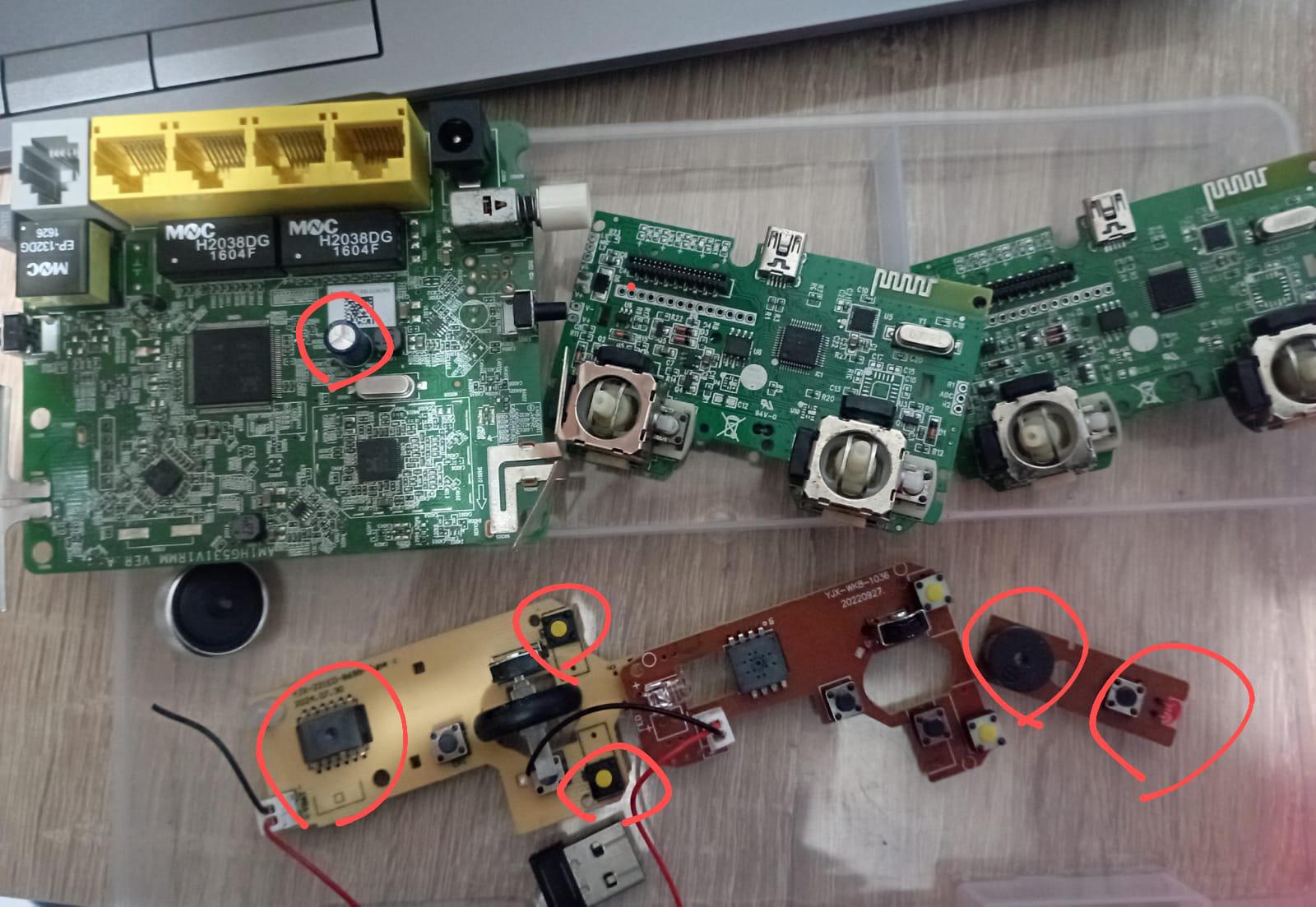
Hardware Help Can i reuse any of these parts?

14 Upvotes

Before i started learning arduino, i used to open broken devices and extract their pcbs. I noticed that some of the pcbs have some parts that seem like i could use them at some point in the future and i'm wondering if i can take them apart and whether they would be useful, thank you in advance.


r/arduino • • 2d ago

Look what I made! Wireless head node working up top while building the rig below (ESP32-C3 + MPU6050 + ESP32-S3)

39 Upvotes

Up top in the clip the headset is already running wireless, and down below I'm putting the rest of the setup together. All coded in the Arduino IDE: an ESP32-C3 with an MPU6050 sending wireless packets over ESP-NOW to an ESP32-S3 USB HID dongle.

​The goal is to keep body awareness and head reference tightly integrated with hand aiming/clutching and drift tuning in code. Open to tips from anyone else tinkering with ESP32, MPU6050, and HID!


r/arduino • • 2d ago

Arduino sketch that plays a hand-annotated EDM track on a WS2812B strip (from my PhD tool, TimeCues Studio)

Post image
4 Upvotes

Hi everyone. During my PhD I wrote a tool, TimeCues Studio, for marking the structure of electronic tracks by ear: parts, buildups, drops, hits. The animation is from it.

There's now an Arduino sketch that takes those marks (converted to a header file) and plays them on a WS2812B strip with no microphone: a color per part, a chase over spans, a flash per hit. Start it from a button or the Serial Monitor on beat one.

Hardware: any FastLED board (Uno, Nano, ESP32...), strip on pin 6 by default. Pin, LED count and type sit at the top of the sketch.

Not tried on physical hardware yet, it ran in a simulator.

Sketch and docs: https://github.com/sapirca/timecues-studio/tree/main/tools/led

Annotator demo: https://timecues-demo.pages.dev


r/arduino • • 2d ago

Project Update! Virtual breadboard update: you now wire a Nano and program it with blocks (radar, servo, LCD, IR remote)

Thumbnail
gallery
15 Upvotes

A while ago I posted the virtual breadboard I'm building for learning electronics step by step. The next part is Arduino, and I wanted to show it here before it opens in a few weeks.

What's in the pictures:

• Radar: SG90 servo on D4, HC-SR04 with Trig on D5 and Echo on D6. The servo sweeps 15–165°, the Nano prints "angle,distance." on serial at 9600, and the radar view next to the breadboard draws it, like the classic Processing sketch.

• Potentiometer on A0 mapped 0–1023 to 0–180° on the servo.

• 16×2 I2C LCD on A4/A5 with your own text.

• IR receiver + remote switching LEDs.

How it works:

• the Nano goes into the breadboard and everything is wired with jumper wires

• programs are built from blocks; "Written code" shows the same program as text

• each lesson goes circuit first, then program: predict what it does, change it, fix a broken version, then write it yourself

• 16 lessons, from a blinking LED to games on the LCD

I'd like to hear from people who teach Arduino: which project would you put first for a complete beginner?


r/arduino • • 2d ago

Rookie question about connecting an Arduino Uno to an TTP223 touch sensor

4 Upvotes

Hi! Very new to working with Arduino introduced by my study. Long story short, i have the TTP223 touch sensors, and some Dupont jumper wires, MM / MF and FF.

How can i connect them the best? I assume i need to strip the jumper wires, solder them onto each sensor?


r/arduino • • 2d ago

Hardware Help Can I use a BD139 to drive a small 12 V fan?

7 Upvotes

It's all I have available. Is it suitable to use with a 12 V, 65 mA fan? If so, what value resistor should I use on the base? I'd like to use PWM to run it at a low speed.


r/arduino • • 3d ago

Software Help Which driver should we download for this esp32 for Arduino IDE?

Thumbnail
gallery
62 Upvotes

Ch9102X is written on the right sided black square behind the port. And also the port option is not available in our Arduino IDE.

Update: Found a soln! I bypassed the code to ESP32 through an Arduino UNO and it worked!!


r/arduino • • 3d ago

Hey I'm new CE student need help

Thumbnail
gallery
40 Upvotes

How can i connect this battery to my arduino uno?

UPDATE: hey guys thanks for the help the professor helped me to day to make it and now the dual-axis automatic solor tracking system work without problem the only thing i need to improve is the base of the 3D print beacuse only 1 servo with it's horn is connected to the whole project below and it makes it unstable to do extrem movement and i made the code work so that it's move smooth and slower with delay in it. I'm grateful for everything you guys taught me and helped me Thanks ❤️


r/arduino • • 3d ago

Pimp My Battery Powered Lamp (SunRise/Set Edition)

Thumbnail
gallery
44 Upvotes

This was a small project I put together in between other projects. We have quite a few battery-powered LED lamps around the house, but for us there are two issues with them:

Either you forget to turn the lamp off, and the battery drains quickly, or you forget to turn it on in the first place.

So I removed the original PCB from the lamp and replaced it with an ESP32-C3 and a charging module. I used a resistor to power the existing LED directly from the IO (so no need for a MSFT and power consumption is also low). With a different controller (e.g., ESP32-S3), you could continue to use the touch button.

I configured the lamp to turn on at 6:30 AM and stay on until sunrise, and then turn on again at sunset and stay on until 9:00 PM.

Here’s how it works:

On first startup, the ESP32 gets the current time from the internet. It then calculates the number of seconds until the next event and goes into deep sleep for that duration. An RTC variable stores whether the lamp should be on or off when it wakes up. Whenever the ESP wakes up, it calculates the next event. I let it run for 2 weeks to determine the inaccuracy of the internal clock, and then I implemented a correction.

Battery life depends on the time of year. In autumn, with the original battery and the resistor in place, this single-LED lamp runs for weeks without needing a recharge, even when used for 4–6 hours a day.

Because of the simplicity of this project and the cozy light it produces, I wanted to buy a few more of the same lamps. Unfortunately, it seems that they are no longer available on AliExpress. In the past, there used to be plenty of listings for them at under €10.


r/arduino • • 3d ago

Powering 12 MG90s servos

9 Upvotes

I need to power 12, MG90s servos. From what I can tell, this will require 5V, and about 3A.

I tried using a MB102 breadboard power module connected to a power plug, but this wasnt enough, so what power supply board can i use, and what battery do i connect to the power supply board, since i want it to use a battery instead of a power plug


r/arduino • • 3d ago

Super Nintendo on Cyberpi

3 Upvotes

You can use Arduino ide to flash a SNES emulator on esp32-based Makeblock's CyberPi. Some people have been flashing things like doom recently. I have made some projects on Arduino ide for the Cyberpi. I also made a doom engine for the Cyberpi.

Here is the Github link: https://github.com/oshsen4262-art/CyberPi-Arduino-Projects

This is also my first github post and reddit. So I hope you enjoy my projects!


r/arduino • • 4d ago

Hardware Help Question

25 Upvotes

With an Arduino, Can I write a block of code to it and “mount it in an enclosure” and have it run the same code over and over again with no interaction to the board other than applying power until eternity?

I’m looking to develop a small toy and essentially looking for a “controller” to run some motors/servos.

If so, What is the cheapest/smallest Arduino to achieve this goal with?

Thank you.


r/arduino • • 4d ago

Software Help Stuck with ESP32-audioI2S crashing my program

5 Upvotes

Hello guys, I've been struggling with this problem for a few days already, and i just can't find the solution. I am using an ESP32-S3-WROOM-1 with platformIO and have written a simple program that uses the ESP32-audioI2S library to attempt to play a file from an SD card.

#include <Arduino.h>
#include <SD_MMC.h>
#include <Audio.h>
#include "pins.h"
#include <Wire.h>
#include "scan.h"
#include "amp.h"
#include "esp_heap_caps.h"

Audio audio;

void my_audio_info(Audio::msg_t m) {
  Serial.printf("%s: %s\n", m.s, m.msg);
}

void setup() {
  Serial.begin(9600);
  delay(1500);

  SD_MMC.setPins(PIN_SDIO_CLK, PIN_SDIO_CMD, PIN_SDIO_D0, PIN_SDIO_D1, PIN_SDIO_D2, PIN_SDIO_D3);

  if (!SD_MMC.begin("/sdcard", false, false, 5000)) {
    Serial.println("SD card init failed");
  } else {
    Serial.println("SD card init success");
  }

  Serial.printf("Total PSRAM: %d bytes\n", ESP.getPsramSize());
  Serial.printf("Free PSRAM:  %d bytes\n", ESP.getFreePsram());
  Serial.printf("Largest free block in PSRAM: %d bytes\n", heap_caps_get_largest_free_block(MALLOC_CAP_SPIRAM));

  Audio::audio_info_callback = my_audio_info;

  audio.setPinout(PIN_I2S_BCK, PIN_I2S_LRCK, PIN_I2S_DOUT);
  audio.setVolume(21);
  if (!audio.connecttoFS(SD_MMC, "/sample-3s.mp3")) {
    Serial.println("failed to connect to mp3");
  }

  delay(100);
}

void loop() {
  audio.loop();
  vTaskDelay(1);
}

When running the code, I get the following in the serial monitor:

SD card init success
Total PSRAM: 2097152 bytes
Free PSRAM:  2065324 bytes
Largest free block in PSRAM: 2064372 bytes
info: inputBufferSize: 655349 bytes
info: Reading file: "/sample-3s.mp3"
Disconnected (read failed: [Errno 6] Device not configured)
Reconnecting to /dev/cu.usbmodem7C0C5F964D501 .  Connected!

After the "info: Reading file:" line, the firmware crashes and reboots. At first I thought there was not enough memory, but i printed the available PSRAM and its way more than the buffer size. Maybe the library was not told to use PSRAM? But I couldn't find a way to do that. What in the world is this issue?


r/arduino • • 4d ago

Hardware Help what is the maximum amount of parts i could plug in my arduino board?

6 Upvotes

hello I'm a beginner in Arduino, and recently i started getting more intrigued by it. However, as I started testing various parts such as ultra sonic sensor, lcd screen, servo motor... I started having questions regarding mixing all these parts in one project and the limitations i would face. for instance, should i avoid connecting everything to one arduino board and use external power source? what if i ran out of digital pins, how to add more pins etc? should i start using my breadboard as i usually neglect it? I would really appreaciate insights on these questions.


r/arduino • • 3d ago

I built my own Arduino-based 180° radar system – Ali's Radar (custom code + active cooling)

0 Upvotes

Hey, I'm Mad Mohammad Ali! Custom ui and code

I wanted to share a project I've been building called Ali's Radar — an Arduino-based ultrasonic radar system with a 180° scanning mechanism and a live radar interface on PC.

This project is built around my own ideas, experiments and custom-written code.

⚙️ Main Features

- 180° servo-controlled radar scanning

- HC-SR04 ultrasonic object detection

- Real-time radar visualisation on PC using Processing

- Live object distance measurement

- Servo-based scanning mechanism

- Joystick controls for manual radar operation

- OLED display integration (planned)

- Active cooling system And On off switch and range selector with 100 cm to 400 cm range

- Custom Arduino and Processing code written by me

🎮 Controls

The system includes a joystick-based control setup:

- VRx: horizontal control

- VRy: vertical control

- SW: joystick button input

The radar also has an ON/OFF control and adjustable scanning behaviour.

❄️ Active Cooling System

I also worked on an active cooling system as part of the project. I wanted to make the setup more than just a basic radar demonstration.

💻 Programming

The Arduino handles the sensor, servo and control inputs, while Processing handles the radar-style PC visualisation.

The code is custom-written by me. I developed and modified the Arduino and Processing sides while testing the system.

🔧 Current Status

The project has had its share of failures and problems during development. Some parts work, while others still need troubleshooting and improvement.

I'm sharing it because I want to document the journey, learn from other makers, and keep improving Ali's Radar.

This is a personal DIY engineering project, and I'm still working on it.

Thanks for checking it out! 📡

r/arduino • • 4d ago

I wrote a free 8-lesson Arduino course for ages 11-14 that runs in Tinkercad, so kids don't need kits

17 Upvotes

When my local library's Arduino program shut down for lack of instructors and materials, a few teammates from my robotics team and I rebuilt it from scratch. It's now taught at five libraries and has reached 1,000+ kids, and a Canadian nonprofit, Digital Moment, adopted the French edition.

What's in it:

- 8 lessons, about 90 minutes each: blinking LED, series vs. parallel, buttons and pull-down resistors, potentiometers and analogRead, servos and map(), switch statements and loops (a 4-mode windshield wiper), and two open-ended capstones

- Every lesson works with real parts OR entirely in the Tinkercad simulator

- Code examples, wiring diagrams, teacher notes, timing, common wiring mistakes, and exit tickets

- Free and MIT-licensed

I'm a high school senior, so I'd really appreciate feedback from people who know this better than I do, especially on the explanations in Lesson 3 (pull-down resistors) and Lesson 7 (millis() vs. delay()). If you teach or mentor and end up using any of it, I'd love to hear how it went.

Link: https://github.com/RohanM1212/teaching-arduino


r/arduino • • 4d ago

Beginner project idea

2 Upvotes

Hello,

I have bought the starter kit with the uno r3, and I got an idea I would think would be really fun personally. I want to make a hub kinda like a hygrometer but also add a UV sensor for my lizard. Would that be a complex first project to start with?


r/arduino • • 4d ago

Look what I made! Arduino MEGA as a JTAG probe??

3 Upvotes

I'm not sure how many details to include, tried all possible googling for how to debug a MEGA and all I found was I had to buy an AVR ICE ?

took me a few weeks to figure this out, all vibe coded so YMMV, you can turn your spare MEGA in a JTAG probe to help debugging another MEGA .

pretty much all that you need is in the repo README

stars, sponsors, forks, comments, issues, feedbacks appreciated

https://github.com/lsdlsd88/mega-jtag-killer


r/arduino • • 4d ago

Uno Q Help with serial Arduino Uno Q

2 Upvotes

Hi. I got the Uno Q last spring but haven't gotten the serial to work which has led to me not using it.

I have found tips on the internett to use the monitor command instead and have coppied code from there. The Uno Q hasn't responded at all.

I know that there is a connection as I can upload all other code as normal. It is however difficult to start to use it without the serial.

I don't have a lot of experience having only used Arduino for one school year building one salinity sensor and a very simple car. Some please ask questions if you need more context and there is relevant information that I haven't given😊

It may be relevant to say that I code on a school Laptop which has applab blocked (as well as almost everything else🫠) so I use the Arduino IDE both the IDE and Uno Q module in the IDE is up to date.

Thanks in advance😊


r/arduino • • 4d ago

Hardware Help How should I connect an MG996R servo, MQ-2 sensor, and flame sensor to an Arduino Mega using an external power supply? (Preferably without soldering)

2 Upvotes

Currently working on a school prototype and I'm trying to figure out the best way to connect my components with proper wiring and tools to use.

I currently have:

  • Arduino Mega 2560
  • 2 flame sensors, MQ-2 gas/smoke sensor
  • MG996R servo motor, XL4016 DC-DC buck converter
  • 12V DC power adapter, 9V battery
  • M/F terminal blocks, Jumper wires, and a Breadboard.

What I'm trying to achieve:

I want to use one MG996R servo with two different operating modes:

  • If either flame sensor detects a fire in its direction, the servo rotates toward that specific area and holds its position.
  • If the MQ-2 detects smoke or gas but neither flame sensor provides a reliable direction, the servo continuously rotates back and forth within its 180° range until the detection clears.

The MQ-2 is intended as a backup trigger since it cannot identify the direction of a fire..

not tested with the sensors yet. It's just my intended arrangement, but you get the idea.

I've already tested the servo using a breadboard, and it works. However, it doesn't seem to reach its full movement potential. I suspect this is because the breadboard and USB power source aren't providing enough current for the MG996R, which can demand around 2A under heavy load. I also tested it using my computer's USB connection, but I only ran it briefly because I didn't want to overload the USB power source.

My questions:

  1. What's the best way to distribute power to these components in parallel? Can I use my 12V adapter with the XL4016 to provide the servo with its required voltage and current while powering the Arduino and sensors separately through properly regulated outputs?
  2. Should the Arduino and sensors have a separate power supply from the servo, or can they share the same 12V source through properly regulated outputs?
  3. How should I connect the grounds and signal wires between the Arduino, sensors, buck converter, and servo? Would terminal blocks or other connectors be suitable instead for making these wiring connections without soldering?
  4. Would you recommend keeping the breadboard for sensor connections only and using separate terminal blocks or another method for the servo's power connections?

I'd appreciate any wiring diagrams, suggestions/comments, or some advice from people who have worked with similar components. Thanks!