r/BambuLab • • 21d ago

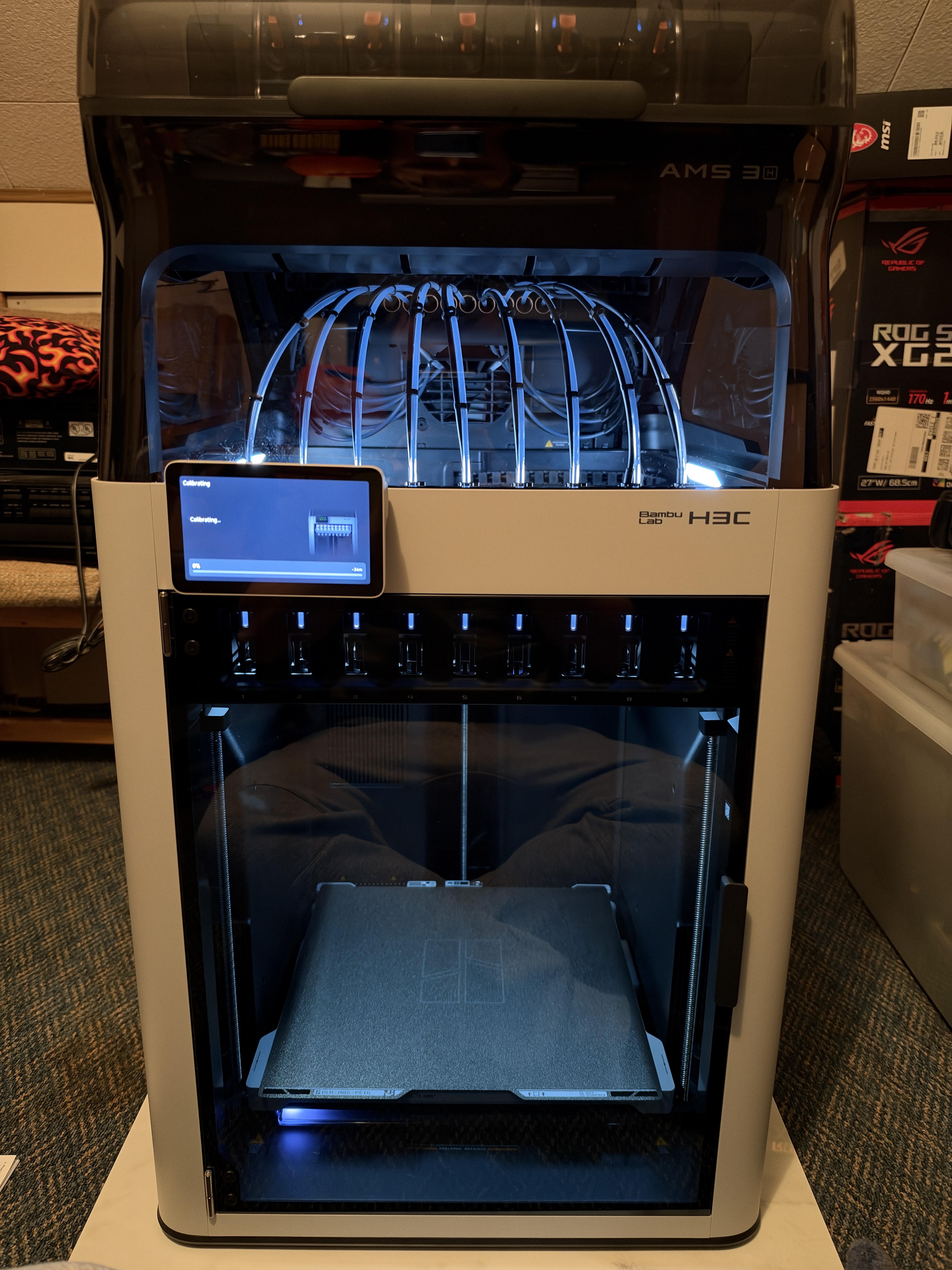
H3C Bambu Lab H3C: Our Full Reveal

650 Upvotes

Swaptek enables 6-second material switches between 9 nozzles. FlexFeed extruder prints soft TPU 75A up to three times faster. AMS 3H combines automated feeding and integrated filament storage.

This is Bambu Lab H3C, a complete system purpose-built around the Tool Changer architecture. Let's dive into it!

SwapTek™: 6-second material switch, including a 3.4-second tool change.

Nine PrintTools, each with its own dedicated filament path and heater, keep every material loaded, preheated, and ready to print. No need to retract one filament before loading another. With an optimized design, fine-tuned parameters, and active preheating, switching between PrintTools takes as little as 6 seconds, with the tool-change done in only 3.4 seconds.

Heating a nozzle usually means waiting. Active Pre-Heat looks ahead to the next tool change and warms the incoming nozzle while the current one is still printing—so the new material starts laying down within 6 seconds.

Swaptek's fast PrintTool-switching allows Full Spectrum Color Mixing color mixing through layered deposition faster and more practical than ever. With nine dedicated PrintTools and five-color CMYKW mixing, the H3C produces a vast spectrum of colors without requiring a separate spool for every shade. The result? Vibrant, full-color figurines with incredible detail.

Mixed Nozzle Sizes: Speed and detail, no more compromises.

The dial, case, and flexible TPU band are printed together as one piece. Fine dial details call for a 0.2 mm nozzle, the case is better suited to 0.4 mm, and the soft band requires a dedicated 0.4 mm TPU nozzle. H3C can carry different nozzle sizes at once. Paired with Bambu Studio’s new mixed-diameter toolpath planning algorithm, each nozzle prints at a layer height that suits it and plays to its strengths, without having to share a single layer height.

FlexFeed Extruder: Softer TPU, up to 3x faster.

Soft TPU has always been slow to print. The softer the filament, the more it bends and buckles before reaching the nozzle. Traditional extruders have to crawl to stay reliable. FlexFeed handles both 1.75mm and 2.85mm filament and switches on the go. A cam-driven mechanism, powered by a PMSM motor, keeps tension precise and consistent. Every extrusion stays rock-solid for prints that are cushion-soft.

With our dedicated 2.85mm TPU, the thicker filament provides greater resistance to buckling and higher volumetric flow. The result: TPU as soft as 75A, printed reliably at up to 3x the flow rate of a traditional printer.

AMS 3H: Filament storage built for Tool Changer.

A fully enclosed, integrated filament management system built for Swaptek: every roll stays sealed against moisture and feeds automatically into the PrintTool.

Auto Filament Loader replaces manual feeding altogether. Drop a filament into any of the nine slots and the AMS 3H detects, routes, and engages it with the PrintTool automatically — across all 9 paths. No more guesswork on loading.

A dedicated 2-slot dryer sits right in the filament slots and works with Swaptek — drying on demand or mid-print, so prep never stalls production. It reaches 85°C, enough for engineering-grade PA, PC, and carbon-fiber-filled filaments.

The H3C integrates filament storage and drying into a clean, compact design, maintaining a footprint comparable to a single-nozzle printer. With 7 built-in bypass feeding ports, even the soft TPU can be routed completely inside the enclosure. No hanging spools, no external racks, no exposed paths.

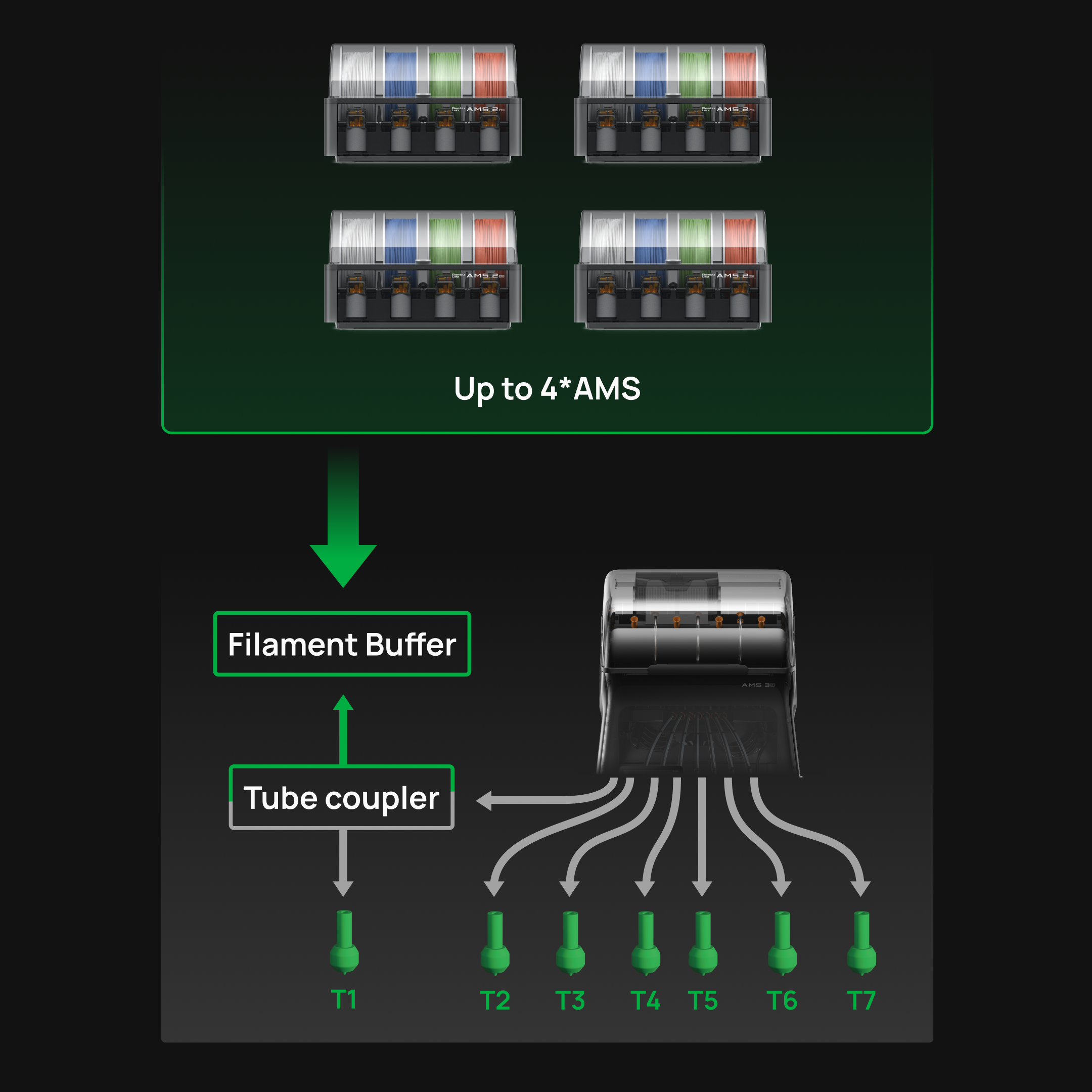
Don't let the number of tools cap your material count. Connect your existing AMS to the H3C through PrintTool No.1, and the system extends to up to 24 filament spools, unlocking more colors and materials in a single print without changing your workflow.

You are here for the print, not (always) the printer.

With the H3C, automation handles routine tasks. AI detection helps make intelligent adjustments along the way. The H3C makes it easy to focus on what matters most: bringing your ideas to life

Full Auto Calibration handles PrintTool docking calibration, offset compensation for accurate color and material alignment, and bed leveling before every print. No manual adjustments are needed, so you can spend more time making, less time tinkering.

Flagship performance. No compromise.

The toolhead and X-axis assembly are 40% lighter compared to the H2D, reducing inertia for faster, more precise movement. With acceleration reaching 25,000 mm/s² and travel speeds up to 1,400 mm/s, the H3C delivers exceptional speed while minimizing vibrations and ringing that can affect print quality.

The H3C runs four cooling layers working together**.** A CFD-optimized part cooling fan and dual auxiliary fans help maintain clean overhangs and bridges, even at high speeds. A dedicated PrintTool fan maintains thermal stability during extended printing and frequent PrintTool changes, while a chamber fan draws in cooler air to help regulate internal temperatures. Together, these systems deliver consistent cooling and reliable print quality across changing ambient temperatures.

Engineering-grade filaments demand precise temperature control. The H3C delivers with active dual-zone chamber heating up to 65°C, helping maintain consistent temperatures and minimize warping. All nine hardened-steel nozzles reach up to 350°C, supporting demanding materials such as ABS, PC, PA-CF, PET-CF, and more.

Go beyond printing.

Swaptek isn't limited to PrintTools. Optional CutTool, DrawTool, DebossTool — and more — mount the same way and switch automatically. Multi-process projects no longer mean multiple machines, manual swaps, or repeated setups. One job, every process, hands off.

Available now at Bambu Lab Store.

Availability and pricing details vary by region. Select features require additional accessories, full details available in Bambu Lab Store.

What multi-material or multicolor print do you hope to make with the H3C? Let us know in the comments below!


r/BambuLab • • 21d ago

H3C Mixed Nozzle Size printing is coming to H2D, H2C, and X2D

Post image
611 Upvotes

We've seen the enthusiasm mixed nozzle size printing has been getting. Developing new products goes hand in hand with bringing new features to existing machines, so alongside H3C, we've been building this for H2D, H2C, and X2D. You'll be able to print a single object with nozzles of different diameters, balancing speed and detail.

For these printers, the real work lies in how to make sure this works smoothly for a wide range of filament and nozzle combination. Each of these printers has a different AMS setup from H3C, so the slicing logic and print parameters need to be adapted. Setups with the Filament Track Switch take more of that work, which is why timing differs by model and configuration.

Estimated Software Update Timeline

  • Without Filament Track Switch:

    • H2D: Late November 2026
    • H2C & X2D: February 2027
  • With Filament Track Switch:

    • H2D: February 2027
    • H2C & X2D: March 2027

r/BambuLab • • 7h ago

P3C Bambu Lab P3C is here: Tool changer, now standard.

Post image
1.1k Upvotes

Swaptek enables 6-second switches between up to 7 materials. CMYKW color-mixing creates a wide spectrum of colors with 5 spools. FlexFeed extruder prints soft TPU 75A fast, reliable, and easy. AMS 3P provides fully enclosed filament storage and feeding.

This is Bambu Lab P3C, the one many have been waiting for.

Swaptek™: Switch materials, keep things moving.

Build color into a design or combine different materials in one print. Swaptek gives each PrintTool it's own filament path and heater, avoiding repeated unloading and reloading. Active Pre-Heat gets the next nozzle ready while the current one prints, so printing can resume with the next material within 6 seconds, with the tool-change done in only 3.4 seconds.

Swaptek also accelerates the frequent PrintTool changes needed for broad spectrum CMYKW color mixing. From subtle petal gradients to beautifully shaded figurines, you can create vibrant color transitions with five base colors through layered deposition, without requiring a separate spool for every color.

FlexFeed Extruder: A softer side to 3D printing.

FlexFeed supports both 1.75mm and 2.85mm filaments, while the optional dedicated TPU PrintTool pairs with our 2.85mm TPU for more reliable feeding. Print materials as soft as 75A with up to 3x the maximum volumetric flow rate.

A posable figure used to mean assembling each joint from separate parts. Here the joints come out of the printer already working – 75A TPU printed in place between rigid shells, grippy enough to hold a pose and flexing instead of snapping when it's handled.

Soft, flexible 75A TPU forms the upper and the sole beneath your foot. Durable 90A TPU forms the outsole where the shoe meets the ground. Two hardness levels, one seamless print. No glue, no assembly.

Mixed Nozzle Sizes: Speed and detail, no more compromises.

The dial, case, and flexible TPU band are printed together as one piece. Fine dial details call for a 0.2 mm nozzle, the case is better suited to 0.4 mm, and the soft band requires a dedicated 0.4 mm TPU nozzle. The P3C combines precision and material versatility in one print. Bambu Studio's new mixed-diameter toolpath planning algorithm allows each PrintTool to use its own optimized layer height, delivering fine details and efficient printing without compromising either.

Two Open Slots: Build your own system.

The P3C comes equipped with five 0.4mm PrintTools with hardened-steel nozzles and two additional slots for optional tools. With one PrintTool dedicated to each CMYKW color, full-spectrum color mixing is ready right out of the box.

The two open slots give you room for more creative possibilities: 2.85mm TPU PrintTool, finer or larger nozzle sizes, or the CraftTool Kit that adds cutting, drawing, and debossing capabilities. Swaptek automatically switches between CraftTools during compatible projects, letting you focus on creating instead of changing tools by hand.

AMS 3P: Seven spools, right where you need them.

The AMS 3P gives seven filament spools a home inside the P3C, with sealed storage and dedicated internal filament paths that keeps materials organized and ready to print. For moisture-sensitive filaments, the optional dual-slot Dryer Module adds active drying capabilities up to 75°C.

With an integrated design, the P3C frees up valuable space in your workspace by keeping filament storage and feeding neatly inside the body. With 5 built-in bypass feeding ports, even the soft TPU can be routed completely inside the enclosure. No spools hanging off the side, no exposed filament tubes.

Don't let the number of tools cap your material count. Connect any existing AMS through PrintTool No.1, and the system extends to up to 22 filament spools, unlocking more colors and materials in a single print without changing your workflow.
Designed for everyday ease.

Automatic calibration ensures precise PrintTool alignment, AI monitoring detects issues before they worsen, and on-screen guidance helps you resolve common issues. Spend less time managing your printer and more time bringing your ideas to life.

Precision is essential for tool changers to ensure colors and materials align perfectly. The P3C's Full Auto Calibration calibrates the Swaptek system and nozzle offsets before printing, ensuring accurate alignment between PrintTools without manual adjustments.

The P3C's advanced vision system monitors your print from preparation to completion. Before printing begins, it checks the chamber against your slicer settings for potential mismatches. During printing, AI monitoring detects issues such as spaghetti failures, purge-bin jams, and clogs before they become bigger problems.

Finally, the all-new HMS with MiniWiki helps you identify potential causes, explains them in plain language, and provides step-by-step troubleshooting guidance directly on the printer's screen. Less guesswork, faster troubleshooting, and more time spent creating.

Available now at Bambu Lab Store.

The standard P3C Combo includes the printer, AMS 3P, and five 0.4mm standard PrintTools. Availability and pricing details vary by region. Select features require additional accessories, full details available in Bambu Lab Store.

What full-color print do you hope to test the P3C with? Let us know in the comment below!


r/BambuLab • • 2h ago

General Discussion Which Printer to Buy & A Timeline of Bambu Printers

Post image
157 Upvotes

Like a lot of you, I've been waiting for the P3C to find out if it would have an active heated chamber. It doesn't, so I was disappointed today, but I hadn't gotten my hopes up too much as it didnt seem likely.

That leaves me with a decision. I put together a timeline of every Bambu release (image attached) to try to guess what comes next. Here are my options as I see them:

  1. Buy the H3C. It has everything I want, but it costs a lot more.
  2. Get the H2C while its on sale. This is tempting, but I'd miss out on the new tool changer tech and the faster print times.
  3. Wait for a possible X3C. Going by the timeline, the P and H series each got a tool changer version about 12–13 months after their gen-2 model. The X2D came out in April 2026, so my rough guess for an X3C is around April next year. Obviously we have no idea if this will happen though.

For those who say the H2C is better, I'd really like to hear why. I know it has multiple nozzles. But take a two-material print where one material is a dedicated support. On paper, the H2C's two dedicated nozzles should win: one for the model and one for the support, so it never has to swap a hotend or change filament. In practice, the H3C prints that same model faster, most likely because its single toolhead is lighter and switches tools much faster. So why would the H2C be better?

Am I missing something? If you've used both, or you went with the H2C on purpose, I'd love to hear your reasoning.

Decisions, decisions.


r/BambuLab • • 7h ago

P3C The P3C is here! £999!!! Whats everyones thoughts. Literally just popped into my inbox

Post image
239 Upvotes

r/BambuLab • • 7h ago

General Discussion Ts just popped out of nowhere

Post image
220 Upvotes

Was just randomly scrolling and saw ts. No teasors or nothing just randomly released


r/BambuLab • • 3h ago

P3C the new P3C has me like...

Post image
97 Upvotes

r/BambuLab • • 5h ago

P3C "Mixed color sublayer" = INSANE color mixing (sphere test)

96 Upvotes

Don't forget to turn on "Mixed color sublayer" for color mixing! 0.2mm layer height!
Filament: Bambu PLA Palette CMYKW


r/BambuLab • • 5h ago

P3C P3C AMS is manual LOAD and UNLOAD

Thumbnail
youtu.be
62 Upvotes

Starts 14:10 to kinda jump to how loading and unloading is.


r/BambuLab • • 6h ago

H2 Series [H2S, H2D, H2C] I printed the "Silent" mod for my H2C and it's beyond amazing

72 Upvotes

On makerworld by Philch

Recorded with the door open

Not 100% silent but the loud clattering of the cutter thingies is reduced so much I can hardly hear it during normal printing while the door is shut.

Easily the part that I instantly hated the most about H2C when I got it a few weeks ago but it feels so good now.


r/BambuLab • • 6h ago

H3C The Colour Mixing is Honestly Incredible.

60 Upvotes

Prior to my H3C, I ran 2x H2Ds and 2x H2S. I'm not sponsored, I pay for all my machines with my own money. I make a lot of multicolour flat signs with raised letters, graphics, so colour layering was helpful as I could do Grey using Black and White for example. The issue always was the top layer. If I wanted grey, I needed to make sure that the stack of layers was black and then ending on a white. If I missed a colour layer stack the print would come out scrap at the last layer.

When i tried the H3C I was very confused because in the slicer, it looks the same alternating layers but the machine is doing each layer almost like a half layer and mixing the colours instead of just simply stacking. I googled around and didn't see very much on this but it does a really good job.

To demonstrate this here is a sign i made that I needed teal using the H2D. I mixed cobalt blue and Bambu green on the H2D alternating to give me teal. However, I need to make sure that the top layer is blue. If it is green the colour looks basically green and not teal at all.

If you look really really close, you can see it but it works fine. The issue is if the last layer is not flat it doesn't work. When i tested the prints on the H3C, something crazy is happening, in the slicer it looks stacked but on the print it is spending 2x on the same layer for each colour and kind of melting them together. Its hard to explain but here is a test I did. I drew up some stacks that have low angle chamfer at the top. I then made a bunch of mixed colours and assigned them.

The preview looks like this.

When i sliced it I was not hopeful as the colours looked stacked like before but the chamfers were not showing up the same.

If this was an H2D it would look pretty much like that and the chamfer would striped. but I wanted to try it so I hit print. How it came out was so much better then I expected.

It got the colours exactly like the preview, the chamfers are the same colour for each layer. Its honestly really impressive.

Each row is 2 colours mixed, from top to bottom they go. Yellow and Black, Red and Black, White and Blue and White and Orange.

I hope this helps someone. Being able to pick out custom colours and know they will match the preview without worrying about the top layer for me is a big deal. A Chicago Blackhawks logo for example would have been 8 colours with an H2D/C running 2x AMS2's. Now I can do it with 5 colours. I cna reduce the number of special colours I have and keep more of the primary's.

I hope this helps someone understand because i had no clue until i played with it.

Here is a video of it doing the half layers. You can see it putting thin layers of colour down and not a full thickness pass.


r/BambuLab • • 5h ago

P3C Here's the optional AMS 3P Dryer

Thumbnail
us.store.bambulab.com
25 Upvotes

$159.90. Out of stock. 75 degree C with active air vent.


r/BambuLab • • 16h ago

H3C Noob guy gets H3C

Post image
199 Upvotes

Hey everyone! My H3C arrived early and I’m already happy with it one little boat in haha. I have never had a 3D printer before and wanted to grab an absolute tank off the rip as I want to go pretty far with this thing in the future for all my local people. I’m sure I will be annoying y’all with questions here and there, but I’m glad to be apart of the club!


r/BambuLab • • 1d ago Heartwarming Bravo Popcorn

Review I spent months building my dream CAD app for any device. Today I'm giving it away for free as a thank-you for your support over the years.

Post image
1.4k Upvotes

Over the last few months, I've been working on my own parametric, history-based 3D modeling app. One that fits my needs without unnecessary features. With over 15 years using different CAD's, I took inspiration from Inventor, Revit, Shapr3D, Onshape and Fusion, and it's a mix of them, with a focus on flexibility and an intuitive user experience. It works on every device, even without an internet connection. It includes freeform modeling, 3D freehand splines, BIM, and tools I haven't seen in any other modeling app. It even has an AR mode for devices with a camera. There's also a tutorial to help you get started.

At first I built it just for myself. But I've made a lot of progress, and it runs well on my phone, tablet, PC and VR headset, so I've decided to release it for free.

It's another way to thank the 3D printing community for the support I've received over the years.

If you like it, great. If not, that's totally fine too. I'll keep improving it, since it's the only CAD app I'll be using from now on.

https://makerworld.com/en/@superGeometry

App: https://supergeometry.app/


r/BambuLab • • 7h ago

Show & Tell Bambu Bar is now on Linux! 🐧

28 Upvotes

Hey everyone! Bambu Bar is now on Linux! 🐧

When I shared the Windows release, someone replied "Cries in Linux 🥹". I said GNOME and Hyprland were coming, and a KDE user chimed in with "Me a KDE plasma user in shambles". This one's for you too. Plasma made it in 🙂

I wanted Bambu Bar to feel like it belongs on the desktop you already use. On GNOME, you can glance up at your top bar to see how much longer a print has to go. On Plasma, you can put a printer widget wherever you like. On Omarchy, it sits in your Quickshell bar, with desktop cards that pick up your theme.

You can keep an eye on print progress, temperatures, and filament while you work. All of it while trying to mantain a polished look and same functionalities as in Mac or Windows

There are native packages for Ubuntu 26.04 with GNOME 50, Kubuntu or Ubuntu 26.04 with KDE Plasma 6.6, and Omarchy 4.5 with Quickshell. Those builds are for Intel and AMD 64-bit PCs. If you’re on Fedora, openSUSE, Debian, or another distro, the guide covers Flatpak too.

Thanks to everyone who asked for Linux! If you try it, tell me which printer and desktop you’re running. I’d love to see your widget setups 🖨️

Grab the build for your desktop and follow the setup steps here 👇
https://github.com/rolottr/bambu-bar/blob/main/LINUX.md


r/BambuLab • • 53m ago

H3C H3C Exhaust Vent Pics

Thumbnail
gallery
6 Upvotes

Just wanted to show what I setup ventilation wise for my H3C.

Loving this printer so far - it’s been excellent but I print a lot of ABS and other engineering materials and wanted to vent externally.

Bambu’s E1 didn’t make sense to me because they still recommend external venting for engineering materials so figured I might as well use that money on the vent hardware and the fan.

Here’s my BOM:

3"Dryer Vent Kit Through Wall... https://www.amazon.com/dp/B0DZHHFWSC?ref=ppx_pop_mob_ap_share

Qofioeuo 2.5 Inch Inline Duct Fan... https://www.amazon.com/dp/B0DS53K71T?ref=ppx_pop_mob_ap_share

2 1/2" x 10' Dust Collection... https://www.amazon.com/dp/B0H3VWDYFB?ref=ppx_pop_mob_ap_share

I went with an off the shelf inline duct fan with a built in controller but I think in the future I’ll build my own unit and print the housing, this unit is really just a 60mm fan on a potentiometer to adjust between 3-12v.

Like the E1, I went with 2.5” / 60mm hose. It’s smaller, looks cleaner and is plenty for just venting gases using the fan.

I used TPU for the gasket between the 2.5” vent duct and the printer, an isolator under the fan that’s attached to my wall to dampen vibrations and at the joints between the exterior vent and the 90 degree duct elbow I printed, the elbow adapts from 3” to 2.5”.

If there’s interest I’ll share my STLs or something so you can set this up too. No more smell with ABS in the room now and the air quality monitor doesn’t pickup any HCHO or VOCs anymore.

EDIT - Added the files on MakerWorld. Enjoy.

https://makerworld.com/en/models/3678404-h3c-exterior-exhaust-ventilation-kit#profileId-4223877


r/BambuLab • • 7h ago

P3C P3C Review - Adam Savages Tested

Thumbnail
youtu.be
18 Upvotes

Includes pricing information.


r/BambuLab • • 1h ago

Show & Tell CyberTractor

6 Upvotes

r/BambuLab • • 3h ago

General Discussion S1 not released yet.

7 Upvotes

u/bambulab

You have 5 days to release the S1 according to your schedule. Just a reminder.

Here I am with the money ready for it. 😂


r/BambuLab • • 19m ago

Just Showing Off Some more acetone vapor smoothing

3 Upvotes

r/BambuLab • • 21m ago

Show & Tell I printed a Christmas wreath from 254 pieces

4 Upvotes

51 × 51 cm, 254 pieces: green fir needles inside, white frosted needles outside, red berries. Every piece has its own height (18–35 mm), so it throws real shadows on the wall. Printed on a P1S in PLA Basic; on mine I split the green between two shades.

Each colour is one 3MF with its plates inside, so no AMS: load a spool, print the plates. Every piece has its number underneath and snaps into a gold frame that's screwed to the wall. I only glued the pieces sitting across a joint between two frame tiles.

Files and the 1:1 assembly map are free on MakerWorld: https://makerworld.com/en/models/3676168-fir-berry-christmas-wreath-wall-art-no-ams


r/BambuLab • • 5m ago

Just Showing Off Im so excited P3c

Post image
2 Upvotes

Just ordered the P3c I'm so excited I don't think I'm going to sleep lol


r/BambuLab • • 14h ago

Filament Troubleshooting/Help! Bambu Labs Wood PLA

27 Upvotes

I ordered a new A1 Combo, and I ordered some PLA with it, all from Bambu Labs, one of the spools I ordered was the official PLA wood filament.

I printed few Christmas decorations with the wood filament, all going great I maybe used 1/3 of the filament then I had a clog. I tried cold pulling, I used the needle that came with the printer but nothing worked, it’s completely clogged and I had to order a new hot end.

What did I do wrong? The wood PLA registered properly on the AMS lite itself so I suspect all my temperatures etc were correct. The filament was only open a couple of days and was in a dry room.

Is wood PLA just a bad choice?


r/BambuLab • • 4h ago

Show & Tell How to "HueForge" with CMYKW in < 60 seconds

Thumbnail
youtube.com
4 Upvotes

Supports the new P3C, H3C, H2C, and the new Bambu PLA Palette (CMYKW)!