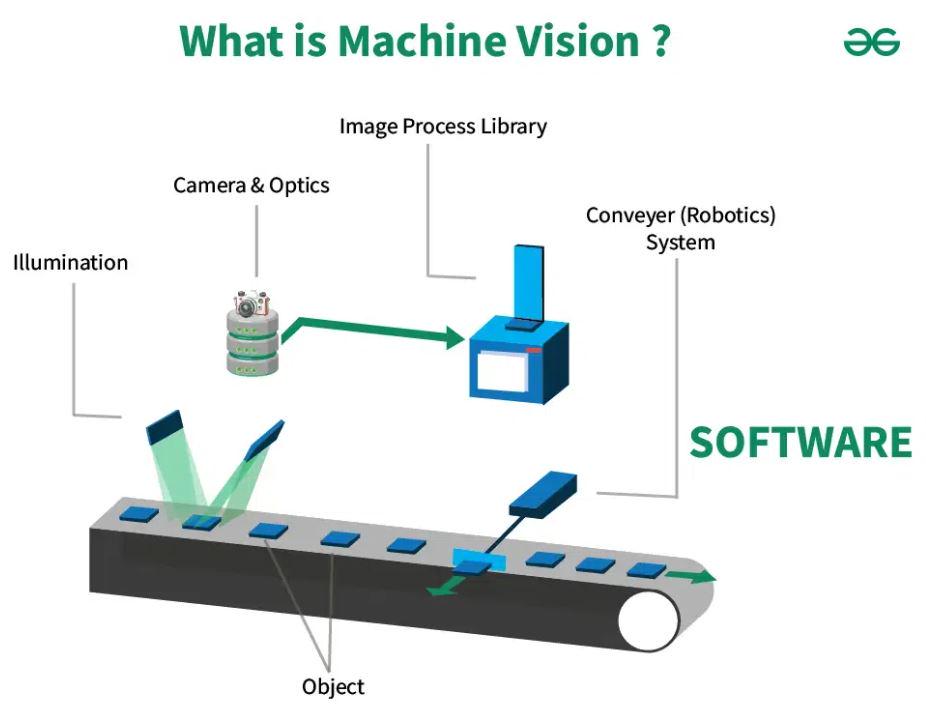
I've recently landed a job for aremote frontend role , once there i discovered the product they want to develop was a shelf product recognition tool capable of recognizing the bay, category of the bay, detecting most of the product and extracting product details.
The frontend code which i was supposed to work on didn't come with the code for image recognition, most of the image data was hardcoded with bad position for bbox.
I've talked to my PM and was notable stressed about that (the guy who built the frontend prototype left the company the same day i started),
After that they asked me to design from scratch + implement the recognition tool.
For all the research i made in internet, we might need to train our own models using YOLO family for this kind of task with a data pipeline to extract other caracteristics
But
The CEO has recently made some prototypes in a huge html file with claude. It did pretty well for detecting most of the product, detecting empty space, price tags, bay, category and extracting characteristics from the product of a shelf image but i don't have context on how he did that
The thing is, to have something production ready and achieving that high detection could be done only by prompting to claude?
My apologies if is a dumb question but i'm totally new in this field.
The CEO is pushing hard to have an mvp of this asap.
I am looking for the following model selection/inference pipeline. Goal is something like this:
detect human -> describe human
detect human -> detect objects in human hand -> describe objects
detect animal -> get specific animal type
detect general object (i.e package)
---
What are the suggested architecture/pipelines for this?
So obviously I can use yolov26 or another baseline yolo model, but I am trying to avoid having to annotate everything from the ground up. I do not mind fine-tuning, I just want to move past coco classes into something a little more broad.
My current idea is use YoloE/YoloWorld for general detections and then do a VLM call after on a separate thread (so base CV model can still run).
I am also playing around with stripping the earlier yolo model heads and maybe using NMS for arbitrary box removal. So the earlier heads determine the general objects, and then I make a VLM call to describe the objects in more detail.
Hello, I’m trying (well, more like being forced by work 😅) to build a face recognition system. The footage comes from CCTV cameras, and the people I need to identify are employees, so I already have photos of each person.
I’m currently using DeepFace, but I’m running into a few problems. The image quality from the CCTV footage isn’t great, and I’m not sure whether I should use the existing photos of each employee as the reference images (they’re much higher quality than the CCTV footage), or whether I should also collect images from the CCTV footage and use those as references.
I also believe DeepFace itself may be quite limited for this particular scenario. I’m actually trying to convince my manager that this might not be realistically achievable with open-source solutions alone.
Even if there are systems capable of handling this kind of scenario reliably, I imagine they’re more likely to be proprietary/commercial systems rather than something publicly available as open source—especially for government or military-grade applications.
Has anyone worked on a similar problem? I’d be interested to hear how you approached it, especially regarding the reference images and dealing with low-quality CCTV footage.
I’m working on a computer-vision problem where I need to detect vehicles (cars, trucks, buses, etc.) using only traditional image-processing/computer-vision techniques.
The important constraint is:
* ❌ No YOLO / deep-learning detector
* ❌ No object detection model
* ❌ No neural networks
* ✅ Motion detection and traditional CV techniques only
The camera is fixed, so the general idea is to identify regions that correspond to moving vehicles.
I’m considering approaches such as:
* Background subtraction (MOG2 / KNN)
* Frame differencing
* Optical flow
* Contour detection
* Morphological operations
* Connected-component analysis
* Tracking detected blobs across frames
* Combining multiple motion cues
But I’m not sure what would be the most robust overall strategy, especially when dealing with:
Faking Vision is an operational method developed as part of Memory Prism / Making Vision for turning visual analysis into an explicit, reconstructable representation.
(Its a pet project which I spend almost a month on to make AI do better image analysis for me. Majority of the time was spent on "Making Vision" aka figuring out natures visual engineering. I cant make a blind AI thing see better without knowing how I see and then it snowballed into different directions because of the availability of AI to do the grunt work. )
Instead of treating an image as something to caption or reproduce directly, FV represents:
objects and instances
object properties
spatial relationships
persistent identities and temporal changes in video
The resulting FV packet is closed-world: reconstruction cannot silently introduce objects or semantic information that aren't represented in the packet. Unresolved observations remain unresolved.
This makes the representation itself editable and testable, while separating errors in visual analysis, representation, compilation, rendering, and evaluation.
FV is the operational companion to Making Vision: Making Vision addresses how visual information can be selectively constructed and processed; Faking Vision makes the relevant representation explicit enough to reconstruct and test.
(Making Vision is an extremely long read, I spent almost a month on it, so I know-I definitely wont read it again, so you have been warned)
One part I found particularly interesting was improving the real-image keypoint annotations.
Initially, I manually annotated the 2D keypoints. The keypoint predictions could look reasonable, but small geometric inconsistencies in the annotations sometimes caused large pose-axis flips or abrupt frame-to-frame changes after PnP.
So I tried a different annotation method.
I used the real image as a background in Blender, aligned the 3D mug model with the real mug, and then projected the predefined 3D keypoints back into the image.
This produces 2D keypoints that are geometrically consistent with the same 3D model used by PnP.
After fine-tuning with these annotations, the large pose-axis flips and abrupt changes were reduced, and the estimated pose became more consistent across frames.
There is no real 6D pose ground truth in this experiment, so I'm not claiming absolute pose accuracy here. I'm mainly looking at PnP consistency and temporal stability.
The full page also includes the synthetic-data generation, object detection, keypoint training, Sim-only vs. Real fine-tuning comparison, and Raspberry Pi 5 inference results.
Hi, I am looking for very accurate segmentation model (instance or semantic) that can perform very good even on small objects. I want to train or full finetune the base model on my dataset. Any suggestions. I have tried sam3, uunet, rfdter. But still i am not satisfied by results. Any suggestions?
As shown in the attached video, I am working on a real-time computer vision system deployed over an industrial conveyor belt to detect, track, and count potatoes moving continuously along the line.
My current camera(Fantech webcam 2k 30fps) setup is a bottleneck due to motion blur and frame pacing. I am looking to upgrade within a budget of roughly $150 – $280
Based on the belt speed and object motion seen in the video, I'd like your advice on frame rate requirements:
Is 30 FPS sufficient, provided I can manually lock a fast shutter speed (or use a Global Shutter) to freeze the motion, or does accurate multi-object tracking (IoU / Kalman filters) realistically require 60 FPS or higher to prevent lost tracks and duplicate counts?
Given the budget, what would be the most reliable camera choice (e.g., USB Global Shutter module like ELP/Arducam, Raspberry Pi Global Shutter camera, or a high-end webcam with manual exposure controls like the Logitech Brio)?
Any feedback on optimizing the capture pipeline for this type of conveyor setup would be greatly appreciated!
Built a 9-class colorectal histopathology classifier. Caught a patient-level data leakage bug that was inflating validation accuracy to 99%+, rebuilt the evaluation pipeline against an independent holdout patient cohort (CRC-VAL-HE-7K), and benchmarked a pathology-native transformer (CTransPath) against an ImageNet baseline. Code, checkpoints, and calibrated weights are open source.
The Bug: Why random patch splits lie
NCT-CRC-HE-100K consists of 100,000 tissue tiles cropped from a limited number of Whole Slide Images (WSIs).
If you do a standard random train/val split at the image-file level, neighboring patches cut from the exact same slide and patient end up scattered across both sets. The model ends up memorizing patient-specific tissue morphology and staining artifacts rather than generalizable histological features.
Once evaluated strictly against an unseen, independent patient cohort (CRC-VAL-HE-7K, n = 3,590), an ImageNet-pretrained EfficientNet baseline dropped from high-90s down to 92.70%.
What Changed: Domain-Specific Pretraining & Setup
To improve generalization without relying on artificial leakage, I swapped the backbone to CTransPath:
Pathology-Native Pretraining: CTransPath is a Swin-Tiny Transformer pretrained via semantically-relevant contrastive learning (SRCL) across ~15M histology patches from PAIP and TCGA.
ConvStem vs. Standard PatchEmbed: Unlike standard Swin Transformers that use a linear projection, CTransPath integrates a convolutional stem (stacked 3\times3 convolutions + BatchNorm + ReLU). Note: Loading CTransPath weights into a stock timm Swin patch embed silently mismatches the input layer projection.
Two-Phase Training: Linear probe on the frozen backbone first, followed by fine-tuning the top 2 stages using differential learning rates.
Strict Split Protocol: Trained exclusively on NCT-CRC-HE-100K. All validation, checkpoint selection, temperature tuning, and final reporting are done strictly on CRC-VAL-HE-7K.
Benchmark on Holdout Patient Cohort (CRC-VAL-HE-7K)
Where It Struggles (MUS vs. STR): Smooth Muscle (MUS, F1: 0.877) and Cancer-Associated Stroma (STR, F1: 0.833) remain the primary source of false classifications. In H&E staining, desmoplastic stroma and muscularis propria share very similar fibrillar, eosinophilic textures—pathologists often rely on IHC (e.g., SMA or Desmin) to differentiate them conclusively.
Two Engineering Fixes Worth Mentioning
Fixing Grad-CAM++ on Swin Features: Standard Grad-CAM++ assumes positive, post-ReLU activations. The final Swin stage outputs signed, zero-centered features after LayerNorm. Direct gradient weighting caused denominator collapse and completely flat/washed-out heatmaps. I fixed this by computing alpha-weights on positive-clamped features (feat_map.clamp(min=0.0)) with an automatic fallback guard to standard Grad-CAM if dynamic range drops below $10{-6}.
Probability Calibration (Temperature Scaling): Raw softmax outputs were over-regularized. Optimizing a post-hoc temperature scalar (T = 0.5655) on the validation subset cut Negative Log-Likelihood (NLL) by 52.2% (0.1960 \rightarrow 0.0937), producing well-calibrated confidence intervals for inference.
Links & Code
GitHub:Repository Link(includes training notebook, inference CLI, and Grad-CAM report generator)
Need help with this, I am trying to retrieve kernel and do deconvolution without any training data. I have had success with my model if the image is sparse like few fluorescent beads in the image but when the image is dense like a biosample algorithm does not work. Literature says that it fails because I am doing joint optimization which can cause problem and suggested MAPk method
Basically this method says to find a kernel k such that it has maximum number of x which can explain y, use this kernel with any non blind deconvolution algorithm and you will get result. However with this method, I am getting delta even though the paper says it works better than joint optimization, could me my implimentation problem. But is there someone here working on something similar? how do you do it? (I want to retrieve exact kernel as I want to know the abberations)
i need to make a person detection in which a video will be uploaded its a fixed footage no moment and it need to detect the persons give them correct id and count them even if they gets blocked and also gets out of frame and comes again teh same id should be used
also i want to count how many people went in and out of that using the virtual line and all
can anyone guide me on which model to choose or what all algorithm to choose
any open source model is enough yolo,rtdetr,cnn or anything
i am new to this and want to do this project so how to do this guys any guidance
I realize, that now once a month someones shares this kind of project, but still wanted to share :)
I wanted to make it work on regular club footage, have it working on 3 courts now. It's mostly general by now, but still requires manual calibration (10 points) on each court, or if camera have moved.
It's my first time dabling with CV, so just playing around. All of it is vibecoded, but with my direction, which is sometimes limited, because.. well, no experience with CV. I have over 10 years of dev experience in other fields, so that helps a lot.
This is an excerpt of my marking/diagnostics app (also vibecoded), two more examples here:
All the footage here has gone trough my review (so hits and point endings fixed, don't remember the actual state of these points, but you can see it in the bottom graph (with little square boxes) - the bottom one is the actual label, and the middle one is decoded one. I only now realized, that this might not be in the spirit of this subredit to show "fixed" footage, but it's mostly identical, and I don't have any other examples at the moment)
Some info about the project (AI generated, sorry), if you care about the tech, or want to roast it (please do!):
The pipeline takes a fixed club-camera recording of a padel match and turns it into a list of ball contacts (who hit, when) grouped into points. Every stage feeds the next.

Stages and models:
Court calibration (court_calibrate.py) — no model. A homography plus lens distortion fitted from ~10 clicked court points, so pixel positions can be converted to court metres.

Player tracking (track_players.py) — YOLO detector at 1280 px. Finds the four players each frame and assigns them to court slots (near-left, near-right, far-left, far-right).

Ball detection (track_ball_wasb.py) — WASB, a small heatmap network fine-tuned on padel footage. Run twice: a strict "event" track for kinematics and a looser "state" track only for coverage features.

Player pose (track_pose.py + far-crop pass) — YOLO11-pose, 17 keypoints. Gives wrist/body positions; far players get an upscaled crop pass because they are tiny.

Candidate generation (detect_hits_from_ball.py) — no model. Speed reversals and gaps in the ball track propose possible contact frames and attribute them to a player slot.

Strike head (strike_scores.py, strike_dense.py lattice) — a CNN on player crops around the candidate frame, trained to say "this player is striking now". Scores candidates, re-times them to the true contact frame, and recovers missed hits.

Strike-withhold mask — no model. Suppresses candidates whose attributed player is a stale, frame-clipped box (out of view).

Point decode (decode_points.py) — a Viterbi-style dynamic program over candidates. Uses two gradient-boosted-tree heads: an emission head (is this candidate a real hit) and a bounce head (is this a bounce, not a hit), plus the strike score and ~15 hand-set costs, to pick the hit sequence and open/close points.

Merge stages — join point fragments across short gaps; a small formation MLP vetoes point starts when players are not in a serving formation.

Eval (eval_hits.py) — scores against hand labels with a 6-frame hit tolerance and 12-frame point-start tolerance.

Bottom line: five learned models (WASB ball, YOLO players, YOLO11-pose, strike CNN, two GBT heads + formation MLP) produce evidence; one deterministic decoder turns that evidence into hits and points. Current in-sample pool F1 is 0.9507 across six cameras.
It has around 95% accuracy (detects 95% of hits correctly, within a specific margin). It detects and opens points with around 90% accuracy using serve formation. The problem is the point endings. I realise that it's likely where this project dies - currently I'm using the "quitness" of the ball and the players, and it works decently. But I'm fixing those manually for now, as well as the winners, so I'm able to generate extended report about the match and mistakes.
Other problem I have is long processing time. I already optimized it a bit, but I feel like I'm probobly using to much stuff. The pipeline grown naturally, by using different things to improve the decode. But I feel like I can try to delete some stuff from it. For example, skipping player pose and using strike head only, things like that. Although, I'll want pose for detecting shot types later, so.. yeah..
My current pipeline timings:
stage
wall
phase A (ball dual + players + base pose, concurrent)
1h13m01s
far-crop pose
36m07s
candidates (C3)
4m13s
strike scores (fp16)
5m32s
strike dense scan (fp16)
16m14s
lattice / withhold / decode+merges / sidecar
1m59s / 8s / 28s / 7s
total
2h17m56s (1.63x realtime)
Another problem is the ball. Would love to have some suggestions, how I could get the actual 3d position of it, but my research came with nothing valuable for my case (1 camera angle).
Would love to hear any advice, directions or any other feedback. Thank you!
I'm trying to get some tips to understands what is good raw egocentric data for any roboticist, and I keep reading posts telling stories about researchers and companies are missing egocentric data. I know that I would need to do some annotation, but I would rather focus first on the raw footage to see if it is useful in any way. I have some samples here.
Guys, I need your help in building a app that scans roads but the problem is i am beginner and don’t from where i should start. Please guide from where should i start?
You guys really loved my last sheet music search engine post, so I decided to make a mockup POC of a VLM-powered piano assistant that reads and transcribes notes, procedurally "generates" a visual tutorial, and listens to you play it back. I call it a concept because I still haven't figured out a way to actually generate a 3D animation on the fly. My best option was Concert Creator, but that was shut down over 4 years ago RIP. So for the time being, I'm having to pre-make the animations.
On the more technical side, Qwen 3.6 27B is taking both video stream and natural language as input, and uses that to determine what smaller task-specific models to call on for the situation. In this case, it's using segmentation, homography, pitch detection, and a custom music OCR model (open source called cadenCV). In short, the VLM is acting as an orchestrator that can see things and reason the best course of action because I'm too much of a lazy bum to hard-code a set of rules for when each model gets called on.
The next step is to figure out how to make it run in real time.
I found a massive dataset of dummy hard CAPTCHAs on Kaggle and ran them through Qwen 3.6 and other models. Results are not too shabby, it was damn near on the money for a lot of the images. I'm confident Qwen 3.8 would pass a lot of these.
One problem with embodied AI isn't just collecting video; it's turning all that video into usable training data.
Manually annotating every frame doesn't scale particularly well. Automated detection can do much of the initial work, but real-world footage still contains occlusions, partial objects, tracking errors, and boxes that a human may want to correct.
So we wanted to test something practical: "Can GPU-based automated annotation and human review work together as one complete data-production loop?"
We built a small end-to-end experiment to find out.
I. The workflow
The pipeline was fairly simple:
Raw video → GPU inference → YOLO11n → ByteTrack → MOT annotations → CVAT → human review → reviewed dataset → validation
The workflow used in the experiment. GPU inference and human annotation review were intentionally kept as separate stages.
The idea was to let the GPU handle the repetitive first-pass work while keeping a human in control of the final annotation quality.
II. Running the automated annotation stage
For the GPU stage, we used a instance with an NVIDIA RTX PRO 6000 (96 GB).
The test video was:
• 101.047 seconds
• 3,300 frames
• 1080 × 1920
YOLO11n handled object detection, and ByteTrack maintained object identities across frames.
The environment used for the automated annotation stage.
This produced 12,901 machine-generated annotations across 604 unique tracks 😄
Output
Result
Frames
3,300
Total annotations
12,901
Unique tracks
604
Person annotations
12,001
Backpack annotations
900
But the numbers aren't particularly interesting until you see the actual output.
✌️ Actual YOLO11n + ByteTrack output from the test video. Boxes contain the detected class, confidence and persistent tracking ID.
This was the machine-generated first pass that we wanted to hand over to a human reviewer.
III. Moving machine annotations into CVAT
The tracking results were converted into MOT-format annotations and imported into CVAT.
The important part here was that CVAT wasn't performing the GPU inference. It was acting as the human-review layer.
The machine-generated detections appeared as editable rectangle tracks over the original video.
Machine-generated tracking annotations imported into CVAT as editable tracks.
This changes the annotation workflow from:
Human labels everything from scratch → Machine generates first pass → human inspects and corrects
For large video datasets, that's the workflow we're interested in exploring further.
IV. We deliberately changed one annotation
We also wanted to verify something that can easily get overlooked:
If a human changes an automatically generated annotation, does that correction actually survive the complete export pipeline?
At frame 2107, we manually adjusted the bounding box around a partially visible person.
Frame 2107 in CVAT, where we deliberately corrected a partially visible person's bounding box.
We saved the change, exported the reviewed annotations from CVAT, and compared the exported dataset against the original machine-generated annotations.
V. Then we checked whether we could find the change
And importantly, our independent comparison found the deliberately modified annotation:
Frame: 2107 Class: Person IoU: 0.791181
Independent comparison of the machine-generated and CVAT-exported datasets. The controlled correction at frame 2107 was successfully detected after export.
A quick clarification: the 0.99995 IoU is not a YOLO accuracy score.
We weren't comparing the detections against manually created ground truth. It measures how similar the machine-generated dataset remained after the CVAT round trip. We deliberately changed one annotation to verify that a human correction would survive the process.
Then we asked: what does the GPU part cost?
Once the workflow worked, we ran the same 101.047-second video through the YOLO11n + ByteTrack stage three times:
Run
Runtime
1
43.188 s
2
30.213 s
3
29.025 s
Average
34.142 s
That gives roughly 2.96× real-time processing for this particular workload.
At the GPUHub instance rate we observed during the experiment, approximately $0.91–$0.96 per compute hour, the average benchmark translates to roughly:
$0.31–$0.32 of GPU compute per hour of source video
The two warm runs were slightly cheaper (~$0.27–$0.28/video-hour), but we're using ~$0.32 as the more conservative preliminary estimate.
This is important: that's GPU inference compute only, not the total cost of producing a reviewed dataset.
It doesn't include human review, CVAT infrastructure, storage, data transfer, QA, or workflow orchestration.
VI. and What did we learn?
The interesting part isn't that an RTX PRO 6000 can run YOLO11n.
What we wanted to validate was the handoff between automation and humans.
We were able to generate structured annotations remotely on a GPU, move those annotations into a separate review environment, edit them manually, export the reviewed dataset, and independently verify that the human correction survived the entire round trip.
So the architecture starts looking like:
Collect → Pre-annotate → Human review → Validate → Training dataset
rather than:
Collect → Manually annotate everything → Training dataset
We haven't measured how much human labor this actually saves yet. That requires a different experiment comparing fully manual annotation against machine pre-annotation + human correction.
That's probably the next benchmark that matters most: reviewer time, final annotation quality, and total cost per reviewed video hour.
For anyone working with robotics, autonomous systems, or large video datasets:
how are you handling the boundary between automated pre-annotation and human review? ✍️
I wanted to know your thoughts and also recommendations of improvements on this please. I built this knife skill assessment for chopping vegetables this summer after reading several papers on cooking as a science. The goal was to find the hardest skill that required a common tool (knife) and then score it. The reason I did this was because I'd like cooks to be paid for their invisible labor and not just hourly as I know how hard that job is. But I doubt this would be beneficial lol ... Anyways, I am more than willing to go into details about what I used starting with the programming language (c++) and temporal and spatial models including how kalman filters were used here. The link to it is down below: