r/coolgithubprojects • • 6h ago

I made an Encarta-style encyclopedia app that works offline

Thumbnail gallery
119 Upvotes

Microsoft Encarta was a big part of my childhood, and I wanted to pay tribute to classic software applications in general, so I decided to make a free encyclopedia app which uses Wikipedia as its source and can work fully offline.

While online, the app pulls everything from Wikipedia and Wikimedia sites, but it can also download packs from Kiwix to browse the full English Wikipedia in offline mode.

In true Encarta fashion, it also has built-in rich media capabilities, such as a photo/video/sound navigator, world map explorer, trivia-based games, and educational activities such as the periodic table and a solar system simulator.

It's just in beta right now, but I intend to add more Wikipedia capabilities (such as editing), more games, and more activities that cover all educational subjects.

Website: https://encyclopedia2000.com

GitHub: https://github.com/sburton0/encyclopedia-2000

Discord: https://discord.encyclopedia2000.com


r/coolgithubprojects • • 4h ago

Made a native YouTube desktop app in Rust.

Thumbnail github.com
13 Upvotes

Just to make sure: yes, using uBlock Origin and SponsorBlock in Firefox gets you 90% there. That's what I have been using for ages now, and it is awesome. This is not meant to be a replacement for that.

My actual reasons for building this:

  1. YouTube was getting in the way of my browsing. When I was watching hours worth of video lectures during work, having it open in a tab meant getting buried under 40 other tabs, being reset every time the browser was reopened or eating up RAM along with everything else. An application that allows alt-tabbing (or pip windowing) seems like the natural way of using it.
  2. The adblocker in the browser always gets broken. Every now and then YouTube decides to change something, and for a week it displays popups saying "ad blockers are not allowed", or refuses to play until filters are updated. This application never loads YouTube's player, it streams the video directly using mpv, so there is nothing to block.
  3. Streaming playback with mpv. Hardware decoding, good speed controls, 4K/60fps playback quality better than the browser's one on my laptop.
  4. Subscriptions without any login. Subscriptions can be stored locally and the page creates its own feed based on it. It's optional to login if you want recommendations or your history back.

Actually, I also wanted to develop something serious in GPUI

If you're happy with your browser setup, you probably don't need this. It's for people who want YouTube as its own app, like a music player is separate from the browser.

What's in it: SponsorBlock, DeArrow, Return YouTube Dislike, live chat, miniplayer/pip, background play, downloads via yt-dlp, hold-Space for 2x, NewPipe/FreeTube/Takeout import, in-app updates. Windows and Linux.

It's an alpha. Things will break, and YouTube will probably change something that breaks it at some point (same as NewPipe/FreeTube deal with). Linux especially needs testers; I've mostly run it on Windows.

GitHub: https://github.com/Avaneesh-Inamdar/Stream-Tube-Desktop

Downloads: https://github.com/Avaneesh-Inamdar/Stream-Tube-Desktop/releases

Thanks :)


r/coolgithubprojects • • 11h ago

A modern Windows software manager that updates all your apps in 1 click and cleans leftover AppData/Registry (Wingetix)

Thumbnail gallery
31 Upvotes

Hey everyone,

I built Wingetix, an open-source desktop control panel for Windows built on top of Microsoft's official WinGet package manager.

What it does:

  • 1-Click Bulk Updates: Upgrades apps in the background across 12,000+ packages without touching the command prompt.
  • Deep Uninstaller: Scans and cleans orphaned %AppData% folders and Windows Registry residue.
  • Platform Shield: Protects core gaming clients and launchers (Steam, Epic, Riot).
  • Cache & Storage Purge: Deletes gigabytes of leftover WinGet download installers and logs.
  • System Restore Integration: Triggers native Windows Restore Points (rstrui.exe) before system alterations.
  • GPU Telemetry: Real-time hardware identification and driver shortcuts.

Feedback, issue reports, and stars are greatly appreciated!


r/coolgithubprojects • • 5h ago

wormsign: one command to check if your laptop has any of the hacked npm or Python packages from this year's attacks

Post image
11 Upvotes

After the ChainDrop worm went through 444 npm packages in August, I wanted to know whether my laptop had picked any of them up. I had 236 lockfiles and package installs spread across old projects, global npm and the npx cache, so checking by hand wasn't realistic. Upgrading a bad package also doesn't remove the Claude Code hooks or VS Code tasks these worms add so they can run again.

I put together a first version with Claude Code doing most of the typing, and I've been iterating on it since. It checks every installed package version against OSV's malware list, then looks at agent hooks, MCP configs, folder-open tasks, dev containers and startup entries like LaunchAgents and crontab. If something's critical, it tells you which credentials on the machine to rotate.

It's a single Go binary. A full scan of my laptop takes about 7 seconds, and wormsign --demo shows what a hit looks like on a fake project.

brew install mansoor-mamnoon/tap/wormsign

It only sends package names and versions to api.osv.dev, and --offline skips even that. I'd like to hear about false positives, or worm indicators it's missing.

https://github.com/mansoor-mamnoon/wormsign


r/coolgithubprojects • • 10h ago

Meet Hearth: An open-source, private desktop archive for Windows that indexes your documents, PDFs, and notes completely offline

Post image
25 Upvotes

Hey everyone,

Like many of you, my local files (PDFs, tax forms, spreadsheets, client contracts, coding notes, receipts) were scattered across dozens of random folders, external drives, and Desktop clutter. Windows Search often felt sluggish or pushed cloud/web results, and existing tools were either commercial subscription bloatware or required uploading personal documents to external cloud services.

So I created Hearth - a quiet, local-first file library and personal archive designed for Windows.

Think of it as a calm, distraction-free sanctuary for everything you want to keep and find instantly.

What makes Hearth special?

- 100% Local and Private by Design: Zero telemetry, no analytics, no external servers, no subscriptions. Everything runs directly on your CPU. Your files stay right where they are on your drive.

- Deep Content Full-Text Search: Indexes not just filenames, but the actual text inside PDF, DOCX, XLSX, PPTX, TXT, MD, CSV, JSON, PY, and 30+ other document formats using SQLite full-text search.

- Seamless Drag-and-Drop (In and Out): Drop entire folder trees or loose files directly into Hearth. Need to send a file to an email or Discord? Drag it straight out of Hearth into any app.

- macOS-style Spacebar QuickLook: Tap Space on any file for an instant full-screen preview with text selection and keyboard navigation (Left / Right arrow keys).

- Built-in PDF Powerhouse: Merge multiple PDFs, split by custom page ranges, extract/delete/reorder pages, rotate sheets, and optimize file sizes without installing third-party utilities.

- Local Image Converter: Convert between PNG, JPEG, WebP, TIFF, and BMP with compression quality controls.

- Smart Collections and Saved Searches: Create persistent smart queries (such as type:pdf after:2024-01-01 size:>5mb) that auto-populate in real time.

- Time Capsule (On This Day): Automatically surfaces photos, notes, and milestones you created on today's calendar date in previous years.

- Duplicate Finder and File Differ: Reclaim disk space by safely detecting exact SHA-256 byte duplicates, plus a side-by-side file comparison inspector.

- Reversible Recycle Bin Deletion: Nothing is destroyed permanently by accident. Every deletion routes to the Windows Recycle Bin with one-click Ctrl+Z undo.

- Warm Obsidian Aesthetic: A handcrafted dark-mode interface with warm bronze accents, smooth 3D micro-animations, and full light mode support.

A Note on AI Usage:

I believe in complete transparency: I leveraged AI solely as an assistive coding copilot - specifically for rapid error detection, troubleshooting edge-case Windows API bugs, and brainstorming feature ideas. The architecture, vision, UI design, core database mechanics, and project implementation were authored and directed by me.

Tech Stack:

- Backend: Python 3.12 and pythonnet (Native WinForms OLE Interop)

- UI: Microsoft Edge WebView2 (Chromium Evergreen) via pywebview

- Engine: SQLite 3 with Write-Ahead Logging (WAL)

- Document and Image Processing: pypdfium2, pypdf, Pillow

- File Monitoring: watchdog

Download and Open Source:

Hearth is completely free and licensed under the permissive MIT License.

You can grab both the modern installer (Setup.exe) and a standalone portable zero-install zip:

GitHub Repository:

https://github.com/rheme18/Hearth

Latest Release (v0.4.3):

https://github.com/rheme18/Hearth/releases

I would love to hear your feedback, feature ideas, and suggestions. What offline workflow tools are you missing on Windows?


r/coolgithubprojects • • 13h ago

ZeroConverter: rename a file in Windows Explorer and it actually converts (Rust + Tauri, MIT)

Post image
25 Upvotes

I built this because I wanted the childhood trick to work: rename clip.mp4 to clip.mp3 in File Explorer and get a real MP3.

While it runs, it watches your folders and converts on rename: images, audio, game textures and video (through FFmpeg). A few extras live in the name itself:

  • photo.jpg@1080 resizes while converting
  • a trailing & keeps the original (otherwise it goes to the Recycle Bin)
  • renaming a folder to Album.webp converts every image inside

There's also a right-click menu, a regular app window for batches, and a command line tool. Rust core, Tauri + React UI, interface in 12 languages. Everything runs locally: no account, no uploads, no telemetry.

Repo: https://github.com/zerofoundry/ZeroConverter

Download: https://github.com/zerofoundry/ZeroConverter/releases/latest

Trailer: https://www.youtube.com/watch?v=qcFnY5N6h3Y

It's the first release (0.1.0) and the installer isn't code-signed yet, so SmartScreen may warn you. Issues and feedback are very welcome, especially if something breaks.


r/coolgithubprojects • • 8h ago

I created an open-source AirDrop alternative for Windows & Linux using native Apple Shortcuts and Rust (<15MB RAM, no cloud, no subscriptions)

Post image
7 Upvotes

Hey everyone!

Like many of you, I love using an iPhone, but my daily driver computer is a Windows PC. For years, transferring full-res photos, 4K videos, or quick screenshots between them has been a pain: slow cloud syncs (Google Drive/OneDrive), plugging in cables, or installing shady third-party iOS apps loaded with subscriptions and ads.

So I decided to solve this once and for all: I built AirDrop Bridge.

It lets you send files directly from your iPhone/iPad to Windows (and Linux) over local Wi-Fi with zero third-party apps installed on your phone.

💡 How does it work without an iOS app?

Instead of an App Store app, it pairs your PC with an official Apple Shortcut. Once added, it integrates directly into your native iOS Share Sheet, Action Button, or Back Tap gesture.

You just tap Share ➔ AirDrop Bridge, and your files land directly in your PC's Downloads folder in seconds!

✨ Key Features:

  • 100% Local & Private: Peer-to-peer Wi-Fi streaming. Your photos and documents never touch external servers or the cloud.
  • Zero iOS Apps: Uses Apple’s native Shortcuts engine.
  • Blazing Fast & Lightweight: Built in Rust with chunked streaming. Constant memory usage under 15 MB RAM on PC. Easily transfers multi-gigabyte 4K videos without buffering or RAM spikes.
  • Bidirectional Clipboard Sync: Copy text on your iPhone and send it straight to your PC clipboard (or pull from PC to phone with a single tap).
  • Native Desktop Experience: Modern dark-mode pairing window, silent system tray daemon, customizable chimes, and Windows toast notifications.
  • Multi-language: Available in English, Spanish, German, French, Portuguese, Italian, Chinese, and Japanese.

🛠️ Getting Started (takes ~30 seconds):

  1. Download and run the standalone executable on your PC.
  2. Scan the on-screen QR code with your iPhone camera.
  3. Tap the link to install the Apple Shortcut and pair your PC.
  4. Select any photo or file in iOS, tap Share ➔ AirDrop Bridge!

(Note on Windows SmartScreen: Because this is an independent, free open-source project without a $400/yr corporate Microsoft certificate, SmartScreen might ask you to click "More info" ➔ "Run anyway". The entire codebase is 100% open, transparent, and can also be built directly from source with Cargo).

I’d love to hear your feedback, feature suggestions, or answer any questions! If you find it useful, a ⭐ on GitHub would mean the world to the project.


r/coolgithubprojects • • 2h ago

Open source desktop SQL client for Postgres, MySQL, SQL Server, SQLite, DuckDB and more, in Rust + Tauri - PlatypusDB

Post image
2 Upvotes

Repo: https://github.com/platypus-labs/platypus-db

I'm one of the three people building it. About a 20 MB installer, big results stream in without freezing, it's careful on production (read-only connections, a confirm before an UPDATE without WHERE, undo scripts), and it doubles as an MCP server for coding agents. AGPL, no account. Feedback welcome.


r/coolgithubprojects • • 6h ago

[Swift] Hangtime - macOS menu bar app that shows your Claude Code, Codex, Grok CLI and Antigravity limits

Post image
3 Upvotes

Hangtime is a macOS menu bar app (plus optional widgets) that shows your Claude Code, Codex, Grok CLI and Antigravity limits and when each one resets.

I built it because many third-party usage trackers struggle to show up-to-date numbers or even show wrong ones. I wanted something that shows the same numbers the CLI would and keeps them current.

There's no server and no analytics. It reads the login each CLI already has and asks the provider for your limits the same way the CLI does.

Other things it does: desktop and Notification Center widgets, notifications when a limit resets or runs low, and a dashboard with token and cost history.

Most of it was written by Opus 5.5.

Free and MIT licensed: https://github.com/Sevi-py/hangtime

If you try it out, please tell me about any issues, especially if your numbers ever don't match what the CLI shows.


r/coolgithubprojects • • 16m ago

Introducing Before You MDM (BYMTest)

Thumbnail gallery
1 Upvotes

Before You MDM is the tool I wish I'd had 5+ years when I began my journey of administering Apple devices in a large, established Windows-first enterprise. I'm not going to say that I built it, because AI coded it. I orchestrated, argued, cajoled, tested, pleaded... I cast the vision, and I made the tool keep refining until it approximated what I was looking for.

What I was looking for was a tool that assesses an organization's readiness prior to implementing Apple device management; can it reach APNS, can it talk to Apple servers/services, can it reach the intended provider's cloud tenant and attendant services? This is not a management tool; it doesn't issue MDM commands. It's read-only, strictly bounded, and evidence-based. If it can't verify something it says so. It runs its evaluation using selected parameters and produces a report with clear, actionable steps.

BYMTest also evaluates configuration profiles and plists against selected macOS release versions 14.x-27.x assessing these against published Apple documentation showing generational changes and which keys have been removed/are no longer supported.

BYMTest - Before You MDM comes in macOS native SwiftUI (ARM64 & x86_64), DotNET10 for Windows (ARM64 & x86_64), & Rust for Linux (ARM64 & x86_64). There are command line versions available for each OS platform. It has bounded logic for performing pre-management assessments, post-enrollment assessments, & migration assessments from various predefined vantage points.

Because I'm not interested in putting any so-called AI Slop out into the world the GitHub repository is private at the present time. While I have run extensive tests, swarms, had the tool audit and harden the app I'm looking for adversarial human review before opening it up to a broader audience. That's where you come in, as anyone interested in testing is welcome to DM requesting access to the private repository. Thank you.


r/coolgithubprojects • • 7h ago

I built a read-only web CLI and MCP server so my agents stop inventing sources, in RUST.

Post image
4 Upvotes

As I have been annoyed by agents being able to refer to pages which they have not seen before, I have made Arana. This is a CLI and MCP Server written in Rust. It is compatible with 14 sources (GitHub, YouTube (Bilibili included) etc.), and has 40 actions/tasks. There are 2 ways to use Arana. As a CLI, each action/task is given as a JSON object. Alternatively, it can be used as an MCP Server. Within this there are methods, list_capabilities, read_url, and read_many. Read many takes in a maximum of 5 URLs and outputs in the same order as the input.

Arana is currently and will remain unable to perform any of the 40 actions (posting, voting, following, logging in etc.) on any of the 14 sources.

The latest version of Arana (for Windows/Linux/macOS) is v0.3.0. It can be downloaded from here: https://github.com/mevarx/Arana


r/coolgithubprojects • • 23m ago

Interactive simulation of a moka pot brew

Thumbnail gallery
1 Upvotes

r/coolgithubprojects • • 23m ago

Get Gitty – a zero-dependency, TLS-encrypted terminal messenger inspired by "Das Erwachen", using GitHub identity instead of passwords.

Post image
0 Upvotes

In Andreas Brandhorst's 2017 near-future thriller Das Erwachen ("The Awakening"), characters communicate over a minimal terminal messenger called Gitty (Gitty 3.1). I liked the concept so much that I built a real, usable version of it in Python.

Gitty is a lightweight, TLS-encrypted terminal messenger with zero third-party runtime dependencies (100% Python stdlib: ssl, socket, sqlite3, threading, urllib).

Try it in 10 seconds

# Isolated CLI install (recommended)
pipx install gitty-messenger
gitty

# Or run directly with uv
uvx --from gitty-messenger gitty

# Or via pip
pip install gitty-messenger
gitty

How it works

  • No passwords or sign-ups: Clients authenticate once via the GitHub OAuth Device Flow (github.com/login/device) and cache the token locally in ~/.gitty/token.
  • Zero token storage on the server: The client sends the token over TLS 1.2+; the server verifies it live against api.github.com/user and discards it immediately after the handshake.
  • Spoofing-resistant permissions: Admin rights (GITTY_ADMIN_ID) and saved friend lists (SQLite) are tied to your immutable numeric GitHub user ID, not mutable usernames.
  • Ephemeral by default: Chatrooms (/create, /join, /leave, /users) and DMs (/msg) live in RAM only—no chat history is written to disk.
  • Terminal-hardened: Incoming messages are stripped of non-printable control characters to block terminal escape-sequence injection, and packets are strictly size-bounded (16 KiB).

(There's also a gitty-server CLI and a docker-compose.yml if you want to self-host your own instance with your own certs.)

- GitHub: https://github.com/Jan-Kirschke/Gitty

- PyPI: https://pypi.org/project/gitty-messenger/

Feedback, security nitpicks, and PRs are very welcome!


r/coolgithubprojects • • 10h ago

Sketchy: an MCP server that lets your AI draw hand-sketched, interactive diagrams while it explains

Thumbnail gallery
6 Upvotes

I got tired of AI explanations that are walls of text, so I built Sketchy, an MCP server that lets the assistant sketch what it’s explaining, right in the chat.

How it works: the model decides what to draw (nodes, groups, links, steps). Sketchy decides where. It uses elkjs for auto-layout, so the model never computes coordinates. A rough.js renderer turns the result into a hand-drawn sketch with a handwriting font, black ink and a few accent colors.

What it can draw:

- Architecture, flows, comparisons and metaphors, with a step-by-step walkthrough you click through

- Free drawings (atoms, forces, orbits, geometry) with sliders and animation

- Molecules from SMILES strings, maps, timelines, cycles and plots

- Arduino and ESP32 circuits, wired from a parts catalog

- Photo labeling with a local vision model (Florence-2), so photos stay on your machine

- Export to SVG, PNG and Excalidraw, plus a “Draw on it and send to AI” mode

Where it runs: Claude (desktop, chat skill and Claude Code), Cursor, VS Code and Codex. Anything that speaks MCP should work. Where a client can’t show the viewer inline, it falls back to an interactive HTML file.

Try it:

npx -y u/ddkbs/sketchy

Repo: https://github.com/ddkbs/sketchy

Live demo and playground: https://sketchy.davidkubus.dev

Feel free to try it out and leave your feedback!


r/coolgithubprojects • • 26m ago

GitHub - evoluteur/snowflake-grower: Grow snow crystals live on a hexagonal grid with Reiter's cellular automaton. Set the humidity and frost to get stellar dendrites, ferns, plates or lace, and download the snowflake.

Thumbnail github.com
1 Upvotes

r/coolgithubprojects • • 5h ago

YT-CLI – Lightweight YouTube/media client in Bash (Linux) & Tkinter (Windows) for 2 GB RAM PCs

Thumbnail gallery
2 Upvotes

Hey everyone,

I made YT-CLI because opening YouTube in Brave on my old Celeron N2805 (1.45 GHz, 2 GB DDR3) pushed CPU to 90%+ and dropped hundreds of frames.

Instead of running a browser, YT-CLI glues together yt-dlp + mpv + ffmpeg:Quick comparison on that same 2 GB RAM Celeron (720p@30fps):Repo: https://github.com/KennyWaddell/yt-cli
Happy to hear any feedback, bug reports, or questions in the comments.


r/coolgithubprojects • • 2h ago

Sysbar: an open-source (Apache-2.0) macOS menu bar system monitor in Swift, no dependencies

Post image
1 Upvotes

Hi everyone,

I'm sharing **Sysbar**, a small open-source macOS menu bar app for system monitoring. I built it for my own use and I'm releasing it under the **Apache-2.0** license.

I've used [Stats](https://github.com/exelban/stats) for years. After installing [oMLX](https://github.com/jundot/omlx), I really liked its System Stats panel and wanted something similar as a standalone menu bar app. Sysbar builds on oMLX's monitoring code, and the menu bar icon is inspired by Stats.

**Repo:** https://github.com/rodrigotrombeta/Sysbar

**What it shows**

- CPU and GPU usage, including E-core and P-core breakdowns on Apple Silicon

- Memory usage, pressure, compression and swap

- Disk space and read/write speeds

- Network upload/download speeds

- Top processes by CPU and memory

- Customizable menu bar charts, colors and detailed panels

- English and Portuguese interfaces

**How it's built**

- Native Swift (AppKit + SwiftUI), no third-party dependencies and no Xcode project. You can build it with just the Command Line Tools.

- Public APIs only (Mach host statistics, IOKit, `vm_statistics64`): no `sudo` and no privileged helper.

- Small: about 0.8 MB on disk and about 25 MB of RAM.

- Requires macOS 14 Sonoma or later.

**Build from source**

git clone https://github.com/rodrigotrombeta/Sysbar.git

cd Sysbar

./build.sh install

A prebuilt DMG is also available on the [Releases page](https://github.com/rodrigotrombeta/Sysbar/releases/latest). It isn't signed with an Apple Developer ID or notarized yet, so macOS blocks it on first launch. To allow it, go to System Settings → Privacy & Security → Open Anyway, or run `xattr -dr com.apple.quarantine /Applications/Sysbar.app`. If you'd rather not do that, building from source avoids the warning entirely.

It's still early, and I keep improving it as I use it. Issues, feature ideas and pull requests are very welcome. I'd especially like to hear from people on Intel Macs or other Apple Silicon chips, since I've only tested it on my own machine.

Thanks to the oMLX contributors and to Stats for the inspiration.


r/coolgithubprojects • • 8h ago

KetraTerm: An open-source terminal emulator and reusable JVM library

Thumbnail gallery
3 Upvotes

Hey everyone!

I've just released KetraTerm 1.0, an open-source terminal emulator written in Kotlin, available for Windows, macOS, and Linux.

I've been building it with two goals in mind: providing a modern terminal with useful everyday features, and creating a reusable terminal engine that other JVM applications can embed.

KetraTerm supports Kitty keyboard, partial Kitty graphics with image rendering, Unicode 17, TrueColor, hyperlinks, synchronized output, and much more.

It also includes:

  • Smart suggestions that learn from successfully executed commands and usage patterns.
  • Sticky command headers and command-block navigation.
  • Customizable prompts, including gutters, dividers, and failure indicators.
  • Command-completion notifications, progress reporting, and searchable scrollback.

Under the hood, it has its own terminal engine and custom Swing renderer, designed with performance and low allocations in mind.

The project also provides modular Kotlin/JVM libraries for headless terminal emulation, session management, input handling, and Swing integration. These are used by both the desktop application and the JetBrains IDE plugin.

It's licensed under Apache 2.0, and development is ongoing.

Contributions are very welcome! Whether you're interested in terminal protocols, performance, UI improvements, documentation, or embedding the libraries into another project, I'd love to hear from you.

Website / Downloads: https://ketraterm.github.io/KetraTerm/

GitHub: https://github.com/ketraterm/KetraTerm


r/coolgithubprojects • • 2h ago

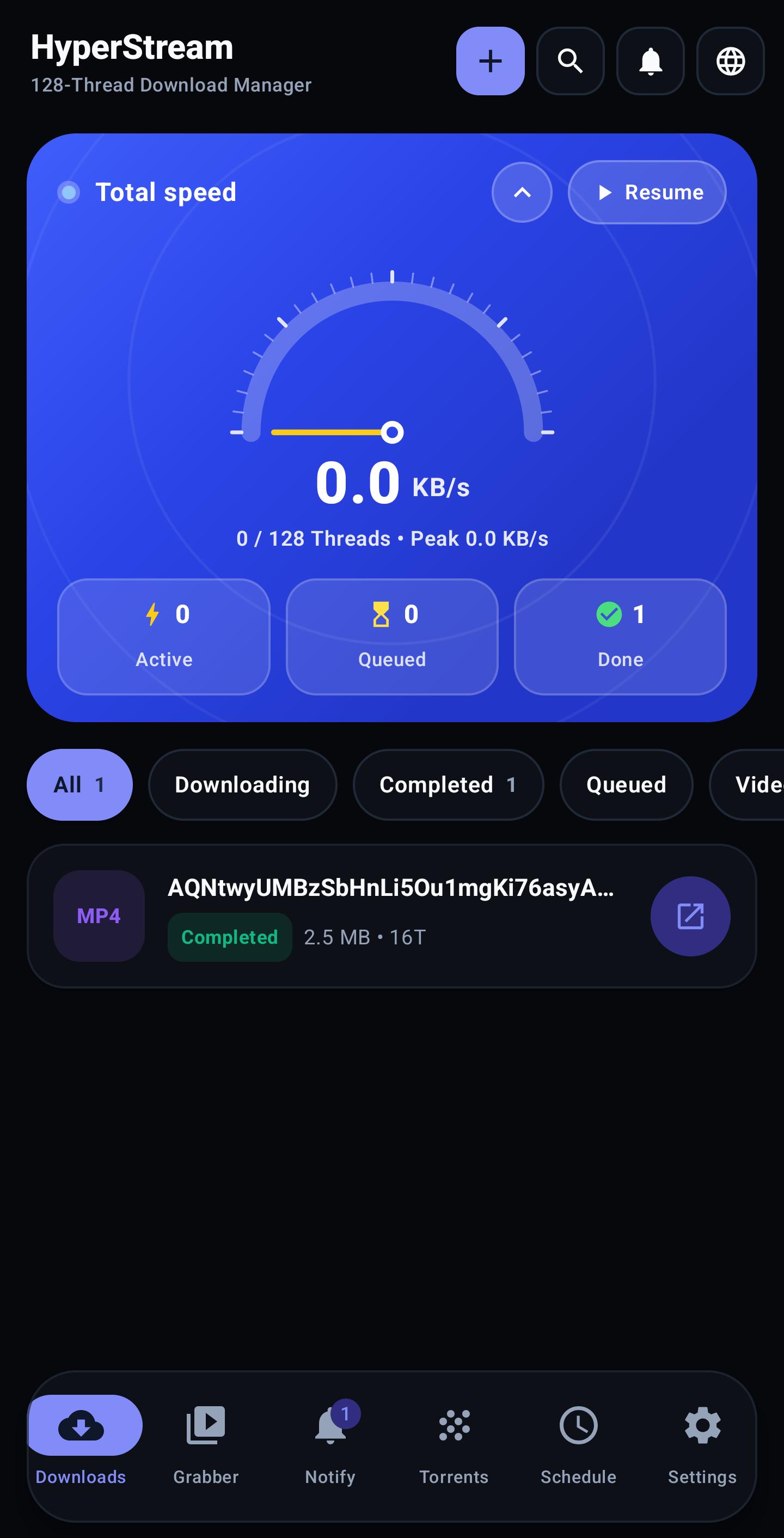
HyperStream Download Manager

Post image
1 Upvotes

HyperStream (com.hyperstream.downloadmanager) is the native Android port and mobile evolution of Mister Download Manager (anefzaoui/misterdownloadmanager). It embeds the full, battle-tested upstream Rust multi-connection engine (libmdm_android.so) directly into a modern Jetpack Compose Material 3 interface styled with an Obsidian OLED Dark flagship design language.

Engineered specifically for 64-bit Android devices, HyperStream bypasses traditional JVM socket bottlenecks, unlocking up to 128 parallel segmented connections per file, full BitTorrent swarm streaming, automated link interception, YouTube 4K/8K media extraction, watermark-free TikTok downloads, and Real-Debrid cloud integration—with 0 ads, 0 trackers, and 0 subscription paywalls.

Project Link - https://djsusmith.github.io/hyperstream-android/


r/coolgithubprojects • • 14h ago

hls-downloader

Post image
8 Upvotes

Guyz, can u Just Try It and gimme a feedback?

- https://github.com/loll019/hls-downloader

If U want to download something this could be useful :)

-->(Open Source)<--


r/coolgithubprojects • • 2h ago

Built an all-in-one AI productivity workspace (TimeX) while in university – would love your feedback on the product & potential acquisition

Post image
1 Upvotes

r/coolgithubprojects • • 3h ago

Kiwi Next Chromium 160 Dev

Post image
1 Upvotes

Finally it's out


r/coolgithubprojects • • 3h ago

StreamSnag: open-source extension that saves videos with no download button (HLS/DASH) and turns the ones you'd rather read into text (GPL-3.0)

Thumbnail streamsnag.app
1 Upvotes

Author here. StreamSnag is a free, open-source (GPL-3.0) Manifest V3 extension for Chrome, Edge and Brave.

I paid for an online course, and the lectures weren't protected, but the site offered no easy way to download them. The browser download helper I tried gave me three free downloads, then one video at a time with a two-hour cooldown in between. So I rebuilt the idea and open-sourced it.

What it does:

- Finds the stream on the page (HLS/DASH, playlists, subtitles) and saves it in one click, even when the site gives you no download button

- Saves the captions as a readable transcript, plus the slides and PDFs the page links to

- "Download all" saves a whole course page after you check the list, and it remembers what you've already saved

- Optional local helper (ffmpeg to merge video and audio, plus yt-dlp for harder sites) that runs on your own machine

- Deliberately refuses DRM-protected streams

- No ads, no account, no tracking. The extension is plain JavaScript with no build step, so the code in the repo is the code that runs

There's also a separate paid add-on (StreamSnag Pro) for studying: transcription on your own computer when there are no captions, and study guides and flashcards lined up with the video. It isn't in the repo, and the downloader doesn't need it.

Install:

- Chrome Web Store: https://chromewebstore.google.com/detail/gknppdninaiiggeoopfiaodfebhdnlgi

- Or load the extension folder unpacked from the repo

Bug reports and PRs welcome, particularly for sites where detection misses.

GitHub: https://github.com/cspergel/streamsnag


r/coolgithubprojects • • 22h ago

NetWatch 1.0 is out - MIT-licensed network monitor in Rust that shows connections, bandwidth, latency and decoded packets in one terminal

Post image
37 Upvotes

NetWatch 1.0 is out. It's an MIT-licensed network monitor in Rust that shows connections, bandwidth, latency and decoded packets in one terminal. One binary, no config needed.

New since 0.40:

  • ISP outage reports. netwatch uptime --since 30d --md > outages.md splits outages into router, internet and DNS. The internet counts as down only when 1.1.1.1 and 8.8.8.8 both stop answering.
  • Diagnose. Names the likely cause of a network problem and the step to run. Five rules are stable, the rest are beta.
  • Command palette. : opens it. Esc steps back out of a drill-down.
  • Fits 80 columns. Tables drop columns instead of clipping.
  • Packet filters take CIDR ranges and !=.
  • Headless mode. netwatch daemon --metrics serves Prometheus metrics.

Subcommands, long flags, config keys, JSON outputs and Prometheus metric names won't break before 2.0, and no 2.0 is planned. The stability policy lists what's covered.

Runs on Linux, macOS, Windows (needs Npcap) and FreeBSD.

brew install netwatch
scoop install netwatch
cargo install netwatch-tui --locked

More install options in the README. Binaries on the release page. Changelog.

Thanks to everyone who sent patches, packaged it or reported bugs. If something breaks, open an issue.


r/coolgithubprojects • • 1d ago

I built a free, self-hosted alternative to MyFitnessPal & MacroFactor: openCalory

Post image
154 Upvotes

I built this for myself because I wanted a fast nutrition tracker without subscriptions, account lock-in, or sluggish network requests every time I log a meal. Figured I'd clean it up, MIT-license it, and share it here in case anyone else wants to self-host it or contribute.

How it's built:

  • Offline-first: Reads and writes hit browser IndexedDB (Dexie.js) locally so logging feels instant, even with zero connection.
  • Optional self-hosted sync: Runs on SQLite locally (docker compose up -d) or Turso libSQL if deployed serverlessly, using 90-day tombstones for conflict-safe deletes across devices.
  • BYOK AI (optional): Hooks into any OpenAI-compatible vision endpoint (OpenRouter, Gemini, OpenAI, or local Ollama) for meal photo estimation and nutrition label OCR, with sliders to adjust gram weights before saving.
  • Adaptive TDEE & no-nonsense UI: Calculates weight trend smoothing and estimated adaptive TDEE without turning everything angry red when you go slightly over your calories.
  • Bundled food data: Includes ~2,500 offline whole-food staples alongside live USDA/Open Food Facts search, browser barcode scanning, and full JSON/CSV export.

Repo: https://github.com/NathanP278/openCalory

It's still evolving, so if you self-host it and run into edge cases or want to help improve the sync engine, regional food datasets, or UI, issues and PRs are super welcome!