r/EFKey • • 15d ago

Announcement How to get the most out of EFKey

72 Upvotes


I get the same questions every day, so here's one post with the answers. If something's missing, ask in the comments and I'll add it.

A lot of things on iOS work differently for a third-party keyboard, or don't work at all, because iOS blocks them for every keyboard that isn't Apple's. Many "EFKey bugs" are exactly that. Below is what you can do about them.

A few things worth knowing first

  • Make EFKey your only keyboard. Remove the others in Settings › General › Keyboard › Keyboards. iOS remembers which keyboard you had open in each chat (iMessage, WhatsApp and others) and puts it back, so if Apple's keyboard was there once, it keeps coming back and it looks like EFKey drops out. With EFKey as the only keyboard, iOS has nothing to switch back to. If you keep more keyboards, switch to EFKey in that chat once by hand and your iPhone remembers it.
  • The emoji and mic row under the keyboard is iOS. iOS draws that bottom row, not EFKey. When EFKey is your only keyboard, iOS puts an emoji button where the globe used to be, because there's nothing left to switch to. Add another keyboard and the globe comes back. The globe in EFKey's toolbar is something else: it opens the translator and AI edits.
  • Passwords: tap straight into the password field. iOS never lets a third-party keyboard into a password field. Apple's keyboard always takes over there, so EFKey never sees a single password you type. AutoFill also lives only in Apple's keyboard: tap the password field first and Apple Passwords (or 1Password, Bitwarden…) fills in the username and password together. No third-party keyboard can offer AutoFill, so you don't lose anything this way.
  • One-time codes fill themselves in. When a code arrives, Apple's keyboard takes over for a moment and fills it in.
  • The strip above the toolbar that comes and goes is iOS. iOS sometimes draws an extra band above every third-party keyboard, outside the area the keyboard gets, so EFKey can't see or remove it. Switch to another keyboard and back and it's gone.
  • After an update, hold the globe. Right after an EFKey or iOS update, iOS sometimes keeps its own keyboard in apps that were already open, or shows only the globe and mic. Hold the globe key and pick EFKey, or close the app and open it again.
  • Can't find a setting? Search for it. The search at the top of the settings knows every switch and takes you straight to it.

How a third-party keyboard works on iOS

  • EFKey has two parts: the app with the settings, and the keyboard, which iOS starts inside whatever app you're typing in.
  • iOS keeps the keyboard on a short leash: little memory, no microphone, and it only sees a few sentences around the cursor.
  • iOS decides when the keyboard shows up at all. Password fields, one-time codes and some banking apps always get Apple's keyboard, for every third-party keyboard.

Why Full Access

  • EFKey works without it. Typing, autocorrect, swipe, predictions and all languages run on your phone, in full.
  • Full Access adds what iOS only allows with it: haptics, clipboard history, GIFs, the translator, AI edits, dictation and syncing settings from the app to the keyboard. Without it iOS doesn't even let a keyboard vibrate.
  • The iOS warning is the same for every keyboard, written for the worst one you could install. EFKey sends nothing on its own. Only what you use yourself goes online (translator, AI, GIFs, iCloud sync). Typing never does.

Why autocorrect learns from you, not from everyone

The big keyboards learn from what hundreds of thousands, even millions, of people type, on their servers. I don't have that, and I don't want it. EFKey has no server that ever sees what you type. The dictionaries and language models come with the language download, and everything after that happens on your phone.

Language updates work one way. When you open the EFKey app, it checks cdn.efkey.app for newer language data and downloads it if there is some. It only downloads: nothing about you or what you type goes back.

So EFKey learns from you: the words you use, where your thumb actually lands on each key and on the space bar, and which word you pick after a swipe. It gets better the more you type, and the first days are the weakest.

You can help it along:

  • Backspace right after a correction undoes it.
  • Tap a word in quotes in the bar and EFKey learns it right away. A word in quotes is exactly what you typed.
  • Bring your words with you. Import words lets you add your dictionary from another keyboard, a SwiftKey backup or any text file with a word list. It only adds words, nothing you already have gets replaced.
  • If a correction is plain wrong, put it on the tracker with what you typed and what came out. Those reports are how autocorrect improves for everyone.

How the free trial works

  • 7 days of all Pro tools: clipboard, GIFs, translation, AI and dictation.
  • You start it yourself in the app. It never starts on its own.
  • It doesn't go through the App Store: no card, no account, no subscription. When it ends, nothing gets charged because there's nothing to charge. The Pro tools just lock until you buy Pro once.
  • It runs once, and reinstalling the app doesn't start it again.
  • Typing stays free either way.

Other iOS limits, and what helps

  • Backspace in Safari's address bar. The URL Safari fills in never reaches a third-party keyboard, so backspace deletes your last letter and Safari fills it back in. Tap at the end of the URL first.
  • Dictation and Apple Intelligence start with a lowercase letter. That's what Apple's engine returns. An AI model through your own API key does it right. I use Gemini Flash-Lite.
  • Google Sheets doesn't switch letters and numbers. Sheets only tells Apple's keyboard. Add the Number pad to the toolbar (EFKey app › Customize the toolbar).
  • Dictation hops to the app for a second. iOS doesn't let a keyboard use the microphone, so EFKey turns the mic on in its app and takes you straight back.
  • "EFKey pasted from…" at the top of the screen. iOS shows that every time a keyboard reads the clipboard. If it bugs you, set Clipboard › Save copied items to Never, and you'll only see it when you paste from EFKey.
  • No "Paste from Other Apps" in Settings yet? iOS adds that row under EFKey only after the first paste from another app. Paste once, then set it to Allow.
  • Spotlight and Siri. Glitches there, like Apple's keyboard showing up in Spotlight or a faint shadow over Siri's answer while the keyboard is open, come from iOS.

Something else broken?

If it isn't on this list, either I forgot to put it here or it's my bug. Report it on https://feedback.efkey.app. Report a bug in the app (Help and community) fills in your device, iOS version and EFKey build for you. Search first, someone may have posted it already, and if so, vote on it.


App Store: https://apps.apple.com/app/id6785545160

Feedback: https://feedback.efkey.app

Website: https://efkey.app

Discord: https://efkey.app/discord


r/EFKey • • Jul 01 '26

Announcement 👋 Welcome to r/EFKey — Start Here

18 Upvotes

I'm u/efkosk, and EFKey is my keyboard. I build it on my own.

Why I built it

I love the Apple ecosystem. The keyboard is the one part I never made peace with. No number row, no characters on long-press, barely any gestures. The alternatives I tried were abandoned, stuffed with things I didn't need, or sent my typing to someone else's cloud.

So I built my own: an iOS keyboard with superpowers, designed from the start for privacy and speed. What you type stays on your phone, and the keyboard opens and reacts as fast as the built-in one.

What it is

A keyboard for iPhone and iPad with swipe typing, a real number row, long-press characters and gestures on the space bar and keys. The autocorrect learns where your thumb actually lands and adapts to it. 90 languages, and you can type in two at once without switching. Typing, autocorrect and swipe run on your phone with no account. The translator and AI actions go online only when you use them.

The keyboard is free. Pro is a one-time purchase, no subscription.

The feature list keeps growing, so the full one lives on https://efkey.app. Every update gets its own post here with everything that changed.

How it gets built

Mostly by you. People have reported hundreds of bugs and suggested hundreds of things on https://feedback.efkey.app, and most of them are already fixed or done. A lot of what's in EFKey today started as somebody's report there.

Found a bug or have an idea? Report a bug in the app (Help and community) opens the tracker with your device, iOS version and EFKey build already filled in. Search first, someone may have posted it already, and if so, vote on it. Language requests go there too. You can also see what's already fixed and in which build, and read the notes for every build.

For quick questions and chat there's the Discord, where new people join every day: https://efkey.app/discord

One favor

If EFKey works for you, a rating on the App Store takes a few seconds and a short review about a minute: https://apps.apple.com/app/id6785545160?action=write-review. More good reviews mean more people find it, and that's what lets me keep putting this much time into it.

And if you really like EFKey, mention it wherever you can, online and offline. Apart from these posts I do no marketing at all, so every recommendation from you helps me a lot.

If you'd like to buy me a coffee, there's Support EFKey in the EF tab of the app, or Ko-fi if that's easier: https://ko-fi.com/efkey Neither unlocks anything; Pro stays a one-time purchase.

App Store: https://apps.apple.com/app/id6785545160

Feedback: https://feedback.efkey.app

Website: https://efkey.app

Discord: https://efkey.app/discord


r/EFKey • • 13h ago

Idea Option to use Apple Hide My Email from menu bar

6 Upvotes

Hello. I’ve been really enjoying the keyboard and have deleted the stock iOS keyboard. But one issue I am facing is when I try to input email address in Safari - with iOS it would suggest the option of creating Hide my email address from the keyboard bar. Is there an option for this with EFkey? If not then can it be included? Thanks!


r/EFKey • • 23h ago

Feedback This keyboard is whats been missing in my life...

26 Upvotes

OK, the title was kinda to much, but ive been always struggling with the iOS keyboard and specifically the text to speak in Swedish.

But after installing this keyboard, and then connected it to Open AI API i was amazed over how good this works. If the iOS keyboard was getting my conversions correct at around 70% correct, this keyboard with open AI is doing 99% correct. I can speak really long messages (1000+ characters) and it still get everything right (which is impossible with the iOS / siri keyboard)

Im also amazed over how many options there are to edit the keyboards settings, even i installed this keyboard two days ago and have hard time to find all the different settings / changes in the setting page.

Sure this keyboard got some bugs, but still worth it!

I will definitely purchase the lifetime license when the trial period is over!

Keep up the good work!


r/EFKey • • 1d ago

Question Strange behavior of the " key

3 Upvotes

First of all, thanks to the dev for creating a keyboard that works better than the original one. On iOS I thought it was an impossible feat.

One thing that happens to me and that I can't explain is why when I select " on the keyboard I get this other type of quotes: «

Edit: experimenting around I understand it's a behaviour of my language (italian), but I would like to disable it, is there a way? thanks


r/EFKey • • 20h ago

Question Quicker switch between languages when using Voice to text?

Post image
1 Upvotes

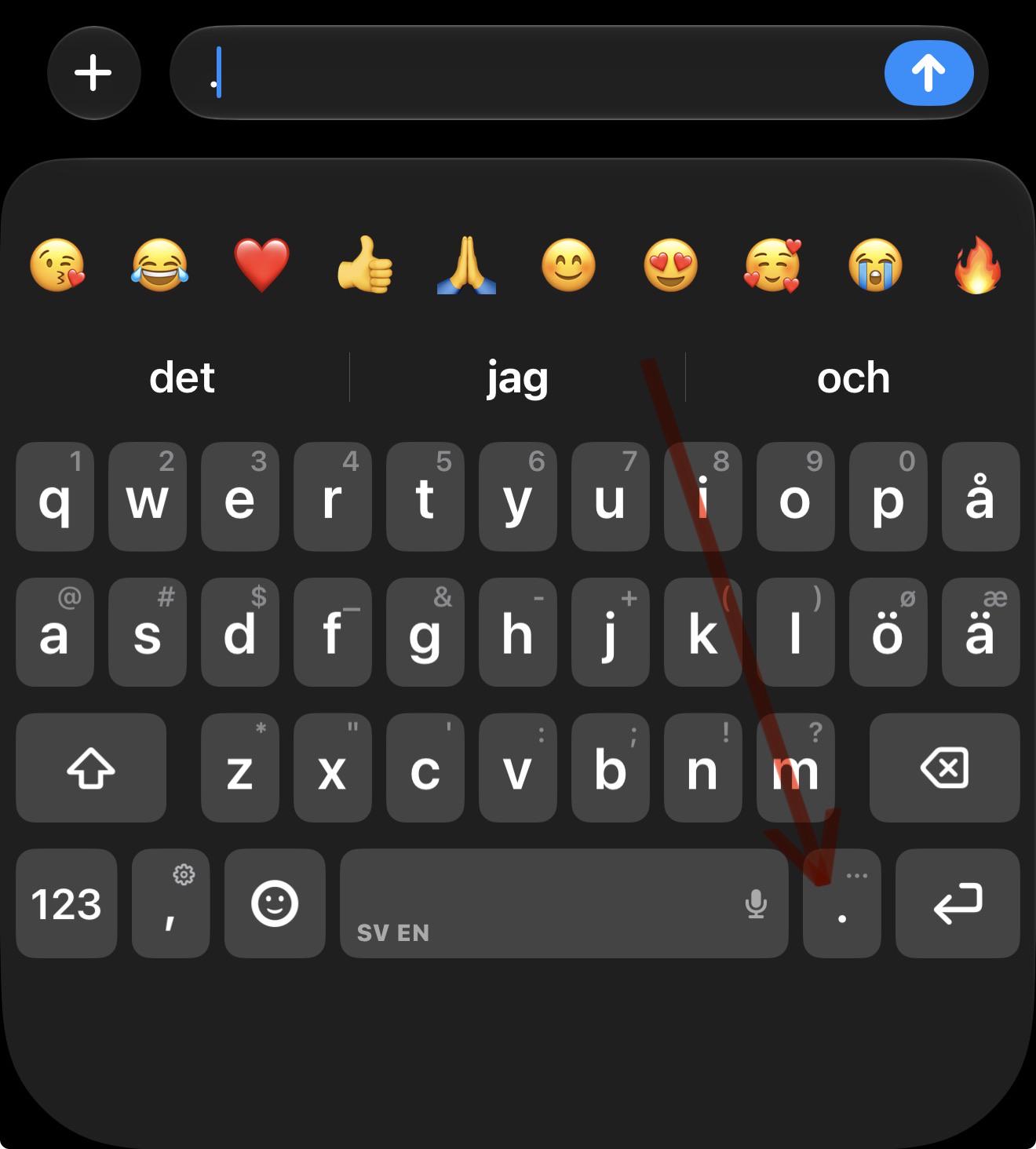
When using two languages on iOS, and using the voice to text (dictation) there is currently a pop-up menu to switch between languages.

It would be nice to have a button for each languages beside each other, instead of having to click on a language, and then choose the other language, and then back. The current layout requires a few more steps to switch between languages.

Easiest way would be to have the language button side by side each other, in this case, one SV button (as seen on the screenshot above) and beside it the EN button, for a much faster switch between languages (without using any menus etc)


r/EFKey • • 1d ago

Bug Possible EF Key bug with external Bluetooth keyboards and Italian layout on iPad

3 Upvotes

Hi everyone,
I’ve noticed what might be a bug when using EF Key with an external Bluetooth keyboard on my iPad.

In EF Key settings, I’ve configured three languages in this order:
Italian
English
German

However, when I connect my Inateck external Bluetooth keyboard, which has an Italian physical layout, EF Key seems to recognize only the English layout. As a result, the keys don’t match their actual positions, and typing becomes quite frustrating.

Has anyone experienced something similar? Could the developers look into this and let me know if this is a known bug or if there’s a setting I’m missing?

Workaround: For now, I’m also using the original Apple keyboard alongside EF Key to make sure the external keyboard is recognized with the correct Italian layout.
Any suggestions would be appreciated. Thanks!


r/EFKey • • 1d ago

Question How to Enter Tags in Apple Notes ?

3 Upvotes

When I insert tags with the native app in Apple Notes using #Text, they are created automatically correctly. Unfortunately, that doesn't work with EFKey; what am I doing wrong? I hope the video shows my problem and that someone can maybe help.


r/EFKey • • 1d ago

Question Launch an app from the keyboard, or a shortcut?

5 Upvotes

Wondering if it would be possible to launch my 1password app from the keyboard, or a shortuct that would launch it. Some sites or apps don't offer the password option, so it would be nice if I could launch it from the keyboard, rather than leaving the app I'm in and looking for the pw manager. Just curious - thanks!


r/EFKey • • 1d ago

Bug Bug de teclado

Post image
1 Upvotes

Hay veces que tengo este bug se me pone el teclado en modo oscuro siendo que el teléfono lo tengo en claro, dura como 2 segundos así y vuelve a color claro


r/EFKey • • 1d ago

Question Possible to change the "dot” to ”question mark” by default? So that question mark replaces the dot?

Post image
3 Upvotes

Are there any settings for this? I would like to change the dot with the question mark so that is always there. Since the dot is also added by double tapping the space button, It is not necessarily needed an extra dot button.


r/EFKey • • 1d ago

Bug Haptic feedback stops working randomly

2 Upvotes

Been loving this keyboard so far literally the perfect IOS keyboard for someone who has been a lifelong android user and just switched to IOS it has so many of the features I loved in gboard on android however I noticed that from time to time completely randomly and haptic feedback stops it no longer vibrates when I press keys I was not able to find any pattern to a reliably way to repeat the bug it just happens and then goes away randomly sometimes it goes away when I hop from one app to the next other times it stays for up to an hour across multiple apps then goes away on its on


r/EFKey • • 1d ago

Question ALWAYS have uppercase keyboard when writing messages with EFKey? Example inside!

1 Upvotes

In ios keyboard, i always have a uppercase keyboard when writing messages, so that the keys on the keyboard are ALWAYS in uppercase letters (and does not switch back when typing). But i could not find a option to activate this in EFkey. Am i blind or does EFkey not support this?

Added a video recording as a example.


r/EFKey • • 2d ago

Feedback Feature request: spacebar custom color

3 Upvotes

My beloved Fleksy keyboard has been abandoned by its devs, so I went hunting for a new keyboard and found EFKey after trying a bunch of others that didn’t quite measure up in one way or another.

LOVE EFKey so much, thank you!

Feature request that’s not a dealbreaker ,just a nice to have: the ability to change the spacebar color like you can for the Enter key. 🙂


r/EFKey • • 2d ago

Question Auto correct

13 Upvotes

Good day all. Huge fan of EFKEY. been a premium user for awhile. I'm personally still having a slight issue with the auto correction on a lot a different words. I have all the proper toggles turned ON for auto correct settings and such (I believe) but still getting odd ones like trying to type 'much' turns into 'muay' or 'a lot' turns itself into 'a log''

Not a huge deal just wondering if anyone has a similar experience. Or something I could try for a fix? It might be a setting I have myself turned on or off lmao.

Regardless still wanted to say. I love the whole app. The keyboard. The functionality of it. The support. And the community. Everything about it is great. And its entire levels above IOS keyboard itself.


r/EFKey • • 2d ago

Question Speech to text

3 Upvotes

Whenever I dictate something, the first word is always lower case. Any ideas on what I've configured wrong?


r/EFKey • • 3d ago

Question Raycast Fix

8 Upvotes

Is there any chance that you could add the Raycast fix for dictation that allows no app switching to dictate?


r/EFKey • • 3d ago

Question Text selection with Shift + Click. It lets you select a large portion of text instantly without dragging your finger across it.

8 Upvotes

Can we get this native keyboard feature with EFKey?

Place your cursor at the beginning of the text you want to select.
Hold down the Shift key on your keyboard.
While holding Shift, click at the end of the paragraph.
Everything between those two points gets selected automatically.


r/EFKey • • 3d ago

Question Is there a way to mimic the slower typing style of the iOS default keyboard?

0 Upvotes

Curious if there is way to mimic the typing style (speed) of the iOS keyboard so that this doesn't only look identical to the iOS one (which is doable), it also feels identical in terms of key presses?


r/EFKey • • 4d ago

Idea Feature Request: Manual Key Position Adjustment in “Where You Tap”

Thumbnail
gallery
8 Upvotes

Hi! I’m a Pro user and I really enjoy this keyboard. However, I think there’s still room for improvement, especially when it comes to autocorrection and touch accuracy.
I’d really appreciate a manual adjustment option for “Where You Tap”. I frequently confuse T and Y, and for example, I end up typing “vot” instead of “voy”. This happens much more often than it did with the native iOS keyboard.
I’ve actually had to reset the “Where You Tap” data more than twice because, over time, typing errors became increasingly frequent rather than improving.
It would be great to have the ability to manually adjust individual keys, moving their touch recognition areas slightly up, down, left, or right, instead of relying entirely on automatic learning.
Ideally, manual adjustments could work alongside automatic learning, allowing users to fine-tune specific keys without affecting the rest of the keyboard.
I think this would make a big difference in typing accuracy and give users more control over their experience.
I’ve attached screenshots showing my current touch distribution.
Thanks for your hard work and for considering this suggestion!


r/EFKey • • 3d ago

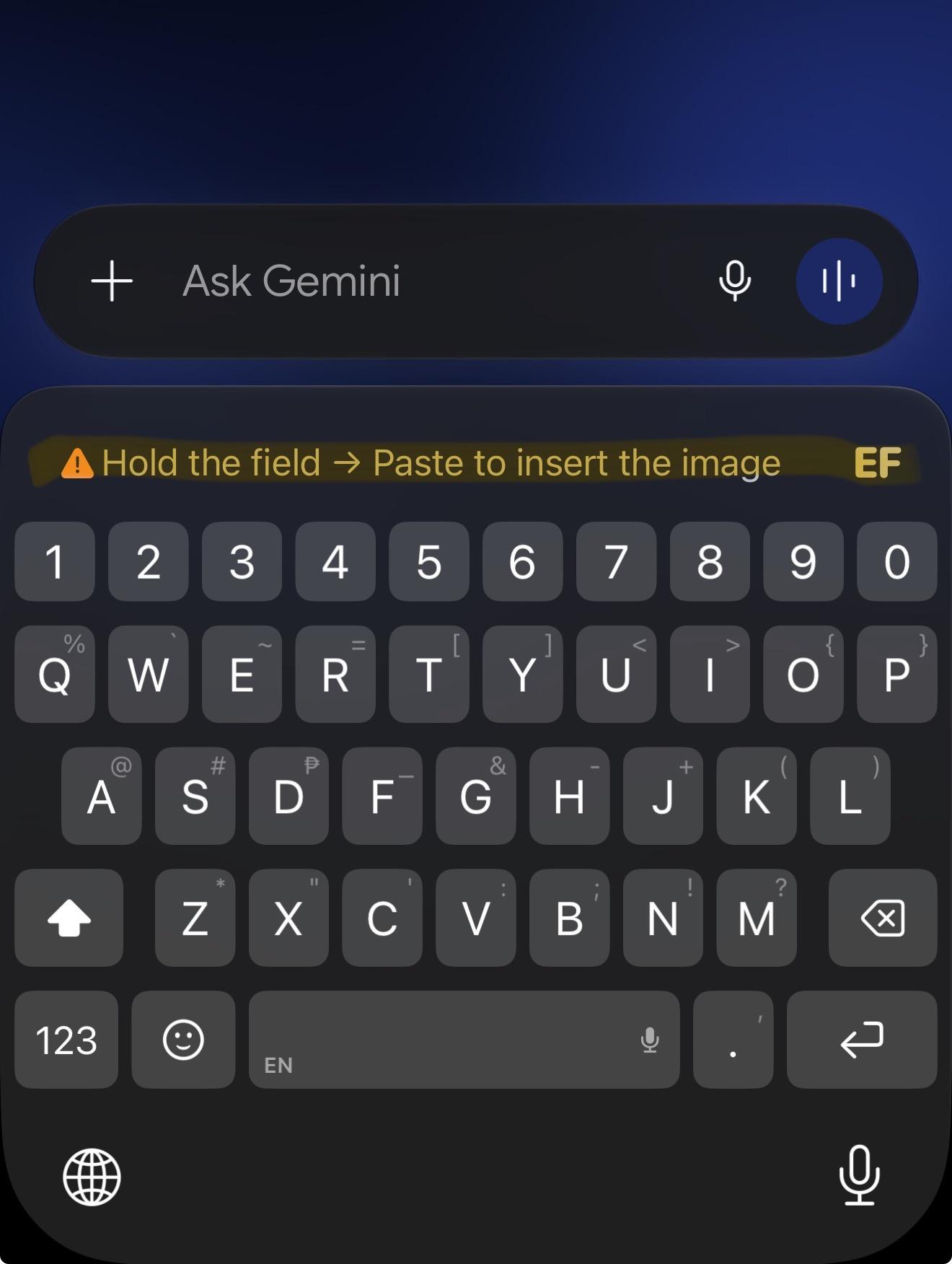
Question Paste image

Post image
4 Upvotes

Can somebody help?


r/EFKey • • 4d ago

Question wasted space at the bottom of the keyboard?

Post image
9 Upvotes

is there a way to remove all the wasted space at the bottom of the keyboard? Or is that Apple thingie?


r/EFKey • • 4d ago

Bug Annoying bug

2 Upvotes

When attempting to manually decapitalize a learned word via the dictionary editor, the UI updates immediately to show the lowercase string. However, the database does not seem to commit the change to disk. As soon as you navigate back to the main Dictionary screen (or close/reopen the app), the word reverts back to its original capitalized casing.


r/EFKey • • 3d ago

Idea Team up with Superwhisper

1 Upvotes

Pretty disappointed that dictation is either Apple dictation or bring your own key. Can you consider pairing with some major providers to improve dictation capabilities?


r/EFKey • • 3d ago

Bug Dictate language download gailed

Post image
1 Upvotes

Is it possible to get this downloaded?