r/foss • • 25d ago

What are your thoughts on AI posts here? Do you like them or dislike them and do you think they should stay? [Pinned discussion post]

5 Upvotes

r/foss • • Oct 26 '26

Megathread for discussion related to recent events

62 Upvotes

Creating this megathread in hopes of reducing "i was banned from ___" and recent open source drama posts in subreddit while still allowing discussion around it,

Making posts about this stuff is still allowed but i would rather if it could be put here so the main subreddit is not having the same type of posts over and over again

The head mod of the subreddit has said this about an hour ago:

https://www.reddit.com/r/foss/comments/1xg3k2o/comment/19rp2205wwrur/

Hey guys, I promise I'm still here. I just replied in a different thread I think.

My head's been under a rock so I have little understanding of what's going on. Regardless, my commitment is still to create a welcoming community that embraces different opinions. I need some time to gather myself and understand what's going on, then hopefully get to the bottom of this.

As for me i have no say in removing mods and its up to the head mod, i am here to keep the subreddit about FOSS and making sure people follow rules


r/foss • • 19h ago

I made an open source app that turns an Android tablet into a wired second monitor for Windows 11

Post image
82 Upvotes

I have a Galaxy Tab S6 Lite and wanted to use it as a second screen next to my monitor. I wanted it wired over USB because wifi always adds lag, so I ended up writing my own thing. It's called USBCD and it's GPL v3.

You plug the tablet in with a USB-C cable and Windows just sees a new monitor at the tablet's full resolution and refresh rate. Unplug it and the monitor is gone again. The tablet speakers also show up as a sound output in Windows, and touch and the S Pen work as normal Windows input (pressure, hover, side button for right click).

There's some extra stuff in the tray menu too, like using the front camera as a webcam or having the tablet screen turn off when the PC screen does.

The Windows side is written in Rust. It creates a virtual monitor with the Virtual Display Driver, grabs it with FFmpeg and encodes on the GPU (NVENC/AMF/QSV, or software if you don't have one). The Android app is Kotlin and decodes in hardware. Everything goes over ADB on USB, no wifi at all. Latency is usually 1-3 frames, so office work and videos feel pretty much native and most games are fine too.

Some things to know:

- Windows 11 only, Android 8+

- USB debugging has to stay on

- one tablet at a time

- I've only really tested it on my Tab S6 Lite, so I don't know yet how it behaves on other tablets

Since USB debugging is a pretty big door to leave open, I put some work into security. The app runs without admin rights, PC and tablet authenticate each other, and updates only install if they're signed.

https://github.com/samuelgoestomars2607/USBCD

If you try it on a different tablet I'd love to hear if it works. Bug reports and PRs are welcome, and if something in the code looks dumb, tell me.


r/foss • • 2h ago

Beyond Linux: A Journey Through the Open Source Ecosystem

Thumbnail
it-notes.dragas.net
2 Upvotes

r/foss • • 3h ago

QR code alternative?

2 Upvotes

I’ve long disliked the look of QR codes while enjoying their speed and accuracy. I decided I’d try to design an alternative. I’m about 130 iterations in and have a few million test scans and simulations (combined). The code can be viewed and accessed at https://openckey.org or https://github.com/clearkeysolutions/ckey/tree/community. Let me know your thoughts or feel free to make contributions to the project. Viable edits to community will be published to the stable release branch. Any local builds should be retrieved from /Stable-Release. Let me know!!!


r/foss • • 55m ago

🐚 clam: call an AI agent right from your shell, regular commands run as usual

Post image
1 Upvotes

r/foss • • 1h ago

I'm building LORE: a self-hostable reader that turns your own eBooks into a knowledge graph and answers questions about them. Every sentence is cited, with no spoilers past your chapter.

1 Upvotes

I kept forgetting who minor characters were mid-book, and every search spoiled something. So I built LORE.

What it does:

- Upload your own EPUBs. It extracts characters, places, events and relationships into a graph.

- Ask questions ("How did Watson meet Holmes?"). Every sentence in the answer cites a passage from the book, and the claims are checked against those passages before you see them.

- Set your reading progress per book and it only uses what you've read. Ask "who's the killer?" at chapter 4 and it won't say.

- Deep dive mode writes longer cited analyses: themes, how a character changes across a series, how a world or magic system works.

Runs on Docker in one command, with local models through llama.cpp, vLLM or Ollama. No cloud key needed.

Open Source: https://github.com/Jatin-Roopchandani/LORE (star it plzz)

Try it: https://lore.jrvn.site


r/foss • • 11h ago

Stilo: a fully MIT WYSIWYG editor for web apps

Post image
7 Upvotes

I've been building Stilo, a rich text editor for web apps, and just released 0.5.

What may matter here:

  • MIT license, the whole thing: no "pro" extensions, no paid tier, no telemetry, no account or API key.
  • Runs entirely in the browser; the HTML it outputs is plain and sanitized (DOMPurify), so your content isn't locked into a format.
  • Built on ProseMirror (also MIT), with a headless core if you want your own UI.
  • Works with plain JS, React, Vue and Svelte.

Features: tables, find and replace, task lists, code blocks, figures with captions, fonts and colors, paste cleanup for Word and Google Docs, dark theme, a compact toolbar for phones, and it stays usable on documents with tens of thousands of paragraphs.

It's a 0.x release, so the API can still change. Source, docs and a link to the live demo: https://github.com/kojak8791/stilo-editor

Issues and criticism welcome.


r/foss • • 1h ago

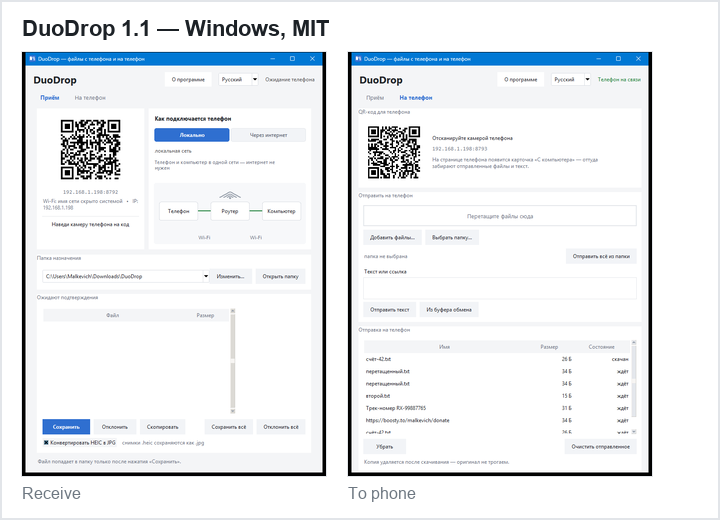
I built DuoDrop — a lightweight, open-source tool to send files, photos, and links between your phone and PC (both ways) with zero phone app installation.

0 Upvotes

Hey everyone,

I got tired of using Telegram's "Saved Messages" or logging into cloud drives on shared/work PCs just to transfer a couple of photos, a document scan, or a long URL between my phone and computer. Existing tools either require installing apps on both devices, compress images, or break when devices aren't on the exact same subnet.

https://raw.githubusercontent.com/malkevich2-ux/duodrop/main/docs/reddit_overview.png

So I built DuoDrop — a free, open-source desktop utility written in Python (MIT license), packaged as a single portable executable for Windows (~38 MB, no installer, no console window). The source also runs on Linux and macOS.

How it works:

  1. Run DuoDrop.exe on your PC.
  2. Scan the QR code with your phone's camera.
  3. A local web UI opens right in your mobile browser. Zero apps or accounts needed on the phone.

Key features in v1.1:

  • Two-way transfer (Phone ↔ PC): send photos straight from the camera, pick files from the gallery, or send text/links. On the "To phone" tab you can drag and drop files from Explorer, pick a source folder, and send text or a link — and anything in the receive queue can be copied back to the Windows clipboard (image, text or file).
  • Native Share button on mobile: every file sent to your phone gets both a Download and a Share button (Web Share API), so you can push it straight into WhatsApp, Signal or email without cluttering your Downloads folder.
  • Works across different networks: uses your local Wi-Fi by default. If your PC is on Ethernet or your phone is on cellular/isolated guest Wi-Fi, flip the "Via internet" switch — it automatically spins up a temporary cloudflared tunnel.
  • Original quality + HEIC to JPG: files are stored as they are, no re-encoding — EXIF and orientation stay intact. There is an optional "Convert HEIC to JPG" checkbox (on by default) that converts iPhone snapshots at save time for sites that don't accept HEIC.
  • Privacy & network diagnostics: no external servers (unless you toggle the Cloudflare tunnel), no telemetry, no accounts, hourly rotating access tokens with brute-force protection, a manual confirmation queue before anything is written to disk, plus built-in VPN detection and a Windows Firewall helper that can create the rule for you.

GitHub & download:

I'd love to hear your feedback, feature ideas, or bug reports!


r/foss • • 12h ago

trying to keep a folder in sync between computers without dropbox, open source options i found

6 Upvotes

trying to keep a folder in sync between a couple of computers without paying for dropbox. not a complete list, just a few that still look maintained.

syncthing keeps folders in sync between your own devices, without a central server. official builds are on windows, mac and linux

rclone is a command line tool for syncing a folder to a server or to cloud storage, including a two-way sync mode. official builds are on windows, mac and linux

unison is a two-way sync tool for two folders, including between windows and linux or mac. official builds are on windows, mac and linux

has anyone here landed on a simple setup for this, or is there a better fit i'm missing?


r/foss • • 9h ago

Android needs per-app control over Phantom Process Limits, not just a global on/off switch.

Thumbnail issuetracker.google.com
3 Upvotes

I've submitted a feature request to the Android team regarding Phantom Process Limits, and I'd like to hear what other Termux and UserLAnd users think about it.

Currently, Android has a default limit of 32 phantom processes across all apps combined. This can become restrictive for applications like Termux, especially when running multiple processes, scripts, or background tasks.

Personally, I'd like to be able to increase the phantom process limit specifically for Termux, rather than changing the restrictions for every app on my device.

For example:

- Termux: 350 processes.

- UserLAnd: 128 processes.

- Other apps: Keep the default limit of 32.

These are just example values. Ideally, users should be able to choose an appropriate limit for each application based on their needs.

What about the existing workaround?

Android already provides the "Disable child process restrictions" option in Developer Options (Android 14+). However, this is essentially a global toggle: you either keep the restrictions enabled or disable them altogether.

It doesn't provide the granular control I'm looking for.

My proposal:

Add a dedicated setting in Android's Settings app that allows users to:

- Adjust the global phantom process limit.

- Set individual phantom process limits for specific apps.

- Keep the current default of 32 unchanged for users who don't want to modify anything.

- Display a clear warning that increasing these limits may increase RAM and battery consumption.

This would give users more control without forcing them to disable process restrictions system-wide or rely on ADB, Shizuku, or root access.

I believe this could be particularly useful for Termux users and people running Linux environments or other process-intensive workloads on Android.

I'd like to hear your thoughts:

- Have you experienced similar limitations when using Termux or other apps?

- Would per-app phantom process limits be useful to you?

- Do you think this kind of control should be available directly in Android Settings?

If you find this feature useful, please consider starring the issue and sharing your experience in its comments. More feedback from actual users could help demonstrate why this feature is worth considering.

Issue: https://issuetracker.google.com/issues/562778579


r/foss • • 4h ago

Drift: A fast, low-memory Git client in Rust + GPUI

Post image
1 Upvotes

I've tried many Git GUIs. Most were heavy on memory, and the polished ones were paid. My Git client is the app I use most after my editor, so I built Drift.

Under 20 MB in size and under 200 MB of RAM.

Keyboard first, with a command palette and quick switching.

A clean, familiar layout inspired by VS Code.

Works on macOS, Windows and Linux.

It's still early, so I'd really like honest feedback and feature requests.

https://rk-kabilan.github.io/drift/


r/foss • • 8h ago

I built an open-source Medal.tv / ShadowPlay alternative for Windows using Rust + Tauri v2 (Zero-Copy GPU, Per-App Audio, ~30–85 MB RAM in tray)

2 Upvotes

r/foss • • 13h ago

I got tired of the screenshot → Alt+Tab → paste loop, so I made a free, open-source capture app that pastes all your screenshots at once

4 Upvotes

Hi! I write a lot of reports and bug reports, and Windows' clipboard only holds one image, so every screenshot is a round trip between apps. Snipmunk keeps every capture in a list, and you paste all of them (or the ones you pick) in one go: into Word, an email or an AI chat.

It also does:

- annotate + redact (names, emails, etc.)

- copy text out of a screenshot, even as a table you can paste into Excel

- screen recording with click highlights and a webcam bubble

- a Documents mode that turns your clicks into a step-by-step guide you can edit and export to Word/PDF

Free, MIT licensed, Windows 10/11. No account, no telemetry, nothing leaves your PC.

Honest heads-up: the installer isn't code-signed yet, so SmartScreen will warn ("More info" → "Run anyway"). It's built on GitHub from the source in the repo.

https://github.com/Second-Dawn-Lab/snipmunk

It's v0.1, so feedback and bug reports are very welcome. What would make it useful for you?

If you like it, a ⭐ on GitHub really helps a small project get seen. And if you'd like to collaborate (code, translations, design, testing), feel free to DM me!


r/foss • • 8h ago

Meet Tchiko

Thumbnail
youtu.be
0 Upvotes

Most AI assistants make you copy-paste terminal errors into a browser tab and pray the fix works.

In Tchiko v1.2, we built a native GTK3 desktop workflow:

drag-and-drop a .log or Crashpad .dmp file onto the floating avatar or right-click it to diagnose a stack trace in your clipboard.

Docs & live demo: Tchiko Assistant


r/foss • • 17h ago

I made RoboUI, a free, open-source GUI for robocopy that lets you stop a big copy and resume it later

Post image
5 Upvotes

r/foss • • 9h ago

How do you make your project sustainable?

1 Upvotes

Hey all!

For those with longer lived open source projects - how do you keep the project sustainable, both financially and avoiding burn out?

Here's my story:

I make Beekeeper Studio (https://beekeeperstudio.io), it's an open source database GUI that's actually nice to use.

It started as 100% open source in 2019 and grew quickly, so in 2022 i started to charge money for an expanded version of the app, and within a year I had enough to hire two of the community contributors!

Our first paid version only had two paid features: two extra themes and a minor feature, but loads of people bought in the first month to support the project which was amazing.

I never got donations to work. Wondering if anyone else has figured that out?


r/foss • • 1d ago

Bridge v1.4.0: mirror your Android phone on your Mac, plus clipboard sync, file transfer and call controls

16 Upvotes

iPhone users can copy on their phone and paste on their Mac, AirDrop files in seconds, and mirror their phone on the Mac.

I use Android with a Mac. I tried KDE Connect and a few other apps. They're great projects, but none of them felt as smooth and "just works" as iPhone + Mac.

So I built Bridge 👇

🆕 New in v1.4.0

  • 🖥️ Phone mirroring. Your Android screen in a window on your Mac. Use the trackpad and keyboard. No USB, no ADB.
  • 📞 Call controls. Accept, decline, silence, mute or end calls from your Mac. Works with regular, WhatsApp and Telegram calls. (You still talk on your phone.)
  • ⏸ Auto-pause. Music on your Mac pauses by itself when a call comes in.
  • 🎵 Media controls both ways. Skip songs on your phone from your Mac, or control Mac music from your phone.
  • 🔋 Quick controls. See battery on both devices, switch Sound / Vibrate / DND, or make your phone ring when you lose it.

✅ Already in Bridge

- 📋 Two-way clipboard for text and screenshots

- 📁 Send files and folders, no size limit

- 🔔 Phone notifications on your Mac, with reply

- 📱 Connect more than one phone to your Mac

🔒 Privacy

Everything stays on your local Wi-Fi. No cloud, no account, no tracking. It's end-to-end encrypted.

⚙️ Requirements

macOS 13+ and Android 8+, on the same Wi-Fi or a phone hotspot.

👉 Free and open source: https://github.com/badruddin-tasnim/bridge

Bug reports and feature ideas are very welcome 🙏


r/foss • • 11h ago

otio-kit: compiling YAML briefs into DaVinci Resolve timelines, because scripting left the free version

Thumbnail
github.com
1 Upvotes
Not a video tool post exactly. I needed to turn a written edit brief into a structured timeline, and measured whether models can do it: brief plus JSON schema in, YAML spec out, compiled to a timeline file, diffed against a hand-made golden.

Result on a 60 s / 3-track specimen, temperature 0, single sample: qwen3.8:27b local hit 5/5 cut points within ±2 frames, structure exact, 30 s wall, $0. Four cloud models matched it for $0.0009–0.0038 per brief. qwen3:0.6b failed the gate with invalid YAML, which is the point of the control.

Files and harness: https://github.com/Egnatia-OC/otio-kit/tree/master/bench — full table: https://github.com/Egnatia-OC/otio-kit/blob/master/docs/llm-baseline.md

Caveats I would insist on if someone else posted this: one sample per model, a well-structured brief, and a mandatory human review step. Real briefs are messier, and schema repair is the next engineering item. The target app is DaVinci Resolve, which is why the output is OTIO and not a render.

r/foss • • 11h ago

Finally finished my vellum PDF craft

1 Upvotes

r/foss • • 16h ago

MIT-licensed software that reads Open Targets and sorts rare-disease medicines, and the gaps patients have already flagged

2 Upvotes

In much of the world it is still hard for a patient or a family to see, in one place, which medicines are licensed for a rare condition and which are in clinical trials. The records exist, but they are spread across regulator labels, trial registries and specialist research portals. Moonlight is MIT-licensed open-source software that takes those links from the Open Targets Platform and shows them as a readable page: type a condition, see cards grouped as Approved, Being studied, New clues and Left out, each pointing back to its source.

That is not a theoretical problem. A person in Kochi, southern India, living with limb-girdle muscular dystrophy used the site to find a trial that was recruiting in the United States, and is content for us to say so. For someone already under a specialist team at a major centre, a page like this adds little. Where those teams are scarce, it can be the first clear map of what the public data actually contains.

HOW THE SOFTWARE IS BUILT

Open Targets is the source of record. The Python package under moonlight/ does not keep a private drug database. fetch.py calls the Open Targets Platform API for the disease, its linked protein targets and the drugs acting on them. translate.py maps an everyday name to a MONDO, EFO or HP identifier that Open Targets already knows. filter.py, engine.py, rank.py and records.py then classify each medicine with ordinary, deterministic rules: licensed for this condition goes to Approved; in a trial for it goes to Being studied; licensed for something else but acting on a disease-linked protein goes to New clues; unapproved or unclear links go to Left out. Salt forms are collapsed into one card. Ranking is by linked-protein score, then report count, then name.

The service is FastAPI and Uvicorn, with a single static HTML and JavaScript page, running in Docker on Google Cloud Run in asia-south1.

cache.py keeps three layers (in-memory, container disk, and Firestore for raw Open Targets responses) so a cold start does not hammer the upstream API.

protein.py and explain.py add a short UniProt line and a plain-English note to each card.

Hand-checked overrides live in versioned JSON beside the code (corrections.json, approvals.json, withdrawals.json, left_out.json and others), each pinned by a pytest test against saved Open Targets fixtures so a fix cannot silently vanish after an upstream release.

A language model is not used to invent drug-disease links when someone loads a page. Offline batch scripts read FDA, EMA, DailyMed and PMDA labels and flag cards whose approved status has no matching label; a person decides every correction. When people on Reddit point out a mistake, it becomes a numbered ticket, is checked against a regulator label, and lands in those JSON files with a test.

WHAT HAS ALREADY COME OF THAT

- Besides the Kochi trial find, Open Targets confirmed seven wrong approval records we reported and has scheduled the correction for release 26.12 (https://community.opentargets.org/t/2105).

- As of this afternoon we have 28 numbered feedback tickets from rare-disease community threads, each checked against a label or trial record before it is accepted.

WHAT STILL LIMITS US

- One upstream source means its gaps become ours: a medicine licensed in the UK, the EU or India, but not reflected the same way in Open Targets, can appear only as a trial, or not at all, until we add a checked override.

- Reading thousands of labels to find those mismatches costs model API credits, which we pay ourselves. There are no ads and no selling of data, and we intend to keep it that way.

LIVE SITE https://www.moonlightclues.com

REPOSITORY (MIT): https://github.com/Moonlight-Clues/moonlight.

A GitHub star is welcome if the work is useful.

The main thing that would help us finish the label audit is model API credits, or an introduction to a programme (or a person who can grant them) that supports open-source public-interest software. If you work on open biomedical data, regulator labels, or know clinicians or patient groups in US/India and other places where specialist access is thin, a pull request or a pointer is just as welcome.


r/foss • • 16h ago

Piveo: proposition de tâches pour tester l'application.

2 Upvotes

Bonjour,

N'ayant pas encore eu de retours de tests sur Piveo à la suite de mes derniers messages, je vous propose une liste de tâches à effectuer, si vous le souhaitez.

Aucune obligation, évidemment, de réaliser toutes les tâches. Même un retour sur une seule d'entre elles me serait utile.

Pour rappel, Piveo est une application libre et gratuite qui aide les utilisateurs à mémoriser les prénoms, les noms et les visages.

Interface principale de Piveo

Le paquet .deb, compatible avec Ubuntu 26.04.1 LTS et Debian 13, est disponible ici : release 2.5.8-2.

Les tests pourraient se dérouler en deux étapes:

1. Tester l'application avec la base de données d'origine

  • 1.1 Installer le paquet .deb. (voir les instruction sur la page de la release 2.5.8-2)
  • 1.2 Lancer Piveo et sélectionner, dans un premier temps, l'organisme « École ».
  • 1.3 Sélectionner une classe (par exemple PSTI2D1) et une option (on peut conserver « TOUS »). Les portraits s'affichent à gauche.
  • 1.4 Tester les différents modes de fonctionnement : lecture, devinette, écriture et recherche d'une ou de plusieurs personnes.
  • 1.5 Effectuer les mêmes tests pour les organismes « Entreprises » et « Collectivités ».

2. Personnaliser la base de données d'origine

  • 2.1 Modifier les fichiers CSV (on peut, par exemple, déplacer un élève vers le fichier CSV des salariés).
  • 2.2 Supprimer la ou les bases de données correspondantes afin de permettre leur reconstruction.
  • 2.3 Vérifier le bon fonctionnement de l'application avec les nouvelles données.

Les procédures d'installation et de personnalisation sont décrites dans la documentation de Piveo.

Lors de vos retours, merci de préciser votre distribution Linux, les numéros des tâches effectuées et les éventuelles anomalies rencontrées.

Les retours positifs sont également les bienvenus !

Merci par avance aux personnes qui prendront le temps de tester Piveo.


r/foss • • 20h ago

Memora – un assistente personale basato sull'intelligenza artificiale, autogestito e incentrato sui file (Markdown + SQLite, automazioni, backup crittografati)

Thumbnail gallery
2 Upvotes