r/GoogleAppsScript • • Jul 26 '25

Question Delete old gmail threads within a label (exclude Sent and Starred)

Could someone help me fix the code?

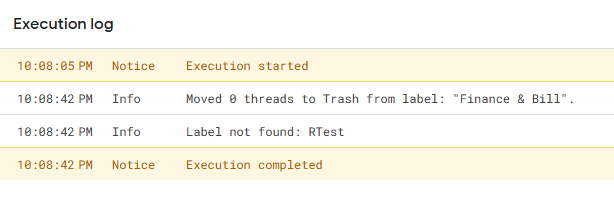
I have quite some threads (oldest is 12/11/2023, not in Sent folder, not starred) meeting the deletion requirement, but the code does not delete any of those old threads.

What is wrong with the code?

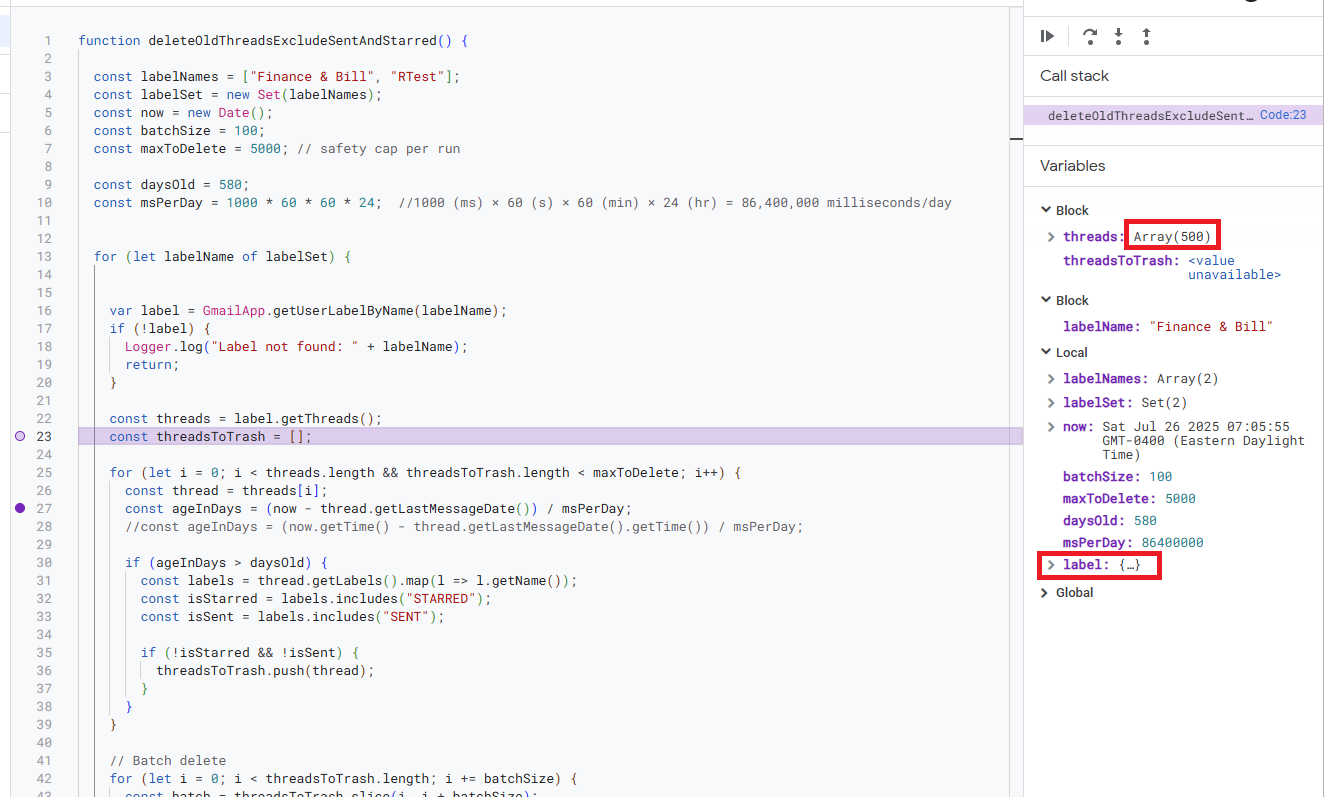
Edit: I added two screenshots, for debug variables, not sure why Array size for threads is only 500, not 4314. It seems the code can only read first 5 pages of gmail thread (there is limit 500?). Not sure why label does not have value
function deleteOldThreadsExcludeSentAndStarred() {

  const labelNames = ["Finance & Bill", "RTest"];
  const labelSet = new Set(labelNames);
  const now = new Date();
  const batchSize = 100;
  const maxToDelete = 5000; // safety cap per run

  const daysOld = 530;
  const msPerDay = 1000 * 60 * 60 * 24;  //1000 (ms) × 60 (s) × 60 (min) × 24 (hr) = 86,400,000 milliseconds/day


  for (let labelName of labelSet) {
    
    
    var label = GmailApp.getUserLabelByName(labelName);
    if (!label) {
      Logger.log("Label not found: " + labelName);
      return;
    }

    const threads = label.getThreads();
    const threadsToTrash = [];

    for (let i = 0; i < threads.length && threadsToTrash.length < maxToDelete; i++) {
      const thread = threads[i];
      const ageInDays = (now - thread.getLastMessageDate()) / msPerDay;

      if (ageInDays > daysOld) {
        const labels = thread.getLabels().map(l => l.getName());
        const isStarred = labels.includes("STARRED");
        const isSent = labels.includes("SENT");

        if (!isStarred && !isSent) {
          threadsToTrash.push(thread);
        }
      }
    }

    // Batch delete
    for (let i = 0; i < threadsToTrash.length; i += batchSize) {
      const batch = threadsToTrash.slice(i, i + batchSize);
      GmailApp.moveThreadsToTrash(batch);
      Utilities.sleep(1000); // slight delay to avoid rate limits
    }

    Logger.log(`Moved ${threadsToTrash.length} threads to Trash from label: "${labelName}".`);

  }


}
1 Upvotes

64 comments sorted by

View all comments

Show parent comment

1

u/stellar_cellar Jul 26 '25

The push() function simply append the thread to the threadsToTrash array, which is used later to actual delete those threads.

New emails that comes during execution may alter the index, I am not sure if that would a problem: appending a thread twice to an array won't be an issue, the function to move them to trash should be fine with duplicates in the array (it's something to test for in order to be certain).

1

u/VAer1 Jul 26 '25

Actually, there is another "issue" not related to duplicates in the array threadsToTrash.

What if two emails hit the label right before the line of code GmailApp.moveThreadsToTrash(batch) (but after array threadsToTrash is finalized)? Initially, I want to delete thread index 98 and index 99, but in the end program could mistakenly delete other threads (original index 98-99 becomes new index 100-101, due to TWO new emails hit the label). So the program could delete threads with original index 96-97, which actually do not meet deletion requirement.

But anyway, I will run the program during midnight, time driven trigger Daily. During those hours, it is less likely to get new emails during code execution time. If some threads supposed to be deleted but not deleted due to new emails change their index, then they will be deleted during next code execution time; if some threads are deleted early due to new mails changes their index, not big deal too, they will meet deletion requirement soon, anyway.

1

u/stellar_cellar Jul 26 '25

So when you append a thread to the array threadsToTrash, you giving a reference to the thread object that was being work during that loop iteration. That reference won't change when you use getThreads() again; the indexing change won't affect it.

Let's say Thread A is at index 0 (newest message) in Gmail, so when you retrieve it, you get an object (instance of class GmailThread) that contains all the properties of Thread A; if you save that object to a variable (e.g. Array), it will always contain Thread A properties until you assign a new value to that specific variable. So if Thread B comes in takes position at index 0 in Gmail and you do getThreads(), it will not overwrite the variable where you saved Thread A unless you explicit tell it to do it.

Finally when you do the moveThreadsToTrash(), it uses the object reference/properties saved in each element of the array to determine which threads to actual execute on.

1

u/VAer1 Jul 26 '25

Thanks for explanation, it seems that there will always be some other "issues", but they are rare cases, I can ignore those "issues". Gmail message is dynamic.

Let us say a thread is appended to threadsToTrash (based on thread.getLastMessageDate and not in Sent and not starred)

But a new email hits the same thread right before GmailApp.moveThreadsToTrash, it seems the code will move the thread to trash along with the new email.

1

u/stellar_cellar Jul 26 '25

Yes I think so, a fix for could be to simply delete based on messages rather on thread. When you get a thread, you loop through the thread's messages and delete the ones that match your criteria.

1

u/VAer1 Jul 26 '25

https://i.postimg.cc/cC9YLmjP/Screenshot-2025-07-26-112101.png

What is execute time limit for Time Driven trigger? I cannot test it manually. It can even handle one single gmail label (4000+ threads with less than 2 years time span, I used to manually delete old threads, if not, it could be 10k+ threads for 4 years), it may take a lot of time to loop through LastestDate in each thread, I guess this step already hits the maximum execution time limit.

So, no, I cannot delete one message at a time, which could take much more time, I already have execution time issue now. I don't even delete one thread at a time, I delete 100 threads at a time, but it still pass maximum execution time limit.

const batch = threadsToTrash.slice(i, i + batchSize);

GmailApp.moveThreadsToTrash(batch);

Any other solutions to go around it?

Maybe I will change let start = 0 to let start = 2000 for some labels, which means I will need another array for starting index of thread for each label.

I will break array for labels, write one program for each label (which I hate very much), I don't want to write multiple similar programs for each label.

1

u/stellar_cellar Jul 26 '25

There is a 6 minutes time limit with Apps Script. If you have a huge backlog, you may need to run your script several times before you get everything.

1

u/VAer1 Jul 26 '25 edited Jul 26 '25

In stead of going through all the threads within a label, I may just want to take a look at oldest100 threads in each label (some label has fewer than 100 threads), which deletes no more than 100 threads from each label each day.

It sounds a solution to me. It seems I need to re-write the code for such solution.

It is annoying, one issue at a time, now execution time limit issue. Not sure if modified code works properly.