r/GoogleAppsScript • • Jul 26 '25

Question Delete old gmail threads within a label (exclude Sent and Starred)

Could someone help me fix the code?

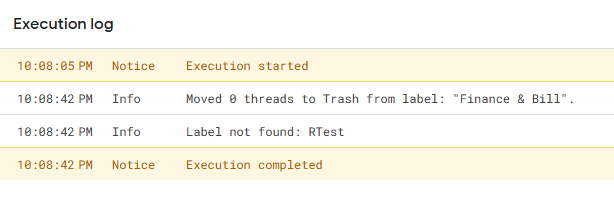
I have quite some threads (oldest is 12/11/2023, not in Sent folder, not starred) meeting the deletion requirement, but the code does not delete any of those old threads.

What is wrong with the code?

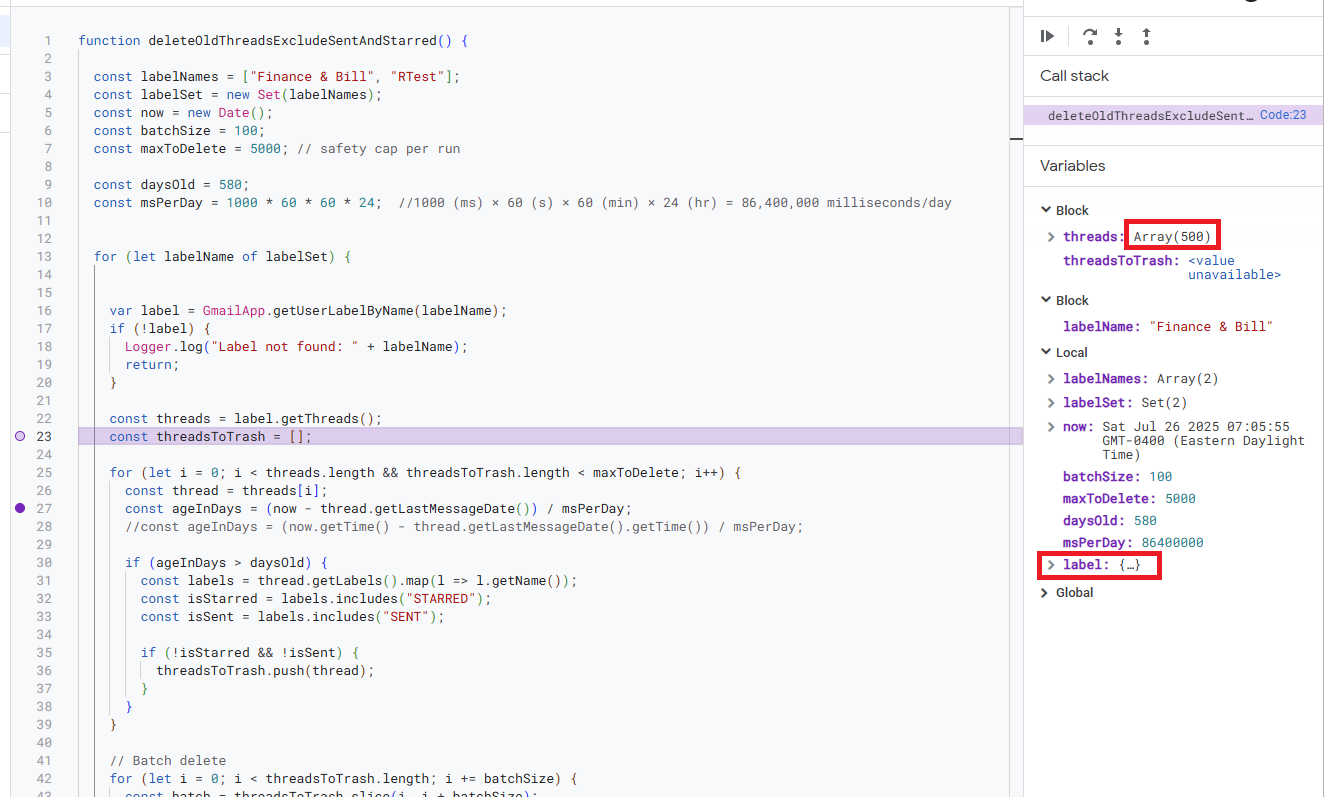
Edit: I added two screenshots, for debug variables, not sure why Array size for threads is only 500, not 4314. It seems the code can only read first 5 pages of gmail thread (there is limit 500?). Not sure why label does not have value
function deleteOldThreadsExcludeSentAndStarred() {

  const labelNames = ["Finance & Bill", "RTest"];
  const labelSet = new Set(labelNames);
  const now = new Date();
  const batchSize = 100;
  const maxToDelete = 5000; // safety cap per run

  const daysOld = 530;
  const msPerDay = 1000 * 60 * 60 * 24;  //1000 (ms) × 60 (s) × 60 (min) × 24 (hr) = 86,400,000 milliseconds/day


  for (let labelName of labelSet) {
    
    
    var label = GmailApp.getUserLabelByName(labelName);
    if (!label) {
      Logger.log("Label not found: " + labelName);
      return;
    }

    const threads = label.getThreads();
    const threadsToTrash = [];

    for (let i = 0; i < threads.length && threadsToTrash.length < maxToDelete; i++) {
      const thread = threads[i];
      const ageInDays = (now - thread.getLastMessageDate()) / msPerDay;

      if (ageInDays > daysOld) {
        const labels = thread.getLabels().map(l => l.getName());
        const isStarred = labels.includes("STARRED");
        const isSent = labels.includes("SENT");

        if (!isStarred && !isSent) {
          threadsToTrash.push(thread);
        }
      }
    }

    // Batch delete
    for (let i = 0; i < threadsToTrash.length; i += batchSize) {
      const batch = threadsToTrash.slice(i, i + batchSize);
      GmailApp.moveThreadsToTrash(batch);
      Utilities.sleep(1000); // slight delay to avoid rate limits
    }

    Logger.log(`Moved ${threadsToTrash.length} threads to Trash from label: "${labelName}".`);

  }


}
1 Upvotes

64 comments sorted by

View all comments

Show parent comment

1

u/stellar_cellar Jul 26 '25

Array can be extremely large, like 4 billions elements big.

Calling on the Google Services is relatively slow, that's where your will get most of your optimization. For example, in your original code, you use getThreads(), then use getLastMessageDate() and getLabels() hundreds of time to find your specific threads; each of this call takes time to access the Google Services. You might see a boost in run time if you use the search() function instead to directly get those threads.

1

u/VAer1 Jul 26 '25 edited Jul 26 '25

I will see later, but I have invoked too many times of service already.

Does below code take time? Is there alternative way to get the result? I may need to incorporate below code into #1 issue mentioned in above your post.

Below function is used to counted thread of all my labels, which is different script file, which takes more than 3 minutes. I cannot image how much more time needed if adding below code to this program. I may need to replace threads.length with below code, I doubt if threads.length returns correct value if there are more than 500 threads. Not sure, I will investigate.

I need to solve two issue (workaround): 6 minutes execution time limit; invoke too many times of service. Maybe invoke too many times of service is not an issue after finishing the project, I just test running too many times.

// Helper: accurately count threads in labels with >500 threads
function getFullThreadCount(label) {
  let count = 0;
  const batchSize = 100;
  let threads;

  do {
    threads = label.getThreads(count, batchSize);
    count += threads.length;
  } while (threads.length === batchSize);

  return count;
}

1

u/VAer1 Jul 26 '25

Does Calling on the Google Services during midnight (not busy hour) help save running time?

How to replace something with getLastMessageDate()?

1

u/stellar_cellar Jul 26 '25

Maybe you will get less busy server around midnight, I have no idea it can be random at times.

I did some bench marking, I can tell you the more threads you retrieve at once the better it is. getThreads(start,100) is faster than doing getThreads(start, 10) ten times.

Additionally, doing the getLastMessageDate() on each single thread is taking a toll; use the GmailApp.search("older_than:1d") instead. In my testing, to retrieve 88 threads ten times, it took 90 sec with getInboxthreads() and getLastMessageDate(), while with search() it only took 1 second. Use the code below for your own testing.

function getInbox(){
  let threads = []
  let startTime = Date.now();
  let iteration = 10;
  for (let i = 0; i < iteration; i++){
    let start = 0;
    const max = 100;
    let output = [];
    do {
      output = GmailApp.getInboxThreads(start, max);
      threads = threads.concat(output);
      threads.forEach(function(thread){thread.getLastMessageDate()});
      start += max;
    } while (output.length === max);
  }
  console.log("getInboxThreads: " + threads.length + " threads\n" + (Date.now() - startTime)/1000 +" seconds");

  threads = [];
  startTime = Date.now();
  for (let i = 0; i < iteration; i++){
    let start = 0;
    const max = 100;
    let output = [];
    do{
      output = GmailApp.search("in:inbox older_than:1d",start,max);
      threads = threads.concat(output);
      start += max;
    } while (output.length === max);
  }
  console.log("search: " + threads.length + " threads\n" + (Date.now() - startTime)/1000 +" seconds");
}

1

u/VAer1 Jul 27 '25

Thanks for the code, I will completely re-write the code for less running time. But I will test in 24 hours.

1

u/VAer1 Jul 27 '25

Is label.getThreadCount() valid method?

1

u/stellar_cellar Jul 27 '25

No, it's not a built in function.