r/GoogleAppsScript • • Jul 26 '25

Question Delete old gmail threads within a label (exclude Sent and Starred)

Could someone help me fix the code?

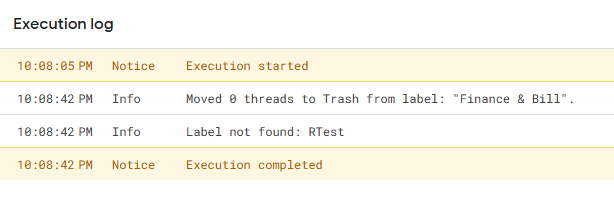
I have quite some threads (oldest is 12/11/2023, not in Sent folder, not starred) meeting the deletion requirement, but the code does not delete any of those old threads.

What is wrong with the code?

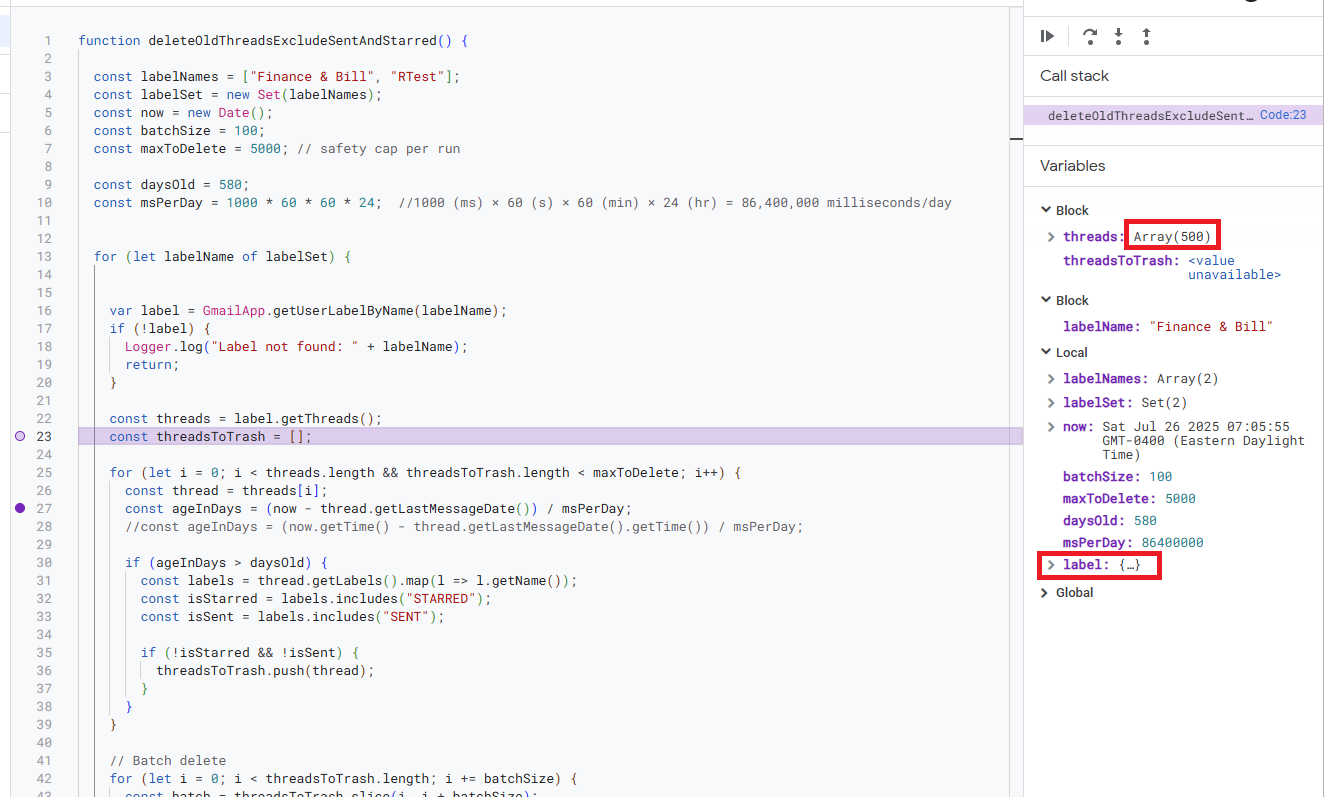
Edit: I added two screenshots, for debug variables, not sure why Array size for threads is only 500, not 4314. It seems the code can only read first 5 pages of gmail thread (there is limit 500?). Not sure why label does not have value
function deleteOldThreadsExcludeSentAndStarred() {

  const labelNames = ["Finance & Bill", "RTest"];
  const labelSet = new Set(labelNames);
  const now = new Date();
  const batchSize = 100;
  const maxToDelete = 5000; // safety cap per run

  const daysOld = 530;
  const msPerDay = 1000 * 60 * 60 * 24;  //1000 (ms) × 60 (s) × 60 (min) × 24 (hr) = 86,400,000 milliseconds/day


  for (let labelName of labelSet) {
    
    
    var label = GmailApp.getUserLabelByName(labelName);
    if (!label) {
      Logger.log("Label not found: " + labelName);
      return;
    }

    const threads = label.getThreads();
    const threadsToTrash = [];

    for (let i = 0; i < threads.length && threadsToTrash.length < maxToDelete; i++) {
      const thread = threads[i];
      const ageInDays = (now - thread.getLastMessageDate()) / msPerDay;

      if (ageInDays > daysOld) {
        const labels = thread.getLabels().map(l => l.getName());
        const isStarred = labels.includes("STARRED");
        const isSent = labels.includes("SENT");

        if (!isStarred && !isSent) {
          threadsToTrash.push(thread);
        }
      }
    }

    // Batch delete
    for (let i = 0; i < threadsToTrash.length; i += batchSize) {
      const batch = threadsToTrash.slice(i, i + batchSize);
      GmailApp.moveThreadsToTrash(batch);
      Utilities.sleep(1000); // slight delay to avoid rate limits
    }

    Logger.log(`Moved ${threadsToTrash.length} threads to Trash from label: "${labelName}".`);

  }


}
1 Upvotes

64 comments sorted by

View all comments

Show parent comment

1

u/VAer1 Jul 27 '25

https://i.postimg.cc/QNWYv04K/Screenshot-2025-07-27-002841.png

GmailApp.search() only returns 500 threads, which is wrong too. I have far more than 500 threads in above screenshot label.

Maybe GmailApp.search() works fine, but threads.length does not return correct value, one of them is wrong.

1

u/stellar_cellar Jul 27 '25

1

u/VAer1 Jul 27 '25 edited Jul 27 '25

Well, that does not work then. I want to check oldest 100 threads in GmailApp.search(query) , but first 500 threads do not include those oldest threads.

I may need to go back with old code label.getThreads(start, batchSize) , but isStarred and isSent do not really work correctly

I need to find a way to get to oldest 100 threads.

const threadLabels = thread.getLabels().map(l => l.getName());  //labels for that thread only
          const upperThreadLabels = threadLabels.map(threadLabel => threadLabel.toUpperCase());
          const isStarred = upperThreadLabels.includes("STARRED");
          const isSent = upperThreadLabels.includes("SENT");

1

u/stellar_cellar Jul 27 '25

Use before:YYYY/MM/DD or older_than:Xd (where X is a number of days) in the search(). Might not get you the oldest threads but you can skip the newest one more easily.

1

u/VAer1 Jul 27 '25

I have a function getFullThreadCount, which can correctly count the # of threads in the label (however, it could include threads in Sent or Star.

So I am able to get to the oldest 100 threads, even if they could be in Sent or isStarred. All I need to do is identifying each thread and see which thread is in Sent or Starred.

I manually mark a thread (in Sent) with label Perm Studio, and one of message in the thread is starred, that is the only thread in label Perm Studio. When I run function logInformationForThreadInLabel , it seems that thread.getLabels() is not able to get label Sent. If Sent can be pulled into output data in some way, then it will become easier.

It is easy to identify if a thread has starred message, so this part of issue can be solved.

The only issue left is to check if a thread is in Sent folder.

function logInformationForThreadInLabel() {
  const label = GmailApp.getUserLabelByName("Perm Studio"); // Replace with your label name
  const threads = label.getThreads(0, 100); // You can paginate if needed

  threads.forEach(thread => {
    const labels = thread.getLabels();
    const labelNames = labels.map(l => l.getName());
    
    Logger.log(`Thread ID: ${thread.getId()}`);
    Logger.log(`Labels: ${labelNames.join(", ")}`);

    if (thread.hasStarredMessages()) {
      Logger.log(`Thread with ID ${thread.getId()} has starred messages.`);
    } else {
      Logger.log(`Thread with ID ${thread.getId()} has no starred messages.`);
    }

  });
}

1:18:39 AM
Notice
Execution started


1:18:40 AM
Info
Thread ID: 15f474e9138ed578


1:18:40 AM
Info
Labels: Perm Studio


1:18:40 AM
Info
Thread with ID 15f474e9138ed578 has starred messages.


1:18:40 AM
Notice
Execution completed


function getFullThreadCount(label) {
  let count = 0;
  const batchSize = 100;
  let threads;

  do {
    threads = label.getThreads(count, batchSize);
    count += threads.length;
  } while (threads.length === batchSize);

  return count;
}