
r/HHKB • u/Comfortable-Creme946 • 12h ago
cerakoted yellow

39
Upvotes
for 2027 😆
r/HHKB • u/Comfortable-Creme946 • 3d ago

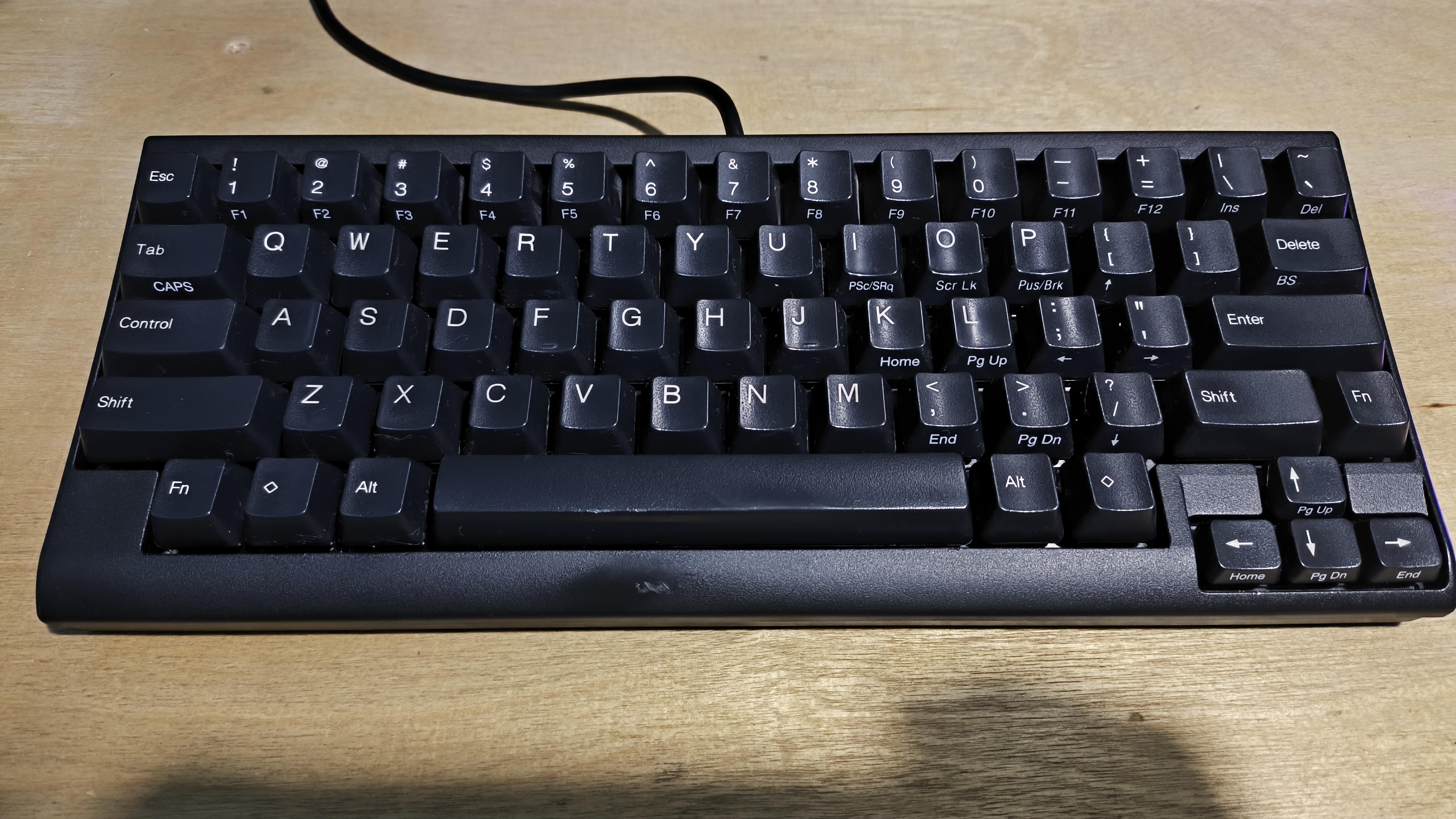
Boards: HHKB Pro 2
Domes: 55gr - RS B Metadomes
Keycap: OEM Black Blank
Internal: EM60 V2
r/HHKB • u/febreeze5 • 3h ago
Hi all,
I’m new to my HHKB keyboard and looking for some keycaps to get used to the new layout. Preferably ones that denote both windows and MacOS commands. I’ve not been able to find any keycaps other than the HHKB website.
Any insight?
r/HHKB • u/audioflc • 18h ago
I only ask this because I’m thinking about getting one but I don’t know if I’m the biggest fan of the layout and the layers. Was thinking of a realforce tkl instead for that reason. But if people really the Hhkb for the layout as well I was thinking of maybe making the jump and just going for it.
r/HHKB • u/febreeze5 • 18h ago
Hello everyone,
I’m a developer/cybersecurity professional and I’ve been contemplating an HHKB for a while since it’s so popular in my niche/industry.
I’m currently a huge fan of the Mac and Apple magic keyboards, so just wanted to see if anyone has switched over from primarily using those.
Looking forward to my HHKB Pro Hybrid Type-s later this week/next week.

I'm happy to announce a new release of DMK, an MIT-licensed custom firmware for modern HHKB Professional keyboards.
DMK runs on the original controller. No hardware modifications, soldering or keyboard disassembly are required.
Supported keyboards:
Main features:
Hybrid power consumption
A lot of work has gone into Hybrid power management. We've managed to get power consumption close to the official firmware. Power-off consumption is now just 0.21 mA on the tested keyboard.
Sleep with matrix wake also supports a configurable scan rate from 1 to 10 Hz, allowing you to choose between faster wake-up and lower power consumption.
Why does the Hybrid require firmware patching?
Unlike the Classic, the Hybrid has two microcontrollers: an STM32L072 for keyboard operation and a Nordic nRF52832 for Bluetooth.
The official firmware update file contains firmware for both chips. DMK replaces only the STM32 firmware and communicates with the original Nordic firmware over SPI.
Since the Nordic firmware is proprietary, I don't distribute it with DMK. Hybrid users need to download the official firmware and patch it locally using the DMK binary.
I've developed a standalone offline HTML patcher to make this process simple. Everything happens locally in your browser, and there is no need to install Python. The original Bluetooth firmware remains unchanged.
Classic users can simply download the ready-to-flash HFB files.
Installation and documentation
The documentation has been updated and now covers installation, configuration, calibration, recovery and other technical details.
Please read the installation guide, use the latest VIA JSON file, and perform a full calibration after flashing.
Special thanks to u/SuperEnduro for extensive Hybrid testing, power consumption measurements and reverse engineering, and to u/guyguilty for testing the Classic.
Download: https://github.com/aroum/dmk/releases/tag/2026.11.22
Documentation: https://github.com/aroum/dmk/tree/main/keyboards/hhkb/docs/en
Source code: https://github.com/aroum/dmk/tree/main/keyboards/hhkb
Feedback, suggestions and bug reports are always welcome!
r/HHKB • u/Dense-College918 • 3d ago
I have been in the keyboard hobby for a few months now, and I have heard of hhkb a lot. What I find interesting is that there are keyboards that are hhkb, but also aren't? (Something related to layout, but I still dont get it.)
So I decided, if I am so curious, to just go to the ppl who actually have an interest in this type of keyboard.
Also, are the original Japanese hhkbs that expensive? So a post for an hhkb being like 2k........No way I would pay that much for a keyboard, but than again topre/higher end domes are generally very niche and very expensive in this hobby, so Im not surprised.
r/HHKB • u/rupanter • 3d ago
Hi,
If you’ve a HHKB Pro 1 for sale, please comment and PM, thanks!
r/HHKB • u/sabitech2k • 7d ago

So recently I changed up my keycaps on my pro2 and thought my Logitrch g pro didn't quite suit the aesthetic. So.... bambu labs mouse kit and 3d printed case to the rescue!!!
Thinking I might change the buttons to black though

I've finally released a new version of my custom firmware for the HHKB Professional Classic!
First of all, thank you to everyone who tested the firmware, reported bugs, shared hardware information, or offered to help with other HHKB models! Your feedback has been very useful.
First of all, thank you to everyone who tested the firmware, reported bugs, shared hardware information, or offered to help with other HHKB models! I really appreciate it.
Special thanks to:
Your help has made a real difference to the project. Thank you!
The firmware runs directly on the original STM32 microcontroller. No controller replacement, soldering, or keyboard disassembly is required.
Currently supported:
Firmware downloads:
https://github.com/aroum/dmk/releases/tag/2026.11.17
Source code and documentation:
https://github.com/aroum/dmk/tree/main/keyboards/hhkb_classic
After quite a lot of optimization, the firmware can now sustain a full 1000 Hz matrix scan rate.
Some numbers:
Most of the improvements came from optimizing the matrix scanning loop, reducing unnecessary function calls, and replacing expensive critical sections.
I didn't have to reduce ADC measurement times or change the analog scanning sequence.
Available scan rates are 50, 125, 250, 500, and 1000 Hz.
Optional 4x hardware ADC oversampling is also available at 50–500 Hz to improve measurement precision and reduce noise.
One of the biggest changes is the new calibration system.
The firmware now supports 5-point per-key calibration using fixed travel distances:
The firmware uses PCHIP cubic interpolation to build a smooth travel curve between these points.
You can also configure the maximum key travel from 3.1 to 4.5 mm, depending on the domes you're using.
This is useful because different Topre domes can have different travel distances. For example, I've been working on another Topre keyboard where one set of domes has 3.8 mm travel and another has 4.3 mm.
I'm not entirely sure how much custom curve calibration is needed in practice, since my measurements suggest the response is already fairly linear. But now you have the option to calibrate each key however you like.
I've also improved baseline calibration:
Important: You must perform a full calibration of all 60 keys after flashing the firmware for the first time.
Every keyboard has slightly different capacitance values, spring characteristics, and assembly tolerances.
Without calibration, some keys may behave incorrectly or register unexpected presses.
Calibration instructions:
https://github.com/aroum/dmk/blob/main/keyboards/hhkb_classic/docs/en/via.md#key-calibration-process
The firmware supports both VIA and Vial for changing keymaps without reflashing.
VIA also provides a custom interface for configuring the advanced Topre features.
There are now six configuration sections:
You can configure actuation points, Rapid Trigger press and release sensitivity, calibration settings, and other options directly through VIA.
Vial supports keymap editing, but its UI doesn't support the custom controls used for advanced Topre settings.
Unfortunately, VIA itself is still somewhat limited. Adjusting calibration percentages in 1% steps can be tedious, but at least calibration is something you normally only need to do once.
I've also added proper HID Consumer Control support.
Media keys now work through both VIA and Vial, including:
Other improvements include:
The firmware now has a more complete diagnostic system.
Through VIA and the USB HID Console, you can monitor:
Debug output is disabled by default, so it doesn't affect normal performance.
The documentation also explains how to use these tools when reporting problems.
Thanks to community members who shared information, it looks like the ANSI and JIS versions use essentially the same controller PCB.
This means supporting the Classic JIS may only require figuring out the key matrix mapping.
There are two possible ways to do this:
If you own an HHKB Classic JIS and would like to help, please send me a Reddit DM.
My next main goal is to start working on the HHKB Hybrid.
The controller PCB is very similar to the Classic, but it also has a Taiyo Yuden EYSHCNZWZ Bluetooth module based on the Nordic nRF52832.
Module datasheet:
https://docs.rs-online.com/2d1f/0900766b81699ea1.pdf
I believe getting my firmware running on the STM32 should be relatively straightforward.
The difficult part is understanding communication between the STM32 and Nordic chips, as well as the firmware update process.
Ideally, I'd like to keep the original Bluetooth firmware and only replace the STM32 firmware.
I'm looking for someone with an HHKB Hybrid who has:
An RP2040 can be used as a basic logic analyzer or SWD debugger, so expensive equipment isn't necessary.
The first step is to make a complete backup of the original firmware and memory contents from both chips, if readout protection allows it, before making any modifications.
After that, I'd like to capture communication between the chips and investigate the update protocol.
I've already collected some information here:
https://github.com/aroum/dmk/tree/main/keyboards/hhkb_hybrid
If you're interested in helping, please send me a Reddit DM.
I've also started looking into the HHKB Studio, although hardware information is still very limited.
From what I can tell, it probably uses an STM32L4 and an nRF52, along with four controllers for the touch-sensitive areas and a pointing stick.
However, I still don't have enough good PCB photos to confirm the complete hardware architecture.
Porting DMK to the Studio would require considerably more reverse engineering than the Classic or Hybrid.
If you own an HHKB Studio and would like to help, I'm especially interested in:
Even just good PCB photos would be a great start.
I've already collected some information here:
https://github.com/aroum/dmk/tree/main/keyboards/hhkb_studio
At this point, I've implemented pretty much everything I originally wanted for the Classic.
My main priorities now are:
I don't own a Hybrid, JIS, or Studio, so help from the community would make a huge difference.
The firmware is open source, and contributions are welcome!
If you encounter any problems, please open a GitHub issue with a detailed description, your VIA settings, and any available debug logs.
And if you'd like to help with reverse engineering other HHKB models, feel free to send me a Reddit DM.
Thanks again to everyone who has tested, contributed, or offered to help. I really appreciate it!
First time using this format, Im using MS PowerToys to use right windows key + numbers as alt + numpad so i can still use ASCII, also swap alt and win keys to match old keyboard
r/HHKB • u/rupanter • 8d ago
Hi,
I am trying to find a HHKB Pro 1 in Ivory!
I have Sho Snipe in silver that I can trade if interested too.
Please comment before sending a PM. Thank you!

The firmware is now released!
It runs on the original HHKB microcontroller. No controller replacement, soldering, or keyboard disassembly is required.
Supported keyboards:
Two configurable LEDs: PA8 and PA9 can be assigned different functions through VIA:
The firmware can be installed directly on the original microcontroller without opening the keyboard.
You can use the Python installation script or the original HHKB Keymap Tool. Restoring the stock firmware is also supported.
This is the first public release. Feedback, bug reports, and suggestions are welcome!
If you have a HHKB Professional Hybrid, Hybrid JIS, or Classic JIS and are willing to help with testing or hardware research, feel free to send me a Reddit DM.
Enjoy!
------
UPD: I’m aware of the issues with the buttons. I’m already working on a fix. Stay tuned.

Here are some screenshots of the firmware configuration in VIA.
My firmware can read all DIP switches. However, for now, I only use SW6 to switch back to the stock firmware.
I can also assign functions to the other switches, just like in the original firmware. But there is one problem.
If a user changes the keymap in VIA or Vial, it becomes unclear how DIP switches should handle layout switching. The original firmware has fixed layouts, but with a custom keymap this behavior becomes more complicated.
You can still assign useful functions to these switches. I just haven't decided what they should do yet.
I'm also thinking about adding DIP switch configuration directly to VIA using dropdown menus, similar to the LED settings.
There is no problem with developing firmware for the HHKB Professional 2 or other HHKB Professional and Lite models.
The main problem is firmware installation.
The Pro2 has no built-in mechanism for USB firmware updates. To install custom firmware, you need to open the keyboard and flash the microcontroller through SWD using a programmer.
So it is possible, but the installation process is more complicated.
The firmware is almost ready.
I'm currently working on cleaning up and organizing the documentation. More updates coming soon!
I'm working on alternative firmware for the HHKB Professional Classic. It runs directly on the original microcontroller. No controller replacement or hardware modifications are required.
Currently supported keyboards:
The firmware can be installed with a single click, directly on the original microcontroller. No keyboard disassembly is required.
You can use either a Python script or the original HHKB Keymap Tool.
You can also restore the original firmware with a single click.
Q: What about HHKB Professional Hybrid / Hybrid JIS?
A: I can already get the firmware running in USB mode. Bluetooth is more complicated, but it should also be possible. The main problem is that I don't have a test keyboard.
If you have one and are willing to help with testing or sharing information, please send me a Reddit DM.
Q: What about HHKB Professional Classic JIS?
A: I couldn't find any photos of its PCB online. PFU also doesn't provide a separate firmware file for this model in its download section.
I suspect it uses the same hardware as the regular Classic, but I can't confirm that yet.
If you own one and can share some information or PCB photos, please send me a Reddit DM.
This is just an announcement for now. More information and details will follow.
r/HHKB • u/sabitech2k • 14d ago

Wanted to try something a little different. So here we go :-)
r/HHKB • u/Hot-Sand-5357 • 15d ago

Here is my little topre collection: NiZ Atom 68, HHKB Professional Hybrid, Realforce R4 TKL
It started 15 years ago when I first saw an HHKB, but I couldn’t afford it. Still, I kept dreaming about it.
A couple of years later I found the NIZ Plum. My first impression was “meh, just a regular membrane keyboard.” But then I got addicted to the rubber-dome typing feel.
Two years ago I finally got my dream HHKB. I decided not to buy the Type-S version so I could experience the original HHKB feel. As someone on Reddit put it: “Buying an HHKB Classic is just the long way to the Type-S.”
It was nice, but my NIZ Plum was much quieter, so I kept switching between them.
This year my friend was traveling to Japan, and I asked him to get me an HHKB Type-S. At the last moment I changed my mind and asked for a Realforce R4 instead — just to add another Topre keyboard to the collection.
And I have to say, it’s great. It feels more solid than the HHKB, and the typing experience is fantastic. The only downside is that it’s quite big, and I want more space on my desk. So now I’m curious how close the Type-S feels to the R4 Silent.
Fun fact: my wife said it looks like I’ve made my HHKB and NIZ look nasty compared to the new one.


