r/linux_gaming • • 22d ago

guide Getting started: the monthly-ish newbie advice thread! (November 2026)

27 Upvotes

Welcome to the newbie advice thread!

If you’ve read the FAQ and still have questions like “Should I switch to Linux?”, “Which distro should I install?”, or “Which desktop environment is best for gaming?”, this here thread is where to ask them.

Alternatively, try r/linux4noobs and r/linuxquestions: both are active subreddits supporting new Linux users.

Please sort by “new” so new questions can get a chance to be seen.

The previous thread is here: https://www.reddit.com/r/linux_gaming/comments/1w4azds/getting_started_the_monthlyish_newbie_advice/


r/linux_gaming • • May 18 '26

guide Frequently Asked Questions 2.0

Thumbnail old.reddit.com
56 Upvotes

Here’s a link to this subreddit’s FAQ document (which attempts to answer many common questions).

This thread is not meant for asking frequently asked questions. There is a pinned monthly-ish “Getting Started” thread for those.

You can post suggestions for improvement below, though! Just please explain what you’re talking about. The number of FAQ editors has been 1 (one) for a while now, and that one’s a dummy that doesn’t use 95% of the fancy gaming stuff y’all do.

Reposted as an Old Reddit link because New Reddit, in addition to being generally confusing, does not display the table of contents.


r/linux_gaming • • 1h ago

wine/proton GE-Proton11-13 Released · GloriousEggroll/proton-ge-custom

Thumbnail
github.com
64 Upvotes

Release: https://github.com/GloriousEggroll/proton-ge-custom/releases/tag/GE-Proton11-13


Changes since GE-Proton11-12:

Component Updates

  • Wine updated to Proton Experimental bleeding edge experimental-wine-bleeding-edge-11.0-478690-20261121.
  • DXVK updated to v3.1.1-235-gf90f1bf1.
  • vkd3d-proton updated to v3.1-83-gcae8353e.
  • DXVK-NVAPI updated to v0.9.3-10-g51a0f79.
  • vkd3d updated to vkd3d-2.1-271-g698cbfbd.
  • FEX updated to FEX-2611-68-g490bb02f6.
  • OpenXR SDK updated to release-1.1.63.
  • Xalia updated to 0.5.1.
  • Added the sbc and piper-phonemize submodules. piper now uses Valve's hosted onnxruntime, so the old workaround was removed.

Upstream Proton changes:

  • Steam networking signaling wrappers.
  • vrclient D3D12 BGRA texture mapping and IVRMailbox passthrough.
  • wineopenxr pointer slot sizing.
  • igdext path casing fix.
  • Game settings for MONOMOON, Warhammer 40,000: Darktide and One Piece Pirate Warriors 3.

Controllers

  • Bluetooth DualSense and DualSense Edge are now presented to games as wired USB controllers by default when Steam Input is disabled for the game (PROTON_DUALSENSE_BT_AS_USB).
  • HD haptics and speaker audio are sent over Bluetooth (PROTON_DUALSENSE_BT_HAPTICS). Haptics and speaker audio were confirmed working in several games.
  • Output reports are coalesced, and state reports are capped at 33 ms (a Bluetooth airtime limit).
  • Compatible vibration uses the motor rumble.
  • Bluetooth DualShock 4 is presented as a wired USB controller with the USB report layout (PROTON_DUALSHOCK4_BT_AS_USB). Games get its speaker and headset microphone (PROTON_DUALSHOCK4_BT_AUDIO).
  • Sony pads stay on SDL with the native Sony report layout when hidraw is disabled for them.
  • Punishing: Gray Raven: disabled the automatic Sony XInput slot, so DualShock 4 and DualSense get Sony prompts and correct mappings with Steam Input off. #616
  • FlatOut 2: fixed a startup freeze caused by XInput waiting on its update thread while the loader lock was held. #939
  • Le Mans Ultimate: wheels are found again after reconnecting. #944

Steam Overlay

  • The overlay focus proxy no longer takes focus from X11 apps, and keeps its focus target in a process Steam knows. #950
  • Rockstar's in-game overlay no longer hides the mouse pointer: resource cursors are shared when they are created.

Wayland and Windowing

  • Battle.net and other Chromium apps on Wine-Wayland: fixed NVIDIA Xid GPU faults and Vulkan threading errors from the cross-process swapchain path. Confirmed by the reporter. #952
  • GTA III, Vice City and San Andreas no longer look minimized during their intro videos on Wine-Wayland. #958
  • Battlefield 4 no longer crashes on alt-tab or when applying graphics settings with server-side decorations.
  • Server-side decorations work with xdg-decoration version 1. #955
  • Balatro: the pointer no longer jumps to the window corner after an early cursor lock. #957
  • Enemy Territory: Quake Wars no longer crashes at startup from a spurious keyboard layout change message. #629
  • Presentation is handed back to a retired presenter once the window's owner stops presenting. This replaces the earlier background presenter approach. #960
  • winewayland uses steam_app_<SteamAppId> as the app ID, like winex11.
  • When SteamAppId is 0 or default, the exe name is used as the WM_CLASS/app ID.
  • Windows are deactivated properly when the host focus loss can't change the foreground window (AION 2 mute on focus loss). #877
  • Layered overlay windows: #752

    • The input shape is now sampled every 100 ms by default (WINE_LAYERED_OVERLAY_SHAPE_INTERVAL), which fixes stutter on large overlays.
    • With WINE_LAYERED_OVERLAY_DIRECT=1, the input shape now updates correctly for windows that reach past the screen edge (Birdwatching Notebook).
  • PROTON_NO_XIM=1 works again. Games get every key press, and dead keys combine like on Windows.
  • Stronghold Crusader HD: fixed the too-fast cursor and scrolling and the tiny cursor.

Video Playback

  • Daemonica: fixed corrupted intro and outro videos. The WMV decoder can now convert to RGB565 and RGB555. Verified in-game. #994
  • Angel Wish no longer hangs at the logos, and needs no extra settings: #982

    • WM reader restart fixes.
    • The reader's undocumented secure channel interface is now stubbed.
    • Confirmed by the reporter.
  • Metro Awakening no longer hangs after its intro movies on first launch. #993
  • NAudio-based games (MP3 playback through MediaFoundationReader) no longer fail on the first sample. #931
  • Fixed movie playback in:

    • Veggie Blast: WPF MediaElement, with a new HEVC decoder, Windows Media Player and EVR fixes.
    • Big Foot Crush: looped Unity video under DXVK.
    • Hoshi to Tsubasa no Paradox: seeking movies.
    • Burning Striker: amstream DirectDraw streams, with a deadlock on stop and upside-down video.
    • Gunslinger Stratos 2: Sample Grabber ARGB32.
    • Hatsune Miku Project DIVA Arcade: separate output threads, with renderer pacing.
    • KanColle Arcade: DXVA2 callers.
    • Pokken Tournament: synchronous ANY_STREAM reads and demuxing without the source lock.
    • Looped MPEG-4 Part 2 video through the source reader under DXVK.
    • Crimson Desert: video frames shared with D3D12 are now flushed promptly.
  • VMR9's default presenter device is created multithreaded.
  • Phantom Blade Zero: disabled MF_SA_D3D11_AWARE to avoid the cutscene freeze. Not yet run-tested on GE's decoder. #903

Rendering and HDR

  • The native HDR colorspace is now opt-in with WINE_WAYLAND_HDR_NATIVE=1. The Windows image descriptions are back as the default. This avoids KWin crashes from invalid mastering primaries on some drivers. #932
  • Added the VK_LAYER_GE_hdr_colorspace layer, which corrects the colors of the Steam overlay and MangoHud in Windows HDR mode. #932
  • Arc Raiders: skip vkSetLatencySleepModeNV for managed swapchains, fixing a crash when the window is unfocused while a level loads. #891
  • Assetto Corsa Rally: triple-screen mode now works. Viewports not set by RSSetViewports are disabled, like D3D12 on Windows.
  • PROTON_STREAMLINE_UPGRADE now also loads upgraded Streamline plugins the game doesn't ship (STAR WARS Jedi: Survivor frame generation). #964
  • PROTON_ENABLE_NGX_UPDATER (NVIDIA R620+) lets the driver's NGX updater provide newer DLSS versions, and sets DXVK_NVAPI_DRS_SETTINGS to match.

Protonfixes

  • Streamline upgrade exposed through PROTON_STREAMLINE_UPGRADE.
  • New fixes: Wolfenstein: The New Order and The Old Blood, Cry of Fear, Kabounce and ElonaPlus (zh_Hans).
  • Fixes and settings:

    • Le Mans Ultimate VR uses the builtin d3dx11_43.
    • Stronghold Crusader HD fixup.
  • umu fixes:

    • User-changed umu mount drive letters are kept. #498
    • Codenames are resolved from the local umu database.
    • Steam VDF parsing is more robust.
    • The debug output shows the Proton build and the prefix version separately.
  • Fixed broken protonfixes in the build, and cleaned up deprecated or upstreamed protonfixes patches.

Other Changes

  • winepipewire.drv (by M0n7y5, from CachyOS): added as an opt-in with PROTON_USE_PIPEWIRE=1 or PROTON_ENABLE_PIPEWIRE=1. It supports audio device hotplug, and routes USB and Bluetooth DualSense and DualShock 4 audio. Controller output volume scales USB DualSense haptics. #692
  • Built-in MIDI synth: for games that expect one, such as RPG Maker titles. It uses FluidSynth with the bundled GeneralUser GS sound font. Disable it with PROTON_NO_MIDI_SYNTH, or use another font with PROTON_MIDI_SOUNDFONT. PipeWire's ALSA bridge ports are no longer mistaken for a host synth. #949
  • Ubisoft Connect: closes after the game exits, so Steam no longer shows the game as running. Set PROTON_KEEP_UBISOFT_LAUNCHER to keep it open. It also stays open when it was launched directly.
  • Battlefield 4: PunkBuster's module scans no longer stall the game for 50-75 ms every few seconds. #984
  • The Witcher 3: fixed stutter by caching InternetGetConnectedState.
  • Le Mans Ultimate: #944

    • Online play: added KDF_SECRET_APPEND support in bcrypt.
  • CUR/ICO loading in d3dx for VR, with bounds checks and cursor transparency.
  • CSP online signing: implemented CryptSIPVerifyIndirectData for PE files.
  • Ini and profile files:

    • HORGIHUGH: kernel32 reads the [] ini section.
    • WritePrivateProfileStringA accepts values over 32766 characters.
  • TriggerHeart EXELICA ENHANCED: no longer aborts from exhausted user handles. LoadAccelerators tables are now cached.
  • Fonts: backported the upstream fix for lost Fonts registry keys.
  • SteamVR and OpenXR:

    • SteamVR is no longer started by background OpenXR probes, such as Steam's startup driver query. #942
    • 32-bit wineopenxr now actually ships. #906
  • ntdll and wineserver: fixes for threads that are created and killed in quick succession.
  • Prefixes: a game or Steam drive entry that isn't a symlink (for example, after a backup restore) is now repaired instead of aborting the launch. #991
  • ARM64 (FEX): full x87 precision is used for Inno Setup (GOG) installers, fixing corrupted install paths.
  • README: fixed the install scripts with single-line GitHub API JSON.

r/linux_gaming • • 15h ago

wine/proton CachyOS November 2026 Release brings support for Easy Anti-Cheat Linux v2

Thumbnail
gamingonlinux.com
627 Upvotes

r/linux_gaming • • 7h ago

graphics/kernel/drivers AMD Preps More Graphics Driver Fixes For Linux 7.5, More DCN6 Enablement

Thumbnail
phoronix.com
89 Upvotes

r/linux_gaming • • 9h ago

Join the gaming on Linux server on Fluxer

Thumbnail fluxer.gg
36 Upvotes

Hope this is okay to post. We have a Fluxer server for gaming on Linux now. For those that want an open source alternative to Discord 👍


r/linux_gaming • • 19h ago

Fleshgrinder is an action-rpg I've been developing, inspired by Diablo 2, Fallout 1-2 and Alien/Zombie Shooter

134 Upvotes

Hi all!

Fleshgrinder is coming to Steam Early Access in Q1 2027 and I'd like to get more eyes on it,

hoping to find the right audience and people who will care about it.

A free demo is available on Steam, and I’m also distributing keys for a closed beta

to those who are genuinely interested and would like to test the content currently available.

Platform: PC (Windows/Linux)

Controller support included

A bit more info about the game:

- Through a campaign called "The Convergence," a megacorp known as SynTech established a global monopoly by distributing advanced augmentations. As a result, the majority of humanity have been "upgraded" - there are no longer any issues like impaired limbs, painful joints, cognitive impairments, or other evolutionary shortcomings that once plagued our species.

- The "Fleshgrinder" appears to spread through these very implants, acting as a digital virus that attacks the central nervous system and seizes control over a large portion of the population.

Other features:

- Randomized mission locations within a persistent world where everything stays exactly as you left it,

- Replayable areas, perfect for farming,

- NPCs, factions, and a wealth of side quests,

- A vast selection of items featuring randomized stats (Diablo-style), unique gear, and set bonuses that can fundamentally alter how your build functions,

- 11 distinct monster types created by the virus, plus the "Genesis Tier" system: The virus gathers materials through the machine infrastructure, it makes enemies across the world ever stronger,

- Brutal carnage: hordes of zombies and other mutants, if they even survive your gunfire and can be left dismembered,

- Realistic ammunition types capable of penetrating specific materials: for instance, you can easily take down an enemy hiding behind a wooden door using an AK,

- Movable objects that allow you to construct barricades, each with its own weight and physical properties,

- 3 character classes that can be controlled as a squad, offering deep synergy potential,

- 4 difficulty levels and a Hardcore mode for a more rogue-like experience

If you enjoyed the video and the description, try out the demo and add the game to your Steam wishlist:

https://store.steampowered.com/app/5074630/Fleshgrinder/

You can also find the game’s other social media channels on the Steam page, where you can also take advantage of opportunities offered to the smaller community (for example, beta access).

Thanks!


r/linux_gaming • • 2h ago

Wayland vs X11 for gaming performance right now?

2 Upvotes

I've been on X11 for years with KDE but keep hearing that Wayland has improved a lot for gaming. My setup is a Ryzen 7 5800X, RX 6700 XT, 32 GB RAM, running Bazzite (which is on Wayland by default).

The games I play most are single-player stuff like Cyberpunk, Control, and some older titles through Proton. Main things I'm wondering about:

  • Noticeable input lag or frame pacing differences in Proton/Wine games?
  • Any issues with HDR, VRR, or multi-monitor setups?
  • Have driver or compositor improvements made the gap smaller recently?

If you've switched recently or tested both side-by-side on similar hardware, I'd like to hear what actually changed for you in real gameplay. Not looking for theory, just practical results.


r/linux_gaming • • 1d ago

tech support wanted Should I switch to Linux from Windows 11?

97 Upvotes

Currently I have a PC with a R9 5900x, 7900xt, and 32gb of RAM. I almost exclusively use it to play games and watch content.

I’m pretty technically literate, I built my own PC, but I’ve never used Linux before. I’m tired of the data farming, bloatware, RAM hogging, and AI garbage that Windows 11 has going on.

With my use case and lack of experience with the OS, would switching to Linux be a good option for me? If you think it would be good for me, could I get some recommendations on what distro I should use?

Would also love some tips on keeping my data when switching OS as well.

Thanks everyone!


r/linux_gaming • • 14m ago

tech support wanted Increasing mouse sensitivity in Bottles

1 Upvotes

Running Bottles 67.7 on Linux Mint.

I'm trying to play an old game (Super DX-Ball Deluxe) in Bottles. It works fine, but the mouse sensitivity is different than it was on Windows: it moves more slowly and it really throws me off. It's one of the old games that runs in a small window when it's not fullscreen, so that might have something to do with it.

Is there a way to increase the mouse sensitivity on a per-game basis (like from a command argument or something)? I tried adjusting the DPI, but that just screwed up the visuals and didn't really help in any way.


r/linux_gaming • • 17h ago

SuperTux v0.7.0.1 and v0.7.0.2 released: Security patch and a few bugfixes!

20 Upvotes

SuperTux v0.7.0.1 has been released to respectively address a security issue, as well as a few bugs, and an Android builds problem. It may take a while for distributions to reflect it. For now, please avoid opening custom levelsets, Add-On's or .zip's from people you do not know or trust until you have updated to v0.7.0.1.

Note that our official add-on repository is unaffected. If you don't do anything listed above, you should be fine.

Thank you very much! If someone attempts to send you anything suspicious on this subreddit, please report it to subreddit moderators!

Download v0.7.0.1 here: https://github.com/SuperTux/supertux/releases/tag/v0.7.0.1


r/linux_gaming • • 52m ago

Proton GE worth it for single-player games on AMD hardware?

0 Upvotes

Running Bazzite on a Ryzen 5 5600X + RX 6600 + 16 GB RAM. Mostly play single-player titles through Steam (Elden Ring, Horizon Zero Dawn, and a few older RPGs).

I've been sticking with the default Proton versions and haven't tried GE yet. Curious if people actually see better stability, fewer stutters, or higher 1% lows in these kinds of games on similar hardware.

Not looking for benchmarks, just what changed (or didn't) when you switched for non multiplayer stuff.


r/linux_gaming • • 5h ago

guide looking for lightweight games for laptop

2 Upvotes

i got a laptop that has 4gb of ram and a Intel(R) N200 cpu with intel graphics, really just looking for something small with a story or survival game


r/linux_gaming • • 1h ago

how to acquire and play forza horizon 4 on linux

0 Upvotes

^ title

i know it was earlier available on steam but i dont own it and now theres no proper way to get it from steam?

what shall i do to acquire it


r/linux_gaming • • 12h ago

help S.T.A.L.K.E.R. Anomaly crashes loading textures on Wine (GTX 550 Ti, 390 driver, no Vulkan): D3DXCreateTexture fails in TW_LoadTextureFromTexture

6 Upvotes

I'm trying to run vanilla S.T.A.L.K.E.R. Anomaly 1.5.3 (no addons) on an old Fermi GPU and could use help. Since the card has no usable Vulkan, DXVK isn't an option, so it runs on wined3d.

System

  • CachyOS, kernel 6.12 LTS, KDE Plasma on X11
  • GTX 550 Ti (1 GB), NVIDIA 390.157 legacy driver, OpenGL 4.6 works
  • i5-3330, 5.75 GB RAM
  • Lutris, Wine-GE 8.26 (fresh prefix)
  • Renderer: DirectX 9 (R2), AnomalyDX9AVX.exe

What happens
Shaders compile fine and models load. Then it dies while loading textures on a new game (Escape), with a Fatal Error:

Expression: D3DXCreateTexture(HW.pDevice, top_width, top_height, levels_exist, 0, t_dest_fmt, ...)
Function: TW_LoadTextureFromTexture
File: ..\xrRender\Texture.cpp  Line: 162

The failing files are the large sky textures (textures\sky\swtc_storm\...). If I force Wine's built-in d3dx9 with DLL overrides, it fails a step later instead, at line 178 (D3DXLoadSurfaceFromSurface).

What I've tried

  • texture_lod 0, 2 and 4
  • -noramtex and -no_ram_textures
  • Deleting the shader cache, resetting user.ltx, fresh prefixes
  • Built-in d3dx9 overrides (b), which only changed the failing line
  • DX8 (R1): fails on the first shader with D3DCompile: Invalid flags specified
  • Wine 11.6 staging: "Please install DirectX 9.0c" (can't create a D3D device on this card)
  • Wine 8.0.1: locked up my desktop

The game seems to get through everything except texture creation. My guess is wined3d running out of memory on the 1 GB card, but I haven't confirmed it yet. Has anyone run Anomaly or other X-Ray games on Fermi under wined3d, or seen this error? Is there a Wine version or setting that handles it?


r/linux_gaming • • 15h ago

hardware System76 Thelio Prime: A Petite But Performant AMD-Powered Linux PC Review

Thumbnail
phoronix.com
10 Upvotes

r/linux_gaming • • 10h ago

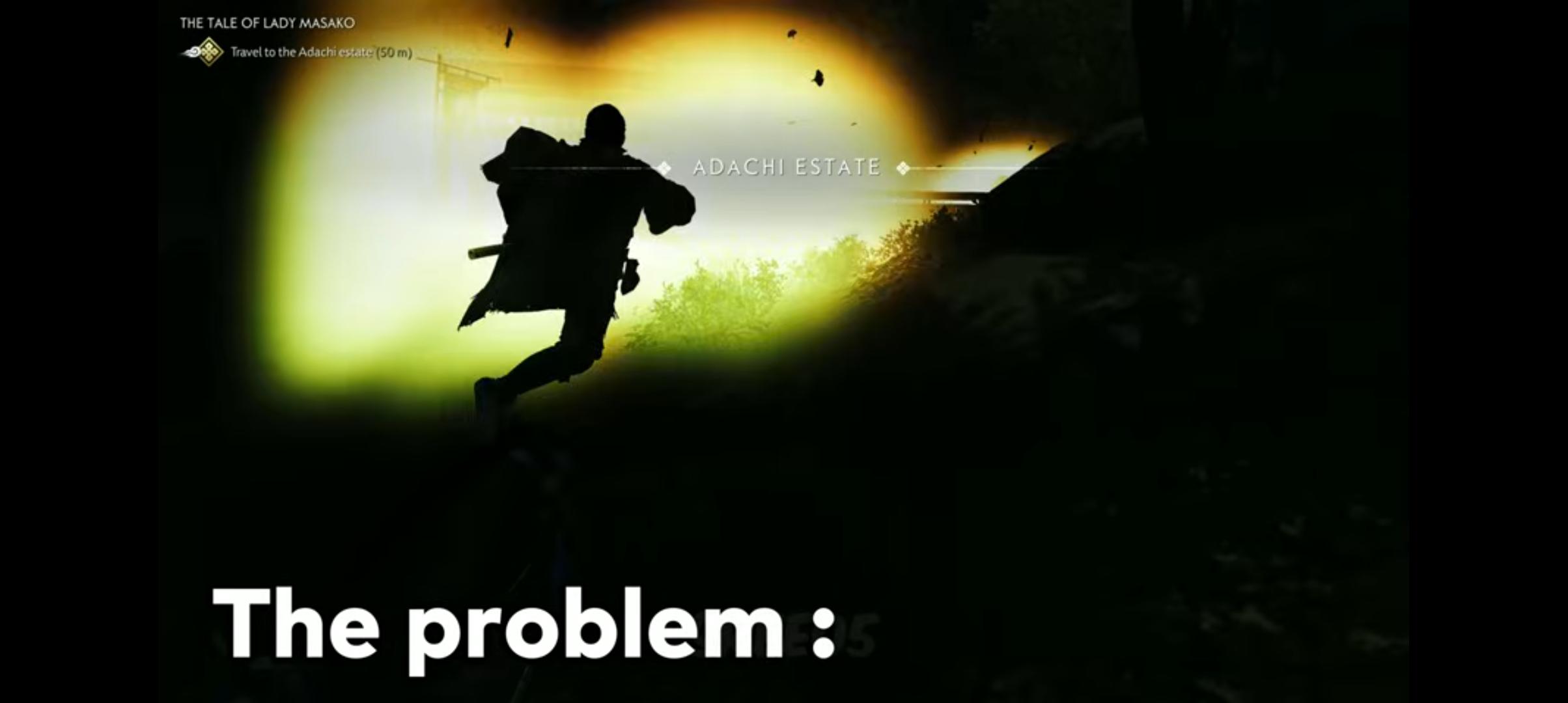
tech support wanted Ghost of Tsushima greenish light flash

Post image
4 Upvotes

I'm playing Ghost of Tsushima on my Cachyos system. Nvidia drivers are updated to the latest and the game is on latest version (steam). But I'm getting these green light flashbang every now and then. Any way to get rid of these?.

My specs:

AMD Ryzen 5 8645HS

16 gb DDR5 ram

RTX 3050 6gb vram laptop gpu

I found a screenshot of the exact problem I am facing rn from a YouTube video but that was on windows and amd gpu combo, and the creator said turning off instant replay in amd software would fix it. I am certain that in my case my Nvidia gpu is rendering the game and not my igpu, and that I do not have any recording/replay software running in the background.


r/linux_gaming • • 13h ago

gamedev/testers wanted I released my free multiplayer digging game with a native Linux build (it also runs in the browser)

6 Upvotes

I'm the solo dev of Floppa Mining. It's a multiplayer digging game made in Godot 4.8: dig down, sell, upgrade, hatch pets, unlock six islands. Up to 10 players per server.

The Linux version is native, 64-bit, not a Windows build to run through a compatibility layer. It comes as a small launcher (no installer): unzip, chmod +x FloppaLauncher.x86_64 if needed, run. The launcher downloads the game and keeps it updated. Game files go to ~/.local/share/FloppaMining. Download: https://floppamining.com/download No install at all: https://floppamining.com/play

Free, no pay-to-win*, needs a free account (email optional). Controllers work.

I only have one Linux machine to test on, so I'd be glad to hear what breaks on your distro, and on a handheld if you have one.

*There's an optional VIP (not on sale yet) that gives a gold name tag and lets you skip the egg animation.


r/linux_gaming • • 3h ago

Updating AW3426DW firmware on Linux

Thumbnail reddit.com
0 Upvotes

r/linux_gaming • • 3h ago

tech support wanted Head Tracking on Linux Mint - Alternatives to Opentrack + Neuralnet?

0 Upvotes

I've used Opentrack with ONNX Neuralnet for dead-simple webcam head tracking previously on Windows 11, mainly with the IL-2 Sturmovik: 1946 and Battle of Stalingrad combat flight simulators via Steam. I was amazed at how easy it was to set it up and use it, and it worked great.

Maybe 6 months or more ago, I tried to get it working on Linux Mint, but alas I failed. Opentrack compiled and ran just fine, it received input from the camera, but I could not get it to connect with ONNX Neuralnet for the actual head tracking. After a few days or troubleshooting I threw in the towel and gave up.

I certainly don't want to go back to Windows for one stupid thing, but I'd really like to fly with head tracking again - on Linux Mint.

Neuralnet seems to have disappeared from Microsoft's github repository sometime in the last few days. Apparently the binaries can still be installed via pip, but having limited knowledge about pip I did a bit of research into it today and it doesn't seem to be very secure? As in anyone can publish a package to it? Is that correct? I was unable to find any kind of security review in the package submission process. Maybe there is one, but it was unable to find it.

So I suppose my questions are:

1- Is pip generally secure, or is it easy/possible for someone to publish malicious binaries to it?

2- Is there anyway to verify the validity of packages pulled from pip before installing them?

3- Are there any alternatives to Opentrack with Neuralnet for webcam head tracking which don't require LED lights or reflectors to function?

I don't know, maybe a hat with reflectors wouldn't be so bad?

Thanks,

Flightless in Frankfurt


r/linux_gaming • • 4h ago

tech support wanted Hardware Encoding on AMD GPU's? (Fedora)

Thumbnail reddit.com
1 Upvotes

r/linux_gaming • • 9h ago

Artifacts in cachyos and Boot Screen

2 Upvotes

I just installed cachyOS on my second SSD and got these artifacts that I once had in windows too, but not anymore. I sometimes have these on my boot screen too which don't bother me much. But since I want to dive a little into the Linux desktop world these are a bummer. Felt like my GPU was dying for a while now since I first encountered these in my Windows installation but since that resolved itself I hoped this was not the real issue behind it. I got 2 screens and just one ist doing it btw. But as I said only in cachyOS and boot screen.

Monitor: LG ultragear 27" 144hz

GPU: Nvidia RTX 3070

Motherboard: MSI B450 Tomahawk

CPU: AMD Ryzen 5700x3d

Sorry for possible spelling or grammar mistakes


r/linux_gaming • • 13h ago

tool/utility OpenSync - self hostable steam and steam cloud alternative

4 Upvotes

Good evening everyone

i wanted to share a project on which i've been working on since August with a couple of friends i met on a discord server (shoutout linux larpers) it's a self-hosted game library and differential save-sync server and it comes with its linux, windows and macos native desktop launcher.

[WEBSITE: https://opensync.pskv.cc ]

[REPO: https://github.com/piskevalee-cpu/OpenSync ]

[LAUNCHER REPO: https://github.com/piskevalee-cpu/OpenSync-Launcher ]

The problem it solves

I keep offline and DRM-free PC game builds on my home server so multiple machines (my main desktop, a Linux couch PC, and family laptops) can pull them down without re-downloading over the internet or plugging in external drives. The annoying part has always been keeping saves and game installs separate across machines and users.

OpenSync stores every game on the server as a normal live folder paired with a SHA-256 JSON manifest. When a player downloads a game, the server streams a ZIP on the fly in uncompressed STORE mode (so a local gigabit or 2.5G link is not bottlenecked by CPU compression) while merging:

clean baseline + user overlay - user deletions

Every user gets their own save overlay computed by diffing against the shared clean manifest, never chained across overlays, with a safety guard that blocks accidental mass deletions (>50% of the manifest) unless explicitly forced

Before writing this, I looked at combining existing tools:

  • Samba / Nextcloud / HTTP file shares: Great for storing files, but every client downloads raw folders manually, and there is no clean per-user save isolation on top of one shared read-only game build.
  • Syncthing: Works well for syncing one known save directory, but bidirectional folder sync gets risky if you accidentally wipe files, does not understand a shared baseline vs. per-user save overlays, and still leaves you configuring paths machine by machine.
  • Ludusavi: Awesome for backing up saves when you already know where every game writes, but it is a backup utility rather than a central LAN distribution server that streams the game itself and merges your saves into the download automatically.
  • RomM / emulator frontends: Focused on ROMs and console emulators rather than arbitrary uncompressed Windows/Linux/macOS PC game directories.

Why this project is relecant to this sub:

  • Simple to host: Runs as a single Docker container (ghcr.io/piskevalee-cpu/opensync, linux/amd64) or directly on Node.js 22.13+ using built-in node:sqlite. Everything persistent (SQLite metadata, game directories, user overlays, and signing secret) lives under one /data volume, so backing up or migrating the server is trivial.
  • Optimized Rust streaming: Zero temporary zip files on disk on either the server or the desktop launcher. Downloads extract straight from the HTTP stream while verifying SHA-256 hashes inline.
  • Cross-platform desktop client: Written in Rust and Tauri v2, supporting Linux (AppImage and Flatpak), Windows (.exe), and macOS (Apple Silicon and Intel .dmg / .app), with automatic ELF/PE/Mach-O executable detection, Proton/Wine support, gamepad navigation, and automatic save sync as soon as a game closes (plus offline queueing if you play away from home).
  • Multi-user: Account registration, per-user profile pictures, role-based admin panel, and isolated save overlays so different people in a house can play the same game archive without touching each other's progress.

After writing by hand the first sketch of the sync saving mechanism, I do admit to using an AI coding assistant during development, mainly for accelerating boilerplate, CSS styling and responsive layout tweaks, writing unit and integration tests, refactoring Rust async command boundaries, and setting up cross-platform CI packaging workflows (Linux, Windows, and macOS builds). I directed the overall architecture, manifest and overlay sync model, feature set, and manual testing across my own machines, and reviewed and verified all changes against the test suites before releasing. However, art is human made!

NOTE: This project is still in rather early developement, especially the desktop client. i do not have a windows machine so i could not test the windows client. We are seeking contributors to help out with this project that, although new and niche, really did come a long way.

thanks to everyone who's going to check this out


r/linux_gaming • • 7h ago

Can't verify the new device on Genshin

Thumbnail
reddit.com
0 Upvotes