r/linuxmint • u/mobxh_ • 16h ago
[Cinnamon] Dark glassmorphism rice on Linux Mint 22.3
gallery
5
Upvotes
r/linuxmint • u/pmags • 1d ago
TL;DR: Burned-out IT worker; quit last fall; installed Linux Mint in February 2026; used it for nearly a year; recently installed Mint on a 2012 MacBook Pro; and started enjoying techie projects again!
Happy Turkey Day (in the USA, in any case!)
I've worked in IT for over 20 years and used various flavors of Linux off and on during that time. A SUSE build as my daily workstation at an ISP in 2004–05, recovery USBs for Windows, and even a few Linux-based servers and related tools.
But Windows or macOS remained my daily driver at home until earlier this year.
When I'm not working in IT, I do a lot of backpacking, photography, map work, and writing.
My main computer since 2019 has been a rather pedestrian HP Pavilion that cost less than $400 new.
This year, however, I started working on what I call my "Lazarus Projects": Reviving supposedly obsolete electronics and bringing them back from the dead.
First up? MintyFresh
Ryzen 5 3500U
16GB RAM (upgraded by me back then)
128GB system SSD
1TB HDD data drive
As someone who worked in IT, I definitely fell into the "cobbler's children don't have good shoes" category at times!
The battery was essentially dead, the fan sounded like an asthmatic Hoover vacuum cleaner, and I used the machine docked most of the time anyway.
Wanting to revive the machine rather than buy a new one, I cleaned out the dust bunnies, swapped the mechanical drive for a 1TB SSD, and installed Mint Cinnamon. A little tweaking, some DisplayLink drivers for my docking setup, and I was in business.
Heck, even my Brother laser printer from 2009 worked without much fuss!
I use RawTherapee, ShowFoto, and XnView for my photography, somewhat resource-intensive mapping tools (Gaia GPS, Google Earth, CalTopo), and the usual assortment of office and Internet-based applications.
I've heard Mint described as the Toyota Corolla of Linux distros on this very subreddit. As someone who wants a car that simply works rather than a hobby car, Mint's wonderfully boring nature appealed to me.
Here's MintyFresh in all its glory: https://imgur.com/EeTm4qg
The HP is showing its age physically, though. The trackpad is kaput, the keyboard is getting wonky, and it's not much of a portable computer anymore.
I'll eventually replace it with a relatively recent used SFF desktop running Cinnamon. Older corporate desktops offer a lot of bang for the buck, and I can expand the storage and memory as prices (hopefully???) drop a bit.
However, I still missed having a portable computer, especially with the holidays coming up.
Enter MacinMint https://imgur.com/ViVadKc
My wife had an old MacBook Pro sitting unused in the closet. With her blessing (I'm stupid, but not THAT stupid!), I decided to give it another life.
The old laptop in question:
Mid-2012 MacBook Pro
13-inch display
Intel Core i5
A whopping 8GB of DDR3 RAM
1TB SSD (upgraded in 2018)
Unlike my HP, this machine was quite well-made to begin with. The aluminum body, keyboard, and trackpad are still in good shape. It's essentially an old luxury car: Well-built, if lacking some of the bells and whistles of newer models.
I installed Mint XFCE. I like Cinnamon on my main workstation, where I tend to have many things going at once, but XFCE seemed like a good fit for a travel laptop.
Within four hours, I had everything set up to my liking. Wi-Fi presented a minor hiccup but was easy to work through, and the mic and camera work fine. I even got the function keys working correctly.
I knew Linux would run on the MacBook. What surprised me was HOW WELL it ran.
For writing, browsing, email, watching videos, and some light photo editing, this old laptop works rather well.
I'm typing on it now, and a machine that sells for under $50 on eBay still makes for a nice little box for my purposes. A well-built machine running a lightweight OS makes for an enjoyable computing experience.
On a related note, I also resurrected an old 2019 Android tablet with LineageOS for reading and playing exercise videos. Another piece of electronics that won't be going to the recycling center anytime soon. Perfect for reading ebooks (even with a cracked screen!)
LazTab: https://imgur.com/PKiXRuX
Overall? Mint works well, and older hardware offers excellent bang for the buck. A used desktop with good specs and a $100 off-lease laptop every five years or so? Sounds good to me.
At this point in my life, not terribly interested in OS or even distro debates. Windows, macOS, and Linux all have their uses. For my needs, Mint fits the bill.
There's another aspect of these projects I didn't quite anticipate, though.
When I was 12, a rather formidable Catholic school nun recognized my interest in computers and insisted my parents get me a Commodore 64. I spent many hours tinkering, eventually making a living doing much the same.
But after years of tickets, deadlines, meetings, and other assorted workplace joys, computers became something I worked on rather than played with. My last IT job left me pretty burned out, tbh.
These projects brought back some of that spark without the "Weekly Crisis of the Century" as with my last hitch.
Instead, I saved some cash, made "obsolete" hardware into useful everyday tools, and found tech fun again.
Not too shabby.
(EDIT - Formatting and flair)
r/linuxmint • u/MortgageStraight666 • 1d ago

r/linuxmint • u/Leniwcowaty • 1d ago
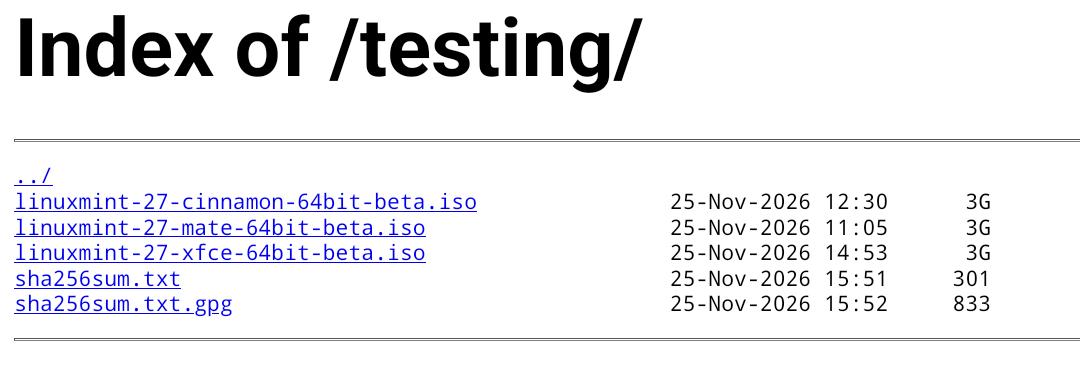
For all of us to test!
https://pub.linuxmint.io/testing/
Go, install, test, give your feedback. We're sooooo back!
r/linuxmint • u/racooo123 • 1d ago
I have been running proxmox and Ubuntu server in my home lab for a little while now. But I have finally gotten fed up with Windows. I think Microsoft did too little too late. Now I only use Windows when I need to.
I am running Mint on my personal laptop. And yes this thing has some cooling issues at times but it would be unusable with windows 45% of the time. Mint makes that thing usable 99% of the time. (I’m pretty sure there is a bug for the cooling system, but I really don’t want the bloatware from the manufacturer if I fix it).
On my work laptop I run LMDE. Unfortunately, I need to use Rockwell software at work so I run a Win 10 vm on LMDE. Which is 1000 times better than the Win 11 machine with Win 10 vm IT set up.
On my gaming PC I run Bazzite, with dual boot just in case I have to deal with Windows.
I still have a metric shit ton to learn yet, but I love Linux so much and really enjoy it. And I actually find myself wanting to learn more and more about Linux.
Anyone else want to unrealistically figure out how to run Rockwell software on Linux?
r/linuxmint • u/TucsonComputerDude • 15h ago

Right click Panel, turn on "Panel Edit mode", then drag drop. Ive looked all over settings, rcant find out how to move MENU back to left side? THANKS
r/linuxmint • u/Asocial_2730 • 12h ago
Buongiorno. Ho installato Linux Mint, primi problemi schermo nero. Riesco a fare gli aggiornamenti software sistema etc. Ad ogni riavvio schermo nero. Riesco a partire in ricoveri mode. Grazie per gli aiuti
r/linuxmint • u/PitifulBodybuilder75 • 3h ago
r/linuxmint • u/TCSMusic • 21h ago
Alright, so reinstalled Mint and this time, instead of choosing the nvidia-open driver from Driver Manager, I had to go into my package manager (kitty) and see REALLY what all drivers I can get, it listed proprietary, so I installed that. Installed Steam, and I game pretty good. I guess there are a few VRAM heavy games I crash in, but most of the games I run play fine
r/linuxmint • u/Dist__ • 15h ago
Does Mint 27 XFCE beta also have wayland support?
i'd like to contribute testing, but my spare machine only has 4GB RAM, i run XFCE on it currently.
i plan to see how reaper with yabridge/wine works with windows VST with wayland - which is my main concern.
r/linuxmint • u/Delicious_Tadpole_76 • 1d ago

APTUI is a terminal user interface (TUI) written in Go for managing APT packages. Browse, search, install, remove and upgrade packages — all without leaving the terminal.
r/linuxmint • u/Captain-Quack • 1d ago
Linux Mint Mate. I'm trying to set up two copies of waterfox. One each on two different workspaces. One for work use and one for personal use. No matter what I do when I setup a profile in one it shows up in waterfox on both workspaces. When I delete one profile it deletes it on the other. I just want one the one profile on the appropriate workspace with their own settings and bookmarks. Any suggestions?
Captain Quack
r/linuxmint • u/Ghost_K1 • 1d ago
I recently got curious about using a window manager (WM) and looked into Hyprland (simply because it’s the most well-known), but it’s designed for Wayland. So, I switched to i3 instead, since it uses X11 and doesn’t cause any issues with Cinnamon.
However, Linux Mint is set to receive an update around Christmas that will include Wayland support. I’m not sure whether I should wait for that, or go ahead and set things up with i3 now—only to redo it all later with Hyprland.
r/linuxmint • u/washyourgoddamnrice • 1d ago
Hello everyone I need guidance on what I should choose for a new laptop. I’ve never bought a gaming laptop before so I don’t know what brand is reliable I just know I want to get windows off it and put Linux on it
Additionally if anyone has direct experience bypassing windows sign up process or if any of the laptops I’ve listed below have compatibility issues with Linux please let me know
I would use the laptop for photo/video editing, 2d animation, 3D modelling, digital illustration and perhaps some gaming
Oh one more thing I would be looking to get a pen display to do work, if anyone knows of compatibility issues with xp pen or huion please let me know
Thank you very much in advance
ACER Predator Helios Neo 18 AI 18" Gaming Laptop - Intel® Core™ Ultra 9, RTX 5070 12Gb Ti, 1 TB SSD
ACER Predator Helios Neo 16 AI 16" Gaming Laptop - Intel® Core™ Ultra 9, RTX 5080 16Gb, 1 TB SSD
MSI Stealth 16 AI+ 16" Gaming Laptop - Intel® Core™ Ultra 9, RTX 5080 16Gb, 1 TB SSD
MSI Raider 16 Max HX 16" Gaming Laptop - Intel® Core™ Ultra 9, RTX 5090 32Gb?* , 1 TB SSD
ASUS ROG Strix SCAR 18 18" Gaming Laptop - Intel® Core™ Ultra 9, RTX 5080 16Gb, 1 TB SSD
ASUS ROG Strix G16 16" Gaming Laptop - AMD Ryzen 9, RTX 5070 12Gb Ti, 1 TB SSD
LENOVO Legion Pro 5 16" Gaming Laptop - Intel® Core™ Ultra 7, RTX 5070 8Gb, 1 TB SSD
r/linuxmint • u/RS_Pete • 1d ago
I have a BMW which has thrown up a warning I need to check. In my pre Linux days I used to use INPA and ISTA BMW diagnostic software which appears unfortunately to only be Windows friendly.
Has anyone run something like this on Linux, presumably using a Windows emulator and if so how, and how successfully?
I would rather not have to return my laptop to Windows for this if I can avoid it....
r/linuxmint • u/Kindly_Door1912 • 22h ago
So I have a modded 3DS, but after I switched to Linux, the SD card won't let me have write access. I copied all of the files, and formatted it, but it still won't work. Help!
r/linuxmint • u/ShadowZ71Z • 2d ago

Messed up something with the partition and now I can't boot up and now apparently my ssd has been overridden.
Kinda sucks cause I spent like 3 hours trying to get mint running from a USB drive but then this happens so lovely like 600gb of windows files gone
Update: luckily most of my stuff can actually be recovered cause God bless DMDE I can get most of my pictures and passwords back
r/linuxmint • u/deathroguetroll • 23h ago
My machine seems to be having issues with sound lately. Over the past couple of days, my sound on my computer seems to cut out every now and again(between 30 seconds and 4ish minutes between each instance), usually only for a second or two at a time before coming back. Sometimes it sounds robotic-y for a moment or two after coming back, but the main issue is the sound cutting in and out. I've already tried disabling power save for the audio device, but it continues to occur.
What has changed around the time this happened:
-a new monitor was put in(going from 1 monitor to 2)
-one monitor was turned vertical
-the computer itself was moved from the floor onto a desk, and as a result, a few of the USB devices were moved around(not the one for the headset, I am using the same one for that)
One of the primary things I am noticing it is in games. When I am on youtube or something similar, it does not seem to happen.
I apologize if my post may seem disorienting or all over the place, I am not good at phrasing questions whilst also providing all necessary information, but I hope there is enough here for someone to potentially help.
r/linuxmint • u/BigD21489 • 14h ago
Hey everyone. I've used a few different Linux distros over the years. Ubuntu, Fedora and maybe one or two others. I've heard a few people like Mint. Give me the pros for Linux Mint. I develop websites and sometimes software, I produce video and design graphics. I run Windows 11, but sometimes boot to Ubuntu. Let me know what the strengths are for Linux Mint.
r/linuxmint • u/RomanProkopov100 • 2d ago

r/linuxmint • u/andres2142 • 1d ago

What I have tried:
cinnamon-settings user opens the same avatar selection window from try #1, I select another image and there is no error output in the terminal, just the path where the image is located (which is Pictures directory)root directory, check .face file, opening that file displays the EXACT image I set on try #2 but the menu keeps displaying the old avatar picture..png, .jpg or .jpeg images, none of them worked.What am I missing?
This is definitely a bug. Users shouldn't have a problem when changing a simple avatar image...
r/linuxmint • u/Silver_Train7685 • 1d ago
i wanted to try i3 on Mint without throwing Cinnamon away, and turns out you don't have to. i3 is just another session at the login screen and Cinnamon stays installed.
I installed i3 from Cinnamon (not from inside i3), then logged out with Menu > Quit > Log Out. On Mint's login screen click your name, then the little gear next to the password box and pick i3. If you see "Cinnamon on Wayland" leave it alone, i3 here is an X11 session. The login screen remembers whatever you used last, so next boot it might already be set to i3. That's normal. If you want Cinnamon back just pick it with the same gear.
To leave i3 I use the power menu, choose Log out and confirm. Then pick Cinnamon at the gear and log in. Cinnamon came back like nothing happened, panel and menu and no leftover i3 bar.
The first hour feels pretty bare since there's no start menu and no desktop icons. These are the keys that got me unstuck:
Two Mint specific gotchas I hit:
If i3 feels like too much on a given day, just log out and pick Cinnamon. You haven't burned any bridges.
I also wrote the keys I actually use onto a free printable one page cheat-sheet if anyone wants it: https://payhip.com/b/1BxVO
r/linuxmint • u/Space_Pirate_8888 • 1d ago
hello everyone! tl;dr below
i was setting up a usb hard drive to store my timeshift snapshots and, after running into some issues, stupidly decided to recursively change the permissions of each file and directory within my snapshots folder. i had assumed that running this command would only affect the files and directories within the snapshots folder. however, from what i've heard, rsync uses hard links that point toward system files. i'm still learning about basic linux file system concepts, so i don't know what hard links are just yet, but i'm concerned that using this command modified the actual system files on my pc that the hard links were pointing toward. in a bit of a panic, i (also stupidly) ran sudo chgrp -R root on the snapshots directory to hopefully restore proper ownership to most system files, but i know that there are system files that don't have root ownership.
i have one snapshot from before i ran this command, but considering i ran it from the snapshot root folder, i don't expect restoring from it to actually do any good. so far i've had no issues using my computer following this, even after a reboot, but i'm still concerned (especially from a security perspective!!). does anyone have any advice? do i have to do a fresh install?
tl;dr: i stupidly ran sudo chgrp -R adm on my timeshift snapshots folder and i'm worried that it changed permissions of my actual system files because i'm using rsync. what should i do?
