r/LocalAIStack • • 3h ago

Getting Zoom, Teams and in-person meetings into Claude over MCP?

1 Upvotes

Our company has meetings across Zoom, Teams, and Meet, along with a lot of in-person discussions. I enabled the Claude Meetings beta and it's been working really well for our Meet calls, but that's currently the only platform it supports.

I tried manually exporting transcripts from Zoom and Teams and adding them to a project, but that routine only lasted about a week before everyone stopped bothering with it!

I'm thinking of setting up a system where transcripts from every platform go into one shared folder. We'd also record in-person meetings on a phone and add those recordings there. Then I'd run a single MCP server over the folder for Claude to access. Would one server and folder still work well once there are hundreds of transcripts, or would it make more sense to organize things separately by platform?


r/LocalAIStack • • 6h ago

The Q4 agent stopped waiting for tool results before acting. Same test on another model: almost no change. Here's why.

Thumbnail
reddit.com
1 Upvotes

r/LocalAIStack • • 14h ago

Host performance optimization TUI

Thumbnail gallery
1 Upvotes

r/LocalAIStack • • 14h ago

3 months in building local ai

Post image
19 Upvotes

Apologies in advance, as many of you seem very advanced, but I wanted to share a project I am working on. For some background, I’m not a developer by any means. I am a data architect by trade who knows some Python and SQL.

What has always appealed to me is taking 20 years of personal and work data—emails, photos, texts, and RSS feeds—and building a database that integrates with a local AI model. It might sound like an unusual goal, but I want a local model that can reflect my approach and perspective based on my own history. For example, if I ask it to design a data model, it can draw from models I’ve built in the past. If I hit a tricky query, it can reference previous SQL problems I have solved. It also doubles as a personal memory bank, letting me quickly look up past flights, hotels, or favorite restaurants in a given city.

Thats’s the core of the project: a private AI that knows my life because it can search my records, not because it was trained on them. Everything runs locally at home on my mini PC and NAS nothing touches the cloud”and I access it from my iPhone, iPad, and laptop over Tailscale. I would appreciate any thoughts or ideas. For the most part, this is up and running and working for me. I still have a lot more to go . But the database side of it is done and I’ve embedded everything.


r/LocalAIStack • • 15h ago

Install Qwen 3.8 27b and Deepseek Harness on 16GB VRAM - Setup Guide

Thumbnail
youtube.com
1 Upvotes

**--- Video content breakdown (Guide and Links are below) ---**

​1. Required Downloads

​Gather the following installers, models, and configuration templates \[00:52\]:

​Beellama Server (beellama.cpp): Download the latest stable Windows CUDA release (e.g., beellama-v0.5.0-bin-win-cuda-12.8-x64.zip) along with the matching cudart archive (beellama-v0.5.0-cudart-win-cuda-12.8-x64.zip) from GitHub \[01:08\].

​DeepSeek Harness: Download the Windows installer directly from the DeepSeek website \[02:09\].

​Qwen 3.8 27B Model: From Hugging Face, download the IQ3_S-mtp GGUF quantization (recommended for 16GB VRAM) as well as the separate multimodal vision projector file (mmproj-Qwen3.8-27B-BF16.gguf) \[02:34\].

​Custom Chat Template: Download chat_template.jinja from the Qwen-Fixed-Chat-Templates repository to prevent thinking loops \[03:07\].

​2. Directory Setup & File Extraction

​Organize your local AI environment in a clean directory (e.g., D:\\LocalAI) \[04:18\]:

​Create two subfolders: beellama and models \[04:24\].

​Extract both the beellama binary archive and the cudart DLL files directly into the beellama folder \[04:36\].

​Move the Qwen GGUF model, the mmproj vision file, and chat_template.jinja into the models folder \[04:57\].

​3. Configuring & Starting the Local Server

​Create a Windows batch file (e.g., start_beellama.bat) in your main directory using the startup script provided in the creator's notes \[05:40\].

​Ensure the file paths in the batch script match your model file names, context size (e.g., 115200), and port (8080) \[07:20\].

​Run the batch file to launch llama-server.exe \[07:36\]. Once running, verify the OpenAI-compatible API endpoint is active by visiting [http://127.0.0.1:8080/v1/models](http://127.0.0.1:8080/v1/models) in your browser \[09:57\].

​4. Installing & Configuring DeepSeek Harness

​Installation: Run the DeepSeek Harness installer and keep the default installation path to prevent configuration path issues \[10:44\].

​Connecting the Local Model:

​Open Settings (Einstellungen) -> Models (Modelle) and add a custom API provider \[11:40\].

​Set the Base URL to [http://127.0.0.1:8080/v1](http://127.0.0.1:8080/v1), select the OpenAI Chat Completions protocol, and fetch the available model (Qwen3.8-27B) \[12:34\].

​Enter any placeholder text (such as 1234) into the API key field, as the app requires a value even though the local server ignores it \[13:04\].

​YAML Configuration: Open the config.yaml file via the top-right button in Settings, completely exit DeepSeek Harness (including from the system tray), and paste in the custom configuration block \[13:26\]. This configures the exact context window (115200), multimodal (text, image) inputs, longer timeout limits for local inference, and adjusted compaction thresholds \[15:01\].

​Setting Up a Workspace: Relaunch DeepSeek Harness, enter your dummy API key if prompted, select Qwen3.8-27B from the model dropdown, and link a dedicated project folder as your workspace with standard read/write permissions \[16:06\].

**--- start of guide ---**

Hey,

as many requested from my [qwen vs inkling report](https://www.reddit.com/r/LocalLLM/comments/1y6ux2s/qwen_38_27b_vs_inkling_2_mini_user_comparison_on/), here is at least a quick setup guide for qwen 3.8 27b and deepseek harness at 16gb vram. Sorry, dont really have time for an in depth tutorial right now, but thought this might suffice to get you started.

**--- Installers and Files ---**

  1. Beellama: [https://github.com/Anbeeld/beellama.cpp/releases](https://github.com/Anbeeld/beellama.cpp/releases)

Download latest stable release and the cuda libraries

\- [beellama-v0.5.0-bin-win-cuda-12.8-x64.zip](http://beellama-v0.5.0-bin-win-cuda-12.8-x64.zip)

\- [beellama-v0.5.0-cudart-win-cuda-12.8-x64.zip](http://beellama-v0.5.0-cudart-win-cuda-12.8-x64.zip)

2. Deepseek Harness: [https://www.deepseek.com/en/harness/](https://www.deepseek.com/en/harness/)

Download the harness installer

3. Qwen 3.8 Model: [https://huggingface.co/ISTA-DASLab/Qwen3.8-27B-GSQ-RCO-GGUF/tree/main](https://huggingface.co/ISTA-DASLab/Qwen3.8-27B-GSQ-RCO-GGUF/tree/main)

Download the model.gguf (mtp version) and the vision gguf

4. Qwen 3.8 Chat Template: [https://huggingface.co/froggeric/Qwen-Fixed-Chat-Templates/tree/main](https://huggingface.co/froggeric/Qwen-Fixed-Chat-Templates/tree/main)

Download the Chat Template file

**--- Llama Starter and Config - Adjust the paths and file names ---**

u/echo off

REM Hide command echoing to keep the startup window clean.

cd /d "D:\\LocalAI\\Beellama"

REM Change working directory to the folder containing llama-server.exe.

REM ============================================================================

REM LLAMA-SERVER PARAMETER DOCUMENTATION

REM ============================================================================

REM

REM \[Hardware & Performance\]

REM -t 12 : Number of CPU threads for generation

REM -tb 12 : Number of CPU threads for batch processing

REM -ngl 99 : Offload up to 99 model layers to GPU

REM --no-mmproj-offload : Keep multimodal projector off GPU (saves VRAM)

REM -fa on : Enable Flash Attention

REM

REM \[Model & Vision\]

REM -m : Path to main GGUF model file

REM --mmproj : Path to multimodal projector file

REM --image-min-tokens 1024 : Minimum image token allocation

REM --alias "Qwen3.8-27B" : Friendly model/API name

REM

REM \[Speculative Decoding (MTP)\]

REM --spec-type draft-mtp : Enable MTP speculative decoding

REM --spec-draft-n-max 3 : Maximum 3 speculative draft tokens

REM --spec-draft-p-min 0.8 : Minimum draft probability threshold

REM

REM \[Context & KV-Cache\]

REM -c 115000 : Maximum context window: 115K tokens

REM -ctk kvarn4 -ctv kvarn3 : Quantized K and V KV-cache formats

REM --kv-tail-tokens 1024 : Preserve recent 1024 KV tokens in cache tail

REM -kvu -np 1 : Unified KV cache; one parallel sequence

REM --cache-ram 16384 : Allocate up to 16 GB RAM for prompt caching

REM --cache-idle-slots : Cache reusable data from idle slots

REM

REM \[Chat Template & Sampling\]

REM --jinja : Enable Jinja chat templating

REM --chat-template-file : Path to custom Jinja chat template

REM --temp 1.0 : Sampling temperature

REM --top-k 20 : Consider the 20 most likely tokens

REM --top-p 0.95 : Nucleus sampling threshold: 95%

REM --min-p 0.0 : Minimum relative token probability filter

REM --presence-penalty 1.2 : Penalize previously appearing tokens

REM

REM \[Reasoning & Loop Guard\]

REM --reasoning on : Enable reasoning support

REM --reasoning-budget 16384 : Reasoning token budget

REM --reasoning-budget-message : Instruction injected when reasoning budget is exhausted

REM --reasoning-loop-guard : Force-close detected reasoning loops

REM --reasoning-loop-interventions : Maximum reasoning-loop interventions (2)

REM --reasoning-loop-min-coverage : Minimum coverage for loop detection (256)

REM --reasoning-loop-window : Token window used for loop detection (1024)

REM --reasoning-preserve : Preserve reasoning information across turns

REM --chat-template-kwargs : Set reasoning effort to extra high (xhigh)

REM

REM \[Network\]

REM --port 8080 : HTTP server listening port

REM ============================================================================

llama-server.exe \^

\-t 12 \^

\-tb 12 \^

\-m "D:\\LocalAI\\models\\Qwen3.8-27B-UD-IQ3_S.gguf" \^

\--mmproj "D:\\LocalAI\\models\\mmproj-Qwen3.8-27B-BF16.gguf" \^

\--no-mmproj-offload \^

\--image-min-tokens 1024 \^

\--alias "Qwen3.8-27B" \^

\--spec-type draft-mtp \^

\--spec-draft-n-max 3 \^

\--spec-draft-p-min 0.8 \^

\-ngl 99 \^

\-c 115000 \^

\-ctk kvarn4 -ctv kvarn3 \^

\--kv-tail-tokens 1024 \^

\-fa on \^

\--jinja \^

\--chat-template-file "D:\\LocalAI\\models\\chat_template.jinja" \^

\--temp 1.0 \^

\--top-k 20 \^

\--top-p 0.95 \^

\--min-p 0.0 \^

\--presence-penalty 1.2 \^

\--reasoning on \^

\--reasoning-budget 16384 \^

\--reasoning-budget-message "Reasoning budget exhausted. Commit to the judgment you have formed so far. Your next output must be a concrete action: a tool call, a gate decision, or a completed deliverable. Do not restart the analysis." \^

\--reasoning-loop-guard force-close \^

\--reasoning-loop-interventions 2 \^

\--reasoning-loop-min-coverage 256 \^

\--reasoning-loop-window 1024 \^

\--reasoning-preserve \^

\--chat-template-kwargs "{\\"reasoning_effort\\":\\"xhigh\\"}" \^

\-kvu -np 1 \^

\--cache-ram 16384 \^

\--cache-idle-slots \^

\--port 8080

pause

**--- Deepseek Harness Config ---**

edit: Reddit messes up the indentation of the file - so rather download it with clean indentation:

[https://drive.google.com/file/d/13GKi0DTl8-Wj8jWb1Jg8gzBzEEKXo_oM/view?usp=sharing](https://drive.google.com/file/d/13GKi0DTl8-Wj8jWb1Jg8gzBzEEKXo_oM/view?usp=sharing)

\# ============================================================

\# CUSTOM QWEN MODEL PROVIDER

\# ============================================================

\# Register a custom LLM provider for DeepSeek Harness.

\- id: llm-pi-ai

\# Unique component identifier used by the harness.

name: "@deepseek-ai/dsh-llm-pi-ai"

config:

providers:

qwen:

\# Friendly provider name displayed in the harness.

displayName: qwen

\# Use the OpenAI-compatible Completions API protocol.

api: openai-completions

\# Local llama-server endpoint.

\# Port 8080 matches your Beellama startup configuration.

baseURL: [http://localhost:8080](http://localhost:8080)

\# Environment variable containing the API key.

\# The actual key is not stored directly in this YAML file.

apiKeyEnv: QWEN_API_KEY

models:

\- id: Qwen3.8-27B

\# Model identifier sent to the API.

\# Must match the model alias configured in llama-server.

name: Qwen3.8-27B

\# Maximum context window advertised to the harness.

\# 115K tokens, matching your server context.

contextWindow: 115000

\# Maximum number of tokens requested for a response.

\# Includes generated reasoning/output, subject to server support.

maxTokens: 32768

\# Supported input modalities:

\# text = normal text prompts

\# image = image/multimodal input

input: \[text, image\]

\# Maximum time to wait for an idle streaming connection.

\# 600000 ms = 10 minutes.

streamIdleTimeoutMs: 600000

\# Maximum request timeout.

\# 600000 ms = 10 minutes.

timeoutMs: 600000

\# ============================================================

\# EXPLICITLY DISABLED COMPONENTS

\# ============================================================

\# Disable DeepSeek Harness session logging.

\- id: session-log-deepseek

\# Original session logging component.

name: "@deepseek-ai/dsh-session-log-deepseek"

\# Prevent this component from loading.

disabled: true

\# Disable the plugin marketplace tool integration.

\- id: tool-plugin-market

\# Plugin marketplace tools component.

name: "@deepseek-ai/dsh-plugin-market/tools"

\# Prevent marketplace tools from being registered.

disabled: true

\# Disable the plugin manager tool integration.

\- id: tool-plugin-manager

\# Plugin manager tools component.

name: "@deepseek-ai/dsh-plugin-manager/tools"

\# Prevent plugin management tools from being registered.

disabled: true

\# ============================================================

\# CONTEXT COMPACTION AND TOOL RESULT MANAGEMENT

\# ============================================================

\# Define a grouped set of compaction-related components.

\- id: compaction

\# cordis:group loads multiple components as one logical group.

name: cordis:group

\# Marks this component as a group rather than a standalone plugin.

group: true

isolate:

\# Isolate the compaction functionality.

compaction: true

\# Isolate tool-result pruning functionality.

toolResultPruner: true

config:

\# ----------------------------------------------------------

\# BASIC CONTEXT COMPACTION

\# ----------------------------------------------------------

\- id: compaction-basic

\# DeepSeek Harness basic compaction implementation.

name: "@deepseek-ai/dsh-compaction-basic"

config:

\# Trigger compaction when context usage reaches 80%

\# of the available context window.

thresholdRatio: 0.8

\# Additional token headroom reserved during compaction.

\# Zero means no additional headroom is configured here.

headroomTokens: 0

\# Retain 12% of the conversation when compacting.

\# Helps preserve important conversational context.

retainRatio: 0.12

\# Maximum token limit used by this compaction component.

maxTokens: 65536

\# ----------------------------------------------------------

\# MANUAL COMPACTION COMMAND

\# ----------------------------------------------------------

\- id: command-compact

\# Registers the /compact command.

\# Allows manual context compaction when supported by the harness.

name: "@deepseek-ai/dsh-command-compact"

\# ----------------------------------------------------------

\# TOOL RESULT PRUNER

\# ----------------------------------------------------------

\- id: tool-result-pruner

\# Automatically manages oversized tool results.

name: "@deepseek-ai/dsh-compaction-tool-result-pruner"

config:

\# Trigger pruning when a tool result exceeds 8192 characters.

thresholdChars: 8192

\# Preserve the first 4096 characters of the tool result.

\# Usually retains the beginning and initial context.

headChars: 4096

\# Preserve the last 1024 characters of the tool result.

\# Usually retains the ending and final information.

tailChars: 1024


r/LocalAIStack • • 16h ago

Trained Qwen 3 4b for legel statute identification

Thumbnail
huggingface.co
2 Upvotes

r/LocalAIStack • • 17h ago

Perplexity Computer Comet Browser Local Alternative

1 Upvotes

Looking for a local alternative to Perplexity Computer's browser control assistant.

For those who do not know Perplexity has a browser called "Comet". Inside comet there is a tab called "assistant" that can control your browser and do tasks for you like navigate webpages, make email drafts on outlook accounts that do not allow AI plugins (by the admin).

Basically I am looking for the best local alternative to this solution, I am spending a few hundred dollars on tokens a month here.

I already have LM studio Bionic that is working quite well using Gemma 4 E4B although I could run a slightly larger model if necessary. ANY help is appreciated, I really like the browser functionality but I do not want to keep spending this much on tokens, would rather buy more hardware if necessary.


r/LocalAIStack • • 19h ago

The Sandstorm Is Carrying an Entire City

4 Upvotes

What if a sandstorm wasn't destroying the city, but carrying something much bigger toward it?


r/LocalAIStack • • 20h ago

Beyond VRAM limits: Running 30B MoE coding agents and 22B audio/video diffusion on consumer GPUs

2 Upvotes

I shared some of my local AI experiments earlier today. The post received over 8,000 views and some genuinely useful feedback, including offers to test on older NVIDIA GPUs, before it was removed by Reddit's filters.

Since then, I've added real UI screenshots, improved hardware detection, and continued working on compatibility.

The original motivation was simple: how far can we push local AI on hardware we already own?

My primary test machine:

  • AMD RX 5600 XT — 6 GB VRAM
  • Ryzen 5 5500
  • 32 GB DDR4 RAM
  • Windows 11
  • Vulkan, no ROCm, no manual C++ builds

I've also tested on NVIDIA hardware. The benchmark results below are specifically from my RX 5600 XT.

I ended up building three Apache-2.0 projects:

  • PicoCode: Local coding LLMs, hardware-aware inference, and a terminal-based coding agent.
  • PicoStudio: A pure Python stdlib web IDE with multi-file editing, split diff, multi-tab terminal, vision support, and a GPU arbiter.
  • localVid: Local image, video, and audio generation with low-VRAM optimizations.

The GPU arbiter allows the coding and diffusion engines to share the same GPU by unloading one before starting the other.

What actually made a difference

The biggest performance gains came from reducing Windows WDDM shared-memory spills and tuning inference configurations.

Qwen3-Coder-30B-A3B — IQ4_XS, 32K context, Q8_0 KV cache

  • Adaptive MoE offloading based on available VRAM
  • --load-mode none
  • ngram-mod speculative decoding
  • --cache-reuse 256

Results:

  • Prompt processing: 58.8 → 71.8–97.5 tok/s
  • Token generation: 16.9 → up to 30.2 tok/s
  • Up to 79% faster generation in tested file-refactoring workloads

Inkling 2 Mini — 26.4B/3.4B MoE + Vision + DSpark

Using --no-op-offload --no-host:

  • Shared VRAM spill: 9.04 → 1.2–2.1 GiB
  • Prompt evaluation: 0.7 → 15.5 tok/s
  • Total execution time: 136.8 → 34.7 seconds

LTX-2.3 22B — Text/Image-to-Video + 48 kHz stereo audio

  • Reduced WDDM memory spills using VRAM budgeting and disabled prefetching
  • Tiled VAE decoding delivered 4.3–11.6x faster video decoding in tested configurations
  • One 25-frame decode went from 149s to 12.8s
  • Two-stage native x2 upscaling reduced total rendering time by approximately 2.1x in my tests

Wan 2.2 14B

  • Addressed Windows TDR crashes on RDNA 1 Vulkan
  • 5–9.3x faster single-step DiT processing in tested configurations
  • 356s → 38.4s at 480×320, 17 frames

These are workload-specific results from my own testing, not universal performance guarantees.

Obviously, these larger models don't fit entirely inside 6 GB VRAM. System RAM, quantization, selective GPU offloading and memory management are essential parts of the setup.

I'm not trying to reinvent llama.cpp or replace frontier cloud models. I'm interested in making local AI more accessible on ordinary hardware.

All three projects are free and open source. Real UI screenshots, benchmark results and installation instructions are available here:

https://github.com/ffalcon3098-droid

I'd be particularly interested in comparing results with people using older AMD cards, Pascal GPUs, budget RTX cards or multi-GPU setups.

Technical feedback, criticism and benchmarks are welcome.


r/LocalAIStack • • 21h ago

Tips on setting up and training a local LLM

Thumbnail reddit.com
0 Upvotes

Hi guys, I have a PC with 64GB DDR5 RAM, I have 5 TB of storage which is expandible. I have a Nvidia RTX 5070ti 26GB VRAM, and a Ryzen 7 9800x3d

I’m looking into running a local AI on this PC for a business of mine. It’s a sort of pilot project. Nothing else has been run on the PC so it’s purely dedicated to running an LLM. I’ve tried installing things through using the web panel. Hasn’t given me the best results I’ve tried claudeing, ChatGPT and so if you could you know give me some tips, point me in the right direction or send some articles things to read upon et cetera. That would be appreciated or if anyone wants to you know work together by chance and test out setting up an LLM since I have hardware and that some people may not have.


r/LocalAIStack • • 22h ago

My German 5-machine home LLM cluster: RTX 3090 + MI50 (Vulkan) main model at IQ3_S, 40G InfiniBand chain, full voice stack – hardware, quants, tok/s, latency

Thumbnail reddit.com
1 Upvotes

r/LocalAIStack • • 23h ago

I got a 30B coding model running on an 8 GB GPU, faster than llama.cpp, and Claude Code works with it too - eomoe

Thumbnail
reddit.com
1 Upvotes

r/LocalAIStack • • 1d ago

[Benchmark / Call for Testing] Does directing an LLM via small reviewed text paths beat prompting it directly? Help run an empirical test on your local GPU (tawjih 0.18.0 — Python stdlib only)

1 Upvotes

Hi everyone,I’ve been building tawjih (0.18.0), a zero-dependency (Python standard library only) CLI and desktop tool for engineers who want to direct LLMs through small, version-controlled plain-text files (human, machine, and science faces) joined into explicit execution paths—with JSON contracts, deterministic retries, fallbacks, and full provenance tracing.

The honest catch: So far, the entire test suite and architecture lab have been verified on CPU and against mock/stand-in servers.

No real GPU or live model benchmark has been published yet.

Rather than making unverified claims, I built a self-contained experiment in the repo and am asking folks with local GPUs (Ollama, vLLM, SGLang, llama.cpp, etc.) to run it and share the raw report. What the experiment tests (experiments/path-vs-direct)It evaluates 60 quadratic equations (20 base + 40 harder generated variants, in both English and Arabic) across 3 runs each, comparing three setups: path: The structured cross-tree path (extracting coefficients $\\rightarrow$ JSON contract validation $\\rightarrow$ deterministic/stepwise solving).direct: Asking the model directly in one shot.steps: Asking the model to reason step-by-step in a single prompt.The script outputs accuracy, 95% confidence intervals, McNemar's test ($p$-value for paired statistical significance), latency, and token usage. How to run it in 3 commands (Zero extra Python packages needed)If you already have Ollama running locally:Bashgit clone https://github.com/AlmodinyMk/LLM-tawjih-Model-building.git

cd LLM-tawjih-Model-building

ollama pull qwen2.5:3b # or test with your own local model (Llama-3.2, Qwen3, Mistral, etc.)

python experiments/path-vs-direct/run.py --models qwen2.5:3b

(You can also point it to any OpenAI-compatible local server like vLLM/llama.cpp via TAWJIH_BASE_URL). Additional GPU tests (Optional, for multi-GPU / vLLM / PEFT users)If you want to stress-test the inference server wrapper or training bridge on real hardware: Inference & KV-cache benchmark: python tawjih.py server bench <name> --from-file 1.1.1 --requests 16 --concurrency 4Neural bridge (17 PEFT methods / QLoRA / SFT / DPO): python plugins/neural_bridge.py envShare your resultsWhether the structured path wins, ties, or loses to direct prompting on your model, please paste the generated report in the comments or open a GitHub issue. Whatever the numbers say goes straight into the README.md and the accompanying technical paper.

GitHub: https://github.com/AlmodinyMk/LLM-tawjih-Model-buildingPyPI: pip install tawjih (v0.18.0)License: CC BY-NC-SA 4.0


r/LocalAIStack • • 1d ago

Experimenting with local AI on AMD: Ollama, Open WebUI, SearXNG and OpenCode

Post image
1 Upvotes

r/LocalAIStack • • 1d ago

Local model for brainstorming and plan preparation

6 Upvotes

Hi.

There is plenty information about quality of the local models for coding and agentic stuff.

I wasn't able to find anything related to brainstorming and based on that - architecture and plan preparation for typical SDLC workflow.

Do you have any cheap solutions for each category tested (model and quant)

\* Brainstorming

\* Plan preparation

\* Orchestration

Is QFN feasible to do some of that?

Maybe some cheap Chinese models on OpenRouter?


r/LocalAIStack • • 1d ago

Trained Qwen 3 4b for legel statute identification

Thumbnail
huggingface.co
1 Upvotes

r/LocalAIStack • • 1d ago Mindblown Bravo

LexiSuite d484004: my all-Rust local AI stack (own kernel, OS, engine, panel) - 206 changes in two days, Inkling-2-Mini at 131 tok/s on one 7900 XTX

Thumbnail
github.com
2 Upvotes

AIO USB/VM/Drive image with Inkling 2 Mini baked here: https://huggingface.co/Wa1k3r/Inkling-2-Mini-NVFP4exp-Q8-draft-LexiSuite-AIO-for-AMD-RDNA

I'm building a local AI platform from scratch in Rust: an inference engine (LexiEngine), a browser control panel (LexiPanel), an appliance OS (LexiOS) and a kernel designed around inference (LexiKernel). It boots from one USB image. It is not a wrapper around llama.cpp, and there is no third-party code in the product.

A new development image went out today. Here is what changed since the last one two days ago, and what the work actually was.

The Panel was rebuilt, page by page (66 changes)

The old Panel worked but read like an engineering console: raw JSON on screen, fields with no labels, boxes inside boxes, internal jargon everywhere. I went through it by hand.

- One header and one navigation instead of five stacked bars

- 12 themes

- A file and folder picker on every path field, so nothing has to be typed

- Right-click menus on instances, files and table cells

- Parameters grouped in the order you set them, with a device chooser for the instance's cards

- Switch an instance between LexiEngine and llama.cpp from one page

- Hardware, Diagnostics, Power, GPU tuning and Models rewritten in plain words (temperatures in degrees, problems listed first)

- An abliteration lab where you pick models with toggles and pick the drive to write to; the original is never touched

- A layout choice: top tabs, or a side tree like a hypervisor console

LexiKernel went from one core to all of them (99 changes)

Until now my kernel ran all threads of a program on a single CPU. That was the biggest gap between it and Linux. Three rounds of work went into closing it: per-CPU timers and scheduling, threads that move between cores with their full vector state, memory handled per NUMA node, huge pages, and TLB shootdowns that a core answers even in the middle of a long system call. It now boots with every core in use and served the Panel to 8 clients at 2, 4 and 8 CPUs in a VM with no failed requests.

The kernel's own GPU drivers for AMD, NVIDIA and Intel are compiled into this build too. They have not run on a real card in this version yet. That is the next milestone, and until then GPU work under LexiKernel goes through a Linux guest. The image also boots LexiOS on Linux 7.4, which is what you want for daily use today.

LexiEngine (27 changes)

- Groundwork for splitting one model across several cards (serving across cards is not in this build)

- New draft options for Inkling 2, off by default until they are measured

- A quantizer that trains with the rounding in the loop instead of rounding afterwards

- The whole tree moved to Rust 1.100.1

Speed, measured on this version

Inkling-2-Mini (the looped mixture-of-experts model released Nov 20), one Radeon RX 7900 XTX, 4-bit KV cache, greedy, one run each, measured Nov 27-28.

After a 16,384-token prompt:

- LexiEngine: prompt 2,244 tok/s, generation 64.6 tok/s, 131.1 tok/s with the model's own draft head

- llama.cpp b12722: prompt 1,060 tok/s, generation 42.9 tok/s

- Strata 0.2.23 (8-bit cache, it refuses 4-bit on this card): prompt 2,075 tok/s, generation 53.9 tok/s

Long context on LexiEngine:

- 261,632-token prompt: 1,157 tok/s reading, then 48.7 tok/s (63.2 with the draft head)

- 523,264-token prompt: 766 tok/s reading, then 39.5 tok/s (46.8 with the draft head)

- 10 of 10 planted facts recalled at both depths

Drafted output was identical to plain output in every run.

Two notes so nobody says I hid them. The llama.cpp number is from the Nov 25 build: the build I fetched today ran this model at 7.6 tok/s on this card, which looks like a bug on their side, so I did not use it. And llama.cpp needs a 26-line loader change to open my file, because the file also carries the draft head and image tower.

What it is not, yet

- A development build, not a production release

- Developed and measured on one card (7900 XTX, Vulkan). Other cards are less tested

- The kernel's own GPU drivers have not run on a card in this version

- The Windows installer is on the stick but has not been run on a Windows PC; no macOS installer yet

- Installing to an internal disk is not in this image

- Only Inkling has been benchmarked on this exact version; my 27B numbers are from a build nine days older and are being re-run

Tested

Every test in the tree ran on this version: 17,932 tests, none failed. Both images passed their Secure Boot checks in a VM.

Links

Download (381 MB USB image, boots to the Panel):

https://lexipanel.com/download/

All-in-one image with Inkling-2-Mini inside (18.1 GB, needs a 32 GB stick):

https://huggingface.co/Wa1k3r/Inkling-2-Mini-NVFP4exp-Q8-draft-LexiSuite-AIO-for-AMD-RDNA

Every one of the 206 changes, one line each:

https://github.com/W61k3r/LexiSuite-Releases/wiki/Changes-d484004

Benchmarks and method:

https://github.com/W61k3r/LexiSuite-Releases/wiki/Benchmarks

Happy to answer questions about the kernel work or the engine.


r/LocalAIStack • • 1d ago

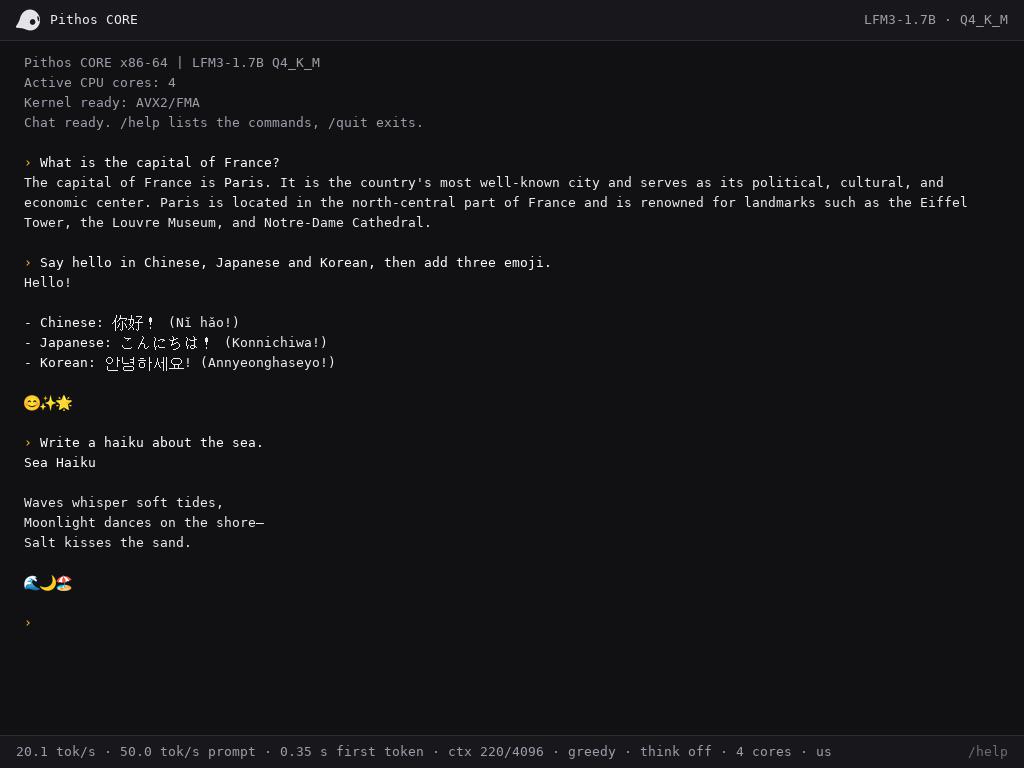
Pithos CORE: inferenza LiquidAI LFM3-1.7B e LFM2.5-350M in linguaggio assembly NASM x86-64, su Linux e come sistema operativo autonomo che si avvia da BIOS o UEFI in una console di chat Unicode. Nessuna libreria libc.

Post image
1 Upvotes

r/LocalAIStack • • 1d ago

Ernie 5.5 flash preview can be run localy now via basalt

Thumbnail
reddit.com
1 Upvotes

r/LocalAIStack • • 1d ago

Need help on making LocalLLM work for my purpose.

1 Upvotes

Hello,

I am getting used to using AI using gemini and chatgpt instead of googling stuff is very convenient and comparing stuff searching for product specs works fine as long as i am checking sometimes i find weird things but you know that.

My issue is a video files that are encrypted. I have bought paid for and have perpetual ownership of some language course. But the videos are sfv format no player reads it. Only its shitty player plays it and it doesn't even have correct aspect ratio on Virtualmachine since it doesn't have a way to activate licencing again. They went monthly subscription route like every company. But i want to access to the videos and play it on my pc and phone. I think this is completely fair nothing unethical or shady. I have bought this years ago and didn't use it because it was inconvenient but i really want to.

Video player uses very old k lite codec pack LAV splitter and lav video and i can switch to ffdshow which are open source.

I read everywhere about vibecoding or AI coding so I asked ChatGPT (paid membership) i knew it wouldn't decrypt videos so I asked for it to make lav video or ffdshow build that would be able to save raw videos. They are open source software. And we worked for half a day and done bunch of shit and after stealing my time it said I cant help you decrypt something...

It did make me install visual studio and compile a lot of things that were to take video stream and encode it real time but it doesn't do the one thing it needs to that i asked for in the beginning.

I installed lmstudio and downloaded qwen 3.8 27b (gemini told me my pc could make it work rest of the model will be on ram and it will work) but it took 5 hours to check video file. and it said headers are not matching video but it has video start codes . So it runs very bad.

Which local llm i could use for this purpose ?

Thank you.

I thought I have very good gaming PC but its so slow

Windows 10

9800x3d

48gb 6000mhz ram

rtx 5080

wd sn750 nvme ssd


r/LocalAIStack • • 1d ago

Hive beta: Pool the memory of your Apple devices to run a larger local model

Thumbnail
reddit.com
1 Upvotes

Hi, I'm the developer. I've been building Hive, a free app, soon to be open source, that lets the Apple devices you already own work together on one LLM.

The problem: the best local models are bigger than the memory of most single devices. A model that doesn't fit gets read from SSD, which is slow. Hive splits the model layers across devices optimally. Allowing your Mac to borrow 4GB from your iPhone offers some pretty large performance benefits.

What it does for you:
- Decides which device holds which layers, and keeps a cache on each one.
- Encrypts the links between devices. Everything stays on your own network.
- Reorganizes automatically when a device sleeps, disconnects or leaves, and when a new one joins.

Requirements:
- Apple silicon and iOS 26 / macOS 26. It's built to work with any mix of Mac, iPhone and iPad, and works best with a Mac + two other devices.

What it doesn't do (yet): x86 Windows machines, NVIDIA GPUs, Intel Macs.
Linux/Android ARM support will be worked on after release.

It's an early beta with rough edges. I'd love feedback on:
- Is it easy to add custom models from hugging face? Which models do and don’t work?
- What happens when a device sleeps or drops off?
- Crashes, stalls or confusing screens.

I don’t want to promise any performance numbers I plan to do thorough benchmarking after the launch of Qwen 4 but from my proof of concept a 32GB Mac + M4 iPad Pro on a 5Ghz WiFi runs Qwen 3.8 over 10x quicker than the Mac alone.

https://testflight.apple.com/join/pgavaTZy


r/LocalAIStack • • 1d ago

SulphurAI/Sulphur-3 · Hugging Face

Thumbnail
huggingface.co
2 Upvotes

Sulphur 3

An uncensored video generation model based on MiniMax H3.


r/LocalAIStack • • 1d ago

Introducing Waddle – an open-source local AI sandbox

Thumbnail
reddit.com
1 Upvotes

r/LocalAIStack • • 1d ago

LOCAL LLM SUGGESTION

1 Upvotes

CPU: core ultra 7 155U

GPU / iGPU: igpu

VRAM: shared

System RAM: 16Gb

Shared / Unified Memory (if applicable): shared

OS: Fedora 45

Runtime / backend: currently llama cpp

Models already tried (if any): qwen 2.5 (3b, 7b), qwen 2.5 coder 8b, llama 3 3b, qwen 3.5 1b... all with Q4_K_M

Use case: agentic workflow, Coding assistant... like generation and completion etc

Desired context size: not sure

Priority: quality / speed / context / balanced: balanced

Other requirements or constraints:nil


r/LocalAIStack • • 2d ago

I built easy way for online Gpu to run your coding tasks -> copy past link

Thumbnail
reddit.com
1 Upvotes