r/OpenSourceAI • • 3h ago

SEEDVR2 Studio Complete New Version 2.0

Post image
4 Upvotes

SEEDVR2 Studio Complete 2.0 – Free & Open-Source AI Video and Image Upscaling Studio – 100% Local Processing

Hi everyone!

I'm excited to introduce my personal project, SEEDVR2 Studio Complete 2.0, a free and open-source application designed for AI-powered video upscaling, image enhancement and multimedia restoration.

My goal is to make advanced AI restoration technologies accessible through a modern, intuitive and comprehensive interface, without requiring users to build complicated workflows manually.

Whether you're looking to restore old movies, enhance low-resolution videos, improve photographs, upscale AI-generated content or bring new life to your multimedia collection, SEEDVR2 Studio provides a dedicated environment for your creative projects.

No subscription. No cloud processing. Your files stay on your computer.

Multiple AI models and upscaling technologies

SEEDVR2 Studio integrates a wide selection of models and upscaling technologies for different quality, performance and hardware requirements:

  • SeedVR2 – advanced video and image restoration from ByteDance Seed.
  • SeedVR2 Lite GGUF – memory-efficient alternatives.
  • SeedVR2 1.4B – a lightweight community model.
  • LTX 2.5 Upscale.
  • LTX 2.5 Detail Refiner.
  • LTX 2.3 Upscale.
  • RelayVSR.
  • FlashVSR One Pass and Two Pass.
  • DLSS 5 Spatial and Temporal Upsampling.
  • Lanczos – traditional upscaling without requiring a GPU.

Additional upscalers are available through optional WanGP integration.

Video restoration and enhancement

  • AI video super-resolution and restoration.
  • Enhancement of older and low-resolution footage.
  • Advanced anti-flickering technology with four intensity levels.
  • Improved temporal consistency between frames.
  • Live monitoring of generated video frames.
  • Before-and-after comparisons.
  • Individual frame and video sequence previews.
  • Hardware-accelerated NVENC encoding when available.
  • Parallel AI processing and video encoding.
  • Support for MP4, MKV, MOV, WebM and AVI.
  • H.264, H.265, AV1, VP9, ProRes and lossless FFV1 encoding.

Image enhancement

  • AI-powered image enlargement and restoration.
  • Enhancement of fine details and textures.
  • Restoration of low-resolution photographs.
  • Interactive before-and-after comparison.
  • Side-by-side comparison and adjustable comparison slider.
  • Zoom and navigation for detailed inspection.
  • Support for PNG, JPEG, WebP, TIFF, BMP, AVIF and EXR.
  • Reuse of validated previews during export without unnecessary regeneration.

Performance and workflow

  • Batch processing and job queue management.
  • Pause and cancel processing tasks.
  • Automatic memory-saving adjustments when GPU memory is insufficient.
  • Live GPU, VRAM, CPU, RAM and temperature monitoring.
  • Processing speed, elapsed time and estimated remaining time.
  • Integrated AI model manager.
  • Parallel model downloads with resume support.
  • SHA-256 integrity verification.
  • Automated dependency and model installation.

What's new in version 2.0?

  • Completely redesigned user interface.
  • Central multimedia viewer and collapsible settings panels.
  • New video anti-flickering system across all upscalers.
  • Improved consistency in brightness, colors and static details.
  • Faster model downloads through simultaneous connections.
  • Optimized video decoding and encoding pipeline.
  • Automatic hardware encoder selection when supported.

System compatibility

  • Windows 10 and 11.
  • Linux.
  • macOS with Apple Silicon, although processing is slower.
  • English and French interface.
  • NVIDIA GPUs with 6–8 GB of VRAM can use selected lightweight models.
  • 16–24 GB of VRAM recommended for more demanding workflows.

Some models and features require additional downloads, compatible hardware and optional third-party components.

SEEDVR2 Studio itself is distributed under the Apache 2.0 license. Integrated third-party models and components retain their respective licenses.

A project built with passion

SEEDVR2 Studio was born from my passion for artificial intelligence, video restoration, digital imaging and multimedia technology.

I believe advanced AI enhancement tools should be accessible to everyone, without expensive subscriptions or mandatory cloud services.

I'm sharing this project with the community because I would love to hear your feedback, ideas, suggestions and feature requests.

Special thanks to the developers behind SeedVR2, ComfyUI-SeedVR2_VideoUpscaler, the community models and WanGP for their incredible work.

If you enjoy the project, feel free to support it with a ⭐ on GitHub!

Restore the past. Enhance the present. Create the future.

🔗 GitHub – Project, documentation and installation instructions:

https://github.com/Aaronstanley78/SEEDVR2-Studio-Complete


r/OpenSourceAI • • 6h ago

FFmpeg Forge 3.0.1.1 NEW VERSION

Post image
6 Upvotes

FFmpeg Forge Desktop 3.0.1 – Free & Open-Source Video, Audio and Image Converter with AI Enhancement

Hi everyone!

I'm excited to share my personal project, FFmpeg Forge Desktop, a free, open-source and portable multimedia application designed to bring the incredible power of FFmpeg into a modern and accessible graphical interface.

My goal is to create an all-in-one multimedia toolbox for beginners, enthusiasts, content creators and advanced users, without the need to manually write complex command lines.

Whether you want to convert media, restore old footage, upscale videos using AI, enhance images or create immersive audio, FFmpeg Forge brings everything together in one application.

Video features

  • Extensive format and codec support, including MP4, MKV, MOV, WebM, H.264, H.265, AV1, ProRes and DNxHR.
  • AI-powered upscaling with RazorNext, VisionNext, OptiPulsar, SeedVR2 and LTX 2.5 Upscale.
  • NVIDIA RTX Video Super Resolution and RTX TrueHDR.
  • Advanced scaling with AMD FSR 1/2/3, NIS, SGSR, Anime4K and OptiScaler.
  • AI noise reduction and FocusPulsar deblurring.
  • SDR-to-HDR10 and Dolby Vision 8.1 conversion.
  • GPU-accelerated encoding and processing.
  • Custom resolution up to 8K, frame rate, bitrate and compression settings.
  • Automatic compression recommendations.
  • QTGMC and BWDIF deinterlacing.
  • Trimming, rotation, cropping and lossless remuxing.
  • Real-time before-and-after filmstrip preview.

Audio features

  • Conversion to MP3, AAC, FLAC, WAV, Opus, AC-3 and many more formats.
  • Immersive multichannel audio configurations up to 22.2.
  • Spatial audio upmixing for music, movies and live concerts.
  • 3D spatial audio for headphones using HRTF processing.
  • Dolby Atmos and DTS:X passthrough.
  • DSD64 and DSD128 audio conversion.
  • EBU R128 loudness normalization.
  • Add, replace or remove audio tracks without re-encoding the video.

Image features

  • Conversion between popular image formats, including PNG, JPEG, WebP and AVIF.
  • AI-powered image upscaling and restoration.
  • Image denoising and detail enhancement.
  • Custom resizing and advanced scaling algorithms.
  • HDR image output with 16-bit PNG and 10-bit AVIF.
  • Frame extraction from videos.
  • Image sequence-to-video conversion.

Additional features

  • Batch processing of files and entire folders.
  • Built-in DVD and Blu-ray ripper for unprotected media.
  • Access to over 570 FFmpeg filters with a full FFmpeg build.
  • More than 45 ready-to-use filter recipes.
  • Advanced filtergraph editor.
  • View and copy generated FFmpeg commands.
  • Modern graphite interface with cyan and indigo accents.
  • Portable Windows version, with a Linux edition also available.
  • Free and open-source under the GPL-3.0 license.

Some advanced AI features require additional model downloads, compatible hardware or external software. Feature availability may vary between Windows and Linux.

A project built with passion

FFmpeg Forge is a project born from my passion for multimedia processing, video restoration, audio technology and artificial intelligence.

I want to make advanced multimedia technologies more accessible while giving users as much control as possible over their files.

I'm sharing this project with the community because I would love to hear your thoughts, suggestions, feature requests and feedback. Every contribution helps improve the software!

If you find the project useful, feel free to give it a star on GitHub.

Convert anything into everything.

GitHub – Source code and downloads:

https://github.com/Aaronstanley78/FFmpeg-Forge-Desktop


r/OpenSourceAI • • 2h ago

Alternative to Pi/Opencode/DSH

2 Upvotes

I made another coding agent, you might like it.

It's called Tuse, and it's a bit like Pi. But it's written in Rust (fast and lightweight), and the plugins are written in Lua (simple and readable configs). The agent runs in codemode with Lua by default, meaning it writes Lua for everything

Tuse is a super minimal core with no skills, MCP, or subagents by default. But it has a powerful and easy-to-understand config API that lets you implement whatever you need.

The project is still in development, and the API changes often, BUT I'm actively working on it, and I want to make it one of the default picks when someone asks: "What harness should I choose? I want something fast and efficient. Something that works with all providers and that I can edit without any trouble"

Tuse is also a perfect fit for different workflows, the config is one file, and you can run 100 instances per machine without any problems. Say, automated reviews or lots of subagents, it'll work perfectly

Anyway, I'd ask you to give it a try and share your thoughts on the project

https://github.com/ethanhamilthon/tuse


r/OpenSourceAI • • 1h ago

an open specification for message boards where people and agents work together

Thumbnail
openmessageboard.com
1 Upvotes

r/OpenSourceAI • • 1h ago

npcpy v2.1.30 release

Thumbnail
github.com
1 Upvotes

r/OpenSourceAI • • 3h ago

AuraVision Player Video 0.10

Post image
1 Upvotes

Introducing AuraVision Player 0.10 A Free Universal Media Player with AI Video Enhancement, 4K Blu-ray and Video Game Cinematics Support

Hi everyone!

I'm excited to share my latest personal project, AuraVision Player, a free universal multimedia player designed to combine advanced playback technologies, artificial intelligence and a distinctive visual experience in a single application.

Built in C++ and powered by FFmpeg 9.1 and Qt 6, AuraVision Player is designed for movie enthusiasts, music lovers, retro gaming fans, multimedia preservation enthusiasts and anyone looking for a new media player.

My goal is to go beyond traditional media playback by integrating modern AI video enhancement technologies while maintaining extensive compatibility with both modern and legacy multimedia formats.

Advanced Video Playback

  • Extensive multimedia compatibility with 522 decoders and 363 demuxers in the reference FFmpeg build.
  • Support for MKV, MP4, AVI, MOV, WebM, TS, M2TS and many more formats.
  • Modern video codecs including H.264, HEVC, AV1, VVC, VP9 and ProRes.
  • GPU-accelerated decoding through D3D11VA, DXVA2 and VAAPI.
  • HDR10 and HLG content support with HDR-to-SDR tone mapping.
  • BWDIF deinterlacing for older and interlaced content.
  • Adjustable playback speed from 0.25× to 4× with audio pitch preservation.
  • Frame-by-frame playback and precise seeking.
  • Automatic playback resume.
  • Screenshot capture and chapter navigation.

AI-Powered Video Enhancement

One of the main features of AuraVision Player is its dedicated Video Enhancement sidebar, providing access to three different AI technologies:

NVIDIA RTX Video Super Resolution

  • Real-time AI video upscaling.
  • Enhanced visual quality when enlarging lower-resolution videos.
  • Native NVIDIA driver integration.

SeedVR2 3B and 7B

  • Advanced diffusion-based video restoration.
  • AI-powered 2× upscaling.
  • Designed to enhance older footage and reconstruct visual details.
  • Integrated through WanGP.

LTX 2.5 Upscale

  • Lightricks' Pixel Spatial Upscaler.
  • AI-powered 2× video enhancement.
  • Integrated through WanGP.

Unlike RTX Video Super Resolution, SeedVR2 and LTX 2.5 process upcoming video segments ahead of playback. The enhanced footage remains synchronized with the original audio, with automatic buffering when necessary.

All AI video processing takes place locally on your computer.

DVD, Blu-ray and 4K Ultra HD Blu-ray

AuraVision Player also supports optical media playback:

  • DVD-Video.
  • Blu-ray.
  • 4K Ultra HD Blu-ray.
  • Physical optical drives.
  • VIDEO_TS and BDMV folders.
  • Unencrypted ISO disc images.
  • Direct title, playlist and chapter selection.
  • HEVC Main 10, HDR10 and HLG.
  • Dolby TrueHD, Dolby Digital Plus, DTS-HD Master Audio and LPCM.
  • Blu-ray PGS and DVD VobSub subtitles.

Unprotected discs and unencrypted backups are supported. Copy protection bypassing and interactive disc menus are not currently supported.

Audio Playback and Music Visualization

  • Support for numerous audio formats, including FLAC, MP3, AAC, WAV, Opus, DTS and TrueHD.
  • Animated 56-band audio spectrum visualizer.
  • Album artwork display.
  • Audio volume normalization.
  • Volume amplification up to 150%.
  • Multiple audio track selection.
  • Audio synchronization controls.
  • Mono mode and stereo channel swapping.
  • Playlist management, shuffle and repeat modes.

Video Game Cinematics and Retro Multimedia

As a fan of video games and multimedia preservation, I wanted AuraVision Player to support formats that are rarely highlighted in modern media players.

Supported game video formats include:

  • Bink Video (.bik, .bk2)
  • Smacker (.smk)
  • id Software RoQ (.roq)
  • Westwood VQA (.vqa)
  • Nintendo THP (.thp)
  • PlayStation STR (.str)
  • Sega FILM / CPK
  • Interplay MVE
  • Electronic Arts multimedia formats
  • Cryo HNM
  • LucasArts SMUSH
  • Mobiclip
  • Sierra VMD
  • Xbox XMV

The player also supports several game audio formats, including BRSTM, BCSTM, BFSTM, ADX, HCA, XWMA and VAG.

Whether you want to rediscover old game cinematics, explore retro multimedia files or listen to video game soundtracks, AuraVision Player provides a dedicated solution.

Subtitles and Network Streaming

  • Embedded and external subtitle support.
  • SRT, ASS/SSA, WebVTT, PGS and VobSub.
  • Automatic detection of matching external subtitle files.
  • Subtitle timing adjustment.
  • Network streaming through HTTP, HTTPS, HLS, MPEG-DASH, RTMP, RTSP, SRT and UDP.
  • M3U playlist support.

Aurora – A Distinctive Visual Experience

I also wanted to create something visually different from traditional media players.

The custom Aurora interface is drawn entirely in code without external image assets.

  • Animated northern lights background with purple, cyan and green effects.
  • Modern frameless window.
  • Floating frosted-glass playback controls.
  • Glowing progress bar with chapter information.
  • Animated on-screen notifications.
  • High-resolution vector icons.
  • HiDPI display support.
  • Interactive AI video enhancement sidebar.
  • Comprehensive preferences panel with eight configuration categories.

Technical Highlights

  • C++ and Qt 6.
  • FFmpeg 9.1 multimedia engine.
  • Custom multithreaded playback architecture.
  • OpenGL video rendering.
  • miniaudio audio engine.
  • Hardware-accelerated video decoding.
  • Local AI video enhancement.
  • Windows x64 portable edition.
  • Linux compilation support.
  • Source code available on GitHub.

Free, Portable and Local

AuraVision Player is designed without mandatory subscriptions, accounts or cloud-based video processing.

The Windows portable edition requires no installation. Simply extract the archive and launch AuraVisionPlayer.exe.

Some important notes:

  • RTX Video Super Resolution requires a compatible NVIDIA RTX GPU.
  • SeedVR2 and LTX 2.5 require WanGP and additional AI model downloads.
  • 12 GB of VRAM is recommended for diffusion-based enhancement.
  • Advanced ASS subtitle styling is not yet supported.
  • The current graphical interface is available in French.

An Independent Project Built with Passion

AuraVision Player was born from my passion for cinema, music, artificial intelligence, software development and video game preservation.

My ambition is to create a universal media player that brings together the versatility of FFmpeg, modern AI restoration technologies and an immersive graphical interface, while preserving compatibility with multimedia formats from different generations.

This project is still evolving, and I would love to hear what the community thinks about it.

Feedback, suggestions, bug reports, feature requests and contributions are always welcome!

Special thanks to the developers and communities behind FFmpeg, Qt, miniaudio, NVIDIA RTX Video Super Resolution, ByteDance SeedVR2, Lightricks LTX and DeepBeepMeep's WanGP.

If you find my project interesting, please consider giving it a star on GitHub to support its development.

AuraVision Player — Beyond ordinary playback.

Play. Discover. Restore. Experience.

GitHub – Source code, documentation and project information:

https://github.com/Aaronstanley78/AuraVision-Player-


r/OpenSourceAI • • 4h ago

When you forget about the email from OpenAI to download your ChatGPT logs

Thumbnail reddit.com
1 Upvotes

r/OpenSourceAI • • 4h ago

Amuse v4.0.0 - Images, Video, Music, Speech and Text (Massive Update)

Thumbnail
github.com
1 Upvotes

r/OpenSourceAI • • 8h ago

Announcing VectHack: Four classic roguelikes compiled to WebAssembly and running in your browser!

2 Upvotes

I've been working on my open source project, VectHack, and it's ready for other people to look at.

It currently runs four classic roguelikes in the browser: NetHack 5.0, Angband 4.2.6, BSD Larn 12.0 and Umoria 5.7.15. It is a system that should be able to incorporate most similar terminal-based dungeon crawlers.

The engines are the real ones, unpatched. Each game is the upstream C source compiled to WebAssembly and run in a Web Worker. Game logic, monster AI, RNG and save format are untouched, so this is not a remake or a port of the rules.

The display is inspired by Star Wars / Tempest vector graphics. True to my original vision, the monsters retain their ASCII representation, just floating in 3D!

What you get from that:

  • An orbital camera over the level, or press F2 and delve in first person!
  • Movement keys (numeric keypad or arrows) follow the camera; everything else is the game's own keys. Use mouse to look around and point.
  • Point at any cell and the engine's own description names it
  • Saves live in the browser and export as one file
  • WebGPU, with a WebGL2 fallback
  • Angband's borg and simple bots for NetHack and Larn, if you'd rather watch

Play: https://vecthack.net

Source: https://github.com/emulvihill/vect-hack

The client code is MIT; each game keeps its own license (NGPL, GPL-2, GPL-3, Larn's original terms).

Feedback and bug reports are welcome, especially from people who know these games better than I do.

If you find something weird, send me a save file so I can reproduce it, or become part of the project! Top list of things someone could help with:

  • mobile interface. Right now I require the keyboard, but a modern phone should run it just fine with a proper input system.
  • key bindings. I know not everyone likes numeric keypad or arrow movement. I'm left handed and for me it's perfection. :)
  • playtesting. I am not that good at these games and haven't had a ton of time to delve. I'd rather get this out so people can 'hack' on it rather than letting it sit indefinitely.

PS I am an old nerd. My first memories of these games were on an orange monochrome screen and an 8086 Epson PC. My friends and I spent 1000's of hours trying to beat the various games. I never came close but with amazing perseverance, my buddy Ethan did.

This project is dedicated to his memory. Thanks for looking!


r/OpenSourceAI • • 6h ago

CUTROOM update: short clips now keep your camera + screen layout

1 Upvotes

I ran into an annoying bug in the open-source editor I’m building: I’d set up a vertical video with my camera above the screen, then open Clips and see only one recording. The clips weren’t using the edit I’d already made.

The new CUTROOM beta fixes that. In Clips → My edit, suggestions come from the edited timeline, and the preview and exported MP4 use the layout you set up. You can also mark In and Out while watching, choose Add to Clips, and keep watching from the same spot. Export one saved range or select several to get a separate MP4 for each.

The editor runs on your computer. Manual clipping doesn’t need an account or an AI model; transcription and first-cut suggestions are optional. The project is MIT-licensed, and this is still a beta.

Build and source: https://github.com/VanoPeradze/cutroom/releases/tag/v1.3-beta-20261128-clips2

If you try it on a long podcast or screen recording, I’d love to know where it slows you down, especially when exporting a clip from near the end.

Screenshot from the beta (stacked camera and screen): https://cutroom-studio.expo.app/assets/studio-clips.png?v=20261128-clips2


r/OpenSourceAI • • 7h ago

Inkling 2 Small and the Real Test for AI Edge Infrastructure

Thumbnail
probackend.com
1 Upvotes

r/OpenSourceAI • • 7h ago

I built TaliGent: an open-core local-first Windows AI agent with UI Automation, SafiGrid Vision, self-evolving Python skills, and a WhatsApp bridge (tested with Qwen-27B & ComfyUI on a single 16GB GPU)

Thumbnail
github.com
1 Upvotes

Hey everyone,
After getting frustrated with desktop AI agents that burn thousands of tokens on continuous screenshot loops, lose context on long tasks, or crash mid-workflow, I built TaliGent NextGen and just open-sourced the core edition (Apache 2.0).
**How it works differently:**Real-world stress test: I ran it locally with Qwen-27B (via LM Studio) on an RTX 4060 Ti 16GB to generate a 2-minute continuous "one-shot" video in ComfyUI—extracting final frames to seed next clips, visually inspecting outputs, rejecting failed camera movements, and notifying me on WhatsApp when each segment finished.
GitHub & Portable Windows Release:
https://github.com/safwan-nj/TaliGent-NextGen-Core/

(There is a ready-to-run Windows Portable release in the Releases tab if you want to test it without manual setup).
Would love your feedback, architectural critiques, or feature ideas!


r/OpenSourceAI • • 8h ago

FOSS VulnDog - I built a passive observer for active hunting, and it flags requests that match known vuln patterns

Thumbnail
github.com
1 Upvotes

Been working on this and figured other hunters might get some use out of it 👍

You point your proxy at VulnDog while you test - Burp, curl, Playwright, whatever you're driving. It watches the traffic you're already sending and highlights the requests that pattern-match against a 456k CVE/CWE/exploit knowledge base. It never sends a request itself and never modifies yours. Pure observer.

What it's actually good for: surfacing the boring thing you were about to skip. You fire 200 requests, one has an oddly-shaped parameter, and it gets flagged instead of scrolling past at 2am.

The MCP angle: if you're running an agent through tool-calling loops, it can query VulnDog over stdio JSON-RPC (vuln_query, highlights, run_status) to ask which of its own requests matched. Feedback loop - the agent stops fuzzing blind and leans into the promising direction.

Honest caveats: these are candidates, not findings. Expect noise. I'd rather over-flag than miss, and you triage. There's an SSRF safety rail, redaction before anything persists, and scope config so out-of-scope targets get ignored.

Github: https://github.com/Keutonim/VulnDog

It is not a scanner, not a WAF, not a fuzzer. It doesn't touch the target.

Python 3.11+, stdlib only, zero runtime deps. Local Ollama embeddings (embeddinggemma:300m), nothing leaves your box by default. 1262 tests, MIT, Linux + Windows. The ~1.93 GiB store ships as a separate release asset, or self-build from the CVE/ExploitDB/CWE/OWASP archives.


r/OpenSourceAI • • 8h ago

I built an open-source AI article writer with 11 specialized agents and it runs locally (FOSS)

Thumbnail
github.com
1 Upvotes

I’ve been working on GeneRaptor — a local-first AI article generation studio.

Instead of relying on one AI prompt, it uses 11 specialized agents to research a topic, plan the structure, write the article, fact-check it, review SEO, and even generate a cover image.

A few things that make it different:

  • Runs locally, no cloud account or telemetry.
  • Supports OpenRouter, Ollama, RouterAI, and custom OpenAI-compatible endpoints.
  • One command to get started: npx generaptor
  • Your data and provider settings stay on your machine.

The project is open source, and I’d genuinely love to hear your feedback!

GitHub: https://github.com/Keutonim/GeneRaptor


r/OpenSourceAI • • 8h ago

Revora — an open-source AI-powered code review platform

Thumbnail
gallery
1 Upvotes

Introducing Revora — an open-source AI-powered code review platform.

With Revora + kLLM, you can run AI models using free GPU resources and perform code reviews without spending on AI APIs.
Open-source and free to try
Sign in with GitHub, explore Revora, and experience AI-powered code reviews.

GitHub: https://github.com/d-kavinraja/revora
Try: https://revora-pr.vercel.app/

If you find Revora useful, please give the repository a ⭐ star and help the project grow. Contributions, feedback, and ideas are always welcome!

#OpenSource #AI #CodeReview #GitHub #ArtificialIntelligence #LLM #LocalAI #AIForDevelopers #SoftwareEngineering #DeveloperTools #MachineLearning #GenerativeAI #Python #FastAPI #NextJS #React #DevTools #OpenSourceSoftware #Coding #TechCommunity #BuildInPublic #SelfHosted #FreeAI #AICoding #SoftwareDevelopment


r/OpenSourceAI • • 10h ago

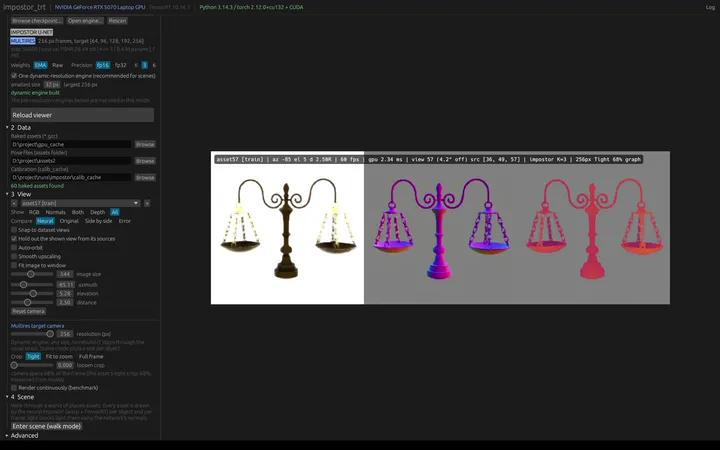
Fully Neurally Rendered object - ~2.7 ms average GPU frame time (256*256)

Post image
0 Upvotes

r/OpenSourceAI • • 11h ago

I built RunMind — a Windows desktop AI assistant combining local/remote LLMs, system management, developer tools, and automation

Thumbnail gallery
1 Upvotes

r/OpenSourceAI • • 1d ago

StradaOS: an open-source launcher for budget-friendly Android-based automotive multimedia systems; it now features a welcome greeting upon startup, improved OBD connectivity, turn-by-turn navigation, and a widget that can be swiped between a map view and a video player.

Thumbnail
gallery
9 Upvotes

StradaOS over 16,000 downloads and 500+ stars on GitHub!

A quick summary for those not yet familiar with the project: many affordable Chinese head units claim to run "Android 10," but they actually run on Android 4.x. StradaOS is written in pure Java, without any external libraries, making it compatible with versions ranging from Android 4.1 all the way to 14.

What’s new since then:

• Startup welcome: The logo lights up and greets you by name—with audio (this option can be disabled).

• Integrated navigation: Search for a destination and get turn-by-turn directions; offline maps are also supported.

• Map/video carousel: Swipe the map to play your saved music videos; the video feed hides when the vehicle is in motion, but the audio continues to play.

• OBD-II scanner (ELM327): Displays engine RPM alongside the speedometer, plus alerts and error codes.

• Automatic album art (when the head unit has an internet connection).

• Premium themes: "Faro," "Carbon," and the new "Premium Cards." The app remains completely free, with no ads and no account required; these themes are an optional way to show appreciation for a donation.

Free, licensed under GPL-3.0, no root access required, ~1.5 MB in size, and available in 13 languages. Repository and signed APK: https://github.com/lordnordic-debug/StradaOS

If you have one of these devices, please let me know the brand, model, and actual Android version (you can check this in StradaOS under: Settings → About), and I will help you.


r/OpenSourceAI • • 15h ago

A 708B open-weight AI model just dropped under the MIT license

Thumbnail reddit.com
1 Upvotes

r/OpenSourceAI • • 17h ago

Tensormorph: a Tensor IDE for open-weight models, and TEL, its tensor expression language

Thumbnail
reddit.com
1 Upvotes

Hi everyone, and welcome! I'm Thanh, the developer behind Tensormorph. This first post explains what I'm building and why.

What is Tensormorph?

Tensormorph is a desktop Tensor IDE for exploring, inspecting, comparing, debugging, and transforming open-weight AI models.

Most tools show a model as a static graph. Tensormorph lets you keep going deeper, while each level keeps its meaning:

Model → Layer → Module → Tensor → Matrix tile → Row/Column → Scalar

Load a Safetensors or GGUF model, then:

  • Visualize tensors as interactive heatmaps
  • Check per-tensor statistics and distributions
  • Compare two models or fine-tunes side by side
  • Analyze quantization effects
  • Inspect huge tensors without loading everything at once

What is TEL?

TEL (Tensor Expression Language) is a short, math-like language for writing tensor operations. It sits between paper notation and executable code.

The idea: you write an expression the way it looks in a paper, with named axes like B, T, H, D. Tensormorph then infers shapes and dtypes, builds a computation graph, and links every part of the expression to the tensors and graph nodes it refers to. Select a term in the formula and you see the matching tensor. Select a tensor and you see where it appears in the math.

An early sketch (the syntax is still changing):

scores[B,H,T,S] = q[B,H,T,D] @ k[B,H,S,D] / sqrt(D)
out[B,H,T,D]    = softmax(scores, axis=S) @ v[B,H,S,D]

The long-term goal is for TEL to cover the building blocks of modern models: attention, RoPE, SwiGLU, normalization, MoE, SSM/Mamba-style layers, and diffusion primitives. Each one should be something you can read, visualize, and run.

What this community is for

  • Development updates and early previews
  • Feature requests and bug reports
  • Discussions about model internals, weight analysis, and quantization
  • Feedback on TEL's design

Questions for you

  1. What do you use today to inspect or debug model weights, and what frustrates you about it?
  2. Would you write tensor math in a dedicated notation like TEL, or would you rather type LaTeX or plain English and have it converted?
  3. Which model or analysis would you want to try first?

Thanks for being here early. I'll be sharing screenshots and progress soon.


r/OpenSourceAI • • 17h ago

GitHub - 4LPH7/Hive_Mind: One shared, self-improving memory for Claude Code, Codex and Antigravity: Obsidian vault + graphify code graphs over MCP, with ACE playbooks, vault lint

Thumbnail
github.com
1 Upvotes

r/OpenSourceAI • • 18h ago

Test-Driven Prompting:

Post image
1 Upvotes

r/OpenSourceAI • • 22h ago

an open specification for message boards where people and agents work together

Thumbnail
openmessageboard.com
1 Upvotes