r/PCsupport • u/Ninoevans • 13m ago
Not solved CS2 hitching 170 → 60 fps for a split second, keeps coming back even after a clean Windows install
reddit.com
1
Upvotes
r/PCsupport • u/yago-leo-castr • 49m ago

Hey everyone. I really need some help because I've been trying to solve a stuttering problem on my PC for quite some time, and I'm running out of ideas.
I recently built the PC I've always wanted, but unfortunately I'm dealing with a problem that's making it extremely frustrating to use.
CPU: AMD Ryzen 5 5500X3D
Motherboard: B550M Gaming Frozen
RAM: 16GB (2x8GB) Kingston Fury DDR4 3200MHz
GPU: ASRock Radeon RX 5700 XT Taichi
Storage: 512GB NVMe SSD
PSU: MSI 650W
Cooling: Gigabyte 360mm AIO Water Cooler
My PC experiences constant stuttering/micro-freezes.
The weirdest part is that it doesn't necessarily show up as an FPS drop. In games, the FPS counter can remain relatively stable and the audio continues playing normally, but the image suddenly freezes for a brief moment.
And this isn't limited to gaming.
I can sometimes notice the same behavior during simple Windows tasks, such as browsing Chrome. The whole system occasionally feels like it freezes for a fraction of a second and then continues normally.
I've already tried several things:
Sometimes the problem seems to improve temporarily, but eventually it comes back.
What really confuses me is that it also happens outside of games. If this were simply a GPU performance issue or a graphics settings problem, I would understand it. But it can happen even when the PC is barely under load.
I'd really appreciate some help from anyone experienced with Ryzen/X3D systems, B550 motherboards, or the RX 5700 XT.
What tests would you recommend to identify the actual source of this problem?
If necessary, I can provide videos showing the stuttering, screenshots, temperatures, CPU/GPU usage, frametime graphs, HWiNFO information, BIOS settings, benchmark results, or anything else that might help with the diagnosis.
I'm especially interested in knowing what metrics I should monitor and what tests I should run next.
This PC was a huge personal achievement for me and something I've wanted since I was a kid. I really just want to be able to enjoy it without constantly dealing with these freezes.
Thanks in advance to anyone willing to help! 🙏
r/PCsupport • u/Shoddy_Shoe6722 • 4h ago
PC started what seems to be boot looping with no error codes after a restart and update a few days ago. Put a new CPU, motherboard, and cooler in a few months back for an overheating problem, been working fine ever since.
I've tried undoing the Windows update, no result. I've tried point in time restore. I've tried system restore, which worked, but then when I restarted it started boot looping again. Also tried booting in safe-mode and that won't work either. Checked bios settings. Checked cables, reseated ram, GPU, CPU, some motherboard cables.
Any suggestions of what to do, or troubleshoot before I take it to a PC shop?
CPU - Intel i9 14900kf Gpu - Nvidia Gigabyte 5070 EAGLE OC 12gb Ram - T-Force 32gb ddr4 Motherboard - MSI PRO B760-P WIFI DDR4 Powersupply - ThermalTake Toughpower GF-1 850 Watt Cooler - LIAN-LI GA II Trinity
r/PCsupport • u/usernamesometh • 5h ago
When I first built my pc, it was running just amazingly fine, never any issues. I reinstalled windows one day not too long ago like 3-5 months ago because I got hit with a session hacker. It’s fine now, but it’s been running weirdly slow or just feels different.
Randomly shuts off, freezes, sometimes when i open any game it freezes + make some weird audio jitter sound that i can’t explain
Feel like I should be getting more performance in games,
9070XT, 7800X3D, B650 Eagle AX 850W 32gb ddr5
what can i do to pinpoint the issues or fix anything of this.
r/PCsupport • u/CranberryFancy5921 • 2h ago
i don’t use Reddit so I don’t know if I should ask for help in another like server or whatever they’re called or if someones even gonna help but I was using my pc browsing not gaming and the pc just turned off itself then turned on then off then on then off on its own and the time between turning on and off keeps getting smaller every time I tried reseating CMOs battery but it didn’t work and i want to know if there’s other quick like attempts to fix before ordering soemthing to fix it or bringing it to a shop I have Msi b760m p 32 gb ddr4 pny performance 9070 xt i5 14400f and deepcool pq850g
r/PCsupport • u/Fit_News_1581 • 3h ago
r/PCsupport • u/Fit_News_1581 • 3h ago
r/PCsupport • u/Fit-Presentation2566 • 3h ago
So , it doesn t make sense because . If i play smth like forza 5 , it runs perfectly for hours (or until i get bored) . But if i play smth like roblox , after about 15/30 mins max . It randomly shuts down . To power it back up i have to disconnect the main power for about 10/15 secs before turning it back on . The temps are running fine , with the highest being 68 degrees celcius .
Specs
Cpu: ryzen3 1200
Gpu: radeon rx 470
Mother board : some asus 300 some
RAM: 2x 8GB DDR4
Psu: i only know that is dluxe 600w
If anyone has some ideeas to solve this . Please let me know
r/PCsupport • u/yago-leo-castr • 4h ago
Fala, pessoal. Preciso muito da ajuda de vocês porque já estou há um tempo tentando resolver um problema de stuttering no meu PC e estou começando a ficar sem alternativas.
Montei recentemente o PC que sempre quis e estou tendo um problema que está me deixando bastante frustrado. A configuração é:
Processador: AMD Ryzen 5 5500X3D
Placa-mãe: B550M Gaming Frozen
Memória RAM: 16 GB (2x8 GB) Kingston Fury DDR4 3200 MHz
Placa de vídeo: ASRock Radeon RX 5700 XT Taichi
Armazenamento: SSD NVMe 512 GB
Fonte: MSI 650 W
Refrigeração: Water Cooler Gigabyte 360 mm
O PC apresenta stuttering/microtravamentos constantemente.
O mais estranho é que não parece ser simplesmente queda de FPS. Em jogos, o contador de FPS pode continuar relativamente estável, o áudio também continua normalmente, mas a imagem dá umas travadas/microcongeladas.
E o problema não acontece somente em jogos. Às vezes consigo perceber o mesmo comportamento até em tarefas simples no Windows, como navegar pelo Chrome.
Já tentei várias coisas:
Em alguns momentos parece que melhora, mas o problema acaba voltando.
O que mais me intriga é justamente o fato de acontecer até fora dos jogos. Se fosse apenas uma questão de configuração gráfica ou falta de desempenho da RX 5700 XT, eu entenderia, mas o problema aparece inclusive em situações em que o PC está praticamente sem carga.
Queria saber se alguém com experiência em Ryzen/X3D, B550 ou RX 5700 XT já passou por algo parecido e quais testes vocês recomendam fazer para identificar a origem do problema.
Se precisarem, posso mandar vídeos do stuttering, prints, temperaturas, uso de CPU/GPU, gráficos de frametime, informações do HWInfo, configurações da BIOS ou qualquer outro teste que possa ajudar no diagnóstico.
Se alguém puder me orientar sobre quais métricas eu devo monitorar e quais testes fazer, agradeço demais.
Esse PC foi uma conquista muito importante para mim e eu realmente queria conseguir aproveitar a máquina sem ficar convivendo com esses travamentos.
Obrigado desde já a quem puder ajudar! 🙏
r/PCsupport • u/Plenty_Steak_6042 • 10h ago
Pc just randomly Shutdown while playing Arena breakout Infinite, black screen, no fan, not overheating and PSU are new MSI MAG A650BN. But in Roblox it works fine... This my pc specs ,,RYZEN 7 5700X, 16GB RAM 3600MHZ AND RX 6600
r/PCsupport • u/RobertoHernandez2001 • 12h ago
r/PCsupport • u/Akewi • 12h ago
Crossposting for visibility.
r/PCsupport • u/No-Lynx3400 • 13h ago
Gaming PC - RTX 4070 Super | Ryzen 7 5800X | 64GB RAM | NZXT H9 Flow
so i left my pc on for 2 nights and came back and couldent start fortnite I reset my pc and launched fortnite i was getting 500 fps like usual and the. after 30 seconds it goes to 140ish and stays there, my pc with nothing running goes to 85c and i just put new paste in it. When i try to start my pc it also says Cpu temperature warning. I let it rest for 2 days and it still happend, what do i do.
r/PCsupport • u/tactical-throwaway15 • 14h ago
r/PCsupport • u/Puzzled_Age7283 • 15h ago
r/PCsupport • u/Sensitive-Elk-8358 • 20h ago
Windows 11
Asus tuf gaming b550 plus wifi II
Ryzen 5600x
16g corsair vengance lpx ddr4
Gigabyte Rx 6650xt
Corsair Rmx750
My PC has no display out currently with my rx 6650
I don't use my PC daily. A couple days ago I noticed display port wouldn't work but HDMI did. I bought a new dp cable and that had no effect. The vga post light is on. I borrowed my brothers old 1660 super and swapped that in while also outputing to a TV via HDMI. That worked. I then plugged my monitor in via dp and nothing happens then I restarted the PC and unplugged the HDMI to the TV and I could get dp output onto my monitor. When I restarted the PC it went back to no output with the vga post light on. I currently am not getting output from either you into either monitor.
r/PCsupport • u/enixthephoenix • 17h ago
r/PCsupport • u/supersonico999 • 17h ago
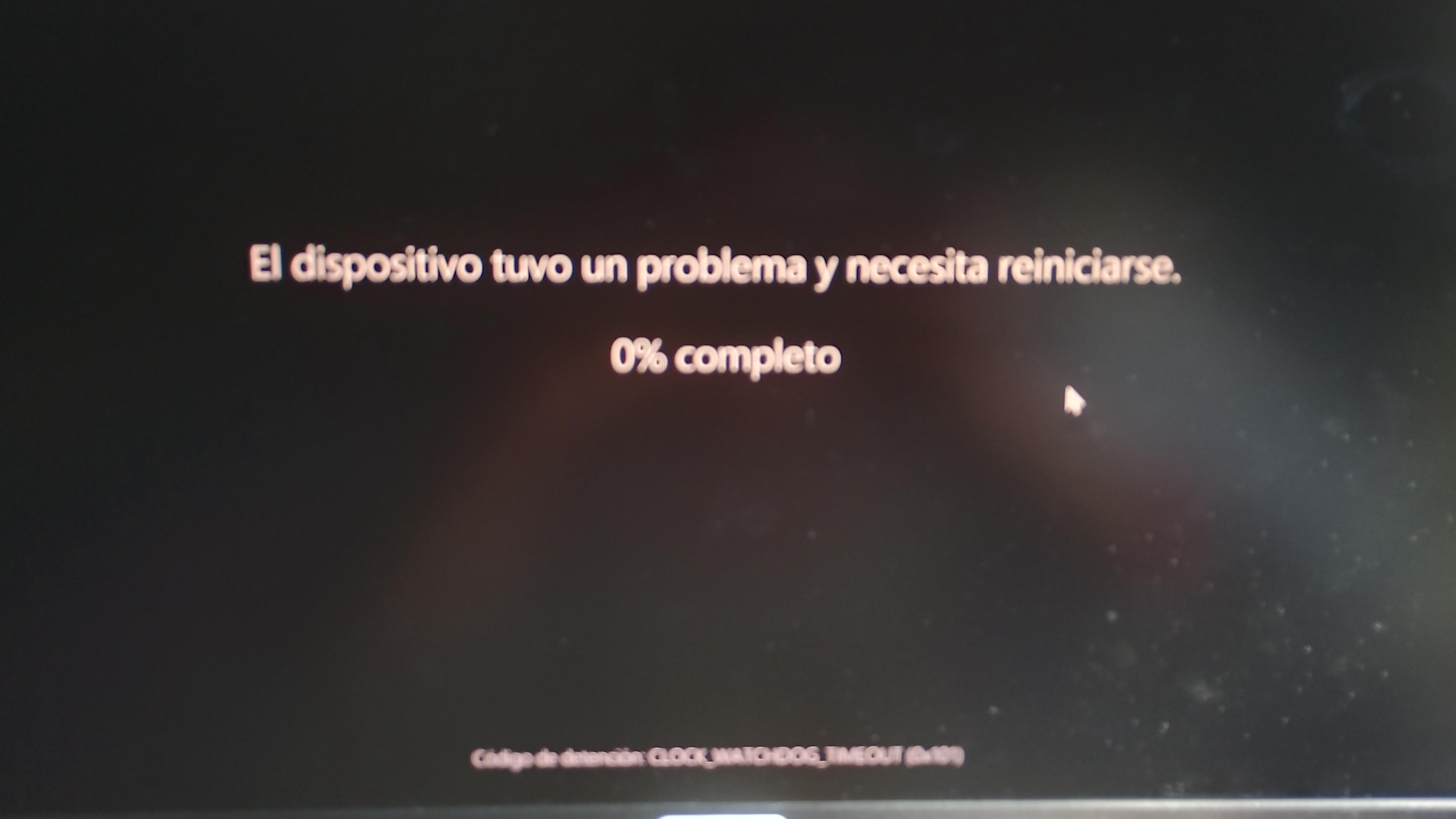
Hi, my name is José. I've never encountered this error before, and it currently happens specifically with two games: Forza Horizon 5 and Minecraft Bedrock Edition.
I find this very strange because I had played approximately 70 hours of Forza Horizon 5 before the problem started.
My PC specifications:
- CPU: Ryzen 5 5600G.
- Motherboard: ASUS Prime B450M-A II.
- RAM: Corsair Vengeance RGB Pro DDR4, 2×8 GB (16 GB), 3600 MHz, CL18.
- SSD: Kingston NVMe 500 GB.
- HDD: WD Black 4 TB.
Everything used to work perfectly fine. I haven't overclocked my PC or made any hardware modifications. One day, out of nowhere, I launched Forza Horizon 5, clicked "Continue", and during the loading screen, the game froze. Immediately afterward, I got a black screen with that error.
Something similar happens with Minecraft Bedrock Edition, but there's one difference: in this case, the system recovers automatically, so I don't have to restart my PC. With Forza Horizon 5, however, everything freezes, and I'm forced to restart my computer using the physical power button on my PC case.
Here's everything I've tried so far:
- Updated my BIOS.
- Ran the "sfc /scannow" command.
- Reset and restarted all Xbox-related services and components because I found it strange that both games are part of the Xbox ecosystem.
- Ran stress tests to check whether the issue was hardware-related.
What's strange is that I didn't encounter any problems during the stress tests, and my temperatures never went above 60°C.
Honestly, I don't know what else to do. I've tried so many things, but I still can't figure out what's causing this issue. That's why I'm reaching out here, because I genuinely have no idea what's going on with my PC.
I would really appreciate any help or suggestions! 😭
r/PCsupport • u/Integral_X_ • 22h ago
Hi everyone,
I own an Acer Predator Helios Neo 16S (Core Ultra 7 255HX, RTX 5070), and I’ve been running into a weird crashing issue.
When the screen turns off (display timeout, not full sleep mode) and I try to wake it back up, the system crashes and reboots. I am currently running in dGPU mode, and everything—all drivers, Windows, and the BIOS—is updated to the latest version.
What I have tried so far:
The crashes happen much less frequently now, but it still happened once again yesterday.
Stability under load: The strange part is that the laptop never crashes during heavy workloads. I’ve run multiple benchmarks (3DMark Steel Nomad, Time Spy, Cinebench R23 & R24, Geekbench) and played demanding games like Cyberpunk 2077, Assassin's Creed Shadows, and Black Myth: Wukong on high settings with zero issues. It only seems to happen when waking the display or dealing with sleep/idle states.
Questions:
Any help or insight would be appreciated!
