r/PS5HelpSupport • u/Party-Ant4494 • 4d ago
FIXED GTA 6 CE-108255-1
EDIT (Nov 20): almost 4 straight hours of gameplay, it happened again. The external drive improved my initial 40 mins of gameplay to 4 hours. I strongly believe it’s software-related. Gonna take a break and soon head back for (I hope) another 4 hours.
EDIT 2 (Nov 20): 4hs gameplay → error → shut down ps5 for 1h → 1h gameplay → error. Okay, I’m now accepting it’s some heat throttling issue. A bud of mine is gonna fully clean + reapply thermal paste tomorrow while we share some beers. He’s apprehensive about handling Liquid Metal though, so we gonna bench this one as our last resource.
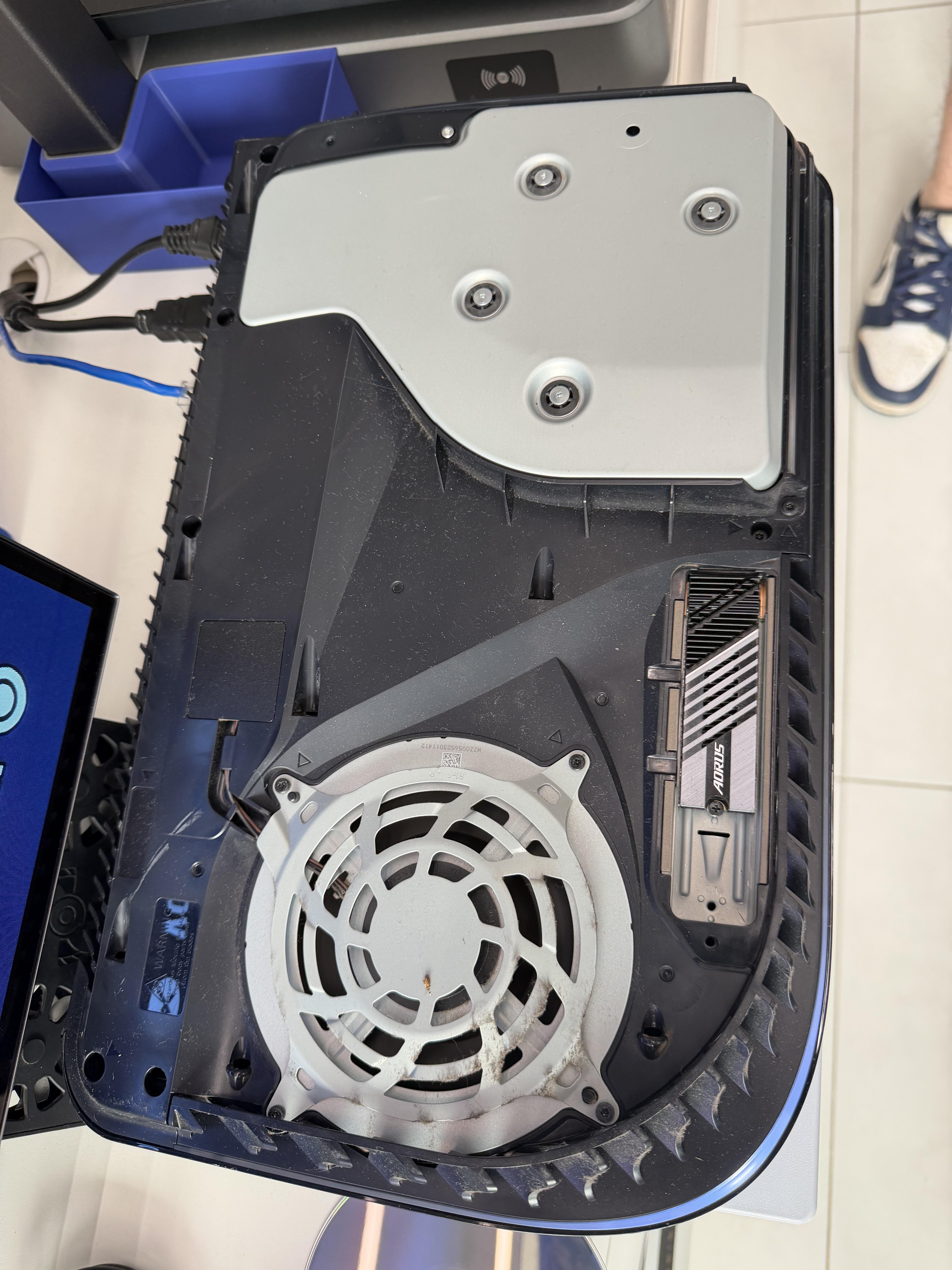
EDIT 3 (Nov 24): Fully cleaned up the console, although didn't mess with the Liquid Metal (sorry for the thermal paste, hardware noob here). We even installed a cooling chip (I've commented here with a pic) to bypass the PS5 cooling demand and always use higher RPM values. No changes, same error, same crashing in middle-game. Tried both The Witcher 3 Remastered and Red Dead Redemption 2 long gameplays, both ran seamlessly. Doesn't look heat-related now. Also, in Brazil we don't have that cloud gaming plan, only remote play — which still uses my PS5, so it solves nothing. Gonna unpatiently wait for a patch, as I fear insisting may corrupt the console, as many reported in other posts.
———
Howdy fellas!
Quick context: 2024 Fat PS5, was able to play GTA VI for 30-40 mins, then image froze, game quit with error. No console shutdown anytime. Only happened with GTA VI, all other games were fine.
What fixed: Some of you mentioned this could be hardware failure in the motherboard’s SSD, so I finally tried adding a M2 nvme SSD to that PS5’s additional slot and… currently running 2 hours straight with no errors!!
Don’t forget to set up your PS5 to store your games in the additional drive instead of the main one.
Hope this helps some of you!
29
u/dankpickles_ 4d ago •
So the only fix is to buy something that costs a couple hundred dollars
5
u/Nalu_KS 4d ago
If other games are fine on the original ssd, and your brand new works fine on gta 6, what if you try formatting the ps5 so that it "cleans" the ssd and try playing it? Maybe there is some problem with storage and residual files after deleting games and somehow it interferes with gta 6 and how it stores memory in the ssd
4
u/TomTomXD1234 4d ago
2 hours of it working is not really a fix. At least give it a day lol
3
u/ZjemCiKolege 4d ago
So easy fix just move game to external hdd and back or rebuild datebase/cache cleanup.
3
u/supertremosso 4d ago
I wish, but didn't work for me. Tried yesterday
2
u/Party-Ant4494 20h ago
Here's the footage I mentioned above in EDIT 3 (Nov 24). It's a generic cooling chip, you may find it anywhere online. Sadly, it didn't solve the
supposedheat issue, but I'm keeping it there anyway. Hope Rockstar/Sony fix this soon!4
u/AdWeak4842 4d ago
thats not really a fix .. some people have played 15 hours into the game and it shuts the console off or bricks the system ... its just random
2
u/bunnyhunter80 4d ago
I’m sure you did, just want to make sure you put the ssd cover on after putting the ssd in. It aids with cooling with the cover it.
3
u/DontBeAngryBeHappy 4d ago
That’s not necessarily the fix case. I installed GTA VI on my M.2 expansion drive, which is faster than the console storage. Still get the 1082551 error. This is still a YMMV on what the root of the problem is for many. Glad it fixed your problem though
7
u/Arthyficier 4d ago
For me I can’t play at all, crash before prologue, after title : Vice City 2 days ago, in loop during 2 days.
1
u/No-Flamingo9444 4d ago
Bro for how long you played?
So you are saying this is related storage memory issue?
1
u/Intrepid-Adagio-6100 4d ago
Cuanto te cobraron por arreglarlo??
1
u/negatyve 4d ago
Could be the stock ssd is overheating with the amount of reading the game requires, which means the thermal putty on the chips need to be replaced.
3
u/WoofManJay 4d ago
Could be an optimization issue with the engine responsible for the communication between the game and storage.
2
u/Zip-Tie-Jedi 4d ago
I’ve always been weary of integrated storage. So when I got a ps5 around 2021, I immediately purchased a 2 tb drive and store game files exclusively on that while putting saves on the integrated storage.
You could show me a 100 studies saying it’s wrong, but this post will always make me feel as though I’m vindicated in that decision.
2
u/taheromar 4d ago
I keep all my PS5 games on the m2 SSD to avoid stressing the internal storage, if the SSD breaks, simply replace it 😄
2
u/Maka_95 4d ago
No thermal paste my dude.
Liquid metal. AND MAKE SURE IT DOENST GET IN THE PCB. The mercury in the liquid metal will eat away traces and shit and short your console
2
u/blackholesun13 4d ago
Thermal paste will be even worse. They need to use liquid metal.
2
u/QuickNick123 4d ago
Isn't the PS5 the console with the bare die and liquid metal, not thermal paste?
2
u/noclassoncall3 4d ago
Your pay is probably covered in dust if that's what I see on the fan. Good chance liquid metal needs a new application. Try cleaning the fan a little and playing with the plate off. Be surprised how much heat gets trapped by that poor design. Since I deep cleaned it, I keep mine off and my ps5 doesn't even get warm anymore.
2
u/zeppahhh 4d ago edited 4d ago
I think that this is not a gta problem, i suspect that gta6 is just so demanding that it reveals hardware that is starting to fail, especially on early models. When you get ce-108255-1 alot of shops will not even take it in because on early models this tends to be a failing apu, ssd controller and nands are also sus. Ps4 games will work all day
2
u/negatyve 3d ago
First time I did a complete repaste on a ps5 I had absolutely no experience with liquid metal, but I successfully completed it and that ps5 has ben running like a champ for months.
First thing you'll want to do once you remove the mobo is clean out the power supply air inlet and the heatsink, cuz they can get caked up and choke the ps5. Might not even need to do anything else. Then you should check the thermal putty and thermal pads on the chips. You want it to be moist and pliable, if it's dry and crumbly you should replace. Use a thermal putty for this, I used a 50gram jar of Polartronix 14.8w.
After that is settled it's time to check the liquid metal. It might not need liquid metal at all. If it's just looking like the liquid metal has been displaced from 1 side to the other, but it's still very liquidy, you might just need to evenly distribute what's there with a qtip. If it's looking scorched, like it's crusty in spots, then it'll need to be cleaned and reapplied. Don't worry too much about any of the liquid metal that's still liquid but polish off any dried or oxidized liquid metal with isopropyl alcohol and qtips. You may need to use a lot of qtips, or even some 2000 grit sandpaper if there's a lot of heavy oxidation on the heat sink, just be careful not to spread the LM beyond the safety partition, or drip any on the circuit board. Patience is key.
When it's cleaned apply new LM with a less is more philosophy. Your goal is a thin, even application to the APU die and the heat sink contact area. I use a drop about the size of a ball bearing on the die, spread it with a qrip then use the same qtip sop up extra and spread it on the heatsink. When you're done double and triple check the circuit board for liquid metal droplets and clean any up with iso.
It seems intimidating but it's more of a pain in the ass than anything. Hope this helps.
3
u/IntelligentInitial38 4d ago
Ahh, so maybe GTA 6 is exposing that we’ve been ripped off by Sony. If they design a console to play games and release a game that overheats their console then that is a faulty console. If they don’t want to accept responsibility for their faulty product then it is up to us to escalate the matter. It’s happening on newer and older consoles alike, and so there’s no excuse for this.
3
u/Mean_Republic3116 4d ago
And rockstar said it plays best on ps5, obviously not if ya can’t play it 🤣
2
u/Temporary-Paint-8400 4d ago
I bought a new ssd today and its still crashing… OP, dud you also install your system on the new drive? Did you do anything else or did you just put the game on the new drive and thats it?
1
u/Silly-Blacksmith6879 4d ago
I guess I am lucky that I happened to have a 1TB SSD in my PS5 along with the Internal SSD.
1
u/Jealous-Ad5952 4d ago
Der Fehler Code ist ein allgemeiner und beweist nicht dass dieser immer die SSD bzw. der Controller ist, auch wenn das extrem häufig die Ursache ist. Ganz wichtig zu bedenken!
1
u/4dots6 4d ago
I tried both on the expansion drive and off, no such luck. Even a full clean system reboot and reset. No luck. Still crashing nearly as soon as I launch the game.
1
u/Heeeliaz 4d ago
I was going to say this, I installed the game in my 2 TB SSD, and it’s been working fine… I also have extra 500 gb there, and I will keep it that way for the time being.
1
u/ernmac74 4d ago
I have the OG Digital PC and also have a 1tb Samsung NVME SSD. Soz maybe your on to something WRT the onboard storage vs add on. Maybe it's a bug when it's installed on the PS5 storage
1
u/Charming1986 4d ago
No problem here ps5 slim did they use different SSD?
1
u/XeLLaR_AC 4d ago
Installed it on my fat release ps5 internal drive and working fine for 20h so far. No crashes at all.
1
u/Extra_Hovercraft3142 4d ago
Yeah I had this error. It’s the ssd on the motherboard / ssd controller. Can’t be fixed. Permanent damage caused by overheating/corruption (power going out/ps5 shutting down incorrectly while ssd is writing data) Was advised it’s best to play games like gta on external storage due to the strain. Playing the game on an external ssd will help with the crashing problem but you still might get crashes since system software is on the motherboard SSD.
1
u/TooManyFuckingBees 4d ago
What was your storage capacity looking like prior to having those issues? I saw somewhere else that leaving some headroom in the SSD could be helpful when it came to stability for GTA 6 on consoles that have it installed on the internal drive.
I have a brand new slim model and haven’t had any issues, but I did delete a couple of other games just as a precaution since I’m not gonna be playing them for a while anyway, and I didn’t think it would hurt. Now it’s at around 75% capacity rather than almost completely full.
1
u/VimFueago 4d ago
does your console have a cool air supply, or a closed cabinet where it's sucking in its own heated air. that the difference.
1
u/BrocolliMonster 4d ago
I have an issue with my ps5. Everything was fine until about 2 days ago when i started playing gta 6. The game was running fine for the first 5-6 hours and then the first crash with error ce-255108-1 appeared. I restarted the game and everything was fine until about 11-12 hours in when another 2 crashes occured. I turned the console off and let it cool down, also changed the resolution to 1080p and it worked fine for another 3-4 hours. Right as i am finishing chapter 1 the game crashed but this time there was no fix as it crashes everytime at the same checkpoint where i have to look for Jason in the hospital. I tried everything, rebuilding database, updating system software via safe mode, clearing cache, reinstalling the game, freeing up the ssd (about 400gb of free space) but to no avail. Next morning i booted the game up again and it worked until i got in the room with Jason (about 60 seconds) and it crashed again. I tried also Gta V and FC 27 and they now all crash just when the game loads.
P.S PS5 Slim dvd version 18 months old always laid horizontally
1
u/Fine_Mouse_489 4d ago
So I’ve been dealing with this same error and think I’ve found the fix. By updating your system software again from the safe mode menu then clearing cache. After this I’ve been playing for hours for the first time with no issues. I hope this helps!!
1
u/spookyyxx 4d ago
J’ai le même problème ça a commencé avec MW4 il y a 1 mois, et maintenant GTA, je ne peux même pas jouer 5min le jeu crash directement dans la prison avec Lucia. Sony cant do shit, j’ai remplacé la pâte thermique et nettoyé chez des professionnels mais le problème persiste !! J’ai fait toutes les manipulations possibles, formaté ma console en mode usine mais rien à faire et Sony m’ont dit qu’ils peuvent rien faire 🥲
1
u/stali84 3d ago
I have the same nvme!
1
u/Efficient-Pin551 3d ago
Was this more an issue with your console more so than the game
1
u/alassassin 3d ago
update later
1
u/Mythic_Tide 3d ago
I have this issue same error code but on witcher 3, it happen sometime but still playable, I dont have GTA VI so I dont know, I think this is a game issue, because my other game are running fine tho...
1
u/AP201190 3d ago
Wait, so is this actually hardware related or some error caused by software?
1
u/JO-DNZ 3d ago
I have an official SSD from PlayStation - it doesn‘t work. 🫠
1
u/ValuableFickle 2d ago
The fix is to clean the dust off the cooling fins and reapply Liquid Metal and only play with the console horizontal so the Liquid Metal doesn’t drip out
1
u/Equivalent_Brief_645 1d ago
Fammi sapere
1
u/Unlikely-Citron-5741 1d ago
The console era is over.
1
u/ImTheOneWhoSleeps 1d ago
Not a hardware issue. Because I'm. playing GTA 6 in my PS5 now through cloud gaming.
1
u/VisualSquirrel9978 13h ago
this worked for me thanks dude
0
u/Background-Title8306 4d ago
Don’t know if it’s relevant as have been reading about all these errors and found something maybe be relevant or maybe not. I have the day one release ps5 which I have never had a problem with touch wood. I have a 1gb internet connection and installed my gta6 two days prior release without any problems but first I reset the console and deleted everything off it as needed doing anyway just to refresh everything and again touch wood gta6 has run since launch with no issues, glitches or anything and kids have been playing it aswell for a couple of hours aswell.
A mate installed his at the same time as me and he has only got 500gb internet connection and his is a fat ps5 purchased last year. He has had numerous glitches and crashes and shut downs. He bought his console to mine thinking possibly overheating so stripped it and put new Liquid Metal on and deep cleaned everything but to no avail it was still doing the same..🤔🤔
Now the interesting thing is whilst it was at mine I reset his console and completely wiped everything to start fresh and then re-downloaded it and guess what it has worked perfectly and he has been on it a few hours and not a problem.
Wondering if may have something to do with install speed and possible conflict with other stuff on the system 🤔
Just a thought
0
u/djack171 4d ago
You’re going to take off the heating and try to apply your own thermal paste? Say goodbye to your ps5 lol