r/PowerColor • u/EfficientSecret1746 • Sep 24 '26
RX 7900 XTX GPU driver timeouts - LiveKernelEvent Code 141
reddit.com
1
Upvotes
r/PowerColor • u/Ok-Material-3065 • Sep 19 '26

Hey guys so yesterday I got a green screen on my computer and it froze when playing games at high loads. I found that odd since i havent had issues in months. So I decided to hard shut down my PC and to turn it back on. When I did that my GPU fans went off at top speed and it started throwing off smoke and fire! I hard shut down my PC but it looks like the components or something got fried. it smells like burnt electronics even days later.
Does anyone know what could've caused this? it looks like it happened close to the HDMI side of the GPU. there was no electrical problems and my power supply is perfectly fine along with the cable pins. there's no visual damage but it definitely smells completely burnt.
r/PowerColor • u/Voldaren • Sep 19 '26

I purchased this rx9070xt about this time last year.
I opened my pc case to dust it out for the first time since building and all the plastic screw holders are broken and the only thing keeping it up was a few cables.
I've never dropped my pc or the graphics card and the packaging i have for it doesn't look damaged. What should i do?
I think i purchased from overclockers uk but can't find the email invoice. Any help appreciated.
UPDATE: Seller closed my enquiry without response and i got this response from the manufacturer
Dear User,
Every region has its own RMA policy and differs by local distributors and resellers.
The vendor where you purchased from has the obligation to service for you.
They will then verify if the problem really exists and apply the product for RMA through their distributor.
Thanks for your inquiry from PowerColor website.
Amazon will refund it but i now need to find a replacement.
Thank you.
UPDATE 2: People here and in build a PC are making it clear that i should push this issue further, especialIy as prices have increased. I have 2 generic responses from the manufacturer. Is there anyone who frequents this sub i could speak to? Thanks =/
r/PowerColor • u/Electronic_Dirt_3309 • Sep 20 '26

r/PowerColor • u/More-Catch7118 • Sep 18 '26
First GPU info: -40mV, -5% PL; 2654 VRam MHz with fast timings (memory junction never goes above 70°C if even that)
The GPU average is around 60–65°C, but the hotspot reaches ~90°C.
The thing is, if I set the fans to 85%, I get around 88°C hotspot. At 75%, it’s still around 89°C, and at 65% it’s around 90–91°C. Only at 50–55% does it start rising more noticeably, to around 94±1°C.
Questions:
r/PowerColor • u/hlalanne • Sep 17 '26

My 9070xt with 9800x3d cpu
r/PowerColor • u/MyEpicWood • Sep 17 '26
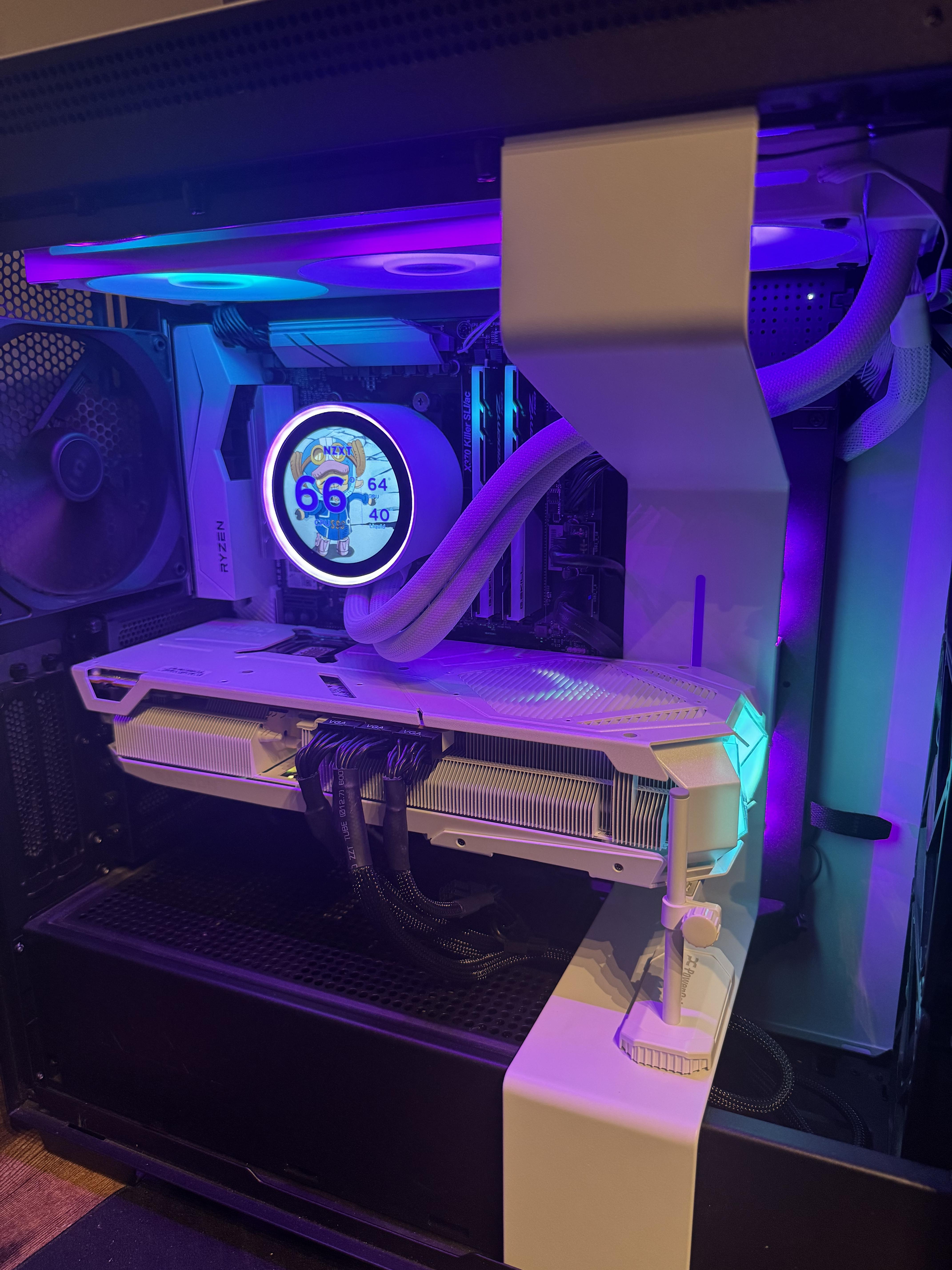
Just wanted to share my build upgrade with yall.
Upgraded to a 5600x3d from a 1600x
X370 Asrock killer sli
Upgraded from a 3060 12gb to the beautiful spectral white red devil.
r/PowerColor • u/Flyh4ck3r • Sep 12 '26

Yesterday i switched my Mainboard from a Gigabyte b450 aorus pro to the Asus ROG STRIX B550-f and i think it looks absolutely perfect with the RedDevil 9070XT.
Cat pic at the End 😌
r/PowerColor • u/hoots_moontower • Sep 13 '26
The first few weeks after purchase in December it was quiet. I've been playing more on speakers and during gaming the coil whine is starting to get obnoxious during quiet times in video games. FPS performance is acceptable, but the noise is becoming a nuisance.
I have a mesh case which certainly isn't helpful. For the price of a new card I expected better engineering
r/PowerColor • u/Flying-Flat • Sep 12 '26

Hi everyone!
I wanted to participate in the event showcase, but I’ve missed it (I only knew about from the physical card inside my GPU when I purchased it)
But I went with the ethereal frost fire theme! And here are the photos.
Full disclosure it’s not 100% done I still need to adjust few things and move the aio tubes a bit.
r/PowerColor • u/One_Statistician_724 • Sep 12 '26
Sapphire RX 5700 XT Nitro+ TriXX issue
Hey, I have a Sapphire RX 5700 XT Nitro+ on Windows 11 Pro using TriXX 11.2.0.
My GPU RGB is stuck on white. TriXX lets me select different colors/effects, but the LEDs never change.
I also noticed that TriXX says my GPU fans aren't working, even though the fans are physically spinning and working normally.
Has anyone with a Nitro+ 5700 XT experienced this? Could this mean TriXX isn't properly communicating with the GPU? Any fixes would be appreciated. 🙏
r/PowerColor • u/Ronchizz • Sep 11 '26
r/PowerColor • u/Dull-Summer4991 • Sep 10 '26
Hello, all. I am requesting help with my RMA request from earlier this year with an RX 7900 XTX. I spoke with Ronak_Patil and eventually got ghosted. At first, the situation went fairly smoothly and was able to get a "replacement" sent to me after roughly a month since my request. The card worked for roughly 5 minutes before crashing and refusing to display immediately after. I contacted Ronak instantly after this happened and asked to send the card back in for a proper working replacement. He assured me that they would handle it, but this is also when I was ghosted. I continued to send messages for the next month until I eventually gave up. Now, 6 months later, I am still very bummed about this especially since the rise in GPU prices and my inability to afford a card as good as the one I had. I have been using a 5070 during all of this time which continues to work just fine in the exact same system I was using with the Rx 7900 XTX, which has a 1000 Watt Gold Certified PSU. However, I would really like the performance I got from the 7900 XTX (certain games just run way better on it, as well as video rendering which I do daily.) Anyway, I am hoping to reach some sort of resolution for my issue. I still have the defective 7900 XTX, which lights up, fans spin, but no display.
Thanks. Please reach out to me and I can provide more information and screenshots of me being being ghosted in conversation. And before you even have to ask, the card has run out of warranty since the conversation stalled, but not before the original request was put in.
r/PowerColor • u/Archranis • Sep 09 '26
Update:
After a dialog with Gigabyte Tech Support, they told me to request an RMA. To be honest, I'm not sure I want to even do that. I found many posts of people having this problem and my interpretation is that the board has an issue with the motherboard traces that ultimately cause this problem. I'm not sufficiently knowledgeable about the hardware to know if this is true or not, but there do seem to be a large number of people experiencing this identical issue. I've decided (for better or for worse) to switch to a different board from a different manufacturer.
Original Post:
I've been troubleshooting for many hours and I'm completely stuck. I hope someone can give me some help.
I've just finished a custom loop build:
I have not installed any operating system at this point; I simply want to get to the bios reliably.
The behavior is this: When booting, I get a long beep followed by 2 short beeps with the VGA diagnostic LED lit up and an Ab status code. This is always the case when the 9070 XT has its 3 power cables plugged in wheher it is connected to the monitor or not. It behaves this way from a cold start as well as a reset.
When I disconnect the 9070XT power cables and switch the HDMI cable from the 9070XT to the internal connector for integrated graphics, after a cold start I sometimes I get to the bios, and other times I get the same behavior as above. In those cases, doing a reset one or two times (instead of shutdown and restart) gets to the bios.
This is what I've tried so far and get the same behavior:
The only thing I can think of at this point is to re-paste the 9070XT, but I have my doubts about that fixing the problem because I get the same problem even when it's not powered. And I'm trying to delay that option as long as possible because draining the loop and removing/reinstalling the 9070Xt will take a significant amount of time, which I'd like to avoid, if possible.
I've been following Google Gemini's troubleshooting suggestions for quite a few hours and it's taking me in circles and pointing me at things that don't even make sense. I've also submitted support requests to Gigabyte and Power Color, but haven't heard back yet.
It is probably worth noting as well that earlier on, I was able to get to the bios using display port from the 9070XT. That seemed to be fine until I enabled EXPO from the Easy menu. That's when all hell started breaking loose. After reflashing and resetting the CMOS (verifying EXPO is disabled), I was able to get to the BIOS using the integrated video only. I did another attempt at setting EXPO1 and ended up in the state that I described above.
Can anyone give me any suggestions, please?
* Cross-posted to r/gigabytegaming and r/powercolor
r/PowerColor • u/MaduXF • Sep 08 '26
Good day everyone. Does anyone know a support number for powercolor. I sent my GPU in for warranty and they've had it for two weeks now and their contact us form did nothing either. I'd like an update and an ETA as I need my GPU. Any help is greatly appreciated. Thank you!
r/PowerColor • u/Flying-Flat • Sep 06 '26
Hi guys!
I’m curious to what kind of settings are you using in adrenaline to run the card. From what I understand the vram comes from Hynix or Samsung which they act differently in terms of overlocking and stability also temps.
I also want to know if 850w psu for the GPU? Kept finding information everywhere that it requires 900w PSU except pc part picker.
r/PowerColor • u/Alarming_Disaster_99 • Sep 04 '26
I am considering buying Hellhound Reva for my white aesthetic build but I am seeing posts like white magnetic Reva backplate won’t fit in some mobo. I am planning to buy MSI B650M mobo and would like to know will the backplate fit in there. If not, what other mobo do you recommend?
r/PowerColor • u/MrFritz85 • Aug 31 '26
Hello Everyone,
I searched for this thread and only found this one
9070 XT Reaper thermal pad thickness? : r/PowerColor
Anybody was able to confirm the thickness? or the caliper (which I have) is still the best way?
I would like to have everything on hand, open it and close it the same day.
TIA
r/PowerColor • u/BiscottiNo7879 • Aug 26 '26
I have a pc with an rtx 4070 super. Randomly I get no dp out, gpu fans spin up, and dp will not turn back on until i restart the computer. All windows audio remains can do win + ctrl + shift + b but nothing happens. Not sure why this is happening need help.
r/PowerColor • u/PowerColorSharene • Aug 26 '26
Hi guys,
We're developing new version of keystone estimated to officially launched on mid-end September,
with new feature for AM10 : APP-specific profile
It'll be a huge help for us if AM10 owners here willing to test it out and gives feedback
Download link : https://devil-zone.s3.us-east-1.amazonaws.com/Tul/POWERCOLOR_KEYSTONE_26.08.01.exe
Cheers!
r/PowerColor • u/littlesirlance • Aug 25 '26
I play War Thunder, and if I'm watching Youtube, or plex, or OBS streaming at the same time. The driver hangs and usually crashes the game. My event logs only seem to note "GPU driver timeout" with nothing else notable showing up.
Computer:
I'm about to come up on 2 years since I initially bought the GPU and am debating if I should be RMAing this thing or not.
I've done about everything I can think of.