r/sdforall • • 1h ago

Other AI Spelling is the easy part of fixing text in an image

Thumbnail
gallery
0 Upvotes

I made these five text edits with SenseNova U1.6. I liked the images already. The small print bothered me.
On the sticker sheet, I wanted two stickers to read "MENTALLY SOMEWHERE ELSE." One has bold black letters on white. The other has outlined letters over a checkerboard. Even with the same phrase, they still feel like two different stickers. There's some garbled text elsewhere on the sheet if you zoom in.
The can on slide 2 is the one I keep coming back to. At thumbnail size, "12 FL OZ" reads clearly and I'd call it done. In the close-up, the metal buckles around the label, and the letters look a little too straight to my eye. The U1.6 notes mention training for perspective and decorative lettering alongside text accuracy. This was the edit where I could actually see why that matters.
The last three slides are a portrait poster, a racing poster, and a license plate. On the portrait, you can see the sweater ribbing where I removed four lines of filler text. The racing poster got a single readable credit line. On the plate, I fixed "CALIFORNIA" above "BARBIE" and removed the stray text underneath.
Back to the can. If you were fixing that label in SD, would you inpaint it or set the type on a separate layer and warp it to follow the creases?
Repo: https://github.com/OpenSenseNova/SenseNova-U1


r/sdforall • • 5h ago

SD News Made a PS4 homebrew app that generates AI art offline on the console (SD 1.5 + SDXL)

Post image
1 Upvotes

r/sdforall • • 2d ago

Tutorial | Guide MiniMax H3 Just Got Faster: Pi-H3 Turbo Setup, Kijai LoRAs & Optimal Settings

Thumbnail
youtu.be
26 Upvotes

r/sdforall • • 1d ago

SD News Made a PS4 homebrew app that generates AI art offline on the console (SD 1.5 + SDXL)

Post image
1 Upvotes

r/sdforall • • 2d ago

Tutorial | Guide The Ultimate MiniMax H3 Workflow for Consistent Character Text & Image-to-Video on Just 6GB VRAM!

Thumbnail
youtu.be
0 Upvotes

Hello everyone I've just released my ultimate MiniMax H3 HyperFlow workflow for ComfyUI, supporting both Text-to-Video and Image-to-Video generation with only 6GB of VRAM! The workflow uses the lightweight 14B-parameter HyperFlow model, capable of generating videos in just 6 sampling steps without requiring any LoRA. I've also integrated SLA Attention and SelfLift Sampler to further optimize performance and accelerate generation. One of the biggest improvements is the integration of ComfyUI-H3-FaceFix-PixelAILabs, which analyzes generated videos, detects problematic facial details, refines them, and stitches the improved faces back into the original video. Finally, RelayVSR handles video upscaling to produce sharper, high-resolution results. The goal was to combine fast generation, facial refinement, and high-quality upscaling into one complete pipeline that runs on low-VRAM GPUs. Everything is optimized for just 6GB VRAM! 🔥 I'd love to hear your thoughts and see what results you can achieve with this workflow!

Workflow links

https://drive.google.com/file/d/1U3v4VLV__ym9srTAEv6z91MHpL6U0SLS/view?usp=sharing

https://civitai.com/articles/39700/the-ultimate-minimax-h3-workflow-for-consistent-character-text-and-image-to-video-on-just-6gb-vram


r/sdforall • • 3d ago

SD News ComfyUI's power without the node spaghetti: Pixelbench combines the best of ComfyUI, A1111/Forge, SwarmUI and InvokeAI in one editor (open source)

Post image
13 Upvotes

r/sdforall • • 3d ago

Tutorial | Guide Fix Video Degradation & Darkness in Long Minimax H3 Chains (Comfy UI Tutorial)

Thumbnail
youtu.be
17 Upvotes

r/sdforall • • 3d ago

Tutorial | Guide Speed up image generation with a resolution ladder!

Post image
2 Upvotes

r/sdforall • • 5d ago

Discussion Comparing GPU options after RunPod’s cold starts and availability got unworkable

1 Upvotes

Comparing GPU options after RunPod’s cold starts and availability got unworkable

We’d been running our image gen on RunPod for a while, and for most of that time it was fine. Eventually, though, the waiting became more annoying than the price.

Cold starts on bigger models are real, and it’s not just me. RunPod’s own writeup showed a 32B model with a median cold start of around 324 seconds on default settings, dropping to about 91 seconds after four configuration changes. A lot of that time is spent on the model side: loading weights, torch.compile, CUDA graph capture, and everything else that happens after the machine comes up.

Storage was another problem. Your network volume is tied to one datacenter, which means GPU availability in that particular location becomes the limiting factor. If the card you need is out of stock there, you’re either waiting for capacity or copying a few hundred gigs of data somewhere else. That kind of defeats the point of having everything ready to go.

For bursty workloads, none of this matters that much. You spin up, run your jobs, and shut everything down. It became a problem once we started running things closer to all day. Keeping workers warm solves some of the waiting, but then you’re paying for idle GPUs around the clock.

So I started looking at alternatives.

Vast seems to be the cheapest by a pretty wide margin, but you’re renting from marketplace hosts, so hardware quality and availability can vary.

Lambda and CoreWeave seem like more predictable options if you just want rented GPU capacity without dealing with individual hosts.

Then there’s the option of owning the hardware. We looked at B3IQ, where you buy the machine and they rack and manage it for you. The obvious downside is that you’re paying for the entire box whether you’re using it or not. They also help arrange offtake contracts, so supposedly you can rent out unused compute instead of letting it sit idle.

What I’m still trying to figure out is whether owning the hardware actually solves the cold start and availability problems, or whether you’re just trading those for hardware failures, maintenance, and the risk that offtake demand doesn’t hold up.


r/sdforall • • 7d ago

Tutorial | Guide ComfyUI Samplers Explained: Best Sampler, Scheduler and Custom Sampler

Thumbnail
youtu.be
12 Upvotes

In this video of ComfyUI Nodes Explained, you will learn what is inside the KSampler and how to build the custom sampler: five small nodes that do the same job and give you more control. You will see what sigmas are, why official templates like Flux 2 Klein use these five nodes, how to write your own plan with ManualSigmas and cut it in two with SplitSigmas, and which sampler and scheduler work best, from a test of all 405 pairs on three models. Two "A Deeper Look" chapters show why the scheduler needs the model, where a KSampler quietly changes the plan, and why some pairs break. The workflows use Z-Image Turbo.


r/sdforall • • 6d ago

SD News In honor of Jeveration's 78ms image gen time on a B200

0 Upvotes

In honor of Jeveration's 78ms image gen time on a B200 I give you my 50ms generations on a 5090 using sdxs-512-DreamShaper. After 20 single steps I click go and you'll see it fly.

I yet have no opinion on the quality between Jeveration and sdxs-512-DreamShaper


r/sdforall • • 7d ago

Tutorial | Guide HyperFlow H3 Flash Faster Generation with 6GB of Vram

Thumbnail
youtu.be
8 Upvotes

Hello everyone

I’ve been testing HyperFlow, a compressed 14B-parameter open-source model created through self-distillation acceleration of the 20B MiniMax H3 model, and I built a complete ComfyUI workflow around it. The main reason I wanted to test it was speed: it aims to reduce generation time without relying on external training data while still maintaining good quality. It also supports NVIDIA Sol-Attn sparse attention, which can provide another speed improvement, especially when combined with the SelfLift sampler.

I also added RelayVSR for upscaling the final result. One thing that surprised me is how well it handles characters and movement compared with some of the other MiniMax H3 workflows I’ve tested. It doesn’t require a LoRA and works well at only 6 steps. On my 6GB VRAM setup, I managed to generate around 0.7 megapixels in about 20 minutes, which is roughly twice as fast as my previous setup.

The main drawback I’ve noticed so far is distorted faces, especially in long distance prompt some generations. I’m currently testing different ways to fix that. Overall, I think HyperFlow is a very interesting option for anyone trying to run high-quality video generation on limited VRAM. I’ve included the complete workflow on Patreon for those who want to test it themselves.

Models & Links

https://huggingface.co/BennyDaBall/HyperFlow-H3-Flash-INT8-ComfyUI/tree/main

https://github.com/Video-Rebirth/ComfyUI-HyperFlow-Flash https://github.com/BennyDaBall930/comfyui_hyperflow_int8_nodes

Workflow Links

https://drive.google.com/file/d/1Ov6VGFgWv5EHQ9Dzof0Z9d8irIwG49sX/view?usp=sharing

https://civitai.com/articles/39206/hyperflow-h3-flash-faster-generation-with-6gb-of-vram


r/sdforall • • 8d ago

Resource PAN 2 now runs in Forge Neo, with a timeline editor that writes its JSON prompts for you

Thumbnail
reddit.com
0 Upvotes

r/sdforall • • 9d ago

Tutorial | Guide MiniMax H3 Image and FIBO 2 in ComfyUI | 14 Free Workflows (Ep43)

Thumbnail
youtu.be
23 Upvotes

In this episode, we test two new image models in ComfyUI with 14 free workflows: MiniMax H3 Image, the image model that MiniMax made itself, and FIBO 2, made by Bria AI. Each model gets seven workflows, so you can generate images from text, edit an image with a prompt, combine a few images, and change only a small area. We test them all, and see what each model does well, and where it struggles.

MiniMax H3 Image: text to image up to 4K, a short idea turned into a full prompt with MiniMax's prompt expander, edit a picture by text, combine two pictures, combine different elements in one image, and change only an area with a box or a mask, so the rest of your image stays as it is.

FIBO 2: it was trained on long, structured JSON prompts, so in these workflows a small helper model writes the JSON from your short idea, and you can always read it. Text to image with the fast Turbo model or the full Dev model, change one thing in an image, edit a picture by text, combine pictures, and edit inside a box or with a mask.

At the end, I compare both with models from older episodes, with the same prompts: Krea 2, MOSS and the P-H3 LoRA for text to image, and the P-H3 LoRA, FLUX 3 Klein and Qwen Image 2.1 for editing. The exact prompts are on the episode page, next to the workflows.


r/sdforall • • 9d ago

Tutorial | Guide Viggle Character Motion Transfer in ComfyUI – 6GB VRAM + Fully Automated Workflow

Thumbnail
youtu.be
7 Upvotes

Hello everyone

I’ve just released a new fully automated Viggle character motion transfer workflow that works with 6GB of vram. This workflow allows you to take any character reference image and transfer the motion from a video onto that character with impressive precision,it is optimized for low-VRAM users thanks to the INT8 ConvRot version of the Viggle model. you can also use LoRA version that converts MiniMax H3 Ref2V into Viggle mode for the motion-transfer process.

The entire workflow is highly automated:

➡️ Load your character reference image
➡️ Upload your motion video
➡️ Choose the video duration
➡️ Let the integrated Qwen VL prompt system analyze the video and handle the prompting
➡️ Generate the result

I also included RelayVSR for upscaling, since Viggle can generate at 480p or 720p. On my setup, a 5-second 480p video takes around 20 minutes.

Worklow Link

https://drive.google.com/file/d/1_FoFWRreYRLTG3d9o2MEUiZ2ZOG5Nk2_/view?usp=sharing

https://civitai.com/articles/39038/viggle-in-comfyui-character-motion-transfer-made-easy-6gb-vram


r/sdforall • • 10d ago

SD News SEEDVR2 Studio Complete

12 Upvotes

Hey everyone!

I'd like to share SeedVR2 Studio, an open-source project I've been working on to make AI image and video upscaling easier and more accessible.

It brings SeedVR2 into a modern, user-friendly web interface, without the need for complicated workflows.

Key features:

  • AI image and video upscaling
  • SeedVR2 Lite GGUF support for lower VRAM usage
  • Before/after comparison and live previews
  • Real-time GPU and VRAM monitoring
  • Built-in model manager
  • Batch processing and job queue
  • Windows, Linux, and macOS installation scripts

GitHub: https://github.com/Aaronstanley78/SEEDVR2-Studio-Complete

I'd love to hear your feedback and suggestions for future improvements.

If you find it useful, consider giving the repository a star to support the project!

Thanks for checking it out!


r/sdforall • • 10d ago

Resource [Release] DiffusionBear v0.5.0 is live — Pure-MLX runtime (-52% .app), 3/4-stage memory lifecycle, Virtual Boxes, Kromoss 5B, RGBA Alpha & Open Agentic REST API

Post image
2 Upvotes

r/sdforall • • 11d ago

Workflow Included Some images from MiniMax H3 Image

Thumbnail
gallery
3 Upvotes

When I've seen the results, I've found them kind of outdated, but I know that a lot of people in the AI image gen community like the old look of the early days of AI image gen.

More images with prompts are on my Substack. I've built an image-to-image workflow on Civitai.


r/sdforall • • 11d ago

Discussion Dynamic Allocation - Comfyui VS Forge Neo SD

Thumbnail reddit.com
1 Upvotes

r/sdforall • • 14d ago

Tutorial | Guide ComfyUI KSampler Explained: Seed, Steps, CFG and Denoise

Thumbnail
youtube.com
26 Upvotes

In this video of ComfyUI Nodes Explained, you will learn what every setting on the KSampler does: the seed and control after generate, how many steps you really need, what CFG does and why it can burn your image, how the sampler and the scheduler work together, and why denoise stays at 1 with an empty latent. Four "A Deeper Look" chapters show the starting noise a seed makes, how much noise each step removes, how CFG mixes two guesses, and how the samplers differ. Everything is shown with Z-Image Turbo, and the full Z-Image model for CFG.


r/sdforall • • 13d ago

Tutorial | Guide Best Character Swap for Minimax H3: Viggle AI or Alissonerdx?

Thumbnail
youtu.be
4 Upvotes

r/sdforall • • 14d ago

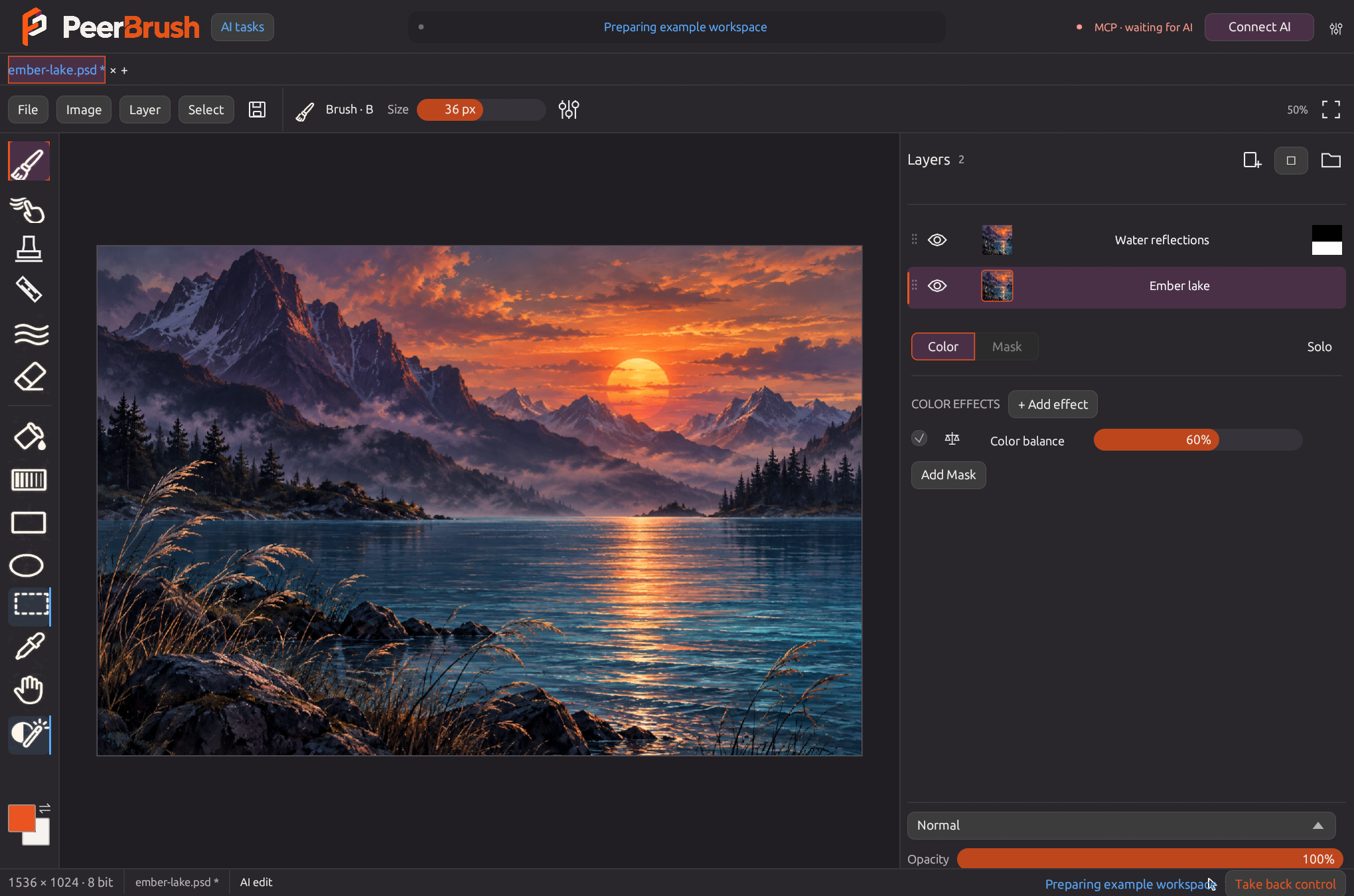
Discussion A layer-and-mask workflow for keeping local Stable Diffusion inpaint variants editable

3 Upvotes

If you have two local Stable Diffusion inpaint results and each one got a different part right, keep them as separate layers. That lets you bring back a detail from the original or blend a seam without running the model again.

  1. In your local Stable Diffusion workflow, export the original and both inpaint results as full-size PNGs with the same canvas dimensions. If you used a crop-only workflow, place the result back into the full frame before exporting.
  2. In PeerBrush, open the original and bring the two outputs into the same document on separate layers above it. Rename the layers for the edits they contain, such as “warmer window light” and “fixed sleeve.”
  3. Select one result layer and choose Add mask. Paint black on the mask wherever you want the layer beneath to show. Use a softer brush at the join, and toggle each layer to compare the result with the original.
  4. Keep the layered PSD so you can revise the masks later. Export a PNG when you need the finished composite.

I’m the solo developer of PeerBrush. It’s free and open source, and this workflow uses the desktop editor without connecting an AI client. It works with rendered PNGs from a local Stable Diffusion workflow. The screenshot shows the editor on its own AI-generated sample artwork. AI helped draft this guide.

Official workspace demo: https://peerbrush.com/#demo

Free downloads: https://peerbrush.com/downloads.html

Official workspace screenshot: https://raw.githubusercontent.com/Deftr0y/PeerBrush/v0.30.1/docs/images/workspace.png


r/sdforall • • 15d ago

Question help me create a workflow

Thumbnail reddit.com
0 Upvotes

r/sdforall • • 16d ago

Tutorial | Guide Pruna P-H3 Image in ComfyUI | MiniMax H3 for 4K Images & Edits (Ep42)

Thumbnail
youtu.be
24 Upvotes

In this episode, we test P-H3 Image in ComfyUI with 18 free workflows. P-H3 Image is a new image model from Pruna AI, built on MiniMax H3: it generates images up to 4K and edits your photos with one sentence. We test them all, and see what it does well and where it struggles.

Generate images: text to image up to 8 megapixels, a short idea turned into a full prompt with the Prompt Upsampler, and exact words written into the image.

Edit one image: a new place, day to night, new words on a sign, restyle a photo into a 3D cartoon, restore and colorize an old photo, and a character sheet with four sides.

Two or more images: an outfit from a second picture, a character in a scene, a logo printed on a product, and four people in one group photo.

Box, frame, upscale and style: edit only inside a box, outpaint to a wider image, a creative upscale from small to big, and a style from a second picture.

Plus a bonus: picture to video with MiniMax H3, with sound and music. And bonus 2: run P-H3 Image in the cloud on RunningHub, with no GPU and nothing to install.


r/sdforall • • 15d ago

Resource I made a one-click prompt browser and I could use feedback, and bug reports

Post image
2 Upvotes

I put together a site that browses prompts like a feed, with one-click copy, and I'm trying to figure out if it's actually useful or just something I like because I built it.

bunchaprompts.com

It's browser-only, nothing to install. Prompts are pulled from sources that allow it, like the Civitai API, with attribution links back.

If you try it, grab anything off the home feed, paste it into your usual UI, and tell me whether the copy button got the whole prompt. If it crashes, I need your device type.