r/ScanSnap • u/Putrid_Effort1018 • 4h ago
Stamped scanner
reddit.com
1
Upvotes
r/ScanSnap • u/kydar1 • Feb 24 '21
A place for members of r/ScanSnap to chat with each other
r/ScanSnap • u/rakhimano • 6d ago
r/ScanSnap • u/rakhimano • 6d ago
r/ScanSnap • u/ExpressionSame6473 • 8d ago
r/ScanSnap • u/DetectiveShot4244 • 9d ago
Looking to buy a document scanner for my paper collages. Most of my work is 7x10 or 9x12 inches. I've read mixed reviews about the Canon CanoScan LiDE 400 Slim Color Image Scanner and wanted to know if anyone has experience with it.
My budget is $300. I'd prefer something portable, but high DPI and user friendliness are my priorities. Let me know!
r/ScanSnap • u/nntp338 • 17d ago
I just updated my ScanSnap Home to version 4.1 and I'm able to scan with my ix500 on my Mac running 27.x again. I wasn't sure if software support for the ix500 was EOL so thank you ScanSnap!
r/ScanSnap • u/no-name-35 • 23d ago
Hey there,
My initial post about ScanSnack, a reverse-engineered Wi-Fi client for ScanSnap scanners has gotten some attention and some asked, if it also supports iX500.
Thankfully, https://github.com/myst3k has contributed the protocol to his iX500, which is now release in the app under version 0.4.0. Get the new version by downloading from the website or updating in the app.
So everyone with an iX500 reading this, please feel free to test it with your scanner and provide feedback (comment or GitHub issue) of any kind. The more testing and feedback, the better the app will become!
Links:
r/ScanSnap • u/no-name-35 • 25d ago
tl;dr: I created a cross-platform open source clone of ScanSnap Home
Hey there,
I burned some tokens for good and reverse-engineered the ScanSnap Wi-Fi protocol using Wireshark and Claude. My main goal was to provide a real non-proprietary driver for using my ScanSnap iX1500 from my Mac without ScanSnap Home and over Wi-Fi.
Website: https://elte0.github.io/scansnack/
Repository: https://github.com/elte0/scansnack
Reverse-engineering with Claude worked extremely well and I had it working after two hours. So I also built a simple UI around it to maybe be able to ditch ScanSnap Home completely.
Of course it's a WIP, but I decided to provide the source code and the protocol quickly, so here it is. Feel free to test and please give feedback, and also check the other project that was also posted here today 😄
r/ScanSnap • u/tkornack • 26d ago
While in macOS 27 beta I was unable to use my scanner with the native software. Like countless others I've written my own client that leans heavily into macOS conventions. This one is free and open source. In doing so I was responding to the utterly incomprehensible app download size, how the app is so full of mystery meat UI, and cumbersome installation and offensive and alien installer/auto-updater system.
I'd really appreciate feedback and I would love to hear reports of working or failure on a variety of ScanSnap models.
I realized too late that the name was kind of taken already. Open to ideas.
https://apps.apple.com/us/app/snapscan-document-scanner/id6796118741?mt=12
r/ScanSnap • u/bcalamita • 29d ago
On Amazon, they list three different versions of the Scansnap iX2500…
-Standard - $379.99
-Photo Edition - $474.99
-Premium - $479.99
Does anyone know the difference between these three different options? I don’t see any difference listed on Amazon’s website. I assume it’s just bundled software, but wanted to see if anyone had definitive answer.
Thanks!
r/ScanSnap • u/sullimareddit • Oct 15 '26
I’m having an issue with my ix500. When I open the cover, even if the blue light comes on, sometimes the scanner doesn’t make the whirring initialization sounds. When that happens, it fails to connect to Scansnap Home. Says the scanner is not connected.
I know the blue light is connected to the little black square button—that does fail to pop up sometimes. I can pop that up manually.
When the sound DOES happen, the scanner connects and works great. If the whirring sound doesn’t happen when the cover is opened, neither WiFi or USB works. This is true every time.
AI troubleshooting says the scanner isn’t “awake” and says it’s either the hinge wiring harness/solder joints where the cover switch connects to the main circuit board, OR a stuck “home position” optical sensor.
I have two ix500. Both intermittently have the issue.
Anybody fixed this?
r/ScanSnap • u/BobVA69 • Oct 07 '26

I'm restoring an older Contex CHAMELEON Tx 36+ / GL67D 36-inch wide-format scanner and am looking for its original Scanner Maintenance calibration sheet.
The Contex service/packed part numbers I've identified are 6799D116 / 6799D116R01. I've also found strong evidence connecting it with a physical calibration sheet marked P/N 6779D126, which appears to have also been used with some HP DesignJet and Océ wide-format scanner systems.
I'm hoping someone here may have one sitting in a cabinet, storage room, old service kit, parts machine, or pile of retired wide-format equipment.
I don't necessarily need to buy it or even borrow it. If you have one, a good high-resolution scan of the calibration sheet may be enough for our research. Good straight-on photographs and physical measurements would also be extremely valuable.
If you're able to photograph one, please include something of known size in the picture for scale—a ruler or tape measure would be ideal, but even a coin, credit card, or other standard-sized object would help. If possible, photograph the sheet as straight-on as you can rather than at an angle.
Of course, if you have an original you'd be willing to sell, I may be interested in that too.
The sheet I'm looking for is roughly 40+ inches wide and has a very distinctive layout: a small Agfa/Agfacolor IT8 color target near the upper left, a machine-readable block near the upper right, large white and black areas, gray bands, alignment patterns, and a dense ruler-like pattern along the bottom.
So far I've confirmed that the scanner itself works. It's connected by SCSI to a dedicated Windows XP system, WIDEsystem recognizes it correctly, and Contex Scanner Maintenance communicates with it. I have deliberately not run calibration without the correct sheet.
If anyone has worked on older Contex, Vidar, HP DesignJet scanner/MFP, or Océ wide-format scanners and recognizes this calibration sheet—or knows a retired technician/dealer who might have one—I'd really appreciate hearing from you.
Even an old part-number cross-reference, service manual, photograph, scan, auction listing, or memory of these sheets could help.
I have attached a small image I was able to find of the calibration sheet, it just doesn't have enough details to help.
Thanks!
r/ScanSnap • u/Dry_Rip8275 • Oct 07 '26
Quelqu’un sait la raison de la perte de crunchyscan ?
Et avez-vous des sites alternatifs en VF ?
r/ScanSnap • u/Defiant-Word-6511 • Oct 04 '26

When I scan a document to to Preview, I get this error. I click "ok", but then it proceeds to open the pdf in Preview without a problem, I can then save it or move the location or remove pages, etc. Any ideas why I get this error each time? I'm on a Mac, using the very latest ScanSnap Home, but I've had this problem in previous versions too.
r/ScanSnap • u/Cautious_Worker_8580 • Oct 02 '26
Hi i have a second handed contex scanner which doesn't have color calibration sheet.
When i scan documents there is a fade blue background and i have to calibrate it.
Can someone guide me how can i do it ?
Does anybody have color calibration sheet for this model?
r/ScanSnap • u/PG2001 • Oct 01 '26
Just got my ix500 back after loaning it to a friend, so had to set up wifi connection again - I'm pretty sure it was working on this network before, but I can't be 100% on that (only moved her less than a year ago, and haven't used the scanner that much since).
The wifi setup went as expected, no problems - was able to connect to the same wifi network my Mac is on, and the blue light on the scanner is on solid. Scanning works fine via USB. But, when I disconnect the USB cord, "Connection type" in the Scanner settings page changes to "No connection"
I've tried restarting ScanSnap (multiple times), power cycling the scanner, switching the wifi switch on and off, rebooting the Mac, no change.
Any suggestions on what the problem might be, or what else to try?
Running ScanSnap Home 4.1.0, latest firmware 0U00.
MacOS 26.2.2

r/ScanSnap • u/paulsiu • Sep 30 '26
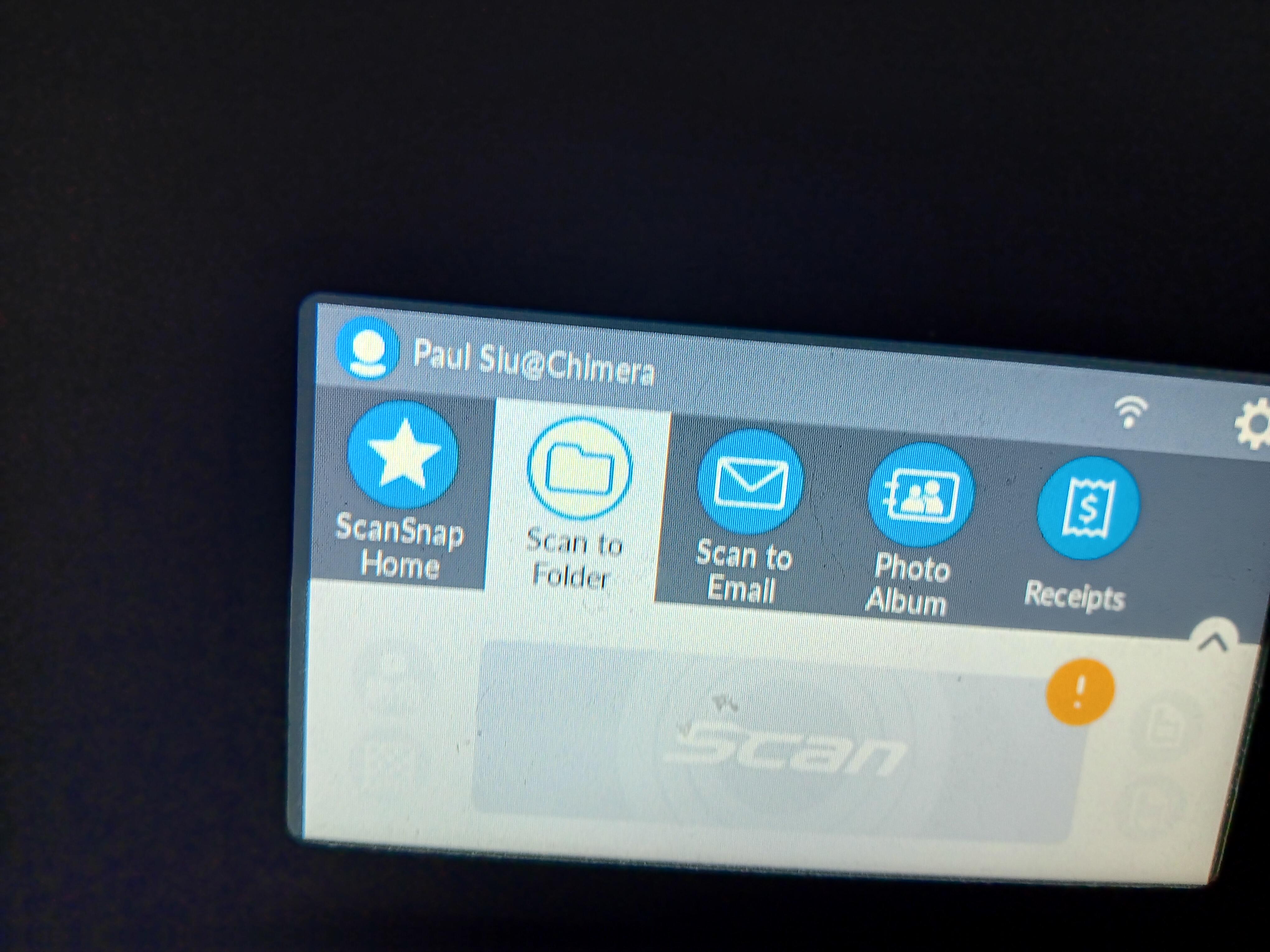
Lately, my snapscan has been going into a state where there is a yellow exclaimation mark. This seems to happen when I use the snapscan and then connection eventually breaks and the scanner goes into this state. When that happens, I have to either power off and power on the scanner or change the network setting off wifi and change it back. It's on the latest firmware and is on Wifi. Is there a setting I can set to get rid of this error. I hate to have to reset the scanner every time I want to use it.
r/ScanSnap • u/rosenkrieger360 • Sep 29 '26
Modifications from 4.0.0 to 4.1.0
New features
Corrected issue
You can get it via ScanSnap Online Update.
r/ScanSnap • u/EmberWeavingSpin • Sep 26 '26
I think about using a DMS without a huge system/setup overhead. ScanSnap Home looks not that bad. On the other hand, it is pretty predefined in features (e.g. document types). The easiest way would be to use a cloud file system instead with a good folder structure.
Are there any experience and heavy users out there? Would be happy to hear some real use cases, pros and pitfalls.
r/ScanSnap • u/crosschk • Sep 25 '26
Is there a way to have images scanned be automatically named for front side and back side of the item scanned?
Example:
scandoc_front.jpg
scandoc_back.jpg
r/ScanSnap • u/QuirkyImage • Sep 24 '26
Hi having trouble with a ix1300 on macOS 27 when scanning, basically it scans but hangs on the image processing.
M1 MacBook 13” 16G 1TB. Any ideas?
update: just seen https://www.reddit.com/r/ScanSnap/s/sMoqUW7uQD
r/ScanSnap • u/rosenkrieger360 • Sep 24 '26

UPDATE (30.09.26): The ScanSnap Home 4.1 Update that arrived fixes the issue, just like the Beta version did before.
-------
macoS 26.7 (not GoldenGate but Tahoe)
ScanSnap Home 4.0.0 (16)
ScanSnap Online Update 3.2.11
I open up ScanSnap Home - hit the Scan Button and it scans.
I click to end the scan - this is where it usually brings up a save-dialog - and it seems to do this, but the windows is NOT shown.
I tried so see if it is hidden by using Mission Control show all windows - but nope. It simply does not show the dialog window anywhere for me to interact with.
Any ideas what I can do/fix ? It worked fine before the macOS 26.7 Security Update.
r/ScanSnap • u/Teelaikhumbi • Sep 21 '26
I put a whole stack through the scanner at once and felt ridiculously efficient for about thirty seconds.
Then I opened the file.
There was a receipt, an insurance form, two letters, part of a manual and several blank backs. One of the blank pages was not actually blank. It had a tiny signature near the bottom.
My first mistake was splitting PDF by the page numbers printed on the documents. That went badly because page 14 in the file was page 2 of one of the letters. I cut the wrong pages twice before I noticed what was happening.
Now I open the thumbnails and make a very ugly map in Notes.
receipt: PDF pages 1 to 3
letter: 4 and 5
manual: 6 to 19
Nothing clever, but it stops me from mixing the PDF position with the number printed on the page.
If the file needs to stay on my computer, PDFsam Basic works for splitting by page ranges. Preview is fine when I only need to pull out or move a couple of pages on my Mac. I have also used PDFAid when I wanted to do the cleanup in the browser, thankfully it worked better
The annoying part is checking everything afterward. I open the first and last page of every new file and keep the original 70-page monster until I know nothing disappeared.
If anyone has a less annoying routine for mixed ScanSnap batches, I am listening.