r/Supernote_dev • • Sep 29 '26

Lasso Plugin Collapse / Expand plugin 1.3.0 — updated to the latest Chauvet

Post image
10 Upvotes

Collapse / Expand hides a region of your handwriting in Notes behind a small ⊕ icon and brings it back when you need it — handy for long derivations, answers to exercises, or anything you want out of the way until later.

What's new in 1.3.0:

- Lasso, then collapse via context menu to hide a piece of text.
- Just tap the icon with your finger to expand or collapse a section.
- New: Resize handle in the bottom-right corner of an expanded section.
- Name a section while it's expanded, and fix a name's underline after erasing part of it.
- Lots of reliability fixes, especially when the device is slow to refresh the page.

Download: https://github.com/vincentaravantinos/supernote-collapse-expand/releases/latest (Settings → Plugins → Install plugin).

Feedback and bug reports welcome!


r/Supernote_dev • • Sep 29 '26

Bug : Received Bug Report: Plugin host keeps the old native code loaded

4 Upvotes

Plugin Host keeps the old native code loaded after a plugin upgrade, causing SIGSEGV crashes and the message "This plugin is not compatible with the current system version"

Here some more details claude gathered from the analysis for me: u/Dunn-sn**: let me know if you have more questions on it.**

Device / firmware: Chauvet.D102.2609111001.2505_beta_ (htfy_px30, userdebug), PluginCoreService 1.00.26009090
Plugin: GtdPara (pluginID ndx27q77pojfqh6l), which includes its own native code (nativeCodePackage: /app.npk, custom ReactPackage)

Summary
When a plugin with native code is upgraded, the plugin host installs the new version inside the host process that is already running. It shuts down the old React instance correctly. However, the old version's native code (its npk, odex and vdex files) stays loaded in memory after those files have been deleted from disk. One to two minutes later, the host process often crashes with a SIGSEGV inside ART on the plugin's native-modules thread. After that, tapping the plugin icon shows:

"This plugin is not compatible with the current system version. Please update the plugin."

A second tap opens the plugin normally, because a fresh host process has started. The plugin then runs without problems until the next upgrade.

Steps to reproduce

  1. Install and use a plugin that ships native code.
  2. Install a new version of it from Settings while the host process is running.
  3. Keep using the plugin for 1–2 minutes: the host crashes. Tapping the plugin icon then shows the message above.

Log excerpts

The upgrade is installed into the running host process (pid 15481, about 9 minutes old), and the old modules are shut down correctly:

16:06:28.429 15481 I PluginInstallManager: installPlugin pluginZipPath:/storage/emulated/0/MyStyle/gtdpara.snplg, installType:0, isSystem:false
16:06:30.350 15481 I PluginInstallManager: checkPlugin newVersion:3
16:06:30.350 15481 I PluginInstallManager: checkPlugin oldVersion:2
16:06:39.657 15481 I PluginInstallManager: installPlugin: success, pluginName=GtdPara, ..., isUpgrade=true
16:06:39.673 15481 I GtdParaRuntime: module invalidated: GtdParaFile build=app_1790690214111 ...

The new version then loads in the same process, and the old version's deleted files are still mapped (read from /proc/self/maps):

16:06:40.110 15481 I GtdParaRuntime: build loaded: build=app_1790690790392 versionCode=3 pid=15481 processAgeMs=533171
16:06:40.112 15481 I GtdParaRuntime:   mapped .../plugins/ndx27q77pojfqh6l/oat/arm64/app_1790690214111.odex (deleted)
16:06:40.112 15481 I GtdParaRuntime:   mapped .../plugins/ndx27q77pojfqh6l/oat/arm64/app_1790690214111.vdex (deleted)
16:06:40.112 15481 I GtdParaRuntime:   mapped .../plugins/ndx27q77pojfqh6l/app_1790690214111.npk (deleted)

The resulting crash, from an earlier upgrade (installed 15:20:24, crash 15:22:25; another upgrade at 14:16:40 was followed by the same crash at 14:17:45):

F libc   : Fatal signal 11 (SIGSEGV), code 1, fault addr 0x14 in tid 13473 (mqt_ndx27q77poj), pid 10233 (note.pluginhost)
F DEBUG  : signal 11 (SIGSEGV), code 1 (SEGV_MAPERR), fault addr 0x14
F DEBUG  : Cause: null pointer dereference
F DEBUG  :     #00 pc 0000000000410818  /system/lib64/libart.so (art::OatQuickMethodHeader::ToDexPc(...)+56)
F DEBUG  :     #01 pc 00000000001c219c  /system/lib64/libart.so (art::FaultManager::IsInGeneratedCode(...)+880)

The other crash's stack goes from Method_invoke into the ART interpreter (DoCall / MterpInvokeInterface) and ends in a null method, with frames in dalvik-jit-code-cache (deleted). It never reaches any code in the plugin itself.

Expected
After upgrading a plugin that ships native code, the host should restart its process (or load the plugin in a fresh process), so that only one version of the plugin's code is ever loaded.

Current workaround in our plugin
The plugin detects that an older version is still loaded and offers a button that ends the host process. This avoids the crash, but the message above still appears once afterwards.Subject: Plugin host keeps the old native code loaded after a plugin upgrade, causing SIGSEGV crashes and the message "This plugin is not compatible with the current system version"
Device / firmware: Chauvet.D102.2609111001.2505_beta_ (htfy_px30, userdebug), PluginCoreService 1.00.26009090

Plugin: GtdPara (pluginID ndx27q77pojfqh6l), which includes its own native code (nativeCodePackage: /app.npk, custom ReactPackage)
Summary

When a plugin with native code is upgraded, the plugin host installs the new version inside the host process that is already running. It shuts down the old React instance correctly. However, the old version's native code (its npk, odex and vdex files) stays loaded in memory after those files have been deleted from disk. One to two minutes later, the host process often crashes with a SIGSEGV inside ART on the plugin's native-modules thread. After that, tapping the plugin icon shows:

"This plugin is not compatible with the current system version. Please update the plugin."

A second tap opens the plugin normally, because a fresh host process has started. The plugin then runs without problems until the next upgrade.
Steps to reproduce
Install and use a plugin that ships native code.
Install a new version of it from Settings while the host process is running.
Keep using the plugin for 1–2 minutes: the host crashes. Tapping the plugin icon then shows the message above.
Log excerpts
The upgrade is installed into the running host process (pid 15481, about 9 minutes old), and the old modules are shut down correctly:
16:06:28.429 15481 I PluginInstallManager: installPlugin pluginZipPath:/storage/emulated/0/MyStyle/gtdpara.snplg, installType:0, isSystem:false
16:06:30.350 15481 I PluginInstallManager: checkPlugin newVersion:3
16:06:30.350 15481 I PluginInstallManager: checkPlugin oldVersion:2
16:06:39.657 15481 I PluginInstallManager: installPlugin: success, pluginName=GtdPara, ..., isUpgrade=true
16:06:39.673 15481 I GtdParaRuntime: module invalidated: GtdParaFile build=app_1790690214111 ...
The new version then loads in the same process, and the old version's deleted files are still mapped (read from /proc/self/maps):
16:06:40.110 15481 I GtdParaRuntime: build loaded: build=app_1790690790392 versionCode=3 pid=15481 processAgeMs=533171
16:06:40.112 15481 I GtdParaRuntime: mapped .../plugins/ndx27q77pojfqh6l/oat/arm64/app_1790690214111.odex (deleted)
16:06:40.112 15481 I GtdParaRuntime: mapped .../plugins/ndx27q77pojfqh6l/oat/arm64/app_1790690214111.vdex (deleted)
16:06:40.112 15481 I GtdParaRuntime: mapped .../plugins/ndx27q77pojfqh6l/app_1790690214111.npk (deleted)
The resulting crash, from an earlier upgrade (installed 15:20:24, crash 15:22:25; another upgrade at 14:16:40 was followed by the same crash at 14:17:45):
F libc : Fatal signal 11 (SIGSEGV), code 1, fault addr 0x14 in tid 13473 (mqt_ndx27q77poj), pid 10233 (note.pluginhost)
F DEBUG : signal 11 (SIGSEGV), code 1 (SEGV_MAPERR), fault addr 0x14
F DEBUG : Cause: null pointer dereference
F DEBUG : #00 pc 0000000000410818 /system/lib64/libart.so (art::OatQuickMethodHeader::ToDexPc(...)+56)
F DEBUG : #01 pc 00000000001c219c /system/lib64/libart.so (art::FaultManager::IsInGeneratedCode(...)+880)
The other crash's stack goes from Method_invoke into the ART interpreter (DoCall / MterpInvokeInterface) and ends in a null method, with frames in dalvik-jit-code-cache (deleted). It never reaches any code in the plugin itself.
Expected

After upgrading a plugin that ships native code, the host should restart its process (or load the plugin in a fresh process), so that only one version of the plugin's code is ever loaded.
Current workaround in our plugin

The plugin detects that an older version is still loaded and offers a button that ends the host process. This avoids the crash, but the message above still appears once afterwards.


r/Supernote_dev • • Sep 29 '26

Showcase [Release] Super Bible: insert Bible passages into your notes (offline BSB, lasso a handwritten reference)

8 Upvotes
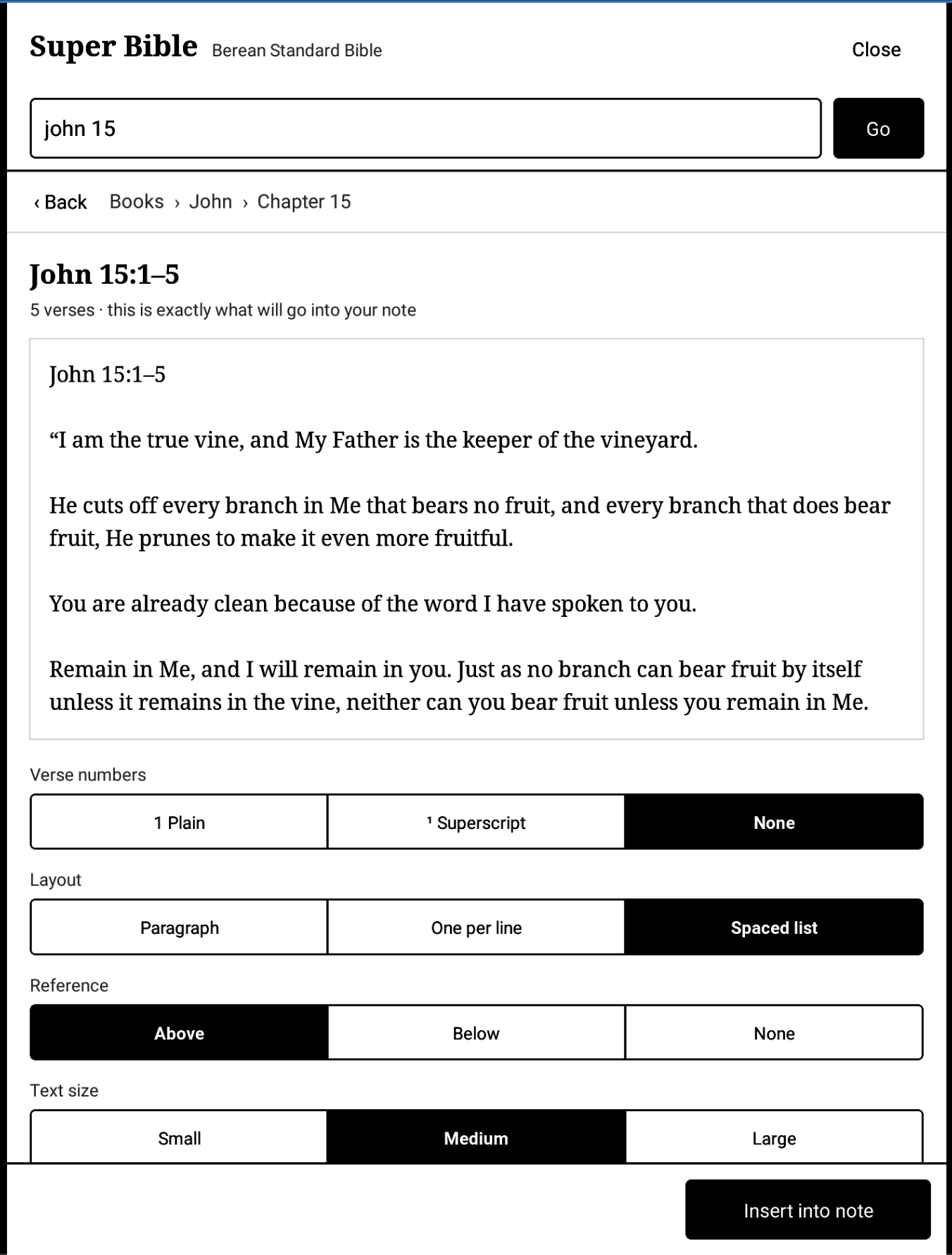
I built a plugin for Bible study on the Supernote.

**Super Bible**
 inserts Berean Standard Bible passages into a note as a text box. The whole BSB is bundled with the plugin, so it works offline.

**What it does**

- 
**Pick or type a passage.**
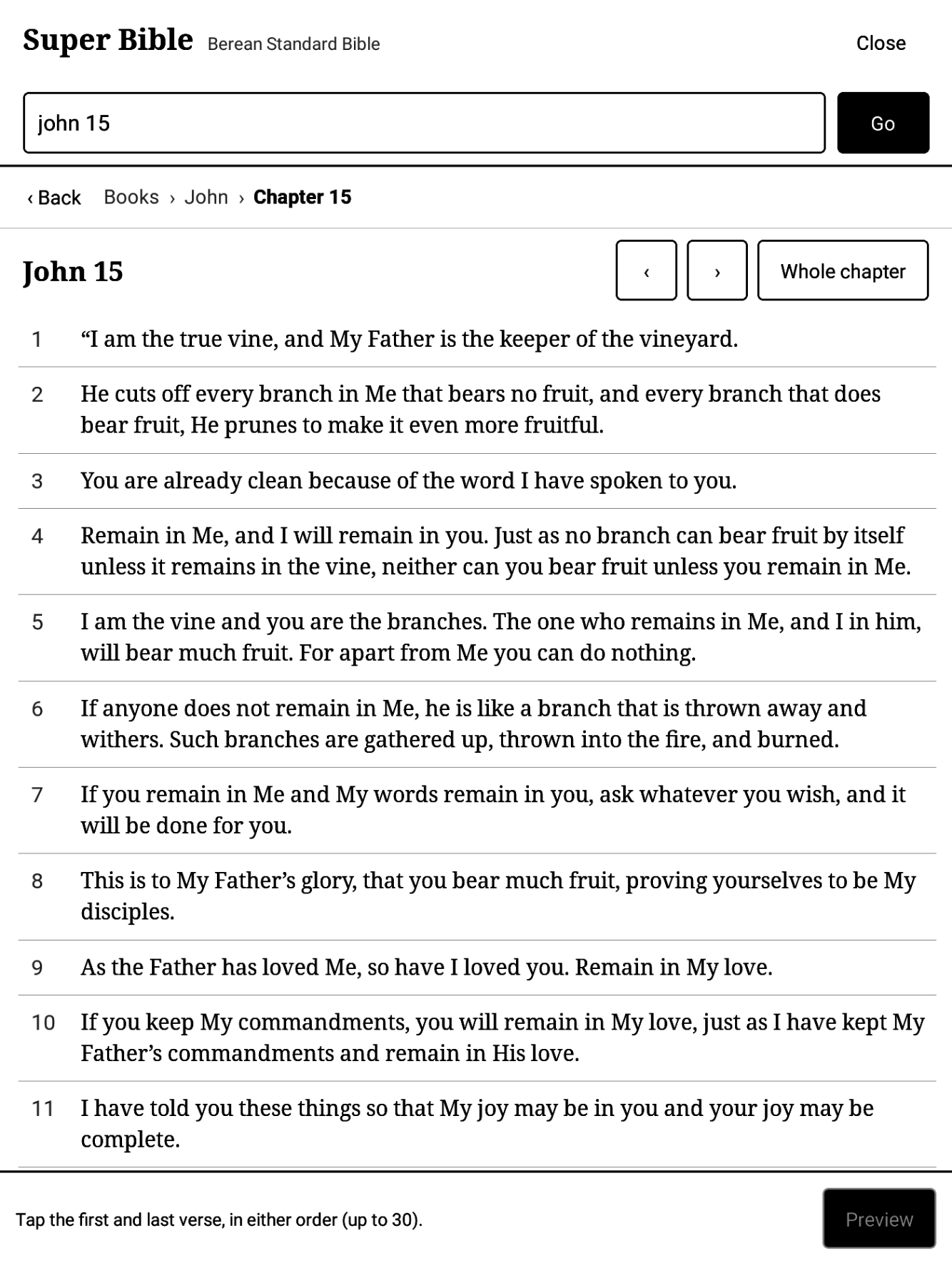
 Tap book → chapter → the first and last verse (in either order), or type a reference like `John 3:16-18`, `Ps 23` or `1 cor 13:4-7`. Abbreviations, "first john", "I John" and so on all work.
- 
**Lasso a handwritten reference.**
 Write 
*Rom 8:28*
, lasso it and tap Super Bible on the lasso toolbar. It reads your handwriting and puts the passage right where you wrote it, replacing the handwriting if you want.
- 
**Below my writing.**
 By default the passage goes just under whatever you last wrote, so you can write, insert and keep writing.
- 
**Edit a passage later.**
 Lasso a Super Bible text box to change the verse range or the layout, and it updates in place.
- 
**Layouts:**
 paragraph, one verse per line, or a spaced list. Verse numbers can be plain, superscript or off, with the reference above or below, and there are three text sizes.
- 
**Recent passages**
 are on the home screen, and your settings are remembered.
- Up to 30 verses at a time, with a warning before inserting if it won't fit on the page.
- Designed for e-ink: big tap targets and no animations.

**Install**

1. Download `snBible.snplg` from the [latest release](https://github.com/AdamDiament/snBible/releases/latest).
2. Copy it to the 
**MyStyle**
 folder on your Supernote.
3. Go to 
**Settings → Apps → Plugins → Add Plugin**
 and pick it.
4. Open a note and look for the Super Bible button in the toolbar.

To update, do the same with the newer file.

**Good to know**


- It works in notes only, not PDFs or documents. 
- The text box has no border or background. I tried everything I could find, and plugins don't seem able to set those yet. If anyone from Ratta is reading, I'd love to know if that's coming!
- The BSB is public domain. The code is MIT-licensed and on [GitHub](https://github.com/AdamDiament/snBible).


Feedback, PRs, bug reports and feature ideas are very welcome, especially from anyone on a Manta or A6X2, since I've only tested on my A5X. What would make it more useful for how you study?

r/Supernote_dev • • Sep 29 '26

Question Browser Emulator/hot reload for plugin dev

4 Upvotes

Are there any options out there? My workflow bottleneck is making changes and then manually importing the snplg file and manually installing it for every change.


r/Supernote_dev • • Sep 26 '26

Showcase Handwritten Notes for Friends and Machines

Thumbnail ifup.org
6 Upvotes

tl;dr I built an open source Supernote plugin to send and receive handwritten notes on the device: https://olaink.com


r/Supernote_dev • • Sep 26 '26

Plugin with best before date

2 Upvotes

Hi

I used currently the app foodless on my android smartphone to follow up my food pantry.I was wondering, if this as a supernote plugin already exists. Would be great to have this in my sn.

The idea is to enter a list of food products (evtl. with a csv import/export), with title, quantity and best before date. Each product would be displayed in a category, ideally configured by the user, to follow the obsolescence of the products. For example, 'expired', 'expire in 7 days', 'expire in 14 days', expire in 30 days'.

Cheers

Marc


r/Supernote_dev • • Sep 25 '26

Showcase A small update on my Supernote Calendar

Thumbnail reddit.com
2 Upvotes

r/Supernote_dev • • Sep 26 '26

Question Quick 2-minute test for Manta/Nomad owners — which of these imported stickers can you lasso?

Thumbnail reddit.com
0 Upvotes

I make custom sticker packs (.snstk) with the open-source PNG converter, and I've hit a
weird firmware behaviour: some converted stickers place fine but the lasso won't select
them afterwards, while others select and move normally. I don't own a device myself, so
I'm trying to pin down where the line is.

I built a tiny 6-sticker test pack with the same two designs at three "densities":

A = densest · B = medium · C = lightest

Download (Manta / Nomad only — N5 format): https://www.dropbox.com/scl/fi/0oo4cv6rf9pxney3gn86l/Supernote_Lasso_Test_ABC.snstk?rlkey=6i05bke6a0qegmyb1o4rl0xqw&dl=1

If you have 2 minutes:

  1. Copy the .snstk into the EXPORT folder on your Supernote
  2. Open any note → Sticker tool → Import
  3. Place TEST_A, TEST_B and TEST_C (any of the six)
  4. Try to lasso and drag each one

Then reply with: which letters could you lasso, your model (Manta / Nomad) and firmware
version (Settings → About). That's it — no email, no sign-up, nothing to buy.

For comparison, Ratta's own Christmas 2025 pack is made of real pen strokes, ~15–500 per
sticker; the converter emits far more, which is my current theory for why the lasso gives
up. Your results will tell me which density to rebuild at. Thanks!


r/Supernote_dev • • Sep 25 '26

3 small plugins : Instant snapping shapes, PDF ⇄ note switch (2-finger gesture), Change stroke width

12 Upvotes

**Update:** these plugins grew up and got new names: Snap, Palette and Swipe. See the new post: https://www.reddit.com/r/Supernote_dev/comments/1wxhocb/

Hi all! I built a few plugins to smooth out my workflow on the Manta.

ShapeSnap: draw a rectangle or a circle and lift the pen, and it snaps instantly into a clean shape drawn with your active pen. It's lasso-selected so you can resize it right away. Circles and rectangles supported for now. Tunable in the plugin settings. https://github.com/CharlesCheval/supernote-shapesnap

PDF ⇄ Note Swipe: swipe up with two fingers to jump between the last PDF and the last note you opened. No button, it just works in the background. https://github.com/CharlesCheval/supernote-pdf-note-swipe

Stroke Width: lasso strokes or shapes and set their width to a pen size (0.1–2.0). Handy after resizing something. https://github.com/CharlesCheval/supernote-stroke-width

Tested on a Manta running the 3.29 beta firmware. They're all pre-1.0, so feedback and bug reports (GitHub issues) are very welcome.

Known limitation: changing the width of hand-drawn strokes clears the undo history. It comes from the SDK, and I've reported it to Ratta. ShapeSnap's default mode keeps the undo history intact.


r/Supernote_dev • • Sep 24 '26

Question More clarity is needed on the "update" process for plugins

12 Upvotes

2 Grievances about the plug-in process as it stands now.

1 - How are feature updates going to roll out? Do all users who downloaded an old plugin get alerted when there is one? My plugin (Modulanner) was relased a few days after the review process kicked off, but I had a new feature to add, But it was then pulled form InkHub and it took 8 days for it to finally get approved again. I can understand this getting sent to the back of the line, but why was the old version pulled?

2 - Updates to descriptions and other non-file based modifications shouldn't trigger a review. My plugin just got approved again, but this time I had a couple small changes to the description of my plugin so I went to fix them and now my plugin is back under review. Does it get sent to the back of the line even though there was no file change?


r/Supernote_dev • • Sep 24 '26

Showcase New plugin - Supernote "Book"

Thumbnail
gallery
20 Upvotes

I have been really enjoying playing around with plugin support. Awesome job Ratta team, this really keeps these devices going and can't wait to see what everyone builds.

I wanted to share a small plugin that attempts to replicate what I miss most about my paper notebooks. And that is, after a day, week, month of jotting down random notes, todos, and whatever else I scribble down, I love being able to hold the notebook and flip back and forth between my days / pages. I feel like I lose so many good notes and thoughts once all my ideas are in individual notebook files and folders.

The plugin is simple. It presents all your notes on the device in a single notebook. With a bit of navigation built it. Tapping a note will take you directly to it.

Anyway, I selfishly built this for myself. Hopefully someone else might find it useful. Curious how it would handle a ton of pages :)

Source:

https://github.com/burgoon/supernote-book
https://github.com/burgoon/supernote-book/releases


r/Supernote_dev • • Sep 23 '26

Microsoft ToDo Integration

0 Upvotes

Do anyone integrated Microsoft ToDo with Supernote ?


r/Supernote_dev • • Sep 22 '26

Suggestion: Received Feature request: ad transparency to Marker in PDF

6 Upvotes

So since I had to use some pdf again in the recent past and also tried out the community planners from Ink Hub (incredible work!) I once again stumbled across a big big misadventage of the Marker: it is not usable in that way (having PDF as Templates for notes) as it is intended to be used. If there would be some way of transparency in the Marker so the template would shine trough, we could use the marker in a better way.

Thanks for helping.


r/Supernote_dev • • Sep 22 '26

Question Feature request: select and copy all items in a page without copying template (note)

3 Upvotes

While the Ratta team has done an excellent job over the past years, there is one feature I wish existed: the ability to select all the elements in a note page, before pasting it on another page, without copying the template of origin on the destination to paste those items in.

Currently you can copy the whole page, which also copies the template, or select and then copy all the elements through the lasso tool, which is awkward, and you may always miss an item. So I think this feature would be useful, and probably not too complicated to implement.


r/Supernote_dev • • Sep 20 '26

[Plugin] SuperDashboard v2.1.1 - major update : native-ink paste, a big To-dos update, and a new Contents module

Thumbnail gallery
25 Upvotes

r/Supernote_dev • • Sep 20 '26

Showcase Five Supernote plugins updated for the current SDK

17 Upvotes

I went through my older Supernote plugin repos and rebuilt the general-purpose ones against sn-plugin-lib 0.1.65.

  • Select All v0.3.0 — selects all elements on the current NOTE page.
  • Half Size v0.2.0 — resizes the active lasso selection proportionally.
  • Snap Shapes v0.1.0 — turns lassoed strokes into clean geometric shapes.
  • Pomodoro v0.0.7 — an e-ink-friendly focus and break timer.
  • Endpoint Lasso v0.2.0 — sends NOTE lasso data or DOC selected text to a configurable endpoint. This one is source-only because the endpoint is configured at build time.

The first four have downloadable .snplg release files. Endpoint Lasso has build instructions for using your own endpoint. They are rebuilt for the current SDK, but I have not re-tested every plugin on every model and current firmware.

I don't have the bandwidth to put them through the current InkHub submission workflow.


r/Supernote_dev • • Sep 20 '26

[Plugin] SuperStickyNote v2.0 — floating sticky notes that capture from your notes and PDFs, and put text back on the page

Thumbnail gallery
8 Upvotes

r/Supernote_dev • • Sep 19 '26

Discussion InkHub plugin submission should not have to happen on the tablet

16 Upvotes

Hi everyone,

I have been updating a number of plugins, and the current submission flow through the Supernote itself is really cumbersome. I don’t think managing an InkHub entry should happen on the device at all.

The tablet should be for finding, installing and updating plugins. For developers, it would make much more sense to have a small web form, or simply use the GitHub repository as the source of truth.

For example, a repository could contain a small YAML file with the plugin name, description, version, permissions, compatibility and download URL. InkHub could read that, run checks, and follow tagged releases automatically. This is roughly how Obsidian community plugins and F-Droid work, and it scales much better than repeating a tablet UI flow for every update.

I also think the source code URL should be one of the main fields—probably mandatory, or at least strongly recommended and clearly visible. It makes the plugin easier to trust, report bugs against, and contribute to.

The current flow may work for one plugin once, but it cannot really work for maintaining a growing ecosystem.

Would others prefer a web submission form, a GitHub/YAML workflow, or both?


r/Supernote_dev • • Sep 19 '26

Question Select all

4 Upvotes

Hi all. I used to use the select all plugin that someone made a lot, it was really useful for creating and saving templates. Is anyone able to create an updated version that works with the current beta build?

Edit: Solved. As someone below mentioned, the make space plugin can solve this.


r/Supernote_dev • • Sep 18 '26

Showcase Supernote pdf page insert plugin

Thumbnail
reddit.com
2 Upvotes

r/Supernote_dev • • Sep 18 '26

Showcase Word (.docx) to NOTE Import v0.1.6 beta (Word Text Import v0.1.6 beta)

Thumbnail
reddit.com
2 Upvotes

r/Supernote_dev • • Sep 18 '26

Question Problem with file write permissions (sometimes(!) works)

2 Upvotes

I need some help here from developers or supernote staff. The strange thing: sometimes it works, sometimes it doesn't, without any code changes at all. As if it flips back between modes, stays there a while and flips. Deinstall or switching plugin off and on did not help. Appreciating any ideas or reports on this

Did anyone have similar experience? This is on the latest beta version Chauvet 2.26.42_beta

This is the logging:

9-18 09:40:57.828 I/ReactNativeJS(  917): '[GtdPara]', 'ensurePluginPermission: calling hasPermission', 'plugin.permission.FILE:WRITE'
09-18 09:40:57.831 I/PluginPermMgr(  917): hasPermission permission:plugin.permission.FILE:WRITE
09-18 09:40:57.831 I/PluginPermMgr(  917): hasPermission is have File Write Permission:true
09-18 09:40:57.833 I/ReactNativeJS(  917): '[GtdPara]', 'ensurePluginPermission: hasPermission', 'plugin.permission.FILE:WRITE', '=>', 1
09-18 09:40:57.834 I/ReactNativeJS(  917): '[GtdPara]', 'ensureFolderExists: start', '/storage/emulated/0/Note/2 Areas/Atruvia/Meetings'
09-18 09:40:57.836 D/GtdParaFile(  917): ensureFolder: start path=/storage/emulated/0/Note/2 Areas/Atruvia/Meetings
09-18 09:40:57.838 I/ReactNativeJS(  917): '[GtdPara]', 'ensureFolderExists: done', '/storage/emulated/0/Note/2 Areas/Atruvia/Meetings'
09-18 09:40:57.839 I/ReactNativeJS(  917): '[GtdPara]', 'listFolderEntries: start', '/storage/emulated/0/Note/2 Areas/Atruvia/Meetings'
09-18 09:40:57.840 D/GtdParaFile(  917): listFolderEntries: start path=/storage/emulated/0/Note/2 Areas/Atruvia/Meetings
09-18 09:40:57.840 D/GtdParaFile(  917): listFolderEntries: exists=true path=/storage/emulated/0/Note/2 Areas/Atruvia/Meetings
09-18 09:40:57.841 D/GtdParaFile(  917): listFolderEntries: raw children=15 path=/storage/emulated/0/Note/2 Areas/Atruvia/Meetings
09-18 09:40:57.847 D/GtdParaFile(  917): listFolderEntries: done entries=15 elapsedMs=7 path=/storage/emulated/0/Note/2 Areas/Atruvia/Meetings
09-18 09:40:57.849 I/ReactNativeJS(  917): '[GtdPara]', 'listFolderEntries: done', '/storage/emulated/0/Note/2 Areas/Atruvia/Meetings', '15 entries'
09-18 09:40:57.850 I/ReactNativeJS(  917): '[GtdPara]', 'ensurePluginPermission: calling hasPermission', 'plugin.permission.FILE:WRITE'
09-18 09:40:57.852 I/PluginPermMgr(  917): hasPermission permission:plugin.permission.FILE:WRITE
09-18 09:40:57.852 I/PluginPermMgr(  917): hasPermission is have File Write Permission:true
09-18 09:40:57.854 I/ReactNativeJS(  917): '[GtdPara]', 'ensurePluginPermission: hasPermission', 'plugin.permission.FILE:WRITE', '=>', 1
09-18 09:40:57.855 I/ReactNativeJS(  917): '[GtdPara]', 'createNote: start', '/storage/emulated/0/Note/2 Areas/Atruvia/Meetings/2026-09-18 - Dailies.note', 'style_white'
09-18 09:40:57.857 I/HostCommImpl(  917): requestClient uid:1002
09-18 09:40:57.858 I/HostCommImpl(  917): getNoteAppPkgName name:com.supernote.document
09-18 09:40:57.858 I/HostCommImpl(  917): checkAPIAvailable packageName:com.supernote.document==createNote
09-18 09:40:57.860 E/ReactNativeJS(  917): '[GtdPara]', 'createNote: failed', '/storage/emulated/0/Note/2 Areas/Atruvia/Meetings/2026-09-18 - Dailies.note', 'This app is not allowed to use this API. Please call a different API.'
09-18 09:40:57.864 E/ReactNativeJS(  917): '[GtdPara]', 'DailyView: meeting action failed', 'This app is not allowed to use this API. Please call a different API.'
09-18 09:40:57.877 E/unknown:ReactNative(  917): console.error: [GtdPara] createNote: failed /storage/emulated/0/Note/2 Areas/Atruvia/Meetings/2026-09-18 - Dailies.note This app is not allowed to use this API. Please call a different API., js engine: hermes, stack:

This is the code block:

export async function createNote(
  path: string,
  template: string,
  isPortrait = true,
): Promise<void> {
  const granted = await ensureFileWritePermission();
  if (!granted) {
    logError('createNote: file write permission not granted', path);
    throw new Error('File write permission was not granted.');
  }
  log('createNote: start', path, template);
  const response = (await PluginFileAPI.createNote({
    notePath: path,
    template,
    mode: 0,
    isPortrait,
  })) as {success: boolean; result?: boolean; error?: {code: number; message: string} | null} | null | undefined;
  if (!response || !response.success || response.result === false) {
    const message = response?.error?.message || 'Could not create the note.';
    logError('createNote: failed', path, message);
    throw new Error(message);
  }
  log('createNote: done', path);
}

Here The code for the permission check:

export async function ensurePluginPermission( permission: string, description: string, ): Promise<boolean> { const manager = PluginManager as PermissionAwareManager;

  if (
    typeof manager.hasPermission !== 'function' ||
    typeof manager.requestPermission !== 'function'
  ) {
    log('ensurePluginPermission: host has no runtime permission API, treating as granted', permission);
    return 
true
;
  }

  const existing = pending.get(permission);
  if (existing) return existing;

  const request = (async () => {
    try {
      log('ensurePluginPermission: calling hasPermission', permission);
      const has = Number(
        await withTimeout(manager.hasPermission!(permission), `hasPermission(${permission})`),
      );
      log('ensurePluginPermission: hasPermission', permission, '=>', has);
      if (has > 
0
) return 
true
;

      log('ensurePluginPermission: calling requestPermission', permission);
      const requested = Number(
        await withTimeout(
          manager.requestPermission!(permission, description),
          `requestPermission(${permission})`,
        ),
      );
      log('ensurePluginPermission: requestPermission', permission, '=>', requested);
      return requested > 
0
;
    } catch (e) {
      logError(
        'ensurePluginPermission: error',
        permission,
        e instanceof Error ? e.message : String(e),
      );
      return 
false
;
    }
  })();

  pending.set(permission, request);
  try {
    return await request;
  } finally {
    pending.delete(permission);
  }
}

export function ensureFileReadPermission(): Promise<boolean> {
  return ensurePluginPermission(
    FILE_READ_PERMISSION,
    'Allow GtdPara to read your Project and Area folders.',
  );
}

export function ensureFileWritePermission(): Promise<boolean> {
  return ensurePluginPermission(
    FILE_WRITE_PERMISSION,
    'Allow GtdPara to create and update project and area files.',
  );
}export async function ensurePluginPermission(
  permission: string,
  description: string,
): Promise<boolean> {
  const manager = PluginManager as PermissionAwareManager;

  if (
    typeof manager.hasPermission !== 'function' ||
    typeof manager.requestPermission !== 'function'
  ) {
    log('ensurePluginPermission: host has no runtime permission API, treating as granted', permission);
    return true;
  }

  const existing = pending.get(permission);
  if (existing) return existing;

  const request = (async () => {
    try {
      log('ensurePluginPermission: calling hasPermission', permission);
      const has = Number(
        await withTimeout(manager.hasPermission!(permission), `hasPermission(${permission})`),
      );
      log('ensurePluginPermission: hasPermission', permission, '=>', has);
      if (has > 0) return true;

      log('ensurePluginPermission: calling requestPermission', permission);
      const requested = Number(
        await withTimeout(
          manager.requestPermission!(permission, description),
          `requestPermission(${permission})`,
        ),
      );
      log('ensurePluginPermission: requestPermission', permission, '=>', requested);
      return requested > 0;
    } catch (e) {
      logError(
        'ensurePluginPermission: error',
        permission,
        e instanceof Error ? e.message : String(e),
      );
      return false;
    }
  })();

  pending.set(permission, request);
  try {
    return await request;
  } finally {
    pending.delete(permission);
  }
}

export function ensureFileReadPermission(): Promise<boolean> {
  return ensurePluginPermission(
    FILE_READ_PERMISSION,
    'Allow GtdPara to read your Project and Area folders.',
  );
}

export function ensureFileWritePermission(): Promise<boolean> {
  return ensurePluginPermission(
    FILE_WRITE_PERMISSION,
    'Allow GtdPara to create and update project and area files.',
  );
}

r/Supernote_dev • • Sep 17 '26

Request for the Supernote app

Thumbnail reddit.com
0 Upvotes

r/Supernote_dev • • Sep 17 '26

Question Is the insert image plugin still being updated? And can FrameClip take JPG?

5 Upvotes

I got the latest release off github, but it doesn't work (something something version too old, update plugin). I use FrameClip to insert images but, even though it detects JPG images, it can't import them?


r/Supernote_dev • • Sep 16 '26

Plugins UI too small - buttons/ fonts

3 Upvotes

Hi,

I’ve tested couple of plugins and they are very useful and I can’t wait to public release so all users can check them out. But all of this I tested have really small fonts / buttons in UI. For me it’s really hard to read and use.

Is it because UI has to be scaled for Nomad ? I use Manta and would like to have the same font as in native UI and the same size of buttons so I don’t have to struggle to see what is written.

Any way to scale this or set font for plugins so the look like the rest of Manta UI ?

This shouldn’t be a problem because Sticker’s plugins looks great and doesn’t have this problem.

Functionality in this plugins is sometimes amazing but the UI just for me is too small.