r/SynergyApp • • 4d ago

Question❓ I’m thinking of using Synergy - Any thing I should know

4 Upvotes

I’m thinking about purchasing Synergy 3 Lite to use on both my Mac and Linux computers , I was wondering if there may be any thing that I should know related to purchasing and using Synergy before I actually pay . Any advice , suggestions or recommendations please

.


r/SynergyApp • • 7d ago

Question❓ Synergy 4 Dragon - Daily Driver

3 Upvotes

Is anyone using this in daily usage? What is the stability like?


r/SynergyApp • • 13d ago

Unblank Ubuntu client screen doesn't work from host computer

2 Upvotes

Using a Ubuntu 26.04 client (with wayland), the host computer can't wake a client screen after it becomes blanked (black screen after inactivity). I know the cursor is moving around, but i have to jiggle a physical mouse to wake it. Syngergy 3 v3.9.1. is this a wayland problem or a synergy client problem?


r/SynergyApp • • 20d ago

Keeping Gnome On Linux(Primary),Windows(Secondary) setup w/ One Monitor

2 Upvotes

Hi Everyone,

Was wondering if anyone else has this problem and how to solve it.

So my primary computer is Fedora (Primary, Keyboard+Mouse) #1 and my work is Windows (Secondary) #2. I'm also using 1 ultra wide monitor with 2 inputs. Input from #1 and #2.

#1 Prompts me to turn this on when I start the computers.

This is all working as expected at this point. I can move my mouse over to the other screen even though I can't see it because I'm actually only on 1 monitor.

When I move to #2 things are still working. I can use my mouse in Windows no problem. When I switch back to #1 after this it kills the capture input and I have to reset connection and answer this prompt again to make sure I can switch back to #2.

Im 100% sure it has something to do with sharing a single monitor. When I got from #1->#2->#1 it kills the sharing and im not sure why. it is some sort of sleep setting I can fix?


r/SynergyApp • • 20d ago

OG lifetime synergy customer.. anyone working on Omarchy?

0 Upvotes

Just pointed my models at trying to get it working. Figured I should ask before i blow thru to much quota. Thanks!

UPDATE: I have it working, licensed and connected but it's not taking input/working for movement.

UPDATE: Ok good news. I think im fully up and running. all keys working and mapped correctly. copy paste working. Smooth mouse. Here are the fixes needed:

UPDATE: Link to .md file

https://github.com/micro23/synergy-omarchy


r/SynergyApp • • 26d ago

Connection issue Linux Mint with 3.9.1

2 Upvotes

Hi,

For some reason I cannot connect from my windows11 laptop to the linux mint laptop. Both have 3.9.1 and the windows laptop succesfully connacts to my Mac and another windows (10) laptop. This Mint laptop is on the same network and I can ping it's ip. And there is no firewall active on Mint or Blocking on Windows. I do see the laptop on all machines with wynergy, but trying to resume results in an error:
[2026-10-30T14:05:05.519] INFO: settings file changed: /home/MyUser/.config/Synergy/synergy-core.conf
[2026-10-30T14:05:05.631] INFO: starting core
[2026-10-30T14:05:05.633] INFO: using legacy x windows screen
[2026-10-30T14:05:05.684] FATAL: a runtime error occurred: No server addresses configured
[2026-10-30T14:05:05.684] ERROR: core stopped with error code: 1

Mij status bar shows the Synergy 3 icon in grey with a pause sign in it. When i right click it it says show config, resume, restart and exit.


r/SynergyApp • • 29d ago

Problem 🛠 Consecutive copies don't update clipboard sync on linux/X11

2 Upvotes

Synergy 3 v 3.8.4

If I open the log window and do two consecutive copies on Windows 10, I can see the two updates in the log window but if I perform the same actions on the Linux/X11 side, I see one clipboard update "adding to clipboard" but a consecutive copy - I see nothing update in the log. The data that is pasted on the Windows side is the same after both copy events.

On my other Linux/Wayland machine it doesn't seem to be an issue - consecutive copies a visible in the log windows as expected.

Is there a known issue with X11

[edit] corrected version


r/SynergyApp • • Oct 15 '26

Problem 🛠 3.7.2 Mouse cursor ends moving on both primary and client screens

0 Upvotes

Is anyone having this issue on 3.7.2 where randomly you will end up with 2 mouse cursors?

One is the real one that you're piloting and the other is on the primary machine and moves around all over the screen (not randomly, in the same directions as you're sending the real cusor) but doesn't click anything?

I upgraded from somewhere around 3.5-ish and have never had this issue before. Primary machine is macOS and the secondaries are a mix of Win11 and macOS.


r/SynergyApp • • Oct 10 '26

3.7.2 & KDE System Tray Icon Issue

1 Upvotes

Tray icon is just black, but you can see it lighten up a little when you hover over the space where it is actually. I did see in the release notes "Pausing now stays in effect across computer restarts, with a dimmed tray icon showing at a glance when sharing is paused." - however nothing is paused. Anyone got a pointer or know of a fix/workaround? Thanks!


r/SynergyApp • • Oct 09 '26

Login screen

1 Upvotes

I have windows 11 pc,mac mini m6,one monitor,
everything working except login screen on macos Golden gate,cannot enter password.
I tried everything.


r/SynergyApp • • Oct 09 '26

Issue updating to Synergy 3.7.2 on Raspberry Pi

1 Upvotes

I'm running Synergy 3.6.3 on my Raspberry Pi 4 with Raspbian OS and I am trying to upgrade to v3.7.2, but when I try to install the deb package I get an error

"A package could not be found that allows the action to complete. More information is available in the detailed report"

My Pi is up to date and I don't know where to find the detailed report.


r/SynergyApp • • Oct 07 '26

Problem 🛠 No longer able to connect via hostname, only IP works

1 Upvotes

When I initially set up Synergy between Linux and Windows 11 at work, I was able to connect using the host computer name. But sometime ago that stopped working and I've been forced to use the host IP. On a DHCP network this is highly annoying since every time the IP of the host changes, I have to figure out what the new IP is, connect a keyboard/mouse to the client PC, change the IP of the server, then reconnect.

I've verified the ports both machines are using is the same (default 24800). I can only guess that something on my work's network has changed.

Anyone have ideas on how i can begin to troulbeshoot this?


r/SynergyApp • • Oct 06 '26

Problem 🛠 Copypaste from Ubuntu 26.04

2 Upvotes

I've recently update to Ubuntu 26.04.
Ubuntu is running gnome.

I'm using my ubuntu desktop as the synergy server.
I've installed wl-clipboard on ubuntu.

I have a mac studio as a synergy host.

I'm using Synergy 3.7.2 on both machines.
I cannot copypaste across the machines.

I cannot fall back an xorg session. I believe that this option isn't available with gnome on 26.04.

I'm I screwed?

-- edit --

For the moment I've switched to KDE/Plasma with xorg.
It's just another desktop environment, so I'm fine with using it.
And the copy/paste function works fine with it.

I have a soft spot for Gnome, so I might switch back once wayland is working properly on it.


r/SynergyApp • • Oct 01 '26

Problem 🛠 Synergy 3.7.2 Lock to Screen Issue

1 Upvotes

I just updated to 3.7.2 on both Win11 (server) and macOS 15 (client). When I got up this morning, I found that Lock to Screen had magically enabled during the night while the server was asleep.

Neither scroll lock nor creating a Hot Key for that action will toggle it any longer, only the GUI on the server.

Needless to say, having this just turn it itself on at random was annoying, and it took me quite a while before I realized that was what the problem was.

Also, logging just isn't showing anything since the upgrade.


r/SynergyApp • • Sep 03 '26

Problem 🛠 Timeout Error

1 Upvotes

Hi everyone. 2-Day old Synergy User here. I was able to successfully connect both my Laptops using my mobile hotspot. When I'm home using my home wifi, I'm getting "Timeout error". Both laptops were Win11.

Tried troubleshooting with all the Youtube and web guides I found online but still getting issues.

I'm not really a techy guy so I appreciate your help. Thanks!


r/SynergyApp • • Aug 27 '26

Question❓ Quick questions regarding Synergy Usage for home use

5 Upvotes

Hi,

After a scare with potential malware/infostealer on my main gaming PC which I also use for personal and financial use (bank/crypto/security accounts, email, etc), I have decided to use a second computer for all personal and financial matters and keep my gaming PC without access to my passwords, cookies, etc. I was deciding between a physical USB peripheral switch or purchasing Synergy Plus. My two questions areas follows:

  1. If I did somehow run malware or an infostealer on my gaming PC and use Synergy Plus with the encryption, is there even a small risk of "cross-contamination"?
  2. Would Synergy Plus allow me to use my peripherals to "wake" and login on my other PC at will? I have read that a similar program from "Microsoft Garage" called mouse without borders allows this if you run it as a "service" BUT that potentially adds the "cross-contamination" risk.

Thanks


r/SynergyApp • • Aug 25 '26

Question❓ Cross-platform usage vs. Mac-only?

3 Upvotes

I'm curious who is using Synergy in cross-platform environments (i.e. some combination of Linux, Mac, and/or Windows) vs. just controlling various Macs.

In theory in a Mac-only environment you can use first-party solutions like Universal Control, but a number of factors can thwart this (e.g. if you're logged into one machine with a different Apple Account).

Are others using Synergy in a Mac-only environment like me because things like Universal Control aren't a viable option?

I developed a Mac-only (for now?) app that does what Synergy does but also provides trackpad gestures and additional mouse buttons on the controlled machines. This was much simpler to implement in a Mac-only context, and so far I'm using this 100% of the time instead of Synergy.

I am considering distributing this more widely, but I'm not sure who else would want it. Let me know if you'd be interested in trying it out.


r/SynergyApp • • Aug 18 '26

Question❓ Anyone using Beta 3.7.0 notice "fights for control" when using UI arranger

2 Upvotes

I'm not sure if this is an issue for just me or if it's a bug or what.. I have 7 systems in my current layout and I made the mistake of trying to put synergy on 2 other systems in another room. This worked in the past - the two isolated systems talked to each other only and the main desk was set up

Even with Auto Discover off, I've noticed now that systems from the other setup were popping backup.

I accidentally did the nuclear "reset app computers" option and have been iteratively adding computers back in one by one.

The issue I'm having is when I open the UI on the main mahcine, it seems like it's "fighting" with another machine - the layout - I'll adjust a screen and it will suddenly pop back to how it was before .. then it will pop back.. or if I'm dragging it will pop between the previous layout and recognizing I'm dragging but then drop weirdly.

The primary machines UI crashed and I had to reboot to get it working again >>

I hesitate to even try and report as a bug as this may be my crazy setup / the fact that I'm on a beta - unless others are seeing it too??

Sorry for the somewhat "hand-wavey" description


r/SynergyApp • • Aug 10 '26

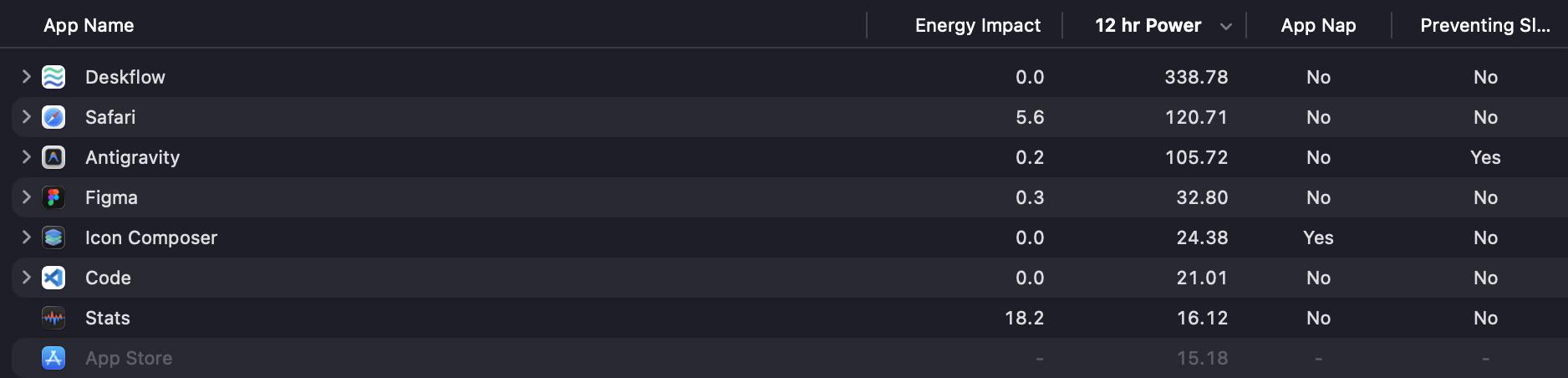
Problem 🛠 Deskflow’s premise is great. But it’s so unoptimized and completely unreliable constantly having to reconnect it. Also eats up battery!

Post image
0 Upvotes

This app is insanely useful to me but extremely frustrating

It constantly disconnects multiple times daily. Sometimes I can quit the app and reconnect. Other times I have to close the app and wait for an hour before trying to use it

Also what’s with the battery usage?! It’s the app using the most battery on my Mac. Does anyone know of a good alternative to this app. Really annoyed with it, but I need this functionality daily

Also I checked the GitHub and find the dev quite arrogant constantly closing off issues that are still present in the app. Really bummed about the entire app cause it’s actually useful if it worked seamlessly


r/SynergyApp • • Jul 22 '26

Client doesn't automatically connect

1 Upvotes

I have my windows 11 PC as the host, and my Mac mini as the client. It used to work natively but stopped after I updated versions. It no longer auto connects my client, and I have to move the Mac in the devices screen and then it magically connects (the green line is present between both machines.) I've tried older versions as well. It used to work automatically but I rebuilt my PC and had some compatibility issues since doing so, which required me to update to the latest version.

Any recommendations are appreciated!

Also, in my config logs it says server is connected and awaiting clients but doesn't show my Mac as connected until it's physically moved in the device layout screen.


r/SynergyApp • • Jul 20 '26

"Controlled" Mac losing focus

1 Upvotes

Running a MacBook Pro with 27 public beta and a Mac Mini also running the 27 public beta. Synergy 3.7 beta running on both. My controlled Mac (the mini) keeps losing focus. Every 15 seconds or so. The MacBook (host) is either pulling focus back or for some reason it's disconnecting from the Mini.

Any ideas?


r/SynergyApp • • Jul 16 '26

Window clicking broken in macOS 27 public beta

4 Upvotes

Yes I know it's a beta so this is not a complaint. Just wanted to see if others are experiencing this / if there is a workaround.

When using Synergy 3 on macOS 27 public beta on controlled computers (i.e. the machine running macOS 27 is not the one with the physical mouse & keyboard connection), clicking on a window does not bring it to the foreground / give that app the input focus. If you click with a pointing device physically connected to that machine, it does what you'd expect (so it's not just completely broken in public beta 1).

If you cmd-tab or select the app's icon from the dock, it works as expected. It's just clicking on windows that exhibits the bug.

Is this a known issue? Anyone found a workaround?


r/SynergyApp • • Jul 07 '26

Question❓ Where did the downloads go?

1 Upvotes

symless.com appears to be mostly dead ("") and synergyapp.io doesn't seem to be alive yet. Just got a new computer and need to reinstall, but all the links are dead. Now what? Is everything okay?


r/SynergyApp • • Jul 05 '26

KBD and Mouse Hardware that enhances Synergy setup

2 Upvotes

Not sure how many will relate, but I find that kbd and mouse that can quick switth (without having to move dongles or go through annoying multi step processes to switch) really work well with my Synergy setup.

I have a primary system that is always on (a server) that my kbd and mouse are connected to and I use that as the Synergy primary. This works great because its nearly never off (recent systems reconfiguration notwithstanding)

My employer recently changed their VPN policy to stop allowing split-tunnel (good move for security but OMG annoying for me) so my work machine (part of my synergy setup as I work from home) becomes unreachable whenever I connect to the VPN. It's a laptop so I can use the built in kbd and trackpad or I could connect a secondary kbd and mouse to it but I find that tedious and wasteful of space

To the rescue: Keyboards that have multiple quick switch bindings. I use a Logitech MX Vertical mouse (it has 3 quick switch bindings) and for the longest time I used Logitech MX Keys keyboard (also 3 quick switch bindings) though I have since switched to a Keychron which has 5 configs (hardwired, bespoke dongle, and then 3 bluetooth bindings) you use a physical switch to switch between hardwire, dongle, and BT and then key combos to switch beteween BT bindings)

I've seen a few other options out there but point is...

whatever hardware you have, having a mouse/kbd combo that can really quickly switch between a couple configs makes it so much easier to adjust to things like "oh crap I need to VPN in to work" or "oh crap I had to reboot the primary system and it's in the middle of a long chkdsk cycle" without having to have like 2 or 3 sets of kbds cluttering up your desk.

Tested and work well: Mice

  • Logitech MX Vertical Mouse (3 quick switch bindings)
  • Logitech Lift vertical Mouse (3 quick switch bindings)
  • JBuds Ergonomic Wireless Vertical Mouse (3 quick switch bindings)

KBDs

  • Logitech MX Keys and MX Keys Mini (3 quick switch bindings)
  • Keychron K5 QMK (5 quick switch bindings (Hardwire, Dongle, and 3 BT))

I'm sure there are a zillion other viable ones these are just the ones I've personally tested and find work really well for my needs.

and before anyone sees long post with formatting - no I do not use AI this was my own brain dump - my neurospicy love language is brain dumps