r/UnityHelp • u/RedAceBeetle • Oct 12 '26
UNITY Any idea on how I should go over this?
When I scale the game view, the distance between orders don't scale with it. I'm kinda stuck on this problem
Any help is welcome!
r/UnityHelp • u/RedAceBeetle • Oct 12 '26
When I scale the game view, the distance between orders don't scale with it. I'm kinda stuck on this problem
Any help is welcome!
r/UnityHelp • u/No-Interaction699 • Oct 13 '26
So im new to all of this and I downloaded Unity , game maker, and unreal. But on the Unity software I keep getting an error and idk how to fix it. And is it a hardware issue
r/UnityHelp • u/Ok-Presentation-94 • Oct 11 '26
Hi, as shown in the attached video, instantiating my character using `Object.Instantiate` works as expected, respecting the prefab's position. However, if I instantiate using NetCode's `PlayerPrefab` field, the prefab's position defaults to (0, 0, 0).
(The instantiation script is very simple I don't specify a position within it.)
r/UnityHelp • u/Holiday_Meal_5510 • Oct 11 '26
is there any unity tutorial about basics of lighting and ui and no i dont want a begginer tutorial i want a tutorial specific to lighting and ui
r/UnityHelp • u/Ex0ticP0ssessi0n • Oct 11 '26
r/UnityHelp • u/Lord_H_Vetinari • Oct 11 '26
r/UnityHelp • u/thekingallofbricks • Oct 11 '26
r/UnityHelp • u/G4M300 • Oct 10 '26
I don't know if it's a Mandela effect or if I pressed something, but when I'm navigating in the Scene View and I rotate the camera, when rotating the camera up at some point it turns the camera upside down and I can rotate 360° when it should have stopped rotating when looking up. Is there anyway to change that?
r/UnityHelp • u/DifferentLaw2421 • Oct 10 '26
r/UnityHelp • u/MathematicianOne7280 • Oct 10 '26
My setup
What happens
Unity.dll, exception code 0xc000008e (floating-point divide-by-zero).TextureImporter).EditorResources.Load.d_iconlockedremoteoverlay.png from com.unity.collab-proxy. After I removed that package, it crashed on another texture (d_PackageInstalled@2x.png), so it isn’t one specific file.What I tried (none worked)
-force-vulkan-batchmode -nographics: it still crashes on a texture import, so it doesn’t look GPU relatedcom.unity.collab-proxy package from the manifestsfc /scannow and DISM /Online /Cleanup-Image /RestoreHealth: no change, the crash still happensNot tried yet: BIOS/firmware update, resetting Windows.
Has anyone seen this crash on a Ryzen 5 5500U / Windows 11 25H2? Could it be a CPU/firmware issue or a corrupted Windows component? Any suggestion is welcome. I can share more if it helps. Full Editor.log (Unity 6000.3.24f1, crashing on a texture import): https://pastebin.com/5CkHkAhz
r/UnityHelp • u/Like_A_Mike2002 • Oct 09 '26
Hello everyone,
I'm currently having a problem building any projects. When I try to, I get the following error message: "Copying C:/Program Files/Unity/Hub/Editor/6000.6.5f1/Editor/Data/PlaybackEngines/WindowsStandaloneSupport/Variations/win64_player_nondevelopment_mono/WindowsPlayer.exe to
Temp/StagingArea/WindowsPlayer.exe: The system cannot find the path specified."
The path it is trying to copy from doesn't exist and repairing my installed modules did not fix the problem. I can get a webBuild but not a Windows one. Also the scene is empty (Im troubleshooting in a new, empty project) so it can't be an issue with code or assets, etc.
I have attached some screenshots for better understanding.
I'm just getting started with Unity so any help is appreciated.
r/UnityHelp • u/Spirituality_awaits • Oct 09 '26
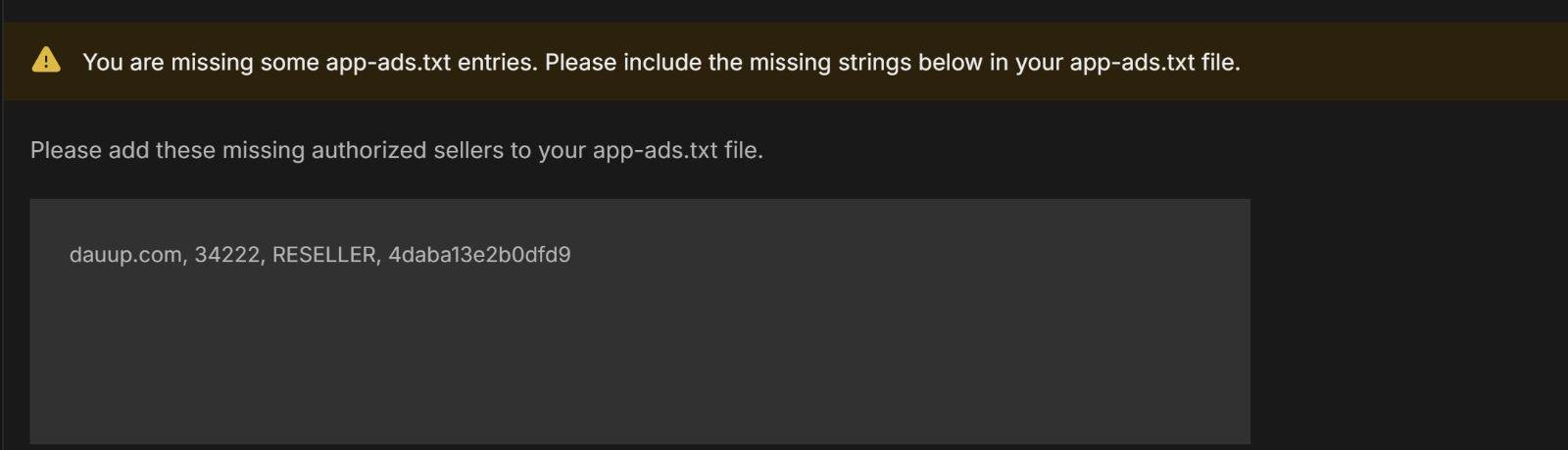
Hey folks. I'm using Unity ads as part of Levelplay mediation. Recently, I implemented the app-ads.txt through a website called app-ads.txt.com (supported by tappx).
After copying all the string values from Unity dashboard (about 60-70 odd) and pasting it into my app-ads.txt file, this particular string value is unable to be copied into my app-ads.txt file.
So, I was wondering if this was going to majorly affect ad revenue in anyway? Please advise!
r/UnityHelp • u/No-Relationship3224 • Oct 09 '26
r/UnityHelp • u/ElOctopusGameStudios • Oct 09 '26
I'm working on a high-speed hover racing game with jumps, uneven terrain, boost pads and branching tracks.
The player ships use a physics-based controller, but I've been thinking about how to implement bot opponents, and honestly, making bots drive with the exact same physics sounds like a nightmare.
So I'm considering a different approach: a network of connected waypoints, with automatically generated smooth paths between them.
For jumps, I'd define takeoff and landing points and generate a controlled parabolic trajectory instead of relying on physics.
Each bot could choose different routes, have slightly different racing lines, and follow its own speed profile depending on difficulty.
The tricky part would be making them interact with physics-based player ships without feeling like indestructible objects moving on rails.
Has anyone tried something similar in a racing game? Did scripted movement end up looking convincing enough?
r/UnityHelp • u/Vast_Alarm8740 • Oct 09 '26
I tried checking the .data file with assetripper but not a single dialogue or ui text was found, i found audio files and images but no text at all. its gotta be inside somewhere since game works fine when I play it locally, can anyone help me please?
r/UnityHelp • u/GhostFlower11 • Oct 08 '26
r/UnityHelp • u/Other-Investigator20 • Oct 07 '26
I was creating Facial emotions on my 3model in Unity. Theni baked it and then exported it into a Vrm Format. When displaying the 3d model in Silly Tavern it looks normal, but when giving the command to display the facial expression, i get a weird glitch. It displays the emotion correctly but also adds this weird artifact on top. Any help would be much appreciated.

r/UnityHelp • u/Bread_Jeremy • Oct 07 '26
Please help me
r/UnityHelp • u/average_girl_173783 • Oct 07 '26
im completely new and i followed this video: https://www.youtube.com/watch?v=BCJ-WkdWBwo As you see the problem is rotation, when i click other arrow it moves drastically. What may cause this error where to fix it?
r/UnityHelp • u/Tuff_Krypte • Oct 07 '26
My issue ---> I need to edit the mesh of an already rigged FBX in use in my project. I want to be able to do something "easy," but for me, it's impossible.
I want to edit the fbx in Blender and send it back to Unity by overwriting the file in use.
But whatever presets I try, it's impossible for me to match the file perfectly.
Is that even possible?
It should be, but I can't find how.
Huge thank you if you have the solution 🥹