r/coolgithubprojects • • 9h ago

[Types /clear into a running Claude Code session from outside it, on Windows] - ccclear

Thumbnail github.com
1 Upvotes

Author here. It's for people who script several Claude Code sessions (a scheduler, an orchestrator, a phone): /clear can't be sent through Remote Control. One native exe, Apache-2.0. It checks that the session is the one you named and idle, types the command and proves it worked (a new session id). Windows and the native Claude Code install only.


r/coolgithubprojects • • 9h ago

feed a movie, ask it away, open source

Post image
1 Upvotes

0.023$ for a whole movie using api key
public repo - https://github.com/Berat02xz/agentic-video-intelligence

would appreciate getting stars


r/coolgithubprojects • • 9h ago

Free Next.js 16 starter for local business websites: typed config, LocalBusiness schema, lead form, CSP, llms.txt

Thumbnail github.com
1 Upvotes

I build sites for local service businesses and kept rebuilding the same foundation, so I cleaned up the core and open sourced it under MIT. One typed config file drives the pages, schema, sitemap, and theme. Happy to answer anything about how it's built.


r/coolgithubprojects • • 9h ago

Dex Debugger- Universal Root Cause and Explainer

Post image
1 Upvotes

Hey everyone! I recently built and deployed Dex (Dex Debugger), a browser-based AI debugging assistant designed to help developers quickly figure out why their code is breaking and how to fix it without getting stuck in endless trial and error. Instead of just dumping a wall of generic text, it lets you paste broken code into a clean interface, explains the root cause in plain language, and suggests working fixes in real time.

Under the hood, I kept the stack focused and lightweight using a Python and Flask backend (app.py, run.py, and chatbot.py) paired with conversational AI logic. It’s deployed live on Render at dex-debugger.onrender.com, and the full source code is available on GitHub atgithub.com/Advik212659/Dex-Debuggerif anyone wants to poke around the implementation or offer suggestions.

I'd love to hear any feedback on the UI, debugging accuracy, or ideas for features that would make it more useful for your daily coding workflow!


r/coolgithubprojects • • 17h ago

OpenScreen just passed 8,000 GitHub stars: thank you, and what's next

Post image
4 Upvotes

Hi everyone,

OpenScreen just crossed 8,000 stars on GitHub (8,276 this morning), and growth keeps speeding up:

  • about 300 stars in June
  • over 2,000 in October
  • almost 2,800 in November, with the month not over yet

That's +3,236 stars in the last 30 days, with a record of +311 on October 31.

Huge thanks to everyone who tested, reported bugs or contributed. Next up: a Claude plugin, currently in review, then a ChatGPT version.

Repo: https://github.com/getopenscreen/openscreen

Feedback and ideas are very welcome, here or as an issue!


r/coolgithubprojects • • 9h ago

I updated my open-source Firefox extension for exporting ChatGPT conversations — now with Gemini support, bulk ZIP exports and faster conversation reading

Post image
1 Upvotes

A few months ago, I shared my Firefox extension, Dialogue Export, here. It started as a small personal project because I wanted to save long ChatGPT conversations without manually copying everything.

Since then, the project has evolved quite a bit.

What's new:

  • Gemini support.
  • Bulk export of ChatGPT conversations into ZIP archives.
  • Faster direct reading of saved ChatGPT conversations without endless scrolling.
  • Improved handling of images, citations, tables and code blocks.
  • Progress tracking and export cancellation.
  • Automatic splitting of large exports.
  • A dedicated project website and a 60-second feature demonstration.

The extension supports Markdown, PDF, HTML, TXT and JSON.

Still free, open-source and local-first. No accounts, ads, analytics or external data collection.

GitHub: https://github.com/vaulthunt3r/dialogue-export

Website: https://vaulthunt3r.github.io/dialogue-export/

Thanks to everyone who provided feedback on the original post. I'd love to hear what you think of the current version and what features you'd like to see next!


r/coolgithubprojects • • 11h ago

I built an open-source AI article writer with 11 specialized agents and it runs locally (FOSS)

Thumbnail github.com
1 Upvotes

I’ve been working on GeneRaptor — a local-first AI article generation studio.

Instead of relying on one AI prompt, it uses 11 specialized agents to research a topic, plan the structure, write the article, fact-check it, review SEO, and even generate a cover image.

A few things that make it different:

  • Runs locally, no cloud account or telemetry.
  • Supports OpenRouter, Ollama, RouterAI, and custom OpenAI-compatible endpoints.
  • One command to get started: npx generaptor
  • Your data and provider settings stay on your machine.

The project is open source, and I’d genuinely love to hear your feedback!

GitHub: https://github.com/Keutonim/GeneRaptor


r/coolgithubprojects • • 11h ago

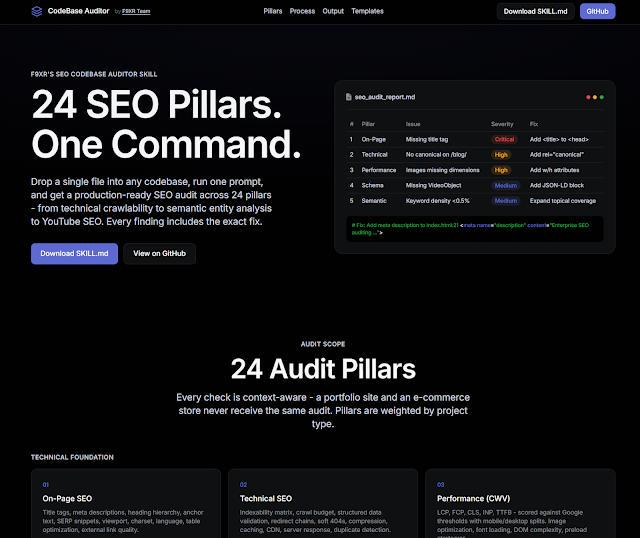
I built a free, open-source SKILL.md file that turns Cursor/Claude/Copilot into a 24-pillar pre-deployment SEO auditor

Post image
1 Upvotes

r/coolgithubprojects • • 11h ago

Zaku 26.1 - Local-first API client written in Rust with GPUI

Thumbnail gallery
1 Upvotes

Hey, I wanted to share that Zaku 26.1 is out with support for environments and variables in requests.

About the app, it stores collections as folders and requests as TOML files. Everything is stored locally on user's filesystem, it doesn't have any login functionality (and never will).

It is available on Linux, macOS and Windows.

I've been working on this for the last 10 months full-time.

Here's what's new:

  1. Define variables at the project, folder and environment level.
  2. Switch between environments with the environment selector.
  3. Use the new variables panel to manage environments and variables.
  4. Autocomplete variables as you type, with highlighting and hover previews.
  5. Switch, create and delete Git branches with the branch picker.
  6. Scale the UI with zoom controls.
  7. Prevent accidental overwrites when files change on disk.

I have lots of things planned, if you try it out please let me know if there's something missing, not working or things you'd like to see added.

Repository:

https://github.com/buildzaku/zaku

Download:

https://zaku.dev/download


r/coolgithubprojects • • 7h ago

.gitignore everything by default

Thumbnail packagemain.tech
0 Upvotes

r/coolgithubprojects • • 1d ago

StradaOS: an open-source launcher for budget-friendly Android-based automotive multimedia systems; it now features a welcome greeting upon startup, improved OBD connectivity, turn-by-turn navigation, and a widget that can be swiped between a map view and a video player.

Thumbnail gallery
52 Upvotes

A few weeks ago, I shared StradaOS (v2.12) here, and the response was incredible. Much of this update came about thanks to your feedback and the bug reports submitted on GitHub.

A quick summary for those not yet familiar with the project: many affordable Chinese head units claim to run "Android 10," but they actually run on Android 4.x. StradaOS is written in pure Java, without any external libraries, making it compatible with versions ranging from Android 4.1 all the way to 14.

What’s new since then:

• Startup welcome: The logo lights up and greets you by name—with an audible greeting (this option can be disabled).

• Integrated navigation: Search for a destination and get turn-by-turn directions; offline maps are also supported.

• Map/video carousel: Swipe the map to play your saved music videos; the video feed hides when the vehicle is in motion, but the audio continues to play.

• OBD-II scanner (ELM327): Displays RPM alongside the speedometer, along with alerts and error codes.

• Automatic album art (when the unit has an internet connection).

• Premium themes: "Faro," "Carbono," and the new "Premium Cards." The app remains free, with no ads and no need to create an account; these themes are an optional way to show appreciation for a donation.

Free, licensed under GPL-3.0, no root access required, ~1.5 MB, available in 13 languages.

Repository and signed APK: https://github.com/lordnordic-debug/StradaOS

If you have one of these devices, let me know the make, model, and the actual Android version (you can check this in StradaOS under Settings → About), and I’ll be happy to help.


r/coolgithubprojects • • 12h ago

Cloud RPC: Self-hosted, tokenless 24/7 Discord Rich Presence & device spoofer dashboard powered by OAuth2 (Node.js)

Post image
0 Upvotes

I open-sourced Cloud RPC, a self-hosted Node.js web dashboard for running 24/7 Discord Rich Presence without needing raw user account tokens.

How it works under the hood: Instead of scraping or storing user tokens like traditional self-bots, users log in through Discord's official OAuth2 flow requesting only identify and sdk.social_layer_presence. The backend manages the token lifecycle (proactive refresh + 4004/401 recovery), opens a Gateway WebSocket session per user, handles op: 2 device identification (Desktop, Mobile, Web, VR, PS5, Xbox), proxies external images through Discord's external-assets endpoint with an LRU cache, and broadcasts updates via op: 3.

Main features:

  • Multi-user web dashboard (EN/AR) with live preview and hardened auth/CSP
  • 6-platform Gateway device spoofing with fast session re-identification
  • Live Spotify presence spoofer with auto-looping timestamps
  • 10 saved preset profiles, Auto-Rotator, and dual-mode Smart Sleep scheduler
  • Local searchable cache of 24,000+ Discord detectable games

Repo (MIT License): https://github.com/Mohammask/cloud-rpc

Full setup instructions (including enabling the Social SDK scope in the Discord Developer Portal) are in the README. Feedback on the architecture or security hardening is always welcome.


r/coolgithubprojects • • 12h ago

Neural Canvas, CNN Visualization

Post image
1 Upvotes

Neural Canvas, CNN Visualization

Neural Canvas can now recognize basic shapes like apples, moons, cars, and more using Google's Quick, Draw! dataset.

20 classes with 1,000 samples per class

2 convolutional layers with 16 and 32 filters

2 fully connected layers with 60 and 40 neurons

91% test accuracy

Trained using JAX on Google Colab

Neural Canvas can also visualize CNN feature maps in real time while drawing, showing how convolutional layers extract features from input images.

GitHub: https://github.com/MuhammadEssa2002/neural_canvas

Live demo: https://muhammadessa2002.github.io/neural_canvas/


r/coolgithubprojects • • 19h ago

I built Vaultdraw: an Obsidian-style vault for Excalidraw drawings, offline and open source (macOS + Linux)

Thumbnail gallery
4 Upvotes

r/coolgithubprojects • • 12h ago

hydo: simulation testing software - finds bugs in your programs autonomously

Thumbnail github.com
1 Upvotes

What it does:

  • Runs your services, their databases and their client in one VM, unmodified: Linux programs or Docker/OCI images
  • Injects faults: process kills and pauses, network delay, loss and partitions, power cuts, disks that drop acknowledged writes, clock jumps, thread timing changes
  • Execution is deterministic -> the same seed gives a bit-identical run, so every failure replays exactly
  • hydo explore generates fault schedules from seeds, runs each failure again to confirm it reproduces, and shrinks it to the fewest faults that still cause it

It autonomously found previously unknown and later confirmed bugs in the hardest projects like Clickhouse, Redpanda, Pulsar, Meilisearch, Dragonfly, NATS, etc.

Supported platforms:

  • Linux: the KVM engine or hydo's own kernel module on Intel VT-x
  • macOS on Apple Silicon

Repo: https://github.com/kakoc/hydo

Any feedback is very welcome, especially from people who test distributed systems or databases. If you need to any help to bootstrap it in your project - please DM me and I'll help. But in general you can just install LLM skill and it'll do all the heavylifting/guidance for you.


r/coolgithubprojects • • 12h ago

I made a website that generates an RSS feed for new releases of an actor or a director. Now it also sends email alerts

Thumbnail gallery
1 Upvotes

I posted here a month ago for this website. Now i added an option for users to receive alerts in email.

You'll receive alerts from magnanium.noreply@gmail.com. It's gmail as you can see. I chose it because i didn't want to pay for an email and it still gets the job done. It may end up in your spam mail list so make sure to check the spam.

It's completely free and don't have ads. Visit https://magnanium.vercel.app

You can still use the RSS feed the same way.


r/coolgithubprojects • • 12h ago

Vetted teachers stream dozens of free yoga, qi gong and tai chi-with-horses classes live every day, but Insight Timer's website stopped showing the schedule, so I rebuilt it with GitHub Actions

Thumbnail matman-dev.github.io
0 Upvotes

r/coolgithubprojects • • 12h ago

I built RunMind — a Windows desktop AI assistant combining local/remote LLMs, system management, developer tools, and automation

Thumbnail gallery
1 Upvotes

Hey everyone! 👋

I'm Omid, and I've been building RunMind, an open-source Windows desktop AI assistant that brings together AI models, intelligent automation, developer tools, system monitoring, and extensible integrations in one application.

I wanted to build something broader than another AI chat window.

Something that could bring AI closer to the actual desktop environment: development projects, system information, tools, and everyday workflows.

After a lot of development, I'm happy to share that RunMind is publicly available, with version 3.5.0 as the current source release.

Here's a better overview of what it is.

🧠 AI assistant and model connectivity

RunMind supports both local and remote LLMs.

The idea is to let you work with different model setups rather than tying the entire application to one AI provider.

Its ecosystem includes integrations around:

  • Ollama
  • LM Studio
  • OpenAI-compatible APIs
  • Local and remote model backends

RunMind also supports agentic workflows, allowing the assistant to work with available tools and integrations instead of being limited to text-only conversations.

💻 Developer tools and code understanding

Development assistance is another important part of RunMind.

Its current code-analysis focus is JavaScript, TypeScript, and JSX/TSX.

The goal is to work with the structure of source code, not just search for matching text.

This includes AST-oriented parsing and structural analysis, with concepts such as declarations, references, scopes, and relationships between code elements.

I'm deliberately keeping the supported language scope focused rather than claiming that RunMind understands every programming language.

🖥️ System Manager and system monitoring

This is an important part of RunMind that I don't want to leave out.

RunMind isn't exclusively a developer assistant. It also brings system monitoring and system-related management into the same desktop environment.

The System Manager direction is about making system-level information and tools accessible alongside the AI assistant, rather than requiring users to treat system information as an entirely separate workflow.

I want the desktop assistant to be useful beyond writing code.

⚙️ Automation, tools, and extensibility

RunMind is designed to work with more than its built-in conversational interface.

It brings together intelligent automation and extensible integrations, including plugin support and MCP-related tooling.

That provides a foundation for connecting the assistant to external tools and extending its capabilities.

The idea is to make RunMind adaptable to different workflows instead of prescribing one fixed way to use it.

🚀 Four ways to access the same complete experience

I also wanted flexibility in how people launch and interact with RunMind.

There are four access options:

  1. Standalone

Open the full RunMind chat application directly.

2. RunMind Runner

Use a compact launcher as an additional entry point, with access to the complete chat application.

3. PowerToys Run Plugin

Interact with RunMind through the PowerToys Run workflow, while retaining access to the full application.

4. PowerToys Command Palette Extension

Access RunMind through the Command Palette, including its inline/docked interaction experience, alongside the full application.

These aren't different editions or feature tiers. They're different ways to access the same complete RunMind experience.

🔐 Local-first options and privacy-conscious design

I also care about giving users flexibility over their AI setup.

Being able to connect local models is important, particularly for people who prefer running models on their own hardware.

RunMind also supports remote model connections, so the application isn't restricted to local inference.

As always, the actual data path depends on the selected provider and configuration. I don't want to imply that every configuration is automatically offline or local-only.

100% open source.

What's next?

RunMind is officially launched, but it's also an actively developed project.

Version 3.5.0 is publicly available, and I'm continuing to improve the application.

I'm especially interested in feedback from people who work with local LLMs, Windows desktop applications, developer tooling, system utilities, and AI automation.

Explore RunMind

🌐 Website: https://omid.navy/runmind

💻 Public source: https://github.com/omidnavy/RunMind

I'd genuinely appreciate feedback, suggestions, and constructive criticism.

I'm building this project myself, and I want to keep making it more useful.

Thanks for reading! ❤️


r/coolgithubprojects • • 1d ago

I made a free, offline, open source campaign manager for D&D 5e called Sanctum.

Thumbnail youtube.com
11 Upvotes

It is a desktop app where everything for a tabletop game (characters, NPCs, combat, an interactive world map, quests, lore) lives in a single local SQLite file on your own machine. No account, no cloud, no server.

The stack, since this is the crowd for it: TypeScript, Next.js and React on the frontend, Electron for the desktop shell (it bundles and spawns the Next.js server as a child process), better-sqlite3 and Drizzle ORM for local storage, Konva for the battle map, Leaflet for the interactive world atlas, and electron-builder for packaging.

A few bits I had fun building:

  • A local-first model where one file holds an entire campaign, fully exportable and portable.
  • A read-only player view the DM shares to a TV or to players' phones over local Wi-Fi, gated behind a private share token so other devices on the network cannot reach the raw data.
  • An interactive map where markers link to real records, so clicking an NPC pin takes you straight to that NPC.
  • A GitHub Actions pipeline that builds the macOS and Linux versions for me, so I can ship for platforms I do not even own.

It is AGPL-3.0, runs on Windows, Linux and macOS, and it is free (pay what you want).

Source: https://github.com/Athanasioust/Sanctum
Download: https://athanasioust.itch.io/sanctum
Short video tour: [paste your YouTube link]

Screenshots below. Happy to answer anything about the build, and feedback is very welcome.


r/coolgithubprojects • • 13h ago

DSMaster – An open-source, fast DualSense emulator built with Rust & GPUI

Thumbnail github.com
1 Upvotes

r/coolgithubprojects • • 13h ago

workflow-walker: a durable DAG runner for Vercel Workflow, Inngest, Cloudflare Workflows and AWS Lambda durable functions

Thumbnail github.com
1 Upvotes

I built workflow-walker for pipevals, an open-source LLM evaluation platform, where it runs the evaluation pipelines. I've extracted it into its own MIT-licensed package so other projects can use it.

You give it a graph of steps, a persistence adapter and your step handlers. It runs the graph level by level, runs the steps within a level in parallel, follows conditional branches, and can suspend on a hook, for example to wait for a human review.

What it does

  • Resumes after a crash. Every step has a deterministic name (node:<id>:handler and so on), so the engine can replay a run and pick up at the first unfinished step.
  • Runs on several engines. Vercel Workflow ("use step"), Inngest (step.run), Cloudflare Workflows (step.do) and AWS Lambda durable functions (context.step) through a small adapter, or in-process with no engine.
  • Gates on branches. A node behind a branching node runs only on its branch, even if it also takes data from upstream.
  • Always finishes the run. A run ends in a terminal status even when something fails outside a step.

Repo: https://github.com/pipevals/workflow-walker npm: https://www.npmjs.com/package/@pipevals/workflow-walker

It's early, so the API can still change. I'd like to hear what's missing for your engine or use case.


r/coolgithubprojects • • 23h ago

I made an open source Windows display manager called NOXEL

Thumbnail gallery
5 Upvotes

Been working on NOXEL, an app that lets you manage resolutions, refresh rates, display colors, monitors and custom presets all in one place.
It’s completely free and open source, with no telemetry or accounts.
Still actively developing it and would appreciate any feedback.
https://github.com/reprinted/NOXEL


r/coolgithubprojects • • 20h ago

Signature Studio — A simpler way to create your email signature.

Post image
3 Upvotes

I built Signature Studio, a free, open-source tool designed to make creating professional email signatures simple.

Designed for simplicity. Built for everyone.

Features

  • 4 refined signature templates.
  • 50+ social and professional platform icons.
  • Custom profile photos, logos and styling.
  • Live desktop and mobile previews.
  • One-click HTML signature copying.
  • Compatible with Gmail, Outlook and Apple Mail.
  • Privacy-first, entirely browser-based experience.

No account. No installation. No unnecessary complexity. Just a clean, professional email signature — ready in seconds.

Explore Signature Studio

Free and open source under the MIT License.


r/coolgithubprojects • • 1d ago

Windows Chosen Utilities v1.12

Thumbnail gallery
115 Upvotes

Disk Clean-up: clears temp files, the Recycle Bin, the Windows Update cache, the thumbnail cache, crash dumps, error reports and, if you tick them, System Restore points. It only touches a fixed list of locations.

Reg Networks: removes the generic "Network N" profiles and opens any pasted registry key in Registry Editor.

Run as TI: runs an .exe or imports a .reg as TrustedInstaller.

Manual Updates: downloads the newest .msu and .NET (ndp481) update for this PC's channel, and installs .msu/.cab files with DISM.

Windows AIO: WIM Editor, ESD to ISO (pick the editions to keep; runs abbodi1406's esd-decrypter-wimlib, fetched each time, and names the ISO like Download Windows), Folder2ISO / ISO2Folder, WinToUSB and Hash.

Windows Repair: SFC, DISM Scan/Restore Health (also from a WIM), Windows Update Cleanup and Reserved Storage, with live output.

Misc Tweaks: Terminal settings restore, plus Enable/Disable switches for Explore Background, Gallery, VBS, RDP blank password, map drives delay, WU drivers, notifications, Windows theme, and Timezone and Region.

Download Windows: builds a bootable x64 or Arm64 ISO from Microsoft's files via UUP dump, with the editions, language and preinstalled apps you choose, in Documents or a work folder you pick.

Install Apps: silent installs and updates of Firefox, IDM, PotPlayer, Chrome Remote Desktop, NanaZip and Tailscale, with signature checks and tidy Start menu shortcuts. Download NVIDIA driver and Download AMD driver find the newest driver for the graphics in this PC (desktop or laptop) and save it where you choose, without installing it: NVIDIA's Game Ready Driver, or a newer hotfix when there is one; AMD's Recommended driver, or a newer Optional one.

MS Office 365: downloads Microsoft 365 Apps (x64) from the Office CDN, installs the apps you pick, and switches between the Current, Beta and Dev Main channels.

Remove Apps: removes the apps that come with Windows for your account, or brings them back.

Boot to USB and Boot to UEFI BIOS (bottom of the rail): restart straight into a bootable USB stick, or into the firmware settings.

Update (bottom of the rail): turns on only when a newer release is out here, and Windows shows a notification then. It shows what's new, downloads the release's exe, checks it against the SHA-256 GitHub lists, swaps it in place of the running exe (same name and folder) and restarts. A folder that needs administrator rights asks through UAC first.

Repo link:

https://github.com/misal1337/windows-chosen-utilities

Please give stars to my repo so that I can code-sign later. (Only if you like the app)