r/coolgithubprojects • • 11h ago

MicDog: Dynamic Island-style overlay shows which app is using your mic + GLOBAL MUTE (open source, Windows)

Post image
1 Upvotes

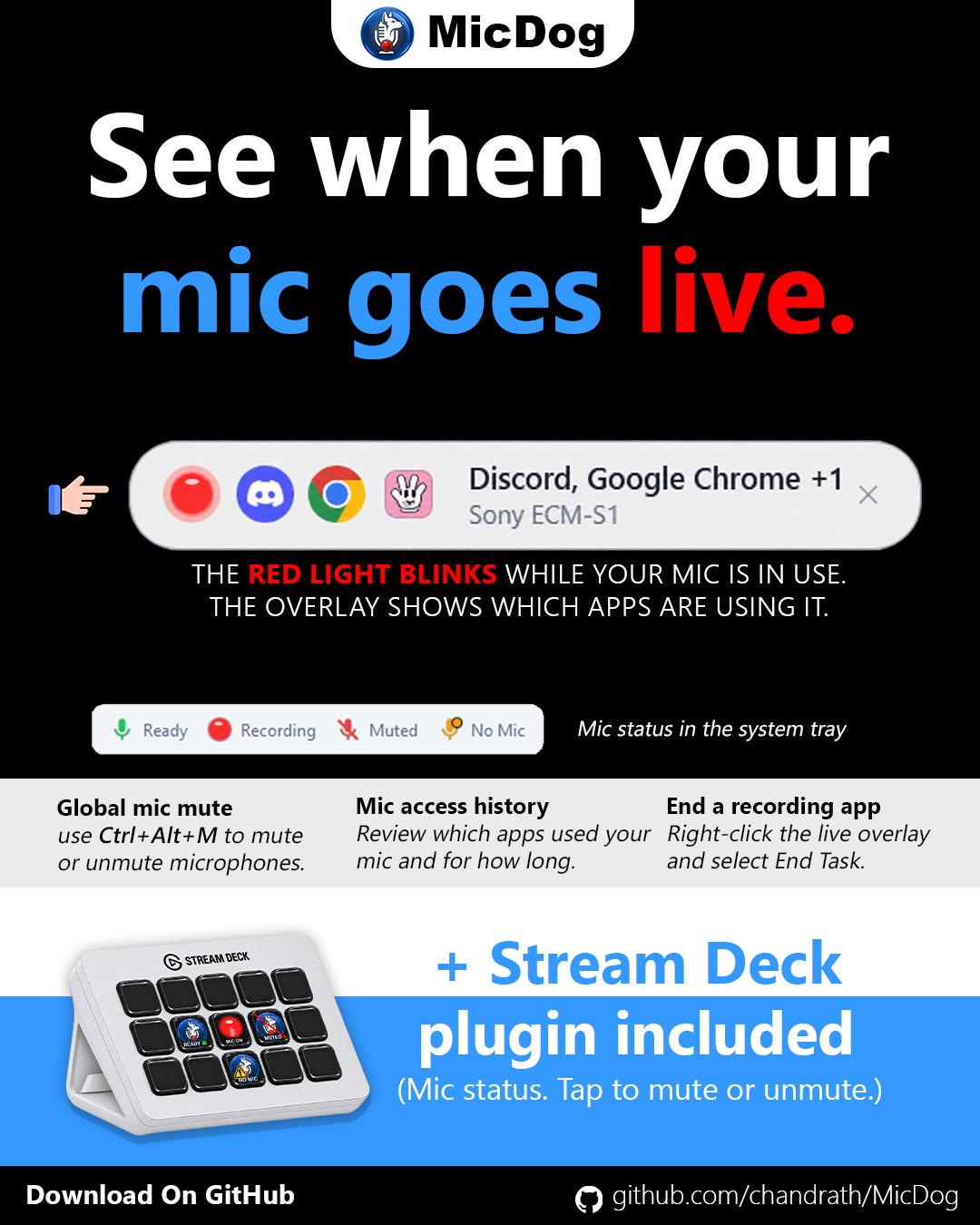
Windows already shows a mic icon in the taskbar, and there are plenty of third-party tools for muting it. The reason to try MicDog is the little overlay that pops up as soon as an app starts using your mic. It shows the app’s name, its icon, and which microphone it’s using. The red light keeps blinking while the mic is active, so you can see what’s going on.

  • Dynamic Island-style mic overlay. A floating capsule bar appears as soon as an app uses your mic, shows the app’s name, and blinks while the mic is active.
  • Mute every mic at once. Click the tray icon, right-click the HUD and select Mute, or press Ctrl + Alt + M.
  • Check your mic before going live. Keep Ready visible in the overlay so you can see at a glance that your mic is detected. If it gets unplugged or stops being detected, MicDog shows No Mic. (default is
  • See what used your mic earlier. The privacy dashboard keeps a local access history. You can also end an app that’s currently using your mic from the overlay.
  • Use an Elgato Stream Deck. Select the optional plugin during setup, then add MicDog to a key for live mic status and one-tap mute. The installer includes it. No Marketplace download needed.

It’s a super lightweight native Windows app built with .NET 10, WPF.

Download MicDog on GitHub


r/coolgithubprojects • • 12h ago

Open source application firewall and network monitor

Post image
1 Upvotes

I've been building Egron, a macOS app to monitor and control outbound network traffic so you can see what happen and where it goes

You can choose between ask mode (prompt on every connection) and silent mode (allow everything, block manually).

It's free and open source. Would love to hear your feedback!

https://getegron.com

https://github.com/Azzurriii/egron


r/coolgithubprojects • • 3h ago

GitHub Profile

Post image
0 Upvotes

I redesigned my GitHub profile README!

I've spent some time redesigning my GitHub profile to make it more visually appealing and showcase my projects, technical skills, and developer journey.

I'd love to hear your thoughts!

Check it out: https://github.com/polyvexr/polyvexr

Feedback and suggestions are welcome. If you find it interesting, consider leaving a star on the repository!


r/coolgithubprojects • • 13h ago

I released an open-source book on ML for ad bidding, with a market simulator and Go bidder you can run

Thumbnail github.com
0 Upvotes

r/coolgithubprojects • • 1d ago

PIC v1.0.5 — A free, open-source Picasa/iPhoto-inspired photo manager for Linux (Rust + GTK4)

Thumbnail gallery
34 Upvotes

Title: PIC v1.0.5 — A free, open-source Picasa/iPhoto-inspired photo manager for Linux (Rust + GTK4)

I've just released PIC v1.0.5, the biggest update yet to my native Linux photo manager built with Rust and GTK4, with over 200 changes since the previous release.

PIC is inspired by the simplicity of classic Picasa and iPhoto, bringing photo organisation, browsing and editing together in one desktop application.

What's new in v1.0.5:

  • 🧠 Smart Albums — Automatically organise photos using rules based on ratings, tags, camera, dates, favourites and more.
  • 🎯 Focus Mode — Dim surrounding photos to concentrate on one image, especially useful when sorting through large collections.
  • 🎨 Redesigned Photo Editor — Improved editing tools, filters, crop controls and individual layers for text, drawings and overlays.
  • 📋 New Properties Panel — A cleaner way to view photo metadata, camera information, tags, albums and notes.
  • 📚 Quick Library Switching — Move between multiple photo libraries with a single click.
  • 🔎 Smarter Search & Filters — Search by dates, album names and filenames, with more accurate filtering.
  • ⚡ Faster RAW Processing & Exports — Improved Nikon RAW handling, faster JPEG exports and consistent image rendering across the app.
  • 🖼️ Edit Photos Without Importing — Drag photos directly from your file manager into PIC, edit them and save a copy without changing the original.

PIC also includes:

🐝 Honeycomb Gallery, 📒 Scrapbook, 📅 Calendar View, 🖥️ Immersive Mode, 🎞️ Animated Screensavers, RAW support, non-destructive editing and collage creation.

There have also been many improvements to browsing performance, folder monitoring, keyboard navigation and overall stability.

Free, open source and built specifically for Linux.

🔗 GitHub: https://github.com/froggy744/PIC

📦 v1.0.5 Release : https://github.com/froggy744/PIC/releases/tag/v1.0.5


r/coolgithubprojects • • 1d ago

Little patch for explorer that allow you to unlock every file/folder right in this annoying window

Post image
131 Upvotes

660KB, no background process, 0% cpu load

Windows 10/11

Source https://github.com/1Stalk/HandsOff


r/coolgithubprojects • • 15h ago

GitHub - jbax/parent: A shared gradle build setup for java projects of any size, whether you're working on a single library, 100+ separate git repositories, or a few multi-module projects sitting side by side.

Thumbnail github.com
1 Upvotes

r/coolgithubprojects • • 15h ago

GameBites: 8 browser games built with vanilla JavaScript

Post image
1 Upvotes

I made a collection of eight browser games, including personality quizzes, island survival, compatibility tests, reaction and memory games.

You can challenge a friend by sending them a link. Both browsers generate the same round from a seed.

Everything runs on GitHub Pages using plain HTML, CSS and JavaScript. No backend, dependencies or registration.

Available in English, Latvian and Russian. MIT licensed.

Play: https://ruslanty.github.io/gamebites/

GitHub: https://github.com/ruslanty/gamebites


r/coolgithubprojects • • 16h ago

I made a free grok bot alternative that you can customize just by asking

Thumbnail gallery
0 Upvotes

Just wanted to share the project I've been working on for the past few weeks. It's like grok bok but highly customizable. It's open source!

prompt: "Make a matrix theme"

source: https://github.com/gmpetrov/brigade


r/coolgithubprojects • • 16h ago

amipatched - Your forgotten side projects are a security risk. This finds them in one command.

Thumbnail github.com
0 Upvotes

We clone, npm install, and move on. The projects stay on your laptop forever: old lockfiles, three Node versions, that one Python from a tutorial. Meanwhile hacked releases of popular packages (axios, LiteLLM…) hit the news every few weeks.

amipatched scans your whole machine and tells you in plain English what's actually risky:

  • 🔎 every runtime, project, global package and editor extension
  • 🧠 what to fix now vs. later, and why
  • ✅ fixes only after you click approve, with an undo
  • 🤖 or just ask Claude Code / Codex / Gemini CLI "am I patched?"
go install github.com/aditya9277/amipatched/cmd/amipatched@latest

👉 https://github.com/aditya9277/amipatched

Free & open source, v0.1, built with help from Claude Code. Roast it!


r/coolgithubprojects • • 17h ago

GitHub - vaultpulse-cloud/vault-backup: Self-hosted GitHub repository backup and restore, using your own Amazon S3 or Azure Blob Storage.

Post image
1 Upvotes

r/coolgithubprojects • • 21h ago

compute resource sharing project, what more do i do with it?

Post image
2 Upvotes

this project allows any two people two host their computing resources or use the computing resources shared by someone else, for now it is dependent on a central server for authentication puposes and the resources can be used by visiting the website which i plan to make it so it is completely local and not dependent on external factors like that. the host does need docker daemon running in the background. the user can download all the workspace files as zip at the end of session. this is the repository: https://github.com/armaan-102006/Dock_Lab/tree/gpu_access , to run host you can download the dockerfile, login and button exe . i would like to know what i can improve or how i can actually make this project helpful to the community as this is my first project that i put some thought into. and i wont be keeping the server running unless someone wants to actually try this out, sorry bout that.


r/coolgithubprojects • • 17h ago

TURBO BUTTON

Post image
0 Upvotes

A portable repair agent for computer technicians. Run it on the customer's PC from a USB stick or desktop, scan the QR code with your phone, and work through the scan, the plan and the fixes with an AI (or without one). You approve every change, and it cleans up after itself when you're done.

https://github.com/flesheatingbug/Turbo-Button

I'm adding features as i use it, which is daily at work, so expect updates and new features. Suggestions are welcome

Can work on multiple pcs at the same time and even generates a handy pdf report of whats done


r/coolgithubprojects • • 18h ago

iSTREAMPAD - Your iPhone/Android as Stream Controller

Post image
1 Upvotes

Turn the phone or tablet you already own into a stream controller for OBS Studio. Go live, record, switch scenes, mute the mic, save a replay, fire keyboard shortcuts and sounds, from a grid of keys on an iPhone, iPad or Android, over your home Wi-Fi. Runs on Mac and Windows. No cloud, no account.

What it does

  • OBS Studio (28 or later, through its built-in WebSocket server): start/stop stream and recording, pause recording, save replay, replay buffer, virtual camera, switch scene, mute a source.
  • Live state on the keys: the live key turns red and says LIVE, the current scene lights up, a muted mic shows a crossed-out icon. Change something in OBS and the phone follows.
  • All your scenes, automatically: the "All scenes" folder has one key per scene in your OBS and follows it when you add or rename scenes.
  • Shortcuts: keyboard shortcuts, open an app, file or website, play a sound, run several steps in a row.
  • Visual editor on the computer; changes reach the phone at once. Folders, on/off keys, portrait and landscape.
  • Private by design: the phone pairs with a QR code and a 6-digit code; only devices on your home network can connect; the OBS password stays encrypted on your computer.

Link: https://github.com/jasonmello/istreampad


r/coolgithubprojects • • 1d ago

I switched from One UI + Good Lock to a Chinese OEM that kills background apps & breaks third-party launcher animations — so I built Lightspeed (Android control layer, Shizuku, v1.5.0)

Thumbnail github.com
4 Upvotes

GitHub: https://github.com/SBFlabs/Lightspeed

I moved from Samsung One UI + Good Lock to a Chinese OEM with almost no customization and aggressive battery management that kept killing my Accessibility services. Switching to a third-party launcher wasn't an option either because it breaks native Recents animations on modern Android.

So I built Lightspeed (Kotlin / Jetpack Compose, Android 8.0–16, no root) — a source-available control layer that runs over your stock launcher so native animations stay intact.

Core features:

  • Deflectors + Shizuku edge overrides: I wanted every side gesture I could think of without fighting the OS back swipe, so optional Shizuku overrides zero out Android's native edge back-gesture insets.
  • One Launch Pad, Three Workstations: Category Cruise (categorized app drawer), Cockpit (quick access to favorite apps and actions), and Central Command (all settings and extra tools).
  • Watchdogs (via Shizuku): Built to protect Lightspeed and other Accessibility services from aggressive OEM battery killers.
  • Hardware remapping & scrubbing: Back-tap triggers, volume-rocker remapping with 8 mappable gestures, and edge brightness scrubbing with Extra Dim.
  • Offline Voice Isolation & Screenshot Blur Engine: I liked Prime Video's dialogue boost, so I added offline 48 kHz voice isolation (integrating Microsoft's MIT-licensed speech-enhancement model via a local C++ JNI + ONNX bridge, credited in CREDITS.md), plus an on-device screenshot-based blur engine inspired by how Infinix handles blur on devices without native window blur, powering multiple themes including HUDs for scrub actions.
  • Zero network permissions: No INTERNET permission in AndroidManifest.xml (0 detections on VirusTotal across all signed APKs).

License & pricing: Source-available (public for code audit and personal builds; non-commercial license, not OSI open-source). All core features are free with zero ads/trackers; an optional $1.99 one-time offline unlock adds extra visual themes and cosmetics.

Releases & SHA-256: https://github.com/SBFlabs/Lightspeed/releases/tag/v1.5.0


r/coolgithubprojects • • 18h ago

Got tired of copy-pasting between Claude and Antigravity, so I made them talk to each other

Thumbnail gallery
1 Upvotes

I kept copying answers from Claude Code into Antigravity and back to get a second opinion. So I built a small app that lets them talk to each other directly.

It is called Consult Room. It runs on your own PC and uses the two command-line tools you already have installed (claude and agy).

How it works:

  1. You give it a project folder and a task.
  2. The two take turns. Claude writes on the left, Antigravity on the right. You watch live and can jump in.
  3. They stop when both agree, or when the turns run out.
  4. If you like the plan, press "Start building". They first agree on every detail (names, files, who does what), then edit a COPY of your project on a git branch.
  5. You read the diffs and press Merge or Discard. Your real folder is never touched before that.

Safety things I cared about:

- Talking is read-only.

- Building only edits a git copy, and neither one can run commands.

- You can mark folders as private so a room can never be opened on them.

- It only listens on 127.0.0.1. Nothing is hosted.

Honest limits:

- Windows 11 only. I have not tested anything else.

- You need both Claude Code and Antigravity installed and signed in. Every turn uses your own accounts.

- It is not a sandbox. It relies on the two tools respecting their own flags.

- It is a personal project. No promises.

No npm packages, just Node 24. MIT licence.

Repo: https://github.com/Sallam5010/consult-room

I built it with a lot of help from Claude Code itself. Feedback is welcome, especially on the safety side.


r/coolgithubprojects • • 1d ago

Zaku 26.1 - Local-first API client written in Rust with GPUI

Thumbnail gallery
3 Upvotes

Hey, I wanted to share that Zaku 26.1 is out with support for environments and variables in requests.

About the app, it stores collections as folders and requests as TOML files. Everything is stored locally on user's filesystem, it doesn't have any login functionality (and never will).

It is available on Linux, macOS and Windows.

I've been working on this for the last 10 months full-time.

Here's what's new:

  1. Define variables at the project, folder and environment level.
  2. Switch between environments with the environment selector.
  3. Use the new variables panel to manage environments and variables.
  4. Autocomplete variables as you type, with highlighting and hover previews.
  5. Switch, create and delete Git branches with the branch picker.
  6. Scale the UI with zoom controls.
  7. Prevent accidental overwrites when files change on disk.

I have lots of things planned, if you try it out please let me know if there's something missing, not working or things you'd like to see added.

Repository:

https://github.com/buildzaku/zaku

Download:

https://zaku.dev/download


r/coolgithubprojects • • 19h ago

GitHub - evoluteur/platonic-solids: Turn the five Platonic solids in 3D, show their duals, read their measurements, and print the nets to fold your own.

Thumbnail github.com
0 Upvotes

r/coolgithubprojects • • 19h ago

Host performance optimzation TUI

Thumbnail gallery
0 Upvotes

r/coolgithubprojects • • 19h ago

AuraVision Player Vidéo 0.10

Post image
1 Upvotes

Introducing AuraVision Player 0.10 A Free Universal Media Player with AI Video Enhancement, 4K Blu-ray and Video Game Cinematics Support

Hi everyone!

I'm excited to share my latest personal project, AuraVision Player, a free universal multimedia player designed to combine advanced playback technologies, artificial intelligence and a distinctive visual experience in a single application.

Built in C++ and powered by FFmpeg 9.1 and Qt 6, AuraVision Player is designed for movie enthusiasts, music lovers, retro gaming fans, multimedia preservation enthusiasts and anyone looking for a new media player.

My goal is to go beyond traditional media playback by integrating modern AI video enhancement technologies while maintaining extensive compatibility with both modern and legacy multimedia formats.

Advanced Video Playback

  • Extensive multimedia compatibility with 522 decoders and 363 demuxers in the reference FFmpeg build.
  • Support for MKV, MP4, AVI, MOV, WebM, TS, M2TS and many more formats.
  • Modern video codecs including H.264, HEVC, AV1, VVC, VP9 and ProRes.
  • GPU-accelerated decoding through D3D11VA, DXVA2 and VAAPI.
  • HDR10 and HLG content support with HDR-to-SDR tone mapping.
  • BWDIF deinterlacing for older and interlaced content.
  • Adjustable playback speed from 0.25× to 4× with audio pitch preservation.
  • Frame-by-frame playback and precise seeking.
  • Automatic playback resume.
  • Screenshot capture and chapter navigation.

AI-Powered Video Enhancement

One of the main features of AuraVision Player is its dedicated Video Enhancement sidebar, providing access to three different AI technologies:

NVIDIA RTX Video Super Resolution

  • Real-time AI video upscaling.
  • Enhanced visual quality when enlarging lower-resolution videos.
  • Native NVIDIA driver integration.

SeedVR2 3B and 7B

  • Advanced diffusion-based video restoration.
  • AI-powered 2× upscaling.
  • Designed to enhance older footage and reconstruct visual details.
  • Integrated through WanGP.

LTX 2.5 Upscale

  • Lightricks' Pixel Spatial Upscaler.
  • AI-powered 2× video enhancement.
  • Integrated through WanGP.

Unlike RTX Video Super Resolution, SeedVR2 and LTX 2.5 process upcoming video segments ahead of playback. The enhanced footage remains synchronized with the original audio, with automatic buffering when necessary.

All AI video processing takes place locally on your computer.

DVD, Blu-ray and 4K Ultra HD Blu-ray

AuraVision Player also supports optical media playback:

  • DVD-Video.
  • Blu-ray.
  • 4K Ultra HD Blu-ray.
  • Physical optical drives.
  • VIDEO_TS and BDMV folders.
  • Unencrypted ISO disc images.
  • Direct title, playlist and chapter selection.
  • HEVC Main 10, HDR10 and HLG.
  • Dolby TrueHD, Dolby Digital Plus, DTS-HD Master Audio and LPCM.
  • Blu-ray PGS and DVD VobSub subtitles.

Unprotected discs and unencrypted backups are supported. Copy protection bypassing and interactive disc menus are not currently supported.

Audio Playback and Music Visualization

  • Support for numerous audio formats, including FLAC, MP3, AAC, WAV, Opus, DTS and TrueHD.
  • Animated 56-band audio spectrum visualizer.
  • Album artwork display.
  • Audio volume normalization.
  • Volume amplification up to 150%.
  • Multiple audio track selection.
  • Audio synchronization controls.
  • Mono mode and stereo channel swapping.
  • Playlist management, shuffle and repeat modes.

Video Game Cinematics and Retro Multimedia

As a fan of video games and multimedia preservation, I wanted AuraVision Player to support formats that are rarely highlighted in modern media players.

Supported game video formats include:

  • Bink Video (.bik, .bk2)
  • Smacker (.smk)
  • id Software RoQ (.roq)
  • Westwood VQA (.vqa)
  • Nintendo THP (.thp)
  • PlayStation STR (.str)
  • Sega FILM / CPK
  • Interplay MVE
  • Electronic Arts multimedia formats
  • Cryo HNM
  • LucasArts SMUSH
  • Mobiclip
  • Sierra VMD
  • Xbox XMV

The player also supports several game audio formats, including BRSTM, BCSTM, BFSTM, ADX, HCA, XWMA and VAG.

Whether you want to rediscover old game cinematics, explore retro multimedia files or listen to video game soundtracks, AuraVision Player provides a dedicated solution.

Subtitles and Network Streaming

  • Embedded and external subtitle support.
  • SRT, ASS/SSA, WebVTT, PGS and VobSub.
  • Automatic detection of matching external subtitle files.
  • Subtitle timing adjustment.
  • Network streaming through HTTP, HTTPS, HLS, MPEG-DASH, RTMP, RTSP, SRT and UDP.
  • M3U playlist support.

Aurora – A Distinctive Visual Experience

I also wanted to create something visually different from traditional media players.

The custom Aurora interface is drawn entirely in code without external image assets.

  • Animated northern lights background with purple, cyan and green effects.
  • Modern frameless window.
  • Floating frosted-glass playback controls.
  • Glowing progress bar with chapter information.
  • Animated on-screen notifications.
  • High-resolution vector icons.
  • HiDPI display support.
  • Interactive AI video enhancement sidebar.
  • Comprehensive preferences panel with eight configuration categories.

Technical Highlights

  • C++ and Qt 6.
  • FFmpeg 9.1 multimedia engine.
  • Custom multithreaded playback architecture.
  • OpenGL video rendering.
  • miniaudio audio engine.
  • Hardware-accelerated video decoding.
  • Local AI video enhancement.
  • Windows x64 portable edition.
  • Linux compilation support.
  • Source code available on GitHub.

Free, Portable and Local

AuraVision Player is designed without mandatory subscriptions, accounts or cloud-based video processing.

The Windows portable edition requires no installation. Simply extract the archive and launch AuraVisionPlayer.exe.

Some important notes:

  • RTX Video Super Resolution requires a compatible NVIDIA RTX GPU.
  • SeedVR2 and LTX 2.5 require WanGP and additional AI model downloads.
  • 12 GB of VRAM is recommended for diffusion-based enhancement.
  • Advanced ASS subtitle styling is not yet supported.
  • The current graphical interface is available in French.

An Independent Project Built with Passion

AuraVision Player was born from my passion for cinema, music, artificial intelligence, software development and video game preservation.

My ambition is to create a universal media player that brings together the versatility of FFmpeg, modern AI restoration technologies and an immersive graphical interface, while preserving compatibility with multimedia formats from different generations.

This project is still evolving, and I would love to hear what the community thinks about it.

Feedback, suggestions, bug reports, feature requests and contributions are always welcome!

Special thanks to the developers and communities behind FFmpeg, Qt, miniaudio, NVIDIA RTX Video Super Resolution, ByteDance SeedVR2, Lightricks LTX and DeepBeepMeep's WanGP.

If you find my project interesting, please consider giving it a star on GitHub to support its development.

AuraVision Player Beyond ordinary playback.

Play. Discover. Restore. Experience.

GitHub – Source code, documentation and project information:

https://github.com/Aaronstanley78/AuraVision-Player-

r/coolgithubprojects • • 19h ago

PIN PILOT - Your Recent Work Always in Sight in Claude Code

Post image
0 Upvotes

Always see what you are working on. Pin Pilot keeps the Claude Code sessions you used recently pinned at the top of the Claude desktop app's sidebar, and unpins them on its own when they go quiet. No more scrolling through every group to find the conversations that are still running.

The problem

If you use Claude Code for more than one thing, your sidebar fills up fast. You file sessions into groups (Work, Apps, Games, Clients...) to keep things tidy, and that works until you have several sessions going at the same time.

Then the questions start:

  • Which conversations was I working on an hour ago?
  • Did that session finish, or is it waiting for my answer?
  • Where did I leave the one about the login bug? Work or Apps?

To answer them you open every group and scroll through all of it, every time. A session that needs you can sit there unnoticed for an hour, just because it was buried in a collapsed group.

The fix

Pin Pilot keeps a short, always-current list at the very top of the sidebar: the sessions you touched recently. Open the app and that list is your "in progress" view. When a session goes quiet, it leaves the list by itself. Your groups stay exactly as you organized them.

Think of it as a "recent" shelf that tidies itself up.

How it works

Every 5 minutes, Pin Pilot looks at your sessions:

  • A session with activity in the last hour (you choose the window) gets pinned.
  • A session Pin Pilot pinned that has gone quiet gets unpinned.
  • Sessions you pinned by hand are never touched. Pin a session yourself to keep it at the top for good.
  • Unpin one of its pins and Pin Pilot lets it be until you use that session again.

Your groups never change: a pinned session stays in its group. Pin Pilot uses no AI model and spends no tokens. It only calls the app's own pin and session-list functions, on your machine. It sends nothing anywhere.

Link here: https://github.com/jasonmello/pin-pilot


r/coolgithubprojects • • 1d ago

Meet SavComponents: 80+ vanilla JS web components you use as plain HTML tags (MIT)

Post image
7 Upvotes

Hi everyone! For the past few weeks I've been working on SavComponents, a free, open-source library of web components. I wanted UI pieces I could drop into any page, whether it's a static HTML file, a server-rendered site or an app, without installing a framework or setting up a build step.

Getting started is two lines:

<link rel="stylesheet" href="https://savcomponents.com/v/1.3.2/sav.css">
<script src="https://savcomponents.com/v/1.3.2/sav.js" defer></script>

<sav-button>Hello</sav-button>

What's in it

  • 80+ components: buttons, inputs, select with search, date and time pickers, colour picker, OTP, password strength, dialogs, popovers, action sheets, toasts, tabs, tables, charts, timeline, drag-and-drop sorting, and more
  • Five visual styles (Soft, Tilt, Sharp, Brutal and Glass), switched with a single class on <html>, plus light, dark and auto mode
  • About 2,000 icons, loaded only when you use them
  • English and Italian built in, and you can add any language with Sav.addStrings()

How it's built

It's all vanilla JavaScript on web standards: no dependencies, no framework. Each component is a custom element with its own Shadow DOM, with styles shared through adoptedStyleSheets. Form fields are form-associated custom elements (attachInternals()), so they submit inside a normal <form> and work with native validation (required, checkValidity()…), with no hidden inputs. Theming goes through CSS custom properties (--sav-color-primary, --sav-radius, --sav-font…), and there's a customiser on the site that exports them for you.

Since they're standard custom elements, they work in plain HTML and alongside most frameworks.

Accessibility

I tried to treat this as a requirement, not an afterthought. Keyboard navigation and screen reader support are built in, and every component page has a WCAG 2.2 AA section that documents keyboard behaviour and roles, and measures contrast live in the current style and theme.

Versioned URLs

Each release lives at its own frozen address (/v/1.3.2/), so your site won't change when a new version comes out. You move to a new version when you decide to.

Used in real projects

I use SavComponents myself in a few apps I'm building, so it gets tested on real interfaces and not just on demo pages:

Where it's at

It's still a young project, and there's plenty I want to improve. For example, the JS isn't minified yet (it's about 180 KB gzipped). I'd love honest feedback: what's missing, what feels off, or anything that breaks.

→ Docs and live demos: https://savcomponents.com
→ Source: https://github.com/Sav22999/savcomponents


r/coolgithubprojects • • 19h ago

GITBEAT - Coding with gamification and tracking

Thumbnail github.com
1 Upvotes

What is GitBeat for?

If you code with AI, your effort is scattered across tool logs you never look at and a GitHub history that hides private work. GitBeat gathers it into one honest picture of your day: how much you leaned on AI, how long you actually coded, and what landed on GitHub. It's a quiet companion in your menu bar — a way to see your momentum, keep a streak going, and own a permanent record of your own activity.

It is not a leaderboard and it sends nothing anywhere. It's for you.

What it tracks

GitBeat reads the files your tools already keep on your Mac and turns them into six views:

  • Summary — today's three rings (AI tokens, coding time, GitHub commits), your streak this week, and weekly charts at a glance.
  • Tokens — tokens per day across Claude Code, OpenCode, Codex CLI and Gemini CLI, broken down by tool and model, over the week, month or year. Includes an equivalent API cost so you can see the scale of your usage (on a subscription you don't pay per token — the number just gives it a size). Cost can be shown in US dollars or Brazilian reais.
  • GitHub — commits and PRs per day, read from each repository's own history, so your private repositories count even when your public profile calendar hides them.
  • Time — active coding time per day and your peak hours, measured from the gaps between sessions.
  • Goals — set daily goals (tokens, coding time, commits) and track them. Defaults are 400M tokens, 4 hours, 3 commits, all adjustable.
  • About — what's on this Mac and where the numbers come from.

Alongside the window, a menu bar item carries an animated mascot that reacts to your activity — focused while you work, celebrating when you close your rings, resting when you step away — plus today's total at a glance.

Why you'll want it

  • See your real rhythm — one glance tells you whether today had momentum, without opening four tools.
  • Keep the history AI tools throw away — Claude Code deletes conversations after 30 days. GitBeat keeps a permanent copy of the numbers (never the text) on your Mac and in your iCloud Drive, so your record outlives the tools.
  • Count your private work — commits are read per repository, so closed-source and work repos finally show up.
  • Understand the cost scale of your AI usage, in your own currency.
  • Stay motivated — rings, streaks and a mascot that cheers you on.
  • Keep everything private — it's a local app, not a service.

https://github.com/jasonmello/gitbeat


r/coolgithubprojects • • 1d ago

Fully Neurally Rendered object - ~2.7 ms average GPU frame time (256*256)

Post image
4 Upvotes

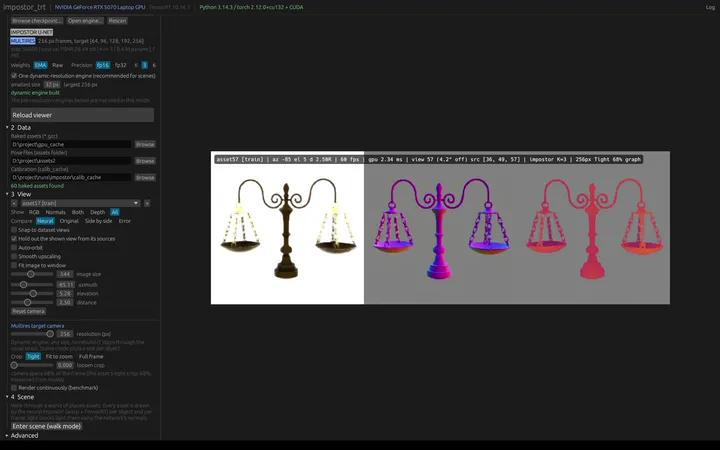
Fully neurally rendered asset (RGB, Normals, and Depth) rendered at an average of ~2.7 ms frame time on 8 GB RTX 5070 Laptop GPU by a custom model architecture in custom inference engine made with Rust, TensorRT, and CUDA kernels. Check out the README in this repo for details. Thanks.