r/coolgithubprojects • • 10h ago

Anybody need a niche terminal player?

Thumbnail gallery
4 Upvotes

I was stressed out of all the music players out there(especially teminal players) not naving ONE feature I need.

I've been working on this player for my terminal for the past few months. It's quite customized to my workflow but I believe others may like it. It includes features like replaygain, search, auto music suggestions, visualizers, and so much more with variable themes!

Would love if you guys can check it out. I'm open to suggestions.

https://github.com/sihooleebd/orbit


r/coolgithubprojects • • 3h ago

Chase - IDE with a Cursor like built-in agent. Use your own models, no account, no telemetry

Thumbnail codeberg.org
1 Upvotes

Chase is an open-source IDE with a built-in agent. The agent edits files, runs tests and can check the result in a preview of your app. You review each change as a diff and can undo it.

You can use any model, cloud or local, including a GitHub Copilot plan. If a provider hits a rate limit, Chase switches to the next one or to a provider with a free tier.

Automations run the agent on a schedule, on file or git changes, or via webhook. Their changes stay in a separate git worktree until you merge them.

Chase also runs in the browser, on your local network or remotely over a VPN.

VS Code extensions from Open VSX work. No account, no telemetry.


r/coolgithubprojects • • 4h ago

I’ve been building a Xbox Emulator for GTA VI

Post image
0 Upvotes

I’ve been working on Jupiter-VI, an open-source experimental Xbox emulation project with a Windows launcher.
The project currently includes:
A Windows WPF launcher and setup flow
Game-directory validation
Hardware capability detection and compatibility reporting
A portable Windows x64 package
A Rust-based emulator core derived from Neptune/Victory
I’ve published the source on GitHub and recently worked on making the project easier to build and distribute.
Important: GTA VI has not been verified to run. On my current system, the title reaches guest code and then hits a breakpoint in the prepared game image. I’m still investigating the emulator’s graphics and runtime limitations.
I’d appreciate feedback on the project structure, documentation, launcher UX, and any emulator-development advice.
GitHub: https://github.com/haxtation/Jupiter-VI


r/coolgithubprojects • • 1d ago

I built KineticType CV: a browser-based typing coach that uses computer vision to catch bad finger habits in real time

Post image
39 Upvotes

Most typing tests (Monkeytype, Keybr, etc.) only measure WPM and accuracy. They have no idea which finger actually hit the key—so you can easily build bad muscle memory (like reaching for V with your right index finger) and plateau without realizing why.

I built KineticType CV to fix that. It runs real-time hand tracking directly in the browser and maps your fingers onto a calibrated keyboard plane to grade your actual typing form alongside your speed.

What it does:

  • Live Biomechanical Keymap: Tracks finger movement at 50+ FPS with visual trails and flags form violations in real time (e.g., "Used R-Index instead of L-Index").
  • Form Score: Grades your technique alongside live WPM and accuracy.
  • Practice Modes: Standard timed/word tests, AI Weakness Drills, and dedicated code modes for TypeScript/Rust and Python.
  • No Webcam? No Problem: Includes a built-in CV Demo mode so you can test the keymap and telemetry right away.

Tech stack: TypeScript, Vite, client-side computer vision.

Repo:https://github.com/tahaenasraoui-debug/kinetictype-cv

I'd love feedback on the keyboard calibration flow and any edge cases with different camera angles or layouts.


r/coolgithubprojects • • 23h ago

ReDash360 – an Xbox 360-style dashboard that turns a Linux PC into a couch console

Thumbnail gallery
35 Upvotes

GitHub: https://github.com/kevin11dev/ReDash360

ReDash360 is a dashboard you sign in to instead of a normal desktop, made for a controller and a TV.

- Qt 6 / QML, running as its own session on KDE Plasma or Hyprland

- A 360-style sign-in screen (an SDDM theme) with profiles and animated avatars

- Steam, Heroic and Faugus games in one library, plus the emulators you already have

- A Guide button that works over any game or app

- Your own backgrounds, avatars and UI sounds

Walkthrough: https://www.youtube.com/watch?v=u-hlxG0jiac

It's still early and only tested on my own setup (CachyOS), so expect bugs. It's source-available under PolyForm Strict: free for non-commercial use, but not open source.


r/coolgithubprojects • • 4h ago

GlideMix Studio - The Legendary workspace: mix the way MixMeister did

Thumbnail gallery
1 Upvotes

r/coolgithubprojects • • 5h ago

Making a free Postman alternative

Thumbnail gallery
1 Upvotes

hello there i've been working on an alternative to postman as we all know postman frustration has hit all of us, the way it eats so much ram and the cloud login and subscription is a pain in the ass

me and another friend of mine both a senior devs and with help of ai development and another quality assurance member of our team for testing ui/ux and functionalities

we build an alternative to postman, free, fast, very light, open source, no forced login, your cloud could be your local git or a github repo, supporting all protocols and methods (grpc, graphQl, websockets, socket.io, etc..)

we have researched on everything wrong and good about the other alternatives bruno, yaak, etc..

heres Blitz, you can check it on my github and its already growing and our corporate has also adapted it and its currently in an ongoing development and testing

i recommend you testing and please do leave a review or suggestion or feedbacks are much appreciated.


r/coolgithubprojects • • 1d ago

Manga Downloader: download manga and comics from 580+ sites into CBZ, CBR or EPUB (Go CLI + desktop app)

Thumbnail gallery
386 Upvotes

When I started this project four years ago, none of the existing downloaders supported the sites I wanted to read on my e-reader, so I wrote my own. It now handles 580+ sites, and comes as a single-binary CLI and as a desktop app for Windows, macOS and Linux.

What it does:

  • Packs chapters into CBZ, CBR, EPUB or PDF: one file per chapter, per volume (automatic for some sites) or for the whole series.
  • Lets you pick the language and the scanlation group
  • Skips chapters you already have, and credit or ad pages
  • Converts AVIF and WebP pages to JPEG so e-ink readers can show them

It's written in Go (the app uses Wails + React), free and open source under AGPL-3.0, with no accounts or ads.

Website: https://mangadownloader.cat (easier download with its button + known supported sites list with filter)

GitHub: https://github.com/elboletaire/manga-downloader

If a site you use is missing or broken, open an issue and I'll take a look 👌

Note: I've edited the description recently to add PDF as part of the supported formats, since it's just been added in version 26.0.0. Sadly I can't edit the title or the screenshots.


r/coolgithubprojects • • 6h ago

aghaz-claude-mods: a safety guard, progress spinner and themes for Claude Code (TypeScript, MIT)

Thumbnail github.com
1 Upvotes

r/coolgithubprojects • • 7h ago

I built a CLI that fabricates GitHub commit history — because not every green square tells the truth.

Post image
0 Upvotes

How much does a GitHub contribution graph actually tell you about a developer?

I built Graph Canvas, an open-source CLI that generates synthetic Git commit history to demonstrate how easily contribution graphs can be manipulated.

It started as an experiment to explore whether those little green squares are a reliable indicator of developer productivity.

Features:

  • Custom start and end dates.
  • Configurable synthetic commit counts.
  • Seeded randomization.
  • Private repository integration.
  • Interrupted-run recovery.

Built with Node.js and Git, featuring a minimal black, white and green terminal aesthetic.

Strictly for educational and experimental purposes. This project is not intended for misleading recruiters, falsifying professional experience, or misrepresenting developer productivity.

GitHub: https://github.com/thesamtom/graph-canvas-pub

I'd love to hear your thoughts on the project, terminal UI, and the credibility of contribution graphs as a measure of developer activity.

Not every green square tells the truth.


r/coolgithubprojects • • 16h ago

I made Glow: Ctrl+F for your whole screen, even text inside pictures (free, open source, Windows)

Post image
6 Upvotes

hey! Glow is a small free tool i built for my own PC and just released.

Press Ctrl+Alt+F and a small search pill opens at the top of the screen. Type a word and every match glows on every monitor at once, in any app, including text inside images, videos and screenshots.

The pill counts them ("12 matches · 3 screens"), and Tab jumps the mouse to the next one. Great for finding that one setting in a crowded window or a name in a long call.

- free and open source (MIT), Windows 10/11, nothing to install

- download + demo: https://p4rkr.online/tools/glow/

- source: https://github.com/pizza-p4rkr/glow

feedback and bug reports very welcome.


r/coolgithubprojects • • 8h ago

I built an air-gapped Windows debugger around Qwen2.5-Coder (1.5B–14B) + <2ms Python AST + silent 3-attempt execution-verified Reflexion (0 KB egress)

Thumbnail gallery
0 Upvotes

Hey r/coolgithubprojects — wanted to share **TraceZero v1.1.0**, a Windows desktop code debugger built for devs working on NDA repos or offline laptops where cloud AI tools (Cursor, Copilot, ChatGPT) aren't allowed.

**How it stops a tiny 1.5B model from hallucinating:**

  1. **`<2ms` Python AST Static Pre-Scanner:** Flags mutable defaults, loop mutations, and race conditions deterministically before inference.
  2. **Silent 3-Attempt Execution-Verified Reflexion:** Compiles (`compile()`) and executes candidate fixes inside an isolated `sys.settrace` step-guarded namespace so syntax/runtime errors are caught automatically before you ever see the diff.
  3. **Hardcoded `127.0.0.1:11434` Loopback + `.tracezero/audit.log`:** Binds strictly to local Ollama (`0 KB` external network egress; works in Windows Airplane Mode).
  4. **Bring Your Own Ollama Model:** Tuned out of the box for `qwen2.5-coder:1.5b` (runs smoothly on 8 GB RAM laptops with no GPU), or swap `"model"` in `tracezero.json` to `qwen2.5-coder:7b` / `deepseek-coder-v2` in 2 seconds.

Includes **Free Forever Lite** (`7-day` full Pro trial, then `3` AI Reflexion fixes a day + unlimited AST scans forever) and a `0/67` VirusTotal clean scan.

Repo & v1.1.0 installer: https://github.com/joyboyy937-rgb/tracezero-desktop


r/coolgithubprojects • • 9h ago

I built Musi, a lightweight menu bar music controller with trackpad swipe gestures and live synced lyrics for free

Thumbnail gallery
1 Upvotes

I wanted a faster way to control Apple Music and Spotify without constantly Command-Tabbing or keeping a mini-player floating over my work. So I built Musi in native Swift/AppKit.

What it does:

  • Menu bar control: Clean, native macOS feel for both Apple Music and Spotify.
  • Trackpad swipe gestures: Swipe to skip/scrub instead of hunting for tiny buttons.
  • Magnetic synced lyrics: A separate child window that snaps magnetically to the controller and displays live synced LRC lyrics, then tucks away when you don't need it.

You can check it out here: https://github.com/mythreyen/musi

Happy to answer any questions or take feature requests in the comments!

*This app was heavily developed with the help of AI so I would love feedback on the gesture sensitivity and any edge cases with your macOS version.

*Feel free raise issue tickets in the repo so I can try to help you!

*You will need to install Xcode for this to work.

*Follow the instructions posted in the repo for this to work flawlessly.


r/coolgithubprojects • • 1d ago

I built an open source alternative to Snyk. Your coding agent has to prove every bug it finds

Thumbnail gallery
42 Upvotes

We spent two years building our AppSec platform. This week we open sourced the whole thing.

You type /cybedefend in your coding agent (Claude Code, Cursor, Codex) and it audits your repo:

- Open source scanners that fit your repo run in Docker (Opengrep, Trivy, Gitleaks, zizmor and more). The ones you already use (Semgrep, CodeQL, SonarQube...) plug in too.

- Then your agent hunts what scanners can't see, like user B opening user A's invoice because a route forgot a permission check.

- The rule for that hunt: no failing test, no bug. It has to write a test in your own suite that fails because of the bug. You don't trust the agent, you run the test.

Everything lands in a dashboard on your machine, wired to GitHub, GitLab, Jira and Linear, with scans on every pull request. No seat limit, no scan quota, no telemetry, no API key.

Repo: https://github.com/CybeDefend/cybedefend

Install: npx skills add CybeDefend/cybedefend -g

Run it on a repo you know by heart and tell me what it gets wrong. And if it's useful, a star helps other people find it :)


r/coolgithubprojects • • 14h ago

Sapwood: read-only disk usage explorer as one PowerShell 7 script

Post image
2 Upvotes

AI disclosure: Sapwood was built with substantial help from coding agents, against a written specification and a large automated test suite. MIT license

It is one script, Sapwood.ps1, with a WPF window. It needs PowerShell 7.4 or later on Windows x64. Windows PowerShell 5.1 cannot run the GUI.

What it does:

- Scans a local folder or a UNC path with the current user's permissions

- Updates folder totals while the scan is still running

- Reports logical size. Allocated size is Unavailable in this edition

- Find and Keywords match names only. File contents are never read

- Opens a path in Explorer, copies a short summary, exports CSV, and saves a snapshot for compare

What it does not do: delete or modify files, send telemetry, install a service, or change the registry.

Headless mode writes one JSON summary to stdout.

https://github.com/OlaProeis/Sapwood


r/coolgithubprojects • • 19h ago

Lattice JSON Workbench – a web app to explore and edit JSON like a spreadsheet

Thumbnail gallery
5 Upvotes

Lattice is an open-source tool for working with JSON files, from app settings and translations to product catalogues and API responses.

  • Edit like a spreadsheet. Change cells, copy and paste ranges, fill down, and add rows or columns.
  • Find what you need. Sort and filter rows, and search inside nested objects and arrays.
  • Explore nested data. Preview it in a cell, inspect it in Details, or open it as its own table.
  • Work directly with the JSON. Jump from a cell to its source, edit a selected section, or format the whole file with Pretty-print, Compact, or Minify.
  • Review changes side by side. Step through edits and restore individual changes before saving.

Files are processed locally in your browser. Try Lattice · Download the standalone HTML for offline use

What kind of JSON do you work with most often, and what would make a JSON toolkit worth keeping around?

If Lattice is useful to you, a star on GitHub is appreciated.


r/coolgithubprojects • • 10h ago

LexiSuite d484004: my all-Rust local AI stack (own kernel, OS, engine, panel) - 206 changes in two days, Inkling-2-Mini at 131 tok/s on one 7900 XTX

Thumbnail github.com
1 Upvotes

AIO USB/VM/Drive image with Inkling 2 Mini baked here: https://huggingface.co/Wa1k3r/Inkling-2-Mini-NVFP4exp-Q8-draft-LexiSuite-AIO-for-AMD-RDNA

I'm building a local AI platform from scratch in Rust: an inference engine (LexiEngine), a browser control panel (LexiPanel), an appliance OS (LexiOS) and a kernel designed around inference (LexiKernel). It boots from one USB image. It is not a wrapper around llama.cpp, and there is no third-party code in the product.

A new development image went out today. Here is what changed since the last one two days ago, and what the work actually was.

The Panel was rebuilt, page by page (66 changes)

The old Panel worked but read like an engineering console: raw JSON on screen, fields with no labels, boxes inside boxes, internal jargon everywhere. I went through it by hand.

- One header and one navigation instead of five stacked bars

- 12 themes

- A file and folder picker on every path field, so nothing has to be typed

- Right-click menus on instances, files and table cells

- Parameters grouped in the order you set them, with a device chooser for the instance's cards

- Switch an instance between LexiEngine and llama.cpp from one page

- Hardware, Diagnostics, Power, GPU tuning and Models rewritten in plain words (temperatures in degrees, problems listed first)

- An abliteration lab where you pick models with toggles and pick the drive to write to; the original is never touched

- A layout choice: top tabs, or a side tree like a hypervisor console

LexiKernel went from one core to all of them (99 changes)

Until now my kernel ran all threads of a program on a single CPU. That was the biggest gap between it and Linux. Three rounds of work went into closing it: per-CPU timers and scheduling, threads that move between cores with their full vector state, memory handled per NUMA node, huge pages, and TLB shootdowns that a core answers even in the middle of a long system call. It now boots with every core in use and served the Panel to 8 clients at 2, 4 and 8 CPUs in a VM with no failed requests.

The kernel's own GPU drivers for AMD, NVIDIA and Intel are compiled into this build too. They have not run on a real card in this version yet. That is the next milestone, and until then GPU work under LexiKernel goes through a Linux guest. The image also boots LexiOS on Linux 7.4, which is what you want for daily use today.

LexiEngine (27 changes)

- Groundwork for splitting one model across several cards (serving across cards is not in this build)

- New draft options for Inkling 2, off by default until they are measured

- A quantizer that trains with the rounding in the loop instead of rounding afterwards

- The whole tree moved to Rust 1.100.1

Speed, measured on this version

Inkling-2-Mini (the looped mixture-of-experts model released Nov 20), one Radeon RX 7900 XTX, 4-bit KV cache, greedy, one run each, measured Nov 27-28.

After a 16,384-token prompt:

- LexiEngine: prompt 2,244 tok/s, generation 64.6 tok/s, 131.1 tok/s with the model's own draft head

- llama.cpp b12722: prompt 1,060 tok/s, generation 42.9 tok/s

- Strata 0.2.23 (8-bit cache, it refuses 4-bit on this card): prompt 2,075 tok/s, generation 53.9 tok/s

Long context on LexiEngine:

- 261,632-token prompt: 1,157 tok/s reading, then 48.7 tok/s (63.2 with the draft head)

- 523,264-token prompt: 766 tok/s reading, then 39.5 tok/s (46.8 with the draft head)

- 10 of 10 planted facts recalled at both depths

Drafted output was identical to plain output in every run.

Two notes so nobody says I hid them. The llama.cpp number is from the Nov 25 build: the build I fetched today ran this model at 7.6 tok/s on this card, which looks like a bug on their side, so I did not use it. And llama.cpp needs a 26-line loader change to open my file, because the file also carries the draft head and image tower.

What it is not, yet

- A development build, not a production release

- Developed and measured on one card (7900 XTX, Vulkan). Other cards are less tested

- The kernel's own GPU drivers have not run on a card in this version

- The Windows installer is on the stick but has not been run on a Windows PC; no macOS installer yet

- Installing to an internal disk is not in this image

- Only Inkling has been benchmarked on this exact version; my 27B numbers are from a build nine days older and are being re-run

Tested

Every test in the tree ran on this version: 17,932 tests, none failed. Both images passed their Secure Boot checks in a VM.

Links

Download (381 MB USB image, boots to the Panel):

https://lexipanel.com/download/

All-in-one image with Inkling-2-Mini inside (18.1 GB, needs a 32 GB stick):

https://huggingface.co/Wa1k3r/Inkling-2-Mini-NVFP4exp-Q8-draft-LexiSuite-AIO-for-AMD-RDNA

Every one of the 206 changes, one line each:

https://github.com/W61k3r/LexiSuite-Releases/wiki/Changes-d484004

Benchmarks and method:

https://github.com/W61k3r/LexiSuite-Releases/wiki/Benchmarks

Happy to answer questions about the kernel work or the engine.


r/coolgithubprojects • • 21h ago

OpenAmbient: open-source screen/music sync for your lights on Windows, 100% local (works with Home Assistant lights too)

Post image
7 Upvotes

I was missing a Hue Sync–style experience that doesn't depend on a single brand or the cloud, so I built OpenAmbient, a free Windows & Mac app that captures your screen (or PC audio) and drives your lights over the local network.

- Native local protocols: WiZ, Govee LAN, Hue Bridge, IKEA DIRIGERA, Nanoleaf, WLED, LIFX, Yeelight

- Any light exposed in Home Assistant (Tapo, Matter, Zigbee, Shelly…) via a long-lived token

- PC RGB too: Razer Chroma, Logitech G, Corsair iCUE, OpenRGB

- Profiles (Cinema / Gaming / Music / Work / Relax), per-light screen zones, smoothing, low-CPU mode

- No account, no telemetry; hub tokens are encrypted with Windows DPAPI

Note: lights going through HA's REST API are slower than direct LAN protocols, so I use them with smoothing on. WLED/Govee are the snappiest.

GitHub (GPL-3.0): https://github.com/zorkobabin/OpenAmbient

Happy to hear feedback, especially from people running it with HA lights.


r/coolgithubprojects • • 11h ago

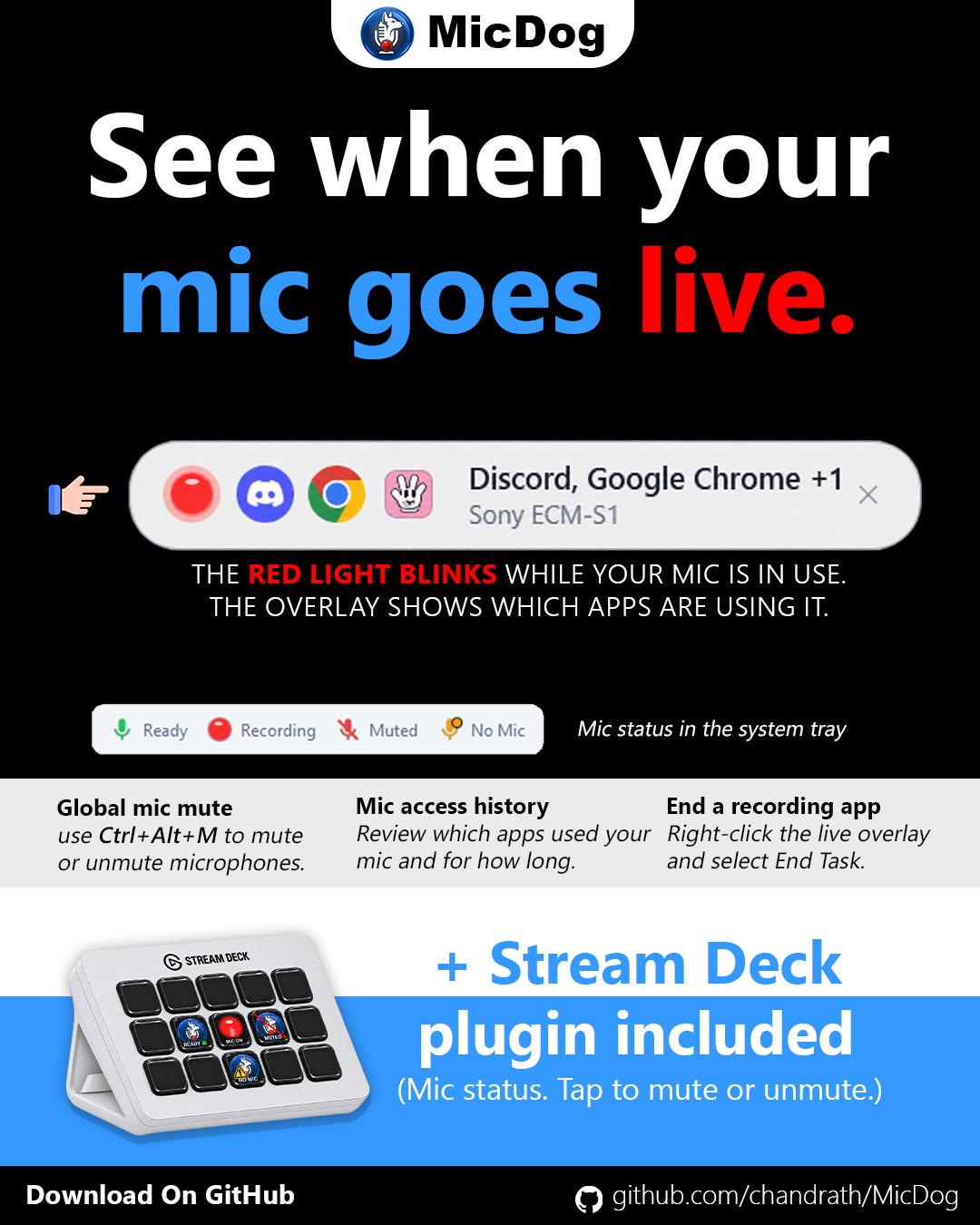
MicDog: Dynamic Island-style overlay shows which app is using your mic + GLOBAL MUTE (open source, Windows)

Post image
1 Upvotes

Windows already shows a mic icon in the taskbar, and there are plenty of third-party tools for muting it. The reason to try MicDog is the little overlay that pops up as soon as an app starts using your mic. It shows the app’s name, its icon, and which microphone it’s using. The red light keeps blinking while the mic is active, so you can see what’s going on.

  • Dynamic Island-style mic overlay. A floating capsule bar appears as soon as an app uses your mic, shows the app’s name, and blinks while the mic is active.
  • Mute every mic at once. Click the tray icon, right-click the HUD and select Mute, or press Ctrl + Alt + M.
  • Check your mic before going live. Keep Ready visible in the overlay so you can see at a glance that your mic is detected. If it gets unplugged or stops being detected, MicDog shows No Mic. (default is
  • See what used your mic earlier. The privacy dashboard keeps a local access history. You can also end an app that’s currently using your mic from the overlay.
  • Use an Elgato Stream Deck. Select the optional plugin during setup, then add MicDog to a key for live mic status and one-tap mute. The installer includes it. No Marketplace download needed.

It’s a super lightweight native Windows app built with .NET 10, WPF.

Download MicDog on GitHub


r/coolgithubprojects • • 12h ago

Open source application firewall and network monitor

Post image
1 Upvotes

I've been building Egron, a macOS app to monitor and control outbound network traffic so you can see what happen and where it goes

You can choose between ask mode (prompt on every connection) and silent mode (allow everything, block manually).

It's free and open source. Would love to hear your feedback!

https://getegron.com

https://github.com/Azzurriii/egron


r/coolgithubprojects • • 3h ago

GitHub Profile

Post image
0 Upvotes

I redesigned my GitHub profile README!

I've spent some time redesigning my GitHub profile to make it more visually appealing and showcase my projects, technical skills, and developer journey.

I'd love to hear your thoughts!

Check it out: https://github.com/polyvexr/polyvexr

Feedback and suggestions are welcome. If you find it interesting, consider leaving a star on the repository!


r/coolgithubprojects • • 13h ago

I released an open-source book on ML for ad bidding, with a market simulator and Go bidder you can run

Thumbnail github.com
0 Upvotes

r/coolgithubprojects • • 1d ago

PIC v1.0.5 — A free, open-source Picasa/iPhoto-inspired photo manager for Linux (Rust + GTK4)

Thumbnail gallery
34 Upvotes

Title: PIC v1.0.5 — A free, open-source Picasa/iPhoto-inspired photo manager for Linux (Rust + GTK4)

I've just released PIC v1.0.5, the biggest update yet to my native Linux photo manager built with Rust and GTK4, with over 200 changes since the previous release.

PIC is inspired by the simplicity of classic Picasa and iPhoto, bringing photo organisation, browsing and editing together in one desktop application.

What's new in v1.0.5:

  • 🧠 Smart Albums — Automatically organise photos using rules based on ratings, tags, camera, dates, favourites and more.
  • 🎯 Focus Mode — Dim surrounding photos to concentrate on one image, especially useful when sorting through large collections.
  • 🎨 Redesigned Photo Editor — Improved editing tools, filters, crop controls and individual layers for text, drawings and overlays.
  • 📋 New Properties Panel — A cleaner way to view photo metadata, camera information, tags, albums and notes.
  • 📚 Quick Library Switching — Move between multiple photo libraries with a single click.
  • 🔎 Smarter Search & Filters — Search by dates, album names and filenames, with more accurate filtering.
  • ⚡ Faster RAW Processing & Exports — Improved Nikon RAW handling, faster JPEG exports and consistent image rendering across the app.
  • 🖼️ Edit Photos Without Importing — Drag photos directly from your file manager into PIC, edit them and save a copy without changing the original.

PIC also includes:

🐝 Honeycomb Gallery, 📒 Scrapbook, 📅 Calendar View, 🖥️ Immersive Mode, 🎞️ Animated Screensavers, RAW support, non-destructive editing and collage creation.

There have also been many improvements to browsing performance, folder monitoring, keyboard navigation and overall stability.

Free, open source and built specifically for Linux.

🔗 GitHub: https://github.com/froggy744/PIC

📦 v1.0.5 Release : https://github.com/froggy744/PIC/releases/tag/v1.0.5


r/coolgithubprojects • • 1d ago

Little patch for explorer that allow you to unlock every file/folder right in this annoying window

Post image
131 Upvotes

660KB, no background process, 0% cpu load

Windows 10/11

Source https://github.com/1Stalk/HandsOff