r/coolgithubprojects • • 5d ago

New moderators needed - comment on this post to volunteer to become a moderator of this community.

5 Upvotes

Hello everyone - this community is in need of a few new mods, and you can use the comments on this post to let us know why you’d like to be a mod here.

Priority is given to redditors who have past activity in this community or other communities with related topics. It’s okay if you don’t have previous mod experience. Our goal, when possible, is to add a group of moderators so you can work together to build the community.

Please use at least 3 sentences to explain why you’d like to be a mod and share what moderation experience you have (if any).

If you are interested in learning more about being a moderator on Reddit, please take a look at these resources:

Comments from those making repeated asks to adopt communities or that are off topic will be removed.


r/coolgithubprojects • • 13h ago Bravo

I've been building my own non-Linux operating system for 10 months — it now runs KDE Hyprland Steam and Proton

Thumbnail gallery
116 Upvotes

Hey everyone i have been working on AvoryOS, an independent operating system with its own kernel, for around 9 or 10 months as a hobby project.

It's not based on Linux, but it has a compatibility layer that allows it to run Linux applications and drivers.

Some of the things it currently supports:

- AMDGPU Drivers, Nouveau Nvidia Drivers and Realtek Ethernet drivers through LinuxKPI (i got the idea from FreeBSD)

- Hardware-accelerated graphics on real hardware

- KDE Plasma 6, XFCE, Cinnamon, Hyprland, Sway and DWM

- Steam, Proton, Wine, Firefox, LibreWolf and Chromium

- KVM and AMD-V virtualization

- Its own package manager, Axon

- EXT4, FAT32 and exFAT filesystems

Theres still a lot of work to do, but Im happy with how far the project has come.

I do love to hear your thoughts and feedback!

GitHub: https://github.com/Hidotu-Labs/AvoryOS

If you find the project interesting a star would be greatly appreciated!


r/coolgithubprojects • • 18h ago

FFmpeg Forge 3.0.1.1 NEW VERSION

Post image
129 Upvotes

FFmpeg Forge Desktop 3.0.1 – Free & Open-Source Video, Audio and Image Converter with AI Enhancement

Hi everyone!

I'm excited to share my personal project, FFmpeg Forge Desktop, a free, open-source and portable multimedia application designed to bring the incredible power of FFmpeg into a modern and accessible graphical interface.

My goal is to create an all-in-one multimedia toolbox for beginners, enthusiasts, content creators and advanced users, without the need to manually write complex command lines.

Whether you want to convert media, restore old footage, upscale videos using AI, enhance images or create immersive audio, FFmpeg Forge brings everything together in one application.

Video features

  • Extensive format and codec support, including MP4, MKV, MOV, WebM, H.264, H.265, AV1, ProRes and DNxHR.
  • AI-powered upscaling with RazorNext, VisionNext, OptiPulsar, SeedVR2 and LTX 2.5 Upscale.
  • NVIDIA RTX Video Super Resolution and RTX TrueHDR.
  • Advanced scaling with AMD FSR 1/2/3, NIS, SGSR, Anime4K and OptiScaler.
  • AI noise reduction and FocusPulsar deblurring.
  • SDR-to-HDR10 and Dolby Vision 8.1 conversion.
  • GPU-accelerated encoding and processing.
  • Custom resolution up to 8K, frame rate, bitrate and compression settings.
  • Automatic compression recommendations.
  • QTGMC and BWDIF deinterlacing.
  • Trimming, rotation, cropping and lossless remuxing.
  • Real-time before-and-after filmstrip preview.

Audio features

  • Conversion to MP3, AAC, FLAC, WAV, Opus, AC-3 and many more formats.
  • Immersive multichannel audio configurations up to 22.2.
  • Spatial audio upmixing for music, movies and live concerts.
  • 3D spatial audio for headphones using HRTF processing.
  • Dolby Atmos and DTS:X passthrough.
  • DSD64 and DSD128 audio conversion.
  • EBU R128 loudness normalization.
  • Add, replace or remove audio tracks without re-encoding the video.

Image features

  • Conversion between popular image formats, including PNG, JPEG, WebP and AVIF.
  • AI-powered image upscaling and restoration.
  • Image denoising and detail enhancement.
  • Custom resizing and advanced scaling algorithms.
  • HDR image output with 16-bit PNG and 10-bit AVIF.
  • Frame extraction from videos.
  • Image sequence-to-video conversion.

Additional features

  • Batch processing of files and entire folders.
  • Built-in DVD and Blu-ray ripper for unprotected media.
  • Access to over 570 FFmpeg filters with a full FFmpeg build.
  • More than 45 ready-to-use filter recipes.
  • Advanced filtergraph editor.
  • View and copy generated FFmpeg commands.
  • Modern graphite interface with cyan and indigo accents.
  • Portable Windows version, with a Linux edition also available.
  • Free and open-source under the GPL-3.0 license.

Some advanced AI features require additional model downloads, compatible hardware or external software. Feature availability may vary between Windows and Linux.

A project built with passion

FFmpeg Forge is a project born from my passion for multimedia processing, video restoration, audio technology and artificial intelligence.

I want to make advanced multimedia technologies more accessible while giving users as much control as possible over their files.

I'm sharing this project with the community because I would love to hear your thoughts, suggestions, feature requests and feedback. Every contribution helps improve the software!

If you find the project useful, feel free to give it a star on GitHub.

Convert anything into everything.

GitHub – Source code and downloads:

https://github.com/Aaronstanley78/FFmpeg-Forge-Desktop


r/coolgithubprojects • • 11h ago

Curio - local-first digital asset manager

Post image
18 Upvotes

Curio is a free, open-source, local-first digital asset manager for Windows, Linux and macOS. Organize images, video, audio, documents, books, fonts, 3D models, code and web links while your assets stay ordinary files on disk - no account, cloud sync or telemetry.

  • Your files stay yours: Index existing folders in place as Locations, or use managed storage whose folder tree mirrors your library with real filenames and hard links.
  • Visual browsing: Switch between Grid, Masonry, Justified, List and the interactive 2D color map to explore assets by hue and brightness.
  • Fast filtering and Smart Folders: Narrow results by dominant color, tags, folders, dimensions, ratings, file types and typed custom fields, or build rule-based Smart Folders and structured queries.
  • Built-in viewers and plugins: Inspect images (including RAW and Live Photos), video, audio waveforms, markdown, code and fonts natively. Add optional plugins for ebooks, PDFs and comics, 3D models (glTF/GLB, OBJ, STL, 3MF) and AI generation metadata.
  • Everyday tools and automation: Find exact or visually similar duplicates, batch rename with metadata tokens, compare images side by side, watch folders with Auto-Import rules, or capture from the browser with the Send to Curio extension.
  • Customizable workspace: Rearrange and dock widgets per screen, switch between 7 built-in dark and light themes (Default, Nord, Catppuccin, Tokyo Night, Gruvbox, Everforest, Solarized) or make your own.
  • Companion Chrome extension: Send images and videos directly to Curio from your browser. Customizable with site rules and data attributes.
  • Local API and MCP server: Automate libraries over a scoped local HTTP/SSE API or connect AI assistants through the built-in MCP server.

https://github.com/Erehr/curio
https://github.com/Erehr/curio-plugins
https://github.com/Erehr/curio-extension


r/coolgithubprojects • • 15h ago

New cool feature

Thumbnail gallery
27 Upvotes

Hey everyone, I've always wanted a quick way to turn my handwritten formulas and circuit diagrams directly into LaTeX / CircuiTikZ code, so I finally added it in my app Abelnotes. It's still a work in progress, so if you want to help improve the recognition accuracy, you can contribute samples here:https://contribute.abelnotes.app/

The project is completely open source (AGPL) on GitHub:https://github.com/abelnotes/abelnotes. You can test it right away in your browser at http://abelnotes.app/ or grab it on the Play Store, Microsoft Store, and Flatpak.

A few other features I've packed in:

  • Cross-device sync: Works with your own WebDAV server (I use Nextcloud) or Google Drive.
  • Clean workflow: GoodNotes-style interface with builtin shape recognition and newly added OCR.

It runs on almost everything the only platforms missing are iOS and macOS because of Apple's $99/year developer fee. If you'd like to help bring it to Apple devices, feel free to support the project here:https://github.com/sponsors/abelnotes (in reality you can still use it in those devices through the website http://app.abelnotes.app/ and add them as a PWA, but it would be more cool to have also the native app in the store)


r/coolgithubprojects • • 1d ago

Maglev: a free, open-source Android app that downloads any link

Post image
126 Upvotes

Paste a link, a magnet or a page, and it downloads. That now includes videos: share a YouTube, Instagram or X link to Maglev, pick a quality, and it saves one file. Search for a film, download it and grab its subtitles, all without leaving the app.

- Videos from YouTube, Instagram, X and other sites, with up to 6 qualities or audio only. In the built-in browser, long-press a video and pick Download this video.

- Torrents, normal links and videos from web pages. The torrent engine is librqbit (Rust).

- Search 50+ public sources at once.

- A built-in browser with tabs and ad blocking that finds the videos and files on a page, including HLS and DASH streams. Pick the quality and audio track and it saves one file.

- Subtitles from 20+ sources, right from your download. No account needed.

- Watch while it downloads, and follow a show or RSS feed so new episodes download on their own.

- Share a link from any app, or select one and pick Download with Maglev.

- No ads, no account, no tracking. GPL-3.0, Android 7+, updates in the app or through Obtainium.

I was bored with the old UI of ADM, 1DM and Flud and with how they're no longer maintained, so here is my honest attempt to fill that gap as an alternative.

- GitHub: https://github.com/Kaos599/Maglev

- Download: https://github.com/Kaos599/Maglev/releases/latest


r/coolgithubprojects • • 5h ago

Anybody need a niche terminal player?

Thumbnail gallery
3 Upvotes

I was stressed out of all the music players out there(especially teminal players) not naving ONE feature I need.

I've been working on this player for my terminal for the past few months. It's quite customized to my workflow but I believe others may like it. It includes features like replaygain, search, auto music suggestions, visualizers, and so much more with variable themes!

Would love if you guys can check it out. I'm open to suggestions.

https://github.com/sihooleebd/orbit


r/coolgithubprojects • • 17m ago

GlideMix Studio - The Legendary workspace: mix the way MixMeister did

Thumbnail gallery
1 Upvotes

r/coolgithubprojects • • 19h ago

ReDash360 – an Xbox 360-style dashboard that turns a Linux PC into a couch console

Thumbnail gallery
32 Upvotes

GitHub: https://github.com/kevin11dev/ReDash360

ReDash360 is a dashboard you sign in to instead of a normal desktop, made for a controller and a TV.

- Qt 6 / QML, running as its own session on KDE Plasma or Hyprland

- A 360-style sign-in screen (an SDDM theme) with profiles and animated avatars

- Steam, Heroic and Faugus games in one library, plus the emulators you already have

- A Guide button that works over any game or app

- Your own backgrounds, avatars and UI sounds

Walkthrough: https://www.youtube.com/watch?v=u-hlxG0jiac

It's still early and only tested on my own setup (CachyOS), so expect bugs. It's source-available under PolyForm Strict: free for non-commercial use, but not open source.


r/coolgithubprojects • • 31m ago

Music theory helper, chords and scales (free, open-source)

Thumbnail gallery
1 Upvotes

After seeing so many cool projects posted here, it's my turn to share something I've been building!

So I present Frettle, an advanced chord and scale visualizer for many instruments (guitar, bass, ukulele, piano, ...).

The app is free, open-source, no account required and has no ads:

https://github.com/gruvw/frettle

So if you play music, give it a try! And if you like it, a quick star on GitHub would mean a lot 🌟

It has some nice features like capo-relative notes, PWA install and offline support, recently used (and pinned) chords, octave shading, alternate tunings, reverse chord naming, and a pretty cool selective link sharing/loading system. It also includes a basic tuner and metronome for quick access.

I truly want to build a better reference tool for musicians. It has already been extensively tested, lots of bugs have been fixed, and the layout is fully responsive.


r/coolgithubprojects • • 32m ago

Making a free Postman alternative

Thumbnail gallery
1 Upvotes

hello there i've been working on an alternative to postman as we all know postman frustration has hit all of us, the way it eats so much ram and the cloud login and subscription is a pain in the ass

me and another friend of mine both a senior devs and with help of ai development and another quality assurance member of our team for testing ui/ux and functionalities

we build an alternative to postman, free, fast, very light, open source, no forced login, your cloud could be your local git or a github repo, supporting all protocols and methods (grpc, graphQl, websockets, socket.io, etc..)

we have researched on everything wrong and good about the other alternatives bruno, yaak, etc..

heres Blitz, you can check it on my github and its already growing and our corporate has also adapted it and its currently in an ongoing development and testing

i recommend you testing and please do leave a review or suggestion or feedbacks are much appreciated.


r/coolgithubprojects • • 19h ago

I built KineticType CV: a browser-based typing coach that uses computer vision to catch bad finger habits in real time

Post image
33 Upvotes

Most typing tests (Monkeytype, Keybr, etc.) only measure WPM and accuracy. They have no idea which finger actually hit the key—so you can easily build bad muscle memory (like reaching for V with your right index finger) and plateau without realizing why.

I built KineticType CV to fix that. It runs real-time hand tracking directly in the browser and maps your fingers onto a calibrated keyboard plane to grade your actual typing form alongside your speed.

What it does:

  • Live Biomechanical Keymap: Tracks finger movement at 50+ FPS with visual trails and flags form violations in real time (e.g., "Used R-Index instead of L-Index").
  • Form Score: Grades your technique alongside live WPM and accuracy.
  • Practice Modes: Standard timed/word tests, AI Weakness Drills, and dedicated code modes for TypeScript/Rust and Python.
  • No Webcam? No Problem: Includes a built-in CV Demo mode so you can test the keymap and telemetry right away.

Tech stack: TypeScript, Vite, client-side computer vision.

Repo:https://github.com/tahaenasraoui-debug/kinetictype-cv

I'd love feedback on the keyboard calibration flow and any edge cases with different camera angles or layouts.


r/coolgithubprojects • • 1h ago

I made Paste wheel: Hold Ctrl+V a moment longer to paste it differently (free, open source, Windows)

Post image
1 Upvotes

hey! Paste wheel is a small free tool i built for my own PC and just released.

A quick Ctrl+V pastes as always. Hold V a little longer and a wheel opens with other ways to paste what you copied: as a real table (rows from Excel, a web page or CSV become an actual table in Word or email), as plain text, as a list, translated, or the text out of a copied picture. A preview card shows the result before it lands.

- free and open source (MIT), Windows 10/11, nothing to install

- download + demo: https://p4rkr.online/tools/paste-wheel/

- source: https://github.com/pizza-p4rkr/paste-wheel

feedback and bug reports very welcome.


r/coolgithubprojects • • 1d ago

Manga Downloader: download manga and comics from 580+ sites into CBZ, CBR or EPUB (Go CLI + desktop app)

Thumbnail gallery
366 Upvotes

When I started this project four years ago, none of the existing downloaders supported the sites I wanted to read on my e-reader, so I wrote my own. It now handles 580+ sites, and comes as a single-binary CLI and as a desktop app for Windows, macOS and Linux.

What it does:

  • Packs chapters into CBZ, CBR, EPUB or PDF: one file per chapter, per volume (automatic for some sites) or for the whole series.
  • Lets you pick the language and the scanlation group
  • Skips chapters you already have, and credit or ad pages
  • Converts AVIF and WebP pages to JPEG so e-ink readers can show them

It's written in Go (the app uses Wails + React), free and open source under AGPL-3.0, with no accounts or ads.

Website: https://mangadownloader.cat (easier download with its button + known supported sites list with filter)

GitHub: https://github.com/elboletaire/manga-downloader

If a site you use is missing or broken, open an issue and I'll take a look 👌

Note: I've edited the description recently to add PDF as part of the supported formats, since it's just been added in version 26.0.0. Sadly I can't edit the title or the screenshots.


r/coolgithubprojects • • 15h ago

SEEDVR2 Studio Complete New Version 2.0

Post image
11 Upvotes

SEEDVR2 Studio Complete 2.0 – Free & Open-Source AI Video and Image Upscaling Studio – 100% Local Processing

Hi everyone!

I'm excited to introduce my personal project, SEEDVR2 Studio Complete 2.0, a free and open-source application designed for AI-powered video upscaling, image enhancement and multimedia restoration.

My goal is to make advanced AI restoration technologies accessible through a modern, intuitive and comprehensive interface, without requiring users to build complicated workflows manually.

Whether you're looking to restore old movies, enhance low-resolution videos, improve photographs, upscale AI-generated content or bring new life to your multimedia collection, SEEDVR2 Studio provides a dedicated environment for your creative projects.

No subscription. No cloud processing. Your files stay on your computer.

Multiple AI models and upscaling technologies

SEEDVR2 Studio integrates a wide selection of models and upscaling technologies for different quality, performance and hardware requirements:

  • SeedVR2 – advanced video and image restoration from ByteDance Seed.
  • SeedVR2 Lite GGUF – memory-efficient alternatives.
  • SeedVR2 1.4B – a lightweight community model.
  • LTX 2.5 Upscale.
  • LTX 2.5 Detail Refiner.
  • LTX 2.3 Upscale.
  • RelayVSR.
  • FlashVSR One Pass and Two Pass.
  • DLSS 5 Spatial and Temporal Upsampling.
  • Lanczos – traditional upscaling without requiring a GPU.

Additional upscalers are available through optional WanGP integration.

Video restoration and enhancement

  • AI video super-resolution and restoration.
  • Enhancement of older and low-resolution footage.
  • Advanced anti-flickering technology with four intensity levels.
  • Improved temporal consistency between frames.
  • Live monitoring of generated video frames.
  • Before-and-after comparisons.
  • Individual frame and video sequence previews.
  • Hardware-accelerated NVENC encoding when available.
  • Parallel AI processing and video encoding.
  • Support for MP4, MKV, MOV, WebM and AVI.
  • H.264, H.265, AV1, VP9, ProRes and lossless FFV1 encoding.

Image enhancement

  • AI-powered image enlargement and restoration.
  • Enhancement of fine details and textures.
  • Restoration of low-resolution photographs.
  • Interactive before-and-after comparison.
  • Side-by-side comparison and adjustable comparison slider.
  • Zoom and navigation for detailed inspection.
  • Support for PNG, JPEG, WebP, TIFF, BMP, AVIF and EXR.
  • Reuse of validated previews during export without unnecessary regeneration.

Performance and workflow

  • Batch processing and job queue management.
  • Pause and cancel processing tasks.
  • Automatic memory-saving adjustments when GPU memory is insufficient.
  • Live GPU, VRAM, CPU, RAM and temperature monitoring.
  • Processing speed, elapsed time and estimated remaining time.
  • Integrated AI model manager.
  • Parallel model downloads with resume support.
  • SHA-256 integrity verification.
  • Automated dependency and model installation.

What's new in version 2.0?

  • Completely redesigned user interface.
  • Central multimedia viewer and collapsible settings panels.
  • New video anti-flickering system across all upscalers.
  • Improved consistency in brightness, colors and static details.
  • Faster model downloads through simultaneous connections.
  • Optimized video decoding and encoding pipeline.
  • Automatic hardware encoder selection when supported.

System compatibility

  • Windows 10 and 11.
  • Linux.
  • macOS with Apple Silicon, although processing is slower.
  • English and French interface.
  • NVIDIA GPUs with 6–8 GB of VRAM can use selected lightweight models.
  • 16–24 GB of VRAM recommended for more demanding workflows.

Some models and features require additional downloads, compatible hardware and optional third-party components.

SEEDVR2 Studio itself is distributed under the Apache 2.0 license. Integrated third-party models and components retain their respective licenses.

A project built with passion

SEEDVR2 Studio was born from my passion for artificial intelligence, video restoration, digital imaging and multimedia technology.

I believe advanced AI enhancement tools should be accessible to everyone, without expensive subscriptions or mandatory cloud services.

I'm sharing this project with the community because I would love to hear your feedback, ideas, suggestions and feature requests.

Special thanks to the developers behind SeedVR2, ComfyUI-SeedVR2_VideoUpscaler, the community models and WanGP for their incredible work.

If you enjoy the project, feel free to support it with a ⭐ on GitHub!

Restore the past. Enhance the present. Create the future.

🔗 GitHub – Project, documentation and installation instructions:

https://github.com/Aaronstanley78/SEEDVR2-Studio-Complete


r/coolgithubprojects • • 2h ago

I built a CLI that fabricates GitHub commit history — because not every green square tells the truth.

Post image
0 Upvotes

How much does a GitHub contribution graph actually tell you about a developer?

I built Graph Canvas, an open-source CLI that generates synthetic Git commit history to demonstrate how easily contribution graphs can be manipulated.

It started as an experiment to explore whether those little green squares are a reliable indicator of developer productivity.

Features:

  • Custom start and end dates.
  • Configurable synthetic commit counts.
  • Seeded randomization.
  • Private repository integration.
  • Interrupted-run recovery.

Built with Node.js and Git, featuring a minimal black, white and green terminal aesthetic.

Strictly for educational and experimental purposes. This project is not intended for misleading recruiters, falsifying professional experience, or misrepresenting developer productivity.

GitHub: https://github.com/thesamtom/graph-canvas-pub

I'd love to hear your thoughts on the project, terminal UI, and the credibility of contribution graphs as a measure of developer activity.

Not every green square tells the truth.


r/coolgithubprojects • • 3h ago

I built an air-gapped Windows debugger around Qwen2.5-Coder (1.5B–14B) + <2ms Python AST + silent 3-attempt execution-verified Reflexion (0 KB egress)

Thumbnail gallery
0 Upvotes

Hey r/coolgithubprojects — wanted to share **TraceZero v1.1.0**, a Windows desktop code debugger built for devs working on NDA repos or offline laptops where cloud AI tools (Cursor, Copilot, ChatGPT) aren't allowed.

**How it stops a tiny 1.5B model from hallucinating:**

  1. **`<2ms` Python AST Static Pre-Scanner:** Flags mutable defaults, loop mutations, and race conditions deterministically before inference.
  2. **Silent 3-Attempt Execution-Verified Reflexion:** Compiles (`compile()`) and executes candidate fixes inside an isolated `sys.settrace` step-guarded namespace so syntax/runtime errors are caught automatically before you ever see the diff.
  3. **Hardcoded `127.0.0.1:11434` Loopback + `.tracezero/audit.log`:** Binds strictly to local Ollama (`0 KB` external network egress; works in Windows Airplane Mode).
  4. **Bring Your Own Ollama Model:** Tuned out of the box for `qwen2.5-coder:1.5b` (runs smoothly on 8 GB RAM laptops with no GPU), or swap `"model"` in `tracezero.json` to `qwen2.5-coder:7b` / `deepseek-coder-v2` in 2 seconds.

Includes **Free Forever Lite** (`7-day` full Pro trial, then `3` AI Reflexion fixes a day + unlimited AST scans forever) and a `0/67` VirusTotal clean scan.

Repo & v1.1.0 installer: https://github.com/joyboyy937-rgb/tracezero-desktop


r/coolgithubprojects • • 4h ago

I built Musi, a lightweight menu bar music controller with trackpad swipe gestures and live synced lyrics for free

Thumbnail gallery
1 Upvotes

I wanted a faster way to control Apple Music and Spotify without constantly Command-Tabbing or keeping a mini-player floating over my work. So I built Musi in native Swift/AppKit.

What it does:

  • Menu bar control: Clean, native macOS feel for both Apple Music and Spotify.
  • Trackpad swipe gestures: Swipe to skip/scrub instead of hunting for tiny buttons.
  • Magnetic synced lyrics: A separate child window that snaps magnetically to the controller and displays live synced LRC lyrics, then tucks away when you don't need it.

You can check it out here: https://github.com/mythreyen/musi

Happy to answer any questions or take feature requests in the comments!

*This app was heavily developed with the help of AI so I would love feedback on the gesture sensitivity and any edge cases with your macOS version.

*Feel free raise issue tickets in the repo so I can try to help you!

*You will need to install Xcode for this to work.

*Follow the instructions posted in the repo for this to work flawlessly.


r/coolgithubprojects • • 1d ago

I built an open source alternative to Snyk. Your coding agent has to prove every bug it finds

Thumbnail gallery
41 Upvotes

We spent two years building our AppSec platform. This week we open sourced the whole thing.

You type /cybedefend in your coding agent (Claude Code, Cursor, Codex) and it audits your repo:

- Open source scanners that fit your repo run in Docker (Opengrep, Trivy, Gitleaks, zizmor and more). The ones you already use (Semgrep, CodeQL, SonarQube...) plug in too.

- Then your agent hunts what scanners can't see, like user B opening user A's invoice because a route forgot a permission check.

- The rule for that hunt: no failing test, no bug. It has to write a test in your own suite that fails because of the bug. You don't trust the agent, you run the test.

Everything lands in a dashboard on your machine, wired to GitHub, GitLab, Jira and Linear, with scans on every pull request. No seat limit, no scan quota, no telemetry, no API key.

Repo: https://github.com/CybeDefend/cybedefend

Install: npx skills add CybeDefend/cybedefend -g

Run it on a repo you know by heart and tell me what it gets wrong. And if it's useful, a star helps other people find it :)


r/coolgithubprojects • • 9h ago

Sapwood: read-only disk usage explorer as one PowerShell 7 script

Post image
2 Upvotes

AI disclosure: Sapwood was built with substantial help from coding agents, against a written specification and a large automated test suite. MIT license

It is one script, Sapwood.ps1, with a WPF window. It needs PowerShell 7.4 or later on Windows x64. Windows PowerShell 5.1 cannot run the GUI.

What it does:

- Scans a local folder or a UNC path with the current user's permissions

- Updates folder totals while the scan is still running

- Reports logical size. Allocated size is Unavailable in this edition

- Find and Keywords match names only. File contents are never read

- Opens a path in Explorer, copies a short summary, exports CSV, and saves a snapshot for compare

What it does not do: delete or modify files, send telemetry, install a service, or change the registry.

Headless mode writes one JSON summary to stdout.

https://github.com/OlaProeis/Sapwood


r/coolgithubprojects • • 6h ago

LexiSuite d484004: my all-Rust local AI stack (own kernel, OS, engine, panel) - 206 changes in two days, Inkling-2-Mini at 131 tok/s on one 7900 XTX

Thumbnail github.com
1 Upvotes

AIO USB/VM/Drive image with Inkling 2 Mini baked here: https://huggingface.co/Wa1k3r/Inkling-2-Mini-NVFP4exp-Q8-draft-LexiSuite-AIO-for-AMD-RDNA

I'm building a local AI platform from scratch in Rust: an inference engine (LexiEngine), a browser control panel (LexiPanel), an appliance OS (LexiOS) and a kernel designed around inference (LexiKernel). It boots from one USB image. It is not a wrapper around llama.cpp, and there is no third-party code in the product.

A new development image went out today. Here is what changed since the last one two days ago, and what the work actually was.

The Panel was rebuilt, page by page (66 changes)

The old Panel worked but read like an engineering console: raw JSON on screen, fields with no labels, boxes inside boxes, internal jargon everywhere. I went through it by hand.

- One header and one navigation instead of five stacked bars

- 12 themes

- A file and folder picker on every path field, so nothing has to be typed

- Right-click menus on instances, files and table cells

- Parameters grouped in the order you set them, with a device chooser for the instance's cards

- Switch an instance between LexiEngine and llama.cpp from one page

- Hardware, Diagnostics, Power, GPU tuning and Models rewritten in plain words (temperatures in degrees, problems listed first)

- An abliteration lab where you pick models with toggles and pick the drive to write to; the original is never touched

- A layout choice: top tabs, or a side tree like a hypervisor console

LexiKernel went from one core to all of them (99 changes)

Until now my kernel ran all threads of a program on a single CPU. That was the biggest gap between it and Linux. Three rounds of work went into closing it: per-CPU timers and scheduling, threads that move between cores with their full vector state, memory handled per NUMA node, huge pages, and TLB shootdowns that a core answers even in the middle of a long system call. It now boots with every core in use and served the Panel to 8 clients at 2, 4 and 8 CPUs in a VM with no failed requests.

The kernel's own GPU drivers for AMD, NVIDIA and Intel are compiled into this build too. They have not run on a real card in this version yet. That is the next milestone, and until then GPU work under LexiKernel goes through a Linux guest. The image also boots LexiOS on Linux 7.4, which is what you want for daily use today.

LexiEngine (27 changes)

- Groundwork for splitting one model across several cards (serving across cards is not in this build)

- New draft options for Inkling 2, off by default until they are measured

- A quantizer that trains with the rounding in the loop instead of rounding afterwards

- The whole tree moved to Rust 1.100.1

Speed, measured on this version

Inkling-2-Mini (the looped mixture-of-experts model released Nov 20), one Radeon RX 7900 XTX, 4-bit KV cache, greedy, one run each, measured Nov 27-28.

After a 16,384-token prompt:

- LexiEngine: prompt 2,244 tok/s, generation 64.6 tok/s, 131.1 tok/s with the model's own draft head

- llama.cpp b12722: prompt 1,060 tok/s, generation 42.9 tok/s

- Strata 0.2.23 (8-bit cache, it refuses 4-bit on this card): prompt 2,075 tok/s, generation 53.9 tok/s

Long context on LexiEngine:

- 261,632-token prompt: 1,157 tok/s reading, then 48.7 tok/s (63.2 with the draft head)

- 523,264-token prompt: 766 tok/s reading, then 39.5 tok/s (46.8 with the draft head)

- 10 of 10 planted facts recalled at both depths

Drafted output was identical to plain output in every run.

Two notes so nobody says I hid them. The llama.cpp number is from the Nov 25 build: the build I fetched today ran this model at 7.6 tok/s on this card, which looks like a bug on their side, so I did not use it. And llama.cpp needs a 26-line loader change to open my file, because the file also carries the draft head and image tower.

What it is not, yet

- A development build, not a production release

- Developed and measured on one card (7900 XTX, Vulkan). Other cards are less tested

- The kernel's own GPU drivers have not run on a card in this version

- The Windows installer is on the stick but has not been run on a Windows PC; no macOS installer yet

- Installing to an internal disk is not in this image

- Only Inkling has been benchmarked on this exact version; my 27B numbers are from a build nine days older and are being re-run

Tested

Every test in the tree ran on this version: 17,932 tests, none failed. Both images passed their Secure Boot checks in a VM.

Links

Download (381 MB USB image, boots to the Panel):

https://lexipanel.com/download/

All-in-one image with Inkling-2-Mini inside (18.1 GB, needs a 32 GB stick):

https://huggingface.co/Wa1k3r/Inkling-2-Mini-NVFP4exp-Q8-draft-LexiSuite-AIO-for-AMD-RDNA

Every one of the 206 changes, one line each:

https://github.com/W61k3r/LexiSuite-Releases/wiki/Changes-d484004

Benchmarks and method:

https://github.com/W61k3r/LexiSuite-Releases/wiki/Benchmarks

Happy to answer questions about the kernel work or the engine.


r/coolgithubprojects • • 12h ago

I made Glow: Ctrl+F for your whole screen, even text inside pictures (free, open source, Windows)

Post image
3 Upvotes

hey! Glow is a small free tool i built for my own PC and just released.

Press Ctrl+Alt+F and a small search pill opens at the top of the screen. Type a word and every match glows on every monitor at once, in any app, including text inside images, videos and screenshots.

The pill counts them ("12 matches · 3 screens"), and Tab jumps the mouse to the next one. Great for finding that one setting in a crowded window or a name in a long call.

- free and open source (MIT), Windows 10/11, nothing to install

- download + demo: https://p4rkr.online/tools/glow/

- source: https://github.com/pizza-p4rkr/glow

feedback and bug reports very welcome.


r/coolgithubprojects • • 6h ago

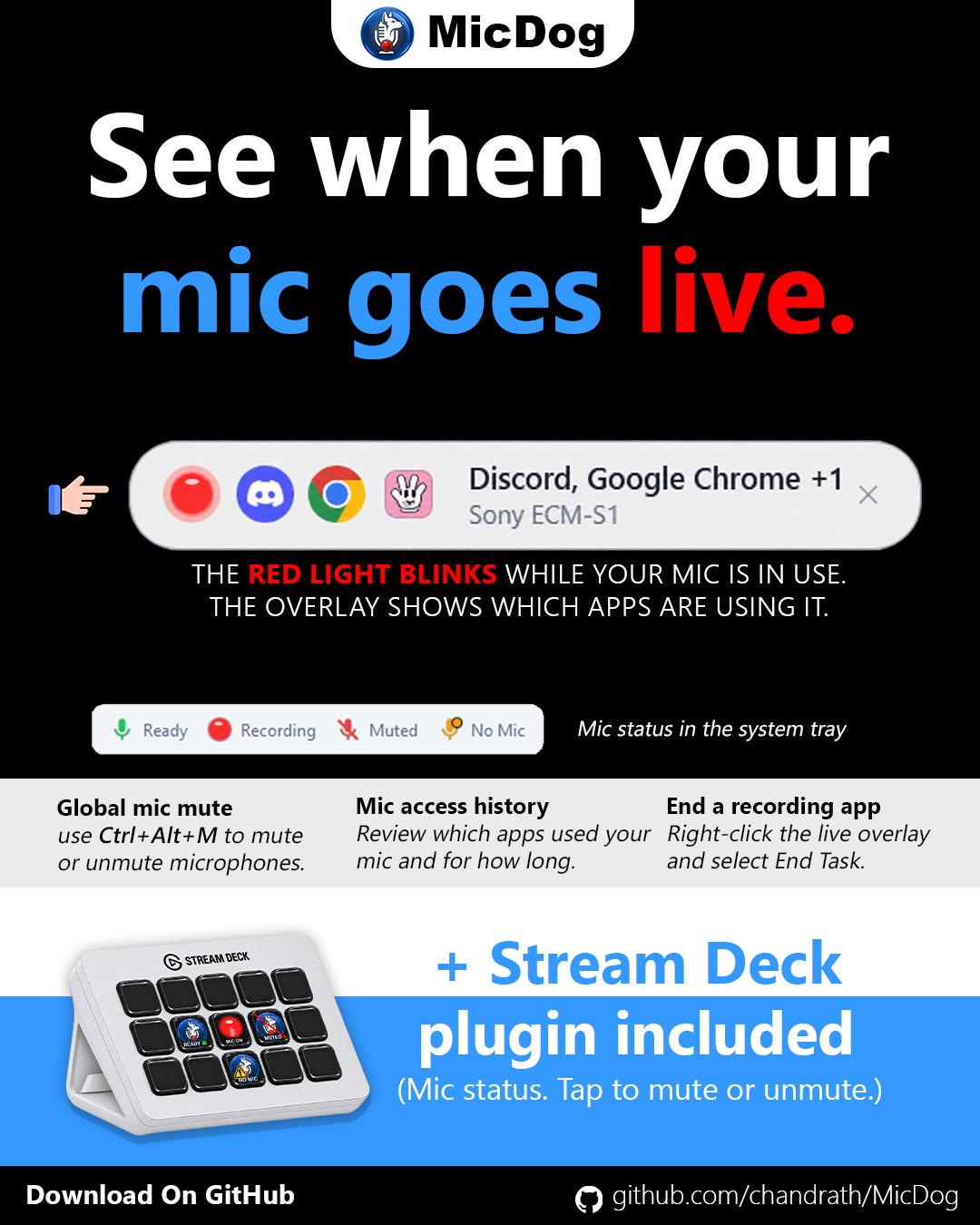
MicDog: Dynamic Island-style overlay shows which app is using your mic + GLOBAL MUTE (open source, Windows)

Post image
1 Upvotes

Windows already shows a mic icon in the taskbar, and there are plenty of third-party tools for muting it. The reason to try MicDog is the little overlay that pops up as soon as an app starts using your mic. It shows the app’s name, its icon, and which microphone it’s using. The red light keeps blinking while the mic is active, so you can see what’s going on.

  • Dynamic Island-style mic overlay. A floating capsule bar appears as soon as an app uses your mic, shows the app’s name, and blinks while the mic is active.
  • Mute every mic at once. Click the tray icon, right-click the HUD and select Mute, or press Ctrl + Alt + M.
  • Check your mic before going live. Keep Ready visible in the overlay so you can see at a glance that your mic is detected. If it gets unplugged or stops being detected, MicDog shows No Mic. (default is
  • See what used your mic earlier. The privacy dashboard keeps a local access history. You can also end an app that’s currently using your mic from the overlay.
  • Use an Elgato Stream Deck. Select the optional plugin during setup, then add MicDog to a key for live mic status and one-tap mute. The installer includes it. No Marketplace download needed.

It’s a super lightweight native Windows app built with .NET 10, WPF.

Download MicDog on GitHub


r/coolgithubprojects • • 16h ago

OpenAmbient: open-source screen/music sync for your lights on Windows, 100% local (works with Home Assistant lights too)

Post image
6 Upvotes

I was missing a Hue Sync–style experience that doesn't depend on a single brand or the cloud, so I built OpenAmbient, a free Windows & Mac app that captures your screen (or PC audio) and drives your lights over the local network.

- Native local protocols: WiZ, Govee LAN, Hue Bridge, IKEA DIRIGERA, Nanoleaf, WLED, LIFX, Yeelight

- Any light exposed in Home Assistant (Tapo, Matter, Zigbee, Shelly…) via a long-lived token

- PC RGB too: Razer Chroma, Logitech G, Corsair iCUE, OpenRGB

- Profiles (Cinema / Gaming / Music / Work / Relax), per-light screen zones, smoothing, low-CPU mode

- No account, no telemetry; hub tokens are encrypted with Windows DPAPI

Note: lights going through HA's REST API are slower than direct LAN protocols, so I use them with smoothing on. WLED/Govee are the snappiest.

GitHub (GPL-3.0): https://github.com/zorkobabin/OpenAmbient

Happy to hear feedback, especially from people running it with HA lights.