r/coolgithubprojects • • 8d ago

WhatsApp’s Windows app used 1 GB of RAM on my laptop, so I built a native one that uses 136 MB

Post image
5 Upvotes

I’m a student developer. A while ago I opened Task Manager and saw WhatsApp sitting at 8 processes and about 1 GB of memory, doing nothing. That’s because the official Windows app is basically WhatsApp Web inside a browser engine.

So I built Velo, a native WhatsApp client for Windows. It’s written in Rust and the UI is drawn straight on the GPU, so there’s no browser inside it.

What it looks like on my laptop (same account, both idle):

Official app: 8 processes, ~1,053 MB

Velo: 2 processes, ~136 MB

It opens in about 0.2 seconds, and the installer is 35 MB with no admin needed. You get an unread count on the taskbar, notifications even with the window closed, HD video calls, animated reactions, 16 wallpapers, and you can click someone’s name in a group to message them privately.

It links with the QR code like WhatsApp Web, so chats stay end-to-end encrypted and on your PC. It’s built on two open-source projects, whatsapp-rust and oxidezap/client.

It’s free: https://github.com/Ruchin-Audichya/velo

It’s unofficial and not code-signed yet, so Windows may warn you the first time you run it. I’d love honest feedback, especially about bugs. What would you want next?


r/coolgithubprojects • • 8d ago

I built an open-source Mac app that lets you share live previews of your Claude Code projects with a link

Thumbnail simpleton.io
0 Upvotes

Hi everyone,

I've been working on Simpleton, an open-source Mac app that lets you share live previews of your local projects with a simple link.

I built it because I got tired of having to deploy projects just to show someone what I was working on.

No deployment or complicated setup needed. Just share a link and anyone can see your project live.

I've attached a short video showing how it works.

Would love to hear your thoughts and feedback!

https://www.simpleton.io


r/coolgithubprojects • • 8d ago

MySpotify: an unofficial Spotify desktop client for Windows and macOS, written in Go with a native UI

Thumbnail gallery
2 Upvotes

I wrote a Spotify desktop client in Go. The official app is built on Chromium. MySpotify draws its interface natively with MyGo, so the sidebar, lists and player are not a web page. It uses about 190 MB of memory while browsing, plus a 60 MB decryption process while a song plays.

What it does:

  • Synced lyrics for nearly every song. When Spotify has none, it checks NetEase Cloud Music and LRCLIB and matches the title and length, so a different version of the song doesn't slip in.
  • Desktop lyrics that float above other windows.
  • Music videos, and video podcasts whose transcripts scroll word by word.
  • Search, home, playlists, albums and artists work before you sign in.
  • Free accounts play whole songs. The system's own DRM decrypts the audio: Widevine in WebView2 on Windows, FairPlay in WebKit on macOS. That is the same path the web player uses.
  • It appears in the Spotify Connect device list on your phone (experimental).
  • No analytics or tracking.

Runs on Windows 10/11 and Apple silicon Macs. Intel Mac and Linux builds are experimental.

It is unofficial. It uses the web player's internal endpoints rather than the public API, so Spotify can break it at any time, and using it may go against their terms. Use your own account at your own risk.


r/coolgithubprojects • • 8d ago

Awesome database of Internet links

Thumbnail github.com
26 Upvotes

I have been capturing and maintaining links since 2021. It was all due to quality of search results, and uncertainty around where these links lead to.

I was also impressed by "awesome lists" over the internet. I started working on "awesome databases" idea, where you share SQLite files instead of links, texts. It has pros and cons.

This database provides:

- youtube links

- github links

- domains I found most important

- some reddit channels

The database contains 'votes' which stand for ranking, "tags", which are necessary to filter out things using a keyword.

If you want to see what is inside, I also generated some text files in lists directory. Like for example a list of github AI related projects: https://github.com/rumca-js/awesome-database-top/blob/main/lists/github_ai.links

This project is a subset of https://github.com/rumca-js/Internet-Places-Database which has 474 stars. It may not be easy to use for everybody, as places database is quite big.


r/coolgithubprojects • • 8d ago

Point: I got tired of describing UI bugs to my agent, so I built a thing that lets me circle them

Thumbnail pointandtell.app
1 Upvotes

I've been vibecoding for 2 years and I keep messing up explaining to my agent where on the screen I'm pointing. Screenshots always helped, but it added 3 more steps every time, and it still will get things wrong.

So I built Point. Press ⌥*, draw on the screen to point, speak your notes out loud. That's it.

Point takes your voice, transcript, screenshot, and drawing into your clipboard for you to past to your Agent or notes. Clearly explain what you want to your agents in Claude Code, Cursor, your team on Slack, anywhere.

View and copy all captures in your Point library.

100% Local, Free, Opensource (MIT). *Customize your trigger key.

Version 0.1 only runs on macOS 26 Apple Silicon. Working on a new release with broader support soon!

Repo: https://github.com/sksareen/point


r/coolgithubprojects • • 8d ago

I made a free, open-source "For Now Perfected" Dynamic Island for Windows 11

Thumbnail github.com
6 Upvotes

I've been building WinOrbit, a Dynamic Island-style capsule that lives at the top of your screen (or any edge).

What it does

  • Live activities: now playing (with album colours and synced lyrics if you want them), Wi-Fi and Bluetooth (with headphone battery), charging, calendar reminders, downloads, screenshots, Caps Lock and more
  • A Control Centre with real toggles, volume per app and one-click output switching
  • 13 desktop widgets, 10 themes, 5 island shapes (capsule, notch, drop…) and coloured rims
  • An optional Agents tab that glows orange when Claude Code or Codex is waiting for you

Privacy: no telemetry, no accounts, and no network connections at all by default. Weather and lyrics are off until you switch them on.

Light: native WPF on .NET 8 (no Electron), about 45–80 MB of RAM and under 0.1 % CPU when idle.

Honest notes: the installer isn't code-signed yet (I'm applying for free open-source signing), so SmartScreen will warn the first time. I've mostly tested on Windows 11 with one monitor at 100 % scaling, so reports from multi-monitor, high-DPI and Windows 10 setups would really help.

Source and download: https://github.com/Mahadi-Siraj/WinOrbit

What would you want it to show next?


r/coolgithubprojects • • 8d ago

Pikoo: shared Pomodoro timer rooms. One link, everyone sees the same countdown (Next.js, Socket.IO, Redis, MIT)

Thumbnail github.com
1 Upvotes

r/coolgithubprojects • • 8d ago

Luna: a fully local AI agent with voice, vision, memory and tool approvals (Python, MIT)

Thumbnail gallery
1 Upvotes

https://github.com/fswolf/luna-local-agent

Luna is a local AI agent that runs entirely on your own hardware. It’s written in Python, MIT licensed, and runs on Linux first, plus macOS and Windows.

She isn’t one model but several local ones working together:

  • Thinking: a chat model on llama.cpp or LM Studio, with tool calling. The installer picks one that fits your GPU.
  • Hearing and speech: Faster-Whisper for speech to text and Kokoro for her voice. Push-to-talk or hands free, and you can talk over her to interrupt.
  • Vision: your screen, plus your webcam if you turn it on.
  • Memory: an embedding model and a reranker pull the relevant facts and notes into each turn.

Memory and state: plain SQLite on your machine. She saves facts with dates (a change retires the old fact, and forget means gone), writes notes on past sessions, and learns lessons from her own mistakes while idle. She knows who’s talking by voice or face, and keeps each person’s memories separate.

Tools: files, shell commands, email, web research, Home Assistant, scheduled jobs and any MCP server. Every action is shown and approved first, with permissions you set. Text from a web page, an email or chat can’t quietly trigger tools.

Inspectable: every turn keeps her reasoning, her confidence in each token, and automatic flags for guesses or tools she promised but never called. A browser viewer shows all of it, live.

Optional extras: an animated Live2D or VRM portrait, phones and tablets as room stations, game playing (chess, Zork, Game Boy), reminders and alarms, and stream chat. You can also train small LoRA patches from replies you corrected (experimental).

No cloud, no subscription. Your data stays on your machine.


r/coolgithubprojects • • 8d ago

[Python/JS] Blave Agent: open-source desktop app where Claude Code or Codex turns a trading idea into a backtested strategy

Thumbnail github.com
1 Upvotes

r/coolgithubprojects • • 8d ago

I made a free and open source Windows app to watermark a whole folder of PDFs in one batch

1 Upvotes
sample photo

If you need to mark a folder of PDFs, opening each file individually gets repetitive.

I built PDF Watermarker to apply a watermark across the whole folder in one batch. Set it up once and preview it before exporting; the Windows app works offline and preserves the originals. Add multiple recipient names if you want a separate marked set for each. It preserves folder structure, and the project includes a command-line tool.

First time building any kind of software, it started out as a vibecoded work project and im just trying to make it as usuable as possible. Would love your guys support and feedback.

This is a open source project and i'd like to invite anyone who can make this better.

Source and releases are here: https://github.com/FZ-Labz/pdf-watermark

What takes longest in your current workflow: setting up the mark, checking the pages, or organizing the outputs?


r/coolgithubprojects • • 8d ago

Announcing v1.0 of Kestrel! Now includes auto updates, older distro support and lots more

Thumbnail gallery
0 Upvotes

(Oh I forgot, this is linux only!)

Hey everyone!

A few weeks ago I shared the preview of Kestrel (previous post), the all-in-one GTK4 utility app I use daily on my daily driver (Pop!_OS 24.04 with the COSMIC DE). The feedback in that thread shaped this release, so thank you. Kestrel 1.0 is out today.

Some of the improvements (and features derived from the feedback).

- A compatibility table: I have tried to maintain a compatibility matrix of all the things that i could test.

- Low resource use: I have tried to make this much more clear now. The idle cost is measured per preset and published. Whats more is that now CI fails if it regresses. There will be no background work if a feature is turned of.

- Flatpak: every release now ships a Flatpak bundle next to the AppImage, plus an Arch recipe (New arch submissions are currently blocked but i will get it there as soon as I can. Also Flatpak submissions are really high up my list).

- Self Updates: the AppImage updates itself: Overview → Get update → Install and restart. Every single releases is signed. I did not want this to be a chore so nothing will download until you click. I have also enabled a way to revert back to a previous version if needed.

- Older distros: it needs glibc 2.35 now instead of 2.39, so Ubuntu 22.04+, Linux Mint 21+ and Debian 12+ work.

Also new:

- Paste a clipboard entry straight into the app you were using, text or images. There is a fairly irritating bug on COSMIC with virtual keyboards but this is also fixed in Kestrel.

- Snippet triggers: This is something that i have used so much!

- A floating shelf to drag files, text and links into and back out of.

- Many updates to the screen recorder (so many quirks in so many DEs!)

What 1.0 means: I have done a lot of testing on this and I still expect some rough edges. But i am comfortable marking this as a major release.

AI usage: same as before. I use AI tools while building this; I've been a software developer for over 14 years, and I code, review and test what goes in.

- Release: https://github.com/kamleshkc2002/kestrel/releases/tag/v1.0.0

- Repo: https://github.com/kamleshkc2002/kestrel

- Report how it runs on your desktop: https://github.com/kamleshkc2002/kestrel/issues/new?template=compatibility_report.yml

- Feedback thread: https://github.com/kamleshkc2002/kestrel/issues/331

I am still looking for reports from GNOME, KDE, Hyprland, Fedora and Arch and i would really appreciate those!


r/coolgithubprojects • • 8d ago

Strand

Post image
3 Upvotes

Strand is a Rust dependency/impact analysis engine built on an instant-open, single-file graph format. It lets you build a dependency graph for a project and output it as one file - no database, no backend server, no waiting. Very large projects with tens of millions of connections load almost instantly because the file is memory-mapped and queried in place.

It supports many ecosystems: source scanning for Rust, Python, JavaScript and TypeScript (via real parsers — syn for Rust, tree-sitter for the rest, so comments/strings/docstrings can't create phantom edges), plus lockfile/manifest import for Cargo, npm, Poetry, Go modules, and Maven. There's also a read-write store format if you need to edit graphs programmatically.

Why use this?

  • The graph is a single shareable file - copy it, diff it, commit it, attach it to CI.
  • It answers "what breaks if I change this?" in milliseconds, and can gate pull requests on impact (strand impact, --git-diff).
  • There's a native desktop app (egui, no webview) for visualizing structure, detecting cycles, and editing the graph directly - with force-directed layout, A/B comparison, and worker-thread analysis so it stays responsive on big graphs.
  • cargo install strand-cli / cargo install strand-gui (or both at once), with a built-in update checker. Apache-2.0, on crates.io as strand-core, strand-import, strand-store, strand-cli, strand-gui.

GitHub: https://github.com/Biggest-Bee/Strand

I'd love to know what you think!


r/coolgithubprojects • • 8d ago

I built AiDotNet to show the world that it is possible for .NET to do AI better than PyTorch

Post image
7 Upvotes

Watch AiDotNet and PyTorch train side by side on my laptop (17 seconds)

I wanted to showcase the project I have been working on for the past 4 years and the progress I have made so far. I was hoping to get some feedback and show everyone how easy it is to use AiDotNet to create AI models with basically no experience necessary. You can give it examples of the inputs and the answers you want it to learn, and you get back a trained model you can save locally, run from your C# app, or host with AiDotNet.Serving.

One of the reasons I built this was to see how far we could push .NET against PyTorch. In our November 13 training tests on my laptop, our development build was faster than compiled PyTorch on 10 of the 11 models we tested on CPU and 7 of 11 on GPU. I still have some performance work I want to focus on, especially with audio models. Results for all 11 models

In the run at the top of the postAiDotNetPyTorch
Time for 4,096 training updates on a GTX 1660 Ti2.60 seconds15.00 seconds
Correct answers on 320 new signals302301

Here’s an easy example you can try yourself. Say you have an app that follows stocks and you want it to sort the news for you. Give it a few headlines about earnings and mergers, tell it which is which, and then ask it to sort two headlines it hasn’t seen.

In a new .NET 10 console project, run dotnet add package AiDotNet --version 0.234.0, replace Program.cs with this, and run dotnet run:

using System;
using AiDotNet;
using AiDotNet.Classification.NaiveBayes;
using AiDotNet.Data.Loaders;
using AiDotNet.Preprocessing.TextVectorizers;
using AiDotNet.Tensors.LinearAlgebra;

string[] headlines = [
    "Quarterly earnings and profits rise", "Merger deal wins approval",
    "Annual earnings beat expectations", "Company announces acquisition deal",
    "Quarterly profits beat estimates", "Boards approve merger and acquisition",
    "Company reports record earnings", "Investors vote on merger deal"
];
string[] topics = ["Earnings", "Mergers"];
double[] labels = [0, 1, 0, 1, 0, 1, 0, 1];

var words = new TfidfVectorizer<double>();
var model = await new AiModelBuilder<double, Matrix<double>, Vector<double>>()
    .ConfigureModel(new MultinomialNaiveBayes<double>())
    .ConfigureTextVectorizer(words)
    .ConfigureDataLoader(DataLoaders.FromTextDocuments(headlines, labels, words))
    .BuildAsync();

string[] newHeadlines = ["Quarterly earnings beat estimates", "Investors approve merger deal"];
var guesses = model.PredictText(newHeadlines);
foreach (var guess in guesses)
    Console.WriteLine(topics[(int)Math.Round(guess)]);

It prints Earnings for the first headline and Mergers for the second. All the training data is right there, so you can change the headlines and try your own.

That’s one small example. There are over 2,100 model types in the library, including 650+ for vision, 430+ for language, and 340+ for audio. You can detect objects in photos, turn speech into text, or build a chatbot that looks up an answer in your own documents. If you already have a language model you like, you can fine-tune it on your own material. Browse the examples

The part I wanted to get right with AiModelBuilder was how much you can change as you learn. You can start by swapping the model in ConfigureModel. If you want more control, you can choose your own layers, change the optimizer that updates the model during training, or split training across multiple GPUs. When you’re ready to use what you trained, you can serve it through an API or export supported models to ONNX for another app. Training and deployment samples

I’d love to get your thoughts on my passion project. The code is on GitHub and contributions are welcome. We have easy examples and guides on our website, plus the details on the free Community license and our paid Professional and Enterprise plans. Website and guides · Plans · GitHub


r/coolgithubprojects • • 8d ago

Title: I built an open-source skill to help AI identify blind spots in its reasoning — looking for feedback

Thumbnail github.com
1 Upvotes

I've been exploring a problem with AI assistants: they can be very helpful, but sometimes they miss important perspectives, assumptions, or things we haven't thought to question.

I started building Skill Blindspot, an open-source project aimed at exploring this problem.

GitHub: https://github.com/emptygpt/skill-blindspot

I'm sharing it here because I'd love feedback from people who build and use AI agents and skills.

A few things I'd particularly like to discuss:

  • How do you currently identify blind spots in AI-generated reasoning?
  • Do you use dedicated skills or rely on carefully designed prompts?
  • What would make a tool like this genuinely useful in your daily workflow?

I'm the creator of this project, so I'm naturally biased. I'd appreciate honest criticism, suggestions, and ideas for improvement.

Thanks!


r/coolgithubprojects • • 8d ago

Built a tool to visualise ML models in realtime

Thumbnail gallery
3 Upvotes

GitHub: https://github.com/tensorviz-org/tensorviz
website : https://tensorviz.dev/

I'm one of the people building tensorViz. We wanted a way to see how a model fits together when we open a new repo. tensorViz opens a PyTorch model as an interactive graph. Expand a block, follow the connections, and jump to the Python behind a layer.

The code is MIT-licensed. The repo includes a VS Code extension and plugins that let Claude Code, Codex, and Cursor inspect the graph too. The README has a small example you can try first.

If you try it on your own model, I'd love to hear which parts of the graph helped you find your way around the code.


r/coolgithubprojects • • 8d ago

OnyxIO – a lightweight open-source replacement for IO Center (be quiet! Dark Mount): Stream Deck plugins, lighting, macros

Thumbnail gallery
5 Upvotes

I own a be quiet! Dark Mount and wanted something lighter than IO Center, so I wrote OnyxIO: a small, open-source (MIT) program that talks to the keyboard through its regular configuration protocol. No firmware changes, nothing flashed.

What it does:

- Display keys work like a Stream Deck – including many Elgato Stream Deck plugins

- Per-key lighting with built-in effects (Ripple, Reactive, …) and a "Custom" effect where you can write your own lighting as a math formula

- Macros and key assignments

- Media Dock support with now playing

- DE (ISO), US (ANSI) and UK (ISO) layouts

- Layout profiles, tray icon, optional start with Windows

- Experimental Linux support

Privacy: no telemetry, no account. Key presses are never logged. The only network request is an optional update check, off by default.

Transparency: I built this together with an AI coding assistant (Claude). I reviewed every change and tested it on my own keyboard, and the full source is on GitHub for anyone to check.

Download (single .exe, no install): https://github.com/Moepchi/OnyxIO/releases/latest

Source + docs: https://github.com/Moepchi/OnyxIO

Not affiliated with be quiet!. Close IO Center before starting it, the keyboard accepts only one program at a time.

Feedback, bug reports and feature ideas are very welcome – especially from Linux users.


r/coolgithubprojects • • 8d ago

Blurt: MIT-licensed macOS dictation with a standalone Swift 6 engine

Post image
1 Upvotes

Blurt turns speech into text in the Mac app you are already using. The repo includes the native app and a separate Swift 6 engine you can inspect or embed.

It is currently #3 on Voice Arena’s Dictation Bench, with 78.00% zero-edit rate on the US-English/macOS overall set (759 clips).

The app is open source; the speech model is a hosted AssemblyAI service. You bring an API key and pay for API usage after applicable credits. Audio and limited text context leave the device.

Source and downloads: https://github.com/assemblyai/blurt

Benchmark: https://voicearena.com/dictation-bench

Feedback on setup, text insertion, and code structure is welcome.


r/coolgithubprojects • • 8d ago

Introducing re:dial: the Surface Dial as a one-handed desktop controller for Omarchy

Thumbnail gallery
0 Upvotes

r/coolgithubprojects • • 8d ago

hermes-harness-clone: run your Hermes AI agent inside Google Antigravity with the same memory and personality, plus a Telegram bot with one topic per conversation (Python, MIT)

Thumbnail github.com
2 Upvotes

r/coolgithubprojects • • 8d ago

I made a Claude plugin that orchestrates my Opencode LLM

Post image
3 Upvotes

https://github.com/a-schaefers/claudes-workbench

Claude orchestrates. An OpenCode local LLM on your GPU writes the code. Workbench is a Claude Code plugin that connects the two inside your normal Claude Code session.


r/coolgithubprojects • • 8d ago

GlassFolio: self-hosted wealth dashboard with client-side encryption, a French tax engine and optional local AI (Ollama)

Thumbnail glassfolio.dev
0 Upvotes

Hi  r/coolgithubprojects ,

I built GlassFolio because I wanted to have a self-hosted portfolio tracker.

It tracks equities, ETFs, crypto, cash and savings across accounts, imports CSV exports from brokers and banks, and prepares French tax forms.

What may interest you here:

- One Docker container, no account and no telemetry

- Data is encrypted in the browser (AES-256-GCM, PBKDF2 with 600,000 iterations) before it reaches the server volume

- Strict CSP with no third-party scripts, and the image is pinned by digest

- Optional AI assistant with a local Ollama model, or your own API key

- MCP bridge for clients like Claude Code or Cursor: every change waits for your approval

Quick start (builds the image locally, there is no prebuilt image yet):

git clone https://github.com/Damien-Esilv/GlassFolio.git && cd GlassFolio && npm run docker:up

Add GLASSFOLIO_DEMO=1 in front of npm run docker:up to explore with demo data.

Being upfront about the limits:

- Market prices come from Yahoo Finance and CoinGecko, so those calls leave your network

- Tax rules are French only for now, and they are estimates, not certified advice

- It has not had an independent security audit

- Source-available under PolyForm Noncommercial, so not open source

- I built it with heavy use of AI coding agents. Their rules are in AGENTS.md, and CI runs about 2,100 tests plus CodeQL

Repo: https://github.com/Damien-Esilv/GlassFolio

Web site: https://glassfolio.dev

Feedback welcome, especially on the Docker setup and the encryption design.


r/coolgithubprojects • • 8d ago

PinTack: sticky notes for macOS that are just Markdown files [Swift] [GPL-3.0]

1 Upvotes

Sticky notes on your desktop, with live Markdown rendering, stacks, todos with progress tracking, vim mode and inline Runner buttons. Every note is a plain .md file in a folder you choose.

https://github.com/mgmourad/PinTack


r/coolgithubprojects • • 8d ago

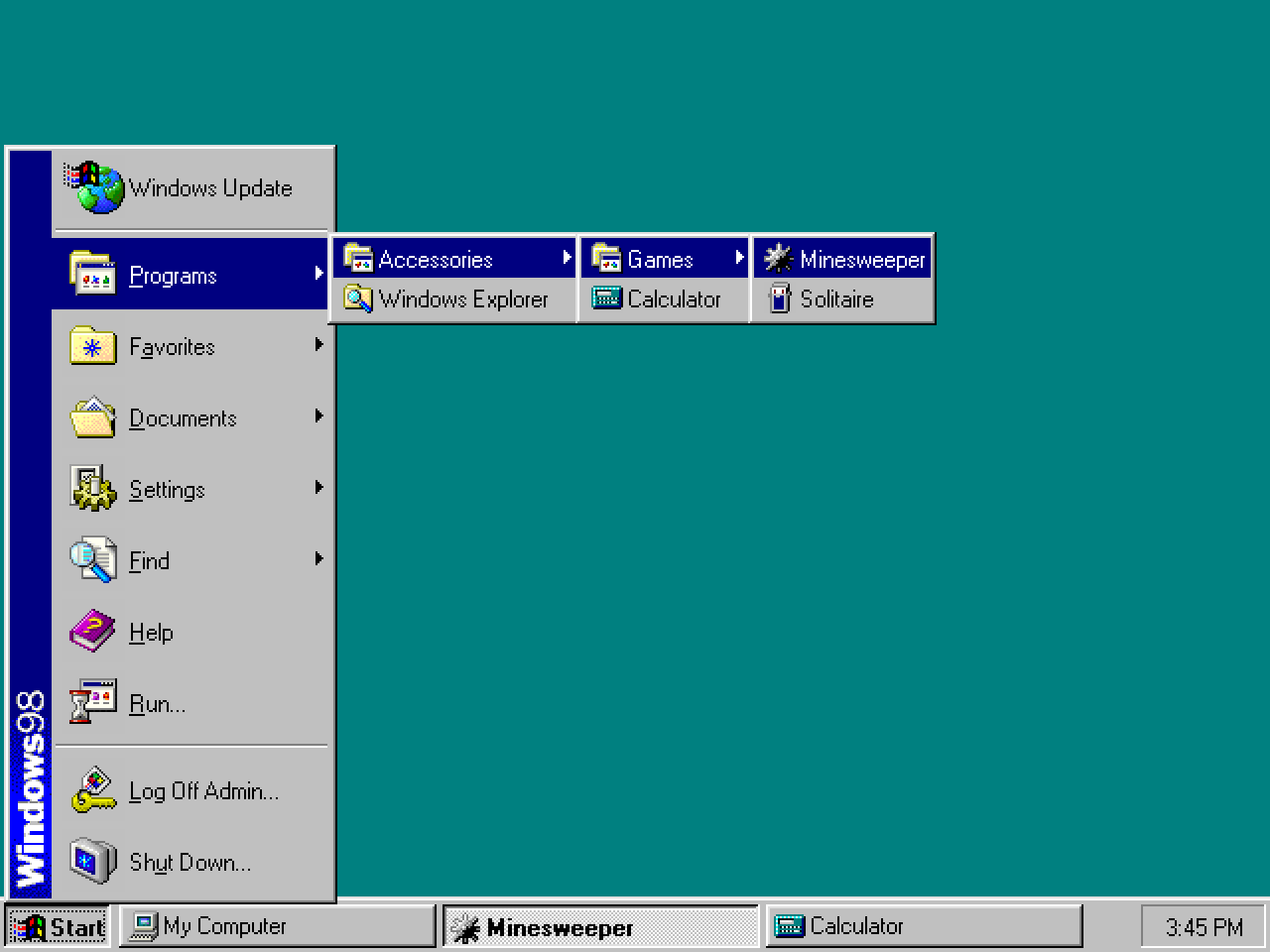
I made a pixel-exact Windows 95/98/2000 taskbar and desktop for Windows 11

Post image
1 Upvotes

r/coolgithubprojects • • 8d ago

I built Self Hosted GPT with a one-click desktop app, an evidence-citing research mode, and a private neural engine and its all local and fully customisable

Post image
4 Upvotes

Hi all I maintain ENZO, a self-hosted AI workspace. It's Apache-2.0, about 60k lines of strict TypeScript, and it runs on your own provider keys (Groq, OpenRouter, NVIDIA, Hugging Face, Google AI). No ENZO account, no subscription, no middleman — you talk to the provider you picked and pay them directly. The v1.7.0 release is out today, and the biggest change in it is how you install it.

Repo: https://github.com/theguysudo/ENZO
v1.7.0: https://github.com/theguysudo/ENZO/releases/tag/v1.7.0

It installs like a normal app now

Until now ENZO was a docker compose file you cloned and edited. v1.7.0 ships a macOS .dmg and two Windows installers. No git clone, no Docker Desktop, no system Node — the bundle carries its own Node runtime and the built frontend, and serves the same backend on port 5200.

  • macOS (Apple Silicon): ENZO-1.7.0-macOS-arm64.dmg (~133 MB)
  • Windows x64, lighter theme set: ENZO-1.7.0-less-theme-setup.exe (~73 MB)
  • Windows x64, every theme and every video background: ENZO-1.7.0-full-theme-setup.exe (~289 MB)

It also updates itself: when a new release appears, a small banner offers Update now, the bundle is swapped in place and ENZO restarts. The reminder is deliberately gentle — at most twice per rolling week, never forced. Your data (memory, vault keys, investigations, neural state, generated projects) lives in a per-user directory outside the app bundle, so an update can't take it with you, and the browser session survives the restart. Docker installs are unchanged and still the better answer for a server — and as of this release a rebuild no longer wipes your investigation data.

ENZO Intelligence — research mode that cites its evidence

What: you write an objective in plain English, and it turns into a set of research questions.

How: connectors (Exa web search, website fetch, GitHub read-only, Wikipedia, your own documents) collect the sources, and a pipeline — plan → discover → extract → resolve → verify → report → diff — turns them into an evidence ledger where every claim carries a verbatim quote from the source it came from.

Why: the weak spot of AI research output is that you can't tell which sentence came from where. Here the claim and its quote sit side by side, and when two sources disagree, the conflict is shown rather than smoothed over.

There are two buttons with two depths: Run planning asks the questions and fetches nothing, Run investigation runs the full pipeline and diffs the result against the previous run. Click any node in the graph to get its explanation and the evidence behind it, and ask follow-up questions that are answered strictly from the ledger. The report downloads as markdown. Page caps, an evidence cap of 400 and a 10-run history are enforced in the orchestrator, not left to the model's judgement. Scraped pages arrive wrapped in an UNTRUSTED rule so a web page can't talk your agent into running commands.

Neural Engine (phases 0–4) — a private preference layer

What: a per-owner research profile across 8 preference dimensions, a knowledge graph, and an append-only audit trail of every mutation.

How: inference needs at least two samples and never overrides something you stated explicitly — the provenance order is always task override > what you said > what was inferred. Every write is schema-gated before it hits disk. A preference context of at most 1400 characters is injected after memory on the chat and research paths.

Why: it stays on your box, forget erases the profile on demand, and ENZO_NEURAL_OVERLAY=0 turns the whole thing off. There's also a zero-cost mode: a capability registry of 8 providers (free flags, quota behaviour, privacy class) drives a fail-closed route check that refuses paid routes. The Neural Map also got a 2D/3D toggle — the 3D orbit camera had existed but was unreachable.

A security pass over the whole surface

Seven fixes, each with a regression test:

  • Every user-supplied URL now goes through one pinned fetcher: https only, no credentials in the URL, the hostname resolved once with every DNS answer required to be public, and the socket connects to that exact validated address — which closes the rebinding window between "we checked the name" and "we opened the socket". The guard is re-applied on every redirect hop and the response is size-capped while it streams.
  • Anonymous callers can no longer touch instance state: the memory and skill commands, the learned-skill context and the neural research profile all require a vault session now.
  • The NVIDIA base URL is pinned, so a caller's key can't be relayed to a host they picked.
  • Project internals (manifest.json, generated databases) return 404, and every HTML/SVG served from a project gets the sandbox CSP — not just the entry page.
  • Generated code can no longer retry without the runtime permission model when its first boot fails.
  • The vault token is never persisted.
  • A high-severity dependency advisory (body-parser DoS) is fixed — npm audit now reports 0 vulnerabilities.

Verification is in CI: 13 test suites / 460 checks, plus a black-box pentest script (11 checks) that runs against the live server.

Smaller fixes worth knowing about

Six real chat reply bugs, found by using the app rather than reading it: a truncated stream lost the last line of an answer, an image attachment ate the reply, AI Assist overwrote the first frame, a stale auto-mode reference fought the UI, previews were detected when there was nothing to preview, and a failed request could leave a blank bubble. The README now also carries an app-downloads badge fed by GitHub's own release-asset counter, and a feedback form.

Why try it

If you've been meaning to self-host an AI workspace but didn't want to deal with compose files, volumes and Node versions, the DMG/EXEs are the shortest path — and it's the same server either way, so you can move between the app and Docker without changing anything. The only thing you need is one provider API key of your own. If something breaks, say so in the comments or open an issue; I read them.


r/coolgithubprojects • • 8d ago

NEXUS AI Ecosystem

Post image
0 Upvotes

NEXUS is a Windows program that tunes your games' graphics on its own, by measuring: it tries one change, watches how your FPS actually move while you play, and keeps only what really helps on your PC.

What it does

AUTO AI: press one button on a game and NEXUS studies its files, applies what it can safely change and, after each session, checks the result and carries on by itself.
It measures for real: no promised FPS. It compares what it measured before and after and tells you, also when a change did not help.
Three routes: the game's own settings, the NVIDIA driver and the Windows graphics settings.
Restore everything: one button puts every setting back the way it was.
A Windows notification when something changes after a session.
Also: live PC dashboard (temperatures, load, FPS), your Steam and Epic library, and power controls.

https://github.com/Haitianleo/nexus-beta?fbclid=PAVERFWAVsTShleHRuA2FlbQIxMABwZG9mAmZkaWQWUSiM3GFfI_hQuI1AxkpVxbEP52zJUXNydGMGYXBwX2lkDzEyNDAyNDU3NDI4NzQxNAABp4_o-1n3xRQO6xPYCSax31sTU2awTDmYr8M_1jEFsmqfRaw_jTs3F_JfLXId_aem_-RASfUVsAFHKZTay95PNuw