r/coolgithubprojects • • 6d ago

I'm building a Hyprland-inspired tiling desktop for Windows (beta) — try it in your browser, workspaces slide horizontally

Post image
2 Upvotes

Logical Lunge is a tiling desktop environment for Windows 10/11 inspired by Hyprland. You can try the interface right now without installing anything — the web demo runs the real bar, launcher, panels and settings in your browser with mocked data:

https://logical-lunge-web-demo.vercel.app/

What it does:

- Workspaces that slide horizontally, with app icons in the bar

- Dwindle tiling like Hyprland: new windows split the one under your mouse, floating windows, window borders drawn by the window manager

- Super menu: fuzzy app search, calculator, file search, clipboard history, workspace previews

- Right panel with quick toggles (Wi-Fi, Bluetooth, night light, ...), notifications, calendar, to-do, pomodoro

- Live wallpapers (videos behind your desktop icons), screen savers, desktop widgets

- Configurable shortcuts, animations and accent colors, 14 UI languages

In the demo, the mouse works everywhere. Some keyboard shortcuts (Alt+1–9, Alt+PageUp/PageDown, Alt+J/K) may be intercepted by your browser.

It's still in beta: usable day to day, but bugs and crashes can happen, and it replaces parts of the Windows shell while it runs (everything is backed up and restored on uninstall). Feedback and bug reports are very welcome.

GitHub (GPL-3.0): https://github.com/KaanAlper/logical-lunge


r/coolgithubprojects • • 6d ago

Meet bridge-anything: point your coding agent at legacy software, get a API/MCP/CLI bridge back

Post image
64 Upvotes

Half the software small businesses run on has no API. Practice management, dealer systems, tax apps, old ERPs, installed on a server in the back office. If your app needs that data, you're stuck. So I wrote down the method I use to get through.

bridge-anything is a skill for coding agents (Claude Code, Codex, Cursor). It uses REA, an open-source reverse-engineering MCP server, to find where a program keeps its data. Then it builds a small bridge next to it:

  1. Find the data. Inspect the installation: runtime, database engine, connection config, export folders. Knows what SQL Server, Firebird, Btrieve, Access, dBase, SQLite and others leave on disk.
  2. Map it with evidence. Every table and column in BRIDGE.md cites where it was proven. Whatever couldn't be proven goes into UNKNOWNS.md instead of being guessed.
  3. Pick the safest path. Vendor API, then interface files, then a read-only DB user, then UI automation.
  4. Build the bridge. Contract first, REST + MCP + CLI adapters, tests against an anonymised snapshot. It refuses to start if its DB user has more rights than declared.
  5. Connect your app. Your app talks to the bridge, never to the legacy database. A vendor update only breaks the bridge, not your app.

Read-only by default. Writes go through the program's own import function (usually CSV or an interface file). Direct table writes come last, and only after the agent has watched the program make the same write in a DB diff.

Your agent writes the code. bridge-anything makes it prove each mapping before it relies on it.

Caveats:

  • It's a method for an agent (a SKILL.md plus reference files), not a binary that does it all by itself.
  • It's new. The method comes from integrations I built by hand. The skill hasn't been run end to end on a real system yet, so expect rough edges.
  • REA's process capture only runs on Linux/macOS. On Windows, writes are confirmed by diffing the database around a single action instead.
  • It stops at licence checks, DRM and encrypted credentials. If the only way in is past an access control, it tells you to ask the vendor.
  • Run it on a copy of an installation you're licensed for, never on the live system.
npx rea-agents setup
npx skills add artesiana/bridge-anything

https://github.com/Artesiana/bridge-anything · MIT

Feedback and PRs welcome, especially from anyone with a test install of some crusty on-prem software. Which system would you point it at first?


r/coolgithubprojects • • 6d ago

Construí Blink, una herramienta de CLI para detectar problemas de calidad de datos antes de que se vuelvan un problema

Post image
1 Upvotes

¡Hola a todos!

He estado trabajando en Blink, una pequeña herramienta de CLI de Python de código abierto que ayuda a detectar problemas de calidad de datos en archivos CSV, TSV y Parquet.

Revisa valores faltantes, duplicados, valores atípicos y tipos de datos inconsistentes. También permite comparar datasets, detección opcional de anomalías basada en ML y reportes en JSON.

Todo se ejecuta localmente sin modificar tus archivos originales.

GitHub: https://github.com/Gianni300x/blink

De verdad agradecería cualquier feedback o sugerencia.

Si te sirve Blink, considera dejar una ⭐ en el repositorio o seguirme en GitHub. ¡Significaría mucho!

¡Gracias por echarle un vistazo!


r/coolgithubprojects • • 6d ago

I made Safelight: a free, open-source Mac menu bar app that fades your screen to deep red at night

Thumbnail gallery
1 Upvotes

I wanted my Mac's screen to go properly red at night, like the safelight in a darkroom, without having to remember to switch it on.

Night Shift only gets so warm. macOS does have a filter that turns the whole screen red (System Settings › Accessibility › Display › Color Filters › Color Tint), but it's buried there, and every change means going back in: switching it on or off, or setting how strong it is.

Safelight puts that filter, brightness and Light/Dark on one schedule and fades between them: normal through the day, warmer and dimmer after sunset, deep red late at night, and back again in the morning. It can follow sunrise and sunset instead of fixed times.

What else it does:

  • Brightness for every display. On Apple silicon, external monitors that take DDC/CI get their real backlight set, and can go darker than the backlight's lowest setting. Monitors that can't be controlled that way get a darkened picture instead.
  • Brightness keys that follow the pointer. Each display can have its own brightness, and the keys set whichever one the pointer is on, external monitors included.
  • A wallpaper each for Light and Dark. Pick one for each, and the desktop changes with the appearance.
  • In your Mac's language. Every label comes from macOS's own translations.

The catches:

  • It isn't notarized, so the first launch needs Open Anyway in Privacy & Security.
  • It uses the private macOS functions System Settings calls, so it can't be on the App Store and a macOS update could break it.
  • Quitting turns the filter off and puts brightness back to full, so you can't get stuck with a red screen.
  • The brightness keys need Accessibility permission, which macOS asks for when you turn on Adjust Independently. Nothing else needs it.
  • It needs macOS 15.5 or later, on Apple silicon or Intel.

It's written in Swift and SwiftUI, GPL-3.0, with no account and no tracking. I built it with Claude Code, and nearly every commit says so.

https://github.com/mopfaff/Safelight


r/coolgithubprojects • • 6d ago

mobile-agent: a Rust daemon, CLI and MCP server that lets AI agents drive iOS Simulators, iPhones and Android devices, built around performance

Thumbnail github.com
1 Upvotes

I built mobile-agent because agents driving phones spend most of their time waiting: every tap is followed by a fresh read of the device and a sleep "to let it settle".

mobile-agent keeps a live mirror of each attached screen (windows, accessibility tree, latest frame), updated from the platform's change events and frame callbacks, so snapshots, waits and settle checks are answered from the mirror instead of polling the device.

- Android: a single-dex agent pushed over adb runs under `app_process` as the shell user. No APK is installed and no instrumentation runs. On the emulator it uses the gRPC controller when that answers.

- iOS Simulator: everything runs from the host, with no XCTest runner and nothing installed. Input goes through the Simulator's HID service, frames come from the display's IOSurface, and the accessibility tree comes from a small Rust reader.

- Physical iPhones (USB): a Rust XCTest runner serves the tree, and the rest goes over a CoreDevice tunnel opened in-process, without root.

- Interface: the CLI follows agent-browser's grammar (`snapshot`, `click u/e3`, `fill`, `wait`), so agent prompts written for browsers carry over. The MCP server exposes the same tools to Claude Code, Codex, Cursor and others.

Try it with Claude Code:

claude mcp add --transport stdio mobile-agent -- npx -y --package=@mobileagent/cli@alpha mobile-agent-mcp


r/coolgithubprojects • • 6d ago

BryceDock: Run classic 1997 Bryce 3D in any web browser via Docker, 32-bit Wine, and noVNC

Post image
11 Upvotes

I wanted a clean, cross-platform way to run original MetaCreations Bryce 3D (1997) on Linux, Windows, and macOS without fighting 16-bit installers, X11 forwarding, or setting up a full Windows 98 VM — just docker compose up -d and open http://localhost:6080.

How it works under the hood:

  • Bypasses the legacy 16-bit SETUP.EXE**:** A multi-stage build compiles unshieldv3 natively on Linux so the container unpacks Bryce 3D's InstallShield 3 data.1 archive and all original CD asset libraries directly from Bryce3DCD.iso on first boot.
  • Fixes a 1997-vs-modern-CPU timing bug: Bryce 3D's Create / Edit / Sky&Fog preset popups open on mouse-down directly beneath the cursor. In 1997 they took ~300 ms to render (after your finger already lifted), whereas on a modern CPU under Wine they map in ~25 ms while a normal click is still held down, immediately dismissing themselves. A ~200-line Python asyncio RFB proxy sits between websockify and Xvnc, tracks Bryce's top palette dynamically, and issues a clean 8 ms click release only on those three preset arrows (leaving all drags, sliders, and trackballs untouched).
  • Seamless file sync: Desktop, Documents, and E:\ inside Bryce 3D all map directly to BryceDock/projects/ on the host so saving .br3 scenes or exporting .bmp/.psd/.avi renders requires zero hunting for paths.

There's a live demo GIF right in the README — happy to hear any feedback or edge cases if you try it out!

Github: https://github.com/RaymonDev/BryceDock


r/coolgithubprojects • • 6d ago

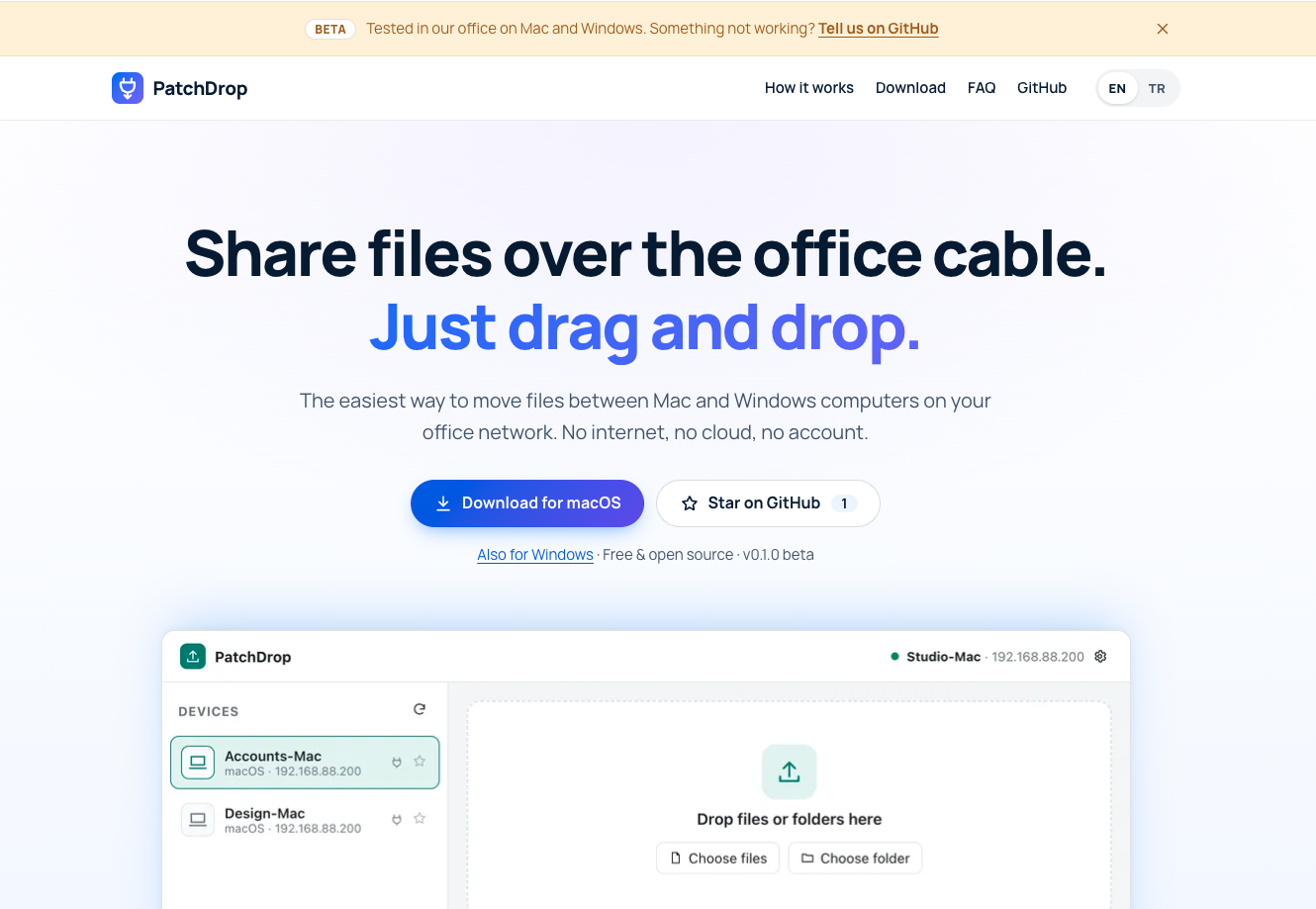
I built an open-source file sharing app for wired office networks (macOS + Windows), because the usual ones couldn’t find each other

Post image
3 Upvotes

Hi all,

In our office the computers are on Ethernet, and file-sharing apps in the AirDrop/LocalSend style often couldn’t discover each other. So we ended up emailing files across the room. I wrote PatchDrop to fix that for us, and I’m sharing it in case others have the same problem.

What it does

  • Drag and drop files or folders to another computer on the same wired network
  • Works between macOS and Windows
  • No internet, no accounts, no cloud
  • Transfers are encrypted (TLS), and everything stays on your LAN
  • Free, MIT licensed

Why discovery works on wired networks
It sends its announcements on every wired network adapter instead of relying on one multicast packet on whichever interface the OS picks. There is also a manual “add by IP” fallback if your network blocks broadcast.

Honest status: this is a beta. So far I’ve only tested it with a few colleagues in our office. I’d really like to know how it behaves on other networks, switches, VPN setups and Windows versions.

The macOS build isn’t notarized yet (right-click → Open the first time), and Windows may ask for a firewall permission on first run.

Site and downloads: https://patchdrop.enginsistem.com/?utm_source=reddit
Code: https://github.com/enselcuk/patchdrop

If it works for you, a ⭐ on GitHub helps a lot. If it doesn’t, please open an issue, that’s the most useful feedback I can get. Happy to answer questions.


r/coolgithubprojects • • 6d ago

I built a dark Renaissance/Eldritch-inspired Obsidian theme called Eldritch Scholar

Thumbnail community.obsidian.md
1 Upvotes

r/coolgithubprojects • • 6d ago

Cadenza, for the piano players out there

Post image
1 Upvotes

Hello everyone!

I'm a student that plays the piano and made Cadenza. I recently stumbled to an app for learning jazz chords for the piano but I realized it needed a midi input, I however, do not own a digital keyboard. I went searching for an app that could be capable of this and only found some that converted audio to a midi file after having recorded a session. That's why I've created the following app.

Cadenza

The app uses your microphone and streams a live midi channel to apps that are midi-capable. The midi stream is close to real time, now having a sub 1 second consistent delay. Note recognition is done using a modification of Transkun, huge thanks to Yujia Yan for their transcription system. Cadenza is currently completely free, donation is of course well appreciated. The app will in future generations also generate sheet music and chord schemes, the current sheet music implementation is a work in progress which I've almost got ready. Jazz chord learning is also on the roadmap, with other genres receiving implementations in the future as well.

The app promises detection of at least 95% of notes played and recognizing those with 98% accuracy after testing. The latest version as of 21 november 12:52 includes a UI overhaul and incredibly accurate detection of the length of notes played which the app lacked before. Starring the repository is much appreciated and testing the application for yourself is just as important. Thank you for reading this and I hope this may come in handy for the target audience 😄

Link to the repo: github.com/deandromi/Cadenza


r/coolgithubprojects • • 6d ago

PleasePrintit: a self-hosted queue for 3D print requests from friends and family (Docker, runs on a Raspberry Pi too)

Post image
1 Upvotes

r/coolgithubprojects • • 6d ago

Find leaked API keys in running web apps (Chrome extension + Python CLI) - KeyLeak Detector

Thumbnail github.com
1 Upvotes

r/coolgithubprojects • • 6d ago

llamadoctor - scans your code for llama.cpp 1.0 breaking changes and fixes the safe ones

Post image
1 Upvotes

llama.cpp hit 1.0 a few days back and quietly removed a bunch of stuff peoples code depends on, functions gone, a flag removed, a header that moved to a different file. couldnt find anything that scans a codebase and tells you whats actually gonna break so i built it

single python file, no dependencies, pip install -e .(Ofcourse after cloning the repo mentioned below) and your done. point it at a folder, it flags everything sorted by how serious it is and links the actual github PR for each one so your not just trusting some random tool. anything with a clean 1:1 fix it offers to apply automatically, asks first, wont touch anything if your git tree isnt clean unless you force it

wrote the whole thing in termux on my phone, no laptop involved, same way i built my last project. link below, open to any feedback since i only had my own stuff to test it against

github.com/hunzo1/llamadoctor


r/coolgithubprojects • • 6d ago

Komet – a native Rust/gpui control plane for coding agents (Claude Code, Codex, OpenCode…)

Post image
1 Upvotes

r/coolgithubprojects • • 6d ago

I built a voice-controlled robot arm app that actually learns a task from a 15-second demo and checks itself with a camera

Thumbnail github.com
1 Upvotes

r/coolgithubprojects • • 6d ago

GlassBook: For the books you already own.

Post image
3 Upvotes

Let's be honest- similarly to podcast apps for Android, the audiobook apps out there aren't much better to look at. After tackling the first issue with GlassCast, I present to you its sister app:

GlassBook. A proper audiobook player with a rich interface full of color and animation that makes listening to your books more than just an auditory experience. Your library colors come to life with each book you play, and go throughout the app for a full immersive experience.

Though you can fully use the app offline, there is the option sync your account with Google, in which your books and library will be uploaded to your own Google Drive, linked with GlassBook. Moving devices? Just log back in, and your full library will be there for you. I know the hassle of moving audiobook apps, managing all the files and metadata; this solves the issue for you.

Not only do you get can immersive app experience, but each book automatically pulls metadata from trusted sources to make sure you books cover, description, and chapters are all there for you. Don't like the metadata it pulled? You can change it by tapping the refresh button on the book's info page. Want to change the cover? Hold down on the book to change it.

This app was made for the listeners in mind, and I hope you enjoy it as much as I did making it.

Find it here: https://anixitea.github.io/glassbook/


r/coolgithubprojects • • 6d ago

Articulate: turns your local Claude Code / Codex / Cursor history into working preferences you can review and edit

Post image
2 Upvotes

If you use coding agents a lot, you probably end up repeating yourself: how you like the work done, what to leave alone, choices you already settled. Those preferences are already in your local session history, just spread across dozens of sessions.

Articulate reads supported local coding-agent activity and turns it into working preferences you can review and edit.

How it works:

  • Choose a project
  • Review the preferences it pulls out, keep what helps and edit or drop the rest
  • Give Codex, Claude Code or Cursor access one at a time through a local MCP

Everything runs on your computer. No account needed, and the testing pilot is free.

Repo: https://github.com/AshPlayer-1415/articulate
Site: https://ashplayer-1415.github.io/articulate/
Product Hunt: https://www.producthunt.com/products/articulate-363

It's early and still a work in progress. I'd really like feedback, especially on which preferences it gets wrong or misses.


r/coolgithubprojects • • 6d ago

K7, three months and 19 releases later (self-hosted media server)

Thumbnail gallery
1 Upvotes

It's been three months since my last post on K7 and there's been a ton of new stuff (509 commits across 19 releases)! Here's what shines the most (in my opinion):

  • Customization with themes and skins. Your look syncs across your devices and admins can define the default experience!
  • Support for Linux through Flatpak
  • Strong playback improvements with Dolby Vision, HDR10 and HDMI auto frame rate on Android TV, audio passthrough, LibVLC direct play on Windows, PGS subtitles drawn instead of burned in, better intro and outro detection
  • Share any media with a public link
  • Scrobbling and dynamic collections
  • Massive Android performance improvements (startup for instance goes from 33s to 9s on my own Nokia streaming box 8000)

Demo: https://k7.kaybi.dev

Repo: https://github.com/kaybi-gh/K7

Latest release: https://github.com/kaybi-gh/K7/releases/tag/v1.18.0


r/coolgithubprojects • • 7d ago

Lithent: a ~4.8KB UI library where component state is plain closure variables, no hooks (JSX or no-build templates, SSR, Custom Elements)

Thumbnail github.com
1 Upvotes

r/coolgithubprojects • • 7d ago

Machitan: An alternate Windows 11 shell made with pure WinUI 3 (FOSS, GPL-3.0)

Post image
12 Upvotes

Edit [28/11/26]: Yes, this is vibecoded. Sorry i haven't disclose this yet.

Hello, this is my first ever post here, not only in this subreddit, but in Reddit overall. I've just released Machitan, custom Win11 shell, as public test hours ago.

Sourcecode: https://github.com/mujairkitten/machitan/
Latest release: https://github.com/mujairkitten/machitan/releases/latest
Background: https://pixiv.net/artworks/129006765

Key features:

  • A real shell replacement, not just a skin. Floating segmented pill bar that hides Explorer's taskbar and restores it on exit — even if Machitan crashes, a watchdog process puts the old taskbar back. Default (Segmented), Joined, and Classic layouts, auto-hide, and maximised windows stop above the bar when auto-hide is off.
  • Grouped task buttons that work like a taskbar should. Click to switch, click again to minimise, running/focus indicators, hover thumbnails with live DWM previews, and a Show Desktop strip.
  • Start menu. Pinned grid, All apps, real search across apps and files, pin/unpin shared with the bar, power menu with a confirm step.
  • Dynaland. A Dynamic Island-style pill at the top that stays minimal when idle and expands for live stuff — with real mic/camera privacy dots that only light up when something is actually using them.
  • A real system tray. Tray icons come straight from the apps themselves, clicks work, and everything is forwarded to Explorer so nothing is lost — it even survives an Explorer restart.
  • Corner widgets. Date, time, and weather on one line top-left; battery, Wi-Fi, and volume as a ring top-right. Both movable and toggleable, with a wallpaper-adaptive accent colour.
  • Hotkeys and flyouts. Win key opens Machitan Start, Win+N calendar, Win+A quick settings with real volume and brightness controls, Win+Tab switcher, Win+1–9 to jump to apps.
  • No bloats. WinUI 3 and .NET 10, no web tech, no WebView. Two installers: Full (40+MB, includes the .NET 10 runtime) and Trimmed (22 MB, if you already have the runtime).

PRs and bugs reporting needed and appreciated! Give it a try!


r/coolgithubprojects • • 7d ago

I Built WebCraft Pro: An Open-Source Toolkit for Better AI-Generated Frontends

Post image
0 Upvotes

I've been building WebCraft Pro, an open-source engineering toolkit designed to help AI coding agents produce cleaner, more accessible, secure, and maintainable frontend code.

The goal is simple: move beyond vague prompting and give AI agents practical engineering standards they can follow.

What WebCraft Pro includes:

- 44 reusable engineering skills across 8 development stages.

- Design direction and anti-generic UI guidance.

- Frontend architecture and implementation standards.

- Accessibility and keyboard-navigation practices.

- SEO and HTML head optimization.

- Performance and security guidelines.

- Selective skill installation for Codex, Claude, and GitHub Copilot.

- Automated validation and security checks through GitHub Actions.

I'm currently developing the selective installer and expanding the project's automated quality gates.

GitHub: WebCraft-Pro

Live documentation: WebCraft-Pro Landing page

I'd appreciate feedback from developers who use AI coding agents:

  1. Do structured engineering skills actually improve AI-generated code?
  2. Which standards or workflows would you want included?
  3. What would make a toolkit like this genuinely useful in your daily development workflow?

If you find WebCraft Pro useful, please consider giving the repository a ⭐ star on GitHub.

I'm an independent developer building this project and maintaining it as an open-source resource. Every star helps increase its visibility, motivates me to keep improving it, and helps other developers discover it.

You don't need to contribute code to support the project — a star is already a big help.

GitHub: WebCraft-Pro

Thanks for checking it out and supporting independent open-source development!


r/coolgithubprojects • • 7d ago

treestamp: Keep your project's directory trees in its project's README, surprisingly?

Thumbnail github.com
0 Upvotes

r/coolgithubprojects • • 7d ago

RiceWM, an instant full Linux Desktop from any browser tab

Thumbnail env.now
55 Upvotes

Started a sideproject called RiceWM, a full Linux desktop in a browser tab. The original idea came from a problem I ran into at work. I needed to run a sensitive AI model in an isolated environment, but getting a proper sandbox set up took far too long. I kept thinking there should be an easier way to spin up a Linux environment without installing anything or setting up a virtual machine.

That's what led to RiceWM.

With RiceWM, you can open a full Linux desktop directly in a browser tab. You get a terminal, file manager, and the ability to run GTK applications, all powered by WebAssembly and running completely locally in your browser. The backend converted apt packages to WebAssembly format, so they run quicker.

You can use it to experiment with software, develop applications, or quickly get a Linux environment on a machine where you can't or don't want to install anything. It can even run VSCode or Docker, natively from your browser tab.

It's still a work in progress, but it's become a pretty serious project, and I thought it might be interesting to share.

You can try it here: https://env.now/

More about the project: https://ricewm.org/

Source: https://github.com/cwittenberg/ricewm

Impression (made with Higgsfield): https://www.youtube.com/watch?v=WhNrgbPdFss&t=24s


r/coolgithubprojects • • 7d ago

Posecode: editable motion phases for humanoid movement

Thumbnail github.com
3 Upvotes

I’m building Posecode, an open-source text format/editor for humanoid movement. The repo turns readable phase data into pose channels and Three.js renderer output, so a small change to one beat does not mean hand-keying the whole clip again.

The current example is a jumping-jacks loop. The practical question I’m working through is where to put landing: its own phase, or inside the down/up cycle? I used an AI assistant to help edit this post; the code and renderer are mine.


r/coolgithubprojects • • 7d ago

I turned my Linux laptop into a self-hosted CI runner for AI coding agents. Curious what experienced developers think.

Thumbnail github.com
0 Upvotes