r/coolgithubprojects • • 6d ago

Goodnotes-Digitizer β€” Convert handwritten photos and PDFs into editable Goodnotes pen strokes (Python, MIT)

Post image
1 Upvotes

I built an open-source Python CLI that converts handwritten notes and drawings from images/PDFs into native .goodnotes notebooks.

Instead of embedding a flattened image, it reconstructs individual ink strokes that you can select, move, recolor, resize, and erase in Goodnotes.

It supports multiple image formats, perspective correction, ink color detection, and multi-page PDFs.

It's still an early project, so feedback and contributions are welcome!

https://github.com/middleclicker/Goodnotes-Digitizer


r/coolgithubprojects • • 6d ago

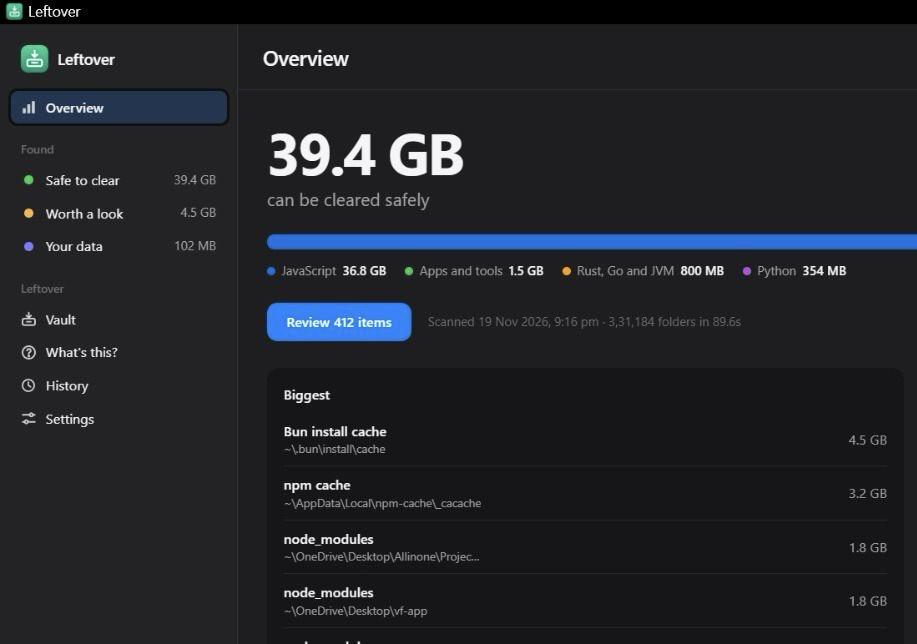
I built an offline disk cleaner for developer junk, Open Source and Runs Locally! Not a promo

Post image
1 Upvotes

r/coolgithubprojects • • 6d ago

I made an open-source book about Tor, with 20 hands-on labs

Thumbnail github.com
16 Upvotes

I've been working on Anatomia di Tor (Onion Routing Anatomy in English), a project that started as part of my thesis and grew into a full technical book.

It covers how Tor works at the protocol level, with Python and Docker labs to experiment with things rather than just read about them.

The whole project is on GitHub, including the source files and translations into five languages.


r/coolgithubprojects • • 6d ago

I built ClashNova β€” an open-source cross-platform proxy client powered by Tauri 2, Rust and sing-box

Thumbnail github.com
1 Upvotes

Hi everyone!

I've been working on ClashNova, an open-source desktop proxy client built with Tauri 2, Vue 3, Rust, and sing-box.

It supports Windows, macOS, and Linux.

Some of the features include:

  • Proxy node and subscription management
  • Latency testing
  • TUN mode and system proxy
  • Rule-based routing
  • Connection management
  • Multiple languages

My goal is to build a modern, lightweight, and user-friendly proxy client with better network diagnostics and cross-platform consistency.

The project is still evolving, and I'd really appreciate feedback, bug reports, and contributions.

GitHub: https://github.com/clashnova-dev/ClashNova

https://github.com/clashnova-dev/ClashNova-Mobile

What features would you like to see in a cross-platform proxy client?


r/coolgithubprojects • • 6d ago

[Rust] BatteryHub – monitor wireless device battery levels directly on the Windows taskbar

Thumbnail github.com
7 Upvotes

I wanted a simple way to see the battery levels of my wireless peripherals without having to open Logitech G HUB, SteelSeries GG or other manufacturer software.

So I made BatteryHub, a Windows taskbar application written in Rust.

It displays the battery percentages of your wireless mouse, headset, keyboard and controller right next to the Windows clock.

Some supported devices and brands:

  • Logitech (LIGHTSPEED, Bolt, Unifying, Bluetooth)
  • SteelSeries (Arctis, Arctis Nova, Aerox, Rival)
  • Razer mice and keyboards
  • Sony DualSense, DualSense Edge and DualShock 4
  • Apple AirPods and Beats
  • Xbox controllers
  • Generic Bluetooth and HID devices

I also focused on keeping it lightweight.

I benchmarked the Rust version against the original C++ implementation on the same PC:

MetricRustC++
Executable size368 KB1,958 KB
Idle RAM2.4 MB29.4 MB
Peak RAM17.8 MB29.8 MB
CPU time/min~0.02 s~0.64 s

A few things worth mentioning:

  • Automatic battery refresh
  • Optional Windows startup
  • Install, update and uninstall functionality
  • No administrator privileges required

Transparency: This is my Rust rewrite/fork of the original C++ BatteryHub by krisgfx9. The original project deserves credit for the concept, taskbar design and device protocols. My version currently supports fewer devices than the original.

I developed it with help from Claude AI.

GitHub: https://github.com/ferloom/Wireless-Device-Battery-Monitor

I'd love to hear what you think! Especially if you have a wireless peripheral that you could test it with.


r/coolgithubprojects • • 6d ago

I built Athena (v1.3.0), an offline tool that checks which callers break before you commit (zero LLM required)

Post image
1 Upvotes

We have all had that moment where git diff looks completely harmless (1 file changed, 2 lines edited), you push it and suddenly 4 callers in other folders break.

git diff only shows what you touched. It does not warn you about everything else in the codebase that depended on the old signature.

So I built Athena (v1.3.0), an open-source (Apache-2.0) CLI, Terminal UI and MCP server that runs locally on your machine with no cloud APIs or vector databases required.

What it does in plain English:

  • Checks callers before you commit (athena check --staged): Parses Python ASTs and structural signatures across 14 languages to flag removed symbols, shifted arguments, unguarded None defaults and recursion bugs before they hit main.
  • Builds a local code graph (athena graph & athena map): Creates a fast, cached map of your repo (<=2KB) so both you and AI coding tools (Hermes, OpenClaw, Claude Code, Codex, Cursor, Pi) can find where things live without burning tokens guessing.
  • Tracks technical debt (athena debt): Finds # shortcut: <limit>, <when to upgrade> comments and binds them directly to the functions and classes they belong to.

Real-world test: I ran Athena offline across 10 open-source repositories with 10k+ stars (psf/requests, trpc/trpc, spf13/cobra, serde-rs/serde, axios/axios, gabime/spdlog, square/okhttp, rubocop/rubocop, JamesNK/Newtonsoft.Json and laravel/framework), inspecting 1,000 commits (HEAD~100..HEAD) and 8,804 source files. All 10 passed with 0 errors and cut context token usage by 49x to 2,067x.

Repo, stars, issues and PRs: GitHub: https://github.com/aaryanrwt/athena

Issues, pull requests, bug reports and stars are always open. If you try it on your own repo and find an edge case it misses, open an issue and I will fix it.


r/coolgithubprojects • • 6d ago

Rewrote my Windows-style Linux file manager from Python/WebKitGTK to native Rust + GTK 4 (OpenXplorer 2.0)

Post image
34 Upvotes

After switching to Zorin OS, I still wanted a file manager that matched Windows File Explorer's layout. My 1.x version used Python and WebKitGTK, so for 2.0 I rewrote it as a native Rust and GTK 4 app on top of GIO/GVfs.

What's in 2.0:

  • Details, Compact, List, and icon views with thumbnails
  • Split panes, tabs, a folder tree, and a clickable path bar
  • Pinned folders, search, undoable file operations, and light/dark themes
  • Local browsing plus SMB, SFTP, FTP, WebDAV, and NFS locations

Licensed under AGPL-3.0, with .deb, .rpm, .pkg.tar.zst, and Flatpak packages on GitHub Releases.

https://github.com/AKolenda/openxplorer


r/coolgithubprojects • • 6d ago

I built a free, self-hosted alternative to MyFitnessPal & MacroFactor: openCalory

Post image
259 Upvotes

I built this for myself because I wanted a fast nutrition tracker without subscriptions, account lock-in, or sluggish network requests every time I log a meal. Figured I'd clean it up, MIT-license it, and share it here in case anyone else wants to self-host it or contribute.

How it's built:

  • Offline-first: Reads and writes hit browser IndexedDB (Dexie.js) locally so logging feels instant, even with zero connection.
  • Optional self-hosted sync: Runs on SQLite locally (docker compose up -d) or Turso libSQL if deployed serverlessly, using 90-day tombstones for conflict-safe deletes across devices.
  • BYOK AI (optional): Hooks into any OpenAI-compatible vision endpoint (OpenRouter, Gemini, OpenAI, or local Ollama) for meal photo estimation and nutrition label OCR, with sliders to adjust gram weights before saving.
  • Adaptive TDEE & no-nonsense UI: Calculates weight trend smoothing and estimated adaptive TDEE without turning everything angry red when you go slightly over your calories.
  • Bundled food data: Includes ~2,500 offline whole-food staples alongside live USDA/Open Food Facts search, browser barcode scanning, and full JSON/CSV export.

Repo: https://github.com/NathanP278/openCalory

It's still evolving, so if you self-host it and run into edge cases or want to help improve the sync engine, regional food datasets, or UI, issues and PRs are super welcome!


r/coolgithubprojects • • 6d ago

I turned the "flag emoji on Windows" font-swap guide into a free one-click app πŸ‡ΊπŸ‡¦πŸ‡―πŸ‡΅πŸ‡§πŸ‡·

Thumbnail codeberg.org
1 Upvotes

Windows' emoji font (Segoe UI Emoji) has no country flags, so πŸ‡―πŸ‡΅ shows up as just "JP". A while ago someone here posted a guide to fix this by swapping it for Google's Noto Color Emoji, renamed so Windows uses it. It works great, but it means installing Python, editing font files in a text editor and copying files from the Recovery Command Prompt.

So I turned it into a one-click app.

How to use it

  1. Download EmojiFlagFix.exe and put it in a folder you'll keep (it saves a backup of your original font next to itself)
  2. Open it β†’ click Install flag emoji
  3. Restart Windows (Restart, not Shut down – Fast Startup skips the swap)

That's it – flags now show in Chrome, Edge, Notepad, Windows Terminal and most other apps. There's a test page with all 259 flags so you can check it worked.

What it does under the hood

- Backs up your original Segoe UI Emoji

- Schedules the font swap for the next restart, so there's no need for the Recovery Command Prompt

- Restore original puts Microsoft's font back in one click

- There's also a recovery kit you can make for the Recovery Command Prompt, just in case

Limitations

- File names in File Explorer still show letters – Explorer doesn't use this font there

- Windows Updates may put the original font back – just open the app and click Install again

- The exe isn't code-signed (certificates cost money), so SmartScreen warns you: More info β†’ Run anyway

- It needs admin rights, because it replaces a file in C:\Windows\Fonts

- Every app gets Google's emoji style instead of Microsoft's

- Tested on Windows 11; Windows 10 is untested

Disclosure: I built this with help from Claude AI.

Free and open source (MIT; the font is Google's, under the Open Font License):

https://codeberg.org/masterbates/EmojiFlagFix

Huge thanks to the author of the original guide: https://www.reddit.com/r/Windows11/s/y5exCuqAqH

Feedback and bug reports welcome!


r/coolgithubprojects • • 6d ago

I built a cross-platform radial launcher in Rust that turns mouse and trackpad gestures into app-specific workflows.

Thumbnail gallery
3 Upvotes

CursorPie is an open-source desktop application written in Rust and egui. It puts a configurable radial menu directly under your cursor, letting you trigger actions with a simple gesture instead of memorizing shortcuts or navigating through menus.

Hold the middle mouse button (or touch and hold your trackpad), flick toward an action, and release.

The idea is to make frequently used actions accessible through one consistent interaction, regardless of which application you're working in.

What it can do:

  • Custom radial menus: Trigger keyboard shortcuts, launch applications, open URLs and files, execute shell commands, switch mouse modes, or open nested submenus.
  • Per-application profiles: Create different menus for different applications. Your editor, browser, design software, and other tools can each have their own dedicated actions.
  • Nested menus: Organize up to 8 slices per ring and 5 levels of submenus without filling your screen with permanent toolbars.
  • Workflow automation: A built-in visual flow editor lets you chain actions together using shortcuts, application launches, shell commands, browser commands, variables, conditions, loops, and interactive panels.
  • Browser integration: An optional extension for Chromium-based browsers and Firefox allows CursorPie to control media playback, manage tabs, and interact with supported web applications, including WhatsApp Web and Telegram Web.
  • Intelligent Pie: An optional, local learning feature that suggests applications, websites, actions, and workflows based on usage patterns. It is disabled by default.
  • Trackpad support: Open and navigate the pie using trackpad gestures instead of a physical mouse button. Force Touch trackpads on macOS can also provide haptic feedback.
  • Flow Hub: A collection of ready-made workflows that can be installed into CursorPie through its browser integration.
  • Customization: Multiple themes, configurable gestures, profile import/export, undo/redo in Settings, and automatic configuration backups.

Platforms

CursorPie currently supports:

  • macOS 11+ (Intel and Apple Silicon)
  • Windows 10 (1809+) and Windows 11
  • Linux with X11 (pre-stable)
  • Linux with Wayland (experimental)

It's built with Rust and egui, and released under the MIT license.

A few things worth mentioning

  • No account system or telemetry.
  • Configuration and usage data stay locally on your machine.
  • The application only checks for updates when Settings is opened, at most once a day. Downloading an update requires an explicit action.
  • The browser extension communicates with the desktop application locally through native messaging.
  • The browser extension currently requires manual installation rather than a published browser-store release.
  • Linux and some trackpad implementations still need more testing on real hardware.

The project is currently at v0.9.0 and is actively evolving.

Links

Feedback, bug reports, feature suggestions, and contributions are welcome. I'm particularly interested in feedback from people using different Linux desktop environments, trackpads, and mouse configurations.

I'd also love to hear how other people use radial menus and what kind of workflows they would build with this.


r/coolgithubprojects • • 6d ago

Flat Finder for Codex: MIT rental-research skill with a local map and evidence-aware shortlist

Thumbnail github.com
1 Upvotes

I built this with Codex for a real rental search and am sharing the implementation.

The installable skill guides source research; Python 3.10+ standard-library helpers validate a private JSON workspace and serve a read-only local viewer. The viewer uses vanilla JS and Leaflet. Rent, maintenance, deposits and setup fees stay separate. Radius, walking-route evidence and provider availability are independent checks.

The useful implementation detail is conservative merging: reimporting an ad must not reopen a closed contact or erase a consumed send. The first real run caught a stale private import, which I fixed and regression-checked. The packaged helpers have 18 passing tests, including protected states, cross-source phone duplicates, atomic imports and local-server access guards.

Public demo (synthetic listings only): https://flat-finder-codex.pages.dev

Source, install instructions and release: https://github.com/jyotirawattech/flat-finder-codex

No built-in scraper, account access or automatic messaging. Private search data stays outside the public repository. Built and written with Codex assistance. Feedback on the data model or merge edge cases is welcome.


r/coolgithubprojects • • 6d ago

The note I'd keep after fixing SQLite's `no such table` error

Post image
1 Upvotes

In a small SQLite reproduction, the setup connection creates an empty jobs table. The worker opens a second connection to count rows. The expected result is 0; instead, it gets no such table: jobs.

The setup connection can still query the table. Both connections use :memory:, which makes the mismatch easy to overlook. Each plain :memory: connection gets its own database.

Opening the same fresh temporary DB file on both connections, with setup committed before the worker queries, makes SELECT COUNT(*) FROM jobs return 0 on both. The file belongs to that test run so another run can start with an empty database.

The fixture comment needs to say why this test uses a file. The same detail is worth keeping in MemoraX Code's Coding Memory.

Setup and worker open separate connections. Give them the same fresh temporary DB file and commit setup before the worker queries. With no rows inserted, SELECT COUNT(*) FROM jobs must return 0 from either connection. Use a separate file for each test.

The connection detail matters more to me than the phrase "use a temp file." Before changing this fixture, I'd check whether setup and worker still open separate connections.


r/coolgithubprojects • • 6d ago

I built a free, open-source password manager that works fully offline. No account, no cloud, launching Nov 27

Thumbnail gallery
0 Upvotes

Hey everyone,

For the past months I've been building VAULT, a password manager for Windows and Android**. It's** free, open source (GPL-3.0), and launches on November 27.

Why I built it

I wanted something in between. Cloud managers like Bitwarden and 1Password are solid, but I didn't want an account or my vault on someone else's server. Offline tools like KeePass are great security-wise, but they feel dated, and on Android you need a separate third-party app. I wanted a fully offline password manager that actually feels nice to use.

What it does

- 100% local: no account, no cloud, no server. Your vault lives encrypted on your own device.

- Encryption: AES-256-GCM, with the key derived from your master password using PBKDF2-SHA256 (600,000 iterations).

- Fingerprint unlock and autofill on Android.

- Password generator and a password health check (weak and reused passwords).

- Encrypted backups: export a password-protected `.vault` file and restore it on any device.

- Thousands of built-in brand icons (works offline, nothing downloaded), so Spotify looks like Spotify.

- Auto-lock and timed clipboard clearing.

- Nine themes, each with a light and dark mode.

Being honest about trust

I know "trust my new password manager" is a big ask, so here's where it stands:

- Every line of code is public. You can read it, build it yourself, and check how the encryption works.

- It makes no network requests for your data, because there's no server to send it to.

- Downloads come with SHA-256 checksums.

- It hasn't been independently audited yet. It's an early beta, so please keep a second copy of important passwords somewhere else for now. Code reviews and issue reports are very welcome.

See it before launch

The website has a short film and screenshots of every theme, and the repo has the full feature list:

- Website: https://tryvault.download

- Code:

https://github.com/Dreeeam123/vault-password-manager

On the site you can tap "count me in" for your platform. It's anonymous (no email), and it just helps me see how many people are waiting.

About money

VAULT has no subscription, no paid tier and no ads, and it never will. I make nothing from it. If you'd like to support development, there's a Buy Me a Coffee link: https://buymeacoffee.com/amirzafer79. No pressure at all. Feedback and stars on GitHub help just as much.

I'd love to hear what you think, especially any criticism of the security design.


r/coolgithubprojects • • 6d ago

Radii Office: an office suite with tons of capabilities

Thumbnail github.com
1 Upvotes

Radii Office is an open-source (CC0 and the Unlicense) office suite with tons of capabilities. It features its own formatting language called Keydown, that has over 18,000 styles instead of the 12 styles that Markdown offers.


r/coolgithubprojects • • 6d ago

I built a opensource TUI Proxy Client on Go

Thumbnail github.com
1 Upvotes

A lightweight, simple proxy client for Linux, written in Go and powered by sing-box.


r/coolgithubprojects • • 6d ago

I built a free, open-source app that runs local text, image, video, voice and speech-to-text on a 4 GB laptop GPU

Thumbnail ashishyadavstudio.github.io
2 Upvotes

Hi all. I've been building Featherbox, a local AI app for ordinary laptops with 4–6 GB graphics cards. The idea: one installer instead of a separate Python environment, CUDA setup and UI for every kind of model.

What it does

  • Chat with a local text model
  • Image and Video generation (text-to-video and image-to-video)
  • Voice (text to speech) in English, Hindi and more
  • Transcribe recordings and videos to text and SRT/VTT subtitles, in 99 languages
  • Studio: type a topic and get a finished vertical video, with a script, voiceover, AI pictures, captions and background music.

What's under the hood

There's no PyTorch and no Python setup for the user. It runs the official builds of llama.cpp, stable-diffusion.cpp and whisper.cpp, plus Kokoro (ONNX, on the CPU) and FFmpeg. It picks CUDA, Vulkan or CPU builds for your hardware. The app itself is a small FastAPI backend with a web UI, running at 127.0.0.1 only. The Windows installer is about 80 MB, and the models download from Hugging Face inside the app.

The part I spent the most time on is the Models page. It detects your GPU, VRAM, RAM and built-in graphics, and tells you in plain words whether each model will run well, slowly, or not at all on your PC. You can also paste your own Hugging Face GGUF links.

GitHub: https://github.com/AshishYadavStudio/Featherbox

Download (Windows): https://github.com/AshishYadavStudio/Featherbox/releases/latest

Website: https://ashishyadavstudio.github.io/Featherbox/

I'd really like feedback on two things. Which models would you add to the catalog for 4–8 GB cards? And does the "will it run on my PC?" advice match what you actually see on your hardware?


r/coolgithubprojects • • 6d ago

(Yet) Another Vibecoded AI Operating System

Thumbnail github.com
0 Upvotes

So, every now and then when a "mindblowing" model comes out, I've tried to vibecode an OS, mostly just to see if it could. I didn't get very far or have satisfactory results until recently.

Inspired in part by the movie "Her", this OS is a custom kernel with some linux glue to make flatpak apps work and some other FOSS elements used and has AI built-in.

But it's not like the other AI OS's (not much anyway...). There are no stock UI elements, no default themes. Your AI will onboard you and then build your desktop from scratch the way you ask, using a new language I've called "Facet", which is a subset of XML and is designed to be LLM-friendly, specifically for building desktop UI and application fronts.

You can tune the voice to sound how you want, and you can use VRM models as your AI's avatar (finally, a use for those "Personal Use Only" models!)

You can use other AI you have access to, but the default that comes with it is a low-ish Qwen model.

The system requirements sit at 32gb RAM, 16gb vRAM for the default system with built-in AI which works offline, but if you're using an external AI then you can try for a lot lower.

By all means this is not a fully finished product, but is also very welcome to testing and feedback.


r/coolgithubprojects • • 6d ago

A very fast, embedded, B+tree, ACID KV store, based on Leanstore research

Thumbnail unchanged.dev
2 Upvotes

r/coolgithubprojects • • 6d ago

My watch's NFC only did payments, so I made it a programmable NFC tag

Thumbnail github.com
1 Upvotes

Side project that got out of hand. The watch pretends to be an NFC sticker and I choose what's on it. Tap a phone and it gets my contact, wifi, a link, or a UPI request for an amount I dial in with the bezel.

The whole app is about 50 KB with zero dependencies, and it doesn't even ask for internet permission.

Honest state: works great on my one watch (Galaxy Watch8 Classic), untested everywhere else, not on the Play Store.

https://github.com/harshtripathi272/tapdrop

If you read the README, tell me where you got lost.


r/coolgithubprojects • • 6d ago

I built YSCode β€” an AI coding agent that runs entirely on your Android phone πŸ“±

Post image
1 Upvotes

r/coolgithubprojects • • 6d ago

Open source Fl studio alternative that is actually pretty

Post image
14 Upvotes

I know there are other options out there, but building my own DAW has always been a dream of mine. I've put a lot of heart into this project. After 40 releases I am able to do anything I was doing in fl studio with stock plugins and samples .

gh: https://github.com/miskibin/synkopa

Website: https://miskibin.github.io/synkopa/


r/coolgithubprojects • • 6d ago

A little preview of what's coming to Shape in 1.0.4.

Post image
0 Upvotes

You can check the repo out here https://github.com/useshape/Shape

I've been super focused on updating the UI/UX but i still need some time.


r/coolgithubprojects • • 6d ago

OmegaStar: a desktop app that turns Claude Code into a team of AI employees, with roles, an org chart, schedules and one Inbox

Thumbnail github.com
0 Upvotes

r/coolgithubprojects • • 6d ago

Rascals - Private, serverless desktop chat with no accounts

Post image
1 Upvotes

Hey everyone. For the last months I've been building Rascals, a peer-to-peer chat app that runs on your desktop. You open it, share a room code with someone, and you're talking. No sign up, no phone number, no company in the middle.

It's built with Tauri, so it's lightweight compared to an Electron app. The whole thing started as a project for me and my friends because I was tired of every chat app wanting an account first.

It's still early, version 0.1.36, so expect rough edges. I'm the only dev right now and I'd honestly just be happy about feedback: what breaks, what's confusing, what's missing.

Repo: https://github.com/MinikLover67/Rascals