r/coolgithubprojects • • 5d ago

splitaudio - one bash file and ffmpeg that splits a video into a clean video file plus one mp3 per audio track

Thumbnail gallery
1 Upvotes

i made this cuz i kept needing the audio out of videos and every tool either re-encoded the whole thing or made me click through a gui for 4 files.

what it does:

- video stream comes out as its own file, copied not re-encoded, so zero quality loss and its instant

- every audio track comes out as a separate mp3 (vbr, -q:a 2, ~190kbps)

- outputs land next to the input, collisions get a _1 _2 suffix so nothing gets overwritten

- files with no audio or no video get skipped instead of shitting the bed

two modes: plain cli (path, globs, `theme [name]`, -v) and a fullscreen tui with a file browser, a review screen, a live job list and a results screen.

why not handbrake or mkvtoolnix for this: no gui, no re-encode, no muxing. you point it at files and you get the parts back.

its one bash file and ffmpeg, MIT, no deps beyond ffmpeg. 13 themes with truecolour and a 256 colour fallback

doesnt run natively on windows, wsl is the answer.

repo: https://github.com/NetherLexis/Splitaudio

or look for splitaudio on: https://noiz.bio/nlexis


r/coolgithubprojects • • 5d ago

AST Security Reviewer: a GitHub Action that flags SQL injection and hardcoded secrets in Java PRs

Post image
0 Upvotes

I built a GitHub Action that scans Java code for SQL injection and hardcoded secrets and comments on the exact line in your PR. It parses the code into an AST with JavaParser instead of using regex, so it understands what the code is actually doing.

I tested it on 31 open source repos (27k files) and kept tuning it until false alarms on secrets dropped 83%. There's also an optional local LLM (Ollama) that suggests fixes.

Takes about 2 min to add to a repo: github.com/marketplace/actions/ast-security-reviewer

Would love feedback, especially any false positives you run into.


r/coolgithubprojects • • 6d ago

Made my GitHub profile README interactive: you can vote for a color, and a GitHub Action updates the chart

Thumbnail gallery
0 Upvotes

I spent some time making my GitHub profile README less static, and I wanted to share the result.

READMEs can't run JavaScript, so I built it out of the pieces GitHub already gives you:

  1. Each color bar is an image wrapped in a link.
  2. Clicking it opens a new issue that's already filled in. You just press Create.
  3. A GitHub Action reads the issue, adds +5 to that color, redraws the chart and commits it to the repo.
  4. The bot thanks you in the issue and closes it. About a minute later, your vote shows up on the profile.

It also shows the total votes and the last voter

I went with a wizard theme with an animated background, plus an auto-generated "Most Used Languages" card.

Come vote for your color: https://github.com/Placidelinkpehoun


r/coolgithubprojects • • 6d ago

Promptly - and AI Chat and My self hosted everything project

Thumbnail gallery
59 Upvotes

G'day,

For about a year me and my buddy claude have been working on Promptly. It started as a openwebui replacement and kept growing, because every time I felt I needed something from g suite, or microsoft I'd just build it into the app.

What's currently in it:

  • Ai Chat (byok or point it at ollama)
  • Files, Docs, sheets and slides
  • Photos, with auto phone backup, face grouping, and search (photo's get described, so you can ask your AI chat about your photos.)
  • Mail, Calendar, Notes, Tasks
  • A password manager (has a chrome/firefox extension)
  • Maps with navigation, and android auto (required playstore invite), all hosted locally
  • Discord style chat rooms with video call, voice call, screen sharing, and DM's
  • Porch, a self hosted social media platform
  • Android app (Apk available in the app under apps > install, but the playstore version is better)
  • With the android app you get widgets (using the Promptly > Apps widget gives you an easy way to access all your different promptly apps)

Plenty more.

Install is one line:
curl -fsSL https://raw.githubusercontent.com/tristenlammi/Promptly/main/install.sh | bash

You need docker, at least 2 cores and about 8gb's of ram, but 16 is much more comfortable. Disk space is obviously heavily dependant on whether you decide to download maps during the setup wizard, and how much cloud storage you want to give you / others.

For clarity,
It's a one person hobby project. My family uses it daily, but no one outside my house has installed it yet as far as I know. So expect rough edges, and that's specifically what I'm chasing. Feedback.

If you decide to use it, I'm chasing people who will create issues on github, or pull requests. I want the project to move forward and at the moment my time to test things is the bottleneck.

Repo and screenshots: https://github.com/tristenlammi/Promptly

Happy to answer any questions, and if the install breaks for you I'd really like to know.

Cheers


r/coolgithubprojects • • 6d ago

RemoteFlow - free open-source SSH/SFTP/RDP manager for Windows & Linux (mRemoteNG alternative)

Post image
51 Upvotes

Hey everyone,

I've been working on a little side project called RemoteFlow for a while now, and I think it's finally ready for other people to try out.

The idea came from wanting something similar to mRemoteNG that runs natively on both Windows and Linux. I wanted to manage all my SSH, SFTP and RDP connections in one place, without cloud accounts, subscriptions or having to switch between multiple applications.

I've used several AI coding agents throughout development, which has been an interesting experience in itself. Now I'd really like to get some feedback from people who manage servers on a daily basis and see how the app holds up outside my own environment.

Here's what it currently supports:

SSH – terminal based on xterm.js, key authentication, OpenSSH certificates, SSH agent and port forwarding (local, remote and SOCKS5).

SFTP – built-in dual-pane file manager, similar to WinSCP, with the ability to open the current SSH working directory directly.

RDP – embedded IronRDP client with dynamic resolution resizing, optional embedded FreeRDP on Linux and support for external RDP clients.

Connection management – tabs, split-screen layouts and connection folders.

Local encrypted storage – AES-256-GCM and Argon2id, quick PIN unlock and portable mode.

mRemoteNG import – import existing connections, folders and passwords directly from confCons.xml.

RemoteFlow is built with Tauri 2 (Rust) and React. It's free, open source and MIT-licensed.

Prebuilt packages are available for Windows (EXE/MSI) and Linux (AppImage/DEB/RPM).

GitHub: https://github.com/jacek-nikiel/RemoteFlow

It's still a work in progress, so there are probably bugs and things I haven't thought of yet.

If you have some time to give it a try, I'd love to hear what works, what doesn't, and what features you think are missing. Code reviews and security feedback are also more than welcome.

Thanks!


r/coolgithubprojects • • 6d ago

ASCAINT — ASCII Character Art Interface for Native Terminals.

Thumbnail gallery
0 Upvotes

r/coolgithubprojects • • 6d ago

"bouncer" for AI coding agents: it stops them from running rm -rf ~, curl | sh, or leaking your .env

Thumbnail github.com
1 Upvotes

AI coding tools like Claude Code, Codex and Gemini CLI can run shell commands on your machine. Most of the time that's great. But every so often an agent "cleans up" the wrong folder, reads your `.env` into a log, or pipes a script from the internet straight into bash.

Their built-in permission rules mostly match the start of a command, so something like `cd /tmp && rm -rf $HOME` can slip past a rule you thought covered it.

**shellbouncer** sits in front of the agent and checks every command before it runs:

- **Reads real shell syntax.** It splits chained commands, pipes, `bash -c "..."` and `sudo`, then checks each piece.

- **One policy file for all three agents.** Set it up once and it works in Claude Code, Codex and Gemini CLI.

- **Three outcomes.** Block (the agent is told why), ask you first, or allow silently.

- **Protects secrets too.** It catches attempts to read or upload `.env` files, SSH keys and cloud credentials.

- **Zero dependencies, fully local.** Nothing is sent anywhere.

Try it:

pipx install shellbouncer

shellbouncer demo

To be clear, it's a seatbelt, not a sandbox. It checks commands before they run, so code hidden inside a Python script or a Makefile gets past it. The README lists exactly what it can't catch.

It's free and MIT licensed: https://github.com/SaadRahman01/shellbouncer

I'd love feedback, especially:

- safe commands it wrongly blocks

- dangerous ones it misses

- whether setup was clear

If it's useful, a ⭐ on GitHub helps a lot.


r/coolgithubprojects • • 6d ago

[Update] Wingetix v1.2.0: Open-source WinGet GUI now with Portable USB mode, Ninite-style Software Packs, and Deep Uninstaller v2 (No ads/telemetry)

Thumbnail github.com
1 Upvotes

Hey everyone!

A few weeks ago I shared Wingetix, an open-source visual manager for Windows Package Manager (WinGet). I got a ton of honest feedback from Reddit regarding things like language phrasing, portability, and safety features.

I took those notes seriously and just pushed v1.2.0. The app is 100% free and open-source under GPLv3, with zero telemetry, no background daemons, and no paywalls.

Here is what is new in v1.2.0:

  1. Zero-Footprint USB Portable Mode If you are an IT tech or just prefer standalone tools, you can run the portable executable straight from a flash drive. It automatically routes all settings, app cache, and profiles to a local .\data folder, leaving zero trace in %AppData% on the host PC.
  2. Deep Uninstaller v2 with Residual Preview Instead of blindly purging leftovers, clicking uninstall now brings up a collapsible drawer showing every orphaned directory (%AppData%, ProgramData) and registry key before anything gets touched. You can uncheck any folder (like your config or save files) to keep it safe.
  3. Platform Shield and Custom Whitelist To make sure you never accidentally nuke game files or work directories, game launchers (Steam, Epic, Riot, Battle.net, EA) and system drivers are permanently protected. You can also add your own custom folders or registry keywords to a whitelist right from the interface.
  4. Software Packs Studio (.wingetix) Think Ninite, but fully custom and tied to WinGet's 12,000+ package catalog. You can bundle your favorite apps, export them into a single .wingetix file (with real icons preserved), and install them unattended on fresh PCs with one click.
  5. Multi-GPU Switcher Laptops with dual GPUs (integrated Intel/AMD + dedicated NVIDIA/Radeon) are now properly recognized. You can toggle between them with one click to see accurate VRAM, driver dates, temps, and quick links to control suites.
  6. Windows 10 Fixes and WinGet Installer Fixed the annoying Windows 10 UAC issue where elevated administrator accounts failed to resolve winget.exe aliases. Wingetix now resolves the binary directly. If your Windows 10 build or LTSC is missing WinGet entirely, there is a built-in 1-click installer.
  7. Polished English Localization Thanks to everyone who pointed out the weird phrasing in earlier builds. The bilingual engine has been completely audited (480+ strings) so technical terms sound natural instead of machine-translated.

The binaries are clean across 70+ antivirus engines on VirusTotal, and the whole codebase is completely public on GitHub.

GitHub repository: github.com/joselyky/Wingetix Website: wingetix.com

If you test it out or run into any bugs, please let me know. Any feedback or pull requests are always welcome!


r/coolgithubprojects • • 6d ago

Meet safe-anything: I built a 100% Rust security scanner, and it found 67 holes in OWASP Juice Shop in 0.03 s

Post image
9 Upvotes

I made rust-anything last week, and this is its sibling: one command that finds the holes in your project before someone else does.

https://github.com/erkamyaman/safe-anything

npx safe-anything .

What it checks:

- Code: SQL injection, XSS, eval, path traversal, unsafe deserialization and more

- Secrets: API keys, tokens, private keys, and .env files that would get committed

- Config: risky mobile, Docker and cloud settings

- Dependencies: every locked version checked against OSV (npm, pnpm, yarn, Cargo, pip, poetry, uv, Go, Ruby, PHP, Dart)

- AI agent setups: Claude Code, Codex, Cursor and MCP settings that give an agent too much power (bypassPermissions, pre-approved Bash, unpinned MCP servers, tokens in plain text)

74 rules, each with a CWE id and an OWASP link. On OWASP Juice Shop it scans 1,195 files in 0.03 s and finds 67 problems, including the SQL injection in routes/login.ts. It's a single Rust binary, works offline, exits non-zero on findings so it fits pre-commit and CI, and can output SARIF for GitHub code scanning. It's also an MCP server and a Claude Code plugin, so your agent can scan before it commits.

MIT, free, and false positives are the bugs I care about most, so issues are very welcome.

https://github.com/erkamyaman/safe-anything


r/coolgithubprojects • • 6d ago

From a doc you already wrote to a polished talk in minutes: I built a slide engine designed for your agent to write

Thumbnail github.com
0 Upvotes

I give technical talks, and making slides was always the slowest part. So I rebuilt my old Eagle.js-based slide framework from scratch as Arao (Vue 3 + Vite), designed from day one to be written by an agent.

How it works with an agent

  • Arao ships an agent skill: the rules for writing a good deck, plus how to check its own work.
  • npx arao layouts --json lists every layout with its description, example, options and slots, so the agent picks the right one without reading the library's source.
  • A checker flags removed APIs and slides whose content overflows, so the agent can fix its own mistakes.

The workflow I actually use: I hand Claude something I already have (a design doc, an article, an analysis, my rough notes) and ask for a talk. It writes a .vue deck: a cover, an agenda built from the sections, grids for key points, code walkthroughs from real files in the repo with lines highlighting step by step, and quotes. Then I iterate on the message instead of fighting a slide editor.

Why the output is good, not just fast: layouts are opinionated and typed, themes are design tokens, and the agent only chooses what each slide is, never where things go. So the deck stays consistent, and you can restyle all of it with a theme.

Presenter view, PDF export and six built-in themes. Open source (Apache-2.0):

Docs: https://rubasace.github.io/araojs/ · Repo: https://github.com/rubasace/araojs

Happy to hear how it works with other agents (Codex, Cursor…).


r/coolgithubprojects • • 6d ago

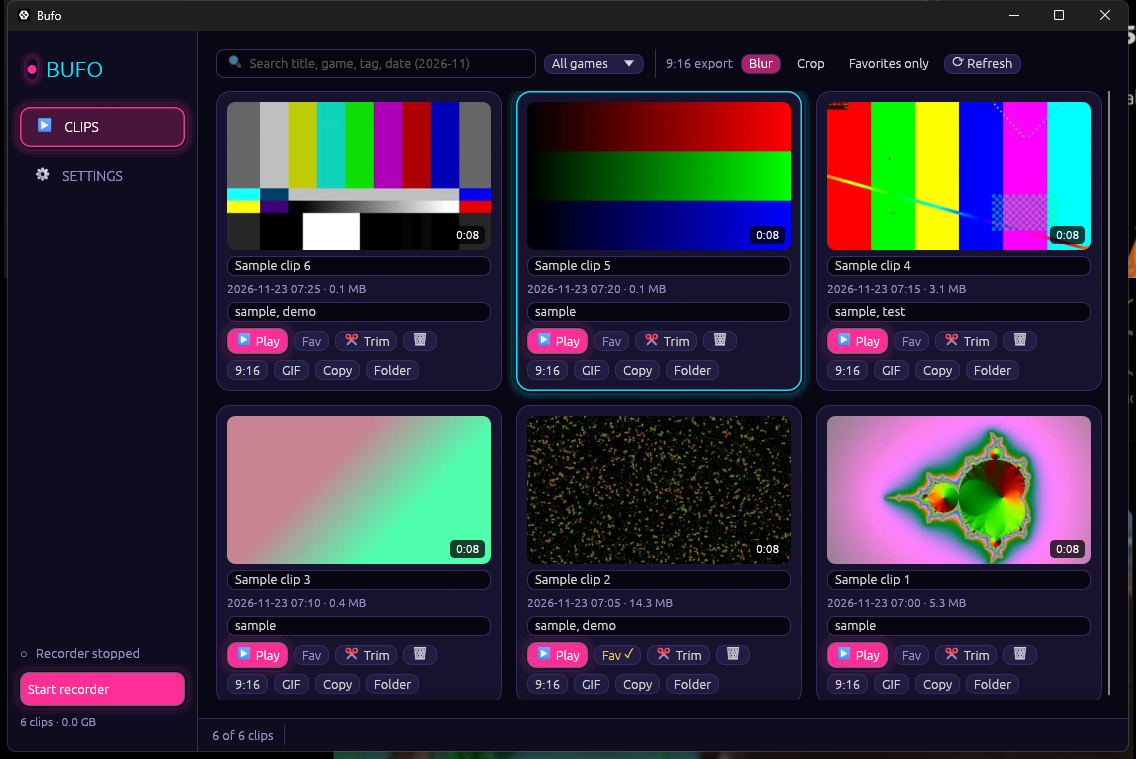
Bufo: open-source instant-replay clip recorder for Windows, written in Rust (one .exe, no ads, ~5% of one CPU core)

Post image
1 Upvotes

Bufo is a lightweight Medal-style recorder: it keeps a rolling buffer of your screen on disk, and one hotkey (Ctrl+Alt+F10) saves the last minute as a clip.

  • One file: download bufo.exe and double-click it (ffmpeg is bundled inside)
  • GPU encoding (NVENC / AMF / Quick Sync); in my test on an RTX 3060 at 1080p60 it used about 5% of one CPU core and ~110 MB RAM
  • Trim editor, GIF export, 9:16 export for Shorts/TikTok, microphone on a separate track
  • No ads, no accounts, no tracking, no network access
  • Rust + egui, GPLv3

Windows only for now. Real-game FPS impact isn't measured yet, and AMD/Intel encoders are untested. Feedback welcome.

Source and download: https://github.com/tsafonov954-boop/Bufo Latest release (single .exe): https://github.com/tsafonov954-boop/Bufo/releases/latest


r/coolgithubprojects • • 6d ago

drip - scriptable notifications that drip from the notch

Post image
2 Upvotes

drip is a macOS CLI that shows scriptable notification cards from the MacBook notch. See it without installing: the demo at https://drip.jrnxf.co runs the real Swift engine, compiled to WebAssembly.

It draws its own card at the notch instead of going through Notification Center. A card can also ask a question, and your script gets the answer as the exit code:

drip warn "Deploy?" --yes Deploy --no Cancel && ./deploy.sh

That runs deploy.sh only if you click Deploy.

Two things I care about most:

It asks for no permissions. drip only uses public macOS APIs that don't need a privacy grant, so there's nothing to approve before your first card. It doesn't add a login item either, and nothing runs in the background unless you set that up yourself.

It doesn't decide when to notify you. You do. I didn't want to build something that only works for me and pushes my notification ethos on everyone else. That control comes from recipes: small scripts that show a card when something happens, like a long build finishing or an agent needing permission. The repo ships with a handful of recipes to start from. Treat them like dotfiles: copy one, change it, and it's yours. If you end up with one you like, open a PR.

Similar tools: terminal-notifier sends to Notification Center and the UI is quite bland, and the notch apps I found are built for coding agents only. drip is a plain CLI, so anything that can run a command can show a card.


r/coolgithubprojects • • 6d ago

Giving away 10 premium theme codes for StradaOS (free, open-source launcher for Android car head units)

Post image
0 Upvotes

Guys, this one’s for you!

StradaOS is a free, open-source (GPL-3.0 licensed) launcher for Android-based automotive head units. It installs just like any other app—no root access or system flashing required.

We’ve already hit nearly 13,000 downloads and over 450 stars on GitHub! As a token of appreciation, I’m giving away 10 codes. Each winner can choose one of these premium themes:

• Faro: Features a carbon-fiber background, a beam of light, and a car whose headlights turn on when night falls.

• Carbono: A deep, midnight-blue aesthetic featuring a large representation of your vehicle, available in 8 different colors.

How to enter:

  1. Leave a comment on this post and include a photo of StradaOS running in your car.
  2. Tell us which feature you use the most.

The giveaway starts now! I’ll randomly select 10 winners from the comments (one entry per person). I’ll reach out to each winner via private message to request their head unit’s unique ID (found under: Settings → Personalization → "Unlock" in the themes section), as each code is activated through that screen.

Beyond themes, the app includes offline maps, turn-by-turn navigation, a speedometer (via GPS or OBD), maintenance reminders, an OBD-II scanner, wired Android Auto compatibility, and support for 12 languages. It’s compatible with Android 4.1 and up.

Learn more about the project here 👇🏽

• Website: https://lordnordic-debug.github.io/StradaOS/

• GitHub: https://github.com/lordnordic-debug/StradaOS


r/coolgithubprojects • • 6d ago

An open-source, private desktop archive for Windows that indexes your documents, PDFs, and notes completely offline: Hearth

Thumbnail gallery
1 Upvotes

I built Hearth, a local-first file library for Windows that makes finding, organizing, and managing files easier without cloud uploads, subscriptions, or telemetry.

It features full-text search across 30+ formats, instant file previews, PDF tools, image conversion, smart collections, duplicate detection, file comparison, and more — all running locally.

Privacy-focused, open-source (MIT), and designed with a warm, distraction-free UI.

AI was only used for debugging, troubleshooting, and brainstorming. The implementation and UI were built and directed by me.

GitHub: https://github.com/rheme18/Hearth

Download: https://github.com/rheme18/Hearth/releases

Would love feedback from fellow Windows users!


r/coolgithubprojects • • 6d ago

T-Bot - Python validation and evidence-integrity toolkits with 141 tests, looking for code revie

Thumbnail github.com
0 Upvotes

I've been independently developing a Solana trading system since June while learning Python and software engineering with AI assistance.

I've started publishing selected standalone components for developers to inspect and challenge.

The GitHub repository currently includes:

- Four Python input validators and 57 tests.

- An evidence-integrity toolkit with 84 tests.

- A standalone educational contributor lab.

- Beginner-friendly tasks and structured review assignments.

I'm especially interested in independent developers who can identify incorrect assumptions, missing edge cases and bugs the existing tests might overlook.

The public components are available to review and improve. The operational trading application remains private.

GitHub: https://github.com/processoverprofit-sys/T-Bot

Starter tasks: https://github.com/processoverprofit-sys/T-Bot/blob/main/community/START_HERE.md

I'd appreciate any constructive technical feedback. Contributions are voluntary and unpaid.


r/coolgithubprojects • • 6d ago

Welcome to BinaryFrontier — Let's build a community for people who love understanding how software works & ENJOY

Thumbnail gallery
1 Upvotes

r/coolgithubprojects • • 6d ago

MID — A new approach to secure and controlled data management

Thumbnail msg-company.vercel.app
1 Upvotes

Your data deserves more than just storage. It deserves control. 🔐

Meet MID (MSG Intelligence Database) — built with a focus on security, privacy and user-controlled data management.

• Secure database management
• Desktop-first control
• Designed for privacy
• A new approach to managing your digital data

We're building MID to make data management smarter, more controlled and more secure.

This is just the beginning.

#MID #MSGCompany #DataSecurity #Privacy #TechInnovation #CyberSecurity


r/coolgithubprojects • • 6d ago

Something New Is Coming for Instagram Creators & Businesses! 🚀

Thumbnail nviora.vercel.app
0 Upvotes

We've been working behind the scenes on something exciting!

Introducing NVIORA, an upcoming Instagram automation platform designed to simplify engagement and reduce repetitive work.

💬 Comment-to-DM automation
🎬 Smart Reel triggers
⚡ Automated comment replies
📊 Engagement insights

We're getting closer to our first release!

More updates coming soon. Stay tuned! 💙

What's one feature you'd love to see in an Instagram automation tool?


r/coolgithubprojects • • 6d ago

I built a free app to revise your coding knowledge and actually learn with AI

Thumbnail tryindent.in
0 Upvotes

everyone says learn with ai, nobody says how. so i built indent.

every repo is a small company with a real problem and you're its developer. you write the fix, hidden tests check it, and the ai tutor helps without giving you the answer.

44 repos across javascript, typescript, python, java, c++, sql and more. free for personal use, no account, mac / windows / linux.

would love honest feedback, especially on what feels confusing.


r/coolgithubprojects • • 6d ago

pliss i need likes

Post image
0 Upvotes

Hello, everyone! 👋

I'd like to share something I've been building: Salvatore Docs.

It's a desktop application I developed using Python as part of my learning journey in Systems Engineering.

Its purpose is to simplify document creation using Markdown and generate PDF files in an accessible way.

This project represents many hours of learning, testing, making mistakes, and improving. There are still many features I'd like to add, but I'm proud of what I've built so far.

It's currently participating in a university competition in Colombia.

If you'd like to check it out and support my participation, here's the official Instagram post:

❤️ https://www.instagram.com/p/DgFf8WtRd03/

Greetings from Colombia! 🇨🇴


r/coolgithubprojects • • 6d ago

Foss YouTube client for Android with no ads, no login, PiP and offline downloads: HiveTube v1.16.0

Thumbnail gallery
1 Upvotes

r/coolgithubprojects • • 6d ago

ROMarr 1.13 is out: cloud storage, Arcade Punks, a chat agent that hunts releases for you, and 400+ GitHub stars, thanks!

Thumbnail gallery
0 Upvotes

r/coolgithubprojects • • 6d ago

SnapSwitch - I made a VS Code extension to switch pinned projects with keyboard shortcuts

Thumbnail github.com
0 Upvotes

r/coolgithubprojects • • 6d ago

control a Windows XP retro PC from your terminal

Thumbnail github.com
0 Upvotes

Hey, I have an old Windows XP PC for retro games and wanted to manage it from my Mac instead of sitting in front of it for every install, file copy or patch check.

It has two parts. On the XP machine runs xpserver.exe, a single .NET 3.5 exe that sits in the tray, nothing to install. On your own machine you use xpctl.py, a single Python script with no dependencies (macOS, Linux or Windows). From the terminal you can run commands, copy files, read windows and click through installers, read the registry, mount CD images, rip CDs, install drivers and check temperatures.

Since the box is for gaming, a lot of it is about games. There is a hand-researched database of around 140 game exes that tells you which version you have installed and whether an official patch exists. Another one lists the copy protection of original discs (SafeDisc, SecuROM, StarForce) and how to image them so they still run. It can also read and edit save games for Diablo II 1.14d and Need for Speed: Underground, with checksum repair and a backup before every write.

Two things to know. It's meant for your LAN only: traffic is not encrypted, the login uses HMAC so the password never goes over the wire, but whoever has the password owns the machine. And the program itself still speaks German (tray UI and CLI output), the docs are in English.

Full disclosure: this is my own project and I used Claude to help me build it. PRs are very welcome, especially new entries for the game version and copy protection databases. If you run an XP box too, tell me what you would want it to do.