r/coolgithubprojects • u/blacklabelsextoys • 2d ago
VoxCarrel - Open Source Mac App for managing your audio and ebooks in one place
github.com
1
Upvotes
r/coolgithubprojects • u/Future_Ad6516 • 2d ago
I've been building Nova, a PC/Android synced roleplay app with local, cloud BYKO and subscription support, universes, group-chats, phone simulation, and deep customization from cosmetic to functional
The app:
Its also shipped with some of my own features:
It's built to stay smooth on a budget Android phone, so streamed text doesn't stutter even in long chats.
Download (APK / exe / AppImage / deb): https://github.com/j-marchon/nova-releases/releases/latest
Source (MIT): https://github.com/j-marchon/nova-releases
I'd love feedback from people running local backends, especially which backend quirks I should handle better.
r/coolgithubprojects • u/bloforge • 2d ago

https://github.com/bloforge/safeusb
writes iso img and compressed gz xz zst files to usb sticks, after writing it reads the stick back and compares the hashes so you know the copy matches,
also backs up disks to compressed archives with per chunk hashes and can restore them,
refuses to write to the system disk and makes you type the target path before anything gets written,
early software, tested the flashing on one stick on windows, so try it on a spare drive first,
cargo install safeusb if you want to try it
r/coolgithubprojects • u/Ok-Rice2704 • 2d ago

https://github.com/AgaresFX/PadNook
Author here. PadNook is a free and open source (MIT) Windows app that lets you use the phone or tablet you already have as a grid of touch keys, like a macro pad.
- Run one exe on the PC (no admin rights), scan a QR code with your phone, done
- Works on iPhone, iPad, Android or any browser
- Local network only: no cloud, no account
- Keys for shortcuts, apps, media, macros, per-app volume, mic mute, soundboard, OBS, Streamlabs, Twitch, Discord, Lightroom Classic, webhooks
- Live keys: clock, weather, CPU usage, mic state, a volume slider
- Auto-switch profile based on the app in focus
Stack: C# / .NET 10 on the PC side, React + TypeScript for the pad and the editor.
Issues and PRs are welcome, especially ideas for new key types.
r/coolgithubprojects • u/Lost_Database5216 • 2d ago
r/coolgithubprojects • u/itsmeSamLOL • 2d ago
I made a simple executable that uses your PC mic to check whether your IEM sounds imbalanced between the left and right ear.
It plays the same sound through each side while you hold the earbud near the mic, and checks whether one side sounds louder. The app gives you instructions on how to do it properly.
It then uses that result to roughly balance the left and right channels in Windows sound settings, so the sound is a bit more centered.
The test obviously isn’t super scientific, but it works way better than you’d think.
It’s free, and the executable is in the GitHub releases.
Windows only, and there’s nothing to install.
r/coolgithubprojects • u/o_sht_hi • 2d ago
r/coolgithubprojects • u/MatteoGuadrini • 2d ago

r/coolgithubprojects • u/khalil_preview • 2d ago
Most "AI sysadmin" tools are just an Electron chat box wrapped around an LLM with subprocess.run().
For Tchiko v1.2, we flipped the architecture: deterministic host diagnostics resolve first in <15ms, and every file mutation is reversible.
Interactive spec & BoopFace demo:
https://zyniq-solutions.github.io/Tchiko-Assistant-Sysadmin-companion/
r/coolgithubprojects • u/khalil_preview • 2d ago
Most AI assistants make you copy-paste terminal errors into a browser tab and pray the fix works.
In Tchiko v1.2, we built a native GTK3 desktop workflow: drag-and-drop a .log or Crashpad .dmp file onto the floating avatar—or right-click it to diagnose a stack trace in your clipboard.
Docs & live demo: https://zyniq-solutions.github.io/Tchiko-Assistant-Sysadmin-companion/
r/coolgithubprojects • u/AntelopeOk8137 • 2d ago
r/coolgithubprojects • u/PowerBeef • 2d ago
Back in March, I posted my first release of QwenVoice and v1.2 here. A lot of you took the time to test those early builds, deal with unsigned xattr -cr quarantine errors, report that .m4a Voice Memos ffmpeg bug, and ask if an iOS App Store version was ever coming.
Thank you for the patience and blunt feedback in those threads. It genuinely shaped what the project turned into. Eight months later, QwenVoice is now Vocello, and v3.2.0 is out (MIT license).
What changed since March:
- No more Python or XPC: I ripped out the bundled Python runtime (and later macOS XPC too) and rewrote the backend in native Swift 6 + Apple MLX (VocelloQwen3Core, trimming ~36k lines from upstream mlx-audio-swift). One in-process engine now powers the Mac app, the CLI, and the iOS app.
- Signed, notarized, and auto-updating: No more xattr -cr in Terminal, no more split macOS 15/26 Metal shader DMGs, and Sparkle updates are built in. Legacy QwenVoice 1.2.3 is still up for macOS 15 users.
- Faster and lighter on 8 GB devices: Replaced the old 4-bit Speed and 8-bit Quality split with one mixed-precision Qwen3-TTS 1.7B model per mode (~2.2 GB each, ~4.7 GB for all three), fused rotary kernels, a compiled code predictor, and on-demand disk text embeddings. Long chapters stream flat under ~2.5 to 3 GB RAM, and v3.2 fixes a cross-thread CompileCache leak plus a live playhead timer bug.
- Signed CLI + 17-tool MCP server: vocello shares the Mac app's models, saved voices, and history, and vocello mcp lets Claude Code or Claude Desktop generate speech and enroll voices locally with sandboxed paths and explicit per-call cloning consent.
- Automated QC and provenance: Built-in take checks catch silent or cut-off outputs before saving, and every saved WAV gets an inaudible MLX-native AudioSeal watermark plus RIFF provenance metadata.
- iOS App Store submission is imminent: I'm finishing the final App Review checklist for v3.2 on iPhone 15 Pro+ and eligible 8 GB+ iPads. The public beta is open on TestFlight in the meantime.
Honest limits:
- Apple Silicon with macOS 26 / iOS 26 only. That floor is what made a single zero-Python engine across Mac and iPhone possible.
- Single model family (Qwen3-TTS 1.7B). It covers 10 languages across Built-in Voice, Voice Design, and Voice Cloning, though top cloud voices still beat it on some English takes.
Links:
Repo: https://github.com/PowerBeef/Vocello
Site and audio samples: https://vocello.vercel.app/
iOS TestFlight beta: https://testflight.apple.com/join/Cvp6yCv7
Earlier threads from March:
First release: https://www.reddit.com/r/coolgithubprojects/comments/1rjt4ye/qwenvoice_native_macos_app_for_offline_ai_voice/
v1.2 update: https://www.reddit.com/r/coolgithubprojects/comments/1s4fclh/qwenvoice_12_offline_macos_tts_voice_cloning_just/
Thanks again to everyone who tested the rough early builds and left feedback. Happy to answer any questions about the Swift 6 / MLX rewrite, memory budgeting on 8 GB hardware, or getting a 1.7B model ready for iOS App Review.
r/coolgithubprojects • u/misal133 • 2d ago
Disk Clean-up: clears temp files, the Recycle Bin, the Windows Update cache, the thumbnail cache, crash dumps, error reports and, if you tick them, System Restore points. It only touches a fixed list of locations.
Reg Networks: removes the generic "Network N" profiles and opens any pasted registry key in Registry Editor.
Run as TI: runs an .exe or imports a .reg as TrustedInstaller.
Manual Updates: downloads the newest .msu and .NET (ndp481) update for this PC's channel, and installs .msu/.cab files with DISM.
Windows AIO: WIM Editor, ESD to ISO (pick the editions to keep; runs abbodi1406's esd-decrypter-wimlib, fetched each time, and names the ISO like Download Windows), Folder2ISO / ISO2Folder, WinToUSB and Hash.
Windows Repair: SFC, DISM Scan/Restore Health (also from a WIM), Windows Update Cleanup and Reserved Storage, with live output.
Misc Tweaks: Terminal settings restore, plus Enable/Disable switches for Explore Background, Gallery, VBS, RDP blank password, map drives delay, WU drivers, notifications, Windows theme, and Timezone and Region.
Download Windows: builds a bootable x64 or Arm64 ISO from Microsoft's files via UUP dump, with the editions, language and preinstalled apps you choose, in Documents or a work folder you pick.
Install Apps: silent installs and updates of Firefox, IDM, PotPlayer, Chrome Remote Desktop, NanaZip and Tailscale, with signature checks and tidy Start menu shortcuts. Download NVIDIA driver and Download AMD driver find the newest driver for the graphics in this PC (desktop or laptop) and save it where you choose, without installing it: NVIDIA's Game Ready Driver, or a newer hotfix when there is one; AMD's Recommended driver, or a newer Optional one.
MS Office 365: downloads Microsoft 365 Apps (x64) from the Office CDN, installs the apps you pick, and switches between the Current, Beta and Dev Main channels.
Remove Apps: removes the apps that come with Windows for your account, or brings them back.
Boot to USB and Boot to UEFI BIOS (bottom of the rail): restart straight into a bootable USB stick, or into the firmware settings.
Update (bottom of the rail): turns on only when a newer release is out here, and Windows shows a notification then. It shows what's new, downloads the release's exe, checks it against the SHA-256 GitHub lists, swaps it in place of the running exe (same name and folder) and restarts. A folder that needs administrator rights asks through UAC first.
Repo link:
https://github.com/misal1337/windows-chosen-utilities
Please give stars to my repo so that I can code-sign later. (Only if you like the app)
r/coolgithubprojects • u/SwissGamerGuy • 2d ago
Hi, I'm the developer. Cometsnap is an MIT-licensed screen capture tool. Windows is the main target (C#/.NET 8, WPF), with Swift macOS and Linux versions in the repo.
Features: instant copy+save on release, magnifier loupe, tray drag-out, annotations, MP4/GIF recording with a trim/cut editor, OCR "copy text", scrolling capture, and 8 languages. No account, no telemetry, no paywall.
Built with a lot of help from Claude. PRs, issues, translations and ⭐s are very welcome.
If you like it, please show some love: star the repo ⭐, share it with a friend who takes too many screenshots, and above all send me feedback. Bugs, feature ideas, "this annoyed me", anything goes: drop a comment here or open an issue at https://github.com/mike-risky/cometsnap/issues. I'm always open 🚀
r/coolgithubprojects • u/SwiftScoutSimon • 2d ago
Hi folks 👋
Copy on your phone, paste on your computer. That should be easy, and it usually means a cloud account, an app per brand, or emailing yourself.
Ferret does it over your own Wi-Fi. Nothing leaves your network.
📋 Clipboard both ways, plus Recent clips (⌃⌥V on Mac)
📦 Files: drop them on the menubar/tray icon or a device
🔔 Phone notifications and texts on the computer, reply from there
🎵 See what plays, control it, or "Continue here" on the other device
🔒 Ring or lock the computer from the phone
⏸️ Pause for an hour when you don't want it on the network
How it works:
- Devices find each other with mDNS and pair with a 6-digit code
- Everything is end-to-end encrypted (Noise XX)
- Speaks the LocalSend protocol too, so it can send to LocalSend devices
- Built with Flutter, with native menubar/tray bits per platform
Free and open source (GPL-3.0). No account, no tracking.
iPhone is coming next.
Downloads are on the Releases page. Feedback and issues are very welcome 🦊
r/coolgithubprojects • u/rafifmsn • 2d ago

I needed clean, minimalist logos for a bunch of side projects and wanted an agent to help generate them in bulk. Doing them manually takes too long, and asking an LLM to write raw SVG path coordinates usually ends up with uneven gaps, messy overlaps, and shapes that fall apart at 24px.
I also looked at native SVG generation models. Commercial ones like Recraft (V4.1 Vector) and QuiverAI Arrow 2 are great for illustrative or freeform vectors, but they are still probabilistic, hard to lock to exact grid spacing, and their free plans restrict commercial use and privacy. Open-weights models like StarVector, OmniSVG, and InternSVG are Apache 2.0, though you still have to host 1B-8B weights on a GPU and you still get raw, unverified SVG paths out the other end.
Instead of paying for a vector API or hosting another model, I built a small local CLI called brandspec (GPLv3) that works with whatever coding agent you already use. It is inspired by the geometric construction style in Jens Muller's Logo Modernism (all original grid math, nothing taken from the book).
Rather than guessing SVG coordinates, the agent reads a short SKILL.md and writes a declarative spec.json on a centered grid. The local Python compiler handles the Boolean operations, interlocking clearances, outlined wordmarks, and optical lockups on CPU, then writes out metrics.json and a 4-panel sheet.png (grid overlay, positive, inverted, and 24px scale strip) so the agent can inspect its own output before handing it back. I also added a localhost review UI and perspective mockups (image on github) for quick sanity checks.
If you run into the same issue trying to get reliable, commercial-safe vector marks out of coding agents, the repo has uvx brandspec and npx skills add rafifmsn/brandspec ready to use.
r/coolgithubprojects • u/kkopy • 2d ago

I created a free-open source Portfolio for crypto and other assets or Indexes, that stores data locally, you can add your own APIs, import-export csv, candle charts options, fear index, notes in each asset, prices in USD/EUR/BTC/ETC and a nice UI. No subscriptions, no limits in assets.
Available for Windows -MacOS -iOS -Android
Enjoy!
PS> Open to any suggestions/needs.
r/coolgithubprojects • u/indie-developeeer • 2d ago
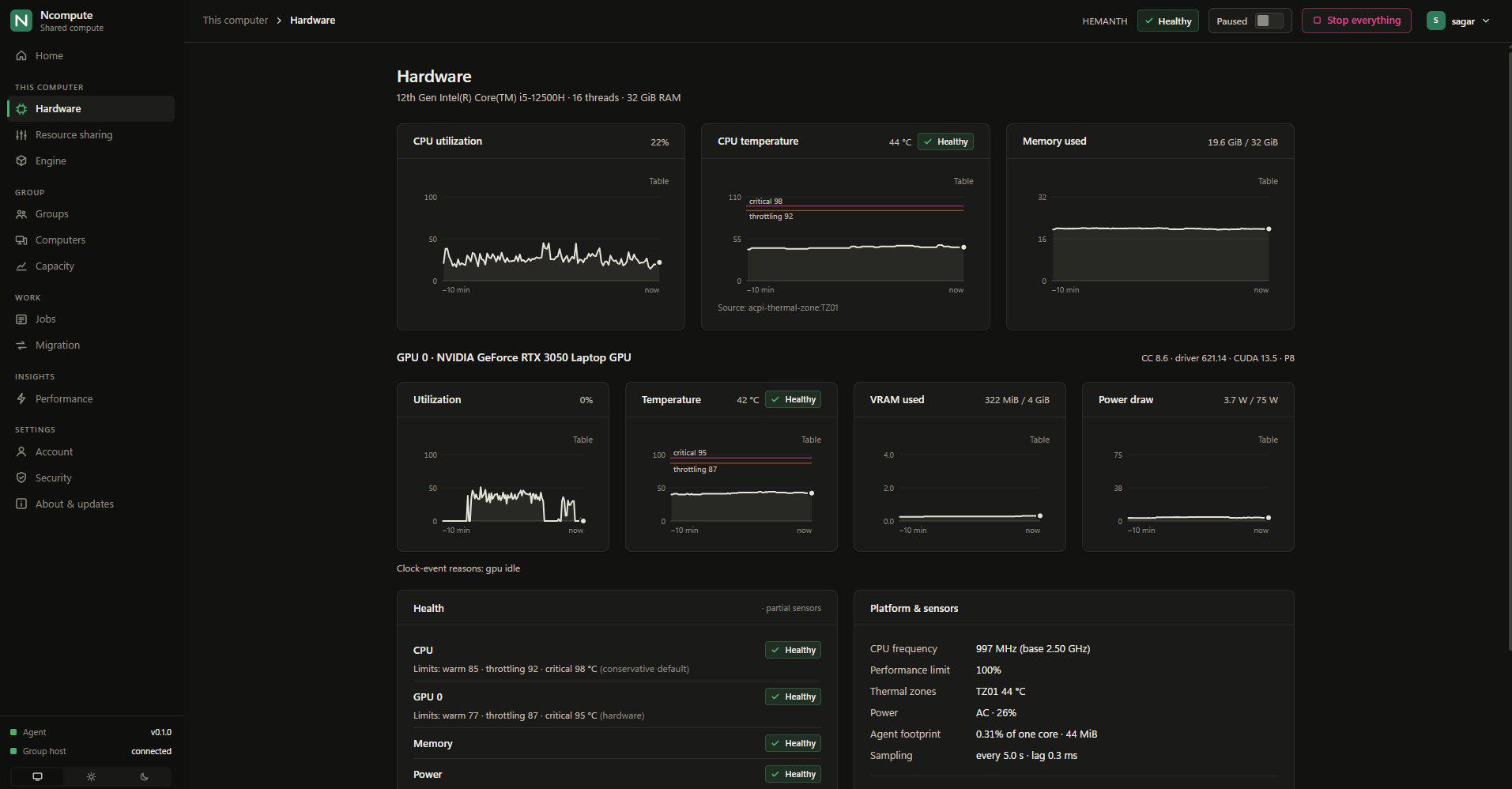
I had an idea: instead of leaving spare PCs idle, why not combine their computing power to run workloads locally?
So I've been building Ncompute, a Windows application that lets computers on the same Wi-Fi network work together.
Currently, it supports:
I just released v0.2.0 and would love some technical feedback.
What workloads would you actually want to run across multiple computers? What features would make something like this useful to you?
GitHub release: https://github.com/sagar2142/ncompute-releases/releases/tag/v0.2.0
r/coolgithubprojects • u/afatcat7999 • 2d ago
Hey everyone!
I've developed an open-source compatibility layer that allows the original HyperX NGENUITY graphical interface to run on Linux without Wine or a Windows virtual machine.
Instead of recreating the GUI, the project runs the original Avalonia interface with Linux compatibility adapters and the ngenuity-linux-cli backend.
Currently tested on the HyperX Pulsefire Haste 2 Pro wireless mouse, running Kubuntu with KDE Plasma.
Working features:
The compatibility code is open source under the MIT license.
No proprietary HyperX binaries are distributed. You must obtain the original NGENUITY software separately.
This is an early alpha release, and I'm looking for community feedback, testers and contributors to help expand hardware compatibility.
GitHub:
https://github.com/ElgatoconboteDEV/ngenuity-linux-ui
Special thanks to PMarinov1994 for the ngenuity-linux-cli backend.
r/coolgithubprojects • u/charydev • 2d ago

I built CatNotch, a free and open-source macOS app that brings Claude Code directly into your MacBook notch.
You can respond to permission requests, monitor active sessions, view conversations, and interact with Claude without leaving your current window.
It also includes music controls, calendar, tasks, and other productivity features.
Still actively working on it and would love to hear what you guys think. Any feedback, feature requests, or contributions are welcome.
r/coolgithubprojects • u/Njakuzure • 2d ago
I just tagged v0.1.0 of Lanner, a native GTK 4 and libadwaita desktop app written in Rust that reads local logs from AI coding agents (Claude Code, Codex, Antigravity, Grok Build, Pi) and visualizes spend, token breakdown, session timelines, and model speed/latency.
Repo: https://github.com/Konakonai/lanner
Flatpak bundle (GNOME 49 runtime, ~2.6 MB): https://github.com/Konakonai/lanner/releases/latest
A few GNOME / technical details:
- Built directly on libadwaita's semantic colors (`@window_bg_color`, `@card_bg_color`, `--accent-color`), so it follows system light/dark and accent themes cleanly without hardcoding a custom stylesheet over it.
- Custom Cairo/Pango charts for the session timeline, stacked history bars, 53-week heatmap, and per-model TTFT / tok/s distributions.
- Live file watching (`notify`) + incremental SQLite parse cache (`~/.cache/lanner`) so restarts only parse changed files.
- Strict read-only Flatpak sandbox: no `--filesystem=home`, only `:ro` binds for the specific agent log directories plus network access for fetching public pricing from models.dev / OpenRouter.
Planning to submit to Flathub once any early 0.1.x rough edges are ironed out. Would love any HIG or UI feedback from folks here!
r/coolgithubprojects • u/TrickySprinkles759 • 2d ago
r/coolgithubprojects • u/krit83 • 2d ago
blitcp is a free, open-source (Apache 2.0) file copy tool with a CLI and a desktop GUI, for Linux, macOS and Windows. No account, no telemetry.
The main new feature in 4.4.0 is multi-destination copy. The source is read once and written to every destination at the same time:
blitcp ~/photos --dest /mnt/usb1/photos --dest nas@host:/backup/photos --dest s3://bucket/photos
Each destination gets its own dedup, incremental check, space check and verification. If one destination fails or stops responding, it is skipped and the others finish.

New terminal dashboard
4.4.0 also adds a full-screen dashboard (--ui dashboard):
- Every phase (scan, dedup, space check, copy, verify) with its own timing
- "What limits the speed": source disk, destination disk, network and CPU side by side, so you can see what the bottleneck actually is
- A live write/read rate graph
- One row per destination with progress, rate and state (writing → verifying → verified)
- Notes when something matters, e.g. when the source and a destination are on the same disk and have to take turns
- Keys: v for per-device details (busy %, latency, throughput), g graph, n notes, 1-4 to focus on one destination, q to stop safely

The desktop app supports multiple destinations too.
What else is new
- HTTP(S) sources: download once, write to several destinations
- Destinations are probed before the copy starts (`blitcp creds test` runs the same check)
- ASC MHL manifests, which you can verify later without the source, with an optional deep check that reads every file back
- `--use-sudo` works with several local destinations
- Local verification reads back from the device, and the output says so when no content was compared
Fixes
- Security: fixed a high-severity issue in elevated (sudo) runs on Linux and macOS, where a local user could swap a folder for a symlink during a copy. Affects 4.2.15 and earlier. Several other path, metadata and log-leak fixes too.
- Data integrity: files with identical twins could keep the wrong content, and corrupted cloud objects could pass verification. Both fixed.
If you're upgrading: some exit codes changed (connection and host-key failures now exit 2), `--stall-timeout` only applies with multiple destinations, script installs need `--fetch-modules` after updating, and Azure needs azure-storage-blob 12.10 or later.
Release: https://github.com/gekap/blitcp/releases/tag/v4.4.0
Site: https://blitcp.dev
Feedback and bug reports are very welcome.
r/coolgithubprojects • u/facontidavide • 2d ago
PlotJuggler is an application to visualize and analyze data. Even if popular in the robotics and with drones, it can be used with any generic data source, such as CSV, Parquet, JSON.
It has dozens of extension including live streaming from MQTT, ZeroMQ, Websoscket, DDs and more.
And of course, since it is 2026, it includes a MCP server to be controlled by a AI Agent.
I can spend 1000 more words telling you more about it, but try it yourself in the browser (link above)
r/coolgithubprojects • u/evrenaraba • 2d ago

I got sick of installing 4 separate utilities (CrystalDiskInfo, CrystalDiskMark, surface scanners, paid recovery apps) just to monitor and maintain Windows drives, so I built a lightweight MIT open-source alternative in Rust + Tauri 2 (~3.7 MB installer, zero telemetry, no ads, no paywall).
Main features:
Safety design: it starts locked in Read-Only mode by default so you can't accidentally trigger writes or benchmarks, and every mutating action shows a dry-run preview before running.
Notes:
SHA256SUMS.txt) and SLSA provenance are attached to each GitHub release, and full source is open if you prefer building it yourself.--snapshot-dir .\src-tauri\tests\fixtures) that inspects sample data with zero disk access.Repo & download: https://github.com/yuefdev/ssd-sentinel
Happy to hear any feedback or bug reports.