r/coolgithubprojects • u/Berat_Ahmetaj • 1d ago
feed a movie, ask it away, open source
0.023$ for a whole movie using api key
public repo - https://github.com/Berat02xz/agentic-video-intelligence
would appreciate getting stars
r/coolgithubprojects • u/Berat_Ahmetaj • 1d ago
0.023$ for a whole movie using api key
public repo - https://github.com/Berat02xz/agentic-video-intelligence
would appreciate getting stars
r/coolgithubprojects • u/Shinn_Digital • 1d ago
I build sites for local service businesses and kept rebuilding the same foundation, so I cleaned up the core and open sourced it under MIT. One typed config file drives the pages, schema, sitemap, and theme. Happy to answer anything about how it's built.
r/coolgithubprojects • u/AdvikGM • 1d ago
Hey everyone! I recently built and deployed Dex (Dex Debugger), a browser-based AI debugging assistant designed to help developers quickly figure out why their code is breaking and how to fix it without getting stuck in endless trial and error. Instead of just dumping a wall of generic text, it lets you paste broken code into a clean interface, explains the root cause in plain language, and suggests working fixes in real time.
Under the hood, I kept the stack focused and lightweight using a Python and Flask backend (app.py, run.py, and chatbot.py) paired with conversational AI logic. It’s deployed live on Render at dex-debugger.onrender.com, and the full source code is available on GitHub atgithub.com/Advik212659/Dex-Debuggerif anyone wants to poke around the implementation or offer suggestions.
I'd love to hear any feedback on the UI, debugging accuracy, or ideas for features that would make it more useful for your daily coding workflow!
r/coolgithubprojects • u/bladerunner2048 • 1d ago
A few months ago, I shared my Firefox extension, Dialogue Export, here. It started as a small personal project because I wanted to save long ChatGPT conversations without manually copying everything.
Since then, the project has evolved quite a bit.
What's new:
The extension supports Markdown, PDF, HTML, TXT and JSON.
Still free, open-source and local-first. No accounts, ads, analytics or external data collection.
GitHub: https://github.com/vaulthunt3r/dialogue-export
Website: https://vaulthunt3r.github.io/dialogue-export/
Thanks to everyone who provided feedback on the original post. I'd love to hear what you think of the current version and what features you'd like to see next!
r/coolgithubprojects • u/TeaBig7333 • 1d ago
GitHub: https://github.com/kevin11dev/ReDash360
ReDash360 is a dashboard you sign in to instead of a normal desktop, made for a controller and a TV.
- Qt 6 / QML, running as its own session on KDE Plasma or Hyprland
- A 360-style sign-in screen (an SDDM theme) with profiles and animated avatars
- Steam, Heroic and Faugus games in one library, plus the emulators you already have
- A Guide button that works over any game or app
- Your own backgrounds, avatars and UI sounds
Walkthrough: https://www.youtube.com/watch?v=u-hlxG0jiac
It's still early and only tested on my own setup (CachyOS), so expect bugs. It's source-available under PolyForm Strict: free for non-commercial use, but not open source.
r/coolgithubprojects • u/Beubii • 1d ago
Most typing tests (Monkeytype, Keybr, etc.) only measure WPM and accuracy. They have no idea which finger actually hit the key—so you can easily build bad muscle memory (like reaching for V with your right index finger) and plateau without realizing why.
I built KineticType CV to fix that. It runs real-time hand tracking directly in the browser and maps your fingers onto a calibrated keyboard plane to grade your actual typing form alongside your speed.
What it does:
Tech stack: TypeScript, Vite, client-side computer vision.
Repo:https://github.com/tahaenasraoui-debug/kinetictype-cv
I'd love feedback on the keyboard calibration flow and any edge cases with different camera angles or layouts.
r/coolgithubprojects • u/Keutonim • 1d ago
I’ve been working on GeneRaptor — a local-first AI article generation studio.
Instead of relying on one AI prompt, it uses 11 specialized agents to research a topic, plan the structure, write the article, fact-check it, review SEO, and even generate a cover image.
A few things that make it different:
npx generaptorThe project is open source, and I’d genuinely love to hear your feedback!
r/coolgithubprojects • u/Resident-Biscotti248 • 1d ago
r/coolgithubprojects • u/errmayank • 1d ago
Hey, I wanted to share that Zaku 26.1 is out with support for environments and variables in requests.
About the app, it stores collections as folders and requests as TOML files. Everything is stored locally on user's filesystem, it doesn't have any login functionality (and never will).
It is available on Linux, macOS and Windows.
I've been working on this for the last 10 months full-time.
Here's what's new:
I have lots of things planned, if you try it out please let me know if there's something missing, not working or things you'd like to see added.
Repository:
https://github.com/buildzaku/zaku
Download:
r/coolgithubprojects • u/Mohammask • 1d ago
I open-sourced Cloud RPC, a self-hosted Node.js web dashboard for running 24/7 Discord Rich Presence without needing raw user account tokens.
How it works under the hood: Instead of scraping or storing user tokens like traditional self-bots, users log in through Discord's official OAuth2 flow requesting only identify and sdk.social_layer_presence. The backend manages the token lifecycle (proactive refresh + 4004/401 recovery), opens a Gateway WebSocket session per user, handles op: 2 device identification (Desktop, Mobile, Web, VR, PS5, Xbox), proxies external images through Discord's external-assets endpoint with an LRU cache, and broadcasts updates via op: 3.
Main features:
Repo (MIT License): https://github.com/Mohammask/cloud-rpc
Full setup instructions (including enabling the Social SDK scope in the Discord Developer Portal) are in the README. Feedback on the architecture or security hardening is always welcome.
r/coolgithubprojects • u/Muhammad-Essa • 1d ago
Neural Canvas, CNN Visualization
Neural Canvas can now recognize basic shapes like apples, moons, cars, and more using Google's Quick, Draw! dataset.
20 classes with 1,000 samples per class
2 convolutional layers with 16 and 32 filters
2 fully connected layers with 60 and 40 neurons
91% test accuracy
Trained using JAX on Google Colab
Neural Canvas can also visualize CNN feature maps in real time while drawing, showing how convolutional layers extract features from input images.
GitHub: https://github.com/MuhammadEssa2002/neural_canvas
Live demo: https://muhammadessa2002.github.io/neural_canvas/
r/coolgithubprojects • u/koc-kakoc • 1d ago
What it does:
It autonomously found previously unknown and later confirmed bugs in the hardest projects like Clickhouse, Redpanda, Pulsar, Meilisearch, Dragonfly, NATS, etc.
Supported platforms:
Repo: https://github.com/kakoc/hydo
Any feedback is very welcome, especially from people who test distributed systems or databases. If you need to any help to bootstrap it in your project - please DM me and I'll help. But in general you can just install LLM skill and it'll do all the heavylifting/guidance for you.
r/coolgithubprojects • u/SBFlabs • 1d ago
GitHub: https://github.com/SBFlabs/Lightspeed
I moved from Samsung One UI + Good Lock to a Chinese OEM with almost no customization and aggressive battery management that kept killing my Accessibility services. Switching to a third-party launcher wasn't an option either because it breaks native Recents animations on modern Android.
So I built Lightspeed (Kotlin / Jetpack Compose, Android 8.0–16, no root) — a source-available control layer that runs over your stock launcher so native animations stay intact.
Core features:
CREDITS.md), plus an on-device screenshot-based blur engine inspired by how Infinix handles blur on devices without native window blur, powering multiple themes including HUDs for scrub actions.INTERNET permission in AndroidManifest.xml (0 detections on VirusTotal across all signed APKs).License & pricing: Source-available (public for code audit and personal builds; non-commercial license, not OSI open-source). All core features are free with zero ads/trackers; an optional $1.99 one-time offline unlock adds extra visual themes and cosmetics.
Releases & SHA-256: https://github.com/SBFlabs/Lightspeed/releases/tag/v1.5.0
r/coolgithubprojects • u/Busy-Contact-5133 • 1d ago
I posted here a month ago for this website. Now i added an option for users to receive alerts in email.
You'll receive alerts from magnanium.noreply@gmail.com. It's gmail as you can see. I chose it because i didn't want to pay for an email and it still gets the job done. It may end up in your spam mail list so make sure to check the spam.
It's completely free and don't have ads. Visit https://magnanium.vercel.app
You can still use the RSS feed the same way.
r/coolgithubprojects • u/Maleficent_Barber672 • 1d ago
r/coolgithubprojects • u/Ready-Pepper-4203 • 1d ago
Hey everyone! 👋
I'm Omid, and I've been building RunMind, an open-source Windows desktop AI assistant that brings together AI models, intelligent automation, developer tools, system monitoring, and extensible integrations in one application.
I wanted to build something broader than another AI chat window.
Something that could bring AI closer to the actual desktop environment: development projects, system information, tools, and everyday workflows.
After a lot of development, I'm happy to share that RunMind is publicly available, with version 3.5.0 as the current source release.
Here's a better overview of what it is.
RunMind supports both local and remote LLMs.
The idea is to let you work with different model setups rather than tying the entire application to one AI provider.
Its ecosystem includes integrations around:
RunMind also supports agentic workflows, allowing the assistant to work with available tools and integrations instead of being limited to text-only conversations.
Development assistance is another important part of RunMind.
Its current code-analysis focus is JavaScript, TypeScript, and JSX/TSX.
The goal is to work with the structure of source code, not just search for matching text.
This includes AST-oriented parsing and structural analysis, with concepts such as declarations, references, scopes, and relationships between code elements.
I'm deliberately keeping the supported language scope focused rather than claiming that RunMind understands every programming language.
This is an important part of RunMind that I don't want to leave out.
RunMind isn't exclusively a developer assistant. It also brings system monitoring and system-related management into the same desktop environment.
The System Manager direction is about making system-level information and tools accessible alongside the AI assistant, rather than requiring users to treat system information as an entirely separate workflow.
I want the desktop assistant to be useful beyond writing code.
RunMind is designed to work with more than its built-in conversational interface.
It brings together intelligent automation and extensible integrations, including plugin support and MCP-related tooling.
That provides a foundation for connecting the assistant to external tools and extending its capabilities.
The idea is to make RunMind adaptable to different workflows instead of prescribing one fixed way to use it.
I also wanted flexibility in how people launch and interact with RunMind.
There are four access options:
Open the full RunMind chat application directly.
2. RunMind Runner
Use a compact launcher as an additional entry point, with access to the complete chat application.
3. PowerToys Run Plugin
Interact with RunMind through the PowerToys Run workflow, while retaining access to the full application.
4. PowerToys Command Palette Extension
Access RunMind through the Command Palette, including its inline/docked interaction experience, alongside the full application.
These aren't different editions or feature tiers. They're different ways to access the same complete RunMind experience.
I also care about giving users flexibility over their AI setup.
Being able to connect local models is important, particularly for people who prefer running models on their own hardware.
RunMind also supports remote model connections, so the application isn't restricted to local inference.
As always, the actual data path depends on the selected provider and configuration. I don't want to imply that every configuration is automatically offline or local-only.
100% open source.
RunMind is officially launched, but it's also an actively developed project.
Version 3.5.0 is publicly available, and I'm continuing to improve the application.
I'm especially interested in feedback from people who work with local LLMs, Windows desktop applications, developer tooling, system utilities, and AI automation.
🌐 Website: https://omid.navy/runmind
💻 Public source: https://github.com/omidnavy/RunMind
I'd genuinely appreciate feedback, suggestions, and constructive criticism.
I'm building this project myself, and I want to keep making it more useful.
Thanks for reading! ❤️

r/coolgithubprojects • u/mantikafasi • 1d ago
r/coolgithubprojects • u/ConsistentFox567 • 1d ago
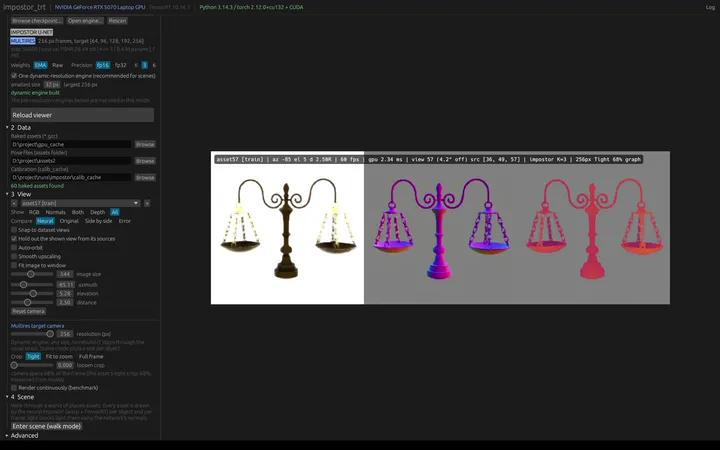
Fully neurally rendered asset (RGB, Normals, and Depth) rendered at an average of ~2.7 ms frame time on 8 GB RTX 5070 Laptop GPU by a custom model architecture in custom inference engine made with Rust, TensorRT, and CUDA kernels. Check out the README in this repo for details. Thanks.
r/coolgithubprojects • u/tilt2k • 1d ago
I built workflow-walker for pipevals, an open-source LLM evaluation platform, where it runs the evaluation pipelines. I've extracted it into its own MIT-licensed package so other projects can use it.
You give it a graph of steps, a persistence adapter and your step handlers. It runs the graph level by level, runs the steps within a level in parallel, follows conditional branches, and can suspend on a hook, for example to wait for a human review.
What it does
node:<id>:handler and so on), so the engine can replay a run and pick up at the first unfinished step."use step"), Inngest (step.run), Cloudflare Workflows (step.do) and AWS Lambda durable functions (context.step) through a small adapter, or in-process with no engine.Repo: https://github.com/pipevals/workflow-walker npm: https://www.npmjs.com/package/@pipevals/workflow-walker
It's early, so the API can still change. I'd like to hear what's missing for your engine or use case.
r/coolgithubprojects • u/Financial_Yam4336 • 1d ago
r/coolgithubprojects • u/MrCuteDiaperRETURNS • 1d ago
Paste a link, a magnet or a page, and it downloads. That now includes videos: share a YouTube, Instagram or X link to Maglev, pick a quality, and it saves one file. Search for a film, download it and grab its subtitles, all without leaving the app.
- Videos from YouTube, Instagram, X and other sites, with up to 6 qualities or audio only. In the built-in browser, long-press a video and pick Download this video.
- Torrents, normal links and videos from web pages. The torrent engine is librqbit (Rust).
- Search 50+ public sources at once.
- A built-in browser with tabs and ad blocking that finds the videos and files on a page, including HLS and DASH streams. Pick the quality and audio track and it saves one file.
- Subtitles from 20+ sources, right from your download. No account needed.
- Watch while it downloads, and follow a show or RSS feed so new episodes download on their own.
- Share a link from any app, or select one and pick Download with Maglev.
- No ads, no account, no tracking. GPL-3.0, Android 7+, updates in the app or through Obtainium.
I was bored with the old UI of ADM, 1DM and Flud and with how they're no longer maintained, so here is my honest attempt to fill that gap as an alternative.
- GitHub: https://github.com/Kaos599/Maglev
- Download: https://github.com/Kaos599/Maglev/releases/latest
r/coolgithubprojects • u/sav22999 • 1d ago
Hi everyone! For the past few weeks I've been working on SavComponents, a free, open-source library of web components. I wanted UI pieces I could drop into any page, whether it's a static HTML file, a server-rendered site or an app, without installing a framework or setting up a build step.
Getting started is two lines:
<link rel="stylesheet" href="https://savcomponents.com/v/1.3.2/sav.css">
<script src="https://savcomponents.com/v/1.3.2/sav.js" defer></script>
<sav-button>Hello</sav-button>What's in it
<html>, plus light, dark and auto modeSav.addStrings()How it's built
It's all vanilla JavaScript on web standards: no dependencies, no framework. Each component is a custom element with its own Shadow DOM, with styles shared through adoptedStyleSheets. Form fields are form-associated custom elements (attachInternals()), so they submit inside a normal <form> and work with native validation (required, checkValidity()…), with no hidden inputs. Theming goes through CSS custom properties (--sav-color-primary, --sav-radius, --sav-font…), and there's a customiser on the site that exports them for you.
Since they're standard custom elements, they work in plain HTML and alongside most frameworks.
Accessibility
I tried to treat this as a requirement, not an afterthought. Keyboard navigation and screen reader support are built in, and every component page has a WCAG 2.2 AA section that documents keyboard behaviour and roles, and measures contrast live in the current style and theme.
Versioned URLs
Each release lives at its own frozen address (/v/1.3.2/), so your site won't change when a new version comes out. You move to a new version when you decide to.
Used in real projects
I use SavComponents myself in a few apps I'm building, so it gets tested on real interfaces and not just on demo pages:
Where it's at
It's still a young project, and there's plenty I want to improve. For example, the JS isn't minified yet (it's about 180 KB gzipped). I'd love honest feedback: what's missing, what feels off, or anything that breaks.
→ Docs and live demos: https://savcomponents.com
→ Source: https://github.com/Sav22999/savcomponents
r/coolgithubprojects • u/CafeConFenix2 • 1d ago
Mega Mixer is a small Windows app that lets you decide where every app's sound goes, and how loud, with a mixer and a patch bay.
GitHub: https://github.com/CafeConFenix/MegaMixer
---
What it does
Drag a cable from an app to an output. That's it. Each app (or game) can play on 1, 2 or 3 outputs at the same time: your game on the headphones, Spotify on the speakers and the TV, Discord only on the headset.

Faders that go past 100%
Every app gets its own fader, and you can push it up to 200%. Useful when a friend on Discord sounds like they're whispering from another room. There's a soft limiter so the boost doesn't distort.

The mic is just another channel
Patch your microphone to any output and hit Listen to monitor yourself. Turn it off and the cables stay where they were.
Any MIDI controller
nanoKONTROL, X-Touch Mini, MIDImix, whatever you have. Pick what to control, press *Learn*, move a fader. Done. It only grabs the MIDI port when you've actually assigned something, so your DAW can still use it.

Works with whatever audio hardware you have
Onboard audio, USB headsets, Bluetooth, HDMI, audio interfaces, virtual cables. Unplug your headphones and their apps fall back to the default output; plug them back in and everything returns where it was. It even runs with no sound card at all and tells you what to plug in.

If you have a GoXLR with GoXLR Utility, the physical faders and the on-screen ones move together.
---
Tech bits, for the curious
- Rust + Tauri 2, plain HTML/CSS/JS for the UI (no framework)
- For each app it picks the cheapest path: if an app only goes to one output at ≤100%, Windows does the routing natively and Mega Mixer uses no CPU for it. It only captures and copies audio (WASAPI process loopback) when you ask for boost or multiple outputs.
- Starts with Windows, lives in the tray
- English and Spanish, x64 and ARM64 installers, MIT licensed

Honest limitations
- Boost and multi-output work best with a free virtual cable (VB-Cable) to "park" the original sound. Without it, it still works but in a limited mode.
- Copies to extra outputs have ~20–30 ms of delay. Unnoticeable in most cases, but if you play the same source on two speakers in the same room you might hear a slight echo.
- Full features need Windows 10 2004 or newer.
---
It's free and open source. Feedback, bug reports and translations are very welcome, especially if you have unusual audio setups I haven't been able to test.
r/coolgithubprojects • u/andrewaltair • 1d ago
Source: https://github.com/blessandsoul/create-tigra
I maintain create-tigra and have opened its published 5.0.2 source baseline for review. It generates a TypeScript project with a Next.js frontend foundation, a separate Fastify API, Prisma/MySQL, auth/session code, Redis-backed limits, tests, CI, and Docker configuration.
The idea is to start with the infrastructure connected and build your own application pages. Forms and API/auth wiring are included; the product screens are yours. That trades repeated setup work for a larger initial stack.
I would appreciate recommendations and honest feedback on the source: what is unnecessary, what is hard to follow, and what would stop you from using or contributing to it? Feel free to roast the repo, especially with a concrete file or alternative approach.
It is free and MIT-licensed. Known dependency advisories are listed in KNOWN_ISSUES.md; the source snapshot is not presented as ready to deploy unchanged.