r/coolgithubprojects • u/Ashamed_Sherbert8713 • 6h ago
aghaz-claude-mods: a safety guard, progress spinner and themes for Claude Code (TypeScript, MIT)
github.com
1
Upvotes
r/coolgithubprojects • u/thesamtom • 7h ago

How much does a GitHub contribution graph actually tell you about a developer?
I built Graph Canvas, an open-source CLI that generates synthetic Git commit history to demonstrate how easily contribution graphs can be manipulated.
It started as an experiment to explore whether those little green squares are a reliable indicator of developer productivity.
Features:
Built with Node.js and Git, featuring a minimal black, white and green terminal aesthetic.
Strictly for educational and experimental purposes. This project is not intended for misleading recruiters, falsifying professional experience, or misrepresenting developer productivity.
GitHub: https://github.com/thesamtom/graph-canvas-pub
I'd love to hear your thoughts on the project, terminal UI, and the credibility of contribution graphs as a measure of developer activity.
Not every green square tells the truth.
r/coolgithubprojects • u/joyboyy937 • 8h ago
Hey r/coolgithubprojects — wanted to share **TraceZero v1.1.0**, a Windows desktop code debugger built for devs working on NDA repos or offline laptops where cloud AI tools (Cursor, Copilot, ChatGPT) aren't allowed.
**How it stops a tiny 1.5B model from hallucinating:**
Includes **Free Forever Lite** (`7-day` full Pro trial, then `3` AI Reflexion fixes a day + unlimited AST scans forever) and a `0/67` VirusTotal clean scan.
Repo & v1.1.0 installer: https://github.com/joyboyy937-rgb/tracezero-desktop
r/coolgithubprojects • u/OpenDistort • 9h ago
I wanted a faster way to control Apple Music and Spotify without constantly Command-Tabbing or keeping a mini-player floating over my work. So I built Musi in native Swift/AppKit.
What it does:
You can check it out here: https://github.com/mythreyen/musi
Happy to answer any questions or take feature requests in the comments!
*This app was heavily developed with the help of AI so I would love feedback on the gesture sensitivity and any edge cases with your macOS version.
*Feel free raise issue tickets in the repo so I can try to help you!
*You will need to install Xcode for this to work.
*Follow the instructions posted in the repo for this to work flawlessly.
r/coolgithubprojects • u/Quiet_Category_628 • 10h ago
I was stressed out of all the music players out there(especially teminal players) not naving ONE feature I need.
I've been working on this player for my terminal for the past few months. It's quite customized to my workflow but I believe others may like it. It includes features like replaygain, search, auto music suggestions, visualizers, and so much more with variable themes!
Would love if you guys can check it out. I'm open to suggestions.
r/coolgithubprojects • u/W61k3r • 10h ago
AIO USB/VM/Drive image with Inkling 2 Mini baked here: https://huggingface.co/Wa1k3r/Inkling-2-Mini-NVFP4exp-Q8-draft-LexiSuite-AIO-for-AMD-RDNA
I'm building a local AI platform from scratch in Rust: an inference engine (LexiEngine), a browser control panel (LexiPanel), an appliance OS (LexiOS) and a kernel designed around inference (LexiKernel). It boots from one USB image. It is not a wrapper around llama.cpp, and there is no third-party code in the product.
A new development image went out today. Here is what changed since the last one two days ago, and what the work actually was.
The Panel was rebuilt, page by page (66 changes)
The old Panel worked but read like an engineering console: raw JSON on screen, fields with no labels, boxes inside boxes, internal jargon everywhere. I went through it by hand.
- One header and one navigation instead of five stacked bars
- 12 themes
- A file and folder picker on every path field, so nothing has to be typed
- Right-click menus on instances, files and table cells
- Parameters grouped in the order you set them, with a device chooser for the instance's cards
- Switch an instance between LexiEngine and llama.cpp from one page
- Hardware, Diagnostics, Power, GPU tuning and Models rewritten in plain words (temperatures in degrees, problems listed first)
- An abliteration lab where you pick models with toggles and pick the drive to write to; the original is never touched
- A layout choice: top tabs, or a side tree like a hypervisor console
LexiKernel went from one core to all of them (99 changes)
Until now my kernel ran all threads of a program on a single CPU. That was the biggest gap between it and Linux. Three rounds of work went into closing it: per-CPU timers and scheduling, threads that move between cores with their full vector state, memory handled per NUMA node, huge pages, and TLB shootdowns that a core answers even in the middle of a long system call. It now boots with every core in use and served the Panel to 8 clients at 2, 4 and 8 CPUs in a VM with no failed requests.
The kernel's own GPU drivers for AMD, NVIDIA and Intel are compiled into this build too. They have not run on a real card in this version yet. That is the next milestone, and until then GPU work under LexiKernel goes through a Linux guest. The image also boots LexiOS on Linux 7.4, which is what you want for daily use today.
LexiEngine (27 changes)
- Groundwork for splitting one model across several cards (serving across cards is not in this build)
- New draft options for Inkling 2, off by default until they are measured
- A quantizer that trains with the rounding in the loop instead of rounding afterwards
- The whole tree moved to Rust 1.100.1
Speed, measured on this version
Inkling-2-Mini (the looped mixture-of-experts model released Nov 20), one Radeon RX 7900 XTX, 4-bit KV cache, greedy, one run each, measured Nov 27-28.
After a 16,384-token prompt:
- LexiEngine: prompt 2,244 tok/s, generation 64.6 tok/s, 131.1 tok/s with the model's own draft head
- llama.cpp b12722: prompt 1,060 tok/s, generation 42.9 tok/s
- Strata 0.2.23 (8-bit cache, it refuses 4-bit on this card): prompt 2,075 tok/s, generation 53.9 tok/s
Long context on LexiEngine:
- 261,632-token prompt: 1,157 tok/s reading, then 48.7 tok/s (63.2 with the draft head)
- 523,264-token prompt: 766 tok/s reading, then 39.5 tok/s (46.8 with the draft head)
- 10 of 10 planted facts recalled at both depths
Drafted output was identical to plain output in every run.
Two notes so nobody says I hid them. The llama.cpp number is from the Nov 25 build: the build I fetched today ran this model at 7.6 tok/s on this card, which looks like a bug on their side, so I did not use it. And llama.cpp needs a 26-line loader change to open my file, because the file also carries the draft head and image tower.
What it is not, yet
- A development build, not a production release
- Developed and measured on one card (7900 XTX, Vulkan). Other cards are less tested
- The kernel's own GPU drivers have not run on a card in this version
- The Windows installer is on the stick but has not been run on a Windows PC; no macOS installer yet
- Installing to an internal disk is not in this image
- Only Inkling has been benchmarked on this exact version; my 27B numbers are from a build nine days older and are being re-run
Tested
Every test in the tree ran on this version: 17,932 tests, none failed. Both images passed their Secure Boot checks in a VM.
Links
Download (381 MB USB image, boots to the Panel):
https://lexipanel.com/download/
All-in-one image with Inkling-2-Mini inside (18.1 GB, needs a 32 GB stick):
https://huggingface.co/Wa1k3r/Inkling-2-Mini-NVFP4exp-Q8-draft-LexiSuite-AIO-for-AMD-RDNA
Every one of the 206 changes, one line each:
https://github.com/W61k3r/LexiSuite-Releases/wiki/Changes-d484004
Benchmarks and method:
https://github.com/W61k3r/LexiSuite-Releases/wiki/Benchmarks
Happy to answer questions about the kernel work or the engine.
r/coolgithubprojects • u/444_Guy • 11h ago
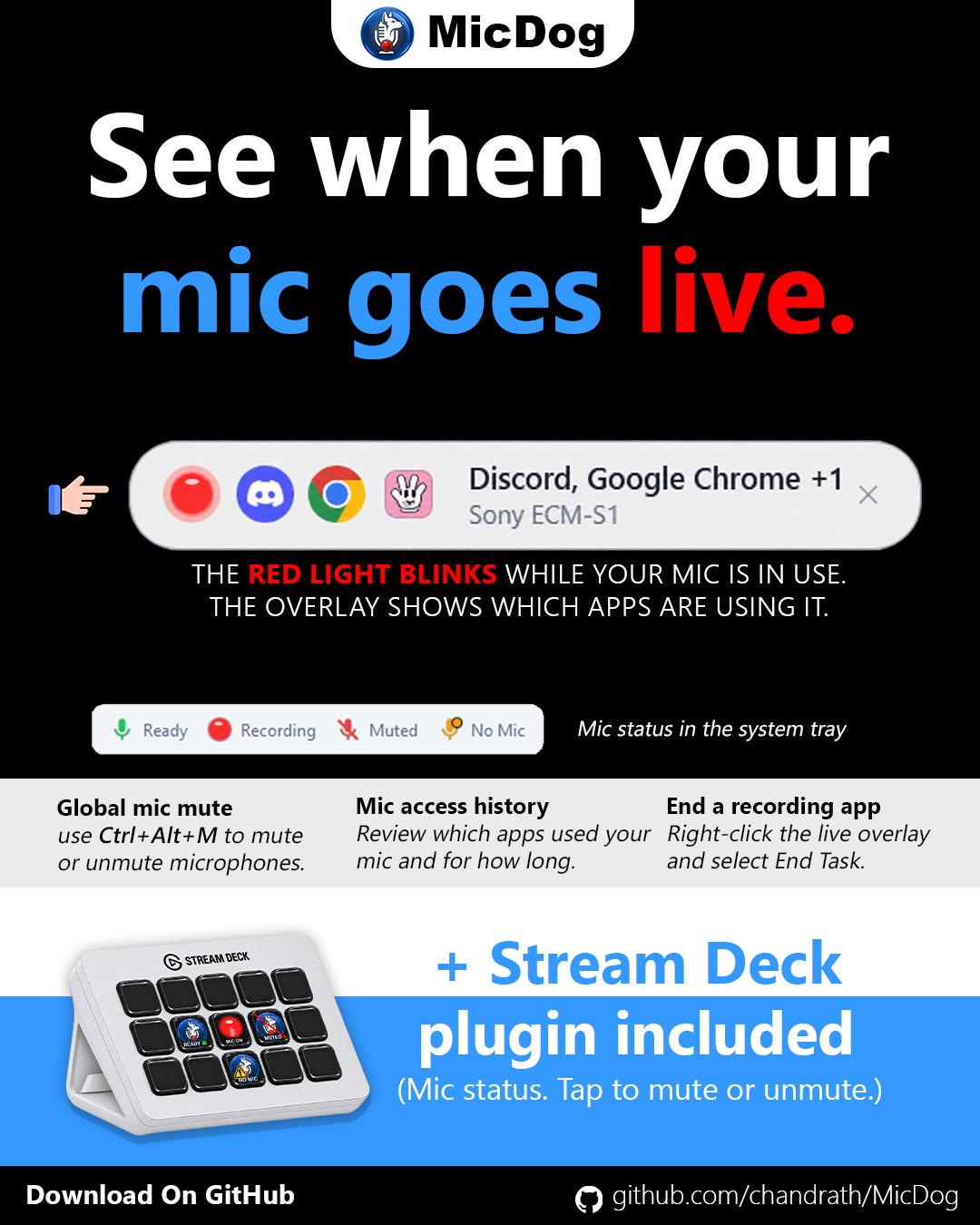
Windows already shows a mic icon in the taskbar, and there are plenty of third-party tools for muting it. The reason to try MicDog is the little overlay that pops up as soon as an app starts using your mic. It shows the app’s name, its icon, and which microphone it’s using. The red light keeps blinking while the mic is active, so you can see what’s going on.
Ctrl + Alt + M.It’s a super lightweight native Windows app built with .NET 10, WPF.
r/coolgithubprojects • u/AppropriatePomelo320 • 12h ago

I've been building Egron, a macOS app to monitor and control outbound network traffic so you can see what happen and where it goes
You can choose between ask mode (prompt on every connection) and silent mode (allow everything, block manually).
It's free and open source. Would love to hear your feedback!
r/coolgithubprojects • u/bweber • 13h ago
r/coolgithubprojects • u/skepsismusic • 14h ago

AI disclosure: Sapwood was built with substantial help from coding agents, against a written specification and a large automated test suite. MIT license
It is one script, Sapwood.ps1, with a WPF window. It needs PowerShell 7.4 or later on Windows x64. Windows PowerShell 5.1 cannot run the GUI.
What it does:
- Scans a local folder or a UNC path with the current user's permissions
- Updates folder totals while the scan is still running
- Reports logical size. Allocated size is Unavailable in this edition
- Find and Keywords match names only. File contents are never read
- Opens a path in Explorer, copies a short summary, exports CSV, and saves a snapshot for compare
What it does not do: delete or modify files, send telemetry, install a service, or change the registry.
Headless mode writes one JSON summary to stdout.
r/coolgithubprojects • u/DetailKey6716 • 15h ago

I've been building Shape, an AI coding agent designed to make AI-assisted development more accessible.
The idea behind Shape is pretty simple: coding agents shouldn't have to come with expensive subscriptions, restrictive usage limits or a frustrating experience.
Shape gives you access to multiple AI models, free usage, and tools designed for more than just writing code. It also includes native reverse engineering and modding capabilities.
I've been putting a lot of work into making the agent more reliable, improving its capabilities and building a better overall experience. It now has a completely redesigned interface and native macOS support.
Some things in the latest update:
Shape is still actively being developed, and there's plenty I'd like to improve. I'm sharing it because I'd love to get more people trying it, hear what they think and find out what features would make it genuinely useful.
If you're interested, you can check it out here:
GitHub: https://github.com/useshape/Shape
Latest release: https://github.com/useshape/Shape/releases/tag/v1.0.4
Website: https://useshape.org/
FYI: I do eventually want to make more models free and increase the monthly limit.
r/coolgithubprojects • u/uniVocity • 15h ago
r/coolgithubprojects • u/Ruslanty • 15h ago

I made a collection of eight browser games, including personality quizzes, island survival, compatibility tests, reaction and memory games.
You can challenge a friend by sending them a link. Both browsers generate the same round from a seed.
Everything runs on GitHub Pages using plain HTML, CSS and JavaScript. No backend, dependencies or registration.
Available in English, Latvian and Russian. MIT licensed.
r/coolgithubprojects • u/Erehr • 15h ago

Curio is a free, open-source, local-first digital asset manager for Windows, Linux and macOS. Organize images, video, audio, documents, books, fonts, 3D models, code and web links while your assets stay ordinary files on disk - no account, cloud sync or telemetry.
https://github.com/Erehr/curio
https://github.com/Erehr/curio-plugins
https://github.com/Erehr/curio-extension
r/coolgithubprojects • u/pasteque42 • 16h ago
Just wanted to share the project I've been working on for the past few weeks. It's like grok bok but highly customizable. It's open source!
prompt: "Make a matrix theme"
r/coolgithubprojects • u/Fast_Literature_2969 • 16h ago
We clone, npm install, and move on. The projects stay on your laptop forever: old lockfiles, three Node versions, that one Python from a tutorial. Meanwhile hacked releases of popular packages (axios, LiteLLM…) hit the news every few weeks.
amipatched scans your whole machine and tells you in plain English what's actually risky:
go install github.com/aditya9277/amipatched/cmd/amipatched@latest
👉 https://github.com/aditya9277/amipatched
Free & open source, v0.1, built with help from Claude Code. Roast it!
r/coolgithubprojects • u/pizza-p4rkr • 16h ago

hey! Glow is a small free tool i built for my own PC and just released.
Press Ctrl+Alt+F and a small search pill opens at the top of the screen. Type a word and every match glows on every monitor at once, in any app, including text inside images, videos and screenshots.
The pill counts them ("12 matches · 3 screens"), and Tab jumps the mouse to the next one. Great for finding that one setting in a crowded window or a name in a long call.
- free and open source (MIT), Windows 10/11, nothing to install
- download + demo: https://p4rkr.online/tools/glow/
- source: https://github.com/pizza-p4rkr/glow
feedback and bug reports very welcome.
r/coolgithubprojects • u/Previous-Professor56 • 17h ago

r/coolgithubprojects • u/Own_Photo_2668 • 17h ago

A portable repair agent for computer technicians. Run it on the customer's PC from a USB stick or desktop, scan the QR code with your phone, and work through the scan, the plan and the fixes with an AI (or without one). You approve every change, and it cleans up after itself when you're done.
https://github.com/flesheatingbug/Turbo-Button
I'm adding features as i use it, which is daily at work, so expect updates and new features. Suggestions are welcome
Can work on multiple pcs at the same time and even generates a handy pdf report of whats done
r/coolgithubprojects
•
u/UcanTosbaBruh
•
18h ago
Hey everyone i have been working on AvoryOS, an independent operating system with its own kernel, for around 9 or 10 months as a hobby project.
It's not based on Linux, but it has a compatibility layer that allows it to run Linux applications and drivers.
Some of the things it currently supports:
- AMDGPU Drivers, Nouveau Nvidia Drivers and Realtek Ethernet drivers through LinuxKPI (i got the idea from FreeBSD)
- Hardware-accelerated graphics on real hardware
- KDE Plasma 6, XFCE, Cinnamon, Hyprland, Sway and DWM
- Steam, Proton, Wine, Firefox, LibreWolf and Chromium
- KVM and AMD-V virtualization
- Its own package manager, Axon
- EXT4, FAT32 and exFAT filesystems
Theres still a lot of work to do, but Im happy with how far the project has come.
I do love to hear your thoughts and feedback!
GitHub: https://github.com/Hidotu-Labs/AvoryOS
If you find the project interesting a star would be greatly appreciated!
r/coolgithubprojects • u/thegodforsaken • 18h ago

Turn the phone or tablet you already own into a stream controller for OBS Studio. Go live, record, switch scenes, mute the mic, save a replay, fire keyboard shortcuts and sounds, from a grid of keys on an iPhone, iPad or Android, over your home Wi-Fi. Runs on Mac and Windows. No cloud, no account.
What it does

r/coolgithubprojects • u/sallam5010 • 18h ago
I kept copying answers from Claude Code into Antigravity and back to get a second opinion. So I built a small app that lets them talk to each other directly.
It is called Consult Room. It runs on your own PC and uses the two command-line tools you already have installed (claude and agy).
How it works:
Safety things I cared about:
- Talking is read-only.
- Building only edits a git copy, and neither one can run commands.
- You can mark folders as private so a room can never be opened on them.
- It only listens on 127.0.0.1. Nothing is hosted.
Honest limits:
- Windows 11 only. I have not tested anything else.
- You need both Claude Code and Antigravity installed and signed in. Every turn uses your own accounts.
- It is not a sandbox. It relies on the two tools respecting their own flags.
- It is a personal project. No promises.
No npm packages, just Node 24. MIT licence.
Repo: https://github.com/Sallam5010/consult-room
I built it with a lot of help from Claude Code itself. Feedback is welcome, especially on the safety side.
r/coolgithubprojects • u/evoluteur • 19h ago
r/coolgithubprojects • u/Known_Barracuda_3977 • 19h ago