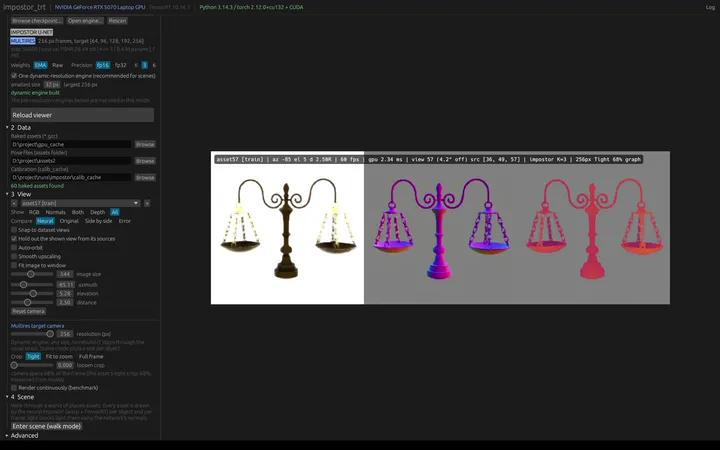
Fully neurally rendered asset (RGB, Normals, and Depth) rendered at an average of ~2.7 ms frame time on 8 GB RTX 5070 Laptop GPU by a custom model architecture in custom inference engine made with Rust, TensorRT, and CUDA kernels. Check out the README in this repo for details. Thanks.
I built workflow-walker for pipevals, an open-source LLM evaluation platform, where it runs the evaluation pipelines. I've extracted it into its own MIT-licensed package so other projects can use it.
You give it a graph of steps, a persistence adapter and your step handlers. It runs the graph level by level, runs the steps within a level in parallel, follows conditional branches, and can suspend on a hook, for example to wait for a human review.
What it does
Resumes after a crash. Every step has a deterministic name (node:<id>:handler and so on), so the engine can replay a run and pick up at the first unfinished step.
Runs on several engines. Vercel Workflow ("use step"), Inngest (step.run), Cloudflare Workflows (step.do) and AWS Lambda durable functions (context.step) through a small adapter, or in-process with no engine.
Gates on branches. A node behind a branching node runs only on its branch, even if it also takes data from upstream.
Always finishes the run. A run ends in a terminal status even when something fails outside a step.
Paste a link, a magnet or a page, and it downloads. That now includes videos: share a YouTube, Instagram or X link to Maglev, pick a quality, and it saves one file. Search for a film, download it and grab its subtitles, all without leaving the app.
- Videos from YouTube, Instagram, X and other sites, with up to 6 qualities or audio only. In the built-in browser, long-press a video and pick Download this video.
- Torrents, normal links and videos from web pages. The torrent engine is librqbit (Rust).
- Search 50+ public sources at once.
- A built-in browser with tabs and ad blocking that finds the videos and files on a page, including HLS and DASH streams. Pick the quality and audio track and it saves one file.
- Subtitles from 20+ sources, right from your download. No account needed.
- Watch while it downloads, and follow a show or RSS feed so new episodes download on their own.
- Share a link from any app, or select one and pick Download with Maglev.
- No ads, no account, no tracking. GPL-3.0, Android 7+, updates in the app or through Obtainium.
I was bored with the old UI of ADM, 1DM and Flud and with how they're no longer maintained, so here is my honest attempt to fill that gap as an alternative.
well, i started building this when barely anyone around me used github or such. I was in school when I first started sync music. It started as a simple music bot just for me and my friends however later made it public and it's now used by 1.4k servers.
I never thought I would get that many users but here it is playing across servers having more than lakhs of people in it.
until another stupid kid comes and asks 'you built or ai', checkout my github, i built sync music when you figured out how to print hello world. All with the help of youtube and random websites and docs.
anyways, checkout the project and the website, give it a star if u like, and of course add it to your own server and listen!!
Hi everyone! For the past few weeks I've been working on SavComponents, a free, open-source library of web components. I wanted UI pieces I could drop into any page, whether it's a static HTML file, a server-rendered site or an app, without installing a framework or setting up a build step.
80+ components: buttons, inputs, select with search, date and time pickers, colour picker, OTP, password strength, dialogs, popovers, action sheets, toasts, tabs, tables, charts, timeline, drag-and-drop sorting, and more
Five visual styles (Soft, Tilt, Sharp, Brutal and Glass), switched with a single class on <html>, plus light, dark and auto mode
About 2,000 icons, loaded only when you use them
English and Italian built in, and you can add any language with Sav.addStrings()
How it's built
It's all vanilla JavaScript on web standards: no dependencies, no framework. Each component is a custom element with its own Shadow DOM, with styles shared through adoptedStyleSheets. Form fields are form-associated custom elements (attachInternals()), so they submit inside a normal <form> and work with native validation (required, checkValidity()…), with no hidden inputs. Theming goes through CSS custom properties (--sav-color-primary, --sav-radius, --sav-font…), and there's a customiser on the site that exports them for you.
Since they're standard custom elements, they work in plain HTML and alongside most frameworks.
Accessibility
I tried to treat this as a requirement, not an afterthought. Keyboard navigation and screen reader support are built in, and every component page has a WCAG 2.2 AA section that documents keyboard behaviour and roles, and measures contrast live in the current style and theme.
Versioned URLs
Each release lives at its own frozen address (/v/1.3.2/), so your site won't change when a new version comes out. You move to a new version when you decide to.
Used in real projects
I use SavComponents myself in a few apps I'm building, so it gets tested on real interfaces and not just on demo pages:
It's still a young project, and there's plenty I want to improve. For example, the JS isn't minified yet (it's about 180 KB gzipped). I'd love honest feedback: what's missing, what feels off, or anything that breaks.
Drag a cable from an app to an output. That's it. Each app (or game) can play on 1, 2 or 3 outputs at the same time: your game on the headphones, Spotify on the speakers and the TV, Discord only on the headset.
Faders that go past 100%
Every app gets its own fader, and you can push it up to 200%. Useful when a friend on Discord sounds like they're whispering from another room. There's a soft limiter so the boost doesn't distort.
The mic is just another channel
Patch your microphone to any output and hit Listen to monitor yourself. Turn it off and the cables stay where they were.
Any MIDI controller
nanoKONTROL, X-Touch Mini, MIDImix, whatever you have. Pick what to control, press *Learn*, move a fader. Done. It only grabs the MIDI port when you've actually assigned something, so your DAW can still use it.
Works with whatever audio hardware you have
Onboard audio, USB headsets, Bluetooth, HDMI, audio interfaces, virtual cables. Unplug your headphones and their apps fall back to the default output; plug them back in and everything returns where it was. It even runs with no sound card at all and tells you what to plug in.
If you have a GoXLR with GoXLR Utility, the physical faders and the on-screen ones move together.
---
Tech bits, for the curious
- Rust + Tauri 2, plain HTML/CSS/JS for the UI (no framework)
- For each app it picks the cheapest path: if an app only goes to one output at ≤100%, Windows does the routing natively and Mega Mixer uses no CPU for it. It only captures and copies audio (WASAPI process loopback) when you ask for boost or multiple outputs.
- Starts with Windows, lives in the tray
- English and Spanish, x64 and ARM64 installers, MIT licensed
Honest limitations
- Boost and multi-output work best with a free virtual cable (VB-Cable) to "park" the original sound. Without it, it still works but in a limited mode.
- Copies to extra outputs have ~20–30 ms of delay. Unnoticeable in most cases, but if you play the same source on two speakers in the same room you might hear a slight echo.
- Full features need Windows 10 2004 or newer.
---
It's free and open source. Feedback, bug reports and translations are very welcome, especially if you have unusual audio setups I haven't been able to test.
I maintain create-tigra and have opened its published 5.0.2 source baseline for review. It generates a TypeScript project with a Next.js frontend foundation, a separate Fastify API, Prisma/MySQL, auth/session code, Redis-backed limits, tests, CI, and Docker configuration.
The idea is to start with the infrastructure connected and build your own application pages. Forms and API/auth wiring are included; the product screens are yours. That trades repeated setup work for a larger initial stack.
I would appreciate recommendations and honest feedback on the source: what is unnecessary, what is hard to follow, and what would stop you from using or contributing to it? Feel free to roast the repo, especially with a concrete file or alternative approach.
It is free and MIT-licensed. Known dependency advisories are listed in KNOWN_ISSUES.md; the source snapshot is not presented as ready to deploy unchanged.
I wanted a simpler way to make content edits on my Astro sites. Fix a typo, change a publish date, or swap an image, then see exactly what changed before saving. So I built goastro.
Run it from your Astro project and it opens an editor in your browser. Your content stays in the .md and .mdx files already in your repo. The editor runs locally, with no account, no telemetry, and no content uploads.
Write or edit the source. Edit headings, links, lists, and images visually, or switch to the raw Markdown. Frontmatter fields like dates and tags have their own form.
Keep your MDX components intact. Visual edits preserve components, imports, and HTML as written.
Review before saving. You get a diff before each save, and goastro backs up the original file.
Preview the actual page. After saving, you can see the page rendered by your Astro dev server. You publish through your usual workflow.
It’s MIT-licensed and available on npm. To try it, run this from your Astro project with Node.js 22.18 or newer.
We spent two years building our AppSec platform. This week we open sourced the whole thing.
You type /cybedefend in your coding agent (Claude Code, Cursor, Codex) and it audits your repo:
- Open source scanners that fit your repo run in Docker (Opengrep, Trivy, Gitleaks, zizmor and more). The ones you already use (Semgrep, CodeQL, SonarQube...) plug in too.
- Then your agent hunts what scanners can't see, like user B opening user A's invoice because a route forgot a permission check.
- The rule for that hunt: no failing test, no bug. It has to write a test in your own suite that fails because of the bug. You don't trust the agent, you run the test.
Everything lands in a dashboard on your machine, wired to GitHub, GitLab, Jira and Linear, with scans on every pull request. No seat limit, no scan quota, no telemetry, no API key.
I maintain speech-swift. If you already have the script for a recording, speech align gives you a start and end time for each word. In v0.0.30 we fixed timestamp handling for repeated words.
I made a short WAV with macOS’s Samantha voice and ran the release on it.
say -v Samantha -r 145 -o recording.wav --file-format=WAVE --data-format=LEI16@24000 "I, I can hear you."
speech align recording.wav --text "I, I can hear you." --language en
Here’s the output. The two I’s get their own spans.
[0.00s - 0.40s] I,
[0.56s - 0.80s] I
[0.80s - 0.96s] can
[0.96s - 1.28s] hear
[1.28s - 1.59s] you.
The first run downloads the alignment model. The audio is processed on your Mac. If you use word timings in an editor, which format is easiest to import?
Windows sends new internet connections through… shows the adapter Windows really uses for IPv4 and for IPv6. It asks Windows directly: a socket is pointed at a public address (nothing is sent) and Windows' choice of source address names the adapter.
Each adapter card shows each protocol's metric and Cost: the default route's metric plus the interface metric, which is the number Windows compares. The lowest cost of each family wins.
Make primary (header) makes the adapter primary for both IPv4 and IPv6; Primary on a protocol line does just that protocol. That adapter gets metric 5, and the others get 25, 35, … in their current order. Where a router hands out a lower route metric (an IPv6 router at "high" preference gives 16, one at the usual "medium" gives 256), the others get raised further so that the chosen adapter's cost really is the lowest.
− / + change a metric by 1 (Shift-click: 10). Auto gives the metric back to Windows, which picks one from the link speed.
IPv4 / IPv6 turn the protocol on or off for that adapter, the same as ticking it in the adapter's Properties. The On switch enables or disables the whole adapter.
Prefer IPv4 over IPv6 is Windows' own setting for this (DisabledComponents bit 0x20 under Tcpip6\Parameters). It takes effect after a restart.
Automatic for all gives every metric back to Windows. Restore original brings back the settings recorded the first time the app ran.
Each card names its adapter and the speed it's connected at, e.g. eth0 · Marvell AQtion AQC113 · 10 Gbps. Ethernet adapters are eth0, eth1, eth2… in the order Windows created them (the order of its own "Ethernet", "Ethernet 2" defaults), so renaming a connection doesn't change them. Long device names are shortened and the chipset is named from the PCI ID database; when both say the same maker, only the chipset is shown. Chipsets carry their speed or Wi‑Fi generation, e.g. Intel I226-V (2.5G), Realtek RTL8852CE (Wi-Fi 6E). Realtek USB Ethernet (RTL8153/8156/8157/8159) and common USB Wi‑Fi sticks are named by their USB IDs, and Intel Wi‑Fi built into the processor (CNVi) by the module the driver names, e.g. Intel BE211 (CNVio3, Wi-Fi 7). A Wi‑Fi card's speed is read every 5 seconds, as it changes with the signal. Nothing is read while the window is minimized.
Each card shows the internet provider behind the adapter, its public IPv4 and IPv6 addresses and its logo, looked up through that adapter itself, so an adapter that a router sends out another line shows that line. The provider and addresses come from ip.sb (with ipinfo.io and ipify as fallbacks). The logo is the provider's website icon: the website comes from PeeringDB or, for networks not listed there, the email domain in the internet registries' public RDAP records, and the icon from Google's site-icon service. A logo that would vanish into the card's background is shown on a small contrasting tile.
The top-right buttons blur the public IPs (for screenshots) and switch between dark and light.
Slack only lets you delete messages one at a time. I needed to clear out thousands of my own messages in a direct message, so I built a small tool for it and made it public.
**What it does**
- Finds every message you sent in a DM, including thread replies and files you uploaded there
- Groups them by day so you can search, filter by date and untick anything you want to keep
- Flags messages that look like they contain a password or API key, so you know what to change
- Deletes only what's ticked, after you type DELETE, with a progress bar and a Stop button
**How it handles your account**
- It's one HTML file. No server, no sign-up, no analytics.
- You create your own private Slack app (the page pre-fills the settings, about 2 minutes) and paste its user token.
- The token stays in the tab's memory, and the page's security policy blocks every connection except slack.com.
- At the end it switches the token off for you.
**Limits**
- Only your own messages. Slack doesn't let you delete the other person's.
- About 50 deletions a minute (Slack's limit), so 3,000 messages take about an hour.
- Free plans only show roughly the last 90 days, and paid workspaces may keep copies for compliance.
One problem with AI-powered browser automation is what happens when an agent encounters a login screen, expired session, MFA or a sensitive action.
I built Hallpass Browser to address this.
It's an open-source authentication and human-oversight layer built on top of agent-browser.
Here's what it supports:
Encrypted credential vault with OS-backed key protection.
Origin-pinned logins and secret redaction.
Persistent browser sessions without requiring passwords to be stored.
Multiple accounts per website.
Parallel browser lanes for concurrent agent tasks on the same authenticated account.
Human hand-off for CAPTCHA, MFA and passkeys.
Configurable approvals for common sensitive actions and file uploads.
Password manager integrations and tamper-evident audit logs.
It provides both CLI and MCP interfaces, with integrations for Claude Code, Codex, Gemini CLI, Cursor, VS Code/Copilot and more.
Try the MCP server:
"npx -y hallpass-browser mcp"
Or install the CLI:
"npm i -g hallpass-browser"
"hallpass init --yes"
It's local-first, MIT-licensed and currently in beta.
The security model is openly documented. It's not an OS-level sandbox, and unrestricted shell access can bypass some protections. It hasn't been independently audited.
I've been working on GAZE, an open-source Windows desktop application designed to tackle a problem many of us encounter when working in public spaces: shoulder surfing.
The idea is simple: use computer vision and gaze/head-pose detection to help protect your screen when someone is looking at it.
Title: PIC v1.0.5 — A free, open-source Picasa/iPhoto-inspired photo manager for Linux (Rust + GTK4)
I've just released PIC v1.0.5, the biggest update yet to my native Linux photo manager built with Rust and GTK4, with over 200 changes since the previous release.
PIC is inspired by the simplicity of classic Picasa and iPhoto, bringing photo organisation, browsing and editing together in one desktop application.
What's new in v1.0.5:
🧠 Smart Albums — Automatically organise photos using rules based on ratings, tags, camera, dates, favourites and more.
🎯 Focus Mode — Dim surrounding photos to concentrate on one image, especially useful when sorting through large collections.
🎨 Redesigned Photo Editor — Improved editing tools, filters, crop controls and individual layers for text, drawings and overlays.
📋 New Properties Panel — A cleaner way to view photo metadata, camera information, tags, albums and notes.
📚 Quick Library Switching — Move between multiple photo libraries with a single click.
🔎 Smarter Search & Filters — Search by dates, album names and filenames, with more accurate filtering.
⚡ Faster RAW Processing & Exports — Improved Nikon RAW handling, faster JPEG exports and consistent image rendering across the app.
🖼️ Edit Photos Without Importing — Drag photos directly from your file manager into PIC, edit them and save a copy without changing the original.
Hi everyone! I'm the solo developer behind Open Stream Environment (OSE).
I wanted a lightweight, privacy-focused alternative to cloud-based overlay tools like Streamlabs and StreamElements — something that wouldn't compete for CPU while you're gaming.
So I built a local-first desktop application on Rust + Tauri 2, with an embedded Axum + WebSocket server that serves overlays to OBS as standard Browser Sources.
Technical highlights & features
Figma-like drag-and-drop editor — a live 16:9 canvas with a snapping grid, layer management and 92 widget types. The "3D" widgets are HTML5 Canvas drawings tilted with CSS 3D transforms (no WebGL), and animation is capped where the cost matters: 3D widgets draw at 20–30 fps, the mic visualizer at 30, and the help tells you to set the OBS browser source to 30 — 60 would only double the work. Live webcam frames go up to 60 fps.
Sandboxed extensibility — custom HTML/CSS/JS widgets run inside isolated iframe sandboxes. There's a theme editor and an npm-published SDK (npx ose-plugin create): widget packages, theme packages, validation and packing.
P2P WebRTC multicam — four guest camera slots joined through one-time browser links. Signaling goes through a small Cloudflare Workers service, and you can point it at your own TURN server when a guest sits behind a strict NAT.
Local-first storage — layouts, chat logs and stream history live in JSON/JSONL files next to the app, written atomically with .bak rotation. On Windows, OAuth tokens and the OBS WebSocket password are encrypted with DPAPI, so the config never holds them in plain text. macOS Keychain and Linux libsecret are the next thing on the list — right now those builds keep the values as they are, and the panel says so instead of pretending.
Full streaming suite — one server-side alert queue, a Nightbot-style bot with automoderation, automatic OBS scene generation over WebSocket, a Stream Deck plugin, an in-game HUD, and a Web Remote for phones and tablets on the same Wi-Fi.
Built with
Rust & Tauri 2
Axum & WebSocket
Vanilla JavaScript, HTML5 Canvas, CSS 3D and Material Design 3 tokens
Live demo:https://tryplaingym.app (no signup). Look around the shared showcase, then make a private copy and switch between owner, coach and student. Copies are deleted within 24 hours, and billing runs in Stripe test mode.
PlainGym runs a gym: memberships, recurring billing, class booking, kiosk check-in, waivers and a member portal. It's built for martial arts gyms (belts, stripes, kyu/dan grades, promotions, family billing for kids' programs), and rank tracking is optional, so it works for any gym.
What's in the repo:
One install = one gym = one server. Docker Compose (app + Caddy + PostgreSQL), a one-line installer and a setup wizard in the browser.
Updates itself: patch releases apply nightly with automatic rollback, and every update takes a snapshot first. Releases are signed.
Backups: encrypted pg_dump snapshots to any S3-compatible storage, with restore from the setup wizard.
Payments through the gym's own Stripe account. No platform fee, no cut.
Data isolation in the database: every query goes through PostgreSQL row-level security, so one household's data can't leak to another.
No Redis, no external queue: background jobs live in a Postgres table, claimed with SKIP LOCKED.
Imports members, memberships, ranks and attendance from other software's CSV exports, without charging or emailing anyone.
Server requirements:
Ubuntu 24.04 or 26.04 LTS, amd64 or arm64
1 GB of RAM minimum (the installer adds 1 GB of swap if there's none); 2 GB gives more headroom. The whole stack has been load-tested on a 1 GB server with no out-of-memory kills.
A domain name pointed at the server, with ports 80 and 443 open (Caddy gets the HTTPS certificate)
An SMTP provider for member emails, an S3-compatible bucket for backups, and a Stripe account for billing
About 30 minutes. The install guide assumes you've never run a server before.
I first saw this in District: scroll down and the tab bar shrinks to just its icons, scroll up and the labels come back. I wanted the same thing in React Native without writing a custom tab bar for every app, so I turned it into a package.