r/coolgithubprojects • • 5m ago

I’ve been building a Xbox Emulator for GTA VI

Post image
1 Upvotes

I’ve been working on Jupiter-VI, an open-source experimental Xbox emulation project with a Windows launcher.
The project currently includes:
A Windows WPF launcher and setup flow
Game-directory validation
Hardware capability detection and compatibility reporting
A portable Windows x64 package
A Rust-based emulator core derived from Neptune/Victory
I’ve published the source on GitHub and recently worked on making the project easier to build and distribute.
Important: GTA VI has not been verified to run. On my current system, the title reaches guest code and then hits a breakpoint in the prepared game image. I’m still investigating the emulator’s graphics and runtime limitations.
I’d appreciate feedback on the project structure, documentation, launcher UX, and any emulator-development advice.
GitHub: https://github.com/haxtation/Jupiter-VI


r/coolgithubprojects • • 27m ago

Making a Postman alternative in Rust

Thumbnail gallery
9 Upvotes

hello there i've been working on an alternative to postman as we all know postman frustration has hit all of us, the way it eats so much ram and the cloud login and subscription is a pain in the ass

me and another friend of mine both a senior devs and with help of ai development and another quality assurance member of our team for testing ui/ux and functionalities

we build an alternative to postman, free, fast, very light, open source, no forced login, your cloud could be your local git or a github repo, supporting all protocols and methods (grpc, graphQl, websockets, socket.io, etc..)

we have researched on everything wrong and good about the other alternatives bruno, yaak, etc..

heres Blitz, you can check it on my github and its already growing and our corporate has also adapted it and its currently in an ongoing development and testing

i recommend you testing and please do leave a review or suggestion or feedbacks are much appreciated.


r/coolgithubprojects • • 28m ago

[WINDOS/macOS] I built BatteryDock, a free open-source Rust app to track all your wireless peripheral batteries without vendor bloatware (now on macOS!)

Thumbnail gallery
1 Upvotes

Hey everyone,

If you use a wireless mouse from one brand, a headset from another, and maybe AirPods or a controller on top, checking battery levels usually means installing heavy background suites (like G Hub or Razer Synapse) or digging through system settings.

I built BatteryDock to fix that, and I just released v1.1.0, which brings full macOS support (Universal Binary for Apple Silicon & Intel) alongside Windows 10/11.

What's new on macOS

  • Native Menu Bar mode: Lives in your top Menu Bar with a battery icon and live percentages for up to 3 devices side by side, plus the full list in the dropdown menu.
  • Quiet background agent: Runs cleanly without cluttering your Dock (the icon only appears while you have the Settings window open).
  • Optional floating pill: If you prefer the floating battery capsule from the Windows version, you can turn it on anytime in Settings > Dock Placement.
  • Apple IOKit support: Reads AirPods, AirPods Pro/Max, Magic Mouse, Magic Keyboard, Magic Trackpad, and other Bluetooth devices natively.

What else it does

  • Zero vendor bloatware: Written in native Rust (no Electron, no accounts, no telemetry). Talks directly to hardware over HID, IOKit, and Bluetooth.
  • Wide hardware support: Logitech (HID++ 2.0), Razer HyperSpeed, SteelSeries, Corsair, Glorious, HyperX, Astro, Sony/JBL/Bose/Sennheiser Bluetooth headsets, plus Xbox, PlayStation (DualSense / DualShock 4), and Nintendo Switch controllers.
  • 24h battery sparklines & autonomy estimates: See discharge trends over the last 24 hours, estimated remaining time, and idle/sleep detection.
  • Smart alerts: Low, critical, and 100% full-charge notifications with a gentle chime (configurable per device).
  • Customizable: 4 themes (Liquid Glass, Dark, Light, System), custom device nicknames, reordering, hiding devices, 21 built-in languages, and an optional click-through Gaming HUD overlay with a global hotkey (Alt + B).
  • Cross-platform: Works on macOS (.dmg) and Windows 10/11 (installer or portable .zip, with multi-monitor taskbar pills).

A quick note on macOS Gatekeeper

Since this is a free open-source project and I don't have a paid Apple Developer certificate yet, macOS may show an unverified developer warning on first launch. You can open it via Right-click > Open (or System Settings > Privacy & Security > Open Anyway). All release binaries are built publicly from source via GitHub Actions if you want to inspect or build it yourself.


Download & Source Code:

If you find it useful, leaving a star on GitHub really helps the project grow and reach more people. Feedback and device support requests are also super welcome!


r/coolgithubprojects • • 32m ago

Lightweight Crosshair X alternative (Rust/Slint)

Thumbnail gallery
3 Upvotes

r/coolgithubprojects • • 52m ago

GlideMix Studio - The Legendary workspace: mix the way MixMeister did

Thumbnail gallery
1 Upvotes

r/coolgithubprojects • • 1h ago

Music theory helper, chords and scales (free, open-source)

Thumbnail gallery
2 Upvotes

After seeing so many cool projects posted here, it's my turn to share something I've been building!

So I present Frettle, an advanced chord and scale visualizer for many instruments (guitar, bass, ukulele, piano, ...).

The app is free, open-source, no account required and has no ads:

https://github.com/gruvw/frettle

So if you play music, give it a try! And if you like it, a quick star on GitHub would mean a lot 🌟

It has some nice features like capo-relative notes, PWA install and offline support, recently used (and pinned) chords, octave shading, alternate tunings, reverse chord naming, and a pretty cool selective link sharing/loading system. It also includes a basic tuner and metronome for quick access.

I truly want to build a better reference tool for musicians. It has already been extensively tested, lots of bugs have been fixed, and the layout is fully responsive.


r/coolgithubprojects • • 1h ago

Making a free Postman alternative

Thumbnail gallery
1 Upvotes

hello there i've been working on an alternative to postman as we all know postman frustration has hit all of us, the way it eats so much ram and the cloud login and subscription is a pain in the ass

me and another friend of mine both a senior devs and with help of ai development and another quality assurance member of our team for testing ui/ux and functionalities

we build an alternative to postman, free, fast, very light, open source, no forced login, your cloud could be your local git or a github repo, supporting all protocols and methods (grpc, graphQl, websockets, socket.io, etc..)

we have researched on everything wrong and good about the other alternatives bruno, yaak, etc..

heres Blitz, you can check it on my github and its already growing and our corporate has also adapted it and its currently in an ongoing development and testing

i recommend you testing and please do leave a review or suggestion or feedbacks are much appreciated.


r/coolgithubprojects • • 1h ago

I made Paste wheel: Hold Ctrl+V a moment longer to paste it differently (free, open source, Windows)

Post image
2 Upvotes

hey! Paste wheel is a small free tool i built for my own PC and just released.

A quick Ctrl+V pastes as always. Hold V a little longer and a wheel opens with other ways to paste what you copied: as a real table (rows from Excel, a web page or CSV become an actual table in Word or email), as plain text, as a list, translated, or the text out of a copied picture. A preview card shows the result before it lands.

- free and open source (MIT), Windows 10/11, nothing to install

- download + demo: https://p4rkr.online/tools/paste-wheel/

- source: https://github.com/pizza-p4rkr/paste-wheel

feedback and bug reports very welcome.


r/coolgithubprojects • • 2h ago

aghaz-claude-mods: a safety guard, progress spinner and themes for Claude Code (TypeScript, MIT)

Thumbnail github.com
1 Upvotes

r/coolgithubprojects • • 3h ago

I built a CLI that fabricates GitHub commit history — because not every green square tells the truth.

Post image
0 Upvotes

How much does a GitHub contribution graph actually tell you about a developer?

I built Graph Canvas, an open-source CLI that generates synthetic Git commit history to demonstrate how easily contribution graphs can be manipulated.

It started as an experiment to explore whether those little green squares are a reliable indicator of developer productivity.

Features:

  • Custom start and end dates.
  • Configurable synthetic commit counts.
  • Seeded randomization.
  • Private repository integration.
  • Interrupted-run recovery.

Built with Node.js and Git, featuring a minimal black, white and green terminal aesthetic.

Strictly for educational and experimental purposes. This project is not intended for misleading recruiters, falsifying professional experience, or misrepresenting developer productivity.

GitHub: https://github.com/thesamtom/graph-canvas-pub

I'd love to hear your thoughts on the project, terminal UI, and the credibility of contribution graphs as a measure of developer activity.

Not every green square tells the truth.


r/coolgithubprojects • • 4h ago

I built an air-gapped Windows debugger around Qwen2.5-Coder (1.5B–14B) + <2ms Python AST + silent 3-attempt execution-verified Reflexion (0 KB egress)

Thumbnail gallery
0 Upvotes

Hey r/coolgithubprojects — wanted to share **TraceZero v1.1.0**, a Windows desktop code debugger built for devs working on NDA repos or offline laptops where cloud AI tools (Cursor, Copilot, ChatGPT) aren't allowed.

**How it stops a tiny 1.5B model from hallucinating:**

  1. **`<2ms` Python AST Static Pre-Scanner:** Flags mutable defaults, loop mutations, and race conditions deterministically before inference.
  2. **Silent 3-Attempt Execution-Verified Reflexion:** Compiles (`compile()`) and executes candidate fixes inside an isolated `sys.settrace` step-guarded namespace so syntax/runtime errors are caught automatically before you ever see the diff.
  3. **Hardcoded `127.0.0.1:11434` Loopback + `.tracezero/audit.log`:** Binds strictly to local Ollama (`0 KB` external network egress; works in Windows Airplane Mode).
  4. **Bring Your Own Ollama Model:** Tuned out of the box for `qwen2.5-coder:1.5b` (runs smoothly on 8 GB RAM laptops with no GPU), or swap `"model"` in `tracezero.json` to `qwen2.5-coder:7b` / `deepseek-coder-v2` in 2 seconds.

Includes **Free Forever Lite** (`7-day` full Pro trial, then `3` AI Reflexion fixes a day + unlimited AST scans forever) and a `0/67` VirusTotal clean scan.

Repo & v1.1.0 installer: https://github.com/joyboyy937-rgb/tracezero-desktop


r/coolgithubprojects • • 5h ago

I built Musi, a lightweight menu bar music controller with trackpad swipe gestures and live synced lyrics for free

Thumbnail gallery
1 Upvotes

I wanted a faster way to control Apple Music and Spotify without constantly Command-Tabbing or keeping a mini-player floating over my work. So I built Musi in native Swift/AppKit.

What it does:

  • Menu bar control: Clean, native macOS feel for both Apple Music and Spotify.
  • Trackpad swipe gestures: Swipe to skip/scrub instead of hunting for tiny buttons.
  • Magnetic synced lyrics: A separate child window that snaps magnetically to the controller and displays live synced LRC lyrics, then tucks away when you don't need it.

You can check it out here: https://github.com/mythreyen/musi

Happy to answer any questions or take feature requests in the comments!

*This app was heavily developed with the help of AI so I would love feedback on the gesture sensitivity and any edge cases with your macOS version.

*Feel free raise issue tickets in the repo so I can try to help you!

*You will need to install Xcode for this to work.

*Follow the instructions posted in the repo for this to work flawlessly.


r/coolgithubprojects • • 6h ago

Anybody need a niche terminal player?

Thumbnail gallery
3 Upvotes

I was stressed out of all the music players out there(especially teminal players) not naving ONE feature I need.

I've been working on this player for my terminal for the past few months. It's quite customized to my workflow but I believe others may like it. It includes features like replaygain, search, auto music suggestions, visualizers, and so much more with variable themes!

Would love if you guys can check it out. I'm open to suggestions.

https://github.com/sihooleebd/orbit


r/coolgithubprojects • • 6h ago

LexiSuite d484004: my all-Rust local AI stack (own kernel, OS, engine, panel) - 206 changes in two days, Inkling-2-Mini at 131 tok/s on one 7900 XTX

Thumbnail github.com
1 Upvotes

AIO USB/VM/Drive image with Inkling 2 Mini baked here: https://huggingface.co/Wa1k3r/Inkling-2-Mini-NVFP4exp-Q8-draft-LexiSuite-AIO-for-AMD-RDNA

I'm building a local AI platform from scratch in Rust: an inference engine (LexiEngine), a browser control panel (LexiPanel), an appliance OS (LexiOS) and a kernel designed around inference (LexiKernel). It boots from one USB image. It is not a wrapper around llama.cpp, and there is no third-party code in the product.

A new development image went out today. Here is what changed since the last one two days ago, and what the work actually was.

The Panel was rebuilt, page by page (66 changes)

The old Panel worked but read like an engineering console: raw JSON on screen, fields with no labels, boxes inside boxes, internal jargon everywhere. I went through it by hand.

- One header and one navigation instead of five stacked bars

- 12 themes

- A file and folder picker on every path field, so nothing has to be typed

- Right-click menus on instances, files and table cells

- Parameters grouped in the order you set them, with a device chooser for the instance's cards

- Switch an instance between LexiEngine and llama.cpp from one page

- Hardware, Diagnostics, Power, GPU tuning and Models rewritten in plain words (temperatures in degrees, problems listed first)

- An abliteration lab where you pick models with toggles and pick the drive to write to; the original is never touched

- A layout choice: top tabs, or a side tree like a hypervisor console

LexiKernel went from one core to all of them (99 changes)

Until now my kernel ran all threads of a program on a single CPU. That was the biggest gap between it and Linux. Three rounds of work went into closing it: per-CPU timers and scheduling, threads that move between cores with their full vector state, memory handled per NUMA node, huge pages, and TLB shootdowns that a core answers even in the middle of a long system call. It now boots with every core in use and served the Panel to 8 clients at 2, 4 and 8 CPUs in a VM with no failed requests.

The kernel's own GPU drivers for AMD, NVIDIA and Intel are compiled into this build too. They have not run on a real card in this version yet. That is the next milestone, and until then GPU work under LexiKernel goes through a Linux guest. The image also boots LexiOS on Linux 7.4, which is what you want for daily use today.

LexiEngine (27 changes)

- Groundwork for splitting one model across several cards (serving across cards is not in this build)

- New draft options for Inkling 2, off by default until they are measured

- A quantizer that trains with the rounding in the loop instead of rounding afterwards

- The whole tree moved to Rust 1.100.1

Speed, measured on this version

Inkling-2-Mini (the looped mixture-of-experts model released Nov 20), one Radeon RX 7900 XTX, 4-bit KV cache, greedy, one run each, measured Nov 27-28.

After a 16,384-token prompt:

- LexiEngine: prompt 2,244 tok/s, generation 64.6 tok/s, 131.1 tok/s with the model's own draft head

- llama.cpp b12722: prompt 1,060 tok/s, generation 42.9 tok/s

- Strata 0.2.23 (8-bit cache, it refuses 4-bit on this card): prompt 2,075 tok/s, generation 53.9 tok/s

Long context on LexiEngine:

- 261,632-token prompt: 1,157 tok/s reading, then 48.7 tok/s (63.2 with the draft head)

- 523,264-token prompt: 766 tok/s reading, then 39.5 tok/s (46.8 with the draft head)

- 10 of 10 planted facts recalled at both depths

Drafted output was identical to plain output in every run.

Two notes so nobody says I hid them. The llama.cpp number is from the Nov 25 build: the build I fetched today ran this model at 7.6 tok/s on this card, which looks like a bug on their side, so I did not use it. And llama.cpp needs a 26-line loader change to open my file, because the file also carries the draft head and image tower.

What it is not, yet

- A development build, not a production release

- Developed and measured on one card (7900 XTX, Vulkan). Other cards are less tested

- The kernel's own GPU drivers have not run on a card in this version

- The Windows installer is on the stick but has not been run on a Windows PC; no macOS installer yet

- Installing to an internal disk is not in this image

- Only Inkling has been benchmarked on this exact version; my 27B numbers are from a build nine days older and are being re-run

Tested

Every test in the tree ran on this version: 17,932 tests, none failed. Both images passed their Secure Boot checks in a VM.

Links

Download (381 MB USB image, boots to the Panel):

https://lexipanel.com/download/

All-in-one image with Inkling-2-Mini inside (18.1 GB, needs a 32 GB stick):

https://huggingface.co/Wa1k3r/Inkling-2-Mini-NVFP4exp-Q8-draft-LexiSuite-AIO-for-AMD-RDNA

Every one of the 206 changes, one line each:

https://github.com/W61k3r/LexiSuite-Releases/wiki/Changes-d484004

Benchmarks and method:

https://github.com/W61k3r/LexiSuite-Releases/wiki/Benchmarks

Happy to answer questions about the kernel work or the engine.


r/coolgithubprojects • • 7h ago

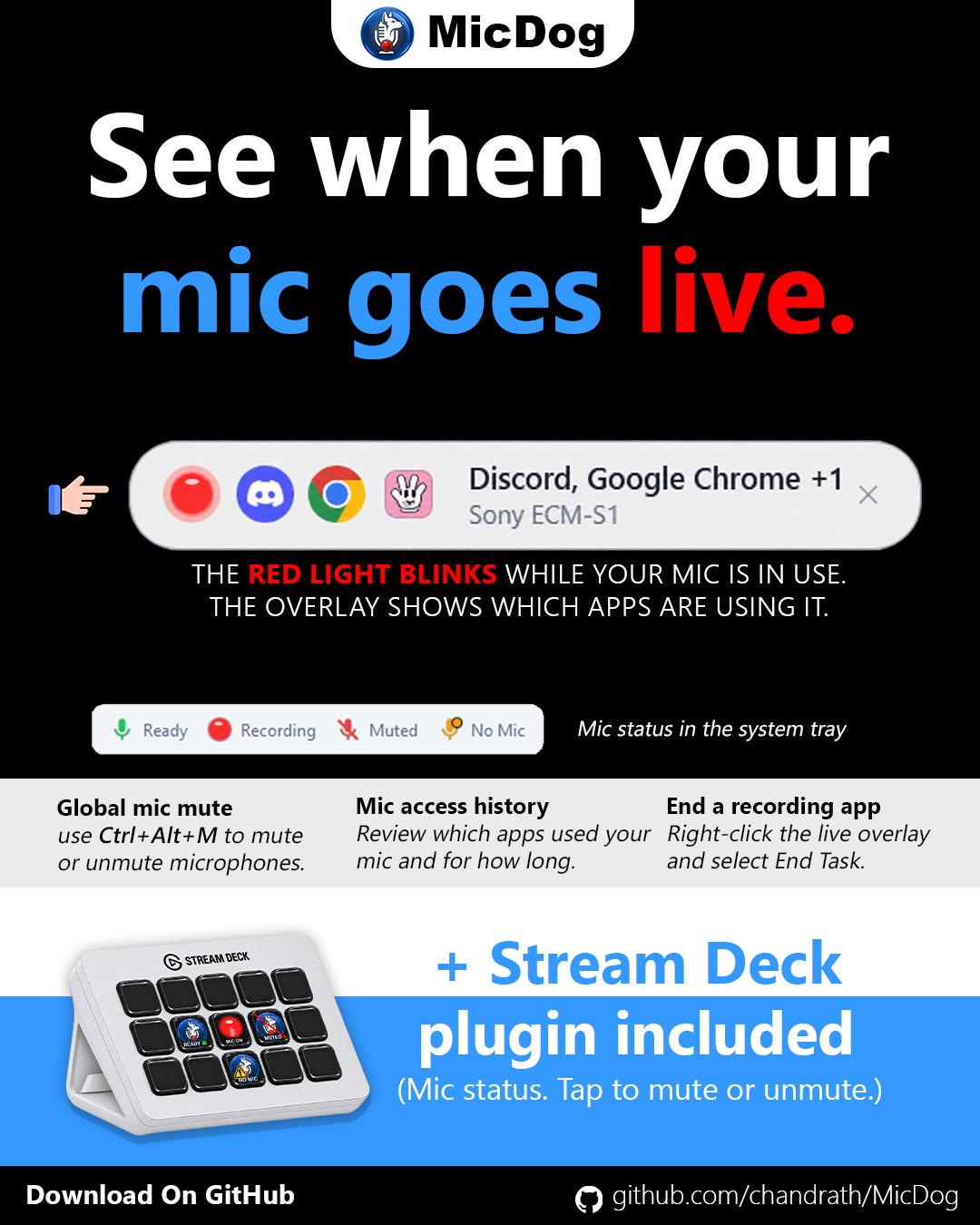
MicDog: Dynamic Island-style overlay shows which app is using your mic + GLOBAL MUTE (open source, Windows)

Post image
1 Upvotes

Windows already shows a mic icon in the taskbar, and there are plenty of third-party tools for muting it. The reason to try MicDog is the little overlay that pops up as soon as an app starts using your mic. It shows the app’s name, its icon, and which microphone it’s using. The red light keeps blinking while the mic is active, so you can see what’s going on.

  • Dynamic Island-style mic overlay. A floating capsule bar appears as soon as an app uses your mic, shows the app’s name, and blinks while the mic is active.
  • Mute every mic at once. Click the tray icon, right-click the HUD and select Mute, or press Ctrl + Alt + M.
  • Check your mic before going live. Keep Ready visible in the overlay so you can see at a glance that your mic is detected. If it gets unplugged or stops being detected, MicDog shows No Mic. (default is
  • See what used your mic earlier. The privacy dashboard keeps a local access history. You can also end an app that’s currently using your mic from the overlay.
  • Use an Elgato Stream Deck. Select the optional plugin during setup, then add MicDog to a key for live mic status and one-tap mute. The installer includes it. No Marketplace download needed.

It’s a super lightweight native Windows app built with .NET 10, WPF.

Download MicDog on GitHub


r/coolgithubprojects • • 8h ago

Open source application firewall and network monitor

Post image
1 Upvotes

I've been building Egron, a macOS app to monitor and control outbound network traffic so you can see what happen and where it goes

You can choose between ask mode (prompt on every connection) and silent mode (allow everything, block manually).

It's free and open source. Would love to hear your feedback!

https://getegron.com

https://github.com/Azzurriii/egron


r/coolgithubprojects • • 9h ago

I released an open-source book on ML for ad bidding, with a market simulator and Go bidder you can run

Thumbnail github.com
0 Upvotes

r/coolgithubprojects • • 10h ago

Sapwood: read-only disk usage explorer as one PowerShell 7 script

Post image
2 Upvotes

AI disclosure: Sapwood was built with substantial help from coding agents, against a written specification and a large automated test suite. MIT license

It is one script, Sapwood.ps1, with a WPF window. It needs PowerShell 7.4 or later on Windows x64. Windows PowerShell 5.1 cannot run the GUI.

What it does:

- Scans a local folder or a UNC path with the current user's permissions

- Updates folder totals while the scan is still running

- Reports logical size. Allocated size is Unavailable in this edition

- Find and Keywords match names only. File contents are never read

- Opens a path in Explorer, copies a short summary, exports CSV, and saves a snapshot for compare

What it does not do: delete or modify files, send telemetry, install a service, or change the registry.

Headless mode writes one JSON summary to stdout.

https://github.com/OlaProeis/Sapwood


r/coolgithubprojects • • 11h ago

Tired of overpriced agents and rolling limits? So I built Shape. Free to use.

Post image
0 Upvotes

I've been building Shape, an AI coding agent designed to make AI-assisted development more accessible.

The idea behind Shape is pretty simple: coding agents shouldn't have to come with expensive subscriptions, restrictive usage limits or a frustrating experience.

Shape gives you access to multiple AI models, free usage, and tools designed for more than just writing code. It also includes native reverse engineering and modding capabilities.

I've been putting a lot of work into making the agent more reliable, improving its capabilities and building a better overall experience. It now has a completely redesigned interface and native macOS support.

Some things in the latest update:

  • Free plan: Access to multiple models, including DeepSeek V4 Flash, GPT-OSS 20B, Qwen3.7 Flash, GLM 5.3 Flash, GPT-5 Nano and Llama 4 Scout.
  • Paid plans: Usage allowances instead of credits, with no weekly resets. Unused usage remains available for up to two years after cancellation (subject to change).
  • Reverse engineering: Native tools for reverse engineering and modding.
  • Cross-platform: Native macOS support.

Shape is still actively being developed, and there's plenty I'd like to improve. I'm sharing it because I'd love to get more people trying it, hear what they think and find out what features would make it genuinely useful.

If you're interested, you can check it out here:

GitHub: https://github.com/useshape/Shape

Latest release: https://github.com/useshape/Shape/releases/tag/v1.0.4

Website: https://useshape.org/

FYI: I do eventually want to make more models free and increase the monthly limit.


r/coolgithubprojects • • 11h ago

GitHub - jbax/parent: A shared gradle build setup for java projects of any size, whether you're working on a single library, 100+ separate git repositories, or a few multi-module projects sitting side by side.

Thumbnail github.com
1 Upvotes

r/coolgithubprojects • • 11h ago

GameBites: 8 browser games built with vanilla JavaScript

Post image
1 Upvotes

I made a collection of eight browser games, including personality quizzes, island survival, compatibility tests, reaction and memory games.

You can challenge a friend by sending them a link. Both browsers generate the same round from a seed.

Everything runs on GitHub Pages using plain HTML, CSS and JavaScript. No backend, dependencies or registration.

Available in English, Latvian and Russian. MIT licensed.

Play: https://ruslanty.github.io/gamebites/

GitHub: https://github.com/ruslanty/gamebites


r/coolgithubprojects • • 11h ago

Curio - local-first digital asset manager

Post image
21 Upvotes

Curio is a free, open-source, local-first digital asset manager for Windows, Linux and macOS. Organize images, video, audio, documents, books, fonts, 3D models, code and web links while your assets stay ordinary files on disk - no account, cloud sync or telemetry.

  • Your files stay yours: Index existing folders in place as Locations, or use managed storage whose folder tree mirrors your library with real filenames and hard links.
  • Visual browsing: Switch between Grid, Masonry, Justified, List and the interactive 2D color map to explore assets by hue and brightness.
  • Fast filtering and Smart Folders: Narrow results by dominant color, tags, folders, dimensions, ratings, file types and typed custom fields, or build rule-based Smart Folders and structured queries.
  • Built-in viewers and plugins: Inspect images (including RAW and Live Photos), video, audio waveforms, markdown, code and fonts natively. Add optional plugins for ebooks, PDFs and comics, 3D models (glTF/GLB, OBJ, STL, 3MF) and AI generation metadata.
  • Everyday tools and automation: Find exact or visually similar duplicates, batch rename with metadata tokens, compare images side by side, watch folders with Auto-Import rules, or capture from the browser with the Send to Curio extension.
  • Customizable workspace: Rearrange and dock widgets per screen, switch between 7 built-in dark and light themes (Default, Nord, Catppuccin, Tokyo Night, Gruvbox, Everforest, Solarized) or make your own.
  • Companion Chrome extension: Send images and videos directly to Curio from your browser. Customizable with site rules and data attributes.
  • Local API and MCP server: Automate libraries over a scoped local HTTP/SSE API or connect AI assistants through the built-in MCP server.

https://github.com/Erehr/curio
https://github.com/Erehr/curio-plugins
https://github.com/Erehr/curio-extension


r/coolgithubprojects • • 12h ago

I made a free grok bot alternative that you can customize just by asking

Thumbnail gallery
0 Upvotes

Just wanted to share the project I've been working on for the past few weeks. It's like grok bok but highly customizable. It's open source!

prompt: "Make a matrix theme"

source: https://github.com/gmpetrov/brigade


r/coolgithubprojects • • 12h ago

amipatched - Your forgotten side projects are a security risk. This finds them in one command.

Thumbnail github.com
0 Upvotes

We clone, npm install, and move on. The projects stay on your laptop forever: old lockfiles, three Node versions, that one Python from a tutorial. Meanwhile hacked releases of popular packages (axios, LiteLLM…) hit the news every few weeks.

amipatched scans your whole machine and tells you in plain English what's actually risky:

  • 🔎 every runtime, project, global package and editor extension
  • 🧠 what to fix now vs. later, and why
  • ✅ fixes only after you click approve, with an undo
  • 🤖 or just ask Claude Code / Codex / Gemini CLI "am I patched?"
go install github.com/aditya9277/amipatched/cmd/amipatched@latest

👉 https://github.com/aditya9277/amipatched

Free & open source, v0.1, built with help from Claude Code. Roast it!