r/coolgithubprojects • • 3d ago

I built an open-source tool to drag 3D React heroes directly on your real Vite page writes 1-line diffs to your .tsx (BETTER THAN SPLINE )

Thumbnail github.com
0 Upvotes

Got tired of guessing `[x, y, z]` numbers in R3F, so I built Prismbox (MIT).

Run `npx prismbox` on a Vite + R3F app (no changes to `package.json` or `vite.config`), drag meshes or scrub GLSL shader sliders right on your live page, and it writes 1-line diffs to your `.tsx`. Also includes an MCP server so Claude Code / Cursor can see your canvas and know which mesh you clicked. `vite build` emits 0 bytes.

GitHub: https://github.com/Guten-Morgen1302/prismbox


r/coolgithubprojects • • 3d ago

Open source Fl studio alternative that is actually pretty

Post image
11 Upvotes

I know there are other options out there, but building my own DAW has always been a dream of mine. I've put a lot of heart into this project. After 40 releases I am able to do anything I was doing in fl studio with stock plugins and samples .

gh: https://github.com/miskibin/synkopa

Website: https://miskibin.github.io/synkopa/


r/coolgithubprojects • • 4d ago

RiceWM, an instant full Linux Desktop from any browser tab

Thumbnail env.now
51 Upvotes

Started a sideproject called RiceWM, a full Linux desktop in a browser tab. The original idea came from a problem I ran into at work. I needed to run a sensitive AI model in an isolated environment, but getting a proper sandbox set up took far too long. I kept thinking there should be an easier way to spin up a Linux environment without installing anything or setting up a virtual machine.

That's what led to RiceWM.

With RiceWM, you can open a full Linux desktop directly in a browser tab. You get a terminal, file manager, and the ability to run GTK applications, all powered by WebAssembly and running completely locally in your browser. The backend converted apt packages to WebAssembly format, so they run quicker.

You can use it to experiment with software, develop applications, or quickly get a Linux environment on a machine where you can't or don't want to install anything. It can even run VSCode or Docker, natively from your browser tab.

It's still a work in progress, but it's become a pretty serious project, and I thought it might be interesting to share.

You can try it here: https://env.now/

More about the project: https://ricewm.org/

Source: https://github.com/cwittenberg/ricewm

Impression (made with Higgsfield): https://www.youtube.com/watch?v=WhNrgbPdFss&t=24s


r/coolgithubprojects • • 2d ago

Linux Time Machine – An open-source journey through Linux history in your browser

Thumbnail gallery
0 Upvotes

I’ve been building Linux Time Machine, an open-source project that lets you explore the evolution of Linux from 1991 to today.
It combines historical x86 Linux environments with interactive educational recreations of later Linux desktops.
The project features early Linux kernels, Slackware 1.01, Red Hat 5.2, a historical timeline, an interactive terminal and browser-based x86 emulation using v86.
It’s built with HTML, CSS and JavaScript, and you can try it without installing anything.
GitHub: https://github.com/hamdyaea/linux-time-machine
Live demo: https://linuxtimemachine.org/
Video: https://youtu.be/GdhBmuVOcXc
Feedback, bug reports and contributions are welcome, especially from people interested in Linux kernel history and retrocomputing.


r/coolgithubprojects • • 3d ago

[Rust] BatteryHub – monitor wireless device battery levels directly on the Windows taskbar

Thumbnail github.com
4 Upvotes

I wanted a simple way to see the battery levels of my wireless peripherals without having to open Logitech G HUB, SteelSeries GG or other manufacturer software.

So I made BatteryHub, a Windows taskbar application written in Rust.

It displays the battery percentages of your wireless mouse, headset, keyboard and controller right next to the Windows clock.

Some supported devices and brands:

  • Logitech (LIGHTSPEED, Bolt, Unifying, Bluetooth)
  • SteelSeries (Arctis, Arctis Nova, Aerox, Rival)
  • Razer mice and keyboards
  • Sony DualSense, DualSense Edge and DualShock 4
  • Apple AirPods and Beats
  • Xbox controllers
  • Generic Bluetooth and HID devices

I also focused on keeping it lightweight.

I benchmarked the Rust version against the original C++ implementation on the same PC:

MetricRustC++
Executable size368 KB1,958 KB
Idle RAM2.4 MB29.4 MB
Peak RAM17.8 MB29.8 MB
CPU time/min~0.02 s~0.64 s

A few things worth mentioning:

  • Automatic battery refresh
  • Optional Windows startup
  • Install, update and uninstall functionality
  • No administrator privileges required

Transparency: This is my Rust rewrite/fork of the original C++ BatteryHub by krisgfx9. The original project deserves credit for the concept, taskbar design and device protocols. My version currently supports fewer devices than the original.

I developed it with help from Claude AI.

GitHub: https://github.com/ferloom/Wireless-Device-Battery-Monitor

I'd love to hear what you think! Especially if you have a wireless peripheral that you could test it with.


r/coolgithubprojects • • 3d ago

Sekai Tune

Thumbnail gallery
1 Upvotes

Sekai Tune is a free open source yt music client.


r/coolgithubprojects • • 4d ago Bravo

Ink Studio - Free, open-source (GPL-3.0) digital painting & manga app with built-in multiplayer (no AI, no telemetry)

Thumbnail gallery
114 Upvotes

Hi everyone! After months of work, I just released Ink Studio. A local-first, open-source digital painting, and manga desktop app built with Tauri v2, Rust, React, and WebGL

GitHub: https://github.com/praisesora/inkstudio
Latest Release (Signed Windows Installer): https://github.com/praisesora/inkstudio/releases/latest
*(macOS & Linux can currently be built from source)*

Key Features

- Brush & Layer Engine: WebGL-accelerated brushes (pressure, tilt, velocity, dual brush tips, wet edges, stabilization), sparse-tile raster & vector layers, clipping/layer masks, and more.

- Format & Brush Compatibility: It opens .clip/.csp, .psd/.psb, .svg, and imports Clip Studio Paint .sut brushes. Saves layered .sora/.ink and .psd.

- Including Manga & Webtoon Tools: Frame border folders & panel splitting, parametric speech balloons, horizontal/vertical text, screentones, effect lines, 1/2/3-point perspective rulers, etc..

- 3D Reference: Embedded three.js viewport with a posable IK mannequin, .glb/.gltf/.obj import, camera-to-perspective-ruler sync, and raster / line-and-tone (LT) baking.

- Animation & Time-lapse: Frame-by-frame cel animation (GIF, APNG, WebM, MP4, .zip) and stroke-based time-lapse recording.

- Built-in Real-Time Multiplayer: Host up to 16 peers over LAN or public invite link (via optional Cloudflare Tunnel). Friends also can join as guests right from browser.

Offline by default, no accounts and no generative AI, WAL crash recovery.

Would love any feedback or bug reports!


r/coolgithubprojects • • 3d ago

I just released LibreReplace v0.3! It can now combine multiple free and open-source alternatives to replace expensive Mac apps

Thumbnail gallery
2 Upvotes

I just released a massive update to LibreReplace, my free, open-source Mac app for finding alternatives to expensive software.

v0.3 takes it way beyond a traditional alternatives directory.

The biggest addition is FreeStack Composer, which builds combinations of free applications and built-in tools around the exact features you need.

Instead of hoping one alternative can replace everything, LibreReplace can combine multiple tools.

For example, it can pair Snapzy for screenshots with LibreReplace Image OCR to cover the screenshot and text-extraction capabilities of CleanShot X.

What's included in v0.3:

  • FreeStack Composer: Feature-aware replacement combinations built around your requirements.
  • Built-in tools: On-device image/document OCR, searchable PDFs, PDF merging and recovery, and image conversion.
  • Saved Setups: Save and reopen complete app combinations.
  • Guided Switching: Review installation options, test tasks, and recover supported migrations.
  • Community Recipes: Export, import, and customize replacement setups.
  • My Mac: Scan installed software and identify potential savings.

I also rebuilt the interface around five connected sections using SwiftUI.

45 paid apps, 70 free-alternative comparisons, and a catalog of 100 distinct products.

The project is 100% free and open source under Apache 2.0, with no accounts, subscriptions, ads, or telemetry.

GitHub (source, screenshots, and download):
https://github.com/maliroq/librereplace

Latest release:
https://github.com/maliroq/librereplace/releases/tag/v0.3.0-preview.1

I'd love feedback from other open-source developers, especially suggestions for useful replacement combinations or contributions to the catalog!


r/coolgithubprojects • • 3d ago

BryceDock: Run classic 1997 Bryce 3D in any web browser via Docker, 32-bit Wine, and noVNC

Post image
9 Upvotes

I wanted a clean, cross-platform way to run original MetaCreations Bryce 3D (1997) on Linux, Windows, and macOS without fighting 16-bit installers, X11 forwarding, or setting up a full Windows 98 VM — just docker compose up -d and open http://localhost:6080.

How it works under the hood:

  • Bypasses the legacy 16-bit SETUP.EXE**:** A multi-stage build compiles unshieldv3 natively on Linux so the container unpacks Bryce 3D's InstallShield 3 data.1 archive and all original CD asset libraries directly from Bryce3DCD.iso on first boot.
  • Fixes a 1997-vs-modern-CPU timing bug: Bryce 3D's Create / Edit / Sky&Fog preset popups open on mouse-down directly beneath the cursor. In 1997 they took ~300 ms to render (after your finger already lifted), whereas on a modern CPU under Wine they map in ~25 ms while a normal click is still held down, immediately dismissing themselves. A ~200-line Python asyncio RFB proxy sits between websockify and Xvnc, tracks Bryce's top palette dynamically, and issues a clean 8 ms click release only on those three preset arrows (leaving all drags, sliders, and trackballs untouched).
  • Seamless file sync: Desktop, Documents, and E:\ inside Bryce 3D all map directly to BryceDock/projects/ on the host so saving .br3 scenes or exporting .bmp/.psd/.avi renders requires zero hunting for paths.

There's a live demo GIF right in the README — happy to hear any feedback or edge cases if you try it out!

Github: https://github.com/RaymonDev/BryceDock


r/coolgithubprojects • • 3d ago

I built a cross-platform radial launcher in Rust that turns mouse and trackpad gestures into app-specific workflows.

Thumbnail gallery
3 Upvotes

CursorPie is an open-source desktop application written in Rust and egui. It puts a configurable radial menu directly under your cursor, letting you trigger actions with a simple gesture instead of memorizing shortcuts or navigating through menus.

Hold the middle mouse button (or touch and hold your trackpad), flick toward an action, and release.

The idea is to make frequently used actions accessible through one consistent interaction, regardless of which application you're working in.

What it can do:

  • Custom radial menus: Trigger keyboard shortcuts, launch applications, open URLs and files, execute shell commands, switch mouse modes, or open nested submenus.
  • Per-application profiles: Create different menus for different applications. Your editor, browser, design software, and other tools can each have their own dedicated actions.
  • Nested menus: Organize up to 8 slices per ring and 5 levels of submenus without filling your screen with permanent toolbars.
  • Workflow automation: A built-in visual flow editor lets you chain actions together using shortcuts, application launches, shell commands, browser commands, variables, conditions, loops, and interactive panels.
  • Browser integration: An optional extension for Chromium-based browsers and Firefox allows CursorPie to control media playback, manage tabs, and interact with supported web applications, including WhatsApp Web and Telegram Web.
  • Intelligent Pie: An optional, local learning feature that suggests applications, websites, actions, and workflows based on usage patterns. It is disabled by default.
  • Trackpad support: Open and navigate the pie using trackpad gestures instead of a physical mouse button. Force Touch trackpads on macOS can also provide haptic feedback.
  • Flow Hub: A collection of ready-made workflows that can be installed into CursorPie through its browser integration.
  • Customization: Multiple themes, configurable gestures, profile import/export, undo/redo in Settings, and automatic configuration backups.

Platforms

CursorPie currently supports:

  • macOS 11+ (Intel and Apple Silicon)
  • Windows 10 (1809+) and Windows 11
  • Linux with X11 (pre-stable)
  • Linux with Wayland (experimental)

It's built with Rust and egui, and released under the MIT license.

A few things worth mentioning

  • No account system or telemetry.
  • Configuration and usage data stay locally on your machine.
  • The application only checks for updates when Settings is opened, at most once a day. Downloading an update requires an explicit action.
  • The browser extension communicates with the desktop application locally through native messaging.
  • The browser extension currently requires manual installation rather than a published browser-store release.
  • Linux and some trackpad implementations still need more testing on real hardware.

The project is currently at v0.9.0 and is actively evolving.

Links

Feedback, bug reports, feature suggestions, and contributions are welcome. I'm particularly interested in feedback from people using different Linux desktop environments, trackpads, and mouse configurations.

I'd also love to hear how other people use radial menus and what kind of workflows they would build with this.


r/coolgithubprojects • • 3d ago

I built an open-source trading journal with a 3D whale to visualize my trades 🐋

Post image
1 Upvotes

Hey everyone!

I've been building Whale, an open-source desktop trading journal.

I wanted something different from traditional trading journals that are just spreadsheets and tables.

With Whale, you can:

  • 📊 Track your trades and trading performance
  • 🐋 Visualize your trading journal as an interactive 3D whale
  • 🧠 Connect trades, setups, mistakes, and emotions
  • 📝 Write detailed trading notes using Markdown
  • 🤖 Use optional AI (Claude or Ollama) to explore your journal
  • 🔒 Keep your trading data locally on your computer

The idea is to help traders understand their decisions, recognize patterns, and learn from their mistakes.

It's still a work in progress, and I'd love to get some feedback.

Would you use something like this? What features are missing from your current trading journal?

GitHub: https://github.com/Kirby54/whale


r/coolgithubprojects • • 3d ago

Request For A Rust App.

Thumbnail diskanalyzer.com
0 Upvotes

Everyone makes a " i made a rust written app XYZ "
Can some one please make a Wiztree alternative for Linux ( .rpm ) in rust?

thank you !!

A linux one is needed


r/coolgithubprojects • • 3d ago

Strand update v2026-11-21.8(latest)

Thumbnail github.com
1 Upvotes

Four improvements to visibility.

Invisibility of dependencies that could not be resolved (computed module names, loaded with glob, wired in frameworks, generated by macros) resulted in some edges being missing. It was impossible to know which edges we could trust.

v2026-11-21.5 - Part 1

Python: Constant propagation has been improved. It can now evaluate string concatenation (+), f-strings, format, join, and ternary operators, dictionary lookups, and loop over fixed-size collections (max 64 elements). import_module("pkg." + NAME) with NAME="ldap" will now create an edge. If the value is unknown (or could have changed) we emit a warning.

Globbing: glob.glob/iglob or Path.glob (Python), require.context, import.meta.glob, template/concat import with static prefix in directory will be expanded according to the files scanned.

Conventions in framework: pytest_plugins, INSTALLED_APPS in Django, and conftest.py ancestors in tests.

Published versions: strand-import v0.9.0, strand-cli v0.3.9.

v2026-11-21.6 - Part 2

Rust parent module inferences: We have identified .rs files that were compiled but had no edges in their dep-info. We infer their parent module based on Rust's predictable structure (a/b.rs in src/ maps to a.rs or a/mod.rs in src/) and add an edge.

Entry point consumers: All calls to entry_points (group='x') and entry_points().select (group='x') link to all targets under group x in pyproject.toml, setup.cfg, setup.py. entry_points() without arguments will link to all.

Published versions: strand-import v0.10.0, strand-cli v0.3.10.

v2026-11-21.7 - Part 3

Edge confidence levels. All edges have confidence level associated with them: Heuristic < Traced < Declared < Resolved < Static. We append a table of u8 confidence levels to node_meta only if any edges in the graph are not Static. If all edges are Static, then the bytes remain identical between versions, meaning backward/forward compatibility is maintained between old and new readers/writers.

Edges are marked by their confidence level of discovery. Edges merged in strand trace are marked as Traced. For duplicate edges, the edge with the highest confidence level is used.

--min-confidence filters out edges with confidence lower than given on all traversal operations. This is done by wrapping the graph in a ConfidenceView. Since all algorithms are generic over a View type, no algorithm changes were necessary.

Published versions: strand-core v0.2.0, strand-store v0.2.2, strand-import v0.11.0, strand-cli v0.3.11.

v2026-11-21.8

Bug fix:

--min-confidence was silently ignored in --weighted / export --why --weighted as it is Graph concrete. We have added shortest_path_weighted_csr_min to filter edges of certain types during traversal of the CSR. The change has been verified by adding a test that proves rerouting occurs correctly after filtering.

Published versions: strand-core v0.2.1, strand-cli v0.3.12.

Test bugs caught:

ConfidenceView slice of edge types was incorrect. Leftover 3 tuple destructuring in tests/examples. Missing re-export of trait. Mismatched argument types in bfs.

Tests:

Scan tests: 37. Core round trip tests: 15 (5 new for edge types & filtering). CLI tests: 11 (1 new end-to-end confidence test). All tests passed (cargo test --workspace --locked) prior to release.

Currently undocumented (invisible):

Names determined by env vars/configs. Data flow between functions. Bypassing tracing in python by using -S/-I. Uncovered run-time paths.

Github: https://github.com/Biggest-Bee/Strand


r/coolgithubprojects • • 3d ago

I built a free, open-source app that runs local text, image, video, voice and speech-to-text on a 4 GB laptop GPU

Thumbnail ashishyadavstudio.github.io
2 Upvotes

Hi all. I've been building Featherbox, a local AI app for ordinary laptops with 4–6 GB graphics cards. The idea: one installer instead of a separate Python environment, CUDA setup and UI for every kind of model.

What it does

  • Chat with a local text model
  • Image and Video generation (text-to-video and image-to-video)
  • Voice (text to speech) in English, Hindi and more
  • Transcribe recordings and videos to text and SRT/VTT subtitles, in 99 languages
  • Studio: type a topic and get a finished vertical video, with a script, voiceover, AI pictures, captions and background music.

What's under the hood

There's no PyTorch and no Python setup for the user. It runs the official builds of llama.cpp, stable-diffusion.cpp and whisper.cpp, plus Kokoro (ONNX, on the CPU) and FFmpeg. It picks CUDA, Vulkan or CPU builds for your hardware. The app itself is a small FastAPI backend with a web UI, running at 127.0.0.1 only. The Windows installer is about 80 MB, and the models download from Hugging Face inside the app.

The part I spent the most time on is the Models page. It detects your GPU, VRAM, RAM and built-in graphics, and tells you in plain words whether each model will run well, slowly, or not at all on your PC. You can also paste your own Hugging Face GGUF links.

GitHub: https://github.com/AshishYadavStudio/Featherbox

Download (Windows): https://github.com/AshishYadavStudio/Featherbox/releases/latest

Website: https://ashishyadavstudio.github.io/Featherbox/

I'd really like feedback on two things. Which models would you add to the catalog for 4–8 GB cards? And does the "will it run on my PC?" advice match what you actually see on your hardware?


r/coolgithubprojects • • 3d ago

Goodnotes-Digitizer — Convert handwritten photos and PDFs into editable Goodnotes pen strokes (Python, MIT)

Post image
1 Upvotes

I built an open-source Python CLI that converts handwritten notes and drawings from images/PDFs into native .goodnotes notebooks.

Instead of embedding a flattened image, it reconstructs individual ink strokes that you can select, move, recolor, resize, and erase in Goodnotes.

It supports multiple image formats, perspective correction, ink color detection, and multi-page PDFs.

It's still an early project, so feedback and contributions are welcome!

https://github.com/middleclicker/Goodnotes-Digitizer


r/coolgithubprojects • • 3d ago

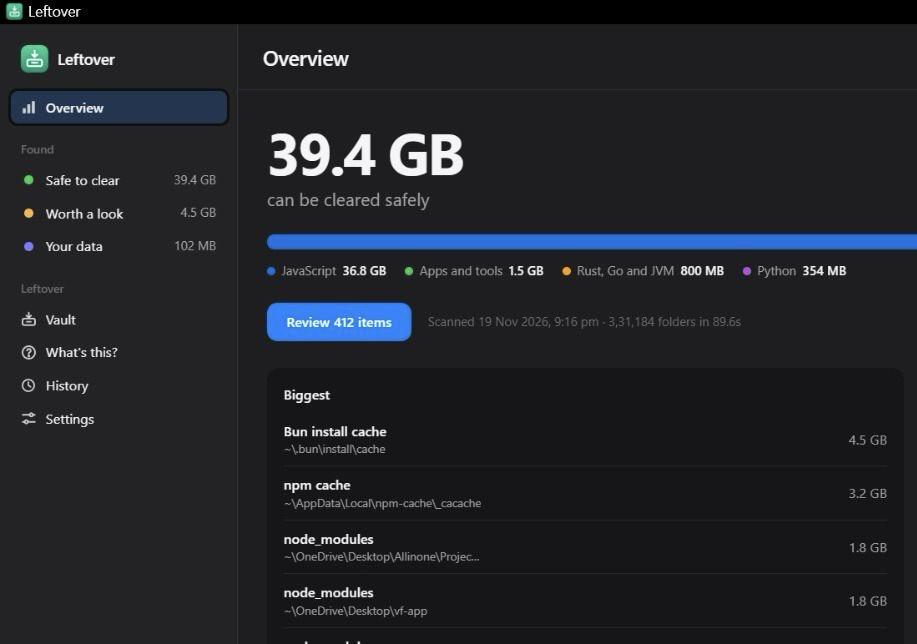
I built an offline disk cleaner for developer junk, Open Source and Runs Locally! Not a promo

Post image
1 Upvotes

r/coolgithubprojects • • 4d ago

Machitan: An alternate Windows 11 shell made with pure WinUI 3 (FOSS, GPL-3.0)

Post image
12 Upvotes

Hello, this is my first ever post here, not only in this subreddit, but in Reddit overall. I've just released Machitan, custom Win11 shell, as public test hours ago.

Sourcecode: https://github.com/mujairkitten/machitan/
Latest release: https://github.com/mujairkitten/machitan/releases/latest
Background: https://pixiv.net/artworks/129006765

Key features:

  • A real shell replacement, not just a skin. Floating segmented pill bar that hides Explorer's taskbar and restores it on exit — even if Machitan crashes, a watchdog process puts the old taskbar back. Default (Segmented), Joined, and Classic layouts, auto-hide, and maximised windows stop above the bar when auto-hide is off.
  • Grouped task buttons that work like a taskbar should. Click to switch, click again to minimise, running/focus indicators, hover thumbnails with live DWM previews, and a Show Desktop strip.
  • Start menu. Pinned grid, All apps, real search across apps and files, pin/unpin shared with the bar, power menu with a confirm step.
  • Dynaland. A Dynamic Island-style pill at the top that stays minimal when idle and expands for live stuff — with real mic/camera privacy dots that only light up when something is actually using them.
  • A real system tray. Tray icons come straight from the apps themselves, clicks work, and everything is forwarded to Explorer so nothing is lost — it even survives an Explorer restart.
  • Corner widgets. Date, time, and weather on one line top-left; battery, Wi-Fi, and volume as a ring top-right. Both movable and toggleable, with a wallpaper-adaptive accent colour.
  • Hotkeys and flyouts. Win key opens Machitan Start, Win+N calendar, Win+A quick settings with real volume and brightness controls, Win+Tab switcher, Win+1–9 to jump to apps.
  • No bloats. WinUI 3 and .NET 10, no web tech, no WebView. Two installers: Full (40+MB, includes the .NET 10 runtime) and Trimmed (22 MB, if you already have the runtime).

PRs and bugs reporting needed and appreciated! Give it a try!


r/coolgithubprojects • • 3d ago

A very fast, embedded, B+tree, ACID KV store, based on Leanstore research

Thumbnail unchanged.dev
2 Upvotes

r/coolgithubprojects • • 3d ago

I built ClashNova — an open-source cross-platform proxy client powered by Tauri 2, Rust and sing-box

Thumbnail github.com
1 Upvotes

Hi everyone!

I've been working on ClashNova, an open-source desktop proxy client built with Tauri 2, Vue 3, Rust, and sing-box.

It supports Windows, macOS, and Linux.

Some of the features include:

  • Proxy node and subscription management
  • Latency testing
  • TUN mode and system proxy
  • Rule-based routing
  • Connection management
  • Multiple languages

My goal is to build a modern, lightweight, and user-friendly proxy client with better network diagnostics and cross-platform consistency.

The project is still evolving, and I'd really appreciate feedback, bug reports, and contributions.

GitHub: https://github.com/clashnova-dev/ClashNova

https://github.com/clashnova-dev/ClashNova-Mobile

What features would you like to see in a cross-platform proxy client?


r/coolgithubprojects • • 3d ago

I built Athena (v1.3.0), an offline tool that checks which callers break before you commit (zero LLM required)

Post image
1 Upvotes

We have all had that moment where git diff looks completely harmless (1 file changed, 2 lines edited), you push it and suddenly 4 callers in other folders break.

git diff only shows what you touched. It does not warn you about everything else in the codebase that depended on the old signature.

So I built Athena (v1.3.0), an open-source (Apache-2.0) CLI, Terminal UI and MCP server that runs locally on your machine with no cloud APIs or vector databases required.

What it does in plain English:

  • Checks callers before you commit (athena check --staged): Parses Python ASTs and structural signatures across 14 languages to flag removed symbols, shifted arguments, unguarded None defaults and recursion bugs before they hit main.
  • Builds a local code graph (athena graph & athena map): Creates a fast, cached map of your repo (<=2KB) so both you and AI coding tools (Hermes, OpenClaw, Claude Code, Codex, Cursor, Pi) can find where things live without burning tokens guessing.
  • Tracks technical debt (athena debt): Finds # shortcut: <limit>, <when to upgrade> comments and binds them directly to the functions and classes they belong to.

Real-world test: I ran Athena offline across 10 open-source repositories with 10k+ stars (psf/requests, trpc/trpc, spf13/cobra, serde-rs/serde, axios/axios, gabime/spdlog, square/okhttp, rubocop/rubocop, JamesNK/Newtonsoft.Json and laravel/framework), inspecting 1,000 commits (HEAD~100..HEAD) and 8,804 source files. All 10 passed with 0 errors and cut context token usage by 49x to 2,067x.

Repo, stars, issues and PRs: GitHub: https://github.com/aaryanrwt/athena

Issues, pull requests, bug reports and stars are always open. If you try it on your own repo and find an edge case it misses, open an issue and I will fix it.


r/coolgithubprojects • • 4d ago

I made a CLI tool for agents to download movie clips from dialogues

Post image
15 Upvotes

So I faced this issue when working with agents to edit video, we were trying to do a supercut with a lot of film scenes. Manually having to go through youtube and other sites to find the clips was tedious. This CLI wraps all that complexity so your agents and you can save a lot of time.

https://github.com/robinroy03/scene-finder

Share with your friends if you find this useful :)


r/coolgithubprojects • • 3d ago

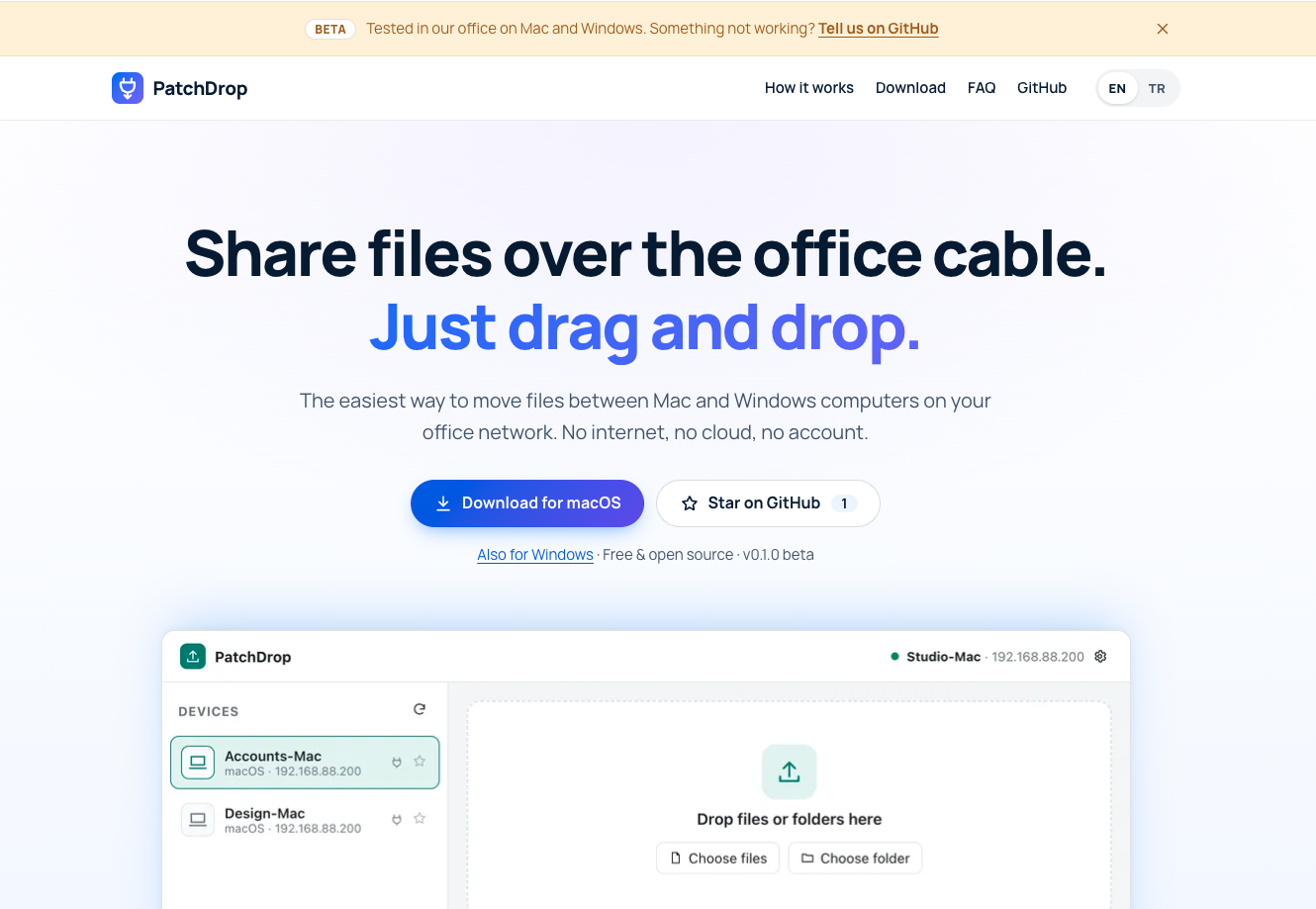
I built an open-source file sharing app for wired office networks (macOS + Windows), because the usual ones couldn’t find each other

Post image
3 Upvotes

Hi all,

In our office the computers are on Ethernet, and file-sharing apps in the AirDrop/LocalSend style often couldn’t discover each other. So we ended up emailing files across the room. I wrote PatchDrop to fix that for us, and I’m sharing it in case others have the same problem.

What it does

  • Drag and drop files or folders to another computer on the same wired network
  • Works between macOS and Windows
  • No internet, no accounts, no cloud
  • Transfers are encrypted (TLS), and everything stays on your LAN
  • Free, MIT licensed

Why discovery works on wired networks
It sends its announcements on every wired network adapter instead of relying on one multicast packet on whichever interface the OS picks. There is also a manual “add by IP” fallback if your network blocks broadcast.

Honest status: this is a beta. So far I’ve only tested it with a few colleagues in our office. I’d really like to know how it behaves on other networks, switches, VPN setups and Windows versions.

The macOS build isn’t notarized yet (right-click → Open the first time), and Windows may ask for a firewall permission on first run.

Site and downloads: https://patchdrop.enginsistem.com/?utm_source=reddit
Code: https://github.com/enselcuk/patchdrop

If it works for you, a ⭐ on GitHub helps a lot. If it doesn’t, please open an issue, that’s the most useful feedback I can get. Happy to answer questions.


r/coolgithubprojects • • 3d ago

I turned the "flag emoji on Windows" font-swap guide into a free one-click app 🇺🇦🇯🇵🇧🇷

Thumbnail codeberg.org
1 Upvotes

Windows' emoji font (Segoe UI Emoji) has no country flags, so 🇯🇵 shows up as just "JP". A while ago someone here posted a guide to fix this by swapping it for Google's Noto Color Emoji, renamed so Windows uses it. It works great, but it means installing Python, editing font files in a text editor and copying files from the Recovery Command Prompt.

So I turned it into a one-click app.

How to use it

  1. Download EmojiFlagFix.exe and put it in a folder you'll keep (it saves a backup of your original font next to itself)
  2. Open it → click Install flag emoji
  3. Restart Windows (Restart, not Shut down – Fast Startup skips the swap)

That's it – flags now show in Chrome, Edge, Notepad, Windows Terminal and most other apps. There's a test page with all 259 flags so you can check it worked.

What it does under the hood

- Backs up your original Segoe UI Emoji

- Schedules the font swap for the next restart, so there's no need for the Recovery Command Prompt

- Restore original puts Microsoft's font back in one click

- There's also a recovery kit you can make for the Recovery Command Prompt, just in case

Limitations

- File names in File Explorer still show letters – Explorer doesn't use this font there

- Windows Updates may put the original font back – just open the app and click Install again

- The exe isn't code-signed (certificates cost money), so SmartScreen warns you: More info → Run anyway

- It needs admin rights, because it replaces a file in C:\Windows\Fonts

- Every app gets Google's emoji style instead of Microsoft's

- Tested on Windows 11; Windows 10 is untested

Disclosure: I built this with help from Claude AI.

Free and open source (MIT; the font is Google's, under the Open Font License):

https://codeberg.org/masterbates/EmojiFlagFix

Huge thanks to the author of the original guide: https://www.reddit.com/r/Windows11/s/y5exCuqAqH

Feedback and bug reports welcome!