r/coolgithubprojects • • 5h ago

canfit – an open-source "top" that tells you if a local LLM or app fits in memory right now, and what you can safely close (Rust, macOS/Windows/Linux)

Thumbnail gallery
1 Upvotes

I built canfit after rebooting my laptop one too many times while running local models next to Docker and an IDE.

  • canfit model.gguf tells you if a GGUF model fits in the memory you have right now (weights + KV cache + overhead, plus the GPU limit on Apple Silicon)
  • canfit free model.gguf suggests the smallest set of apps you can safely close (system processes are never suggested)
  • canfit alone is a live monitor that starts with a sentence instead of a table
  • other commands available and more soon...

Single Rust binary, MIT, no telemetry.
Feedback very welcome!

It's my open-source project, so if you find it useful, a ⭐ on GitHub would really mean a lot and help it reach more people.

GitHub: https://github.com/federicolaterra/canfit

Thanks!


r/coolgithubprojects • • 5h ago

[Python/Kotlin] PhilPDF – free, open-source PDF editor for Windows, Linux and Android

Thumbnail philouelchapo.github.io
1 Upvotes

r/coolgithubprojects • • 6h ago

GitHub - OmarMogahed2020/pencil: A text editor that supports both LTR and RTL writings

Thumbnail github.com
1 Upvotes

Hi r/linuxapps! 👋

For the past few months, I’ve been struggling to find a text editor on Linux that is lightweight, fast, and has perfect Right-to-Left (RTL) support for Arabic and Persian. Most options were either too heavy (like VS Code) or didn't handle bidirectional text correctly.

So, I decided to build my own: Pencil. 📝

It’s a simple, native PySide6 editor designed to be a "gentle" replacement for Notepad++ on Linux.

Key Features:

  • ✅ Native RTL Support: The cursor and text alignment behave exactly as they should for Arabic/Hebrew/Persian.
  • ✅ Lightweight: Built with Nuitka, so it starts instantly. No Electron bloat.
  • ✅ Themes: Comes with 10+ built-in themes (Dark/Light, Dracula, Nord, Monokai, etc.).
  • ✅ Simple UI: Line numbers, basic syntax highlighting, and a clean interface.
  • ✅ Easy Install: Packaged as a standard .deb file (no Snap/Flatpak required).

I’m still learning the ropes of Linux packaging, so I’d really appreciate your feedback! If you find any bugs or have suggestions for new features, please let me know in the issues tab.

🔗 GitHub Repo: https://github.com/OmarMogahed2020/pencil 📦 Download .deb: https://github.com/OmarMogahed2020/pencil/releases/tag/v1.2.0


r/coolgithubprojects • • 6h ago

unslop - one rule file that stops AI coding agents from shipping generic landing pages

Thumbnail github.com
1 Upvotes

r/coolgithubprojects • • 6h ago

I built a skill to help AI assistants build better Ratatui applications

Post image
0 Upvotes

r/coolgithubprojects • • 7h ago

Built an internal developer platform on top of Argo CD, with a Slack front-end

Thumbnail github.com
1 Upvotes

So I’ve been building tool called Deployground, and the way I describe it is a mini IDP - the Backstage/Port style self-service layer, but instead of another web dashboard, it’s wherever your team already chats/communicates. Right now that’s Slack, but it’s built so the chat/UI layer is extendable, Teams is on the roadmap, and I am happy to consider more

The idea is a dev/QA/product - whoever you decide has access, picks a catalog entry, names their stack, perhaps overrides a version, and clicks submit. That turns into a single PR with everything is traceable (owner, TTL, resolved versions), Argo CD takes it from there and syncs it the normal way, and the thread updates as it goes live or breaks.

The bit relevant to this sub - it’s not another tool with cluster creds. Git is the only interface it has, PR in, Argo CD applies, done. Since that’s the whole mechanism, it rides on whatever cluster/region topology your Argo CD is already managing. Multi-cluster, multi-region estates work without Deployground needing to know or care, since it’s just writing manifests into Git and Argo does the actual placement. Works against either an ApplicationSet or raw Application CRs if your org restricts those, and it can take status either from Argo CD notifications or just poll the API.

Every deploy also has an expiry baked in. You get warned before it dies, there’s extend/destroy buttons in the thread, and a reaper cleans up the PR’s worth of stuff if nobody acts. No DB behind it either, state just comes from Git

Repo + demo gif: https://github.com/rhysmcneill/deployground

Licensed under Apache-2.0. Feel free to try it out, contribute, and 🌟 if you enjoy it.


r/coolgithubprojects • • 7h ago

unslop: an agent skill that finds the purple gradient, the glow and the emoji labels in vibecoded UI, then fixes the screen pass by pass

Thumbnail github.com
1 Upvotes

r/coolgithubprojects • • 18h ago

I open-sourced the skill I use to run several Claude Code chats on one repo without them stepping on each other

Post image
7 Upvotes
I run 5 to 10 AI coding chats on the same repository at once. Without rules they collide: one switches branches under another, two green PRs break main when merged back to back, and review by the same model misses the same things.

So I wrote it down as an Agent Skill with small Node scripts (no dependencies):
- each chat gets its own git worktree, outside the main checkout
- a machine-wide queue limits how many test suites run at once
- PR through gh; critical paths get reviewed by a different model (Codex or Gemini, Claude as fallback), and the reviewer can fix, not only approve
- merges go one at a time, only with the branch up to date with main
- deploy and health check after merge, then cleanup

On first run it detects your setup and asks a few questions (who reviews, where it deploys, how many chats at once).

Install: npx skills add mestrecs/skills
Repo: https://github.com/mestrecs/skills

It works on Windows, macOS and Linux. Feedback welcome, especially from people running Codex or Gemini CLI.

r/coolgithubprojects • • 3h ago

Emulating GTA VI on MacOS using ScarlettMac

Thumbnail gallery
0 Upvotes

I made ScarlettMac, trying to get GTA VI to run on Apple Silicon. Its based on XCL, the most promising GTA VI Xbox compatibility layer, and I run it through Rosetta 2 and CrossOvers D3DMetal framework for the graphics.

I got it to boot, launch the world and the setup. It also rendered the 3D opening, but its obviously unplayable for now. Give me a few days.

https://github.com/paveledits/ScarlettMac


r/coolgithubprojects • • 7h ago

Guaardvark in four GIFs: a self-hosted AI studio where you drag cards, chat with your files, render Wan 2.2 video and storyboard a short film

Thumbnail gallery
1 Upvotes

These are screen recordings of Guaardvark running on one PC at home. The dancers are Wan 2.2 clips rendered on that same machine, and the chat answers come from a local model reading a folder of made-up company documents.

  1. Card workspaces. Every page is a board of cards. Drag one and it lifts off the board, right-click it for a colour, double-click its bar to fold it, and the Layout button cycles through four arrangements.
  2. Chat with your files. Ask about your own documents and the answer names the file it used. The model runs through Ollama on the same box.
  3. Video Gen. Wan 2.2 on your own card. Every clip in the library opens with the prompt, model and seed that made it, so a rerun on the same seed is one click.
  4. Film Crew. Five agent roles take a logline to a script, a cast, a storyboard you approve shot by shot, and a finished short.

I made this Free & Open Source for everyone. Star the repo if you enjoy it.

MIT licensed. Install on Linux:

curl -fsSL https://guaardvark.com/install.sh | bash

Windows 11 (WSL2 or Docker Desktop) and Apple Silicon steps are in INSTALL.md.

Repo: https://github.com/guaardvark/guaardvark

The same four loops cut together with music (43 s): https://www.youtube.com/watch?v=uzMIYsmd9Fg


r/coolgithubprojects • • 9h ago

Ordet — a fast, offline terminal word processor (WordStar chords, split panes, crash recovery)

Thumbnail gallery
1 Upvotes

https://github.com/LeonardoAmadeo/Ordet

Ordet is a free, open-source word processor for the terminal (dual-licensed MIT / Apache-2.0) written in Rust. It works completely offline with zero network calls and saves drafts as .ord, plain text, or Markdown.

Features include WordStar-style Ctrl-K and Ctrl-O chords alongside normal arrow-key navigation, a margin ruler, paragraph alignment, word count targets, regex search and replace, a workspace folder browser, a Notes panel, up to four tiled split windows, background autosave, crash recovery, and revision history. Under the hood it uses a rope buffer and its own lightweight TUI framework (`ordet-tui-framework`) with double-buffered ANSI diff rendering.

Install with `cargo install ordet` (macOS, Linux, and Windows). Feedback and bug reports are welcome.


r/coolgithubprojects • • 13h ago

Joshu 0.1.68: one container, one command, runs almost anywhere

Post image
2 Upvotes

r/coolgithubprojects • • 9h ago

OdoDash: a self-hosted vehicle dashboard to track fuel, expenses, maintenance, trips and EV charging

Thumbnail github.com
1 Upvotes

Free and open source (MIT). Runs in a single Docker container and keeps all your data on your own server. Light and dark themes, works well on a phone (PWA). It's a fork of the May project with a redesigned interface.

Live demo (login demo / demo): https://ododashdemo.moshiur.space/

Feedback welcome, especially on what's missing.


r/coolgithubprojects • • 23h ago

Whiteboard Tracker – A fast, open-source task whiteboard written in Rust (egui) with automatic 2×2 tiling and mind-map branches

Post image
13 Upvotes

Hi, I just released v0.1.0 of Whiteboard Tracker, an open-source desktop whiteboard for writing down and tracking tasks smoothly.

Built in the Swiss minimalist style (high-contrast calm white UI) using Rust and egui, the binary is under 5 MB and starts instantly.

### Key Features

Daily Profiles: Every day is its own profile. Create multiple profiles and carry unfinished tasks over to a new one.

Quick Entry & Automatic 2×2 Tiling: Type your day's tasks in one go and they are automatically laid out on the screen (up to 4 tasks per page, opening new pages as tasks grow).

Unlimited Mind-Map Branches: Break any task into smaller sub-tasks and infinite branches rendered as a clean mind map (with collapsible +N nodes).

Focus Mode: Click any task to expand it along with its branches.

Notes & Three Statuses: Attach notes to any task/branch and track progress across Active, Completed, and Cancelled states with automatic completion bars.

Index & Undo: Reorder tasks across pages, edit/delete from a global index, and undo actions (Ctrl+Z).

Local-First & Bilingual: Auto-saves locally with JSON export/import, plus full Arabic support with a geometrically mirrored RTL interface.

### Installation

Ready-made packages are available on the Releases page for Fedora (.rpm), Ubuntu/Debian (.deb), and Windows (.exe / .zip).

### Roadmap (v0.2.0)

Swiss Dark Mode

Cloud Backup (optional)

Direct integration with your own AI client

Source Code: https://github.com/octapus871/whiteboard-tracker

Download (v0.1.0): https://github.com/octapus871/whiteboard-tracker/releases/tag/v0.1.0

Feedback, bug reports, and feature ideas are very welcome!


r/coolgithubprojects • • 25m ago

If you’re using replit, this is what you’re funding

Post image
0 Upvotes

r/coolgithubprojects • • 1d ago

I built a procedural tropical island you can walk, swim, and fly in the browser

Post image
19 Upvotes

Try Windward · Source on GitHub

Best in Chrome. Free to try, open source under the MIT license.

Windward is a small tropical island drawn entirely when the page opens — no images, models, audio files, or libraries. One HTML file (~360 KB). You can walk the beach, swim the lagoon and reef, and fly the whole island while the day and weather move.

It was built in the spirit of Abyssal Garden by Maksymilian Dendura: a self-contained WebGPU world. Windward keeps that approach and extends it above the waterline as well as below, so both feel like one place.

AI agents in Cursor wrote the code iteratively (shaders, terrain, ocean, plants, wildlife, sound), checking frames in a headless browser along the way. I used Fable 5.2 while directing the work.

I'd love feedback — especially how it runs on your GPU (press H for frame times; try Medium/Low if High is heavy), whether the island feels convincing, and what to improve next.


r/coolgithubprojects • • 1d ago

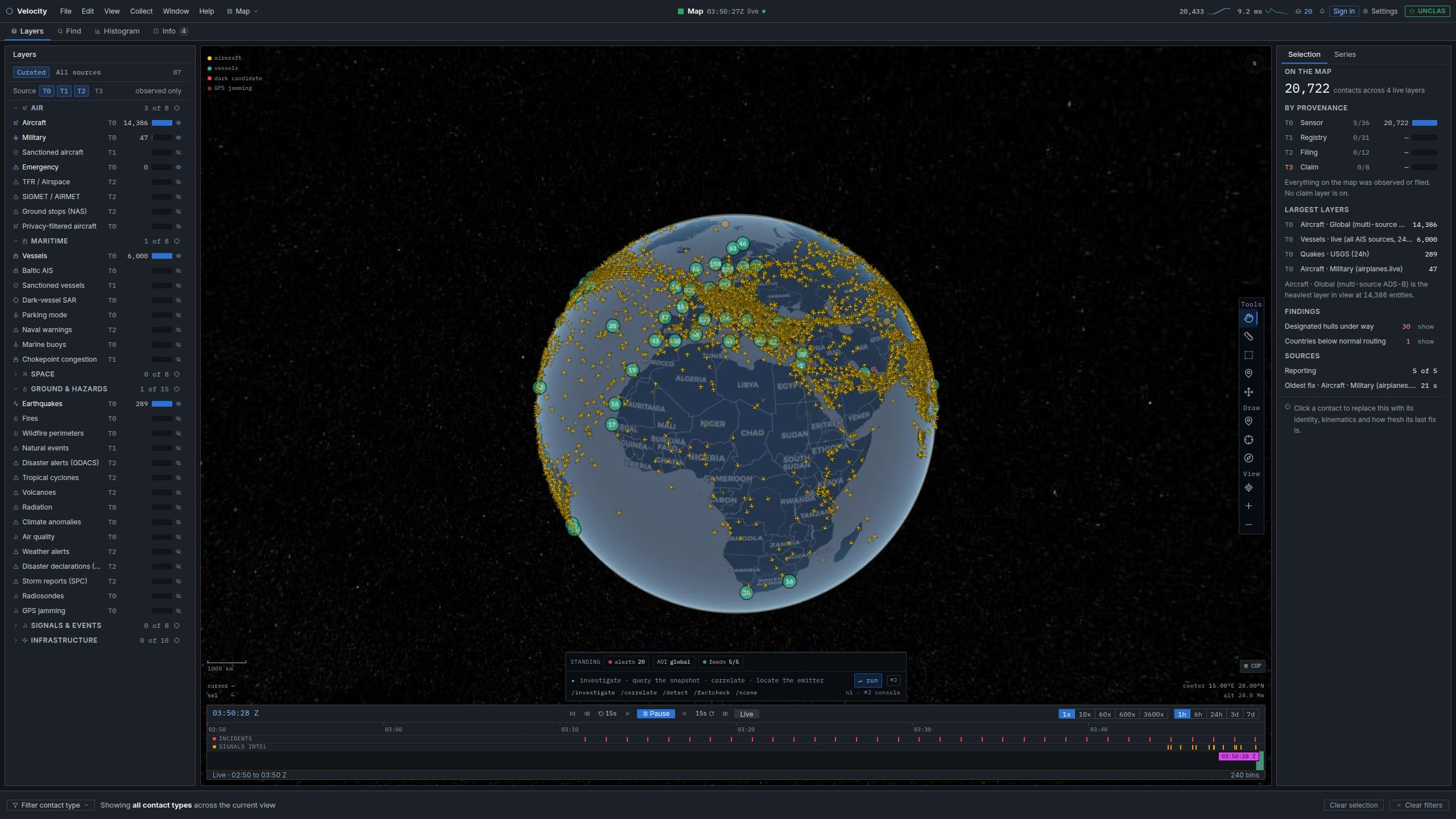
I built a free, open-source flight and ship tracker inspired by Flightradar24. It records everything to your own disk so you can rewind any moment, and it needs zero API keys.

Post image
21 Upvotes

Meet Velocity: a self-hosted live map of aircraft, ships and satellites on a 3D globe. It pulls public ADS-B, AIS and satellite feeds and writes every position to a database on your own machine, so you can scrub back to any moment it has seen.

Why I built it: Flightradar24 gives 7 days of replay on the free tier, MarineTraffic 24 hours, and ADS-B Exchange dropped its free API. The positions are public; the history is what they charge for. Velocity keeps the history, as much as your disk holds.

What's in it:

• live aircraft from community ADS-B feeds, ships from open AIS, satellites from CelesTrak (no keys, no account)

• a replay timeline over everything it has recorded

• a GPS-jamming map built from aircraft navigation-accuracy reports, plus emergency squawks

• watch rules: pick an area, or pin one aircraft or ship, and get pinged (in-app, Discord, webhook or ntfy)

• earthquakes, wildfires and cyclones on the same globe

• an MCP server, so an AI agent can query the same live feeds

Tech stack: Python/FastAPI backend, React + Cesium globe, history in TimescaleDB, everything in Docker Compose.

I wrote it with a lot of help from Claude Code, and I keep it honest with tests (3,300+) rather than vibes. To run it: git clone the repo, then docker compose up and open localhost:8080.

Try it and tell me what's broken. I'm also curious which feeds you'd want added.

⭐ Repo: https://github.com/AndrewCTF/velocity


r/coolgithubprojects • • 16h ago

I built a tool for changing monitor brightness and input from the computer which support macOS and Debian

Post image
3 Upvotes

I use 2 different computers (Debian and macOS) with 1 monitor. Every time I moved from one to the other, I had to use the physical button on the monitor.

It was uncomfortable to reach for the monitor button and keep stay there until it reacted and switched to other computer, and meanwhile I was losing my focus on what I was working on. And meantime, I wouldn't like to use VNC based solutions since it doesn't give the real monitor experience.

I checked the existing solutions, but I couldn't find one that controls the brightness, switches input sources, and works on both Debian and macOS.

So I built it myself. I added a system tray for both OS, and a pre-switch hook for prevent sleep situations.

You can try it on: https://github.com/utkudarilmaz/monctl


r/coolgithubprojects • • 1d ago Bravo

Watch your network, block what's suspicious: free and open source Glasswire Alternative

Thumbnail gallery
62 Upvotes

Your PC talks to the internet all day, and almost none of it is visible. A password stealer looks the same as everything else: one quiet program sending a few MB to a server you've never heard of.

Would you notice? Probably not. So I built Kestryl.

Download (Windows 10/11): https://github.com/HacanAle/Kestryl/releases/latest

What it does:

  • Live traffic: every app, every byte. See what each program uploads and downloads, and which site, country and company it talks to.
  • Catches stealers: if a program opens your saved passwords, crypto wallets or a pile of documents and then sends data out, you get a high alert within seconds.
  • Block anything in one click: Blocks are real Windows Firewall rules, so they keep working even after you close Kestryl.

    • Block an app: stop a program from reaching the internet at all.
    • Block an IP: cut off one server address for every program.
    • Block a domain: block a whole site (every address it resolves to).
    • Block an incoming port: close a door others could use to reach your PC.
  • Cut off the internet: one panic button stops every program from connecting.
  • Known malware servers: every connection and DNS lookup is checked against free threat lists (abuse.ch, C2IntelFeeds, Spamhaus DROP, Emerging Threats).
  • Where your data went: a world map of today's uploads by country and company, worked out offline on your PC.
  • While you were away: lock your screen and come back to a report of everything that was sent.
  • Clipboard guard: catches malware that swaps a copied crypto wallet address or IBAN for the attacker's own.
  • Camera and mic watch: see which app is using them right now.
  • Windows health check: Defender, firewall, proxy, DNS, hosts file, Remote Desktop, and every place malware hides to start with Windows.
  • Look inside: check whether a connection is really encrypted, and (password-protected) see what one app sends inside HTTPS.
  • Simple or Advanced view: plain words for everyone, and IPs, ports, PIDs and hashes for IT folks.
  • Coming next: multi-language support. Kestryl will be available in more languages soon. Which language would you like first? Tell me in the comments.

No driver. No account. No cloud. Everything stays on your PC. Free and open source (GPL-3.0), built in Rust and Tauri.

Want to try it without real malware? Run Kestryl.exe --simulate and it fills itself with fake threats, like the screenshot.

Download (Windows 10/11): https://github.com/HacanAle/Kestryl/releases/latest

Source code: https://github.com/HacanAle/Kestryl

I'd love feedback, especially on false alerts. If you find it useful, a star on GitHub helps a lot.

[EDIT]: You may see a Windows 11 SmartScreen warning while installing. This is because the project is open source and I haven't code-signed the app, so Windows warns you before installation. Nothing to panic about, it's just a warning for unsigned apps.

Still, if anyone wants to personally sign the app, a PowerShell script is available on GitHub that lets you sign apps locally for your own PC.


r/coolgithubprojects • • 1d ago

I made a free, open-source Android app that runs AI models fully offline on your phone

Post image
13 Upvotes

Hey all,

I've been working on TinyModels, a side project that lets you download small open models from Hugging Face and chat with them entirely on your phone. There's no account, no cloud, and nothing leaves your device.

What it does right now:

  • Browse and download LiteRT-LM models, and see whether they'll fit your phone before downloading
  • Chat with streaming replies, saved conversations, and per-chat settings
  • Ask questions about photos (on vision models), processed locally
  • Optional web search, off by default
  • Benchmarks so you can see how fast models actually run on your device
  • Import and export .litertlm files to share models between devices

It has no analytics or tracking. It needs Android 8+, arm64, and 4 GB RAM (8 GB+ is better for 3B models).

Play store link : Link

Github Link : Link

It's still early, so I'd really appreciate feedback, bug reports, or feature ideas. Thanks for checking it out!


r/coolgithubprojects • • 8h ago

Issues · profullstack/c0mpute

Thumbnail github.com
0 Upvotes

r/coolgithubprojects • • 6h ago

I made a self-hosted alternative to ChatGPT with native mobile apps and disposable linux workspaces

Post image
0 Upvotes

I've been working on a self-hosted version of ChatGPT for the last 5 months. I'm excited to finally
share it. I've been testing it with around 30 friends on my own self-hosted instance.

Check it out, I'm very open to feedback :)
https://github.com/IsaacThoman/pulpo

Some things that make this app unique

  • It uses a Pi agent on the server, which can use bash through K3S managed Linux VMs
  • Agents are fast to spin up because it assigns VMs from a configurable warm pool
  • Pi also has web search, file/document storage and editing, and computer use
  • Native mobile apps that stay perfectly in sync with socket.io
  • User spend/budget management
  • A friends and leaderboard system to compare usage by different models with friends
  • It caches recent chats in browser storage for quick switching between threads

If you want to try it out quickly, I have my own instance hosted at https://pulpo.baby for anyone to experiment with


r/coolgithubprojects • • 13h ago

I built dibs, a tool that checks whether someone is already working on a GitHub issue

Thumbnail github.com
0 Upvotes

I started contributing to open source recently, and while looking for an issue to work on, I saw good first issues that already had several overlapping pull requests. So I built dibs, a check you run before starting on an issue.

Give it an issue URL and it reads the issue's history: open and draft pull requests that reference it, "I'd like to work on this" or "/assign" comments and how old they are, assignees, labels like wontfix, and what the project's CONTRIBUTING or AI policy says about AI. It answers GO, ASK or STOP and quotes what it found.

I also made it work as a GitHub Action, which comments on a new pull request when it duplicates an earlier one or takes an issue someone else claimed, and as an Agent Skill, which makes coding agents run the check before they write any code. It doesn't guess who wrote the code. It's MIT licensed and uses only the Python standard library.

It only understands claim comments written in English so far, so I'd like to hear how people claim issues in other languages.


r/coolgithubprojects • • 20h ago

WhatsFlare – a WhatsApp gateway that runs entirely on Cloudflare's free tier

Post image
3 Upvotes

Most "self-hosted WhatsApp" setups mean a VPS, a Docker container, and a monthly bill for a process that spends 99% of its life waiting. This one is a Cloudflare Worker: one Durable Object per linked account drives the WhatsApp Web session, and you pay nothing at low volume.

GitHub: https://github.com/dannybyarun/whatsflare (MIT)

Why the architecture looks odd. Cloudflare gives 13,000 GB-s of Durable Object time per day. A DO holding a WhatsApp socket bills 128 MB × 86,400 s ≈ 10,800 GB-s, so a single always-on session would eat 83% of the entire free tier. The session is therefore lazy: /wake opens the socket, /messages drains with a monotonic cursor, /ack prunes once you have persisted the rows, /idle closes it. A window slides on activity but is capped, so a drain that takes 90 s finishes and a poller on a tight loop cannot pin the object.

What is actually hard. baileys wants net/tls for its WebSocket client and workerd has neither. The replacement is a fetch() upgrade, which means calling accept() yourself, emitting open exactly once, numeric error codes, binaryType = 'arraybuffer', and no AbortSignal on the upgrade. Each of those is documented in the patch header, because getting one wrong gives you a socket that opens and then dies silently.

What you get: WhatsApp Web-style UI, REST API, WebSocket event stream, token-scoped sending (full / send / embed with per-token chat allowlists and daily caps), media fetched on demand instead of stored, a Google Sheets drainer via Apps Script, credential export/import, and an MCP endpoint so an agent can read chats and send messages without a DB or an extra Durable Object.

Two things I would flag rather than hide: it is a ~9k-line TypeScript project written with heavy AI assistance (architecture and tests reviewed by me), and syncFullHistory: false means a chat with no traffic since you linked the device never appears in the list.

Happy to answer anything about the workerd socket, the DO cost model, or why the message parser has to unwrap ephemeralMessage / viewOnceMessageV2 / documentWithCaptionMessage before it can tell whether a message is even displayable.


r/coolgithubprojects • • 1d ago

thir v0.7.1 – A custom OS built on Linux 6.12 with an all-Rust userspace

Post image
16 Upvotes

I just released v0.7.1 of thir, an experimental open-source OS I've been building from scratch on top of the Linux 6.12 kernel with a custom all-Rust userspace (custom init, nsh shell, login, and a tiling framebuffer GUI called den).

Earlier versions were under 10MB and only handled basic shell commands, so for this release I wanted to see how far I could push it toward being an actually usable desktop environment—even if compiling WebKit alone took ~4 hours and bumped the system size up to ~145MB.

What's inside v0.7.1:

  • Web & Media: A WebKit-based browser (capable of playing YouTube), music/video player, picture viewer, voice recorder, and camera apps with mic/camera permission prompts.
  • Built-in Utilities: Notes, Calendar, Contacts, Clock, Calculator, plus core CLI tools (top, file editor, neofetch).
  • Optional BYOK AI Agent: Typing ! in the terminal lets you run natural-language commands like ! move notes into docs or ! make me a weather app. It previews the plan, asks for your approval, and generates working apps inside the OS (currently outputting Lua scripts, with plans to support React-based native API apps in future updates).

Right now, this is purely a solo fun experiment rather than something meant for production, and since I'm the only one who has tested it so far, expect a few rough edges and bugs. It boots via UEFI and runs cleanly in VirtualBox if you want to spin it up.

If you give it a try and run into any issues, feel free to open a GitHub issue—and if you think it's neat, a Star on the repo would really make my day!

GitHub: https://github.com/Adhishtanaka/thir