r/coolgithubprojects • • 4d ago

New moderators needed - comment on this post to volunteer to become a moderator of this community.

5 Upvotes

Hello everyone - this community is in need of a few new mods, and you can use the comments on this post to let us know why you’d like to be a mod here.

Priority is given to redditors who have past activity in this community or other communities with related topics. It’s okay if you don’t have previous mod experience. Our goal, when possible, is to add a group of moderators so you can work together to build the community.

Please use at least 3 sentences to explain why you’d like to be a mod and share what moderation experience you have (if any).

If you are interested in learning more about being a moderator on Reddit, please take a look at these resources:

Comments from those making repeated asks to adopt communities or that are off topic will be removed.


r/coolgithubprojects • • 3h ago

I'm building AppImage Vault: browse 9,800+ Linux AppImages in one place (early beta, testers wanted)

Post image
21 Upvotes

Hunting through GitHub release pages for AppImages? I'm building AppImage Vault to put them in one place.

What it does:

• Browse and search a list of 9,800+ apps from public GitHub releases

• Install them into one App Images folder and add them to your app menu

• Launch, update and remove apps installed through the store

• Start with Vault Picks and starter collections

It's free, open source (GPL-3.0) and for 64-bit Intel/AMD Linux. There's an AppImage, plus Arch, Fedora and Debian/Ubuntu packages.

Please know before trying it:

• This is an early beta (0.1.0), with little testing outside CachyOS

• Most listed apps haven't been tried

• Listed apps are NOT safety-reviewed. Only run apps you trust

• Not every AppImage runs on every Linux system

• It's not an official project of the AppImage team

Download and source code:

https://github.com/metalmike17/appimage-vault

I'd love testers! Which distro are you using, what worked, and what broke?


r/coolgithubprojects • • 5h ago

StradaOS: an open-source launcher for budget-friendly Android-based automotive multimedia systems; it now features a welcome greeting upon startup, improved OBD connectivity, turn-by-turn navigation, and a widget that can be swiped between a map view and a video player.

Thumbnail gallery
23 Upvotes

A few weeks ago, I shared StradaOS (v2.12) here, and the response was incredible. Much of this update came about thanks to your feedback and the bug reports submitted on GitHub.

A quick summary for those not yet familiar with the project: many affordable Chinese head units claim to run "Android 10," but they actually run on Android 4.x. StradaOS is written in pure Java, without any external libraries, making it compatible with versions ranging from Android 4.1 all the way to 14.

What’s new since then:

• Startup welcome: The logo lights up and greets you by name—with an audible greeting (this option can be disabled).

• Integrated navigation: Search for a destination and get turn-by-turn directions; offline maps are also supported.

• Map/video carousel: Swipe the map to play your saved music videos; the video feed hides when the vehicle is in motion, but the audio continues to play.

• OBD-II scanner (ELM327): Displays RPM alongside the speedometer, along with alerts and error codes.

• Automatic album art (when the unit has an internet connection).

• Premium themes: "Faro," "Carbono," and the new "Premium Cards." The app remains free, with no ads and no need to create an account; these themes are an optional way to show appreciation for a donation.

Free, licensed under GPL-3.0, no root access required, ~1.5 MB, available in 13 languages.

Repository and signed APK: https://github.com/lordnordic-debug/StradaOS

If you have one of these devices, let me know the make, model, and the actual Android version (you can check this in StradaOS under Settings → About), and I’ll be happy to help.


r/coolgithubprojects • • 12h ago

Windows Chosen Utilities v1.12

Thumbnail gallery
75 Upvotes

Disk Clean-up: clears temp files, the Recycle Bin, the Windows Update cache, the thumbnail cache, crash dumps, error reports and, if you tick them, System Restore points. It only touches a fixed list of locations.

Reg Networks: removes the generic "Network N" profiles and opens any pasted registry key in Registry Editor.

Run as TI: runs an .exe or imports a .reg as TrustedInstaller.

Manual Updates: downloads the newest .msu and .NET (ndp481) update for this PC's channel, and installs .msu/.cab files with DISM.

Windows AIO: WIM Editor, ESD to ISO (pick the editions to keep; runs abbodi1406's esd-decrypter-wimlib, fetched each time, and names the ISO like Download Windows), Folder2ISO / ISO2Folder, WinToUSB and Hash.

Windows Repair: SFC, DISM Scan/Restore Health (also from a WIM), Windows Update Cleanup and Reserved Storage, with live output.

Misc Tweaks: Terminal settings restore, plus Enable/Disable switches for Explore Background, Gallery, VBS, RDP blank password, map drives delay, WU drivers, notifications, Windows theme, and Timezone and Region.

Download Windows: builds a bootable x64 or Arm64 ISO from Microsoft's files via UUP dump, with the editions, language and preinstalled apps you choose, in Documents or a work folder you pick.

Install Apps: silent installs and updates of Firefox, IDM, PotPlayer, Chrome Remote Desktop, NanaZip and Tailscale, with signature checks and tidy Start menu shortcuts. Download NVIDIA driver and Download AMD driver find the newest driver for the graphics in this PC (desktop or laptop) and save it where you choose, without installing it: NVIDIA's Game Ready Driver, or a newer hotfix when there is one; AMD's Recommended driver, or a newer Optional one.

MS Office 365: downloads Microsoft 365 Apps (x64) from the Office CDN, installs the apps you pick, and switches between the Current, Beta and Dev Main channels.

Remove Apps: removes the apps that come with Windows for your account, or brings them back.

Boot to USB and Boot to UEFI BIOS (bottom of the rail): restart straight into a bootable USB stick, or into the firmware settings.

Update (bottom of the rail): turns on only when a newer release is out here, and Windows shows a notification then. It shows what's new, downloads the release's exe, checks it against the SHA-256 GitHub lists, swaps it in place of the running exe (same name and folder) and restarts. A folder that needs administrator rights asks through UAC first.

Repo link:

https://github.com/misal1337/windows-chosen-utilities

Please give stars to my repo so that I can code-sign later. (Only if you like the app)


r/coolgithubprojects • • 5h ago

meshvpn: a mesh VPN with no coordination server, with a terminal console for all your machines (Rust)

Post image
13 Upvotes

meshvpn connects your machines into one private network without a central server. Nodes find each other through gossip and relay for each other when two machines can't connect directly, so any node can go down and the rest keeps working.

What's in the screenshot: running meshvpn opens a console with every node, how it's reached (direct, direct UDP over IPv4/IPv6, or relayed through another node), latency and free GPUs. Press Enter and you get a shell on that node in a new tab. Names and IPs are demo data.

  • Each node gets a 100.x IP and a name.mesh hostname
  • NAT traversal over UDP and IPv6, with an end-to-end encrypted relay as fallback
  • Optional BitTorrent DHT rendezvous (off by default): nodes find each other again after an IP change, no DynDNS needed
  • Single static binary, Apache 2.0

Tested with two laptops on two different 5G hotspots, both behind CGNAT, with no server: with the DHT on, they connected directly over IPv6.

It's pre-1.0, and Linux gets the most testing.

GitHub: https://github.com/PlugOvr-ai/meshvpn
Website: https://meshvpn.dev


r/coolgithubprojects • • 16h ago

SSD Sentinel v1.10 - Free open-source Windows disk health, direct-IO benchmark, surface scan & read-only NTFS recovery (3.7 MB)

Post image
50 Upvotes

I got sick of installing 4 separate utilities (CrystalDiskInfo, CrystalDiskMark, surface scanners, paid recovery apps) just to monitor and maintain Windows drives, so I built a lightweight MIT open-source alternative in Rust + Tauri 2 (~3.7 MB installer, zero telemetry, no ads, no paywall).

Main features:

  • Live NVMe, SATA SSD & HDD SMART health + local SQLite write-rate / remaining lifespan tracking
  • Built-in Win32 Direct-IO speed benchmark (SEQ + 4K random IOPS/latency)
  • 200-zone read-only surface scan with thermal watchdogs and bad/slow block relocation
  • Read-only NTFS file & deleted app/game recovery ($MFT, VSS shadow copies, Recycle Bin, carving)
  • SSD-to-HDD cold folder offloading via SHA-256 verified NTFS junctions (reversible in one click)
  • Stale dev artifact cleanup (node_modules, target, .venv) + WSL2/Docker .vhdx compaction

Safety design: it starts locked in Read-Only mode by default so you can't accidentally trigger writes or benchmarks, and every mutating action shows a dry-run preview before running.

Notes:

  • Windows 10/11 x64
  • Currently unsigned (no paid Authenticode cert yet), so SmartScreen will show a warning. Checksums (SHA256SUMS.txt) and SLSA provenance are attached to each GitHub release, and full source is open if you prefer building it yourself.
  • Has an offline demo mode (--snapshot-dir .\src-tauri\tests\fixtures) that inspects sample data with zero disk access.

Repo & download: https://github.com/yuefdev/ssd-sentinel

Happy to hear any feedback or bug reports.


r/coolgithubprojects • • 8h ago

PearUI: the best of Mac, Linux and Windows on your Windows PC 🍐

Thumbnail gallery
11 Upvotes

r/coolgithubprojects • • 6h ago

JustUninstallApps — Free, feature-packed yet lightweight open-source Windows uninstaller with 1-click Junk cleanup and zero background nonsense. First step of IJUST-Apps, with more apps coming — just the apps you need!

Thumbnail gallery
7 Upvotes

About IJUST-Apps

IJUST-Apps is a growing collection of real free, open-source desktop apps built around one simple rule: just the apps you need — no bloatware, no resource hogs, and zero nonsense background services.

About JustUninstallApps

JustUninstallApps is the first release in the lineup: a fast, feature-packed yet lightweight Windows uninstaller designed to keep your system clean with one-click!

Key Features

  • Smart App Uninstaller: Quickly search, filter, and cleanly remove unwanted desktop programs.
  • 1-Click Junk & RAM Cleanup: Built-in buttons to purge temporary/cache junk files and free up memory on demand.
  • Customizable Themes: Switch between multiple clean, modern UI themes directly inside the app.
  • 100% Local & Private: Runs completely offline under GNU GPL-3.0 — zero telemetry, zero ads, and zero background processes.

Links

Any feedback, bug reports, or ideas for future tools are welcome!


r/coolgithubprojects • • 10h ago

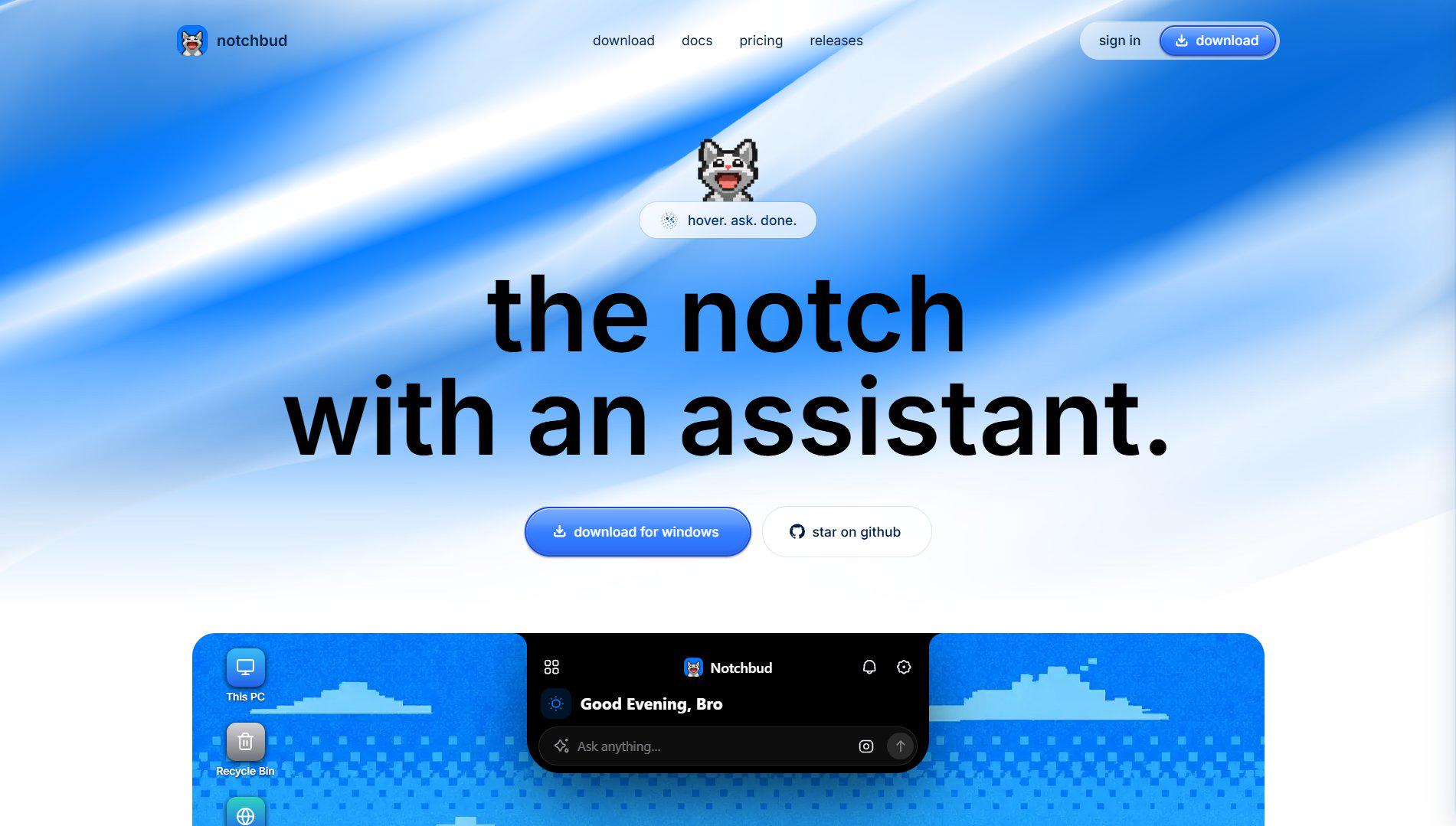
I built NotchBud: an open-source, native Rust "Dynamic Island" AI assistant for Windows (~5 MB idle RAM)

Post image
15 Upvotes

built NotchBud

a lightweight, open-source Windows desktop assistant that lives in a Dynamic Island-style notch at the top of your screen. Hover to open it, stream answers from any AI provider without switching windows, and move away to collapse it.

• Website & Download: https://notchbud.vercel.app

• GitHub: https://github.com/ankitdey01/notchbud


r/coolgithubprojects • • 3h ago

Paladio – A self-hosted travel agency that learns your taste, optimizes itineraries, and tracks flight+hotel deals

Post image
4 Upvotes

Hey everyone!

I've been building Paladio for a couple months and it's at the point where I'm proud of showing it, and would like for people to give feedback.

What I wanted to achieve (and how I made it): I wanted to travel more and spend less, and for trips to be planned according to my taste and be able to discover new places in a simple way. I wanted a travel agency, self-hosted.

ding to my taste and be able to discover new places in a simple way. I wanted a travel agency, self-hosted.Main features:

  • Paladio learns your taste: It takes your actions and creates you own taste star which will be used to search places that will fit your likings (each city is seeded with a database of thousands of places), find the best hotel and creating trips according to your style and much more. If you travel with more people, each ones taste is taken into account for the trip.
  • Paladio can plan for you: if you'd like, you can just drop your flights and hotel confirmation (or boarding passes, confirmation emails, etc.) and Paladio will fill the info for the trip for you. Then, write a single description (or create a blank trip) and Paladio will build an intelligent route (with good meal spacing, real opening hours, etc.), mathematically optimized using the Paladio's solver engine and with public transit, weather, search of places with natural language... You can also arrange the itinerary as you like dragging and dropping the places.
  • Paladio saves you money: You can monitor trip routes and Paladio will intelligently search the best flights + hotel combination for that route, saving you real money and finding the best deals.
  • Paladio integrates with your ecosystem: Connect your Immich, Synology, Pushify, Notify, your own AI (via the MCP or the chat window). The trip also saves your reservation and flight/hotel tickets, with all their info and their QR, and all you expenses and tells you how to split them between the trip members Splitwise-like. You can also export your trip via PDF, directly to your calendar, in a .gpx... Also, use the vault to see previously completed trips, or change the settings to your taste: currency, language (10 languages implemented), city (national holidays or manual integrated). If you ever get stuck, use the help center for finding solutions.
  • Much more still...

Repo: https://github.com/Leandro-Juan/paladio

Demo page: https://paladio-xi.vercel.app

If anyone detects any bugs or has any ideas or recommendations to improve I'll be thankful to know them!


r/coolgithubprojects • • 9m ago

GitSync - A repository manager

Post image
2 Upvotes

I’ve been building a repository manager that connects to your GitHub , you can view your repository’s as well as push and pull commits

You can also clone your repos as well as showing you the latest commit , who it was done by and at what time

This is just a start so please bare with me

Repo link : https://github.com/AceAdz/GitSync


r/coolgithubprojects • • 7h ago

Disk Rewind: A simple Windows tool that shows which files/folders grew between disk scans(suggestions needed)

Post image
6 Upvotes

Umm... Everyday I see my C drive getting filled... just a simple app to check what grew.. https://github.com/silveryverse/Disk-Rewind

I need suggestions as what more features I can add..


r/coolgithubprojects • • 18h ago

Built Melo, an open-source YouTube Music Client | 10K downloads and 250+ stars in one week!

Post image
34 Upvotes

Melo is an open-source Android music player bringing Spotify, YouTube Music, and your local library together.

Top Features: 1.Hi-res lossless playback 2.Add-on support 3.Clean, ad-free listening

Huge thanks to everyone who downloaded Melo, starred the project, and shared feedback this week. I’m building this in the open, and there’s a lot more to come!

📥 Download Melo: https://github.com/aarush-io/melo/releases/latest ⭐ Star the project: https://github.com/aarush-io/melo


r/coolgithubprojects • • 2h ago

Orbit File explore

Post image
2 Upvotes

r/coolgithubprojects • • 7h ago

Started as a simple script, then I added a GUI, then I lost control: Audio-SWARM

Thumbnail gallery
4 Upvotes

Hey everyone,

A few months ago, I just wanted a simple script to turn an audio file into a clean waveform graphic and embed it as album art.

Then I added batch folder processing, then circular/radial spectrums, then bulk cover-art embedding, and suddenly I had to build a full desktop GUI around it.

I just cleaned it up and released it under **AGPL-3.0** for Linux, Windows, and macOS:

What it does for music projects:

  • Circular & Radial Waveforms: Real-time preview with adjustable inner radius, rotation, amplitude, and outward/inward/bidirectional peaks (exports transparent PNGs up to 12,000px wide for vinyl labels, social posts, or merch/prints).
  • Linear & Vertical-Flow Waveforms: Custom color gradients, stem thickness, and recursive batch folder processing.
  • Bulk Artwork Linker: Drops a folder of cover images into a folder of audio files (WAV, FLAC, MP3, AIFF, M4A, OGG, OPUS) and embeds them all without renaming your files.

It's still in public alpha, so if you try it out on your tracks and have ideas for new visual styles, let me know!


r/coolgithubprojects • • 33m ago

Cyberdog: open source SFTP client + SSH terminal + server dashboard (MIT, Mac/Win/Linux)[GIF]

Post image
1 Upvotes

I'm a dev/sysadmin and used Cyberduck for years. It still works, but it felt stuck in another era: no terminal, no way to see what's going on on the server, and a separate app for every other task. I got fed up and built Cyberdog to get all of it in one modern window.

Files and editing

  • SFTP explorer with drag and drop, server-to-server copies, split view, remote search, and archives created and extracted on the server
  • Resumable transfer queue that asks what to do when a file already exists
  • Monaco (VS Code) editor that keeps encodings and line endings. For nginx, sshd, Apache, HAProxy or systemd configs it runs the test (nginx -t, sshd -t...) and only reloads if it passes. If something goes wrong, you can roll back to the previous version in one click.
  • Folder sync between local and remote, with a diff preview

Server management

  • SSH terminal docked under the explorer, opened in the current folder
  • Health dashboard showing CPU, RAM, load, disks with alerts, uptime and latency, with nothing to install on the server
  • systemd services: start, stop or restart them (sudo is handled), filter the failed ones, and jump to their logs
  • Live logs from journalctl, nginx, syslog, auth.log or any file, with level filters and errors highlighted
  • Cron jobs and systemd timers: schedules shown in plain words, crontab editing, and "run now"
  • Docker containers: live logs, CPU/RAM, restart, recreate, and a shell inside the container
  • Process explorer grouped by service, user or container, flagging CPU spikes, memory growth and zombies, with SIGTERM/SIGKILL
  • Kubernetes through the server's kubectl, plus PostgreSQL, MySQL and Redis
  • Saved bash scripts you can run on one server or on all open ones, with input forms

Keys, certs and security

  • SSH key manager: generate Ed25519 or RSA 4096 keys, install them in authorized_keys in one click, and see which keys are already authorized on the server
  • SSL certificates found on the server (Let's Encrypt, nginx, Apache), with expiry alerts and Certbot renewal
  • Jump hosts, pinned host keys, and passwords in the OS keychain or pulled from 1Password, Bitwarden or Vault

It also supports S3, FTP/FTPS, Azure, WebDAV, SMB and Google Drive.

Switching

It detects Cyberduck, FileZilla, WinSCP, MobaXterm, Transmit, PuTTY, Tabby and ~/.ssh/config, and imports your servers with their groups. Passwords come along when the source app stores them in a readable form.

No account needed. Packages: signed .dmg, Homebrew, Windows installer/portable, AppImage and .deb.

https://github.com/pickywawa/cyberdog

Feedback and PRs welcome.


r/coolgithubprojects • • 13h ago

Ferret: phone ⇄ computer without the cloud. Clipboard, files, notifications and texts over your Wi-Fi (Android, Mac, Windows, Linux)

Thumbnail github.com
10 Upvotes

Hi folks 👋

Copy on your phone, paste on your computer. That should be easy, and it usually means a cloud account, an app per brand, or emailing yourself.

Ferret does it over your own Wi-Fi. Nothing leaves your network.

📋 Clipboard both ways, plus Recent clips (⌃⌥V on Mac)

📦 Files: drop them on the menubar/tray icon or a device

🔔 Phone notifications and texts on the computer, reply from there

🎵 See what plays, control it, or "Continue here" on the other device

🔒 Ring or lock the computer from the phone

⏸️ Pause for an hour when you don't want it on the network

How it works:

- Devices find each other with mDNS and pair with a 6-digit code

- Everything is end-to-end encrypted (Noise XX)

- Speaks the LocalSend protocol too, so it can send to LocalSend devices

- Built with Flutter, with native menubar/tray bits per platform

Free and open source (GPL-3.0). No account, no tracking.

iPhone is coming next.

Downloads are on the Releases page. Feedback and issues are very welcome 🦊


r/coolgithubprojects • • 1h ago

Eclipse Enclave - run AI coding agents safely in isolated containers

Thumbnail github.com
1 Upvotes

Eclipse Enclave is an open-source tool that lets you run AI coding agents like Codex, Claude Code, and OpenCode in isolated Docker/Podman containers.

It provides filesystem and network isolation, allowing agents to work autonomously without risking unrestricted access to your host system.

GitHub: https://github.com/eclipse-enclave/enclave


r/coolgithubprojects • • 1h ago

Crewenv lets you review .env changes in Git without exposing the values

Thumbnail github.com
1 Upvotes

I made Crewenv for teams that want to keep their .env files alongside their code. It encrypts each value separately so git diff still shows which variables changed. crewenv check also catches missing variables in CI without a decryption key.

It’s MIT and the demo uses throwaway keys.


r/coolgithubprojects • • 2h ago

[C#] T-Dagger Lighting Control Panel: free Windows app for the Bora Lite keyboard's lighting, with a live synced preview

Post image
1 Upvotes

https://github.com/OBSTar-debug/T-Dagger-Lighting-Control-Panel

A single-file C# WinForms app that controls the lighting on the T-Dagger Bora Lite (USB 258A:013B) over HID feature reports. It has 12 effects, speed and brightness, a preview whose timings were measured on video, restore at sign-in, and 0% CPU when minimized or behind a fullscreen game. It builds with the compiler built into Windows. MIT licensed. Feedback welcome.


r/coolgithubprojects • • 2h ago

senn is a selfhosted docker panel that doesnt lock you into it

Post image
1 Upvotes

ok so my stacks are just folders on each server with a compose file and a .env and thats it.

i tried dockhand and komodo and a bunch of other panels but none of them did what i wanted which is leave the folders alone and still give me a dashboard with update notifications and metrics without sshing into every box. coolify and dokploy are fine but they also do all the reverse proxy and exposing stuff. i specifically only wanted a management ui that just simplifies things i already have and doesnt need the panel for my stuff to keep running.

anyway senn is my take and it also does the grafana + prometheus/beszel thing with system resource metrics.

full rambling version: https://pandadev.net/projects/senn

github: https://github.com/0PandaDEV/senn


r/coolgithubprojects • • 6h ago

TCKR, a scrolling LED stock and crypto ticker for Windows desktops.

Thumbnail gallery
2 Upvotes

I'm the developer of TCKR, a Windows app that docks an LED-style scrolling ticker at the top of the desktop so stocks and crypto stay in view while you work. I built it because I couldn't keep my brokerage site open at work, and I've loved those LED tickers since I was a kid. I tried a browser version first and couldn't get a thin, ticker-shaped window without the browser chrome, so I built a native Windows app in Python, with some AI help on the coding.

It's free to install and use. Just install and run: tckr.pro

PRO is optional and one-time. It adds more symbols, visual effects, Price Watch alerts, news headlines, and a dual ticker, and it's $9.99 (normally $14.99) on the Microsoft Store through Cyber Monday, November 30. Happy to answer questions.

I also made NFL-TCKR, a free and open-source NFL score ticker for Windows in the same docked LED style. It sits at the top of the desktop with live scores, down and distance, the last play, QB stats, and weekly and season leaders, and it can span multiple displays. I built it after making TCKR, my stock and crypto ticker, and this one is completely free.

Site: krypdoh.github.io/NFL-TCKR
Source: github.com/krypdoh/NFL-TCKR

I'd love feedback from anyone who leaves a game on in the background all Sunday.


r/coolgithubprojects • • 3h ago

I built a Rust tray app that keeps one battery history for my G502 X PLUS over USB and LIGHTSPEED

Post image
1 Upvotes

I saw the Wireless Battery post here and thought people might be interested in a problem I worked on in Volty. When I plug my G502 X PLUS in to charge, I want the battery history to continue on the same chart.

Volty reads the battery over Logitech HID++ and uses the mouse’s unit ID, when available, to match readings from the USB cable and LIGHTSPEED receiver to the same device.

The GIF shows my mouse at 58% in the Windows tray. Clicking the tray icon opens the battery history, which stays on the PC. Volty is written in Rust and MIT licensed.

If you have another wireless G502 model, I’d be curious whether Volty recognizes it over both cable and receiver.

GitHub repository · Tested devices


r/coolgithubprojects • • 3h ago

I built a free, open-source Windows app that lets you save and locally transcribe audio after it happens

Thumbnail github.com
0 Upvotes

Hi!

I've been working on Sonago, a free and open-source Windows 11 app. It's basically Instant Replay, but for audio.

It runs in the system tray and keeps a rolling history of your system audio and microphone. Whenever something worth saving happens, you can go back and save it, even if you weren't planning to record anything.

Features:

  • Configurable audio history of up to 12 hours
  • Independent system audio and microphone capture
  • Quick saving with a global hotkey or by double-tapping the right Ctrl key
  • Local audio transcription with speaker identification, timestamps and music detection
  • Matroska and Ogg Opus export with separate audio tracks
  • Native WinUI 3 interface with a Rust audio engine

Everything is processed locally. No accounts, subscriptions or cloud processing.

It's still in early development, so I'd love to hear your feedback, especially if you have a use case I haven't thought of yet.

GitHub: https://github.com/newbialywhodis/sonago


r/coolgithubprojects • • 3h ago

create-tigra — MIT npm generator for Next.js + Fastify; feedback and repo roasts welcome

Thumbnail github.com
1 Upvotes

I maintain create-tigra and have opened its published 5.0.2 source baseline for review. It generates a TypeScript project with a Next.js frontend foundation, a separate Fastify API, Prisma/MySQL, auth/session code, Redis-backed limits, tests, CI, and Docker configuration.

The idea is to start with the infrastructure connected and build your own application pages. Forms and API/auth wiring are included; the product screens are yours. That trades repeated setup work for a larger initial stack.

I would appreciate recommendations and honest feedback on the source: what is unnecessary, what is hard to follow, and what would stop you from using or contributing to it? Feel free to roast the repo, especially with a concrete file or alternative approach.

It is free and MIT-licensed. Known dependency advisories are listed in KNOWN_ISSUES.md; the source snapshot is not presented as ready to deploy unchanged.