r/coolgithubprojects • • 2d ago

New moderators needed - comment on this post to volunteer to become a moderator of this community.

5 Upvotes

Hello everyone - this community is in need of a few new mods, and you can use the comments on this post to let us know why you’d like to be a mod here.

Priority is given to redditors who have past activity in this community or other communities with related topics. It’s okay if you don’t have previous mod experience. Our goal, when possible, is to add a group of moderators so you can work together to build the community.

Please use at least 3 sentences to explain why you’d like to be a mod and share what moderation experience you have (if any).

If you are interested in learning more about being a moderator on Reddit, please take a look at these resources:

Comments from those making repeated asks to adopt communities or that are off topic will be removed.


r/coolgithubprojects • • 8h ago

Liquid glass in rust

Thumbnail gallery
72 Upvotes

I was playing around in claude code and it gave me a pretty good and quite nice looking liquid glass UI framework, which looks close to apple's liquid glass, not only with the refraction and chromatic aberrations but with animations and everything else, although it's not done and needs more work.

Feel free to clone the repo or download the code and use it as you like !

Let me know what you think and if you would like to see any particular features from Apple's liquid glass, shoot me a dm, i would be happy to add them.

Crate Github repo


r/coolgithubprojects • • 12h ago

Made a simple per-app audio mixer for streaming on macOS. Sharing in case it helps someone else

Thumbnail gallery
32 Upvotes

Hey all,

Something about me first: I'm not a "real" Mac developer. I vibe coded this for my own streaming setup. It's been working well for me, so I thought I'd share it in case anyone else is dealing with the same headache.

If you've streamed from a Mac, you probably know the problem. macOS has no built-in way to control how loud each app is, let alone send a different mix to your stream than to your headphones. I was setting things up in Audio MIDI Setup, plus a few other places, and every change meant digging through several windows. What I wanted was one control panel I could open quickly and run everything from.

So I built Cablebay. It's basically a small mixing desk for your Mac:

  • Every app that plays sound gets its own channel strip with a level meter
  • Each channel has two faders: one for what you hear, one for what goes to your stream
  • The stream mix shows up as a virtual mic ("Mixer Stream") you can pick in OBS, Discord, Zoom and so on
  • That means you can play music quietly for yourself while it's louder on stream, or keep a Discord call in your ears but off the stream
  • Your mics can be channels too
  • There's a little patch bay where you drag cables to send an app to a specific output. I know that's a bit extra, but I like it
  • It lives in the menu bar or a floating panel, so it's always one click away
  • Optionally, it switches back to your chosen output when AirPods connect and macOS changes it on you

Some honest caveats:

  • It's ad-hoc signed. I don't pay for an Apple Developer account, so macOS will warn you the first time and you'll need right-click → Open (or Privacy & Security → Open Anyway).
  • It needs the "Screen & System Audio Recording" permission. That's how macOS lets apps tap other apps' audio. It never records your screen. The code is all on GitHub if you'd rather check that yourself.
  • The virtual mic is an optional driver install that needs your password.
  • macOS 14.2 or newer only.
  • I'm one person and I built this for my own setup, so there will be bugs and edge cases I haven't hit. If something breaks, please tell me and I'll try to fix it.

There are polished paid tools for this, like Loopback and SoundSource, and if you need something rock solid they're probably the better choice. This is just a free, open-source option for people who want something simpler, all in one place.

It's free and MIT licensed, and there's a one-click uninstall in the settings if it's not for you.

GitHub: https://github.com/nimasarabi/Cablebay

Feedback is very welcome, including "this doesn't work with my setup." Thanks for reading!


r/coolgithubprojects • • 6h ago

I made Mirada, a small open-source teleprompter for Linux that sits under your webcam and only scrolls while you talk

Thumbnail gallery
5 Upvotes

I record short videos and do a lot of video calls, and I kept looking down at my notes instead of at the camera. So I built Mirada: a teleprompter that docks as a thin strip at the top of the screen, right under the webcam, so your eyes stay close to the lens while you read.

What it does:

- Notch mode: a strip centered under the webcam, always on top. Or a floating window you can move and resize.

- Voice-activated scrolling: it scrolls while you're talking and waits when you pause. It only measures microphone volume, locally. No speech recognition, nothing leaves your machine.

- Sections: lines starting with # become sections; jump with 1–9 or PgUp/PgDn.

- Hover to pause, arrow keys for speed, mirror mode for beam-splitter glass.

- Optional phone remote over your local Wi-Fi (off by default, needs a secret link).

Install (no sudo, everything goes to ~/.local):

git clone https://github.com/jleiva831/mirada.git

cd mirada && bash install.sh

Python + Qt (PySide6), MIT license.

Honest limitations:

- On Wayland it runs through XWayland so it can stay on top. Works on GNOME and KDE; native Wayland may lose always-on-top.

- Linux has no standard way to hide a window from screen capture, so share a single window rather than your whole screen.

- Voice tracking is volume-based, so a noisy room or loud keyboard can make it scroll. Lower the sensitivity or use a headset.

- The UI is in Spanish for now. Translations are very welcome.

Disclosure: I'm the author, and I built a big part of the code with an AI coding assistant. I reviewed and tested it, and it has tests and CI, but I'd love more eyes on it.

The images are renders of the real app; in the demo GIF the microphone input is simulated.

Feedback I'm looking for: does it work on your distro/desktop? Is the notch size right on HiDPI laptop screens? What would make it useful for your recordings?

https://github.com/jleiva831/mirada


r/coolgithubprojects • • 5h ago

primitive decoder – turn descriptions of real-world systems into interactive 3D exhibits

Thumbnail github.com
4 Upvotes

I've been building primitive decoder, an open-source project that turns structured descriptions of physical systems into interactive 3D exhibits.

The idea is to make it possible to explore how something works, not just look at a static model.

You can:

  • Pull mechanical assemblies apart along their disassembly paths.
  • Run simulations and watch components move.
  • Trace relationships between parts, including force, torque, heat, fluid, signals and control.
  • Switch between cutaway, X-ray, thermal, wireframe and other views.
  • Generate technical illustrations and export 3D geometry.

It also includes a Studio, CLI and an agent skill that lets coding agents create, validate and package exhibits.

One feature I particularly wanted was offline portability. You can export a complete interactive exhibit as a single HTML file with no network requests.

There are seven built-in examples, including an espresso machine, mechanical watch, human heart, four-stroke engine and computer processor.

The engine also tracks evidence classifications, so documented, inferred and illustrative components aren't presented as equally verified.

It's released under Apache 2.0.

GitHub: https://github.com/Primitivelabai/decoder

Live demo: https://primitivelabai.github.io/decoder/

Would love to see what other people try building with it and hear what you'd improve.


r/coolgithubprojects • • 7h ago

Playing GTA VI on my PS5 with mouse and keyboard from my PC (free, open source)

4 Upvotes

I wanted to play GTA VI on my PS5 from my PC with a keyboard and mouse, so I built it on top of chiaki-ng (the open-source PS5 Remote Play client).

What it does

- Mouse look: the mouse drives the right stick, so you aim and turn the camera with it

- Left click shoots, right click aims, Shift runs, Space jumps, C crouches, E interacts

- A launcher where you click an action and press a key to rebind it. The default layout follows GTA VI's controls

- Vehicle mode: press V when you get in and W/S become gas/brake; it switches back when you get out

- Works with any PS5 game, GTA VI just has the ready-made layout

The PS5 just sees a normal DualSense, so there's nothing to install on the console. It's Windows only for now.

Honest caveats

- It's a beta. I've only tested it on my own setup, so expect rough edges

- The console only understands stick input, so mouse aim is turned into stick movement. It feels good with the in-game sensitivity maxed and the deadzone low, but it isn't the same as native mouse aim

- Remote Play adds some latency. A wired connection on both the PS5 and the PC helps a lot

Download / source: https://github.com/AhmetQara/chiaki-ng-kbm

It's free and open source (AGPL). Every release is built by GitHub Actions straight from the public source code, so you can check exactly what you're running.

If you try it, I'd really like to hear how it feels, and if you want a layout for another game, a screenshot of its controller settings is all I need.

Not affiliated with Sony, Rockstar or the chiaki-ng project.


r/coolgithubprojects • • 3h ago

ScreenTinker 3.2.6 update - open-source digital signage, now with Google Drive folder sync and curbside pickup screens

Thumbnail github.com
2 Upvotes

3.2.6 is out. Main bits:

  • Google Drive folder sync. You create your own Google Cloud service account (key is stored encrypted). Share a folder with it and the pictures/videos stay in sync in the library, plus a playlist that updates itself.
  • Folders now sync their subfolders too (Google Drive and SharePoint/OneDrive), in path order. If a subfolder can't be listed for some reason, nothing gets removed that run.
  • Curbside pickup: QR code per parking spot, customers check in with their order number, staff mark them, and a widget shows the order numbers on screen.

I'm the developer. Totally open for feedback and bugs. If there's something it's missing let me know.


r/coolgithubprojects • • 5h ago

[Kotlin] Droid - an AI that uses your Android apps for you

Thumbnail github.com
3 Upvotes

Computer use agents never really worked for me but on a phone the same models are surprisingly good. It does the task on its own hidden screen so you can keep using your phone, and answers with a little app you tap instead of a wall of text. Passwords stay on the phone. Works with your Claude or Codex sub, or free models.


r/coolgithubprojects • • 16m ago

I’m learning how character models work by building one lesson by lesson in Python

Thumbnail github.com
1 Upvotes

I’m teaching myself how language models work and turning each lesson into one open-source project. The current version connects the basics: character tokenization, context-and-target examples, counting which characters follow a context, and sampling those counts to generate a continuation.

It uses only Python’s standard library. It’s a tiny statistical model for learning, not a neural network or a useful chatbot yet. I’m planning to keep improving it as I work through more lessons.

The code is linked above. I’m documenting the lessons on YouTube too: https://www.youtube.com/channel/UCWMERaecgKZmrqPUHLqWuow

If you’re learning this stuff too, I’d be interested in feedback on the project structure or what would make the next step clearer.


r/coolgithubprojects • • 1h ago

Z-Bot: open-source Binance spot trading bot (Python, FastAPI, React, Docker) with every backtest

Thumbnail github.com
1 Upvotes

r/coolgithubprojects • • 1h ago

PDF to Word converter that keeps real headings, lists and links, benchmarked against pdf2docx and LibreOffice - pdf2docx-healer

Thumbnail github.com
1 Upvotes

r/coolgithubprojects • • 5h ago

I built a tiny Windows widget that counts how far your mouse travels — mine did 3,552 km

Thumbnail github.com
2 Upvotes

r/coolgithubprojects • • 8h ago

Convert Linux PC into a Bluetooth HID Device

Thumbnail github.com
3 Upvotes

Hey all, I figured I'd share this project I've been working on.

I found that I'd often have multiple devices in front of me and swapping between keyboards eventually became a minor peeve or that I'd occasionally need a wireless keyboard + mouse but I didn't have any on hand. So I've spent a year working on this "one-month long" project and created this program that enables your computer to double as a BLE HID device.

There's definitely things I'm planning on improving/fixing up before I consider this to be "finished" but it currently works on all the devices that I've tested it on (Ran from Dell XPS, Ubuntu 24.04) and could definitely work in a pinch.


r/coolgithubprojects • • 11h ago

I built Kladje, a small open-source Markdown editor that works offline

Thumbnail gallery
5 Upvotes

Hi! I’ve been building Kladje, a small desktop editor for everyday Markdown files. You can open a .md file from any folder, write with a live preview beside it, and save it where it already lives.

I spent some time on what happens when something goes wrong. If another app changes the file while you’re editing, Kladje lets you compare the versions side by side. If the app quits unexpectedly, it can offer to recover your draft.

The first preview also has Quick Open, which shows a formatted excerpt before you open a file, and a focus mode that highlights the paragraph you’re writing.

Kladje is free and MIT-licensed. The first builds are available for Apple silicon and Intel Macs, plus an unsigned Windows x64 preview.

Source on GitHub · Website & downloads

If you try it, I’d love to hear how it handles the Markdown files you already use. What felt awkward, or what did you miss?


r/coolgithubprojects • • 15h ago

Javascript Messaging App

Post image
10 Upvotes

IMPORTANT DISCLAIMER: This is my own project. Im am using AI. Its important to get that out of the way... because its the key reason for why YOU SHOULD NOT USE IT. Im not trying to promote "yet another secure messaging app", this is an example to see what is possible with a related UI framework im working on ( https://github.com/positive-intentions/dim ). Its unreviewed, unaudited and far from finished. This framework is intended for myself on my own projects. It is provided open-source for transparency, testing and demo purposes only. There will be breaking changes.

The key details that set this approach apart:

  • No React, NPM or bundler
  • No minification or transpilation
  • Works from index.html

To make something complicated at scale, i would need to have an approach for testing out changes in a way thats more isolated/focused. The npm ecosystem is useful because you can have things like storybook, unit-testing and browser automation tools. So i wanted to see what is possible with the pure javascript approach and created runTests.html. Like the main app, the code is just plain javascript and so it can be imported and tested in with production statics. The testing functionality here is especially far from finished. This is an important feature to do it properly because it would be doing a lot of heavy lifting as the project improves.

The architecture is also a bit unique. Module federation has been around for a while but still fairly under-used. Im aiming for something that could be described as like a "decentralized microfrontend architecture", where in this aproach, i can abstract complexity into seperate repositories to manage reusble functionality.

To avoid vibecoded cryptography, the aim here is to avoid handling encryption where possible. Browsers that support webrtc, will have their own mechanisms for managing encryption (as required by the spec). The details are not accessible from app-level JS code. For security best-practice, users should use an OS, browser and network they trust.

P.S. The disclaimer above is always worth repeating. Im aiming for a post like this to be like "building in public". If interesting to anyone, i hope its inviting to take a look. It's hard to determine if / when its a good time to share, so best to get it out there sooner for any outstanding issues i may have overlooked.


r/coolgithubprojects • • 11h ago

Hey Hey — a 'living workspace' for agentic development with product management that keeps itself in sync

Thumbnail gallery
4 Upvotes

I wanted an agent development environment with everything you’d expect from that kind of app: several sessions at once, different providers, web and phone access. I wanted the memory handled seamlessly in the background. More importantly, I wanted to take the best lessons I’d learned from product design and try to make the successful path the default path.

What I ended up building is Hey Hey. There are tasks and plans, but a project is made up of features, decisions, contracts, mockups, and diagrams. They’re connected in a graph, so the project isn’t just a pile of independent tickets and documents. You can also define custom types for the things that matter to your project. (I have a marketing type, which does show there are limits to how much agents can help you...)

The challenge was to thread the needle between putting everything on rails and expecting the user to bring more than their fair share. I settled on a hierarchy of features at the core of the experience, with modular types hanging off those features.

Then, lightweight assistants are always around to help you understand and build within the product you define. A typical session can feel a lot like working in a CLI, but, while you’re building something new, the agent says, “We should update this mockup and UX flow.” I hadn't even remembered the screen, let alone referenced it, it was from four months ago. (Note changes go through a proposal system.)

If you like the UI coding experience and want an agent environment with memory and project system built in, give it a shot.

https://github.com/zsutton00/hey-hey - You can run it locally via its CLI. It needs docker at the moment. I'm working to make that a bit easier. Feedback is appreciated!


r/coolgithubprojects • • 3h ago

Open-source time tracker that uses GitHub instead of a database

Post image
1 Upvotes

We'd been using Clockify for years until they limited their free plan. We tried Kimai and Solidtime, but then had a slightly weird idea: why not use GitHub itself as a backend for time tracking?

So we built Clockoli.

It's a browser extension that stores time entries as plain JSONL files in a private GitHub repo. Each team member writes to their own branch. No application server, no separate database, no infrastructure for us to maintain.

A few things it supports:

  • Time tracking on any URL, with timers right inside GitHub issues and PRs.
  • Offline tracking and background sync.
  • Team reports, historical hourly rates, multiple currencies and PDF invoices.
  • Built-in migration from Clockify.

It's free and open source, with no user limits.

We've been using it at Manticore Search for about a month now. So far so good.

My favorite part is that even if we abandon Clockoli tomorrow, you still have your data. Just git clone the repo and do whatever you want with it.

Thought some people here might find it interesting.

https://github.com/clockoli/clockoli

https://clockoli.com/


r/coolgithubprojects • • 10h ago

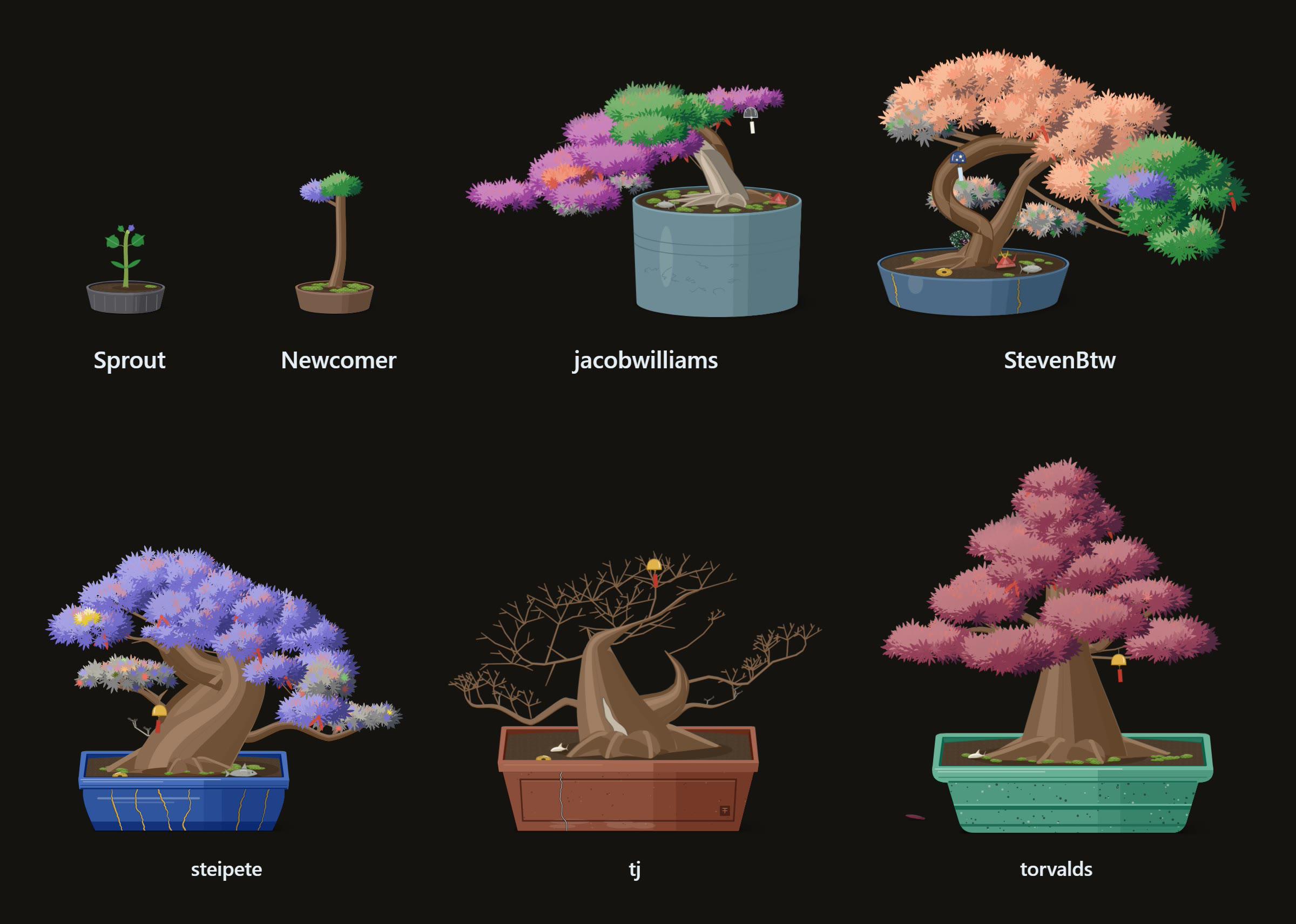
Grow a bonsai from your GitHub activity for your profile README - gitbonsai

Post image
3 Upvotes

gitbonsai is a GitHub Action that grows a Japanese maple bonsai from your contribution history and commits it to your profile README as a light and dark animated SVG, once a week. Your first language is the trunk, your recent years the crown, and your last three years pick the style: steady work stands upright, pauses slant it. The randomness is seeded by your account id, so no two accounts grow the same tree. The built-in GITHUB_TOKEN is enough.

The image shows real accounts at one scale. Top: a sprout, a newcomer, jacobwilliams and me. Bottom: steipete, tj and torvalds.

Repo: https://github.com/StevenBtw/gitbonsai. Preview any account's tree at https://gitbonsai.dev. Written in Rust, MIT or Apache-2.0.


r/coolgithubprojects • • 1h ago

AI-Atlas: a live wall of the strongest new AI repos on GitHub, ranked by what their code shows

Post image
0 Upvotes

I think this would be useful for you guys struggling with visibility and recognisability for your open-source repos.. It might spike your interest!

Designed by me: Every tile is a GitHub repo shipped in the last weeks, with a score out of 100 from an AI judge that reads the source, and a two-line pitch from its builder (what it solves, what's new). Fresh work leads, projects people open climb, and 1 slot in 6 is kept for newcomers. You can follow builders to hear when they ship. Free to browse, to connect to other fellow builders, and free to map your own GitHub.


r/coolgithubprojects • • 5h ago

hunch - Yet another Cotypist alternative.

Thumbnail gallery
1 Upvotes

Hello,

Just sharing my completely vibe coded open source cotypist alternative:

hunch

I know there are quite a few out there already. But this is my take on it. I'm not a programmer by trade. So, roast away if you find it lacking.

There are a few features that i think are unique:

  1. Dictation with AI cleanup using Whisper and the same language model that drives the autocomplete. Hunch provides a simple way to have some functionality of apps like Openwhispr or wisprflow plus the autocomplete. As of now, it doesn't have any meeting transcription features, though. It’s purely text input via voice.
  2. Write for me and Polishing: This feature is already everywhere like in the Mail app or Gmail, so it's not really new. But in Hunch you can steer in the drafting process like asking it to make it shorter, more formal...etc. before the text is automatically pasted into the field. you can also type it as a draft or a command ("write a short email to john about this" instead of a draft of the said email), and it should be able to figure out what you mean.
  3. The two features above share the language model with autocomplete by default. Avoiding extra copies of the model weights being loaded into memory.
  4. Some goofy effects to make the suggestions appear in a fun (or distracting) way.
  5. Per-app and per-website configuration that's quite granular. you can decide which apps get suggestions, how many words ahead each app's suggestions should be. One app's autocorrect can auto-capitalize and fix punctuations, while in another app you can have it left completely lowercase only and no punctuations. And you can have the goofy effects only appear in certain apps, of course.

I spent about two months on this so far. And it's working okay for me so i thought i'd share in case anyone is looking for a free alternative to cotypist that also has some other bells and whistles.

I recommend using Gemma 4 E4B instruct model for the language model. I did most of the tuning work with that one. But you can also add your own models or link hunch to your LM Studio models folder.

The app is ad-hoc signed. LIke i said I'm not a dev and don't have a developer account. The Get Started guide has instructions on how to install ad-hoc apps. Also just like other autocomplete apps, it’s gonna need permissions, with an optional microphone permission for the dictation feature. There is a welcome tour that walks you through those.


r/coolgithubprojects • • 5h ago

A transpiler that only swaps keywords, and is byte-identical run to run

Thumbnail github.com
1 Upvotes

r/coolgithubprojects • • 9h ago

A new way to record and stream your gameplay!

Post image
2 Upvotes

https://github.com/NotADeveloper4665/Simulcast-Studio

OBS Studio forked and rewritten in rust to provide a modern solution for recording and streaming both horizontal and vertical output with two independent editable scenes and individual orientation recording and streaming you will be able to use one familiar interface to record content in multiple aspect ratios to allow you to reach wider audiences! Currently appimages and rpms are built and working and will be up on the github soon once i build the mac release i will spin up the github sight and have all releases easily published for testing.


r/coolgithubprojects • • 9h ago

[Show] Code Review Framework — Enterprise software quality framework (ISO 25010, OWASP ASVS)

Thumbnail github.com
2 Upvotes

A hierarchical tree of 13 pillars, 136 atomic checkpoints, and standards-backed gatekeeping (ISO/IEC 25010, OWASP ASVS, Google practices). Includes a CRF CLI, MCP server integration for Cursor/Claude/Copilot, and one-click AI prompts. Domain-agnostic.

Link: https://github.com/wabdelgilil/code-review-framework

PRs welcome — there's an open roadmap for multi-language examples and translations.


r/coolgithubprojects • • 9h ago

[Project] GitHub-Navigator — Personal Command Center & Dashboard for GitHub

Thumbnail github.com
2 Upvotes

A personal command center & dashboard for GitHub activity: repo catalog with fuzzy search, branch divergence graphs, and a staleness radar. Free, local-first, React + TypeScript + Vite, hosted on GitHub Pages.

Link: https://github.com/wabdelgilil/GitHub-Navigator

PRs welcome.


r/coolgithubprojects • • 10h ago

Open Source iOS SSH Client

Post image
2 Upvotes

I did not like any of the SSH clients on the app store that I could use for free, so I've shipped Pockterm. The GitHub repo for the app is here: pockterm, pull requests, issues, any sort of feedback is welcome. Pockterm also has a full screen mode, tested on Viture glasses. Features currently under review at Apple: key storage in the secure enclave and automatic reconnect to tmux sessions. Many languages, including languages with right-to-left scripts. More at Pockterm.com .