r/csshelp • • Apr 30 '25

CSS Edit for User Flairs?

2 Upvotes

Seeking guidance to make User Flairs, colored text on colored backgrounds.

Not currently using any CSS anywhere, so nothing to compare.


r/csshelp • • Apr 25 '25

CSS Grid centered positioning does not work

Thumbnail
2 Upvotes

r/csshelp • • Apr 23 '25

Hubspot CSS Form Styling

2 Upvotes

Hi, I’m new to styling with CSS, and I’m running into issues getting a Hubspot form to do what I want. My site is on Wordpress and I’m using Elementor for the builder.

I pasted the Hubspot embed code into the HTML widget on my page, then I added my CSS in the Additional CSS section of Wordpress (see end of post for full code).

The section, container, and widget are all 100% width and center aligned.

It almost looks how I want, but the width of the fields is too small for the page and the fields and button won’t center align. I want the form completely centered on the page, taking up about 75% of the screen width. No matter what I change, the form stays the same width and everything left aligned.

Here’s the CSS I’ve been using, please help!

.hbspt-form { display: flex; justify-content: center; align-items: center; flex-direction: column; background-color: transparent; width: 100%; margin: 0 auto;

.hbspt-form form { width: 100%; font-family: 'Gotham', sans-serif; font-weight: 500; font-size: 14px; letter-spacing: -1px; }

.hbspt-form .hs-form-field { margin-bottom: 20px; width: 100%; }

.hbspt-form .hs-form-field label { display: block; font-size: 14px; margin-bottom: 8px; font-weight: 500; color: #000;

.hbspt-form .hs-input { width: 100%; height: 40px; font-family: 'Gotham', sans-serif; font-weight: 500; font-size: 14px; letter-spacing: -1px; padding: 0 15px; color: #141414; background-color: #fff; border: 1px solid #000; border-radius: 5px; box-shadow: none; box-sizing: border-box; }

.hbspt-form textarea.hs-input { min-height: 150px; padding: 10px; background-color: #fff; border: 1px solid #000; border-radius: 5px; box-sizing: border-box; }

.hbspt-form .hs-input:focus { outline: none; }

.hbspt-form .hs-button { width: 25% !important; background-color: #fff; color: #000; border: 1px solid #000; border-radius: 5px; font-family: 'Gotham', sans-serif; font-weight: 700; font-size: 16px; letter-spacing: -1px; padding: 15px 30px; cursor: pointer; text-align: center; transition: all 0.3s ease; margin: 20px auto 0; }

.hbspt-form .hs-button:hover { background: linear-gradient(204deg, #f9cb76 0%, #ffffff 85%); color: #2c383a; border: 1px solid #000; }

.hbspt-form select.hs-input { appearance: none; background-color: #fff; color: #141414; padding-right: 40px; background-image: url("data:image/svg+xml,%3Csvg width='12' height='8' viewBox='0 0 12 8' fill='none' xmlns='http://www.w3.org/2000/svg'%3E%3Cpath d='M1 1L6 6L11 1' stroke='black' stroke-width='2'/%3E%3C/svg%3E"); background-repeat: no-repeat; background-position: right 10px center; background-size: 12px 8px; width: 100%; padding: 0 15px; box-sizing: border-box; }

.hbspt-form select.hs-input option { background-color: #2c383a; color: #fff; }

.hbspt-form .hs-error-msgs { display: none !important; }


r/csshelp • • Apr 14 '25

Request Xbox 360 NXE Dashboard 3D Tiles for SteamDeck CSSLoader

1 Upvotes

(Im not talking about the colors or background images or anything, just the 3D "list")

Summary simplified

Hi all, so ive been recently on my nostalgia trip lately and ive been wondering if/how i can be made, that the Tiles from the Steamdeck, can be modified to a like 3D horizontal list? It is possible to modifiy the tiles behavior which shows, this Theme already. Im just a complete noob when it comes to css or programming, so i dont even know where to begin properly. Ive looked into the authors Theme and he seems to be manipulating the behaviour of "element classes", which i cannot find in the development menu from big picture mode.
Any and all help or just explainations would be greatly appreciated!!!

/*Offset the most recent tile*/
.gamepadhome_RecentSection_39tNv 
.basicgamecarousel_BasicGameCarousel_3MdH5
.ReactVirtualized__Grid__innerScrollContainer > div:nth-child(1)
.basicgamecarousel_BasicGameCarouselItemMediaContainer_1HIFN > div:first-child
{
    transform: translateX(40%) perspective(600px) rotateY(calc(1*var(--ren-tilt-angle))) translateX(-40%);
}


/*Tilt 'View More' tile*/
[data-id="GoToLibrary"] {       
    transform: perspective(600px) rotateY(calc(-2*var(--ren-tilt-angle))) scale(0.94);
    transition: transform 0.4s;
}

/*Tilt,scale and offset focused 'View More' tile*/
[data-id="GoToLibrary"].gpfocuswithin  {
     transform: scale(1.05);   
}


/*Tilt left game portraits*/
.gamepadhome_RecentSection_39tNv
.basicgamecarousel_BasicGameCarouselItemMediaContainer_1HIFN > div:first-child
{
    transition-duration: .4s;
    transform: perspective(600px) rotateY(calc(2*var(--ren-tilt-angle)));
}

/*Tilt right game portraits, also while tabbed out*/
.gamepadhome_RecentSection_39tNv 
.basicgamecarousel_BasicGameCarousel_3MdH5
.ReactVirtualized__Grid__innerScrollContainer > div.gpfocuswithin ~ div
.basicgamecarousel_BasicGameCarouselItemMediaContainer_1HIFN > div:first-child
,
.gamepadhome_RecentSection_39tNv 
.basicgamecarousel_BasicGameCarousel_3MdH5
.ReactVirtualized__Grid__innerScrollContainer > div[tabindex]  ~ div 
.basicgamecarousel_BasicGameCarouselItemMediaContainer_1HIFN > div:first-child
{
    transform: perspective(600px) rotateY(calc(-2*var(--ren-tilt-angle)));
}

/*Scale focused tile, also while tabbed out*/
.gamepadhome_RecentSection_39tNv 
.basicgamecarousel_BasicGameCarouselItemMediaContainer_1HIFN.gpfocuswithin > div:first-child,
.gamepadhome_RecentSection_39tNv 
.basicgamecarousel_BasicGameCarouselItemMediaContainer_1HIFN[tabindex] > div:first-child,
.gamepadhome_RecentSection_39tNv 
.basicgamecarousel_BasicGameCarousel_3MdH5
.ReactVirtualized__Grid__innerScrollContainer > div:nth-child(1)
.basicgamecarousel_BasicGameCarouselItemMediaContainer_1HIFN.gpfocuswithin > div:first-child
{
    transform: scale(1.02);
}

r/csshelp • • Apr 12 '25

Needing help with CSS background. Background does not cover entire text block.

1 Upvotes

I am a bit of a beginner at web design and looking to seek some advice I have on a project I'm working on. I want to put a background over the text area but it stops halfway through the entire page. I have tried to play around with the padding and margin, but it only pushes the "personality" and triva section down.

It comes out like this

And here is the code:

.background {
  background-color: rgb(16, 202, 193);
  border-color: rgb(255, 255, 100);
  border-style: solid;
  margin: 10px 10px 10px 10px;
  padding: 5px 10px 10px 10px;
}

body {
    background-image: url("Bubble_Buddy_Background.webp");
    color: rgb(255, 255, 100);
    overflow: hidden;
}

.desc {
    overflow: auto;
    max-width: 1100px;
    font-family: 'Montserrat', sans-serif;
    font-size: 0.9em;
    word-wrap: break-word;
}

h1  {
    font-family: "Spongeboy";
    font-size: 20px;
}

h2 {
    font-family: "Spongeboy";
    font-size: 15px;
}

hr.solid {
  border-color:rgb(255, 255, 100);
  margin-top: 25px;
}

<body>
  <div class="background">
  <h1>Spongebob Squarepants</h1>
    <div class= "desc">
    Elit sapien nisi interdum risus consectetur ad sem. Tincidunt cubilia montes auctor ultricies curae parturient risus vel. Odio eros vel eleifend faucibus volutpat conubia velit. Natoque sociosqu interdum netus mauris in placerat phasellus scelerisque.</p> 
    </div>
      <hr class="solid">

    <h1>Personality</h1>
    <div class= "desc">
     <p>Montes blandit finibus molestie iaculis eu tortor. Praesent fermentum hendrerit ullamcorper habitant phasellus. Sagittis sollicitudin eros magna conubia; dictumst cubilia integer taciti. Dapibus dolor sed ex lacinia nulla et hac. Sociosqu sagittis non lectus ullamcorper dapibus class fermentum sapien.</div></p> 
    </div>
      <hr class="solid">

      <h1>Relationships</h1>
      <h2>Patrick Star</h2>
      <div class= "desc">
    Lorem ipsum dolor sit amet, consectetur adipiscing elit, sed do eiusmod tempor incididunt ut labore et dolore magna aliqua. Ut enim ad minim veniam, quis nostrud exercitation ullamco laboris nisi ut aliquip ex ea commodo consequat. Duis aute irure dolor in reprehenderit in voluptate velit esse cillum dolore eu fugiat nulla pariatur.</div>
      <h2>Squidward Tentacles</h2>
    <div class= "desc">
    Lorem ipsum dolor sit amet, consectetur adipiscing elit, sed do eiusmod tempor incididunt ut labore et dolore magna aliqua. Ut enim ad minim veniam, quis nostrud exercitation ullamco laboris nisi ut aliquip ex ea commodo consequat. Duis aute irure dolor in reprehenderit in voluptate velit esse cillum dolore eu fugiat nulla pariatur.</div>
      <hr class="solid">

      <h2>Trivia</h2>
    <div class= "desc">
       <ul>
  <li>Magnis platea accumsan ultrices velit auctor nascetur conubia. 
  </li>
  <li>Viverra phasellus placerat odio dolor aliquet vestibulum est viverra. </li>
  <li>Pulvinar est facilisi adipiscing pellentesque euismod. </li>
      </ul>  
</div>
</div>
  </body>

r/csshelp • • Apr 09 '25

Create Stunning Shiny Circular Loaders with Pure CSS – No JavaScript Needed!

1 Upvotes

r/csshelp • • Apr 09 '25

Does somebody know what could be wrong in my code to make the animations work

1 Upvotes

Hello. I'm trying to learn from a cool project I found in codepen and integrating it on my own little starting project, but I don´t seem to make the animation work. Does anybody spot the mistake that is preventing my CSS from working correctly? The idea is for the div with the class of item2 to have multiple effects that layer one on top of the other and work together to create a unique effect. Thank you very much!!!

You can find my HTML and CSS here: https://codepen.io/TheorizeAlfredo/pen/gbOJjRX


r/csshelp • • Apr 04 '25

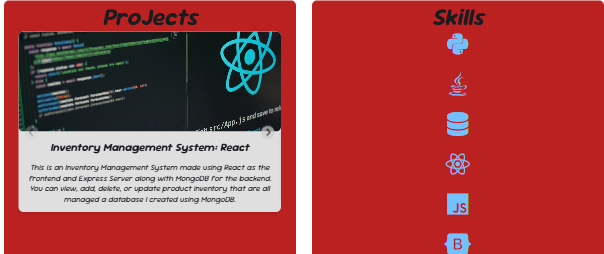
can someone help me align the two headings in my two column layout?

1 Upvotes

I have this layout and I can't seem to get the two heading aligned properly "skills" is slightly higher than "projects" Here is my repo hope someone can help me figure this out thanks


r/csshelp • • Apr 01 '25

Request Is the new header bottom right buttons static?

0 Upvotes

Just noticed that reddit changed a little. There's now two new buttons next to the old notification button. A new notification button (#notifications), and a new chat button called #chat-v2. This kinda annoys me, since the spritesheet work on an old subreddit wasn't done by me, so I have to literally get the artist back that did the spritesheet to make new stuff for the new thing.


r/csshelp • • Mar 29 '25

Multiple classes or duplicate code?

2 Upvotes

First off, I am doing this as a hobby, I have had no schooling in this whatsoever. I am experimenting and learning as I go.

TLDR: For an E-Book is it better to to use multiple classes for common code, or just to duplicate the code for each class?

Long version : I am downloading free E-Books from Project Gutenberg and playing around with optimizing the files. I found a lot of books actually have the style code in each line, so I decided to play around and optimize the files by using the CSS file. One thing I have noticed is that a lot of styles will use the same elements, though not all of the same elements. So, I started using multiple classes where I can, but I started wondering if I should just create individual classes with duplicate code instead. Here are a few lines of code I did for one book. I am not done with it yet, but you get the idea :

.ti, .ti1, .ti4, .bb {

text-indent: 2.6em;

}

.ti1, .ti2, .ti3, .ti4, .tii, .bu {

text-align: center;

font-weight: bold;

}

.ti, .cr, .bu1, .afd, .afi {

font-size: 0.86rem;

}

.ti1, .ti2 {

font-size: 1.9rem;

}


r/csshelp • • Mar 26 '25

Request Move Reddit save botton next to share?

0 Upvotes

Can someone help me move the save button next to the share on the post instead of nesting it under the three dot menu l'm the top right corner. I'm using Firefox and I was told to down the Stylus extension but that's was about it.


r/reddithax • • Nov 28 '21

Proud of r/Patrn new css... looks as close to a new.reddit and old.reddit hybrid as I could get it.

Thumbnail reddit.com
11 Upvotes

r/reddithax • • Jun 08 '21

is this subreddit alive?

10 Upvotes

wake wake, get 2 da snake


r/reddithax • • Mar 30 '20

How to change background image of the subreddits on the top

4 Upvotes

.dropdown.srdrop .selected {

background: none repeat scroll center right;


background-image: url(%%insertimagehere%%);


display: inline-block;


vertical-align: bottom;


padding-right: 21px;


padding-left: 5px;


color: black;


font-weight: normal;


margin-left: -5px;


margin-right: 10px;

}

#sr-header-area .sr-list {

background: none repeat scroll center right;


background-image: url(%%insertimagehere%%);


display: inline-block;


vertical-align: bottom;


padding-right: 21px;


padding-left: 5px;


color: black;


font-weight: normal;


margin-left: -5px;


margin-right: 10px;

}


r/reddithax • • Sep 07 '19

This CSS changes markdown bullets into "*"

4 Upvotes
.md ul {list-style-type: none}
.md ul>li:before {content: "* "}

I was gonna try it with emoji but reddit's css wouldn't allow me to.

You can swap out the asterix with something else I guess, but I can confirm you can't make unordered lists with pointer fingers.

👉 Not gonna happen.

* works perfectly fine


r/reddithax • • Jun 22 '19

Have multiple custom themed >!spoiler!< tags

7 Upvotes

Before reddit had proper markdown-based spoilers (like this), communities used CSS hacks for implementing spoiler tags, [like this](#spoiler).

Using this technique, some communities would even have multiple spoiler tags for different seasons (like the Game of Thrones subreddit used to have) that would allow you to see a "Season 1 Spoiler" text before the spoiler to help differentiate between different season's spoilers. Like: [some spoiler](#s1-spoiler)

There's a way, if you'd like, to have custom themed spoiler tags using the new markdown-based spoiler tags if you'd like, with a syntax like this: [](#s1-spoiler) >!Some Spoiler!<

a[href="#s1-spoiler"] + .md-spoiler-text:not(.revealed) {
    background: red;
}

a[href="#s1-spoiler"] + .md-spoiler-text::before {
    content: "Season 1 Spoiler";
    color: black !important;
    font-size: 10px;
}

r/reddithax • • Feb 17 '19

Trick I see used not often enough: Add "pointer-events: none" to custom emoji/stickers that you make by styling "a" elements. That way people can't click on the links which go nowhere.

11 Upvotes

r/reddithax • • Feb 10 '19

Coloring the little arrow/nub/triangle on hover-bubble

5 Upvotes

The little arrow/nub/triangle of the pop-up that you get when hovering over a username can be colored with the following rules:

/* Border color for nub on bottom */
.author-tooltip.hover-bubble.anchor-bottom-left::before,.author-tooltip.hover-bubble.anchor-bottom-right::before { border-top-color: #BF1E2D }
/* Border color for nub on top */
.author-tooltip.hover-bubble.anchor-top-left::before,.author-tooltip.hover-bubble.anchor-top-right::before { border-bottom-color: #BF1E2D }
/* Nub color for nub on bottom */
.author-tooltip.hover-bubble.anchor-bottom-left.author-tooltip_common::after,.author-tooltip.hover-bubble.anchor-bottom-right.author-tooltip_common::after { border-top-color: #000 }
/* Nub color for nub at top */
.author-tooltip.hover-bubble.anchor-top-left.author-tooltip_common::after,.author-tooltip.hover-bubble.anchor-top-right.author-tooltip_common::after { border-bottom-color: #282828 }

As someone who was unfamiliar with the CSS triangle trick this was incredibly hard to find, since the element is hidden via JavaScript before you can inspect it. The default rules can be found in author-tooltip.css .


r/reddithax • • Feb 02 '19

Sidebar Discord Widget for legacy/old Reddit - Instructions & CSS

Thumbnail self.DiscordWidget
6 Upvotes

r/reddithax • • Jan 10 '19

(/r/32kHz) I've done plenty of things for a sub that I mod, but the most recent (and most proud) achievement I've done is creating a custom minimal userbar with my own icons and fixed scrolling!

5 Upvotes

I made it using CSS grid, which I learned just recently, but due to the scarcity of reddit's documentation, I can't find the classes of the active modmail and new modmail. Also, I can't see what it looks like without the two modmail buttons in the first place. Either way, at the moment I like how it looks, but any tips are welcome!

(the subreddit: 32kHz )


r/reddithax • • Sep 09 '18

I (mostly) fixed Card view on the redesign.

Post image
12 Upvotes

r/reddithax • • Jun 14 '18

How can I raise a sidebar until it covers part of a banner?

3 Upvotes

Been messing around on a private sub, made a banner for it, realized it wasn't wide enough. I could make it wider by massively stretching it, but then it would be too tall and too low res. My current thinking is that if I can raise the sidebar until it's at the top, the banner space will effectively be shorter, and I can just put the banner on the left, resize it a bit, and call it a day.

Like this.

How would I go about doing this? Thanks in advance.


r/reddithax • • Jun 08 '18

How to make comments change color depending on whether you upvoted or downvoted.

3 Upvotes
.comment .usertext-body {
    border: 1px solid #------;
    background-color: #------;
}

.comment.stickied .usertext-body {
    border: 1px solid #------;
    background-color: #------ !important;
}

.comment .likes .usertext-body {
    border: 1px solid #------;
    background-color: #------;
}

.comment .dislikes .usertext-body {
    border: 1px solid #000;
    background-color: #------;
}

r/reddithax • • May 19 '18

How to hide the "recently viewed links" sidebar box

4 Upvotes

First to target and hide it you will have to target the moderator box as well under :not(.collapsible) > * id.

.sidecontentbox:not(.collapsible) > * { display: none; }

Then if you want the moderator box to appear again:

.sidecontentbox:not(.collapsible) .helplink, .sidecontentbox:not(.collapsible) .helplink ~ * {
    display: block;
}

r/reddithax • • Apr 28 '18

Removing the "Try the Redesign" button off your subreddit.

2 Upvotes

Just put this in your stylesheet.

#sr-header-area .redesign-beta-optin {
    display: none;
}