r/Ergonomics • • 13h ago

Why even great ergonomic gear works twice as well once your desk setup is dialed in

Post image
3 Upvotes

As a physiotherapist, I love seeing remote workers invest in good hardware like vertical mice or split keyboards. Easing the strain on your forearms and wrists really can make a big difference!

But here's something that often gets overlooked: your nerves don't actually start at the wrist. The median, ulnar, and radial nerves leave the spine in your neck (C5–T1, as you can see in Plate above) and pass through three tight spots on the way to your hand:

  1. The scalenes (neck): When your laptop screen sits too low, your head drifts forward and keeps the nerves at their root under constant tension.
  2. Pectoralis minor (chest): Rounded shoulders can squeeze the nerve and blood vessel bundle under your collarbone.
  3. Shoulder and forearm: A desk that's even just 1.5–2 inches too high makes your shoulders creep upward and your muscles stay tense without you noticing, which limits how freely your nerves can glide.

So think of it as teamwork: good peripherals relieve the end of the chain, while the right chair, desk, and monitor height take the load off everything upstream. You get the best results when you do both.

If you're not sure where to start, a quick tweak like raising your screen to eye level is often a great first step.

I'd love to hear from you: when you upgraded your setup, what helped most? Was it the mouse and keyboard, or adjusting your desk and monitor height?


r/Ergonomics • • 11h ago

Do you prefer single or dual monitors?

1 Upvotes

I’ve been working from home since the pandemic and traditionally have worked with a 27” monitor with my MacBook off to the side.

Recently I’ve been debating whether or not it’s better for my productivity to keep everything on a single monitor.

If I'm being honest with myself, the only thing I have really pulled up on the side on my MacBook is normally just Spotify, Slack, or, if I have to work, two spreadsheets at a time (which, even then, is pretty rare).

I'm just trying to get some different perspectives here


r/Ergonomics • • 16h ago

Chair rec for a short user (5'0", 145 lbs), 8+ hrs/day, sit/stand desk

Thumbnail reddit.com
1 Upvotes

r/Ergonomics • • 21h ago

Disappointed with ProtoArc EU direct store support (EC200 chair order)

Thumbnail reddit.com
1 Upvotes

r/Ergonomics • • 1d ago

Anyone ever get tricep/shoulder pain after a while of gaming?

1 Upvotes

I used to play on a regular desk that would be too high but not by much, I never got the pain there but now that I got an adjustable desk I’ve started getting the pain described in the title.

I also find myself subconsciously tensing my shoulder regardless of the height of the desk.

I’ve tried those ergonomic diagrams of 90 degree arms and monitor around eye level etc but to no luck.

Could this be my body getting used to having the right posture considering my old set up I was used to for years had the desk too high?


r/Ergonomics • • 1d ago

Ergonomic chair recommendation around 5-6k

Post image
0 Upvotes

5-6k in Indian rupees.


r/Ergonomics • • 1d ago

Skwoosh gel cushions

1 Upvotes

I am devastated to find that Skwoosh brand gel cushions has gone out of business. I have used their therapy cushions for about 20 years and they were perfect for my needs. I have ischial bursitis and am unable to sit on hard chairs, or any hard surface. This has limited my options for dining and travel, the first thing I look at when deciding where to eat is if I can sit on the chairs! I have looked on the internet and found nothing even similar. Does anyone with the same or a similar problem know of a similar product?


r/Ergonomics • • 1d ago

anyone else have their desk mat hang off the edge when pulling up close?

1 Upvotes

swapped to an extended desk pad to fit both my low-sens mouse swipes and 75% board. keeping my forearms parallel with the tabletop surface on an hbada x3 means my stomach presses the bottom stitched edge of the mat against the desk bevel during aim-heavy sessions. do you guys push your mats further up towards the monitor mount or just let the bottom lip curl down?


r/Ergonomics • • 1d ago

Help me find an office-chair

Thumbnail reddit.com
1 Upvotes

r/Ergonomics • • 1d ago

Sitting crossed legged or in other weird positions

Thumbnail reddit.com
2 Upvotes

r/Ergonomics • • 1d ago

Thoughts on this Hyken and Gabrylly I found on marketplace?

Thumbnail gallery
1 Upvotes

r/Ergonomics • • 1d ago

How do you tell if lumbar support is too far forward?

Post image
1 Upvotes

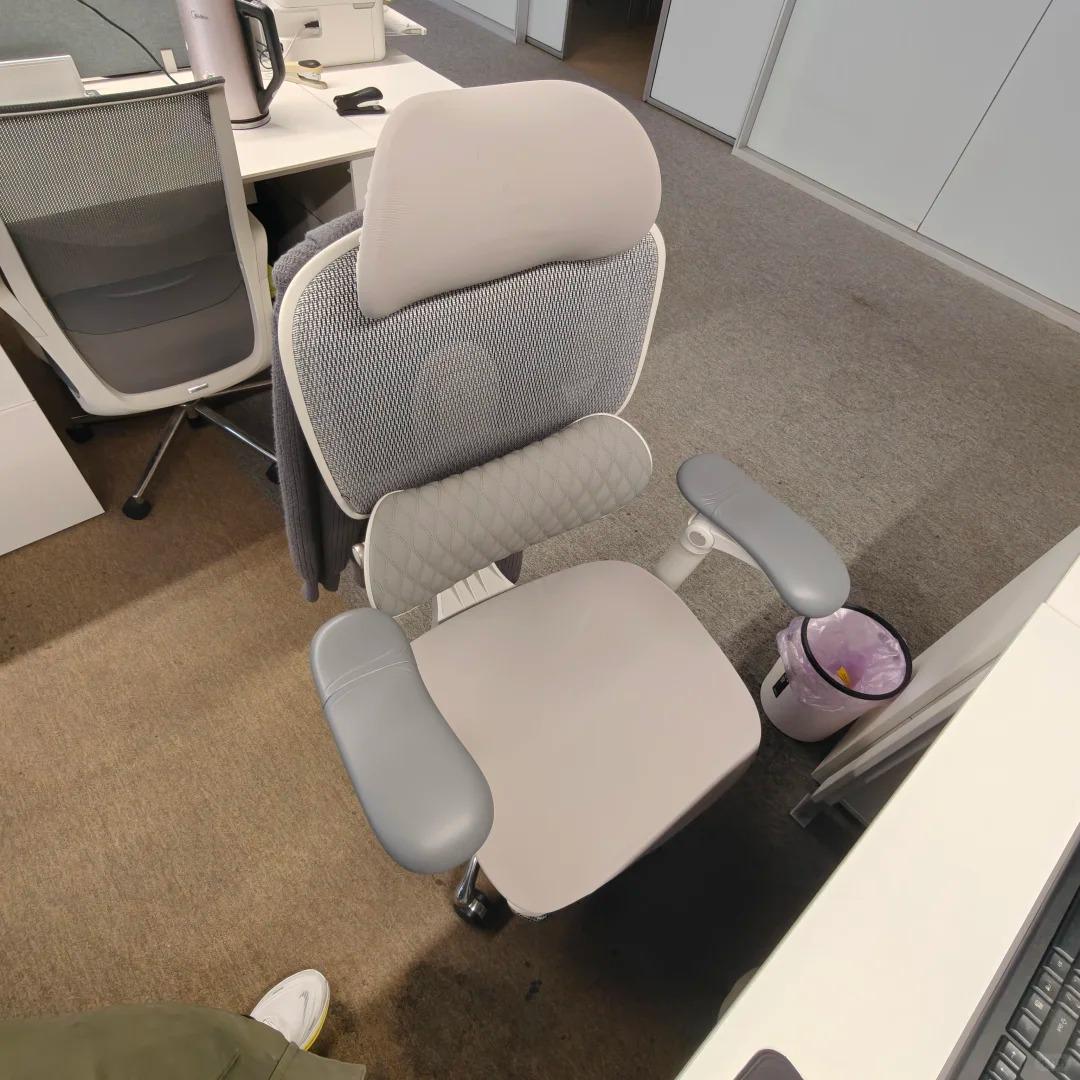
The separate lumbar section on this Sihoo sits forward of the main backrest. With this kind of design, what do you look for when adjusting it?

How can you tell whether it’s supporting your lower back or pushing you too far forward?


r/Ergonomics • • 2d ago

Keyboard/Mouse Ergonomic left hand mouse for small hands

1 Upvotes

Hey guys,

I'm looking for an ergonomic mouse that is left-handed and suits small hands. Any tips?


r/Ergonomics • • 2d ago

A cautionary tale about falling into the ergonomics rabbit hole: good enough is good enough

17 Upvotes

The history of my desk setup when it comes to peripherals (keyboard and mouse).

I went through a massive, expensive loop testing mice, trackballs, RollerMice, keyboards, and layouts before realizing I was overengineering everything. Evolution beats revolution, and chasing a holy grail wastes time and money. Here is everything I tried and what actually worked, so you can avoid making the same mistakes.

FYI TL;DR: Shorter AI-generated abstract/summary can be found in the very end of this post.

AI usage information: I've written the whole post by myself and used AI to rephrase it, make it more precise, use proper English and make it less repetitive and more understandable. So, even if it looks like "AI slop" at a first glance, you can read it without concern, because these are my own words - simply polished by AI.

Important note: this whole post only contains my personal opinions. I'm totally respectful and open to the fact, that some people's opinion might be completely different or even opposite. I encourage you to respond, which might be helpful to others, rather than downvoting it simply, because you do not agree with my choices. I try to give out what I have learnt, rather than recommending or not some of the products. I recently saw a YouTube video of a lad comparing the Orbit Fusion to the EM06 and in his opinion the Orbit Fusion is the best trackball ever. And I do understand why he would think that, and I'm absolutely fine with it.

1. Mice and Trackballs

My starting problems with a regular mouse were wrist pain from long sessions and a lack of desk space.

  • Vertical mouse: Fixed the wrist pain, but constantly lifting and repositioning it on a cramped desk became even more annoying.
  • Logitech MX Ergo: Fixed both wrist angle and desk space, then caused thumb pain. At first, I just wanted a better thumb trackball instead of a total change.
  • Elecom EX-G Pro: Flat, very comfortable hand posture and easier thumb control, but stiction drove me crazy, so I swapped the bearings.
  • Elecom EX-G Pro (with ZrO2 G5 ceramic bearings): Improved smoothness, yet thumb pain kept returning.
  • Elecom Huge (swapped to ZrO2 G5 bearings immediately): Great finger precision (especially in GIMP), but the shell shape felt awful for my hand, which pushed me to try almost everything else:

    • Kensington Orbit: Great overall, a bit small for a large hand, low DPI, and I loved the scroll ring.
    • Kensington Orbit Fusion: Nice, but too little of the ball protrudes, so I kept hitting the scroll ring.
    • Elecom Deft Pro: Fixed the Orbit Fusion's ball clearance, but scrolling hurt my thumb.
    • Logitech Trackman Marble: Tried out of curiosity; very low DPI, poor ergonomics, no scroll wheel, and I do not get the hype.
    • Nulea M505B: Very comfortable, low stiction, good precision and specs, though scrolling was still a pain.
    • Kensington Expert: Great trackball and scroll ring, held back by low DPI.
    • Kensington SlimBlade Pro (also used SlimBlade EQ daily): Great trackball and twist-to-scroll concept, though scrolling long documents gets tedious.
    • L-Trac: Tried for non-static bearings; the only unit I could import from the US arrived with a dead laser, felt clunky with an unpleasant ball roll, had low ball exposure like the Orbit Fusion, and had poor ergonomics.
    • Nulea M512: Great overall, very smooth with low stiction, and much more ergonomic scrolling. However, lack of a scroll ring is painful on such a good device.
    • Elecom Huge Plus (my favorite): Tested both rolling bearings and BTUs. BTUs feel like clean static bearings with lower initial stiction and higher precision, while rolling bearings won for me. Still, I needed 3D-printed shell add-ons for a comfortable grip, and scrolling remains annoying.
    • ProtoArc EM06: Waited for it, then skipped it once I saw it used static bearings and ball scrolling.
    • Gameball Pro: Waited for it, but the final product did not appeal to me.
    • Elecom IST (Bluetooth only): Bought on a good deal as a smaller laptop-bag backup for quick tasks where thumb control is fine. Installed BTUs because the stock rolling bearings sat awkwardly and created resistance on certain axes, and I wanted non-static bearings for precision.
    • Perimice 522: Looked promising initially, skipped after reading reviews.
    • Kensington TB800: Too many launch flaws to bother.
    • Kensington TB900: Ordered on Amazon and looking forward to it; static bearings make it a downgrade from my Elecom Huge Plus, but you cannot have everything.

Takeaway: Trying everything was absurd. Good enough is good enough, every device has compromises, and reviews do not lie. A solid finger trackball works great, and I could have easily stopped at the Nulea M512.

2. RollerMouse

I tried these to reduce reaching right from the keyboard and was surprised by how pleasant they feel.

  • Contour RollerMouse Red (my favorite): Middle-clicking triggers scrolling, which is annoying, but otherwise it has no flaws.
  • Contour RollerMouse Pro: Decent, same middle-click scroll issue, less comfortable and less ergonomic.
  • Mousetrapper Advance 2.0: Great feel, though moving the cursor diagonally took noticeable force.
  • Mousetrapper Delta: Very good, but awkward button placement and too wide for me.
  • Contour SliderMouse: Bought used as a potential upgrade over the Advance 2.0; awful pad movement and unusable (likely defective, though the pad concept itself feels awkward and worse than a rollerbar).

Takeaway: Since I need a wrist rest anyway, my Contour RollerMouse Red Wireless sits in front of my keyboard. I mainly use my trackball, while the RollerMouse is great as a backup for quick scrolling without moving my hands. Taking only a RollerMouse on a trip, however, caused discomfort over time.

3. Keyboards and Layouts

This was the biggest, most absurd loop of all.

  • Standard 100% gaming keyboard (and standard membrane / blue-switch mechanical boards): Fine, but something felt off.
  • Microsoft Ergonomic Keyboard: Better hand angle, but a mushy spacebar and massive footprint.
  • Perixx boards (Periboard-355, Periduo-606, Periboard-613): Affordable fix for oversized boards; paradoxically, the membrane Periboard-613 was my favorite. Paired with separate numpads:

    • Cheap membrane numpad: Fair enough.
    • Filco Majestouch Silent Red: Fine, hard to justify the high price.
    • Cherry ML 4700: Great numpad supporting left-Alt codes without AutoHotkey.
    • Apayado K33 Mini: Includes partial TKL keys, overkill button count for me, and cheap build quality.
    • Redragon Cove K733: Great numpad I alternate with the Cherry ML 4700; love its standalone calculator, and swapped in Panda switches since I dislike linears.
  • Standard staggered boards (like Keychron K2 with Reds): Great build quality, yet something still felt missing.
  • YIVU Corne V4 (tested in Colemak and QWERTY with Reds): Went too far with splits; could not adapt to layers and badly missed a numeric row and arrow keys.
  • Israfel #07 (Browns): Got me into low-profile switches, but putting the up arrow where the question mark belongs and hiding symbols under layers ruined it. F1-F12 on a layer is fine, but hiding -, =, [, ], \, ;, ', and others is not. Why can a right split half not just include two more columns?
  • ErgoDox EZ (Browns, later Gateron Reds on thumb keys): Used for a month (and even sent ZSA detailed feedback before unsuccessfully trying to resell it locally in Poland for around 1,600 PLN, as returning it made no sense). Great build, white aesthetic, wrist rests, and ZSA support, and the tenting freedom is huge. In practice, too much freedom meant constantly readjusting loose halves, legs blocked bringing the halves closer, only two thumb keys were reachable (and felt identical, causing mix-ups, while stock Browns on long thumb caps needed softening or stabilizers), and missing right-side keys and a natural arrow cluster slowed my coding down to 80 WPM after three weeks of trying. Plus, the thumb cluster stole desk space from my RollerMouse. And still... 2 missing columns on the right...
  • X-Bows Nature/Knight with Reds: It was an ergonomic nightmare with an awful layout and mushy oversized keys requiring giant hands or unnatural finger stretching.
  • ID75 (low-profile GTMX Brown half-height switches and low-profile keycaps): Adapted quickly and typed fast, though missing function keys got annoying and switching back to a laptop keyboard felt jarring.
  • Ortho A_82 (bought after struggling to import the Chinese Ortho A82): My favorite for a long time because it kept all needed keys in proper spots (unlike the overcomplicated A_87). Eventually, switching back to staggered laptop keyboards (like a MacBook Pro while traveling) became painful, typing over 100 WPM caused unnatural finger strain, and I missed a V-shaped split angle. (Also considered the X-Bows Crystal, but it kept the same missing-key and ortho-to-laptop muscle memory issues.)
  • Keychron Q10 (home, Panda switches) and Keychron V10 (office, Brown switches, soon Akko Bittersweet): Dropped ortholinear despite once evangelizing it, and moved to an Alice layout. Staggered is completely fine when your hands have used it since childhood, and real-world comfort beats finger-angle theory. Both use ISO layout (which I prefer over the ANSI-only K15), giving me a 1:1 home and office setup. Hitting 120 WPM with very few mistakes feels effortless.
  • Keychron Q8 (Red switches): Bought on sale as a lighter travel option than the V10, but it is still fairly heavy, lacks function keys, has linear switches I dislike, and places Right Alt awkwardly, which breaks typing Polish diacritics.
  • Skipped high-end concaves: Considered the Glove80 and Kinesis Advantage2, glad I skipped those expensive experiments since I now know I would hate them.

Colemak and Dvorak: I pushed hard to learn both, only to find some words got easier while others got harder. The transition cost outweighs any real gain over QWERTY, and vertical finger travel is overblown.

Final Thoughts

Keep it simple. People hyperfocus on tiny, meaningless details instead of big, low-friction wins like an Alice layout that fixes wrist angle without fighting muscle memory.

Maybe part of this is just me, and other people are genuinely more sensitive to tiny differences. Personally, I do not understand arguments like "I had to switch to 40g switches because 60g felt too heavy to press." Unless you are an author typing enough words every single day to get literal muscle soreness in your fingers, those problems feel too trivial to worry about. Still, everyone is different, so if you swear by Colemak, an ErgoDox, or featherweight switches, share your side.

Abstract/Summary

Background: The pursuit of optimal workstation ergonomics often leads users into a cycle of excessive hardware modification and diminishing returns. This case report documents an extensive, multi-iteration empirical evaluation of computer input devices conducted to resolve wrist discomfort, limited desk space, and typing fatigue without sacrificing professional software development productivity.

Methods: Over a series of sequential trials, the subject evaluated 21 pointing devices across vertical mice, thumb-operated trackballs, finger-operated trackballs (incorporating static, ceramic ZrO2 G5, rolling, and ball-transfer unit bearings), and central rollerbar/touchpad units (RollerMouse and Mousetrapper). Concurrently, the subject tested over a dozen keyboard configurations spanning standard staggered, split-row, ortholinear, columnar-staggered, concave-thumb-cluster, and Alice-style layouts, alongside alternative keymaps (Colemak and Dvorak) and varying mechanical switch profiles. Devices were assessed based on musculoskeletal comfort, spatial footprint, scrolling ergonomics, muscle-memory retention across mobile and desktop environments, and typing speed (words per minute).

Results: Extreme ergonomic departures—specifically layer-dependent split keyboards, ortholinear matrices, and non-QWERTY layouts—imposed severe cognitive and muscle-memory penalties, reducing typing efficiency to 80 WPM and causing finger strain above 100 WPM. Conversely, moderate adjustments yielded optimal outcomes. A finger-operated trackball with rolling bearings (Elecom Huge Plus, supplemented by a Contour RollerMouse Red Wireless for secondary navigation) eliminated wrist and thumb strain, while transitioning to an ISO-layout Alice mechanical keyboard (Keychron Q10/V10) restored natural wrist pronation and ulnar alignment while maintaining 120 WPM and seamless cross-compatibility with standard staggered laptop keyboards.

Conclusions: Evolutionary adjustments outperform revolutionary overhauls in workstation ergonomics. Addressing macro-level biomechanical issues (such as wrist angle) provides substantial relief, whereas hyperfocusing on micro-optimizations (such as low-actuation-force switches or unconventional keymaps) introduces unnecessary complexity with negligible practical benefit. For most users, adopting a "good enough" standard prevents overengineering and preserves real-world productivity.


r/Ergonomics • • 2d ago

SIHOO M57Pro Ergonomic Chair

1 Upvotes

r/Ergonomics • • 2d ago

Can Workouts Balance Out a Long Day at a Desk?

2 Upvotes

A regular workout can be a great part of the day, but spending eight hours sitting at a desk still seems like a lot of time in one position. Even people who exercise consistently may barely move during working hours.

I've been thinking that an ergonomic workspace and a workout routine probably serve different purposes. One helps make work more comfortable, while the other gives us dedicated time to move and build strength.

For those who work at a desk and exercise regularly, what changes to your workspace or workout routine have made the biggest difference?


r/Ergonomics • • 2d ago

Haworth Zody Lumbar Support Disaster

Thumbnail gallery
1 Upvotes

r/Ergonomics • • 2d ago

Best ergonomic office chair under 600€?

Thumbnail reddit.com
1 Upvotes

Looking for the best option in Europe, i see tons of ads, but i would trust more in some honest reviews from the community.


r/Ergonomics • • 3d ago

Is automatic lumbar tracking worth the extra cost?

Post image
1 Upvotes

I'm a bit of a tech nerd and always interested in smart home gadgets and new AI features. I've been looking at office chairs lately and came across the Hbada E3 Pro and X7. The E3 Pro seems like a solid everyday chair, but the X7 caught my eye with its intelligent lumbar supports, massage and heating features. I'd love a chair that responds when my position changes but also curious about how useful these smart features actually are in daily use.

The X7 is quite a bit more expensive of course. But with black Friday, I could save over four hundred bucks so now I'm wondering if it's worth stretching my budget to try an AI-powered chair.

Would you pay extra for the smart features, or is something like the E3 Pro already more than enough for everyday use? Any insights are welcome!


r/Ergonomics • • 3d ago

¿Buscando una silla ergonómica de gama alta para programar 8+ horas al día (sin límite de presupuesto)? ¿Herman Miller, Steelcase o LiberNovo?

Thumbnail reddit.com
1 Upvotes

r/Ergonomics • • 3d ago

Reading Chair Recs

1 Upvotes

Hello! I am looking for chairs recommendations or even pillow recommendations. I read a lot in my bed or in regular chairs but my neck suffers tremendously. I love to hold the book so book holders would be too weird for me. I was wondering if anyone had recommendations for an apparatus that doesn't leave their lower back and neck in pain every time they read?


r/Ergonomics • • 3d ago

High back executive computer chair for 12+ hrs of sitting. Please help!

Thumbnail reddit.com
2 Upvotes

r/Ergonomics • • 3d ago

Analysis paralysis, in the end I will just go with budget/refurbished chair to get but which one ?

Thumbnail reddit.com
1 Upvotes

r/Ergonomics • • 3d ago

High back executive computer chair for 12+ hrs of sitting. Please help!

Thumbnail reddit.com
1 Upvotes