Edit: First of all, thank you so much for all the compliments and constructive feedback. I really appreciate it! What a great community.
Regarding the setup: let me share my key takeaways with you:
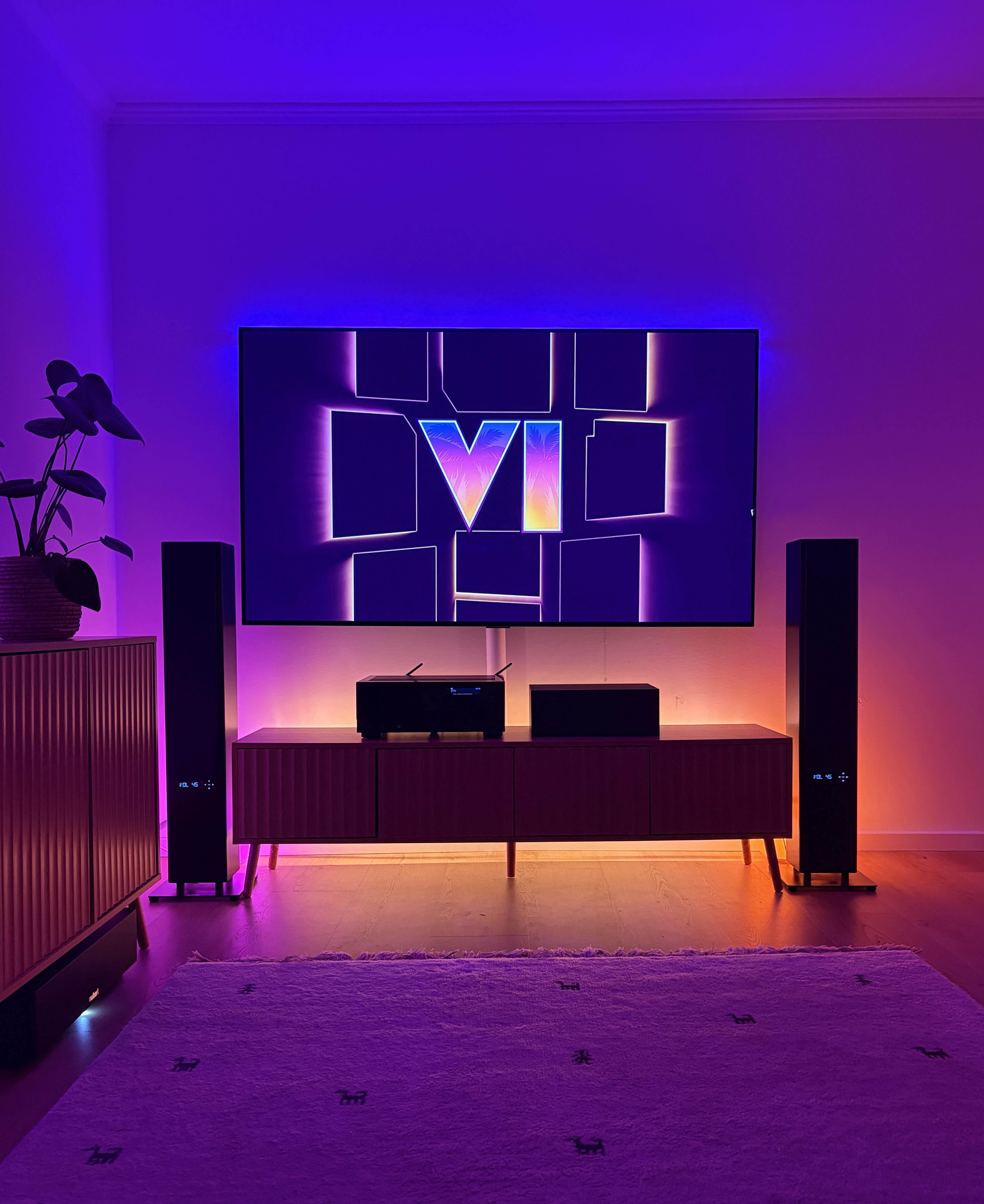
- there are three color light strips (behind furniture and tv) and two basic single bulps (coloured) left and right of the lowboard installed (5 in total), - Regarding colour setting try to isolate light bulb one by one and try to approach target colour (in this case, the „VI“-Symbol on the TV-Screen), - set mid down colour light with warm white and go to the sides (left / right) with greater saturation of the colour of your choice - warm colours (orange - in this case on the right; or fuchsia - in this case on the left) need to have a overweight in overall intensity to get a warm atmosphere overall
Disclosure: Philips Hue Canada provided me with the Gradient Strip Light Pro and 8K Sync Box to review. All opinions in this review are entirely my own.
Hello fellow Philips Hue enthusiasts. I was selected by r/LG_UserHub to receive a 65-inch LG G6 OLED TV through a promotional event in r/4kTV.
I also own a 65-inch LG C5 OLED, which has the original Philips Hue Play Gradient Lightstrip installed behind it. Philips Hue provided the new Gradient Strip Light Pro so I could use it with the G6 and compare it with the original strip on my C5.
Setup and installation
Setup was a breeze. I already have an extensive Hue ecosystem, including a Hue Bridge, the original Play Gradient Lightstrip behind my C5, and Hue Signe floor lamps on either side of the G6. I also have additional Hue lighting in my home-theatre room, so connecting everything and adding the new products to my setup was straightforward.
The Pro was noticeably easier to install than the original light strip. It’s narrower in diameter and lighter, and Philips includes more mounting brackets. Those differences made it easier to position and secure behind the TV.
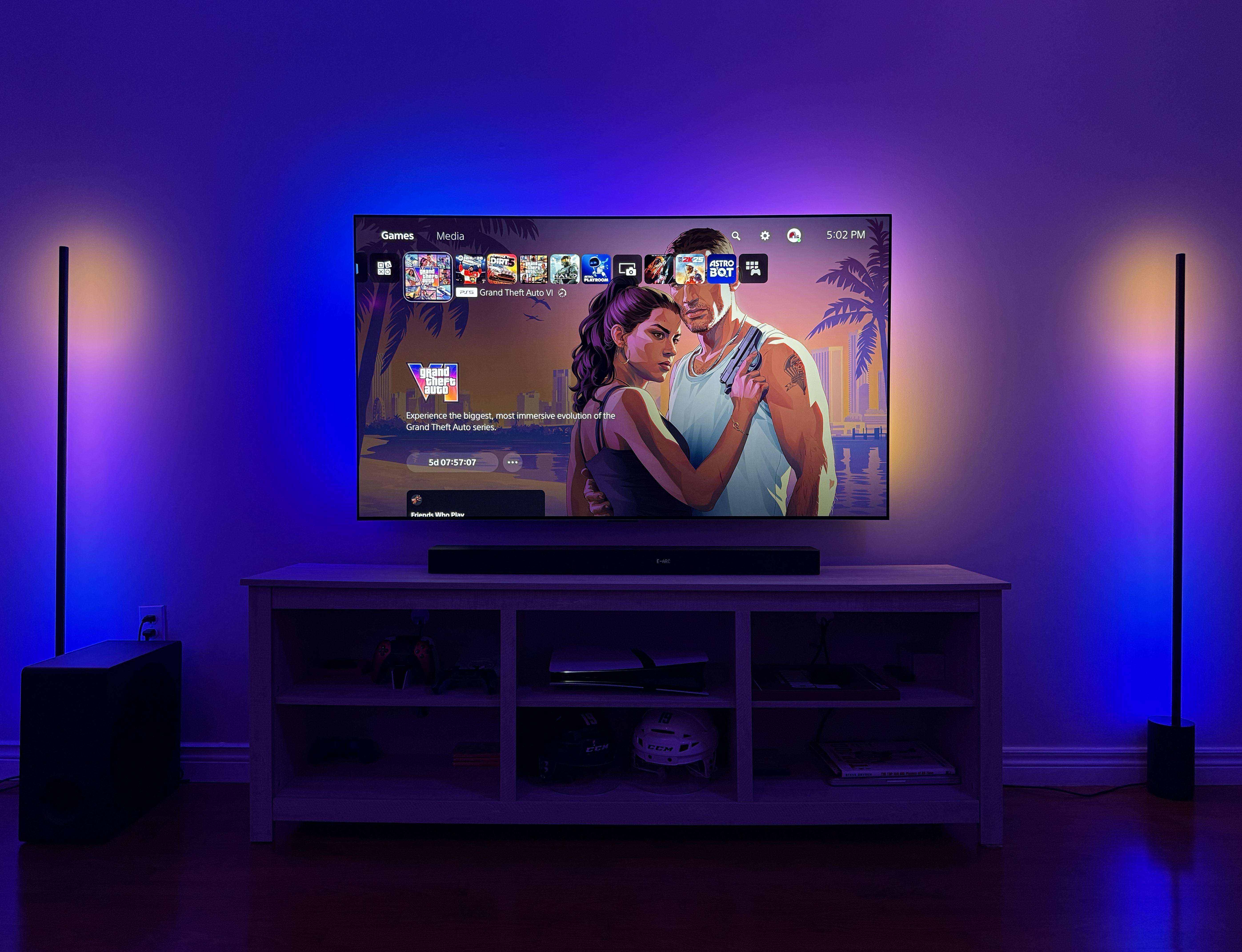
My G6 is mounted with the front of the screen 4.5 inches from the wall. The TV itself is exactly one inch thick, leaving a 3.5-inch gap between the back of the TV and the wall. The Gradient Strip Light Pro fits well in that space and spreads its light beautifully across the wall.
Picture and lighting
Compared with the original strip on my C5, the Pro is much brighter and has a stronger spread of light. Its new OmniGlow technology features a high-density, smart LED strip-lighting technology designed to deliver completely seamless, spot-free illumination without visible individual LED diodes or "hotspots". In my opinion, this is the top feature and what really sets the Pro apart from the original light strip.
65" LC C5 OLED + Original Philips Hue Play Gradient Lightstrip65" LG G6 OLED + New Philips Hue Play Gradient Strip Light Pro
The Gradient Strip Light Pro also matches exceptionally well with the Hue Signe floor lamps on either side of the G6. Together, the lights make the whole setup feel very immersive.
The Hue scene I use most often is Meriete. It’s easily my favourite, and it’s a great match to the GTA VI colour scheme. I also like Dimmed and Energize; they offer two very different lighting moods, and both look excellent.
8K Sync Box
The 8K Sync Box adds another layer of immersion by syncing the Gradient Strip Light Pro and the other Hue lights in my room with the content on screen.
The Sync Box is HDMI 2.1 certified and supports syncing lights with TV content at up to 8K 60Hz or 4K 120Hz. My G6 is a 4K 120Hz TV with HDMI 2.1 ports and VRR up to 165Hz, while my PS5 Pro also has HDMI 2.1 and can output up to 120Hz, so the 8K Sync Box fits my gaming setup perfectly.
The lighting feels like an extension of the TV, and the Gradient Strip Light Pro does a phenomenal job of matching the colours and action on screen thanks to its Chromasync precision colour matching technology.
It can, however, get distracting as I found out after about 20 minutes of use, but that’s just my personal experience. For others, this may be their favourite feature and the reason they decide to buy a light strip in the first place. I’m not here to say one person’s preference is right and another person’s is wrong, I think to each their own — you should use your lighting the way you personally prefer.
Please note, if you want the sync feature to work best when gaming, make sure you choose the 8k Sync box with support for 4k 120Hz rather than the 4k sync box because the 4k sync box only supports 4k 60Hz while most modern gaming consoles & PC’s support 4k 120Hz or higher.
My personal preference is to pick a Hue scene, or a custom scene that I personally made, depending on my mood and then leave it set for the duration of my viewing time, or adjust to a different scene depending on the content I’m watching.
Final thoughts
I still love the original Philips Hue Gradient Lightstrip on my C5, but the Gradient Strip Light Pro takes the experience a step further. It’s brighter, produces richer colour, and spreads that colour beautifully across the wall. Paired with the 8K Sync Box and the rest of my Hue lighting, it helps turn a regular TV room into a home theatre—although I typically prefer to pick a pre-set scene rather than having the lights match the content on screen. Overall, it’s quite impressive, and I highly recommend the Philips Hue Gradient Strip Light Pro! 🙌😊
Put a gold wrap sticker around the black body cases and put some mercury glass lampshades on top to disguise the modern looking wall washers. Getting bonus fluted effects from the shade 🤌🏻✨
Hi, I'm sharing PWM test results for the Philips Hue White Ambiance bulbs. A few days ago I posted a test of the Hue Essential bulbs, which showed almost no flicker. The Hue White Ambiance bulbs, on the other hand, have clear PWM flicker. So if you're sensitive to PWM at all, I'd go with the Hue Essential bulbs since they seem much better in that regard.
I don't know why there's such a big difference between the bulbs, but it's good that there's a low flicker option available for those who don't do well with PWM, like myself. To be clear, the "Not Recommended" rating in these images is the classification per the Illuminating Engineering Society's technical standard called TM-39-25, so it's not my determination on what is an isn't recommended. This was measured using a flicker meter I created called the TLM-110.
The model number of the bulbs in this test is 591131.
Hey guys, so I'm looking to get a back light setup for my tv, someone recommended the Philips hue sync box 2. I was wonder if I can also sync a color-capable smart lightbulb(the kind you'd screw in a lamp or ceiling light)up to the tv sync box so it can change with what's happening on the tv and emulate the light from sun/sky while I'm playing a game(GTA 6)
This music app has an amazing sync abilities with hue lights in entertainment areas. I love that nothing is hidden behind in-app purchases or membership. It's on github https://github.com/engabd11/CAMusic
I'm using it with navidrome. Thanks to the developer!
Hi, I managed to get most of my Philips Hue stuff connected now with no issues at all. I'm very happy with the products.
For some reason, my lamp won't connect. It arrived today and I followed all the instructions, tried with the code and with the QR code, and it won't connect.
I m hesitating to buy a gradient tv lightstrips for my gaming session. I would like to see a honest video review with a comparison with and without. The problem is that it’s quite impossible to find, internet being full of sponsored video. Can you help me ?
Hi all, I'm stuck trying to get my Hue bulb working with Alexa again and I'm out of ideas. I have a Philips Hue White A60 bulb (806 lm, B22, Bluetooth + Zigbee, model 9290018217A) and an Echo Dot 5th Gen (model C2N6L4), which is online and otherwise works fine. I don't have a Hue Bridge, so the bulb runs in Bluetooth mode in the Hue app. I'm in the UK, using an iPhone and classic Alexa (not Alexa+).
This exact bulb and Echo worked together about 1.5 years ago. Since then I've reset both, and now Alexa never finds the bulb. I've factory reset the bulb from the Hue app and factory reset the Echo Dot and set it up again. The bulb firmware is up to date. I removed the bulb and an old "Hue white lamp" entry from my iPhone's Bluetooth settings, and I turned off Bluetooth on my phone and on another phone in the house that had connected to it before. I then power cycled the bulb at the wall switch and said "Alexa, discover my devices", and I also tried the Bluetooth setup flow in the Alexa app (Add Device > Philips Hue > Discover Devices). Saying "Alexa, turn on first light" does nothing, there's no old or ghost light in the Alexa device list, and restarting the Echo didn't help either. The Philips Hue skill route just says "A Hue Home is required", which I understand is bridge-only.
The bulb is in a ceiling fitting, so the Echo may not have been within the 1 m the setup screen asks for.
Has anyone had this recently? Is Hue Bluetooth discovery on Echo broken, or is there a trick I'm missing? I'd rather not buy a bridge just for one bulb.
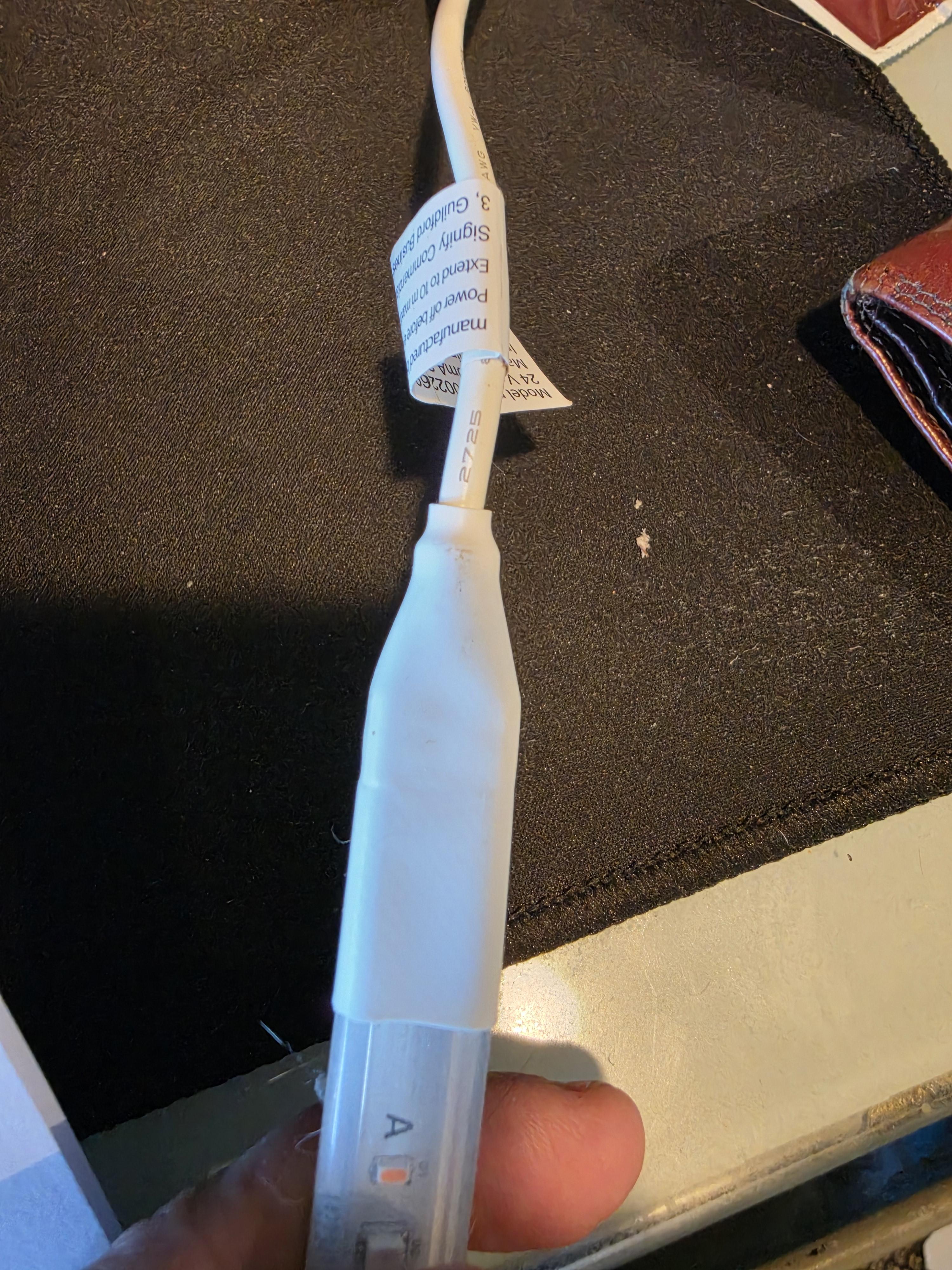
Has anyone here ever extended Flux Lightstrips beyond 20 meters? I need 23 meters, so two 10-meter strips and one 3-meter strip. Will that work? Because the extension instructions say "Maximum extension 20 m (65 feet)".
I have the Bridge Pro, some essential bulbs, and the Hue Go; I want to buy some products, but I don't know which are the best. Could you please advise me?
Recently got some nanoleaf panels and the hue controller.
After setting everything up, I noticed that the top left panel thinks its one position lower than it is when displaying a gradient.
I tried turning each panel clockwise or counter-clockwise. Moving the hue controller to a different panel or location didn’t help either. Adding or removing panels changes how the gradient is displayed, but not the issue. Changing the direction, or horizontal/vertical mode in the hue app does not solve it.
So hopefully someone on here has faced a similar issue. I purchased it off someone on Facebook Marketplace. After adding the 6 digit serial code the light flickers once but it doesn’t successfully add.
Doing a basement reno. I already own a lot of the retros, are these as good as the slim downlights?
Also what are we doing for wall switches these days? I'd love the inovelli button controller to finally come out so I can have some nice scenes in a single gang...
One question that comes up a lot, here and pretty much everywhere else, is whether smart lighting is actually worth the higher price up front. It's a fair question. Nobody wants to pay more for a bulb and then wonder a couple of years later whether it was worth it.
A big part of that answer comes down to how long the bulbs last. Hue bulbs are made to go the distance, but the rated lifetime depends on which model you have, so it's always worth checking the details for the specific bulb you're looking at. And like any LED, how long a bulb really lasts in your home can vary. How many hours a day it's on, where it's installed and how warm it gets all play a part. A bulb in a well-ventilated lamp in the living room is going to have a different life than one tucked inside a tight, enclosed fixture.
It's also worth knowing that a rated lifetime isn't a promise that every single bulb hits that exact number of hours. Think of it more as a guide than a countdown clock. Some bulbs will go well past it, others might call it a day a little sooner, and that's true for LEDs in general.
Longevity isn't just about the LED itself, either. A good smart lighting setup is really about the whole package: the hardware, the software, and everything continuing to work nicely together over the years as your home and your setup change.
Which brings us to the fun part. We'd love to hear your stories. What's the oldest Hue bulb you've still got running? Where is it, and what has it survived?
Apologies for the AI image, but thought it would make it easier to explain what I am trying to achieve.
I am looking to run light strips into the shelves by recessing them inside a light strip profile diffuser like in the second photo.
I just wanted to check if this is a viable option by using one controller and power supply which will be run behind the wall. I have seen some connectors from litcessory that look like they’d be able to be used to extend between each shelf/strip. I am only just getting into the Hue ecosystem but ideally wanted to stick with them so I can control them with my other lights.
If this is viable, what light strips would you recommend that can be extended?
Sometimes when I flip the regular wall switch to turn on my Philips Hue Infuse ceiling light, it doesn't just flash briefly, but it keeps flashing white and green continuously. Other times it turns on normally.
• Wired to a standard wall switch (no dimmer) • Happens intermittently on power-up, then stays flashing instead of settling
Has anyone seen this exact white/green continuous flashing on an Infuse or similar Hue fixture, or does this point to a failing internal driver/power supply?
Im currently working on building a desk and need to make the cable do a 90° turn but the "sock" at the start of the LED strip is giving me space constraints.
Would me removing the "sock" allow me to make that bend easier?
I bought these strips way in advance so I don't think I have to worry about a warranty so any modification is on the table at this point.
(Chiming in on the GTA VI trend - our new "Vice Paradise" scene set in a fitting setting; Transparency: Only title illustration has been AI generated using a real app screenshot)
New in iConnectHue 5.19
Stop what you're doing and take a look: This is not your average iConnectHue update - time to get excited! This update gives you a lot more of everything - the whole app just got a major upgrade! We've also added a little extra for those who play GTA VI or just like its moods.
More with your Pro Bridge
iConnectHue is the first 3rd party app to support new Pro Bridge functionality.
The first new thing you can now do is disable Contact Sensors, Motion Areas or Camera Motion with a time limit. This may look like a small feat, but lays the groundwork for future improvements.
What would you like your Pro Bridge to do for you? Let us know - write us!
(Available with 2026 upgrade, included with new app purchase)
More supported devices & more functions
You can now use the Camera Motion of wired, wireless and battery driven cameras. Due to the way this works, you are currently limited to what the Hue app can do, plus Magic Scenes - and with our little extra sauce you can lower inactivity times down to 30 seconds, and you can now toggle Camera Motion as new Widget action.
In addition to this, you can now set the motion type of your Motion Area in its sensitivity settings, and use a scene for Motion Area and Camera Motion to be returned to after no motion has been detected.
(Available with 2026 upgrade, included with new app purchase)
More Nanoleaf capabilities
iConnectHue now supports Nanoleaf Blocks, shows your panel setup in the app, and lets you rename your panels (only stored locally since not supported by their API).
Do you have Nanoleaf panels and haven't connected them to iConnectHue yet? Try it out now: Go to Devices->+->Scan for Nanoleaf devices.
(Available with Pro Membership)
More Bridge control
The virtual Bridge button returns! Available in Bridge settings - tap the button directly or open options. Remote access is required due to security reasons, but no bending over for the button push any longer ;).
New Bridge resources: see Behavior and Formula usage at a glance. Tap on them for exact count (Formulas only on Pro Bridge).
More Magic Scenes
We've updated to improved AI models for better Magic Scenes and color descriptions. Not satisfied with the result? You can now refine your Magic Scene descriptions or retry for better results. You can also now paste colors directly in the Magic Scene editor via the menu (Pro), and rename them in place.
We've prepared you for your GTA sessions - the new Vice Paradise Membership bonus set gives you 8 fresh Magic Scenes to enjoy your gameplay!
(GTA and Grand Theft Auto are trademarks of Take-Two Interactive Software, Inc. iConnectHue is not affiliated with or endorsed by Take-Two Interactive or Rockstar Games.)
Other bright ideas
We've again been working to make things easier to use and understand:
Edit widgets right from your Dashboard – no need to leave your home view any longer
Main button shows the location it controls - when multiple locations are set up
Improved dialogues for a smoother experience
Tap time values next to sliders to select them directly (device inactivity, animation fades)
Refined haptic feedback
Several detail improvements to make your life easier