r/iOSProgramming • • 9h ago

Discussion Let Claude Code test your iOS app once on the Simulator or a real iPhone, then replay it in CI forever with zero tokens (open source, 3x faster than agent-device)

59 Upvotes

I built phonedriver, a free open-source tool (Rust + a tiny Objective-C XCTest runner, zero telemetry) that lets Claude Code, Codex, Cursor, or plain scripts test iOS apps on the Simulator or a real iPhone (and android) over USB or Wi-Fi.

Instead of feeding screenshots on every turn or writing flaky XCTest UI code by hand, phonedriver sends the model a short numbered text list of the screen (59 tokens for a sign-in view) and returns only the lines that changed after each tap (20 tokens). Once an agent tests a flow and it passes, you save it and replay it in CI with no model at all:

phonedriver save login.steps
phonedriver replay login.steps --screens screens/login

On simulator-use's iOS Simulator sign-in benchmark (time and reply tokens):

Stepphonedriversimulator-useagent-device
Read screen29 ms (59 tok)45 ms (71 tok)33 ms (125 tok)
Tap + settle316 ms (20 tok)435 ms (17 tok)872 ms (38 tok)
Type email848 ms (13 tok)578 ms (14 tok)2.43 s (47 tok)
Full sign-in (step by step)1.75 s (173 tok)1.78 s (192 tok)5.67 s (762 tok)
MCP tool list (paid every turn)17 tools (1,849 tok)12 tools (2,443 tok)63 tools (27,918 tok)

Four Xcode and Simulator quirks that got it there:

  • XCTest spends ~330 ms before the app sees a tap. Sending Simulator taps straight through SimulatorKit's HID port (the path idb uses) delivered the touch in a few milliseconds, dropping tap-and-settle from 0.84 s to 0.32 s.
  • HID typing is fast and silently wrong. Sixteen characters went in under 10 ms, but x "q" 'r' -- teh ok. Gary@Mail.com came out as x ‘q’ ‘r’ — teh ok. gary2mail.com because apps dropped Shift and applied smart punctuation when the hardware keyboard was off. Typing stays on XCTest instead (simulator-use beats phonedriver on Simulator typing because hardware keys hide the software keyboard, while XCTest keeps it up like a real iPhone).
  • Xcode recorded QuickTime video of every runner session. Long-running UI tests default to PreferredScreenCaptureFormat = screenRecording. My Simulator's testmanagerd folder held 154 movies up to 209 MB each (1.2 GB total), and 84 DerivedData folders took another 940 MB. Setting systemAttachmentLifetime = keepNever and preferredScreenCaptureFormat = screenshots in the scheme's test action stopped it.
  • Fast accessibility reads without WebDriverAgent. Calling XCAXClient_iOS directly read an iPhone 17 Simulator screen in 22 ms vs 380 ms for WDA at depth 30 (45 ms with every WDA option tuned).

Install in one line: brew install hridaya423/tap/phonedriver or npx -y phonedriver init

Site: https://phonedriver.dev
Repo: https://github.com/hridaya423/phonedriver
Benchmarks & raw runs (including the steps I lose): https://phonedriver.dev/benchmarks/#simulator

If you run long Xcode UI test suites, check your Simulator's testmanagerd folder. Mine was quietly holding over a gigabyte of .mov files too lol


r/iOSProgramming • • 4m ago

Question Starting an iOS internship in 1,5 months

0 Upvotes

Hello!
I don't usually post on reddit, but I just recently graduated from uni in CS and got an opportunity for an unpaid internship for a few months at an international company in their iOS department. But I am not very good at programming at a professional level. Is there a way to learn good? Should i just do a lot of app tutorials where they create different apps on youtube so i get familiar with different things? or is it better to do 100daysofswift as i have seen other people recommend? Appreciate all the tips, i am super excited for this internship and want to do well. maybe its my insecurities kicking in, i am not sure. Sorry.


r/iOSProgramming • • 10m ago

Question Guideline 1.2: User-Generated Content

1 Upvotes

I need some clarification, I am working on releasing an app where users will be able to publicly share images and videos, according to apple's Guideline 1.2, we are strictly responsible for preventing and removing objectionable content, meaning we must make sure that content does not go live in the first place.
Does that mean we will need to implement some sort of screening (say through AWS) to every image/video? Or would a system that screens reported content be enough? When asking any LLM, they all say "Yes you need to prevent objectionable content, but no you don't need to screen everything" which is very confusing, since to be able to prevent bad content from being uploaded, we'd need to screen everything.. Any help is appreciated.


r/iOSProgramming • • 1h ago

App Saturday App Saturday: Near, a countdown app built on SwiftData, CloudKit sharing, WidgetKit and on-device Foundation Models

0 Upvotes

Hi all. I'm the solo developer of Near, a countdown and count-up app for iPhone with photo widgets and shared countdowns.

Tech Stack

  • Swift 6 with strict concurrency, SwiftUI, iOS 26
  • SwiftData for storage, CloudKit sharing for countdowns shared between family members
  • WidgetKit (Home Screen and Lock Screen widgets) and ActivityKit (a Live Activity on the day itself)
  • Foundation Models (Apple's on-device model) for natural-language entry, with a heuristic parser as fallback
  • StoreKit 2 for the Near+ purchase, App Intents
  • XcodeGen for the project file

Development Challenge
Photo widgets kept rendering blank with no error. Widget extensions have a tight memory budget, and full-size photos from the library blow straight past it. The fix: downsample with ImageIO (CGImageSourceCreateThumbnailAtIndex, max 800 px, without decoding the full image) before the photo goes into the timeline entry, then re-encode as JPEG. The widgets have been reliable since.

A second one: natural-language entry ("Mom lands Dec 22 at 6pm") uses the on-device model, but it isn't available on every device or language, so a rule-based parser handles the same input when the model can't.

AI Disclosure
AI-assisted. I built it with Claude Code as a pair programmer: it wrote a lot of the SwiftUI and boilerplate under rules I set in the repo, and I designed the app, made the architecture decisions, and debugged and tested everything on device.

Free with up to three upcoming moments; Near+ is an optional in-app purchase. Happy to answer anything about the code.

https://apps.apple.com/app/id6772564252


r/iOSProgramming • • 1h ago

App Saturday Chord: an pen-source macOS app for iOS devs working with coding agents

Post image
0 Upvotes

When I work on iOS/macOS apps with AI agents, I can get a lot done in parallel. The problem was that the agents kept building over each other, and I couldn't run builds or check previews on different branches at the same time.

I also hate having a lot of apps open at once like sourcetree, Xcode, finder, the Simulators and so on. Chord puts all of that in one window. It's now the app I use every day. You can bring your own harness (pi, Claude Code, Codex or OpenCode), run builds and simulators for each branch, and check every SwiftUI preview from a list.

Tech Stack

  • Tauri and Rust
  • React for the UI
  • A small Swift helper for rendering the previews

Development Challenge

When two builds run in the same DerivedData folder, the second one fails with "database is locked". This happened all the time when more agents were working at once. I also tried to copy DerivedData from one worktree to another, but it didn't work, because the build database saves absolute paths.

So now every worktree gets its own DerivedData folder, its own simulator and its own build slot. If a new build starts, Chord stops the old one in the same worktree first.

AI Disclosure

AI-generated. I planned the architecture but AI agents wrote the code completely.

https://github.com/Pistifeju/Chord


r/iOSProgramming • • 2h ago

Question Is HTTP loopback OAuth actually feasible in a native iOS app? (Sign in with ChatGPT / SwiftUI)

0 Upvotes

I’m developing a native SwiftUI iOS app and trying to implement OpenAI’s Sign in with ChatGPT (SIWC) open-source plan-usage flow.
The documented flow requires:

  • A local HTTP callback at http://127.0.0.1:<port>/auth/callback
  • A local listener running before authorization starts
  • Opening the system browser
  • Receiving the authorization code through the loopback callback

My implementation uses Apple’s Network framework (NWListener) and opens the authorization page in external Safari.
On a physical iPhone, the OpenAI consent page loads and displays the correct account and subscription information. However, the consent button keeps spinning indefinitely, and the app never receives the callback.
My suspicion is that iOS suspends the app while external Safari is active, which prevents the local listener from receiving the redirect.
I’ve considered a few alternatives:

  1. SFSafariViewController to keep the app in the foreground.
  2. ASWebAuthenticationSession, although its callback handling does not appear to support HTTP loopback.
  3. An officially supported alternative OAuth flow for native iOS apps.

The problem is that OpenAI’s documented SIWC open-source flow explicitly requires HTTP loopback and a system browser.
My questions:

  • Has anyone successfully implemented a local HTTP loopback listener in a native iOS app while completing OAuth in an external browser?
  • Does iOS actually suspend NWListener when the app enters the background?
  • Could SFSafariViewController keep the listener alive, and would this be a technically sound approach?
  • Is there another standards-compliant approach that would work without changing the provider’s required redirect URI?

I’m specifically looking for a solution that does not involve API keys, cookie extraction, password handling, proxies, or undocumented endpoints.
Any practical experience or technical insight would be greatly appreciated.


r/iOSProgramming • • 9h ago

App Saturday [App Saturday] DockMagic: a second Dock of widgets for macOS

3 Upvotes

Hi, I'm Don. I have a 9-to-6 job and build my own Mac apps in the evenings. DockMagic is a second Dock that sits next to the Apple Dock and holds widgets: system stats, calendar, clipboard history, a screenshot editor, Claude Code and Codex limits and more. macOS 14+, Apple silicon and Intel.

Tech stack: Swift, SwiftUI + AppKit. Distributed outside the Mac App Store as a notarized DMG and a Homebrew cask, updates through Sparkle, licenses sold through Dodo Payments with a small license and trial API on my own domain.

A challenge: the Dock can sit on the bottom, left or right edge and can be resized, so every widget has limited space that keeps changing. For a while I struggled with how to fit the UI in that space. In the end it came down to making it responsive. Since 1.3 the widget layouts adapt as the Dock is resized, with compact and icon-focused presentations for each placement.

Another one, less fun: license activation failed for about a month, 0 of 61 activations worked. I was busy shipping features and never went through the whole buy flow myself on a clean Mac. If you sell outside the App Store, test that flow from day one.

AI disclosure: AI-assisted. I use Claude Code a lot to write the code.

Pricing: one-time license, $25 / $40 / $60 for 1 / 2 / 3 Macs, 7-day trial with no card. https://dockmagic.app

Feedback on how the widgets look on a left or right Dock is welcome.


r/iOSProgramming • • 5h ago

Question Publish to App Store, registering as an LLC

0 Upvotes

I wish to register as an LLC to publish on the App Store. The biggest hurdle I'm facing is regarding the Registered Agent address. I am hoping to receive clarity on this as I've received pretty conflicting answers. I simply wish to register as an LLC with a Registered Agent address, and just need to know if doing so would qualify for developer registration. I've reached out to Apple's dev support but never heard back. I appreciate any responses. Thanks!!


r/iOSProgramming • • 6h ago

App Saturday I built Budget Flow, a native expense tracker for iOS, iPadOS, macOS and watchOS, migrated it to SwiftUI, and recently brought it to Android using Skip (50% off the lifetime purchase until December 1)

Thumbnail
gallery
1 Upvotes

Hey everyone! 👋🏻

I've been developing Budget Flow, a modern and privacy-focused expense tracker for iPhone, iPad, Mac, Apple Watch, and Android, as a side project since 2021.

The app has been available on the App Store for over three years, and I recently completed one of its biggest technical milestones: migrating the existing UIKit and Storyboard-based codebase to SwiftUI and bringing the app to Android using Skip.

My goal with Budget Flow is to offer a simpler alternative to many budgeting apps that feel overly complex or subscription-heavy, while providing a truly native user experience across both the Apple and Android ecosystems and maintaining a high level of privacy and data security.

Tech Stack

Budget Flow is built using Swift and SwiftUI, leveraging Skip to share a single codebase across iOS and Android while maintaining native user experiences and platform-specific integrations where needed.

Here are some of the technologies and frameworks used throughout the app:

Shared Codebase:

  • Swift & SwiftUI: Shared application logic and user interface
  • Combine: Reactive data flows and state management
  • Repository Pattern & DTOs: Platform-independent business logic and data access
  • RevenueCat: In-app purchases and subscriptions
  • Firebase Crashlytics: Crash reporting and stability monitoring
  • Firebase Remote Config: Remote configuration and feature flags

Apple Platforms (iOS, iPadOS, macOS & watchOS):

  • UIKit: Platform-specific UI integrations and special cases where SwiftUI is not sufficient
  • Swift Charts: Interactive charts and financial visualizations
  • Core Data & CloudKit: Local persistence, iCloud synchronization and shared budgeting
  • App Intents: Shortcuts and transaction automation
  • WidgetKit: Home Screen and Lock Screen widgets, Apple Watch complications and Smart Stack widgets
  • ActivityKit: Live Activities and Dynamic Island integration
  • VisionKit & Apple Intelligence: Receipt scanning and automatic data extraction
  • Mac Catalyst: Mac support, including keyboard shortcuts and platform-specific integrations
  • LocalAuthentication: Biometric authentication

Android:

  • Skip Lite: Transpiling Swift to Kotlin
  • Jetpack Compose: Native Android UI through SkipUI
  • Vico Charts: Interactive charts and financial visualizations
  • SkipSQL & SQLite: Local data persistence

Development & Tooling:

  • Xcode
  • Swift Package Manager: Dependency management
  • GitHub Actions & Fastlane: Continuous integration and automated builds

Development Challenge: Migrating an Existing App to SwiftUI and Android

One of the biggest challenges was bringing an already established iOS app to Android without maintaining two entirely separate codebases or compromising the native user experience.

Since large parts of the original app were built using UIKit, Storyboards and Core Data, this required more than simply migrating the UI to SwiftUI.

To address this, I introduced a repository-based architecture with shared data models and DTOs, decoupling the application's business logic from its underlying persistence layer. This allows me to continue using Core Data and CloudKit on Apple platforms while using SQLite through SkipSQL on Android.

Another important lesson was that shared source code does not necessarily mean identical runtime behavior. Performance, navigation, state management and platform-specific UI behavior still need to be considered and tested independently.

After experimenting with different approaches, I decided to use Skip Lite for the Android version, which transpiles Swift into Kotlin and maps SwiftUI views to native Jetpack Compose components.

I've written a more detailed article about the migration, architectural decisions, technical challenges and lessons learned along the way: https://budget-flow.app/migration-to-swiftui-and-skip/

AI Disclosure

AI-assisted: Budget Flow has been independently designed and developed by me since 2021, with AI tools now used to assist with development and debugging.

Pricing & Black Friday Sale

Budget Flow is free to download, with optional in-app purchases to unlock additional features.

As part of my Black Friday & Cyber Monday Sale (November 27 – December 1), the lifetime version is currently 50% off.

Pricing (Apple App Store):

  • $4.99 monthly subscription
  • $29.99 yearly subscription (with free trial)
  • $69.99 $34.99 one-time purchase (50% off)

All in-app purchases on the Apple App Store are universal across iPhone, iPad, Mac, and Apple Watch and can be shared with up to 5 family members via Apple Family Sharing.

Apple App Store:

https://apps.apple.com/app/id1640091876

For those of you who also use Android, Budget Flow is now available on Google Play as a free public beta.

Google Play (Public Beta):

https://play.google.com/store/apps/details?id=app.budgetflow

Official website:

https://budget-flow.app

I'm looking forward to hearing your feedback, both on the app itself and on the technical approach. If you're considering migrating an existing UIKit app to SwiftUI or bringing your SwiftUI app to Android using Skip, I'd also be happy to answer any questions! 😊


r/iOSProgramming • • 1d ago

Question Help me make sense of these onboarding numbers

2 Upvotes

Doing some early end of month analysis for November.
I've had 243 users install the app but only 78 of those users complete onboarding. I'm looking at this from two angles.

  1. My app's onboarding experience gives the user a peek into what the app contains. So from this perspective onboarding serves as a good filter that will just turn away users who aren't really aligned with the flow of my app. Keep onboarding as is.
  2. It's too tedious / boring and it's just making me lose users. Refine the onboarding experience.

What a conflicting state to be in! Have others encountered this same thing? How did you approach it?

Edit: spelling


r/iOSProgramming • • 1d ago

Article App Store review times in 2026: Apple vs Google Play

Thumbnail
bitrise.io
4 Upvotes

r/iOSProgramming • • 1d ago

Question How do some apps access battery details of AirPods

2 Upvotes

Title basically says everything.

I could only find a private but not public API to access battery details of AirPods in my own App.

However update submission using private APIs will be refused by Apple due to guidance 2.5.1

Does anyone know how other Apps in AppStore do it or do they maybe just use private and are lucky in review?


r/iOSProgramming • • 1d ago

Article I built a CLI to find unused and duplicate .xcassets images

6 Upvotes

On almost any iOS app that's been around for a couple years, `Assets.xcassets` turns into a junk drawer. Someone rips out an old screen and forgets the assets. Design hands over a tweaked icon under a slightly different name, and the old one just sits there forever.
   
nobody wants to clean it up by hand because Xcode won't warn you if an image is still used somewhere. You only find out after a build ships with a blank spot.
   
So I put together a small open-source CLI called `asset-guard` to audit `.xcassets` catalogs and optionally strip out unused `.imageset` folders before a build. It's written in Python, so you can run PR checks on a cheap Linux runner instead of burning macOS CI minutes.
   
If you have `uv` installed and want to run a read-only check on a project without installing anything permanently:
   

uvx --from git+https://github.com/nguyen-ta-cuong/asset-guard asset-guard audit /path/to/MyApp

A few choices I made because deleting a live image is way worse than leaving a dead one behind:

  • Reference scanning leans conservative on purpose. It checks Swift and Obj-C string literals (with comments stripped), dynamic patterns like "icon_\(i)" and @"icon_%d", Xcode
  15+ generated symbols (Image(.logo), UIImage.logo), plus storyboards, XIBs, and plists. It also picks up multiple .xcassets catalogs across targets and local packages while
  skipping Pods, .build, DerivedData, and Carthage.
  • clean is a dry run by default. Passing --apply deletes whole .imageset folders, and it refuses to run if your catalogs have uncommitted git changes so you can always revert.
  • Byte-identical duplicates (matched via SHA-256) are flagged and can fail CI with --fail-on duplicates, though clean will never auto-delete them. Removing a duplicate safely
  means rewriting code references, and I didn't want a pre-build script silently touching source files.
  • It also flags broken image sets like bad Contents.json files and missing 2x, 3x scales.

A couple honest caveats right now. It only scans .imageset folders (.colorset and .symbolset aren't supported yet), and duplicate matching is byte-exact so visually identical re-exported PNGs won't show up. Also, if your app pulls asset names from a server or builds them with + concatenation, you'll need to put globs for those into .asset-guard.toml.

Repo (MIT licensed, includes a GitHub Action and Jenkinsfile example): https://github.com/nguyen-ta-cuong/asset-guard

If you've got an older Xcode project lying around, I'd love to see if audit throws any false positives on your setup. How are you all keeping .xcassets under control right now, or do dead images mostly just sit in the repo?

If you enjoy it, would you mind giving the repo a star? Thanks so much!


r/iOSProgramming • • 1d ago

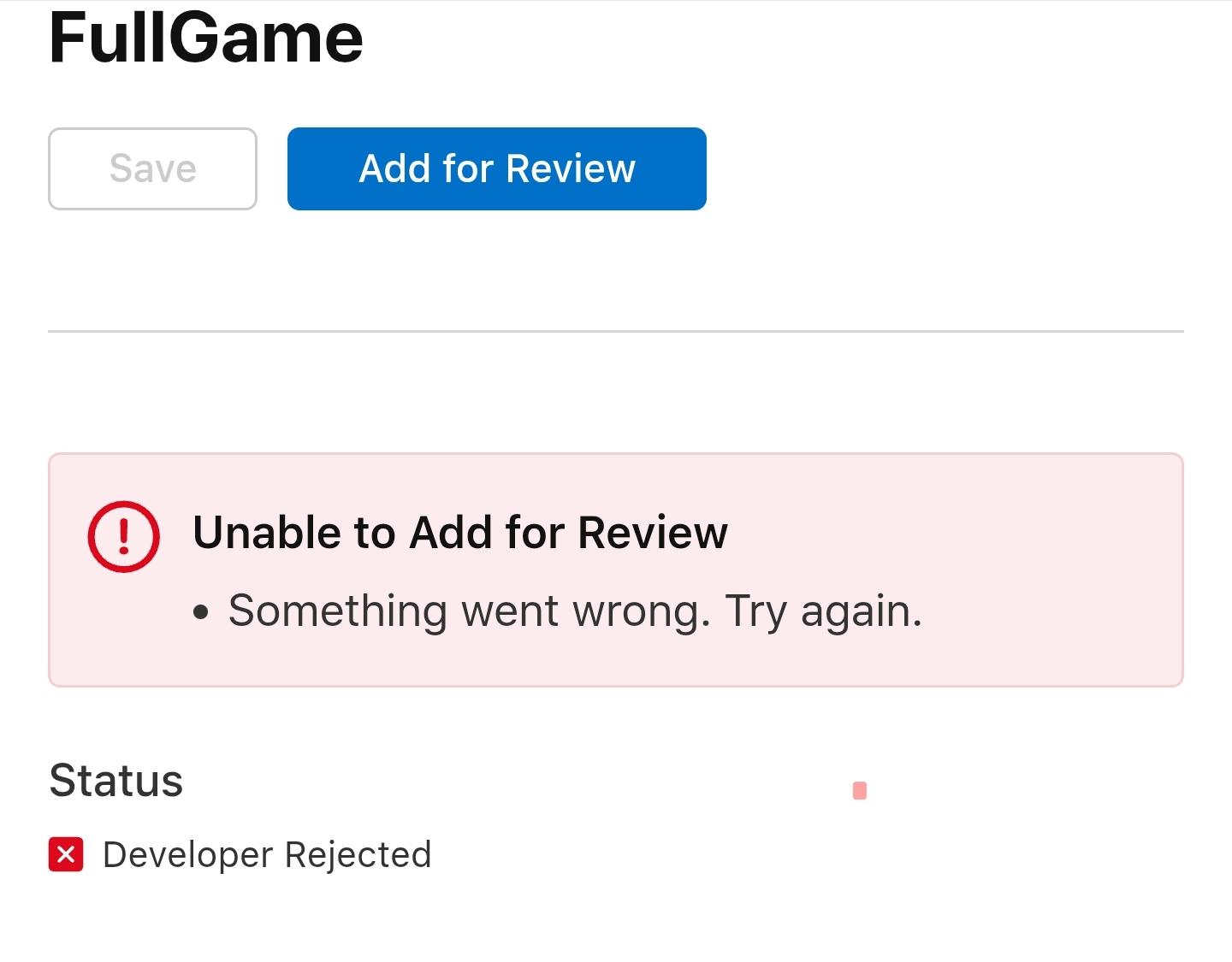
Question How to add IAP back on review resubmit after rejection?

Post image
2 Upvotes

I got rejected for having the same icon for my in app purchase as my game. I couldnt edit the in app purchase so I thought I'll remove it which gave it status developer rejected and add it back. Now when I got to add it back I get this error message.

Is there any way to fix this IAP so I can resubmit it with the review again?


r/iOSProgramming • • 1d ago

Tutorial Building apps is a system design exercise

Thumbnail
blog.jacobstechtavern.com
1 Upvotes

r/iOSProgramming • • 2d ago

Tutorial Everything I know about App Store Optimization(ASO) after making $3k passively with apps

22 Upvotes

Hey guys, I decided to create a little guide on ASO, hope you enjoy it!

A little bit about me: my name is Dan, I've been developing apps for iOS for a bit over a year now. In that time I've managed to make $3k almost passively with my apps by focusing on ASO and optimizing it, some of them made more, others made less but at the end of the day all of them contributed to earnings.

Anyway, let's talk about the main tips that helped me to get there:

Before building the app research the keywords first

This step is the most important because the entire ASO strategy relies on finding keywords with relatively low competition, but with high popularity and search intent. Don't rush this process, take your time. I usually spend a whole day or two doing keyword research.
For keyword research, firstly you have to come up with a few ideas for an app on your own(don't be afraid to copy other apps a bit), after this you should think with which keywords(search queries) users will search for your app. Then you put these keywords that you came up with into a keyword search tool of your choice and look at the popularity and difficulty scores. I use Astro ASO to view the popularity and difficulty of keywords, but in the beginning I was using SensorTower for this(it's free, unlike the first option). As a rule of thumb, popularity always has to be >20 and difficulty <50. Also make sure that the majority of the keywords that you have chosen have high search intent. For example, for an app that teaches Spanish, keywords with high search intent would be "learn spanish", "spanish lessons", "spanish grammar", while keywords with low search intent are "dictionary", "teacher", "learning" etc.

The keyword order matters

After the previous step you should have about 10 keywords that fit the criteria of popularity and difficulty. You should filter these keywords into more important(very high popularity and low difficulty) and less important(not that high popularity and medium to high difficulty). You put your more important keywords in the title and subtitle and less important keywords in the keywords field(the one that is located under the description field). The order of importance of keyword placement is as follows: Title -> Subtitle -> Keywords field -> Decription. That means that App Store values the keywords in the title the most. Don't put the same keyword in multiple placements, the only exception for this would be description field because as far as I know Apple doesn't really evaluate the keywords in this field, but it doesn't hurt to integrate them organically in the description too. Another important thing is that if you only rely on organic downloads(meaning that you don't run ads or social media for your app) you should put the keyword before the brand name in the title. For example, if we take the Spanish learning app from the previous step as an example and let's say that its brand name is "Fluentio", its title should be something like this: Learn Spanish - Fluentio. Here "Learn Spanish" is the main keyword and it receives the most attention from App Stroe if we put it like that in the beginning of the title

Screenshots are more important than you think

The problem that I see with many developers and that I had myself when I started publishing apps is that they focus just on developing the app and when it comes to creating screenshots for the app they just put default screenshots with some vague text on them listing the features of the app. This is wrong because you are competing with other apps that have the same features and most users don't care about the features, they care about the results that the app can bring to them. Again, taking the Spanish app from the previous steps as an example, a good text for its screenshot would be something like "Reach basic fluency in 60 days" and a bad vague text would be "60 unique lessons". Make sure that the text on screenshots stands out, it should be bold, some of the words are underlined or another size to draw users attention to the most important things. Also the visuals themselves should not be boring, make them pop out of the screen template to accentuate attention on your main features.

Optimize your paywall

This is more about the money-making aspect of apps rather than ASO but still. Your paywall should be optimized so that the work you put in the previous steps does not go to drain. In some way optimizing a paywall is similar to optimizing screenshots, your paywall should list results that the user will get by using your app, it should not be just another feature list. For the apps that rely entirely on ASO for getting downloads I found that the most effective paywall strategy is showing it once after the onboarding with an option to close it and then showing it after the user used the main feature a certain amount of times. By the way, your app making money is also a factor in ASO. It has been shown that the more your app makes per install the higher it will be in search results, this is logical I guess because obviously Apple wants to make as much money as possible so it pushes the most profitable apps.

Don't sleep on reviews

The amount of the ratings and reviews that you have greatly influences ASO and it doesn't matter what is the average rating(though it matters for converting users). Apple is tightening up the mechanisms of asking users for a rating, so you should be ready that they reject your app if they think that the review prompt that you have in the app is placed inappropriately. But you still should always have a review prompt in your app, don't expect users to go themselves to the App Store to give you a rating, it rarely happens. For my apps the most effective rating-asking placements are often after the user used a feature for the first time or after multiple times of using a feature. Make sure to keep you average rating at least as close to 4.5 as possible because at this average rating the percent of view to install is the highest.

Summing all of this up, I would say that another tip I can give you is that you should build the app in 1 or 2 weeks(focus on building simple apps with 1 or 2 features) while keeping it at high quality. Because of the widespread use of AI in the development process, the good keyword that you found may be polluted with other apps a few weeks later because not only you found it, so you have to develop fast. Also please don't use AI for ASO because it will give mediocre results, it is one of those things that it can't do because it lacks a real world perspective on which keywords are good which are bad so if you develop this skill it will be your edge against competitors.

By the way, I also do individual ASO audits for apps, so if you're interested in something like that hmu ;)


r/iOSProgramming • • 1d ago

Question Mac app stuck "In Review" for 3 days. Anyone else?

0 Upvotes

Hi everyone,

My app has been on iOS for a few years, and this week I finally submitted the macOS version. It moved to "In Review" after only 3 hours, but it's been stuck there for 3 days now with no updates.

Is anyone else seeing this? Normally my wait is in "Waiting for Review," but once an app is in review it gets approved fairly quickly. I haven't seen it sit "In Review" this long before.

Thanks!


r/iOSProgramming • • 2d ago

Question Anyone use Supabase as a backend? How did it go?

17 Upvotes

r/iOSProgramming • • 3d ago

Question China mainland app requirements

Post image
6 Upvotes

I see this missing information for my app. But the app is unavailable in Mainland China. Does anyone else see this issue?


r/iOSProgramming • • 3d ago

Article I am creating animated widgets.

Thumbnail
gallery
8 Upvotes

Hey all!

I’m building Jubs, an app with animated iPhone widgets.
I want them to feel alive, and a big part of that is getting the little details right.

I draw everything by hand first, then write simulations to figure out how it should move.
For this snow globe, that meant working out how snow falls and how the curved glass bends what you see through it.

Let me know your thoughts, please.

Thank you


r/iOSProgramming • • 3d ago

Question Measuring paid iOS installs with no SDK or MMP — is anyone actually doing this?

5 Upvotes

Solo dev here. I'm about to run my first small paid test (Apple Ads, YouTube, maybe Reddit) for a document app, and I've committed to no attribution SDKs, no MMP, no pixels, nothing user-level.

From what I can tell:

  • Apple Ads reports installs in its own console with nothing in the app.
  • Google's iOS App campaigns want an install event from Firebase or an attribution partner, so it's Demand Gen to App Store links instead.
  • Reddit reports SKAN installs but says it doesn't optimise on them without an MMP.

My fallback is App Store Connect campaign links, custom product pages and offer codes per channel. Has anyone made this work well enough to judge which channel is paying off? Or did you end up caving and adding an SDK?


r/iOSProgramming • • 4d ago

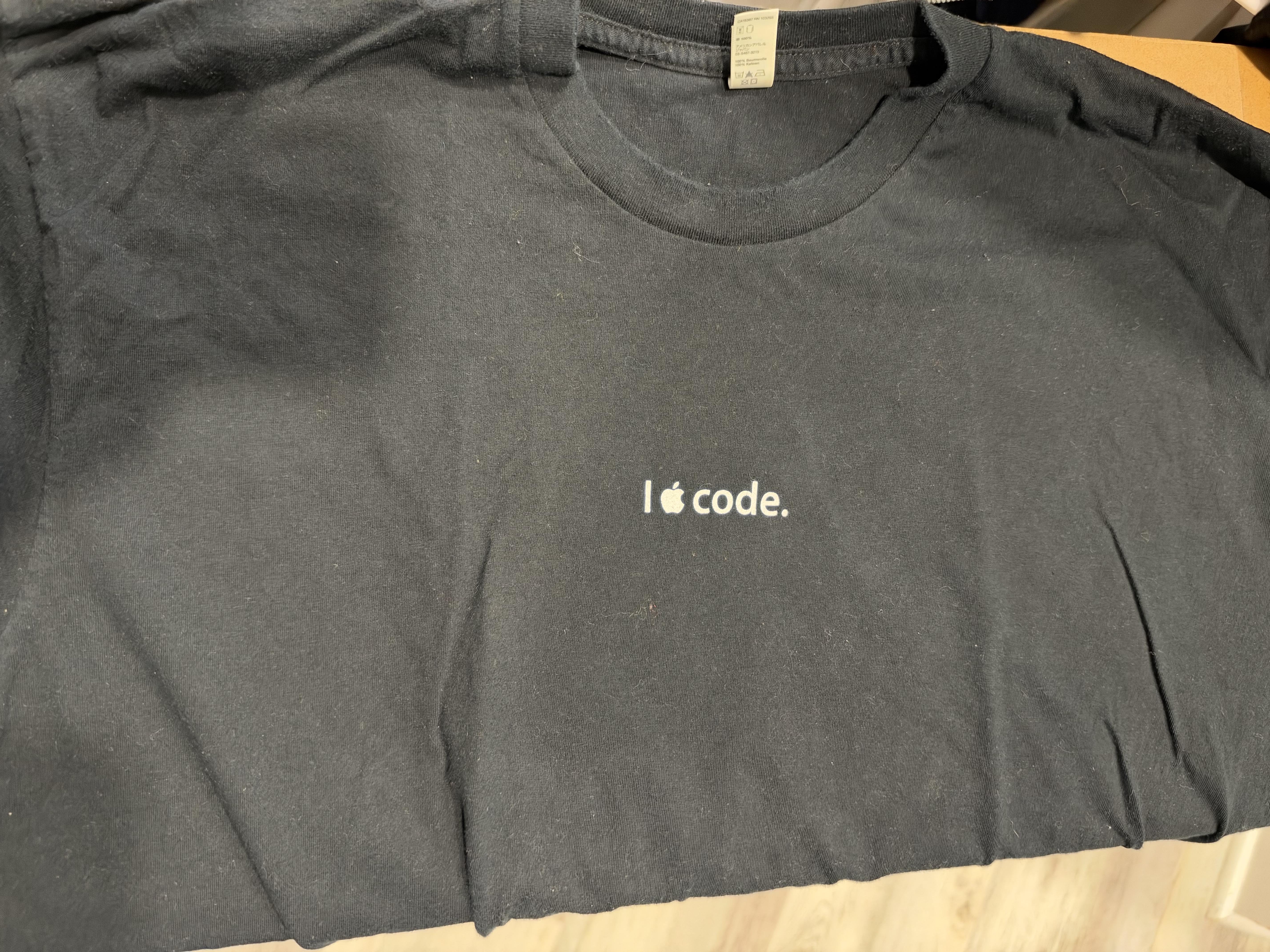
Discussion Attic find: old dev program swag

Post image
93 Upvotes

This probably will sound strange to all the new developers, but once upon a time, when you became an Apple developer, it wasn’t just an account. You received a welcome package in the mail. It had DVDs with developer tools, the latest copy of macOS X, other swag, including this T-shirt. I loved this shirt, but I had to stop wearing it because people kept thinking I worked at the Apple Store and then ask me for a discount. I got tired of telling people, no, I made iPhone apps.


r/iOSProgramming • • 3d ago

Discussion Expedited App Review really works! (and yes, I know I might be ruining it for everyone)

0 Upvotes

Partly a PSA, partly because I'm still a bit surprised.

I recently submitted a big update for an app that was delisted from the App Store over two years ago. I brought it back, reworked a lot, and this time it also came with an in-app purchase.

My other apps have recently been reviewed in anywhere from a few hours to half a day. This one? "Waiting for Review" for over a week. Not "In Review". Not rejected. Just... waiting. My guess is that a returning app plus a brand-new IAP landed it in some slower queue, but that's pure speculation.

I hadn't requested an expedited review in years. Back then my takeaway was that it changed little, if anything. So I didn't have high hopes, but after a week of refreshing App Store Connect, I had nothing to lose.

A few hours later: Rejected.

Not quite the outcome I was hoping for, but honestly, the reviewer had a point. The note was fair. I fixed the issue, sent a new build, and a few hours later it was approved. After a week of silence, the whole reject → fix → approve cycle took less than a day. Wow.

Takeaways:

  • If your submission is stuck way longer than usual, try expedited review. It seems to actually do something now.
  • It speeds up the review, not the outcome. "Expedited" doesn't mean "approved", it means "you'll find out faster". For me, that was exactly what I needed.
  • Apple says it's meant for urgent cases, so please don't burn it on typo fixes. I'm fully aware that posting this might lead to everyone smashing the expedite button, and in six months we'll all be back in the slow lane. So let's keep this between the few hundred thousand of us, ok? 🤫

Has anyone else had a similar experience recently? I'm curious whether the week-long wait was IAP-related or just bad luck.


r/iOSProgramming • • 4d ago

Discussion I migrated my app from UIKit to SwiftUI and brought it to Android using Skip. Here's what I learned.

Thumbnail budget-flow.app
13 Upvotes