r/KonicaMinolta • u/Cultural_Active_939 • 3d ago
Necesito ayuda con una Bizhub c364 al sacar la densidad 255 sale en blancose le cambió banda de transferencia y laser
reddit.com
1
Upvotes
r/KonicaMinolta • u/bob98b3 • 4d ago
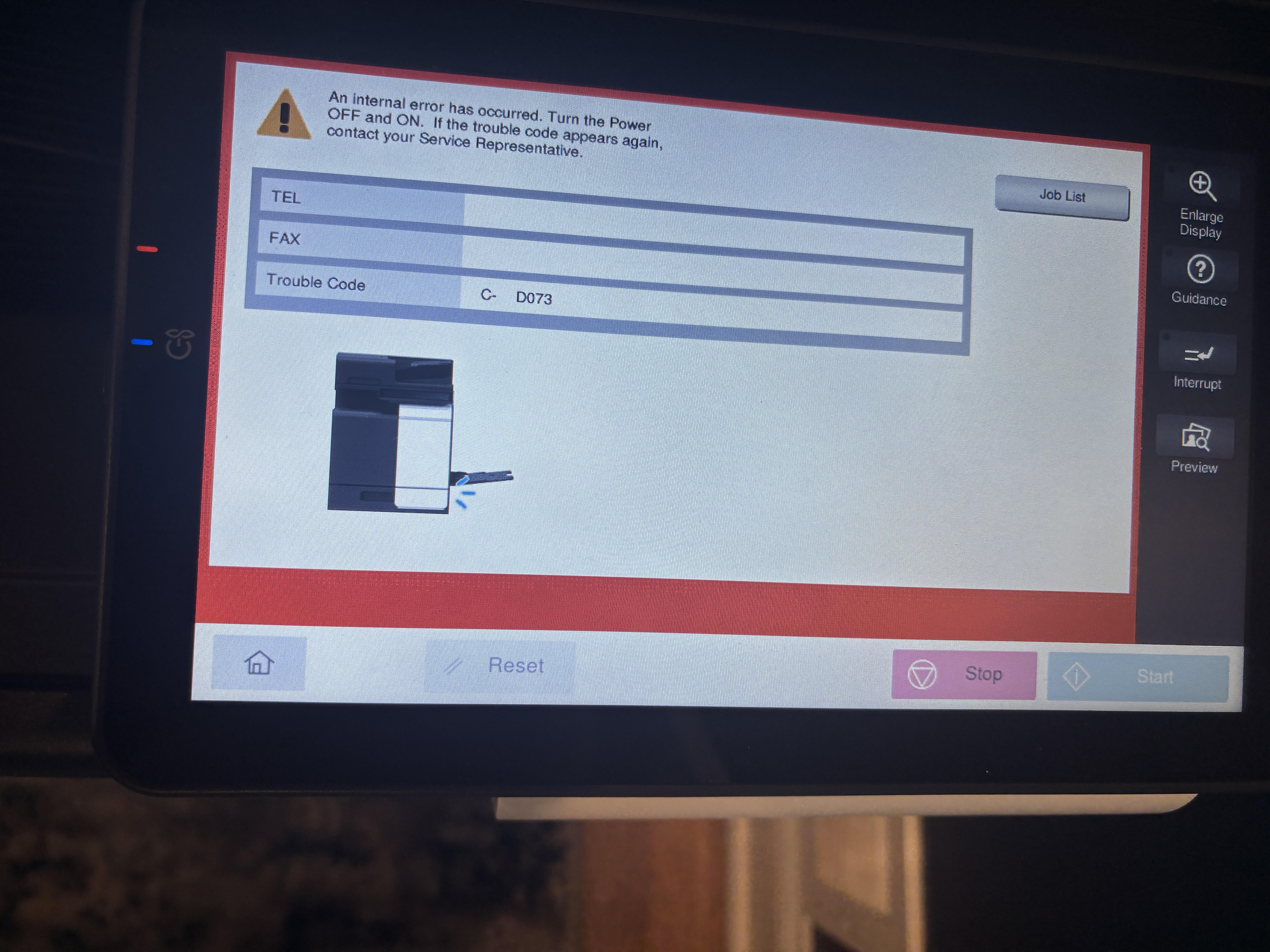
Hey everyone -
When my companies physical office shut I was able to get the bizhub C3350i printer which was always a solid machine. I was told it was fully reset by IT and now that I have it home I'm getting an error screen. I have tried everything I can find to try to get this fixed and working but no luck. So before just bricking the thing and chucking it in the trash I figured I'd reach out here to see if anyone has any thoughts or ideas.
Attached is the error I get on the screen when the printer is flipped on. Any help would be appreciated or if I'm just up a creek with no paddle then please let me know that as well. I'm hoping I can get it working as it would be great to have this at home. Thanks in advance!
r/KonicaMinolta • u/Cultural_Active_939 • 5d ago
r/KonicaMinolta • u/Shitsumondayo • 5d ago
Hey everyone, I’d like your help to find out if we are being taken advantage of concerning the new printer model Konica Minolta is offering our tiny office of 2 people.
Since English isn’t my first language, please let me know if there’s anything I didn’t make clear or is hard to understand.
We have a leasing agreement with Konica Minolta (KM). Since our old printer – a bizhub 4020i – is starting to leave streaks, I asked them to please send us an offer for a new leasing agreement. For our current plan we are paying 50,29 € a month.
Firstly, KM told me, we don’t use our monthly amount of 500 pages. We only print around 200 pages per month (ppm). They asked if we would like to lower the ppm and I agreed to lower it to 300 pages.
They then sent me an offer for a bizhub 4051i, asking for 51,45 € a month although we lowered the ppm by 40%. I told them I can’t accept that offer since we’re getting less for more money and they came back to me with the same offer for 46,34 € a month.
Since that is lower than our current monthly rate, I’m basically fine with it but I don’t think we even need the 4051i?
I don’t know a single thing about printers, but I did compare the information I could find on the 4051i with the specs of a way smaller and less heavy device I would personally prefer the bizhub 4221i.
From what I’ve seen, the 4051i has way more RAM, prints faster and with better quality than the 4221i. We don't need that.
So, I asked KM why they would offer us the 4051i instead of the 4221i since from my perspective, 4221i is smaller, lighter and as we are not printing much, completely sufficient for out little bureau. I received the following answer from KM:
“The 4051i is our entry-level-model and the most economical solution which is why we have offered it as a follow-up for your 4020i (for which support / production of spare parts might end soon). [...] With the 4221i, we would already be moving up to a higher product and price tier within the portfolio."
They also added that the price is not based on “single hardware specs” but that it also “considers the platform, scope of application as well as it’s placement inside the product portfolio.”
So please let me know: Is the 4051i really the better and cheaper choice for us when compared to 4221i, or are they trying to take advantage of us?
I might still accept the offer since it is less than what we're paying now, but I am awfully curious tbh.
Thank you very much for your advice!
r/KonicaMinolta • u/Most_Fig_4721 • 7d ago
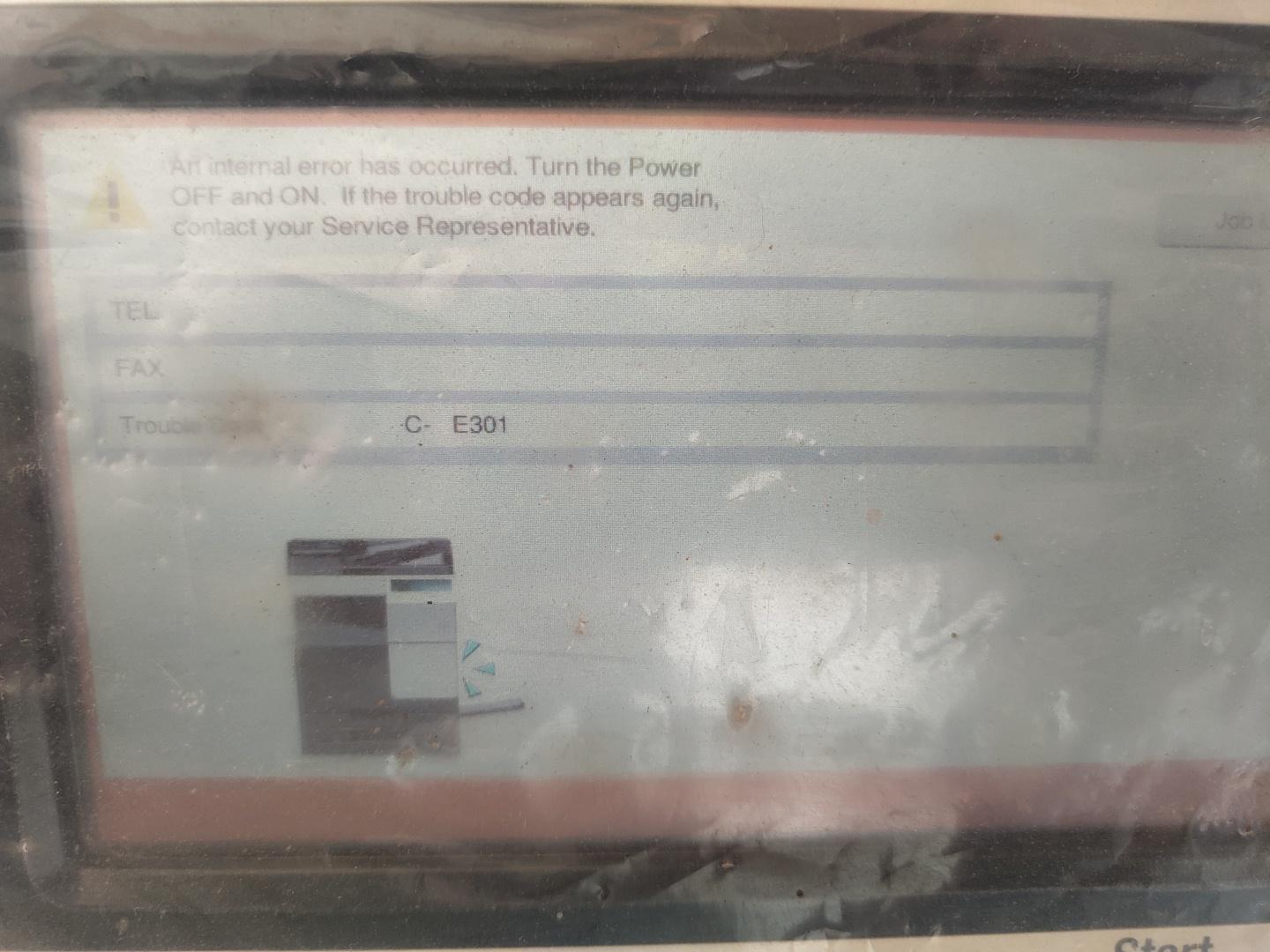
Getting this error in my machine how can I fix this
r/KonicaMinolta • u/BeefShortRib647 • 12d ago
r/KonicaMinolta • u/Spritee_0 • 20d ago

Hello everyone. As you can see in the images, I’m having trouble installing the firmware on a C300i. I replaced the hard drive because the previous one was damaged—it had been causing issues for a while. I installed a Kioxia drive—which many recommended as the right choice—and attempted to install the firmware, but I keep running into this error. Do you know how to fix it?
r/KonicaMinolta • u/DailyGrind37072 • 24d ago
Purchased a secondhand machine, and after research shows that there is a few upgrades that should happen, including security firmware.
I contact KM, and of course want me to go through sales for a contract. Don't want to sign a contract for someone to come plug in a USB, flip a switch, and be done in 5 minutes - for a 5 year contract.
Help?
Current Firmware/ROM Version: A8JE0Y0-F000-G00-W5
r/KonicaMinolta • u/Alan_Mazzoni • 26d ago

Mí equipo konica c266i sigue pidiendo que rellene el toner magenta. Pero lo cambié y nada.
No reconoce el cambio de toner
Usamos toner de terceros
Cómo se si es el motor u otra pieza?
Eddit: acaba de venir un técnico y el me mostró que los toners giran así que descartamos que el problema sea ese
Además me mostró que el toner está pasando a la unidad de imagen.
Me dijo que el problema son las unidades de imagen. Será eso?
r/KonicaMinolta • u/surfteach1 • Oct 22 '26

My church owns a C258 that works well in general, but recently started leaving black "streaks" on the pages. I suspected a drum, but the black drum looks fine and while the magenta drum is not perfect, the streaks are definitely black, not red. Also, the marks on the printed page are always in exactly the same place; I am thinking if it is a drum it would change position at least slightly. Is there anything else to look at? I am good with printer repair in general, though mostly the old HP Laserjets and Color Laserjets.
r/KonicaMinolta • u/Human_Personface • Oct 20 '26
We have a Konica Minolta 283 at my work. Last week it gave the alert that the toner needed to be replaced. I replaced it-- following all the steps provided on the machine, and using the correct brand/model toner-- and it worked perfectly fine right away. We have copied and printed tons of things in the following days without issue.
Now, a week later, it showed the alert again that the toner needed replacing. I know there is no chance that this brand new toner has been used up already. I took the bottle out, covered the hole as best as I could, and gave it a bit more shaking (I wondered if that was the problem. And yes, despite my best efforts, this was a messy endeavor). I replaced the bottle and the machine began making noises for a few minutes with the notification "Automatically refilling Toner" on the screen. After those few minutes, the alert about needing to refill toner came back on.
I tried it 2 more times, and the same thing has happened. I also restarted the printer twice
Does anyone know what the issue might be, and how to fix it?
Thank you in advanced for any help!
EDIT - Thank you, everyone for your responses! I tried a few things based on your advice, and it looks like there's an issue with the motor/hopper. We'll have a service tech come out to fix it, as that's certainly beyond my personal abilities. Hah.
I really appreciate how many people responded! Thank you, so much!
r/KonicaMinolta • u/Figofago2k • Oct 19 '26
Edit: Went back to client to look for a solution. I figured out that jamming happens when fuser is used for around 30 mins non-stop or simply by printing 200 pages without breaks. Fuser temperature was set to +5 in service come so I turned it down to default 0 and placed paper so It would go with shorter edge. So far client didnt have any issues.
Hello. I am working on my client’s C220 and I cant figure out whats wrong with it. It jams always when im not around. During my tests it works flawlessly. Tested almost 100 duplex pages and no jam. I’ve been 6th time today in last 2 weeks and client is losing its patient and so am I
Jam codes: 30-03, 32-05, 20-01. It jams when printing from 1st and 2nd tray, below fuser unit or jams inside it. Also it never happened during my tests. Manual tray works perfectly. I replaced the whole tray 1 and 2 modules (those with rollers inside), replaced fuser multiple times, replaced registration roller clutch, cleaned all sensors, door handles arent broken.
I repaired hundreds of these machines but this one is just not giving up. Any ideas what else to replace? Im definetly missing something. Im afraid even if I replace the whole doors, it will still jam.
r/KonicaMinolta • u/achbob84 • Oct 13 '26

Any idea what would cause this? I've cleaned it out a few times, it just builds up inside the cleaning assembly again until it's completely full. The white door on the end is definitely opening, the chute to the waste box is definitely clear, and the screw is definitely turning!!
Edit: Is it normal to have a build up in there? It only even has the stripe on the paper in that one spot? Maybe the blade is bad???
r/KonicaMinolta • u/Acrobatic_Ad726 • Oct 04 '26
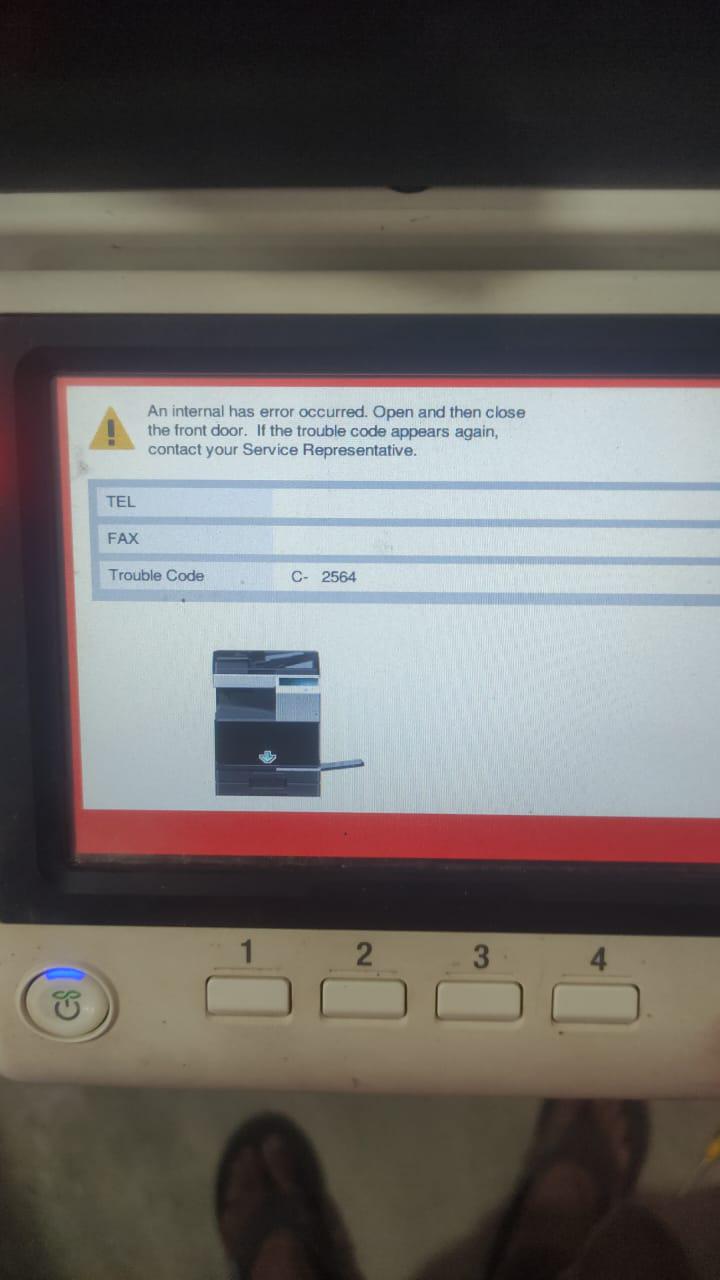
Hello,
The technician filled the developer and replaced its chip.
When I installed the developer and the drum back into the machine, I filled it with toner from a large toner bottle that I had already been using before, and then this error message appeared.
Before the machine failed, i was printing a pdf file but after about 20 pages, it printed about 400 page pages that were completely black , which eventually used up all the toner.
r/KonicaMinolta • u/headoctopus • Sep 29 '26
Hi! I’m trying to diagnose an issue with a Konica Minolta C7090 and would really appreciate some advice from someone familiar with this machine.
I’m having several related problems:
- C-3804 appears occasionally, mainly during long print runs.
- With 300 gsm stock, dark solid areas sometimes don’t fuse properly.
- The same 300 gsm stock also occasionally jams in/around the fusing unit.
- I’ve been compensating by increasing the fusing temperature in:
Paper Setting - select tray - Change Set - Expert Adjustment.
This helps with the fusing, but I don’t want to keep increasing the temperature without knowing what is actually wrong.
- These problems do not occur with other paper weights.
- The machine has also recently started taking noticeably longer to shut down.
The engineer who services the machine is already aware of the issue. As far as I know, he has already replaced the fusing belt, checked/replaced the thermistors/sensors, and checked the fusing lamp.
I personally suspect that the pressure roller may be worn, but I’ve only recently started working with this machine, so I don’t know how it was maintained before I came here or how old the current parts are.
So I’m trying to figure out what else could cause these symptoms and what should be checked next...
r/KonicaMinolta • u/Adept-Ad4882 • Sep 28 '26
Hello all!
At my office we have 3 C458 bizhubs, and I'm in the process of adding VLANs to our network. I have run into an odd issue though. When setting the switch port to an access port, I lose connection to the printer.
The printer has the correct static TCP/IP setup for the VLAN. The correct subnet, DNS, and gateway. If I set the IP to DHCP, it successfully grabs an IP from the DHCP server but I still cannot connect.
The only way I can get VLANs to work is to enable the VLANs and set the switch port to a trunk port. The only issue I have with this is it enables a Network 1 and Network 2. Is there a way to either disable Network 2 or have the access port with no VLAN set on the printer work properly?
r/KonicaMinolta • u/Relative-Response-26 • Sep 27 '26

I have had this problem woth my printer before, had a repair ma come ocer a couple of times trying to fix it. Eventually he did, by changing out all components in it it seemed. Worked fine for a while. Had to change toner, did that and the first paper that came out, the stripes came back and i also removed that toner and switched it with another but the problem presisted. Is there any nice soul out there that have any idea on how to solve this?
Thank you
r/KonicaMinolta • u/DewiVonHart • Sep 27 '26
I have a persistent phantom paper jam on my c454e that I can't clear. I've read to pull out the developer units and look behind that but I'm curious if anyone has any tips for simple things to check before I do that. I've also had an oddly hard time finding the location of the sensors, if anyone has a diagram for that.
For what it's worth, the machine sat unused for a couple weeks and the jam appeared when powering on. I don't believe there was ever an actual jam. Also, the jam location error is 31. And lastly, I did a self-test in service mode and it didn't display any faulty sensor errors as far as I could tell.
Machine is off-site from me so a list of things to check would be most helpful, but I appreciate any thoughts.
r/KonicaMinolta • u/abubakr_elsadig • Sep 20 '26
Will it cause any problems? And if so, what might happen if I keep using it.
The TN-622 is a much cheaper option than the compatible OEM cartridges.
r/KonicaMinolta • u/Rocco_Hunter007 • Sep 19 '26

It was printing fine but suddenly it started printing very low kindly help me out what might be the problem
r/KonicaMinolta • u/HealthSavings2734 • Sep 18 '26
i have a minolta bizhub c458 and it showing me C-2152 error. i tried changing Transfer belt and also resetted the machine but didnt work. Can anyone suggest if i should try updating its firmware or any other solution. Thanks
r/KonicaMinolta • u/ponay95 • Sep 08 '26
Hi everyone,
Friends and I have Bizhub C750i, C258 and C458. We are looking for the latest firmware files (firmware, movie, etc.) and update procedures.
If someone having access to KM could get them and upload them somewhere, that would be super great.
Thank you much :)
r/KonicaMinolta • u/Lanky_Mission_5489 • Sep 07 '26
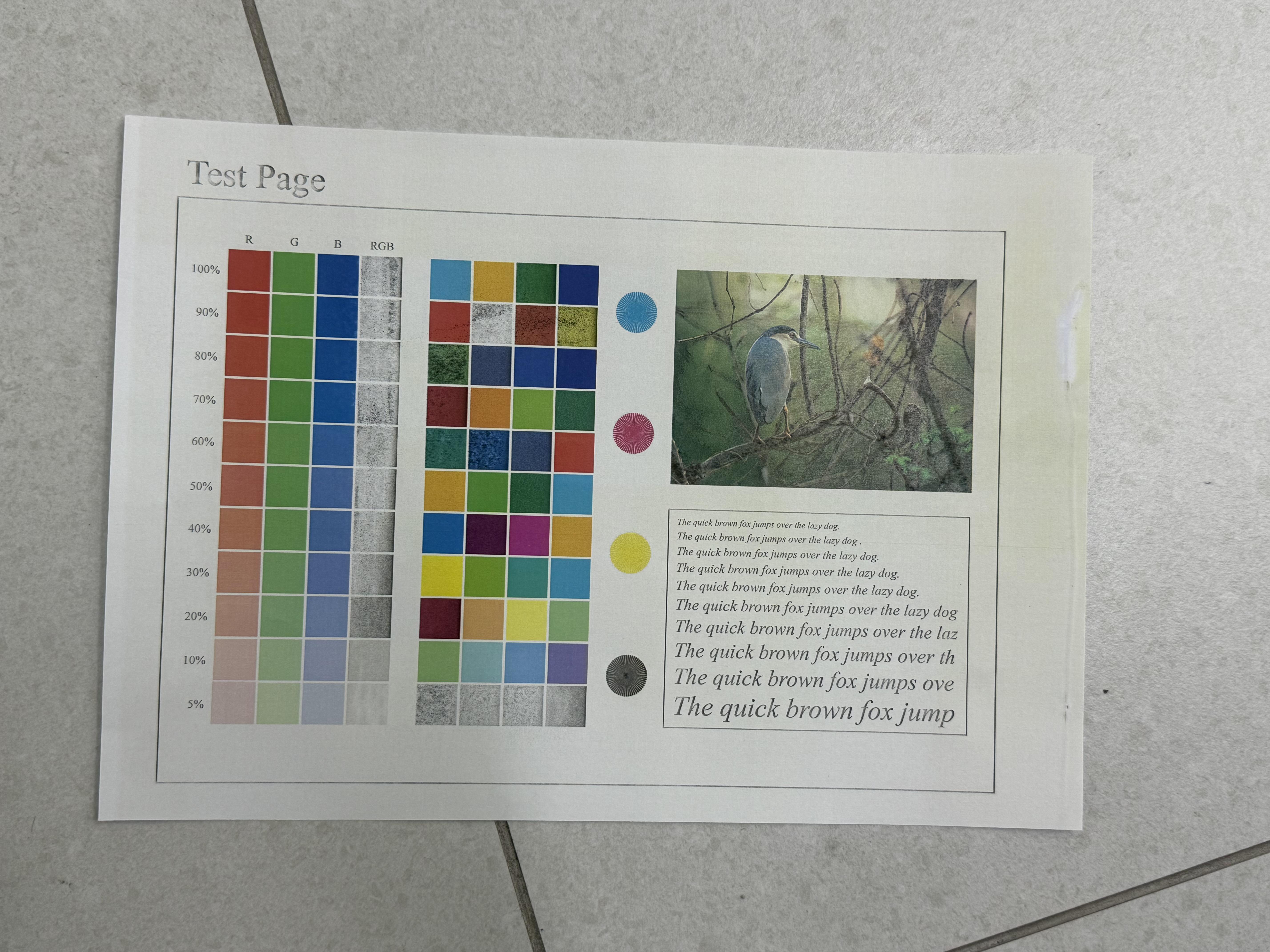
Good day all, machine was printing well the whole day , but after printing about 200 pages, the printer started overtoning yellow and the black is not sticking well and can be rubbed off on color jobs. On normal black and white jobs the black is feint and not as sharp. I have installed a New black drum , image transfer Belt unit , full oem toner sets. I was recently helped with cleaning the laser as there where white lines.
r/KonicaMinolta • u/TheRealMark89 • Sep 04 '26
As I posted a while back I have reached out to Konica Minolta about the upcoming issues with MacOS 28.
Upon the third or fourth rather annoyed request I finally got a reply.
Their suggestion: “Just use AirPrint”……..🫠
To which I promptly asked what they thought I should do, with all the advanced features and Ysoft configuration, since that isn’t supported via AirPrint.
Aaaaand silence from them again, it’s almost like they have zero knowledge or idea about what’s about to happen🙃