r/MacOS • • 5h ago

Bug Mouse Cursor Bug Reproduced in Apple Store

74 Upvotes

Hi, I have posted a few times to show my disappointment about the bug in macOS 27 that can cause the mouse cursor (or app windows) to go rogue. But I have also been wondering if this is because my old 4K LG display is no longer compatible with the new system.

To find out, I went to an Apple Store. There happens to be a MacBook Pro connected to a new Studio Display XDR using an Apple-branded Thunderbolt cable. So I tried to reproduce the same issue on their machine.

As you can see in the video, the bug can be consistently reproduced with Apple-branded hardware and accessories. As if that wasn't ridiculous enough, the window involved is Apple's own price tag app.

At this point, I can confidently conclude that this issue is caused by none other than Apple themselves.

I no longer even expect Apple to fix this. I just want to show everyone how ridiculous this is and how far Apple has fallen from what it used to be proud of.


r/MacOS • • 5h ago

Apps Ultra-realistic rain on a misted window pane - a native, Metal-powered screen saver for macOS 26+.

70 Upvotes

Rain is a native macOS screen saver. Drops run down a misted window pane while the street behind it is a blur of headlights, sodium lamps and neon. It runs in real time in Metal. Nothing is pre-rendered and no video is looped, so it never shows the same thing twice.

https://github.com/mariuszostrowski/rain


r/MacOS • • 3h ago

Developer Saturday My Mac app turns your clicks into step-by-step guides with screenshots. After your feedback here, most of it is free now

36 Upvotes

I'm Julian and I build StepGrab on my own, so yes, this is my app. You do a task on your Mac once and every click becomes a step with a screenshot, an arrow and a short sentence. Then you export it as a PDF, GIF, video or web page. It works in any app, not only the browser, so Finder, System Settings, Excel, whatever you need to explain.

With 1.7 most of it is free now, details below. If you still need Pro after that, I put codes for this sub on this page: Lifetime for free for the first 2 people and 40% off for the next 20.

I've posted here a few times and the comments were pretty blunt. One person recorded a whole guide and only then found out the export needed Pro. Someone else called it subscription slop. Both fair, so I turned it around.

Free now: every export format (PDF, GIF, MP4, HTML, Markdown), all the styles, unlimited recordings and guides up to 15 steps. Auto redact is free too. It blacks out emails, phone numbers and IBANs in the screenshots while you record, and if you black out a name once you can remove it from every other step in one go.

Pro is for removing the small "Made with stepgrab.net" line, for guides longer than 15 steps (up to 500), and for your own logo and brand profiles. You can pay once, there's no need for a subscription (but there is if you wnat to try it first).

It runs offline and you don't need an account. The screenshots stay on your Mac.

The codes only work for the .dmg from my site, not in the Mac App Store. There it's Black Friday too though: Lifetime is $30.99 today and $33.99 on Sunday and Monday instead of $44.99.

Auto redact is the part I'm least sure about. If it misses something on your screen, I'd really like to know.

Mac App Store: https://apps.apple.com/app/id6760129490
Windows (Microsoft Store): https://apps.microsoft.com/detail/9PGXWH0DCHGJ
Mac download (.dmg) and the codes: https://stepgrab.net/try/macos/?src=reddit-macos


r/MacOS • • 10h ago

Developer Saturday Make any external monitor feel like an Apple display

139 Upvotes

If you use a non-Apple external monitor with an M-series MacBook or Mac mini (or plan to), this one's for you. If not, feel free to skip it, or read along if you're curious.

Have you ever tried to change the brightness of your external monitor from your Mac? Out of the box, you can't. The brightness keys do nothing, and the brightness slider in Control Center and System Settings works for your built-in screen but stays greyed out for your external display. macOS only supports native brightness control on Apple's own monitors (Studio Display, Pro Display XDR) and the LG UltraFine 5K. Those are gorgeous displays, but I wasn't going to spend that kind of money just for a brightness slider, and I'm guessing most of you aren't either. (If you did, I'm jealous.)

So for the past year I've been trying to make my external monitor behave like an Apple display. Specifically, I wanted:

  • The native macOS brightness popup (OSD), not a lookalike
  • The Control Center slider to work instead of being greyed out
  • The brightness keys to just work

I tried everything I could find. The popular apps get close, but none of them gets all the way there:

  • MonitorControl (free, open source) handles the brightness keys well. Since macOS 26 it can no longer show the native OSD, and the Control Center slider has never worked.
  • BetterDisplay has every external display feature you could think of. On macOS 26 it draws a near-perfect copy of the OSD instead of the real one, but the native slider is still greyed out.
  • Lunar sits somewhere between the two and also can't drive the native slider.

So I went down the rabbit hole of figuring out how Apple's displays get native brightness control when almost no other monitor does.

The result is Candela. With it, your external monitor behaves like an Apple display: the brightness keys, the real macOS OSD, and the Control Center slider all just work. Think of the app as a driver for your external display.

I don't think anyone should pay for something before knowing it works on their setup, so Candela comes with a free 14-day trial. If you like it, it's a one-time purchase of $3.49 / €3.49 after that. I've put a lot of hours into this, and charging a small amount lets me keep it working as macOS changes. I hope that feels fair.

Download link: https://livoni.software/candela

I’m the developer, so I'd love your feedback, bug reports, and questions about how it works!

Best Sebastian


r/MacOS • • 2h ago

Developer Saturday Wallspan: a free, open source app that spans one wallpaper across all your monitors, replacing paid multi-monitor wallpaper apps

Thumbnail
gallery
24 Upvotes

Hi r/MacOS, I'm the developer of Wallspan. It's a menu bar app that spans one wallpaper across all of your displays.

https://github.com/Serubin/WallSpan

I used to use Multi Monitor Wallpaper, a paid app. However, after it broke and the developer refused to fix it, I canceled my yearly subscription and decided I wanted something open source that I could fix myself, so I wrote a replacement for my setup: a 34" ultrawide next to a 27" portrait monitor.

Give it a try: `brew install --cask serubin/tap/wallspan`

What it does:

  • Spans one image across every display
  • Compensates for bezels, so a straight line stays straight when it crosses from one monitor to the next
  • Corrects for different pixel densities, so the image is the same real-world size on each screen
  • Has a calibration window: it draws a test pattern over your screens and you line it up by eye with the arrow keys or by dragging
  • Can line up your monitors in macOS more precisely than dragging them in System Settings, so the cursor crosses where the picture does
  • Cycles a folder of images on a schedule, in the background and across logins

There's also a CLI underneath if you want to script it.

Some limits: anything behind a bezel or off-panel isn't shown, so an unusual monitor layout can lose a good part of the image. macOS also keeps a separate wallpaper per Space, so a one-off apply only reaches the current Space. Cycling handles this by applying the image as you arrive at each Space.

Free and open source (GPL-3.0). No subscription and no account. The CLI never touches the network. The app checks for updates only when you ask or turn that on, and it sends one usage ping a day so I can tell whether anyone is using it. That ping is on by default and contains only the app version, with no identifier or cookies. Nothing is sent on first launch, and you can turn it off in the menu with Send Daily Usage Ping. The README has the exact request. macOS 14+, Apple Silicon and Intel, signed and notarized.

I've been a software engineer for 15 years and built this with the help of some AI. I'm happy to answer questions about that or anything else.

The first image is simulated from my saved layout rather than a photo of my desk. If you run an odd monitor layout, I'd love to hear whether it holds up. Thanks!


r/MacOS • • 1d ago Heartwarming

Discussion macOS is not UNIX anymore

Post image
1.1k Upvotes

Honestly, this might be a good thing. Apple has little reason to keep dealing with unnecessary certification bureaucracy and pay 'Open Group' just to maintain a place in a registry.

macOS is built on Darwin and the XNU kernel (literally "X is Not Unix"), which combines Mach and BSD-derived components. Its Unix heritage, POSIX foundations, and compatibility with the broader Unix ecosystem are established facts. None of that changes because of a certification status.

Linux has demonstrated for decades that an operating system can follow Unix principles, provide extensive POSIX compatibility, and power much of the computing world without needing to carry the UNIX trademark.

An operating system should be judged by its engineering, architecture, and actual capabilities, not by whether it maintains a certification from a third-party organization.

Apple doesn't need The Open Group's validation to prove what macOS is. Perhaps it's time to move on.


r/MacOS • • 2h ago

Developer Saturday TideGlass · Living worlds for your Mac

5 Upvotes

I wanted something quiet I could glance at on my second monitor while I work, so I built TideGlass.

TideGlass runs live nature and space simulations on your Mac. Pick a kelp forest, a stretch of coast or a view of Saturn and leave it running in a window or full screen. You can addd widgets to that view to see how long you’ve got before a break, skip a song or run one of your Home Assistant scenes without switching apps.

We donate 20% of every TideGlass sale to conservation. The groups we support include The Ocean Cleanup, Rainforest Trust and DarkSky International. See who we support (https://tideglass.app/#giving)

Comparison:

I’d pick Portal for its recordings of real places in spatial audio, or Aerial to play my own videos as wallpaper. TideGlass runs the world live, so the music already playing on my Mac can change what happens. Put on a song while the rocky creek is open and more water comes in upstream.

Pricing:

Ten worlds are free forever. $12 once unlocks the rest with lifetime updates, including future worlds. It runs on Apple silicon with macOS 15 or later.

Download TideGlass (https://tideglass.app/download/)


r/MacOS • • 13h ago

Developer Saturday RetroMac 3.1: OS X Mavericks, KDE 1.x, Windows NT 4.0, Windows 2000, Amiga Workbench themes, plus a BIOS you can actually enter

Thumbnail
gallery
41 Upvotes

Finally, RetroMac 3.1 is out. If you haven't seen it before: it's a free, open source menu bar app that makes modern macOS look like older systems (Snow Leopard, Mac OS 9, NeXTSTEP, Windows 98/XP and more). One click and everything is back to normal.

I'm the guy behind the app and here is what changed since my last post three weeks ago.

New themes:

  • OS X Mavericks (you asked that the most)
  • Windows 2000 (no one asked 😬)
  • Windows NT (I grew up with)
  • Amiga Workbench 4.x (for me the most difficult one, because I never used Amiga)
  • KDE 1.x (still a work in progress)

The part I spend the most time for research an testeing: the boot animations now start with a BIOS, and you can actually go into the setup screen before the system boots.

Smaller things:

  • The Mac themes now have a live Calendar icon in the Dock instead of a static one
  • The Windows 9x themes can get a desktop buddy (Clippy!!!! and friends). Strictly optional
  • There is a SETI@home emulation now, for that 1999 feeling.. I never found an alien but grilled my cpu a lot.
  • Title bar theming for running apps was completely reworked and optimized

As I mentioned: I never owned an Amiga, so if the Workbench theme gets something wrong, I'd like to hear it.

Free to use, with an optional one-time Pro upgrade for aditional shaders and webcam support. 99% of you will be happy with the free version. No subscription, no account, no tracking. macOS 14 or later, Apple Silicon and Intel.

Source and download: https://github.com/klotzbrocken/RetroMac
Website: myretromac.app

Disclaimer: Yes, I used Claude to build this app. I know there is a lot of AI slop out there, and I understand if you think "yet another one". I am working on RetroMac for 7 months and put a lot of work (!) into research, testing and emulating old systems to get the themes right. It's a hobby project, built for fun and to bring back the old times. Just saying ◡̈


r/MacOS • • 5h ago

Developer Saturday LaunchOS: A year of bringing the classic Launchpad back to macOS

7 Upvotes

Hey there, happy Developer Saturday!

I'm one of the developers behind LaunchOS, a Launchpad alternative for macOS 26 and 27.

When Apple replaced Launchpad, many of us missed being able to organize and find apps the way we'd been used to for years. That's why we started building LaunchOS.

Our goal was pretty simple: bring back the familiar Launchpad experience and make it even better where it makes sense.

It's been over a year now, with 39 public releases and 500+ builds.

Here's what LaunchOS offers today:

  • Classic fullscreen and window-style mode
  • Custom app order, grid size, pages, folders, and scrolling
  • F4 and 4/5-finger trackpad gestures, just like before
  • Import your existing macOS 15 Launchpad layout
  • Multi-select, batch operations, and quick actions
  • Clean app uninstallation
  • Custom multi-monitor behavior

We've also spent a lot of time getting the little things right: opening speed, animations, memory usage, ProMotion and 120Hz+ support, three-finger drag, natural scrolling, and more.

Basically, we want it to feel like a native part of macOS.

One of the hardest parts of development has been deciding what NOT to add. A launcher is something we use many times a day, so keeping it fast, familiar, and reliable has always been our priority.

Pricing & Black Friday

The Basic version is free forever and should cover most everyday needs. There's also a 7-day Pro trial.

We're currently running our Black Friday sale, with the lowest prices of the year:

  • Lifetime Pro for 1 Mac: $5.40
  • Extra 8% off with code REDDIT
  • All future Pro updates included. No subscription.

LaunchOS runs locally with no telemetry.

Website: https://launchosapp.com

A big thank you to everyone who has supported us over the past year. Your support has made it possible for us to keep working on LaunchOS, and we're committed to keeping it maintained and improving it for years to come.

Happy to hear your feedback or answer any questions!


r/MacOS • • 48m ago

Developer Saturday open source project: a native macos port of ori and the will of the wisps, built from your own copy of the pc game

2 Upvotes

i've been working on glade, an unofficial port of ori and the will of the wisps to macos. it uses metal for graphics, coreaudio for sound and the gamecontroller framework for controllers, and it runs at 120 fps on an m3 pro. it currently runs the game's windows code under rosetta 2, and a native apple silicon build is in progress.

you point the installer at your own copy of the microsoft store pc version, and it builds the app into ~/Applications in about five minutes. no game files are included or downloaded. it's playable through the prologue so far and still rough around the edges.

github: https://github.com/thecatthatflies/glade discord: https://discord.gg/nztkCGVuSm


r/MacOS • • 5h ago

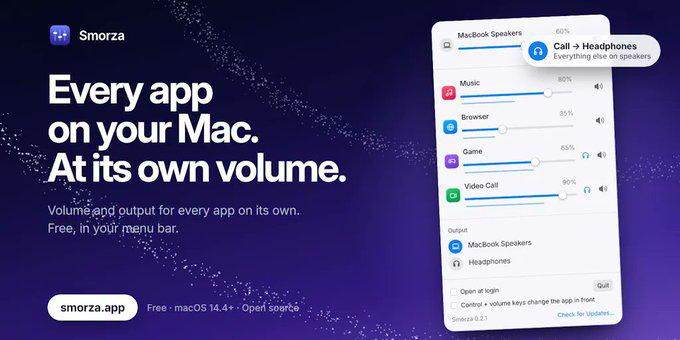
Developer Saturday I made a free, open source volume mixer for macOS: every app gets its own volume and output

Post image
3 Upvotes

macOS still has one volume slider for everything, so I built Smorza.

It sits in the menu bar and gives every app that plays sound its own:

- volume slider

- mute button

- output device (calls in your AirPods, music on the speakers)

It uses the audio taps Apple added in macOS 14.4, so there's no audio driver to install and nothing to uninstall later. Native Swift, small, no account, no tracking.

Why another one? FineTune is great if you want EQ and boost, but it needs macOS 15. Smorza works from macOS 14.4 (Sonoma), installs no driver like Background Music does, and stays simple: volume, mute and output per app, nothing else. And unlike SoundSource, it's free.

It's MIT licensed, the code is here: https://github.com/rokoov/smorza

Download and screenshots: https://smorza.app

It's still early (v0.4), so bug reports and feature ideas are very welcome. What would you want a volume mixer on the Mac to do?


r/MacOS • • 20m ago

Developer Saturday DoublOne Studios Black Friday! (Up to 50% off our apps)

Post image
1 Upvotes

We're a small indie dev studio, building privacy-focused and productivity apps for Mac, and we're now running a Black Friday sale across four of our Mac utilities this weekend!

25% off

  • Paperman: Adds a subtle paper texture over your Mac display to soften harsh contrast and reduce eye fatigue without shifting your colors.

40% off

  • LeedPDF: A lightweight PDF reader and annotator for highlighting, commenting, and sketching. A single license gets you both the Mac and iPad apps!

50% off

  • DoublShot Pro: A screenshot tool that automatically frames your captures with clean padding, shadows, and gradients. Free to try.
  • Glucose Subtitles: A Safari extension that adds live, on-device subtitles and real-time translation to web videos (Youtube, Netflix, etc)

You can check them all out on our catalog page: https://doubl.one/catalog

If you've tried some of them, we would love to know what you think!


r/MacOS • • 35m ago

Help Screen looks darker ever since macOS 27.2.1 update

1 Upvotes

I have recently updated Macbook Neo to Golden Gate 27.2.1 and the screen start to feel dimmer than it was before. I checked all the settings. The auto-brightness is off. Dimmer screen on battery is off. Night mode is off. Restart the system and yet it is not fixed. The issue is particularly visibly while watching Netflix or movies. Anyone else facing this issue after the update? Any solution to it?


r/MacOS • • 38m ago

Help Why can't you close windows or quit apps directly from Mission Control?

1 Upvotes

This has bugged me for years. Mission Control shows every open window at a glance, which makes it the perfect place to tidy up. But you can't actually do anything about the clutter you're looking at. There's no close button when you hover over a window, no way to quit an app, and no keyboard shortcut. You have to leave Mission Control, find the window, and close it from there.

It's not as if Mission Control is view-only, either. You can drag windows between Spaces and create or remove desktops, so it already manages windows to some extent. Windows' Task View lets you close windows right from the overview, and third-party apps add this to macOS, so it's clearly possible.

Mission Control (and Exposé before it) has been around for well over a decade and this has never changed, so I assume there's a good reason. Something technical about how the window previews work?

Does anyone know the actual reasoning, or have a good theory?


r/MacOS • • 1h ago

Developer Saturday Shepit Point: offline voice typing app for macOS (runs Whisper locally)

1 Upvotes

Press a shortcut, speak, paste anywhere.

Everything runs locally on your Mac using Whisper. You choose and download whichever model you want, and your audio never leaves your device.

Basic dictation is free to use, and the full version is a $9.99 lifetime unlock. I actually released it a couple of months ago, but never really shared it publicly, so I figured Developer Saturday was a good time to finally post it here. Would love any feedback!

Mac App Store: https://apps.apple.com/app/apple-store/id6812809856?pt=127842684&ct=reddit_macos&mt=8
Website: https://staryk.com/apps/Shepit-Point/


r/MacOS • • 1h ago

Developer Saturday SnapState, I'm the developer: my windows kept landing on the laptop screen after sleep or monitor changes, so I built a menu bar app that puts them back

0 Upvotes

Demo video (30 sec): https://getsnapstate.com/demo.mp4

I'm the developer, so grain of salt.

My setup is a MacBook plus an external monitor. When the Mac slept, restarted, or the monitor woke up a few seconds late, macOS treated the monitor as gone and piled windows onto the laptop screen. Sometimes they came back on the wrong display or the wrong Space.

SnapState lives in the menu bar. Arrange things once and save it as a workspace. It remembers window positions and sizes on every Space, which apps were open, the monitor layout, and the open tabs in Safari, Chrome, Edge, Brave, Arc, Chromium and Firefox. Then it puts everything back after sleep, a restart or a display change, or when you press a shortcut. Display Memory can treat home and office monitor setups as different layouts, and full-screen apps go back to their own Spaces.

If your screens changed, it remaps windows onto whatever displays you have now. Workspaces stay on the Mac. It is a native Swift app, signed and notarized, macOS 15.7 or later.

It's $9.99 one-time for up to 3 Macs, no subscription, with a 14-day refund window: https://getsnapstate.com/?utm_source=reddit

Happy to answer questions. If it misbehaves on your setup, tell me which apps, macOS version and monitors you use and I'll look at it.


r/MacOS • • 18h ago

Developer Saturday got roasted on Reddit for my local AI noise remover, so I rebuilt it and tested it against every app people suggested. It now beats Final Cut Pro and even cloud tools like Adobe Podcast (audio inside)

22 Upvotes

I built AudioRefine, a Mac app that turns voice recordings made in noisy places into clean, natural-sounding audio. Drop in an audio or video file, listen, and export. Everything runs locally on your Mac, and it's a one-time $14.99, with no subscription.

Free 7-day trial with full exports, no card needed: AudioRefine (r/macOS gets 15% off with code REDDIT15, limited to the next 30 users)

When I first posted it on Reddit, it got roasted: the demo sounded bad, and people were right. Since then I've replaced the entire cleanup engine and tested it against every tool people recommended (Adobe Podcast, Final Cut, Soundproof, Audacity and more). It now scores highest for natural-sounding voice. Results below.

Who it's for

  • Podcasters stuck recording in less-than-ideal spaces
  • YouTubers and course creators dealing with AC hum, fans or traffic
  • Interviews, lectures and meeting recordings you can't redo
  • Client or private recordings you're not allowed to upload to a web tool

How it works

  1. Drag in your file: MP4, MOV, M4A, WAV, Opus and more.
  2. Hit play and switch between Original and Cleaned at the exact same moment, so you hear precisely what changed.
  3. Export. For video, only the audio is replaced. The picture is copied as-is, so there's no quality loss and no waiting on a re-encode.

Why it's worth it

  • Natural sound. Your voice stays full instead of turning thin and robotic like it does with most noise removers.
  • Private. No uploads, no account, no analytics. Works completely offline.
  • One-time payment. $14.99, no subscription, no per-minute credits, and it works on 3 Macs.
  • Built for video too. H.264/HEVC video is never re-encoded, and any other audio tracks in a MOV are left untouched.
  • Ready to publish. Batch-process a whole folder, with optional loudness targets for podcasts (−16 LUFS) or YouTube (−14 LUFS). Your originals are never overwritten.
  • Three modes. Studio (default), Enhance (makes lightly noisy recordings clearer and fuller) and Fast (processes an hour of audio in under 2 minutes).

The proof

I ran the same noisy lecture clip through each tool on default settings and scored the output with Microsoft's DNSMOS speech quality model. Higher means more natural. For reference, the same voice recorded in a quiet room scores 3.37.

ToolScorePrice
AudioRefine Enhance3.48$14.99 once
AudioRefine Studio3.44$14.99 once
Adobe Podcast Enhance3.30Free tier, paid plan inside Adobe Firefly
Soundproof3.11$49.99 once
Final Cut Pro / Logic Voice Isolation2.96$299.99 / $199.99
Audacity Noise Reduction1.51Free
Original noisy recording1.49

don't trust a number, trust your ears. All 9 tools are on this page, and you can switch between them mid-sentence: getaudiorefine.com/comparisons

How it compares

  • Adobe Podcast Enhance: AudioRefine sounded more natural in my test (3.44 vs 3.30), never uploads your files, and cleans video without a paid plan. Adobe is still the better choice if you don't want to install anything, you're on Windows, or the free web version is all you need.
  • Soundproof: Both work offline and are pay-once. AudioRefine scored higher (3.44 vs 3.11) at less than a third of the price. Soundproof is still the better choice if you work with MKV or other containers AudioRefine can't open yet.

Pricing: $14.99 once for a lifetime licence on up to 3 Macs, with all future updates free. Free 7-day trial with full exports and no card required, plus a 7-day refund. Code REDDIT15 gives 15% off ($12.74) for the next 30 users: getaudiorefine.com

Honest limits: Enhance is an optional 585 MB download. Because it rebuilds the voice, it can very rarely change a word, so listen before publishing if you use it. That's why Studio is the default: it only removes noise and never changes your words. Requires Apple silicon and macOS 14+.

Trust

  • Developer: Prashant Kumar · LinkedIn
  • Site: getaudiorefine.com · Privacy Policy · Terms of Service
  • Distribution: Direct download, signed with an Apple Developer ID and notarized by Apple. The Mac App Store version is in review with Apple and I'll add the link here once it's live.
  • Payments: Handled by Dodo Payments as merchant of record, so I never see your card details.

r/MacOS • • 1h ago

Developer Saturday [OS] Glint - free screenshot/screen-recording app

1 Upvotes

Hey everyone,

For the past few months I've been building Glint, a menu bar app for screenshots and screen recordings. I wanted something like CleanShot X that's free and open source, so I started making it myself. It just hit 1.0 with 1.1 (cloud storage) in the pipeline, so I figured I'd share it here.

What it can do:

  • Screen captures go to quick access for easy access for drag and drop
  • Area, window, full screen and scrolling screenshots
  • Annotations: arrows, text, counters, blur, highlighter, a magnifier, and nice backgrounds in one click
  • Copy text from anything on screen (OCR), QR codes too
  • Screen recording to video or GIF, with a simple editor (trim, zoom, captions)
  • Studio Mode: automatic zooms, cursor effects, camera and captions that you can still change after recording
  • Capture History, so you can get back any recent screenshot
  • Pin screenshots on top of your other windows
  • Plenty more :)

All for free, no subscription needed.

One thing up front: I don't have a paid Apple developer account yet, so the app isn't notarized. macOS will block it the first time you open it, and you have to click "Open Anyway" in Privacy & Security once. The README walks you through it.

If you use an AI coding agent (Claude Code, Codex, Cursor…), you can also just tell it: "Help me set up Glint: https://github.com/TheOnlyKuhni/Glint/blob/main/docs/agent-setup.md". It downloads Glint, helps with the macOS warning and permissions, and asks you before changing anything.

GitHub (download + a short video for each feature): https://github.com/TheOnlyKuhni/Glint

It's a one-person project, so feedback and bug reports are really welcome. Let me know what you'd want it to do next!

Hope you enjoy Glint ❤️


r/MacOS • • 1h ago

Developer Saturday [Black Friday 20% Off] GameRex 3.0.2 – Turn any game controller into a precision macOS mouse + True HID Virtual Gamepad macros for Emulators & VMs

Thumbnail
gallery
1 Upvotes

Hi everyone,

We just shipped GameRex 3.0.2 for macOS—our biggest update yet—and we’re kicking off our Black Friday Sale (20% Off) right now. You can grab the discount code directly on our website at https://gamerex.uk.

If you haven’t heard of GameRex, it’s a native macOS utility built to turn any game controller into a high-precision mouse and a True HID macro engine.

What’s New in 3.0.2: True HID Virtual Gamepad & Virtual Keyboard

Most macOS keymappers rely on high-level software events that emulators and Virtual Machines completely ignore.

With 3.0.2, GameRex now sends Virtual Keyboard and Virtual Gamepad signals at the hardware level—passing straight into emulators and even across into games running inside Virtual Machines.

  • Shows up as a real controller: GameRex Virtual Pad appears as an actual selectable input device inside your apps and emulators, making GameRex the only macOS app (non-driver) capable of genuinely running macros to play games inside emulators.
  • Automate quests & replay combos: Record complex button sequences or repetitive grinding/quest routines once, then replay the entire combo or macro with a single button press.

Full Feature Highlights in GameRex 3.0.2

  • Turn Any Controller Into a Precision Mouse: Map analog joysticks—or any controller input—to mouse movement.  Acceleration Curve & Speed Shift Curve, giving you smooth control along with 8 customizable Max Speed levels.
  • True HID Macros & Turbo Everywhere: Run reliable macros and turbo inputs across standard macOS apps, keyboard-driven games, console-button (XYAB) games, emulators, and Virtual Machines.
  • Smart Profile Switching: Automatically switch controller profiles depending on which app or game is active, or swap profiles manually anytime.
  • Instant "Back To Mac" Control: Jump straight out of a game screen and regain control of your macOS Desktop with a single press of the Back To Mac button. 
  • Built-in On-Screen Keyboard: Type effortlessly from your couch or controller setup without reaching for a physical keyboard.
  • Floating & Customizable Menu Bar: Keep an eye on your real-time mouse speed, active profile, and currently running macros at a glance via the customizable menu bar or floating overlay.
  • Personal iCloud Profile Sync: Automatically share and sync your custom profiles across all your Macs using your own private iCloud account.

Black Friday Deal – 20% Off

If you’ve been looking for a way to automate emulator grinding, pull off one-button combos, or control your Mac entirely from a gamepad, now is the best time to grab a license.

Get 20% off with the Black Friday promo code available directly on our site: 👉 https://gamerex.uk

Happy to answer any technical questions about how the Virtual HID setup works or take feature requests in the comments!


r/MacOS • • 1h ago

Developer Saturday Mac screens stay lit edge to edge by default. Here is what happens when light follows your attention instead (real desk clips)

0 Upvotes

I'm Richard, the solo dev behind Musou.

Most Mac utilities treat screen clutter as a window-management problem, or tint background apps a darker grey. This flips the premise: instead of leaving every square inch of glass lit like a lamp all day, your screens stay dark by default and only light up what you are actually looking at.

Once you treat screen light this way, it fixes four separate daily Mac annoyances:

  1. Keeping a MacBook open under a monitor. Closing the lid kills Touch ID, speakers, and the mic. With Follow the Mouse, whichever display your cursor leaves drops dark until you slide back onto it.
  2. Watching video without locking your desk into Fullscreen. Only the Video isolates just the moving picture inside your browser (no tabs, comments, or second-monitor glare), without trapping you in a separate macOS Space.
  3. Working with 40 tabs open. Keep your active window lit (or pin a reference window beside it) while everything else vanishes without closing a tab. Cmd+Tab moves the light to whichever app you switch to, and triple-clicking any dark area (or Esc three times) wakes everything right back up.
  4. Stepping away without macOS scrambling your windows. Away mode drops your displays dark without triggering hardware display sleep, so external monitors never disconnect and your layout stays put.

If native Fullscreen, PiP, or a grey dimmer like HazeOver already gives you what you want, you probably do not need this. For anyone curious, here are the honest details upfront:

  • Specs & panels: Native Swift and Metal (3.8 MB), Apple silicon only (macOS 14.2+, no Intel). OLED pixels switch physically off on pure black, Mini-LED dims local zones, and standard LCDs keep a faint backlight behind the black.
  • Free vs. paid: Every download starts with a 14-day full trial (no account or card). After that, single-screen Work Focus and Away stay free forever ($0). The inner browser video crop, multi-display Follow the Mouse, unlimited pins, and the 9 Metal transitions (like the Black Hole sweep in the clip) are part of Supporter ($4.99/mo for 1 Mac / up to 2 screens, $29.99/yr or $49.99 one-time Founding Lifetime for 3 Macs / all screens).
  • Permissions & signing: Core blackout and Away need zero permissions; window/video tracking uses Accessibility; Screen Recording is only requested if you opt into baked-in video letterbox bar trimming. Current release (1.1.6.2) is locally signed (OLED Saver Local Signing) while Apple notarization clears, so first launch needs one Privacy & Security > Open Anyway click (totally fair if you prefer waiting for notarization).

Site: https://musouapp.com

Happy to answer anything about multi-monitor setups, browser/Spaces edge cases, or how the Metal transitions work.


r/MacOS • • 10h ago

Help 240 GB of ‘System Data’ after `mo clean`

Thumbnail
gallery
6 Upvotes

also followed https://macresearch.org/clear-system-data-on-mac/. what else should i try?


r/MacOS • • 3h ago

Feature External Drive Photos

1 Upvotes

Hello everyone, I am a long-term iPhone user, and I have lots of pictures, and exporting pictures from iPhone to windows always pain in the ass. So I am planning to buy a MacBook for myself, mainly for photos.

So mainly, the Mac Photos app feature lets you search for people, and it recognizes faces, and you can also search for things like dog, beach, snow, etc.

But I have one question.

  1. So if I have an external drive and every time I connect, is it going to index photos everytime or after one-time indexing? Whenever I connect it, will it recognize people or places?

r/MacOS • • 3h ago

Developer Saturday I built Musi, a lightweight menu bar music controller with trackpad swipe gestures and live synced lyrics for free

1 Upvotes

Hey r/MacOS,

I wanted a faster way to control Apple Music and Spotify without constantly Command-Tabbing or keeping a mini-player floating over my work. So I built Musi in native Swift/AppKit.

What it does:

  • Menu bar control: Clean, native macOS feel for both Apple Music and Spotify.
  • Trackpad swipe gestures: Swipe to skip/scrub instead of hunting for tiny buttons.
  • Magnetic synced lyrics: A separate child window that snaps magnetically to the controller and displays live synced LRC lyrics, then tucks away when you don't need it.

You can check it out here: https://github.com/mythreyen/musi

Happy to answer any questions or take feature requests in the comments!

*This app was heavily developed with the help of AI so I would love feedback on the gesture sensitivity and any edge cases with your macOS version.

*Feel free raise issue tickets in the repo so I can try to help you!

*You will need to install Xcode for this to work.

*Follow the instructions posted in the repo for this to work flawlessly.


r/MacOS • • 12h ago

Tips & Guides PSA: Mail's "Send Later" runs on your Mac, not the server. Here's how to make it reliable

5 Upvotes

Apple Mail's Send Later doesn't hand the email to your mail server ahead of time. At the scheduled time, your Mac has to be awake, online and able to run Mail. If the lid is closed or the Mac is asleep, the email can sit there or go out late, and it looks like it vanished.

Things that help:

  1. Find scheduled emails in the Send Later mailbox in the sidebar. If one is stuck there after its time, that's the cause.
  2. On a desktop Mac, check System Settings > Energy (or Battery > Options on laptops) for "Wake for network access" and keep the Mac from fully sleeping around send times.
  3. Leave Mail open, or at least launch it before the scheduled time.
  4. For anything important, schedule from the provider's web app (Gmail, Outlook and Fastmail all schedule server-side), since that sends even when your Mac is off.

How do you handle scheduled emails? Do you trust client-side Send Later, or do you always go server-side?