r/ncasedesign • • 21m ago

NCASE Announcement NCASE SFX850 SFF Kit Now Includes 3× PCIe 8-Pin GPU Cables!

Thumbnail gallery
2 Upvotes

Thanks for all the feedback on our SFX850 launch!

We've heard your requests and updated the SFF Kit to include 3× PCIe 8-pin (6+2) GPU cables, alongside the original 24-pin ATX, CPU EPS, and 12V-2x6 cables.

The updated SFF Kit is now $130 USD.

All modular cables feature our ultra-soft, flexible design with tinned-copper conductors and fully gold-plated connector terminals.

Really appreciate all the suggestions from the community. We're happy to make this adjustment based on what you guys need for your builds!

Product page:
https://ncased.com/collections/all-products/products/psu-sfx-kit

Original launch post & discussion:
https://www.reddit.com/r/ncasedesign/comments/1y14x0t/ncase_sfx850_850w_platinum_sfx_psu_us_preorders/


r/ncasedesign • • 2d ago

NCASE Announcement NCASE M3 & M2 Side USB IO Kit – Now Available for Pre-Order!

Thumbnail gallery
58 Upvotes

We know many of you have been asking for this, and it's finally here!

The Side USB I/O Kit for the NCASE M3 and M2 is now available for pre-order!

Key Features:

  • 2 × USB-A 3.0 ports (5Gbps)
  • 1 × USB-C 3.2 Gen 2 port (10Gbps)
  • Integrated power button with replacement power switch cable
  • CNC-machined aluminum shell
  • Flexible cable routing, either inside or outside the case

Thanks for your patience and all the feedback along the way!

Pre-order here:
https://ncased.com/collections/all-products/products/m-series-usb-io-kit

!!!!Update: November 23, 2026

We've seen some questions in the comments and wanted to clarify a few things:

  • USB Connection: The kit extends your motherboard's rear USB ports rather than connecting to internal USB headers.
  • Cable Routing: External routing is designed to leave more clearance for bottom-mounted fans, but internal routing works too.
  • Case Feet: Any compatible case feet at least 15mm tall will work. You don't need to purchase a specific set.
  • EU Shipping: We've recently adjusted our EU shipping rates. Shipping for accessory-only orders now starts at approximately €16 ($18 USD).

We've also updated the pre-order product page with these details to make everything clearer before purchasing.

Thanks again for all the questions and feedback. We appreciate it!


r/ncasedesign • • 13h ago

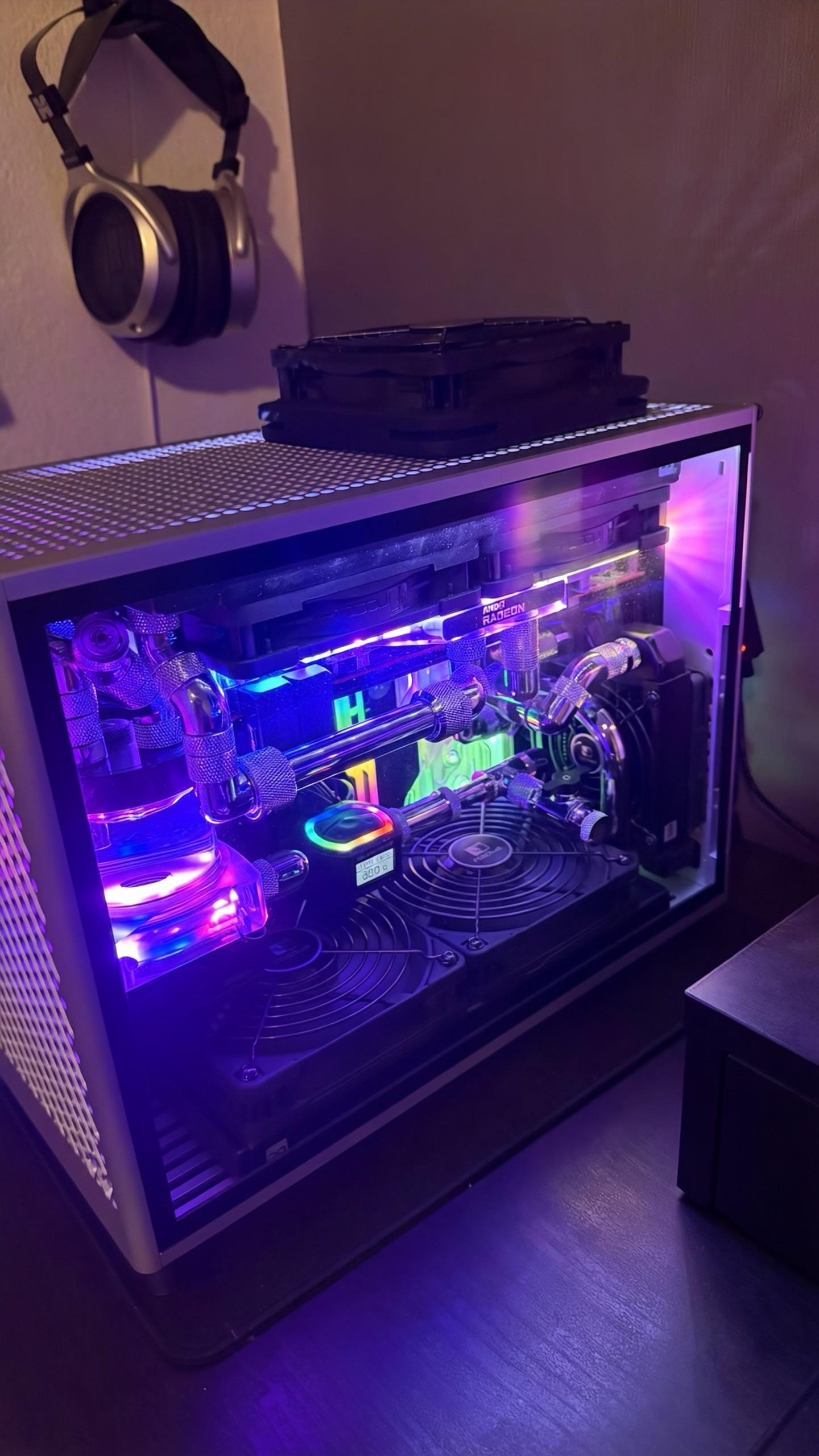
Finished Build I think I'm finally done... T1 5080 build

Thumbnail gallery
13 Upvotes

This year has been a bit of a rollercoaster fueled by some depression probably, but I started with a poorly built T1, sold it for an M2, thought that was too big, sold that for a Nanoq S, didn't like the sound profile after having to switch to AIO, decided "fuck it, let's go mobile", sold it and got a Flow Z 13 instead, realized that made no sense since I work from home and the eGPU would be as big as a T1, so... here we are, selling the Flow Z13 and back in a nice T1 build, after learning to undervolt!

CPU: 9800x3D - -25 PBO undervolt

GPU: Asus Prime 5080 that I modded with an RGB strip for fan glow... just because

Motherboard: Gigabyte Aorus x870i

Cooler: Thermalright AXP90x53 with Noctua slim fan

Exhaust: Phantek D30s

PSU: Corsair SF1000

Custom Cables: Zcooi Mod (excellent customer service, by the way!)

Clear side panel by JakeFace customs (Etsy)

Noodle decal by Vinyl Disorder

Just happy it's all done, and I can offer PLENTY of advice to anyone building in a T1, M2, M3, or nanoq S at this point.

Also, if anyone is in the market for a Coolermaster Atmos II LCD edition or FlowZ 13, I have them listed in hardware swap.


r/ncasedesign • • 2d ago

My Custom M3 Side/Front IO

Thumbnail gallery
30 Upvotes

My M3 is beautiful like a sports car, but I don't love the lack of motherboard front IO and the inconvenient, inflexible power button that feels like an afterthought. One thing I love is the bottom panel -- it is so open and flexible with many potential mounting points for hardware. I have come to realize that this design philosophy is the reason so many of the official accessories are lacking -- you are meant to bring or build your own.

For awhile I thought I might attach something off-the-shelf -- Lian Li used to make great options for this kind of thing -- but I guess those days are over, because the only new IO units I could find were meant to mount in a drive bay. Time to DIY!

Some say this is a little maximalist and excessive -- it sure is! I decided if I was going to go to the effort I wanted everything I could fit. I'm quite happy with the 3 way momentary switch, clockwise is the power button and counterclockwise is the reset button. The grommet is placed so the box can be rotated to face front and the cables will still pass through.

The difficult part of this build was machining the aluminum. No trendy CNC or 3D printing here, I did everything with a power drill and files. Measure several times, The 1" hole at the top of the box was trickiest, I torqued my hand a little with the high speed bit I used -- I probably should have used something with a smaller diameter and expanded the hole with a file.

I used the following: 155*32x111mm Aluminum Enclosure Motherboard IO unit 19mm 3 Position 3-6V Yellow Rotary Momentary Reset Switch 12mm Yellow 3-6V Warning LED 30mm grommet

Not linked but still necessary: SN-58B Dupont crimper to make the LED and switch connections Motherboard front panel extension cable Screws and washers to attach the box to the case

Apologies that I don't have any photos of the build process. Thanks to NCASED for making such a great chassis!


r/ncasedesign • • 2d ago

M3 Grater build problems

Post image
6 Upvotes

Hi Guys, I'm currently building my m3 and was wondering if it is normal, that the gpu doesn’t fully go into the pcie slot (picture follows) and I would appreciate, if anyone could help me, thanks.


r/ncasedesign • • 3d ago

NCASE Announcement NCASE SFX850 – 850W Platinum SFX PSU | U.S. Pre-Orders Open

36 Upvotes

Hey everyone,

We've been working on our own SFX PSU for a while, and it's finally ready for pre-order!

Having designed SFF cases for years, we know that cable management can be a pain. We wanted to make an SFX PSU with flexible cables and practical cable lengths for compact builds, while keeping the price reasonable.

A quick rundown of the specs:

  • 850W fully modular SFX PSU
  • 80 PLUS & Cybenetics Platinum certified
  • Cybenetics LAMBDA A- noise rating
  • ATX 3.1 & PCIe 5.1
  • Zero RPM up to 425W at 30°C ambient
  • Ultra-flexible modular cables
  • 105°C Japanese capacitors
  • 5-year warranty

We're starting with the SFF Kit (3 cables) at $125 USD. We'll look into offering more cable options based on your feedback.

We've also designed a 3D-printable cable management kit to make cable routing easier and cleaner in our cases. We'll be releasing it next week!

Availability:

  • U.S. pre-orders are now open.
  • Estimated shipping starts December 7th.
  • We'll gradually make stock available in more regions, so stay tuned!

Hardware Busters has also published an independent review if you'd like to check out the detailed test results.

Product page: https://ncased.com/products/psu-sfx-kit

Independent review: https://hwbusters.com/psus/ncase-sfx850-atx-v3-1-psu-review/

Let us know what you think! We'd also love to hear what other cable lengths or configurations you'd find useful for your builds.

Happy building!

NCASE Team


r/ncasedesign • • 3d ago

NCASE M2 Review + Mods

Thumbnail youtu.be
12 Upvotes

r/ncasedesign • • 3d ago

Cable management with pro art 5090

1 Upvotes

so the case i have is the s5m case and I saw the dimensions of the pro art 5090 and it was sitting the cases limit so i was wondering any advice or tips for management when you hit the cases size limit?


r/ncasedesign • • 3d ago

NCASE M2 VGPU Kit 90D: riser stuck at PCIe 3.0, three months of support limbo, and a replacement that arrived without the riser

Thumbnail gallery
1 Upvotes

Setup: NCASE M2 + VGPU Kit 90D (bought June 2026), ASUS Astral RTX 5090, ASUS ROG Strix X870-I, 9850X3D.

The problem: In mid-September I checked the link speed for the first time. GPU-Z and HWiNFO64 showed x16 5.0 @ x16 3.0, and it stayed at 3.0 under load (GPU-Z render test, FurMark, games). A BIOS update, reseating the riser twice and flipping its orientation changed nothing. I also confirmed the right M.2 slot was used.

Timeline

  • ~16–17 Sept: Opened a support ticket with all of the above. It was escalated to the product team.
  • 26 Sept: Asked for an update and was told there was none yet.
  • ~7 Oct: My chat history had vanished, so I had to open a new chat and repeat everything.
  • 8–9 Oct: Product team asked for my CPU, the test software and screenshots. I sent GPU-Z and HWiNFO64 screenshots showing 3.0.
  • 9–10 Oct: Asked for updates twice more. I was told they were still waiting on the product team and that it was a Chinese holiday.
  • Mid-Oct: The product team said they’d send a replacement and put me on the RMA list, shipping “next week.”
  • Late Oct: I asked where it was. They said they were “still reviewing” and would send a replacement if the cable had issues. That contradicts the earlier RMA confirmation.
  • 10 Nov: A package arrived with the mounting hardware only. No riser cable.
  • 10–20 Nov: Opened a new case to explain this. No reply for three days. Chats keep disappearing, so I keep re-explaining the whole story.

Where I’m at: About three months in, with vague answers, no clear communication, and a replacement shipment that missed the one part that mattered. Very likely to just purchase a LINKUP riser instead now. If you’re considering accessories from NCASE, I’d personally stick to the plain metal parts. Check your link speed under load if you use the VGPU kit.

Anyone else got similar experience with their support ?


r/ncasedesign • • 4d ago

Ncase rose gold coming back in stock?

2 Upvotes

Their Reddit post says once it’s gone, it’s gone. But their website says restocking. Which one is it?


r/ncasedesign • • 7d ago

Still waiting on the clear panel but here’s my build so far!

Thumbnail gallery
40 Upvotes

I still got my clear panel with vented holes coming in but I did promise to show what the build looks like at the moment!

I got the gpu propped up with a small little gpu stand and have a total of 4 fans now in the build, don’t know if can get another now that the gpu is propped up two notches but thermals for me have been ok to my knowledge

You can also see it’s little bro in the back the ps5 pro as well, I haven’t powered it on in close to a month now and am even considering selling it off, I got two pros at the moment anyway so I guess some extra pocket money wouldn’t hurt y’know

Still getting it to top shape software wise as I’m trying to find the best memory/cpu settings for it to run at long term

Update: got the clear panel finally and just my luck it’s not working or sitting flush enough for me, seller is being a pain is *** about it too so it’s mesh for me for now haha


r/ncasedesign • • 7d ago

Is My T1 V2.5 Optimized?

Thumbnail reddit.com
1 Upvotes

r/ncasedesign • • 8d ago

Compatibility/Build Check First build M3 compatibility check

2 Upvotes

Any glaring issues with this build? Looking to do inverted with rear and/or bottom exhaust. I'm guessing the extras like feet, dust filters, and power supply bracket are pretty much mandatory? Thanks!

M3 Grater

X870I AORUS PRO ICE

Noctua NH-D15 G2 LBC

Corsair SF850

9850X3D

Sapphire Nitro+ 9070XT

Gskill Flare X5 DDR5 6000 CL30

2tb Samsung 9100 pro or larger gen4 ssd

3 or 4 case fans? 2 bottom, 1 rear, 1 front? Or is that overkill


r/ncasedesign • • 8d ago

Finished Build S5M x MORA 400

Thumbnail gallery
13 Upvotes

Threw this together yesterday, think I spent pretty much half the day, finally excited I went to the parcel drop off location and got my S5M in the mail. Upon returning home, unfortunately I've noticed the backside having a pretty mad dent, but nevermind that. I was happy to finally be able to build in this "little" machine. Disassembled my old case (M3), put everything neatly back in the box and started with this one....

What a wild ride, first the specs:

- Asus Loki 1000W
- Ryzen 7 7800X3D + old alphacool block
- AMD 6900 XT Reference + Heatkiller V block
- Asus B850i Gaming Wifi
- Mora 400 + passive control
- Aquacomputer Octo and Flow Next
- Watercool pcie flow thru bracket (had to ghetto mod this and file down the edges of the top part otherwise it wouldn't have fit the pcie slots)
- Samsung 870 Pro 2 TB + 870 Evo Plus 2TB
- G.Skill Trident Z DDR5 6000

Mind you I got all of the above minus the psu before prices went mental.

Building was straightforward but not without it's quirks, I'm still surprised it went smoothly for the most part, main thing that took me so much time was the fact that my dumb ass drenched the gpu in coolant when I knocked over the container I used to drain the M3's loop. Having to cut the pcie bracket to fit the mora power cable and filing down the G1/4 thread. Still waiting for custom cables from zcooi and might get a clear side panel as the one I'm using is oddly bent in some ways, like a bulge as if someone had punched it. (Maybe my own fault, fitment was really tight, wondering whether this is normal). But for now I'm happy with this thing just running.


r/ncasedesign • • 8d ago

M2 Grater: First build. Checking for compatible components.

4 Upvotes

Before I order the M2 Grater, I’d like to make sure there won’t be any issues with assembly. I’ve been advised to build an inverted setup. I’m aiming for the M2 Build Level 8, but I’m also considering the M2 Build Level 9 as a non-inverted option. Do I need to buy any additional accessories apart from larger feet and a GPU cable if I decide to go for the M2 Build Level 9?

Components:

ASUS TUF Gaming GeForce RTX™ 4070 Ti 12GB GDDR6X OC Edition – 305 x 138 x 65 mm. If I’m not mistaken, this is a 3.25-slot graphics card.

AMD Ryzen 7700X – Can be swapped for something more power-efficient.

Asus ROG STRIX B850-I GAMING WIFI Mini ITX

Corsair SF750 (2024) 750 W 80+ Platinum Certified Fully Modular SFX Power Supply

G.Skill Trident Z5 NEO RGB 32GB 6000MHz CL30 DDR5 Memory

ARCTIC Liquid Freezer II 280 A-RGB – 24L x 69W x 2.5H centimetres – I may swap this for an air cooler.

2x M.2 2280

If I decide against the AIO, I’m considering these two air coolers:

Noctua NH-D12L

Thermalright Peerless Assassin 120 Mini

What should I change to avoid any mistakes? Am I good to go?


r/ncasedesign • • 9d ago

Finished Build M3 Grater Build Upgrade/Refresh

Thumbnail gallery
92 Upvotes

Recently did a little build upgrade/refresh with a CPU upgrade and cooler upgrade.

Went from 7800X3D/U12A with G2 fans to 9850X3D/D15 G2 and added a Thermal Grizzly contact frame when I had it apart. The rest of the build is unchanged.

Gaming wise, not huge but notable uplift in FPS in the games I play. Roughly 15-20% in average FPS, but significantly better 1% and 0.1% lows. In day to day use and more productivity focused workloads, however, the 9850X3D is substantially faster than the 7800X3D.

Only downsides to the upgrade were the daughter board with the 3rd M.2 slot doesn’t fit with the D15 G2 installed so I had to relocate it externally to a 40gbps external USB4 M.2 enclosure. This is fine as this drive is used primarily for backing up family photos and various documents. Also had to ditch the factory heat spreaders on the Corsair Vengeance RGB, but temps are still great without it and I wasn’t really using the RGB anyways.

Full build specs:

- M3 Grater
- MSI X870I Edge Ti Evo WiFi
- Ryzen 7 9850X3D
- RTX 5080FE
- Corsair Vengeance RGB 64GB 6000mhz CL30
- 1x Samsung 9100 Pro 2TB boot drive
- 1x Samsung 980 Pro 2TB game drive
- 1x Samsung 980 Pro 2TB media drive (in external USB4 40gbps enclosure)
- Corsair SF1000 power supply
- Noctua D15 G2 Chromax
- 4x A14x25 G2 Chromax case fans
- ASUS XG27AQWMG Tandem OLED 1440p/280hz main display
- ASUS XG27UCSR Gen 2 IPS 4K/160hz secondary display

CPU Tuning:
- PBO on
- -25mv negative offset
- FCLK 2000mhz
- +200mhz all core boost clock offset

RAM Tuning:
- EXPO profile 6000mhz 30-36-36-76 1.4V

GPU tuning:
- Max FPS: +400mhz Core, +2000mhz Mem, 108% power limit
- General Use: UV/OC 3000mhz @ 950mV +2000mhz Mem 108% power limit

Cooling Config:
- D15 G2 rear intake config
- 2x A14x25 G2 bottom intake
- 1x A14x25 G2 top exhaust
- 1x A14x25 G2 front exhaust

Temps:
- CPU Idle: 42-44C
- GPU Idle: 30-31C
- RAM Idle: 28-29C
- 9100 Pro Idle: 28C
- 980 Pro Idle: 34C (back of motherboard, slim heatsink)
- CPU gaming: 65-66C peak
- GPU gaming: 62C peak OC, 59C peak UV/OC
- RAM gaming: 45C
- 9100 Pro Peak: 45C
- 980 Pro Peak: 55C (back of motherboard, slim heatsink)

Overall, significantly cooler CPU temps with increased performance all around versus old CPU/cooler combo. Happy with the upgrade, out of pocket about $150 after selling my 7800X3D, Noctua U12A and some old A12x25 case fans I had laying around from an older build


r/ncasedesign • • 8d ago

Ncase M2 Grater change build check

Thumbnail reddit.com
1 Upvotes

r/ncasedesign • • 9d ago

Compatibility/Build Check Triple 280mm radiator custom loop in the Ncase M3

Thumbnail gallery
46 Upvotes

Majority of my parts came in. Super excited to do a triple rad custom loop. Inspiration came from EIGAs pantheon build with the WOBO 4090 and LOBO pump block but the creators behind that case just keep edging the members on their discord with vauge updates so I’m going with the M3 instead until it fully available for sale.

So far I’ve got the HPE ST20 280mm rads in. All of them will have PP NF-A14x25s.

For fittings I’m going pneumatic. I found some 45 degree fittings that will enable very nice tubing runs that would be too tight for 90 degree fittings.

A mod that I’m wanting to try is 3D printing a front fan bracket for NF-A9X14. Right now it’s just a barely too thick to close the side rad since I’m also trying to mount a WVP2 wired on the rear as well. I can’t take off the rear panel of it since I’ll lose the mounting points and expose the wires which scares me lol.

As it stands everything looks good so far just a few more things need tinkering but I’m very confident it will close up and be super tidy. Thinking about flipping the LOBO to shorten tubing runs.

The final and most awaited part is the ModUltra 5090 WOBO. Once that arrives I’ll be able to finish my end game dream build. (If and when the pantheon case drops)

Once it arrives and I install it I’ll follow up but for now here to waiting !!

Main components are:
5090FE
9950X3D
ASUS ROG X870i
64Gb Gskill Flare X5 CL30 6000Mts
Corsair SF1000 with Zcooi custom cables


r/ncasedesign • • 9d ago

Compatibility/Build Check Custom Cable Help

1 Upvotes

Hi everyone! I was wondering if a 20cm 24pin cable from MODDIY would work in a NCase M3? I’ve seen it work in an NCase M2, but I’m not sure about the M3. I currently have this set:

24-Pin: 20cm
8pin CPU: 30cm
12VHPWR 16-Pin: 40cm

Would appreciate any help!


r/ncasedesign • • 12d ago

Compatibility/Build Check Will this GPU fit in the NCASE M2?

Post image
11 Upvotes

For reference, it's the Gigabyte NVIDIA Aorus GeForce RTX 5070 Ti INFINITY 16GB GDDR7 Graphics Card, the dimensions are L=330 mm, W=145 mm, and H=65 mm.


r/ncasedesign • • 13d ago

Quietest 280mm AIOs for M2 build? How to make high flow 2x 140mm bracket work with a 240mm AIO?

8 Upvotes

I'm absolutely in love with the M2 grater and I can't see my next build using any other case. However I want to use the highest TDP CPU that I can keep cool in NEAR SILENCE and there are some challenges there right now.

A 280mm AIO comes with the quiet-cooling POTENTIAL that is 2x 140mm fans (+36.11% radiator frontal area and +36.11% fan swept area vs. a 240mm rad) AND it's a great fit for the 2x 240mm high flow fan bracket, HOWEVER pump noise is particularly annoying and tends to end up louder than the fans when the CPU's not doing much.

Noctua attacked the problem of AIO pump noise head-on with their AIO series, but because they are just leveraging the Asetek Gen8 platform, they don't currently sell a 280mm rad-based AIO; the only Noctua AIO that will fit in an M2 is the little 240mm AIO AND Ncase doesn't have a 2x120mm high flow bracket....

I have it on good authority that Noctua is currently evaluating the market for, and is strongly considering releasing a 280mm AIO, but their product development cycles are INSANELY slow (See how long it's taken for them just to release their current AIO lineup with BLACK fans...), so it's hard to wait for a future Noctua AIO release.

-Are there any 280mm AIOs that work well with the Ncase M2 2x 140mm high-flow fan bracket that have also addressed pump noise?

-Any good solutions for adapting the 2x 140mm Ncase high flow fan brackets to the 2x 120mm Noctua AIO? (The sound of a 140mm fan mounted right next to a restrictive grate is no mi gusta.)

P.S. Yes, I know that Noctua tested the 240mm AIO with a 200 watt TDP CPU and it "cooled fine" and "didn't get super loud", but I also know that when it comes to minimal sound for maximal cooling, you can't overcome the 36.11% rad frontal area and fan swept area difference vs. a 280mm rad. For quietly cooling powerful CPUs in an SFF, 280mm AIOs are "king".


r/ncasedesign • • 13d ago

Anyone fit a PNY 5090 (or any oversized 5090) with a WVP2 in an SFF case?

Thumbnail reddit.com
1 Upvotes

r/ncasedesign • • 14d ago

An extra fan changed the game

Post image
26 Upvotes

I added an extra Noctua fan with the multipurpose gasket and it dropped liquid temps by 5c and both CPU and GPU temps by 5-7c. I’m buying another to see if it can help even more. At full load both CPU and GPU are in the 50’s.


r/ncasedesign • • 15d ago

Compatibility/Build Check AIO GPU and a CPU AIO in the M2?

Post image
8 Upvotes

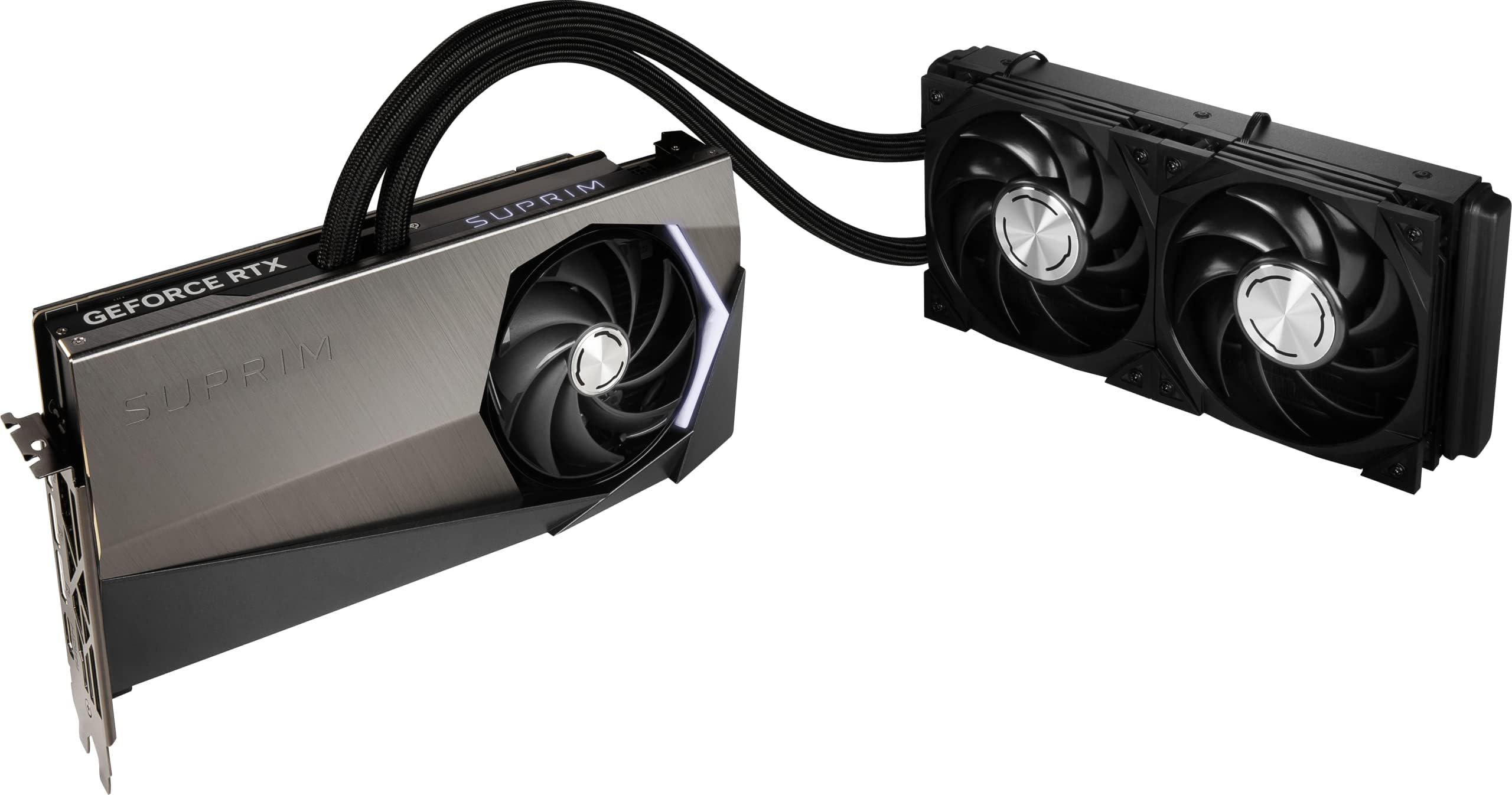
Has anyone fit a hybrid/AIO GPU and a CPU AIO in the M2? 🙏

I'm moving my current rig into an M2 for travel and want to keep my GPU, which has its own attached 240mm rad.

Currently have a 360mm AIO CPU cooler, wondering if this will fit
(Also sorry if i am a noob asking dumb questions)

Keeping:

• Ryzen 9 9950X3D

• MSI RTX 4090 Suprim Liquid X (card is 280×140×43mm, 2-slot; rad + fans 274×121×55mm; tubes ~470mm)

Planning to buy:

• AM5 Mini-ITX board

• 1000W SFX PSU (SF1000 or similar)

• 240 or 280 CPU AIO (leaning Kraken Elite 280)

Questions:

  1. Has anyone done a GPU rad + CPU AIO combo in the M2? Which positions did each rad go in (side bracket / top / bottom)?
  2. Does the 470mm GPU tubing route OK, or is it a mess?
  3. If two rads won't work, would you go 240 instead of 280 for the CPU, or air cool the CPU instead?

Pics of similar builds very welcome. Thanks!