r/postprocessing • u/karadenizlikedii • 2d ago
After/Before

122
Upvotes
r/postprocessing • u/Dismal-Treacle9623 • 2d ago

I'm trying to get better in postprocessing did I do this underexposed duck justice ? I feel like there is something wrong but I can't get it. For context I study in photography so I am hungry for any tips or piece of knowledge.
r/postprocessing • u/macherie69 • 2d ago

r/postprocessing • u/s_busso • 1d ago
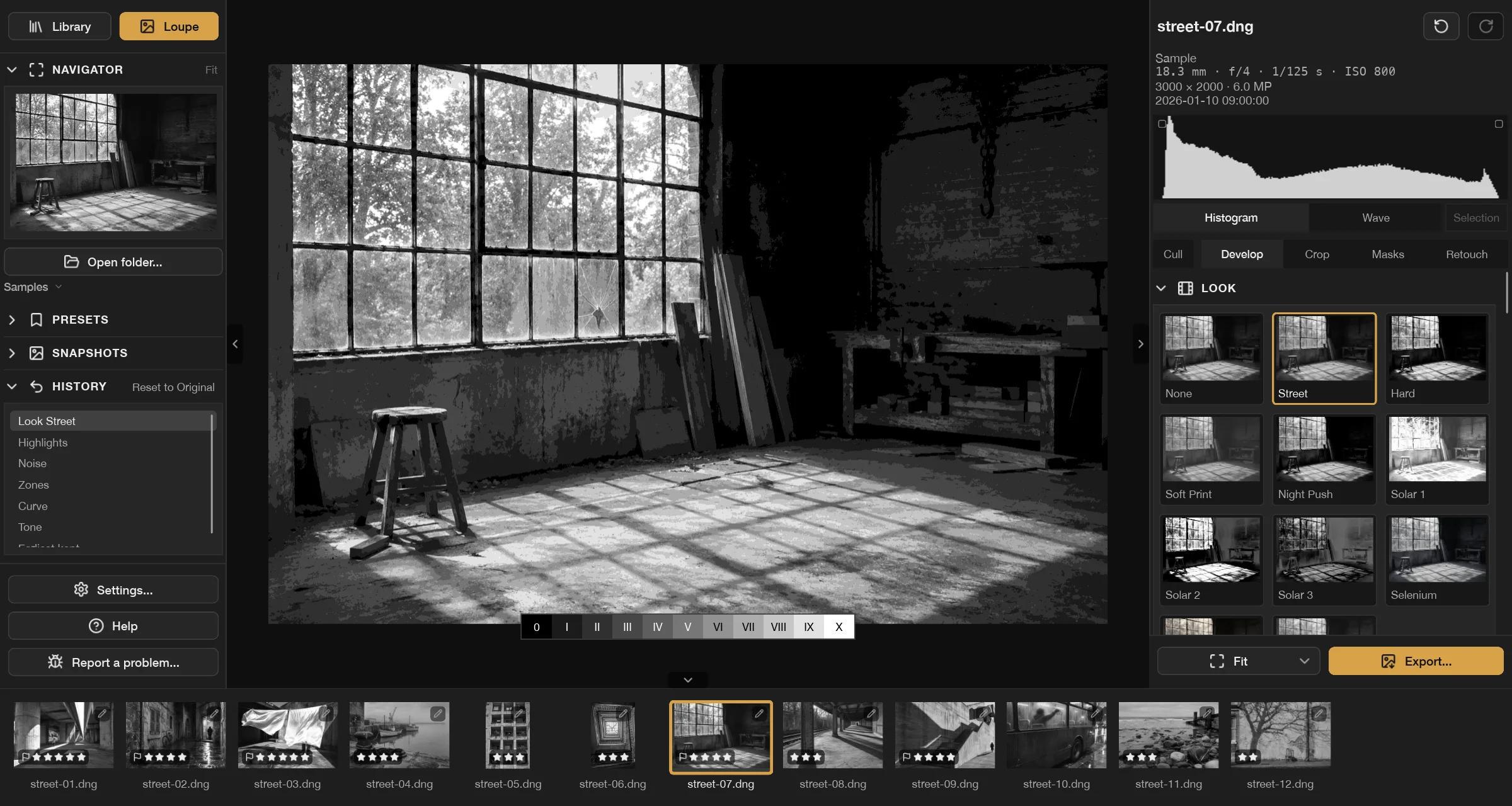
Hi everyone,
A few days ago I bought the Ricoh GR IV Monochrome. It was a bit of a risk. I was always more interested in light and contrast than in colors, and I was never good with color anyway.
The first pictures blew me away. Deep blacks, deep shadows, and very, very fine detail, especially at night. You really need to try it with your own pictures. It is not for everyone.
There was no software delivered with it, so I made one. It is called Monocard. It is free and open source, and it only does monochrome. There is not a single color tool in it.
It is built on Greycard, an open source raw editor by Jess Olmstead. Monocard is a separate project, a monochrome-only fork.
What it does today:
Edits the DNGs and the camera's JPEGs, with one channel from sensor to print
Zone view: the picture painted in Ansel Adams' zones 0 to X
A darkroom: 18 B&W films, developer, temperature and agitation, six papers, split grade, lith and cyanotype, and toner baths (selenium, sepia, gold...)
The camera's own modes (Standard, Solid, Solarized...) as editable looks
Denoise made for a mono sensor, and a burst merge for handheld night shots
A camera window to import over USB
Export to grey JPEG, TIFF, JPEG XL, and looks out as LUTs or Lightroom profiles
It runs on Mac, Linux, and Windows too (those two are less tested).
Site: https://sbusso.github.io/monocard/
Source: https://github.com/sbusso/monocard
It is early. What do you use to edit your monochrome files today?
r/postprocessing • u/lotzik • 1d ago

Disclaimer - this is going to be a paid app and you are welcome to skip this post entirely if new commercial photo editing software isn't in your immediate interests, because you may love using open sourced programs better or just hate capitalism, etc.
If you are still reading, then great!
You are welcome to apply to join the beta for a new RAW + LUT workflow software, this is the link to know more:
Despite the criticism I received in the first post a couple of days ago, that I'm a marketeer etc, a few people still came through to apply and we have some traction going for the beta. For people that love RAW + LUT workflows, the program is worth giving a try.
So, if you are not someone that understands more advanced color grading tools, node based editing, reference matching and gradient transfers, just ignore it. It's mostly aimed for a photographer / colorist hybrid. It's front face is simple enough to make the learning curve smoother for beginners, but you'd not feel comfortable too fast with it.
r/postprocessing • u/OpalOnyxObsidian • 2d ago

too much?
r/postprocessing • u/Character_Cut_2491 • 2d ago

Disclaimer: first time using masking.
I used radial gradient for the light and linear gradient for the sides to lower exposure etc. However, I do find the light being a bit unnatural.
r/postprocessing • u/Current-Long-3167 • 2d ago

PSA: This is an artistic edit, I'm well aware that the end result is vastly different from the original image. Thanks for your attention to this matter 😅
r/postprocessing • u/Old-Cucumber-3117 • 2d ago

photos by @ samsocorro on ig
r/postprocessing • u/TurtleGEE360 • 3d ago

r/postprocessing • u/HeyNiceOneGuy • 2d ago

Went a little hard on this one probably didn’t need to do so much but just a quick in the moment edit
r/postprocessing • u/Superb_End_2148 • 2d ago

r/postprocessing • u/YD_81 • 2d ago

Quick edit in lr mobile
r/postprocessing • u/jhracing99 • 2d ago

Wanted to lighten him up, but not totally happy with how much he looks pasted in now. Is it just too much exposure change or should I have done more feathering maybe? Started with Sony ARW files and using RapidRAW.
r/postprocessing • u/fadingvistas • 2d ago

Mostly a green-blue colorgrade to the shadows. Darkened the shadow area on the left. Softened that darker patch close to the ladder at the left. I felt that It was boxing in the ladder. Maybe I should remove a linear gradient of that mask on the left side of the patch because now it's bright compared to patches further left.
r/postprocessing • u/Wild-Lingonberry-204 • 2d ago
I currently use lightroom, and I'm generally satisfied with the de-noise function. Although the de-noise can be problematic in terms of detail loss and that "too smooth" look at high ISO's
I do a lot of concert photography, and also night photography. So high ISOs can be a thing for me.
Any thoughts on whether it's worth the spend?
Edit: tried the DxO - excellent results compared to Lightroom on a shot taken in a dark club, 10,000 iso 1/160 f2.8.
r/postprocessing • u/thephlog • 4d ago

Captures this frosty morning in the German alps the past weekend. Unfortunately, there was no colorful sunrise, so I decided to shoot a long exposure to make the overcast sky look more interesting. The original raw was intentionally overexposed so I’m able to keep the details in the shadows while being able to recover the blown out parts of the image (ETTR).
The editing was done in Lightroom and can be seen in the video here: https://youtu.be/MYj4hsucGvg
I brought down the exposure and the highlights to recover the blown out parts of the image. Then, I increased the blacks to keep the photo from becoming too dark. I also increased whites to bring back some contrast. The white balance was slightly adjusted to reduce the heavy blue color cast, but I wanted to keep most of the blue tones. I also brought down the vibrance. Finally, Texture, clarity and dehaze was increased for a sharp, clean looking shot.
2. Masking
The sky was still lacking details at this point. To make the long exposure clouds visible I used a linear gradient over the sky and cranked up dehaze and clarity while also reducing the texture to keep the area noise free and clean.
For a better balance, the water in the foreground also was made darker using a landscape mask and dropping the exposure. Then, I added some light on the mountains using another linear gradient. Here the clarity was also increased to make the mountains appear sharper.
Using another landscape mask, I targeted the jetty. I wanted it to standout a lot more from the water, so I brought up the whites and the texture. Finally, using an objects mask I targeted the boat and slightly shifted the tint so the green tones became stronger (just for some color contrast)
3. Colors
For the colors I used split toning to add a subtle blue tone to the highlights and the mid tones of the image for the final, cold look.
Edit: i also did remove some distractions in the water with the spot healing brush
r/postprocessing • u/assholesplinters • 2d ago
I'm realizing more and more that I missed a lot of the basics teaching myself lightroom and want to go back and make sure my basics and fundamentals are solid and I'm not making life harder for myself. Is there a course you'd recommend thats either free or affordable?
r/postprocessing • u/lotzik • 3d ago

Hey guys! Some of you probably have seen me in some of your comments occasionally replying to your 'how do I get this look?' posts when it comes to film simulations.
Well, here I am once again and excited to announce that ANDP Studio enters it's open beta where anyone can use it for up to a month for free.
There is a reward program with discounts, and free color grades, as well as attributing credit to anyone that would like to participate and provide feedback.
You can read more and apply in
https://www.andpfilmstyles.com/studio/
r/postprocessing • u/Careful-Ebb1003 • 4d ago

Original was taken on cloudy day with no opportunity to adjust position. To highlight the plant I masked out most of the water, but if you enlarge you can see gray areas amongst the “blossoms“. individuaaly applying a masking brush would be very tedious to get these area black. Is there a better way or tool to accomplish this. Also would appreciate comments on coloration to improve impact.
r/postprocessing • u/Nic727 • 3d ago
Hi,
I've been editing some photos in the past years. Some were excellent, some were ok.
But at the end, I still have no idea what I'm doing.
I understand the different sliders, but I have difficulty understanding when to use them in the most effective way.
And every tutorial I watch are saying different things. Some says to lower highlight, others to increase. Some says to never touch exposure, and others are saying to remove all contrast and then use the tone curve to bring back a more realistic contrast. Or people just teaching you while using presets that they are probably selling. Doesn't really help.
So, at the end I'm a bit lost and confused.
When I edit photos, I always try to get as close as possible to how it was when I was shooting. My goal is to create my own kind of preset to use on different kind of photos as a starting point. But so far, I always end up editing my photos one by one which is very time consuming. I didn't find what kind of preset I can create.
So, what do you start with? Do you ever use the tone curve with a s-curve?
Does the histogram matter when editing?
Thank you very much for any clarification :)

